GitNexus: The Zero-Server Code Intelligence Engine
Introduction
GitNexus represents a paradigm shift in how AI coding assistants understand codebases. With over 25,000 GitHub stars and 2,790 forks, this open-source project addresses a fundamental limitation in current AI development tools: the lack of deep architectural context. While tools like Cursor, Claude Code, Codex, and Windsurf excel at generating code, they often miss critical dependencies, call chains, and structural relationships that human developers intuitively understand.
The core innovation of GitNexus lies in its precomputed relational intelligence. Rather than forcing AI models to explore codebases through multiple queries, GitNexus builds a comprehensive knowledge graph at index time, capturing every dependency, call chain, cluster, and execution flow. This precomputation approach means that when an AI agent queries the codebase, it receives complete context in a single response, dramatically improving accuracy while reducing token consumption.
GitNexus operates on a simple principle: build the nervous system for agent context. By indexing any codebase into a knowledge graph and exposing it through intelligent tools, GitNexus ensures that AI agents never miss code relationships that matter. This approach democratizes sophisticated code analysis, making it accessible to smaller language models that can now leverage precomputed structural insights rather than expending tokens on exploration.
The Problem with Current AI Coding Tools
Modern AI coding assistants face a critical blind spot: they don’t truly know your codebase structure. When an AI edits UserService.validate(), it has no awareness that 47 other functions depend on its return type. This ignorance leads to breaking changes that ship to production, causing cascading failures across the application.
The traditional approach to code intelligence relies on Graph RAG (Retrieval-Augmented Generation), where the LLM receives raw graph edges and must explore them through multiple queries. This approach has several fundamental limitations:
Token Inefficiency: Understanding a single function might require 10 or more queries as the LLM traces callers, checks file locations, filters tests, and assesses risk levels. Each query consumes valuable context tokens.
Context Gaps: LLMs can miss critical relationships simply because they didn’t think to query for them. A human developer knows intuitively that changing a return type affects all callers, but an AI must explicitly discover this through exploration.
Model Dependency: Traditional Graph RAG requires sophisticated models capable of multi-step reasoning. Smaller, faster models struggle with the exploration overhead, limiting their effectiveness for code analysis tasks.
Manual Context Selection: Developers must manually provide context or accept that the AI will make changes without full understanding. This creates friction and reduces the productivity gains that AI coding tools promise.
GitNexus Solution
GitNexus solves these problems through a revolutionary zero-server architecture that performs all computation client-side. This approach offers three key advantages:
Privacy-First Design: Your code never leaves your machine. The CLI runs entirely locally with no network calls, storing indexes in .gitnexus/ (gitignored). The web version runs everything in your browser, with API keys stored only in localStorage. This makes GitNexus suitable for proprietary codebases and security-sensitive environments.
Precomputed Intelligence: Unlike traditional Graph RAG, GitNexus computes structure at index time. Clustering, process tracing, and confidence scoring happen during indexing, not querying. When an AI agent asks “What depends on UserService?”, the tool returns a complete answer: “8 callers, 3 clusters, all 90%+ confidence” in a single query.
Model Democratization: Because tools do the heavy lifting, smaller LLMs can work effectively. The precomputed context means even compact models receive complete architectural understanding without the token overhead of exploration.
The architecture supports both a CLI for daily development and a web UI for quick exploration. The CLI indexes repositories locally and connects AI agents via MCP (Model Context Protocol), while the web UI provides a visual graph explorer with AI chat capabilities, all running client-side with no server required.
Architecture Overview
Indexing Pipeline

Understanding the Indexing Pipeline
The indexing pipeline represents the heart of GitNexus’s code intelligence capabilities. This six-phase process transforms raw source code into a queryable knowledge graph, with each phase building upon the previous to create increasingly sophisticated structural understanding.
Phase 1: Structure
The pipeline begins with file tree walking, mapping the physical organization of the codebase. This phase identifies directories, files, and their hierarchical relationships. The structure phase captures the organizational intent of developers, recognizing that file placement often indicates functional grouping. This creates the foundation for all subsequent analysis, establishing the spatial context in which code exists.
The structure phase also identifies configuration files, package manifests, and other metadata that inform later phases. By understanding the project’s physical layout, GitNexus can make intelligent decisions about module boundaries and entry points.
Phase 2: Parsing
Tree-sitter AST extraction forms the parsing backbone, supporting 14 programming languages with varying levels of feature support. The parser extracts functions, classes, methods, interfaces, and their signatures. This phase transforms textual source code into structured representations that capture syntax without semantic understanding.
The parsing phase handles language-specific constructs: named bindings in TypeScript (import { X as Y }), heritage patterns in object-oriented languages, and type annotations where available. Each language has tailored extraction logic that maximizes the information captured from its syntax.
Phase 3: Resolution
Cross-file import resolution connects the isolated AST islands into a coherent graph. This phase resolves imports, function calls, heritage relationships, constructor inference, and self/this receiver types. The resolution phase is where GitNexus begins to understand code relationships rather than just code structure.
Language-aware logic handles the nuances of different import systems. TypeScript’s module resolution differs from Python’s import machinery, and Go’s package system has its own conventions. GitNexus implements language-specific resolution strategies that correctly trace dependencies across file boundaries.
Phase 4: Clustering
The Leiden algorithm groups related symbols into functional communities. This phase identifies cohesive modules within the codebase, recognizing that related functionality tends to cluster together. The clustering creates a higher-level view of the codebase, enabling queries that operate on functional areas rather than individual symbols.
Clustering provides the foundation for process detection and impact analysis. When symbols are grouped by functionality, changes can be assessed for their blast radius across related code. The Leiden algorithm was chosen for its ability to detect communities at multiple scales, capturing both tight-knit modules and looser functional groupings.
Phase 5: Processes
Execution flow tracing identifies how code runs in practice. Starting from entry points (API endpoints, main functions, event handlers), this phase traces call chains through the codebase, capturing the dynamic behavior that static analysis alone cannot reveal.
Process detection enables GitNexus to answer questions like “What happens when a user logs in?” by tracing the complete execution flow from the login endpoint through validation, database access, and response generation. This dynamic understanding complements the static structure captured in earlier phases.
Phase 6: Search
Hybrid search indexing combines BM25 (keyword-based), semantic (embedding-based), and RRF (Reciprocal Rank Fusion) approaches. This multi-modal search ensures that queries find relevant results whether they use exact terminology or conceptual descriptions.
The search phase creates indexes that enable fast retrieval across all captured relationships. Vector embeddings capture semantic similarity, while BM25 handles precise term matching. RRF combines these signals to produce ranked results that balance relevance and accuracy.
Knowledge Graph Schema
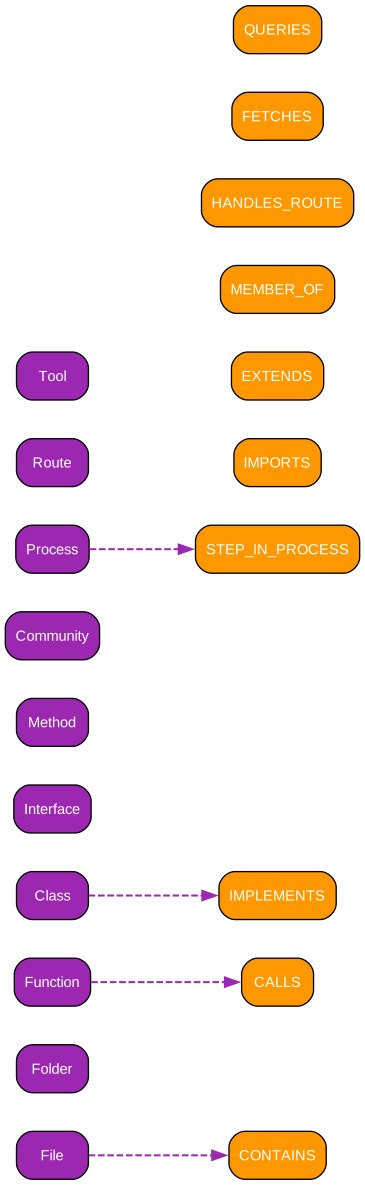
Understanding the Knowledge Graph Schema
The knowledge graph schema defines how GitNexus represents code structure and relationships. This schema transforms the abstract concepts of programming into a concrete, queryable graph structure that captures both static and dynamic aspects of codebases.
Node Types
The graph centers on several node types that represent different code entities:
File Nodes represent source files in the codebase. Each file node contains metadata about its location, language, and role within the project. File nodes serve as containers for symbol nodes and participate in import relationships with other files.
Symbol Nodes represent functions, classes, methods, interfaces, and other named code entities. Symbol nodes carry rich metadata including type signatures, visibility modifiers, and documentation. Each symbol belongs to exactly one file but may participate in relationships spanning the entire codebase.
Community Nodes represent functional clusters identified by the Leiden algorithm. These nodes aggregate related symbols, providing a higher-level view of code organization. Community nodes enable queries that operate on functional areas rather than individual symbols.
Process Nodes represent execution flows traced from entry points. A process node captures the complete path of execution through multiple symbols, enabling questions about runtime behavior and data flow.
Relationship Types
The graph captures several types of relationships that connect nodes:
CALLS relationships link symbols that invoke each other. These relationships carry confidence scores indicating the certainty of the call relationship. Direct calls have high confidence, while inferred calls through interfaces or dynamic dispatch have lower confidence.
IMPORTS relationships connect files that depend on each other’s exports. Import relationships enable impact analysis that traces changes across file boundaries, identifying downstream effects of modifications.
EXTENDS relationships capture inheritance in object-oriented languages. These relationships enable understanding of class hierarchies and polymorphic behavior, critical for assessing the impact of changes to base classes.
MEMBER_OF relationships link symbols to their containing communities. These relationships enable queries that operate on functional clusters, retrieving all symbols within a module or assessing the cohesion of a community.
PARTICIPATES_IN relationships connect symbols to the processes they participate in. These relationships enable tracing execution flows and understanding how symbols contribute to runtime behavior.
Graph Query Capabilities
The schema supports sophisticated queries through Cypher, the graph query language. Developers can find all callers of a function, trace execution paths, identify affected communities, and assess the blast radius of changes. The graph structure makes these queries efficient, returning results in milliseconds even for large codebases.
MCP Architecture
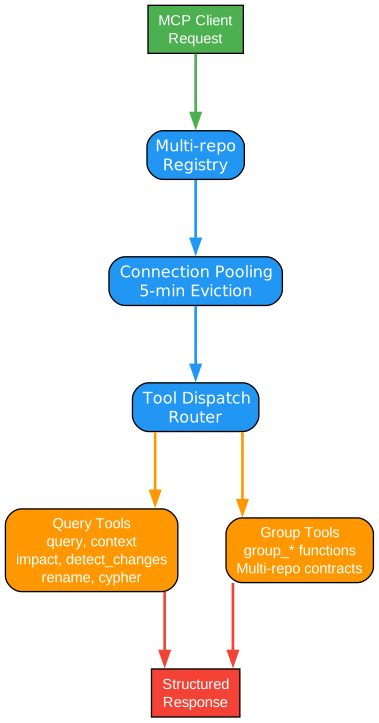
Understanding the MCP Architecture
The Model Context Protocol (MCP) architecture enables GitNexus to serve multiple indexed repositories through a single server instance. This design eliminates the need for per-project configuration, allowing developers to set up GitNexus once and have it work across all their projects.
Global Registry
At the heart of the architecture sits ~/.gitnexus/registry.json, a global registry that tracks all indexed repositories. Each gitnexus analyze command stores the index in .gitnexus/ inside the repository (portable and gitignored) and registers a pointer in the global registry. This separation of index storage and registry enables efficient multi-repo support.
The registry contains only paths and metadata, keeping sensitive code content local to each repository. When an AI agent starts, the MCP server reads the registry and can serve any indexed repository without additional configuration.
Connection Pool
The backend maintains a connection pool to LadybugDB instances, opening connections lazily on first query. This design conserves resources by only keeping active connections in memory. Connections are evicted after 5 minutes of inactivity, with a maximum of 5 concurrent connections.
The connection pool architecture enables efficient resource utilization while maintaining responsiveness. Frequently accessed repositories remain warm in the pool, while idle repositories release their connections for other uses.
16 MCP Tools
GitNexus exposes 16 tools through MCP, divided into per-repo and group categories:
Per-Repo Tools (11): list_repos, query, context, impact, detect_changes, rename, cypher, and additional tools for repository-specific operations. These tools operate on individual repositories, with the repo parameter being optional when only one repository is indexed.
Group Tools (5): group_list, group_sync, group_contracts, group_query, and group_status. These tools operate across multiple repositories, enabling cross-repo analysis and contract matching.
Tool Dispatch
When an AI agent invokes a tool, the MCP server dispatches the request to the appropriate backend. The server reads the registry, identifies the target repository, and routes the query through the connection pool. Results are formatted and returned to the agent in a structured format that includes confidence scores and relationship metadata.
The tool dispatch mechanism handles errors gracefully, providing informative messages when repositories are stale or connections fail. This robustness ensures that AI agents can continue operating even when individual queries encounter issues.
Graph RAG Agent
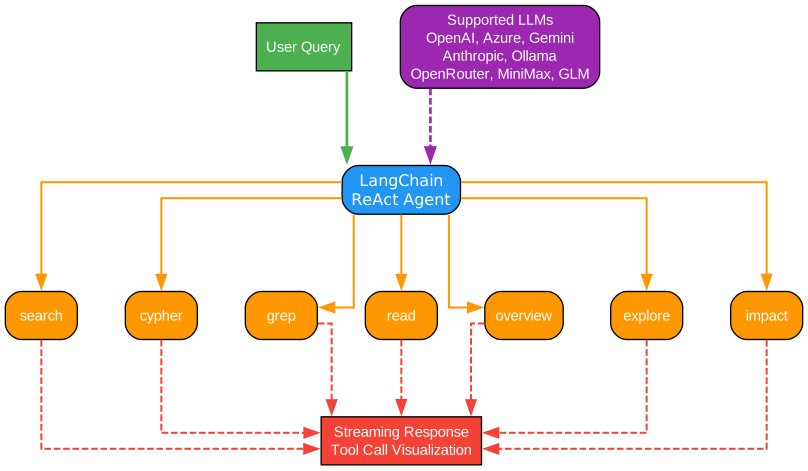
Understanding the Graph RAG Agent
The Graph RAG Agent provides an intelligent interface for querying the knowledge graph through natural language. Built on LangChain’s ReAct (Reasoning and Acting) framework, the agent translates user questions into graph queries and synthesizes results into coherent answers.
LangChain ReAct Framework
The ReAct framework combines reasoning and acting in an iterative loop. When a user asks a question, the agent first reasons about what information it needs, then acts by invoking appropriate tools, observes the results, and iterates until it has sufficient information to answer. This approach enables complex multi-step queries without manual intervention.
The agent maintains conversation context, allowing follow-up questions that build on previous answers. This conversational interface makes graph querying accessible to users who may not know Cypher or the specific structure of the knowledge graph.
7 Agent Tools
The agent has access to 7 specialized tools for graph interaction:
Query Tool: Performs hybrid search across the knowledge graph, combining keyword, semantic, and structural signals. This tool handles natural language queries and returns ranked results with relevance scores.
Context Tool: Provides 360-degree views of symbols, showing incoming calls, outgoing calls, imports, and process participation. This tool enables deep understanding of individual code entities.
Impact Tool: Performs blast radius analysis, tracing upstream and downstream dependencies. The tool groups results by depth and confidence, helping assess the risk of changes.
Detect Changes Tool: Maps git diff output to affected symbols and processes. This tool enables pre-commit analysis, identifying potential issues before code is merged.
Rename Tool: Plans multi-file coordinated renames using both graph relationships and text search. The tool provides confidence scores for each proposed change.
Cypher Tool: Allows direct Cypher queries for advanced users. This tool provides full access to the graph query language for complex analysis.
Process Tool: Traces execution flows from entry points, showing the complete path through the codebase. This tool enables understanding of runtime behavior.
Supported LLM Providers
The agent supports multiple LLM providers through LangChain’s provider abstraction. OpenAI, Anthropic, and local models can be configured through environment variables. This flexibility enables organizations to choose models that match their privacy requirements and budget constraints.
The web UI includes built-in support for API key management, storing keys in localStorage and using them directly from the browser. This client-side approach maintains the zero-server architecture while enabling sophisticated AI-powered analysis.
Web UI Architecture
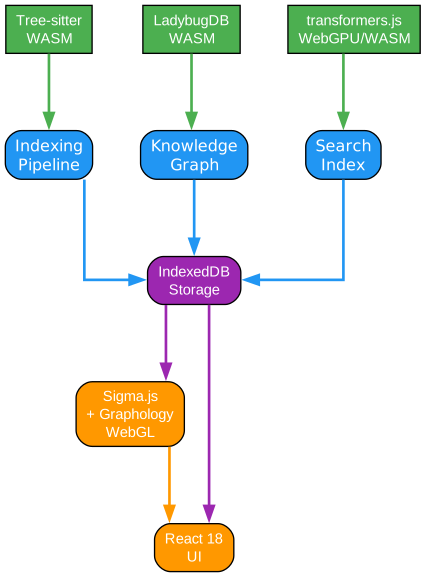
Understanding the Web UI Architecture
The Web UI architecture demonstrates GitNexus’s commitment to zero-server operation. Every component runs client-side, from parsing to visualization, ensuring that code never leaves the user’s browser. This architecture enables powerful code intelligence without infrastructure requirements.
Browser-Based Processing
The web application runs entirely in the browser, with no backend server required for core functionality. Users drag and drop a ZIP file containing their repository, and all processing happens locally. This approach eliminates privacy concerns and deployment complexity.
The browser-based architecture uses WebAssembly (WASM) to run native code in the browser environment. Tree-sitter WASM provides parsing capabilities, while LadybugDB WASM offers graph database functionality. These WASM modules deliver near-native performance while maintaining browser compatibility.
WASM Components
Tree-sitter WASM: The Tree-sitter parser, originally designed for native execution, has been compiled to WebAssembly for browser use. This enables GitNexus to parse 14 programming languages directly in the browser, with no server-side processing.
LadybugDB WASM: The graph database engine runs in WebAssembly, providing full Cypher query support in the browser. This enables sophisticated graph queries without network latency or server infrastructure.
Transformers.js: The embedding model runs through Transformers.js, which provides WebGPU acceleration when available and falls back to WASM for broader compatibility. This enables semantic search without external API calls.
WebGL Visualization
Sigma.js combined with Graphology provides WebGL-accelerated graph visualization. This stack handles thousands of nodes and edges with smooth interaction, enabling users to explore large codebases visually. The visualization supports zoom, pan, selection, and filtering, making complex graph structures comprehensible.
The WebGL renderer uses GPU acceleration to render nodes and edges efficiently. This approach maintains responsiveness even for large repositories, where traditional DOM-based visualization would become sluggish.
Local Backend Mode
For users who want both the web UI and CLI capabilities, GitNexus offers a bridge mode. Running gitnexus serve starts a local HTTP server that the web UI can connect to. This enables the web UI to browse all CLI-indexed repositories without re-uploading or re-indexing.
The bridge mode maintains the privacy-first approach: all communication happens locally, with no external network calls. The web UI auto-detects the local server and seamlessly integrates CLI-indexed repositories into the browser interface.
Key Features
Zero-Server Architecture
GitNexus operates entirely without servers. The CLI runs locally with no network calls, while the web UI processes everything in the browser. This architecture eliminates deployment complexity, reduces costs, and ensures code privacy. Organizations can use GitNexus without infrastructure investment, and individual developers can analyze proprietary codebases without security concerns.
14 Language Support
GitNexus supports 14 programming languages with varying levels of feature coverage:
| Language | Imports | Named Bindings | Exports | Heritage | Type Annotations | Constructor Inference |
|---|---|---|---|---|---|---|
| TypeScript | Full | Full | Full | Full | Full | Full |
| JavaScript | Full | Full | Full | Full | Partial | Full |
| Python | Full | Full | Full | Full | Full | Full |
| Java | Full | Full | Full | Full | Full | Full |
| Kotlin | Full | Full | Full | Full | Full | Full |
| C# | Full | Full | Full | Full | Full | Full |
| Go | Full | Partial | Full | Full | Full | Full |
| Rust | Full | Full | Full | Full | Full | Full |
| PHP | Full | Full | Full | Partial | Full | Full |
| Ruby | Full | Partial | Full | Full | Partial | Full |
| Swift | Partial | Partial | Full | Full | Full | Full |
| C | Partial | Partial | Full | Partial | Full | Full |
| C++ | Partial | Partial | Full | Full | Full | Full |
| Dart | Full | Partial | Full | Full | Full | Full |
Process Detection
GitNexus traces execution flows from entry points through call chains, capturing how code runs in practice. This dynamic understanding complements static analysis, enabling questions like “What happens when a user logs in?” or “What code path handles this API endpoint?”
Community Detection
The Leiden algorithm identifies functional clusters within codebases, grouping related symbols into communities. This higher-level organization enables queries that operate on modules rather than individual symbols, providing context for architectural decisions.
Multi-Repo MCP
A single MCP server serves all indexed repositories through a global registry. This design eliminates per-project configuration, allowing developers to set up GitNexus once and use it across all projects. The server manages connection pooling and lazy loading for efficient resource utilization.
Confidence Scoring
Every relationship in the knowledge graph carries a confidence score. Direct calls have high confidence, while inferred relationships through interfaces or dynamic dispatch have lower confidence. This scoring enables nuanced impact analysis that distinguishes certain from probable dependencies.
Technology Stack
| Layer | CLI | Web |
|---|---|---|
| Runtime | Node.js (native) | Browser (WASM) |
| Parsing | Tree-sitter native bindings | Tree-sitter WASM |
| Database | LadybugDB native | LadybugDB WASM |
| Embeddings | HuggingFace transformers.js (GPU/CPU) | transformers.js (WebGPU/WASM) |
| Search | BM25 + semantic + RRF | BM25 + semantic + RRF |
| Agent Interface | MCP (stdio) | LangChain ReAct agent |
| Visualization | - | Sigma.js + Graphology (WebGL) |
| Frontend | - | React 18, TypeScript, Vite, Tailwind v4 |
| Clustering | Graphology | Graphology |
| Concurrency | Worker threads + async | Web Workers + Comlink |
Installation and Usage
CLI Installation
# Install globally via npm
npm install -g gitnexus

# Index your repository (run from repo root)
gitnexus analyze

# Start MCP server for AI agent integration
gitnexus mcp

# Start local HTTP server for web UI connection
gitnexus serve

# List all indexed repositories
gitnexus list

# Generate repository wiki from knowledge graph
gitnexus wiki
MCP Configuration
For Claude Code (full support with MCP + skills + hooks):
# macOS / Linux
claude mcp add gitnexus -- npx -y gitnexus@latest mcp

# Windows
claude mcp add gitnexus -- cmd /c npx -y gitnexus@latest mcp
For Cursor (global configuration in ~/.cursor/mcp.json):
{
  "mcpServers": {
    "gitnexus": {
      "command": "npx",
      "args": ["-y", "gitnexus@latest", "mcp"]
    }
  }
}
Web UI
Access the web UI at gitnexus.vercel.app - no installation required. Drag and drop a ZIP file containing your repository to start exploring immediately.
Use Cases
Code Exploration
Navigate unfamiliar codebases using the knowledge graph. Find entry points, trace execution flows, and understand module boundaries without reading every file. The graph visualization provides a map of the codebase, while the AI chat answers questions in natural language.
Impact Analysis
Assess the blast radius of changes before making them. The impact tool traces upstream dependencies (what depends on this) and downstream dependencies (what this depends on), grouped by depth and confidence. This analysis prevents breaking changes from reaching production.
Refactoring Assistance
Plan safe refactors using dependency mapping. The rename tool identifies all occurrences of a symbol across files, using both graph relationships and text search. Confidence scores help distinguish certain matches from probable ones requiring review.
Pull Request Review
Analyze changes before merging with the detect_changes tool. Map git diff output to affected symbols and processes, identifying potential issues before code review. This pre-commit analysis catches problems that tests might miss.
Debugging
Trace bugs through call chains using the context tool. See all callers of a function, the processes it participates in, and the symbols it calls. This 360-degree view accelerates debugging by revealing the full context of problematic code.
Conclusion
GitNexus represents a significant advancement in code intelligence for AI-assisted development. By precomputing structural relationships into a queryable knowledge graph, it enables AI agents to understand codebases with the depth that human developers bring to their work. The zero-server architecture ensures privacy and simplicity, while the multi-language support makes it applicable across diverse technology stacks.
The combination of CLI and web interfaces provides flexibility for different workflows, from daily development with AI agents to quick exploration of unfamiliar codebases. As AI coding tools continue to evolve, GitNexus provides the foundational infrastructure that enables them to operate with true codebase understanding.
Repository: https://github.com/abhigyanpatwari/GitNexus
Try the Web UI: gitnexus.vercel.app
Discord: Join the community

