Harbor: Enterprise Cloud Native Registry for Container Security
Introduction
Harbor is an open source trusted cloud native registry project that stores, signs, and scans content. Developed by VMware and now a graduated project of the Cloud Native Computing Foundation (CNCF), Harbor has become the de facto standard for enterprise container registry management. With over 27,000 GitHub stars and widespread adoption across industries, Harbor provides organizations with a secure, performant, and feature-rich solution for managing container images, Helm charts, and other cloud native artifacts.
The project addresses critical enterprise requirements that public registries cannot fulfill: vulnerability scanning, image signing, role-based access control, and regulatory compliance. Organizations like Apple, Microsoft, and numerous Fortune 500 companies rely on Harbor to secure their software supply chain. As container adoption accelerates and security concerns intensify, Harbor’s comprehensive approach to artifact management makes it an essential component of any production Kubernetes deployment.
Harbor’s CNCF graduation status signifies its maturity, widespread adoption, and commitment to open governance. The project benefits from a vibrant community of contributors and users who continuously enhance its capabilities. Whether deployed on-premises for air-gapped environments or in hybrid cloud scenarios, Harbor provides the flexibility and security that modern enterprises demand.
Core Architecture
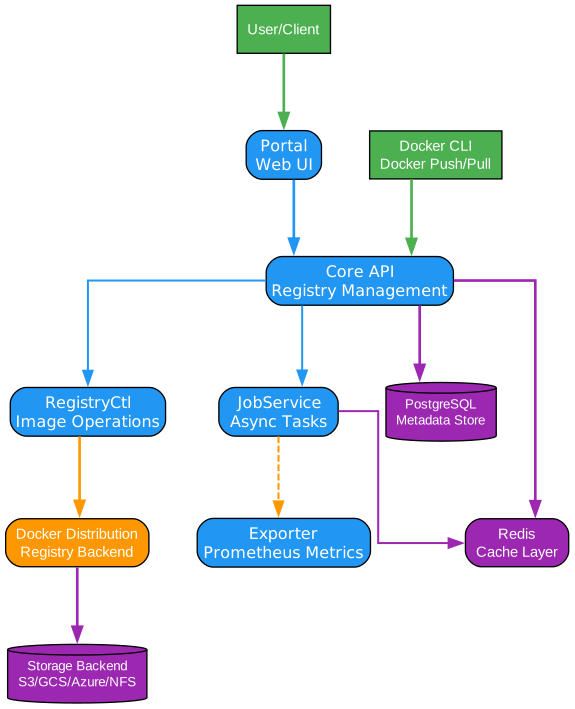
Understanding the Harbor Architecture
The Harbor architecture is designed with modularity, scalability, and enterprise-grade reliability at its core. Each component serves a specific purpose while maintaining loose coupling through well-defined APIs, enabling independent scaling and maintenance. Let’s examine each component in detail:
Core API Service
The Core service acts as the central orchestration layer, handling all API requests from users and external systems. It manages authentication, authorization, project management, and artifact metadata storage. The Core service implements the OCI Distribution Specification, ensuring compatibility with standard container tools like Docker, Podman, and containerd. This service also handles quota management, garbage collection scheduling, and webhook notifications for CI/CD integration.
JobService
The JobService is an asynchronous task processing engine built on top of a job queue system. It handles long-running operations such as image replication, vulnerability scanning, garbage collection, and artifact copying. By offloading these tasks from the Core service, JobService ensures that API responses remain fast while background operations proceed reliably. The service supports multiple worker instances for horizontal scaling and implements retry logic with exponential backoff for resilience.
Portal (Angular UI)
The Portal provides a comprehensive web-based management interface built with Angular. Administrators can manage projects, configure security policies, view scan results, and monitor replication status through an intuitive dashboard. The Portal communicates exclusively with the Core API, ensuring consistent security enforcement. Users can browse repositories, view image manifests, check vulnerability reports, and manage access permissions without command-line tools.
RegistryCtl
RegistryCtl serves as the control plane for the underlying Docker Distribution registry. It handles administrative operations like garbage collection, manifest deletion, and storage quota enforcement. This component bridges the gap between Harbor’s management capabilities and the actual storage layer, enabling operations that the standard Distribution API does not support.
Exporter (Prometheus Metrics)
The Exporter exposes comprehensive metrics in Prometheus format for monitoring and alerting. It collects data on repository counts, pull/push operations, storage utilization, replication status, and scan results. Operations teams can integrate these metrics with Grafana dashboards for real-time visibility into registry health and performance. Alerting rules can detect anomalies like storage exhaustion or replication failures.
PostgreSQL Database
PostgreSQL serves as the persistent data store for all Harbor metadata, including user accounts, project configurations, access policies, scan results, and replication rules. The database supports high-availability configurations with streaming replication, ensuring no single point of failure. Harbor’s schema is optimized for the read-heavy workload typical of container registries, with proper indexing for fast artifact lookups.
Redis Cache
Redis provides caching and session management capabilities. It stores frequently accessed metadata, rate limiting counters, and session tokens for authenticated users. The caching layer significantly reduces database load and improves API response times. Redis also coordinates distributed locks for operations that require exclusive access, preventing race conditions in multi-instance deployments.
Docker Distribution Foundation
At its foundation, Harbor builds upon Docker Distribution, the reference implementation of the OCI Distribution Specification. This ensures full compatibility with the container ecosystem while adding enterprise features on top. The Distribution layer handles blob storage, manifest management, and content-addressable storage, while Harbor adds security, access control, and management capabilities.
Security Features
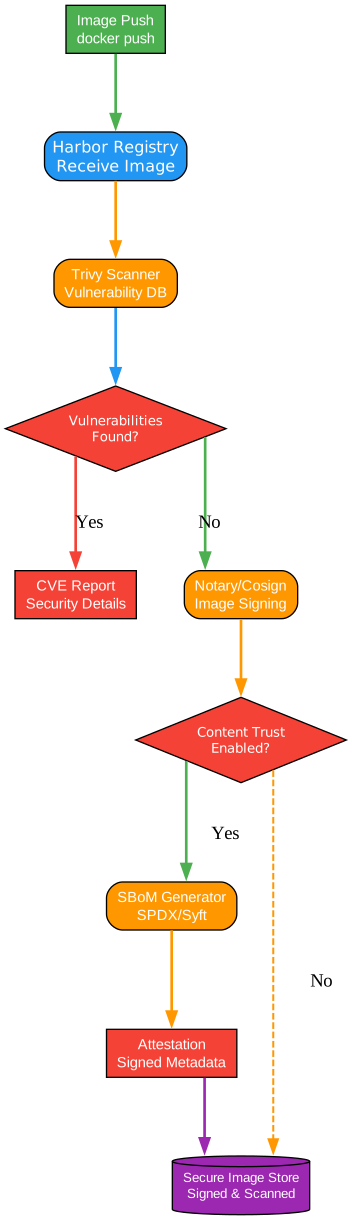
Understanding Harbor’s Security Architecture
Security is not an afterthought in Harbor; it is woven into every aspect of the platform. Harbor implements a defense-in-depth strategy that addresses vulnerabilities at multiple layers, from image content analysis to cryptographic signing and access control. This comprehensive approach makes Harbor suitable for regulated industries and security-conscious organizations.
Trivy Vulnerability Scanning
Harbor integrates Trivy, a comprehensive vulnerability scanner that detects known CVEs in container images. Trivy analyzes operating system packages, language-specific dependencies, and application binaries to identify security issues. The scanner maintains an up-to-date vulnerability database from multiple sources including NVD, Red Hat, and Debian security trackers. Scans can be triggered automatically on image push, scheduled periodically, or initiated manually through the API or UI.
CVE Reporting and Management
Beyond detection, Harbor provides robust CVE management capabilities. Administrators can configure vulnerability severity thresholds that prevent vulnerable images from being pulled. For example, a policy might block images with Critical or High severity CVEs while allowing Medium severity issues with warnings. The system tracks scan history, enabling teams to understand when vulnerabilities were introduced and whether they’ve been remediated. Detailed reports show affected packages, severity scores, and remediation guidance.
Notary and Cosign Image Signing
Harbor supports both Notary v1 and Cosign for image signing, enabling content trust throughout the software supply chain. Notary uses The Update Framework (TUF) to manage signing keys and verify image integrity. Cosign, part of the Sigstore project, provides a modern approach with keyless signing using OIDC identity tokens. Signed images carry cryptographic proof of their origin and integrity, preventing tampering between build and deployment.
Content Trust Policies
Content trust policies enforce that only signed images can be pulled from specific projects or repositories. This prevents deployment of unverified or potentially malicious images. Teams can configure policies at the project level, requiring signatures from specific keys or keyholders. The integration with CI/CD pipelines ensures that images are signed during the build process, creating an unbroken chain of trust from development to production.
Software Bill of Materials (SBoM) Generation
Harbor supports SBoM generation and management, providing visibility into the complete dependency tree of container images. SBoMs list all components, versions, and licenses, enabling organizations to track software provenance and comply with regulatory requirements. The CycloneDX and SPDX formats are supported, allowing integration with various supply chain security tools. SBoMs become particularly valuable during vulnerability disclosures, enabling rapid identification of affected systems.
Security-First Design Philosophy
Every Harbor feature is designed with security as a primary consideration. The principle of least privilege guides access control decisions. All communications use TLS encryption. Secrets management integrates with external vaults. Audit logging captures all operations for compliance reporting. This security-first approach means organizations can deploy Harbor with confidence in environments with stringent security requirements.
Replication and Distribution
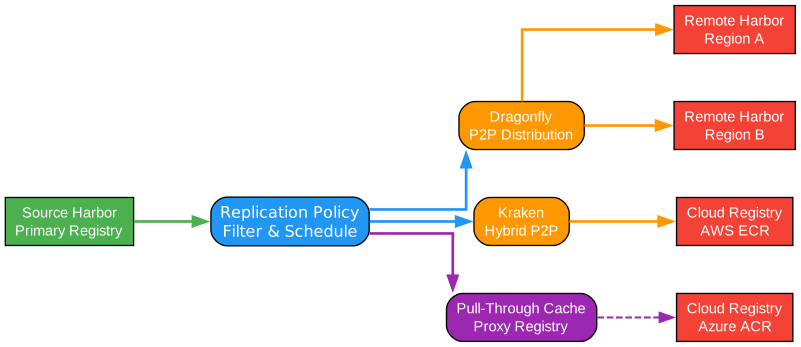
Understanding Harbor’s Replication Capabilities
Harbor’s replication capabilities enable organizations to distribute container images across multiple registries, regions, and cloud providers. This functionality is essential for hybrid cloud deployments, disaster recovery, and optimizing image pull performance for geographically distributed teams. The replication system supports both push and pull models, giving teams flexibility in how they manage artifact distribution.
Policy-Based Replication
Replication in Harbor operates through user-defined policies that specify source and destination registries, filtering criteria, and trigger conditions. Policies can filter by repository name, tag patterns, labels, or artifact types. For example, a policy might replicate all images tagged with “production” from a central registry to regional registries. The policy engine supports complex filtering logic, enabling fine-grained control over what gets replicated and when.
Push and Pull Replication Models
Harbor supports both push-based and pull-based replication. In push mode, Harbor actively sends images to destination registries when triggered. This is ideal for distributing images from a central build registry to edge locations. In pull mode, Harbor fetches images from external registries, useful for mirroring public images or creating local caches of frequently used base images. The pull-through cache mode can proxy requests to upstream registries, reducing bandwidth and improving pull latency.
P2P Distribution with Dragonfly and Kraken
For large-scale deployments, Harbor integrates with peer-to-peer distribution systems like Dragonfly and Kraken. These tools dramatically reduce bandwidth consumption and improve image pull speeds by enabling nodes to share image layers with each other. Dragonfy uses a supernode architecture to coordinate P2P distribution, while Kraken implements a tracker-based approach. Both solutions are particularly valuable in large Kubernetes clusters where many nodes pull the same image simultaneously.
Multi-Cloud and Hybrid Scenarios
Harbor’s replication capabilities shine in multi-cloud and hybrid deployments. Organizations can maintain a central Harbor instance on-premises while replicating images to cloud-based registries like AWS ECR, Google GCR, or Azure ACR. This enables consistent artifact management across environments while meeting data residency requirements. Replication policies can be configured to respect bandwidth limits and schedule transfers during off-peak hours.
Performance Optimization
The replication engine includes several performance optimizations. Bandwidth throttling prevents replication from overwhelming network links. Parallel transfer of layers maximizes throughput. Delta replication only transfers changed layers, minimizing data transfer. Retry logic with exponential backoff handles transient network failures gracefully. These optimizations ensure that replication operates efficiently even across high-latency links or with large images.
Cross-Registry Compatibility
Harbor can replicate to and from various registry types, including other Harbor instances, Docker Hub, AWS ECR, Google GCR, Azure ACR, and any OCI-compliant registry. The adapter architecture makes it easy to add support for additional registry types. This flexibility allows organizations to integrate Harbor into their existing infrastructure without requiring wholesale migration.
Enterprise Integration
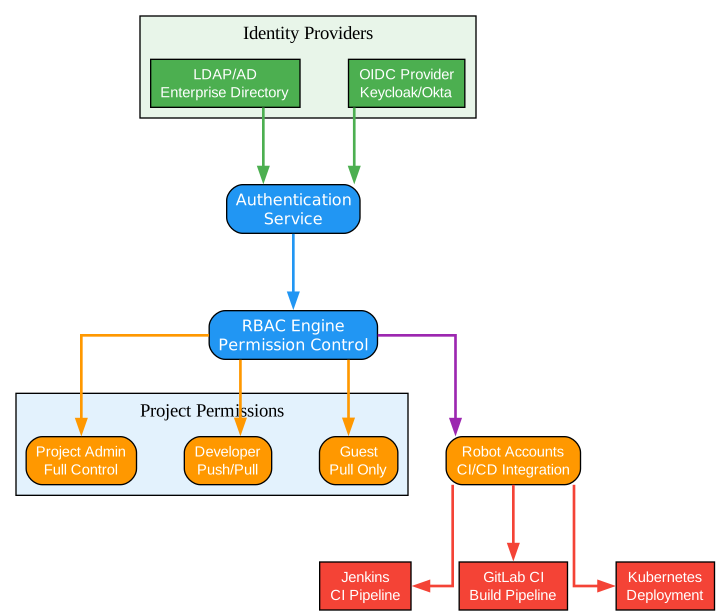
Understanding Harbor’s Enterprise Integration Capabilities
Enterprise environments demand seamless integration with existing identity systems, access control frameworks, and CI/CD pipelines. Harbor provides comprehensive integration options that enable organizations to deploy it within their existing infrastructure without disrupting established workflows. These integrations are essential for maintaining security policies and operational efficiency at scale.
LDAP and Active Directory Integration
Harbor integrates directly with LDAP and Active Directory for user authentication and group management. Users authenticate with their corporate credentials, eliminating the need for separate Harbor accounts. LDAP groups can be mapped to Harbor projects, automatically granting access based on group membership. This integration supports complex organizational structures with nested groups and multiple domain controllers. Configuration options include secure LDAPS connections, certificate validation, and custom search filters.
OIDC and SSO Support
For organizations using modern identity providers, Harbor supports OpenID Connect (OIDC) for single sign-on. Integration with providers like Okta, Keycloak, Azure AD, and Google Workspace enables seamless authentication. Users can log in through their identity provider’s login page, and Harbor automatically provisions accounts based on OIDC claims. Group claims can be mapped to Harbor projects, enabling automatic access management. The SSO integration reduces password fatigue and centralizes identity governance.
Role-Based Access Control (RBAC)
Harbor implements a comprehensive RBAC system with predefined roles and fine-grained permissions. At the project level, roles include Guest, Developer, Master, and Administrator, each with progressively more capabilities. System-level roles include System Administrator and Anonymous User. Permissions cover operations like image push/pull, scanning, signing, replication configuration, and member management. This granular control ensures that users have exactly the access they need, following the principle of least privilege.
Robot Accounts for CI/CD
Robot accounts provide non-human identities for automated systems like CI/CD pipelines, build servers, and deployment tools. Unlike user accounts, robot accounts use token-based authentication with configurable expiration dates and scoped permissions. A robot account can be granted access to specific projects with specific capabilities (push-only, pull-only, or both). This separation of human and machine identities improves security auditability and enables credential rotation without impacting users.
Project-Level Permissions
Projects in Harbor serve as isolation boundaries for artifacts and access control. Each project can have its own members, quotas, policies, and configurations. Project administrators can manage members, configure vulnerability scanning policies, set up replication rules, and define webhook notifications. This project-centric model maps naturally to team structures and application boundaries, enabling decentralized management while maintaining centralized oversight.
Webhook Notifications
Harbor can send webhook notifications for various events, including image push, scan completion, replication status, and quota warnings. Webhooks integrate with CI/CD systems like Jenkins, GitLab CI, and GitHub Actions, triggering pipelines when new images are available. They can also notify monitoring systems, Slack channels, or ticketing systems. The webhook payload includes detailed information about the event, enabling downstream systems to take appropriate action.
Audit Logging and Compliance
All operations in Harbor are logged with user identity, timestamp, and operation details. Audit logs support compliance requirements like SOC 2, HIPAA, and GDPR. Logs can be exported to external systems like Splunk, ELK, or cloud logging services for long-term retention and analysis. The comprehensive audit trail enables security teams to investigate incidents and demonstrate compliance during audits.
Deployment Options
Harbor offers flexible deployment options to match various operational requirements and infrastructure environments:
Docker Compose (Development)
For development and testing environments, Harbor provides a Docker Compose-based deployment. This approach uses a single install.sh script that orchestrates multiple containers for Core, JobService, Portal, Registry, and supporting services. Docker Compose deployment is ideal for:
- Local development and testing
- Proof-of-concept deployments
- Small-scale production environments
- Air-gapped environments without Kubernetes
# Download Harbor offline installer
wget https://github.com/goharbor/harbor/releases/download/v2.10.0/harbor-offline-installer-v2.10.0.tgz
tar xzvf harbor-offline-installer-v2.10.0.tgz
cd harbor

# Configure harbor.yml
./install.sh
Helm Chart (Kubernetes)
For production Kubernetes deployments, Harbor provides an official Helm chart. This approach integrates seamlessly with Kubernetes infrastructure, leveraging native concepts like Deployments, StatefulSets, and Services. The Helm chart supports:
- High-availability configurations
- External database and Redis
- Ingress configuration for various controllers
- Persistent volume management
- Horizontal Pod Autoscaling
# Add Harbor Helm repository
helm repo add harbor https://helm.goharbor.io

# Install Harbor
helm install harbor harbor/harbor \
  --set expose.ingress.hosts.core=harbor.example.com \
  --set persistence.persistentVolumeClaim.registry.size=100Gi \
  --set externalURL=https://harbor.example.com
Harbor Operator (Enterprise)
For enterprise deployments requiring advanced lifecycle management, the Harbor Operator provides Kubernetes-native management of Harbor instances. The Operator handles:
- Automated installation and upgrades
- Configuration management through custom resources
- Backup and restore operations
- Certificate management
- Multi-tenancy support
# Harbor custom resource
apiVersion: goharbor.goharbor.io/v1
kind: Harbor
metadata:
  name: production-harbor
spec:
  harborAdminPasswordRef: harbor-admin-password
  externalURL: https://harbor.example.com
  expose:
    ingress:
      host: harbor.example.com
  persistence:
    registry:
      size: 500Gi
Getting Started
Quick Installation
The fastest way to get started with Harbor is using the offline installer:
# Prerequisites: Docker and Docker Compose
docker --version
docker-compose --version

# Download and extract
wget https://github.com/goharbor/harbor/releases/download/v2.10.0/harbor-offline-installer-v2.10.0.tgz
tar xzvf harbor-offline-installer-v2.10.0.tgz
cd harbor

# Configure
cp harbor.yml.tmpl harbor.yml
# Edit harbor.yml to set hostname and other settings

# Install
./install.sh
Basic Configuration
Key configuration options in harbor.yml:
# The IP address or hostname the Harbor server runs on
hostname: harbor.example.com

# HTTP/HTTPS port
http:
  port: 80
https:
  port: 443
  certificate: /your/certificate/path
  private_key: /your/private/key/path

# Harbor admin password (change on first login)
harbor_admin_password: Harbor12345

# Database configuration
database:
  password: root123
  max_open_conns: 100

# Redis configuration
redis:
  password: redis123
First Image Push/Pull
After installation, verify Harbor is working:
# Login to Harbor
docker login harbor.example.com
# Username: admin
# Password: Harbor12345 (or your configured password)

# Tag and push an image
docker pull nginx:latest
docker tag nginx:latest harbor.example.com/library/nginx:latest
docker push harbor.example.com/library/nginx:latest

# Pull the image
docker pull harbor.example.com/library/nginx:latest
Enabling Vulnerability Scanning
Configure Trivy scanner:
# In harbor.yml
scanner:
  trivy:
    enabled: true
    version: 2
    offline_scan: false
    insecure: false
Or enable through the UI:
- Navigate to Configuration > Scanner
- Select Trivy as the default scanner
- Configure scan schedules and severity thresholds
Conclusion
Harbor represents the gold standard for enterprise container registry management. Its comprehensive feature set addresses the critical needs of modern software delivery: security through vulnerability scanning and image signing, reliability through replication and high availability, and operational efficiency through enterprise integrations and automation support.
As a CNCF graduated project, Harbor benefits from enterprise-grade maturity combined with open source flexibility. Organizations can deploy Harbor on-premises for complete control over their artifacts, in the cloud for managed operations, or in hybrid configurations that balance both approaches. The active community ensures continuous improvement and rapid response to emerging security threats.
For organizations serious about securing their software supply chain, Harbor provides the foundation for trustworthy container artifact management. Its integration with the broader cloud native ecosystem, from Kubernetes to CI/CD tools, makes it a natural choice for teams already invested in cloud native technologies.
Resources:
Related Posts:
- AgentSkillOS: Skill Orchestration System
- GitNexus: Zero Server Code Intelligence
- AI Hedge Fund: Multi-Agent Investment System
