Introduction
In the rapidly evolving landscape of AI-powered development tools, one challenge has become increasingly apparent: AI coding agents excel at generating functional code, but often produce interfaces that suffer from what can only be described as “AI slop aesthetics.” These are the telltale signs of machine-generated design - Inter font everywhere, purple-to-blue gradients, cards nested within cards, gray text on colored backgrounds, and layouts that feel generic rather than distinctive.
Impeccable, created by Paul Bakaus and now boasting over 17,000 stars on GitHub, addresses this fundamental problem head-on. It provides a comprehensive design vocabulary system that transforms how AI coding agents approach frontend design. Rather than accepting generic output, developers can now guide their AI tools toward creating interfaces that are visually striking, memorable, and genuinely professional.
The project represents a significant evolution beyond Anthropic’s original frontend-design skill, offering deeper expertise, more granular control, and explicit anti-pattern detection. With support for 10 different AI coding platforms including Cursor, Claude Code, Gemini CLI, Codex CLI, and more, Impeccable is positioned as a universal solution for improving AI-generated design quality across the entire development ecosystem.
The Problem: AI Slop Aesthetics
Every large language model has been trained on similar datasets, absorbing the same design patterns, templates, and conventions. Without explicit guidance, these models converge on predictable choices that reveal their artificial origins. The result is a monoculture of design that makes AI-generated interfaces instantly recognizable - and not in a good way.
Common AI Design Anti-Patterns
The Impeccable project identifies and addresses numerous anti-patterns that plague AI-generated interfaces:
Typography Monoculture: The reflex to reach for Inter, Roboto, or system fonts creates visual sameness across projects. Even when told to avoid Inter, models often default to their “second favorite” fonts like DM Sans, Outfit, or Plus Jakarta Sans - creating a new monoculture.
Color Formula Thinking: The AI color palette typically involves cyan-on-dark themes, purple-to-blue gradients, and neon accents on dark backgrounds. These choices look “cool” without requiring actual design decisions.
Layout Templates: The hero metric layout (big number, small label, supporting stats, gradient accent) and identical card grids (same-sized cards with icon + heading + text, repeated endlessly) are hallmarks of AI-generated interfaces.
Visual Noise: Cards wrapped within cards, side-stripe borders on list items, glassmorphism applied everywhere, and sparklines used as decoration rather than meaningful data visualization.
Motion Missteps: Bounce and elastic easing that feels dated, animations on layout properties instead of transforms, and micro-interactions scattered everywhere instead of focused, purposeful motion.
These patterns aren’t inherently wrong in isolation - they become problematic when they appear as defaults across thousands of AI-generated projects. Impeccable’s approach is not to ban these patterns entirely, but to make them intentional choices rather than reflexive outputs.
Architecture Overview
Impeccable is built as a multi-format skill system that adapts to different AI coding platforms while maintaining consistent design guidance across all of them.
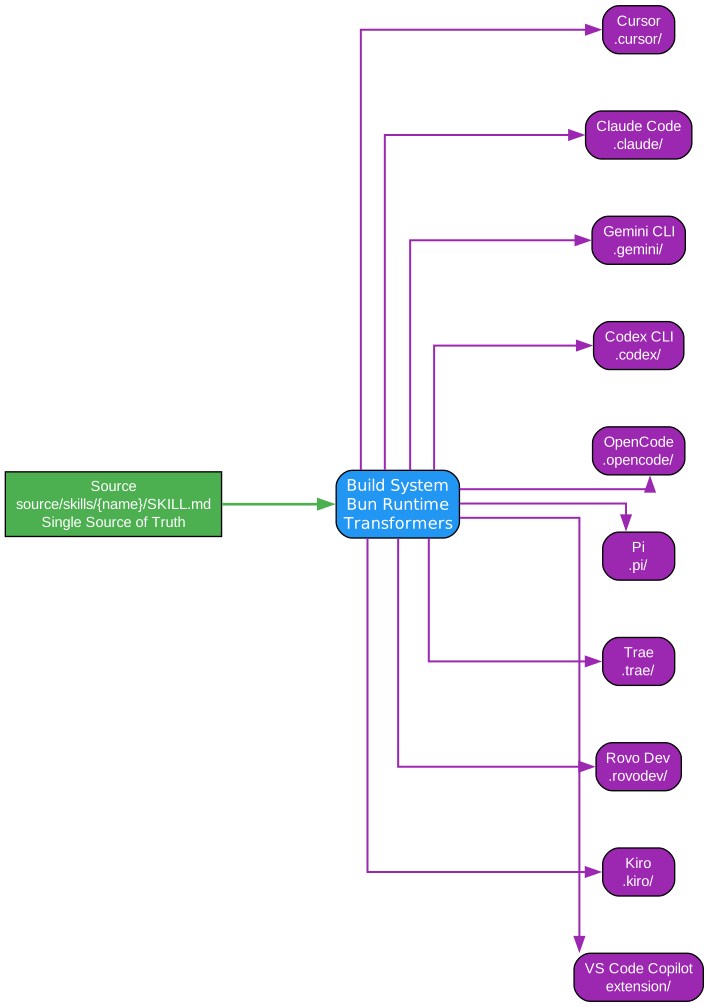
The architecture diagram above illustrates how Impeccable operates as a universal design vocabulary layer that sits between developers and their AI coding agents. At its core, the system transforms a single source of design truth into platform-specific formats that integrate seamlessly with each supported tool.
The build system takes the master skill definitions from the source/skills/ directory and generates optimized outputs for each platform. For Cursor, it produces .cursor/rules/ files that integrate with the IDE’s rule system. For Claude Code, it generates .claude/ directories with command files. Similar transformations occur for Gemini CLI, Codex CLI, OpenCode, Pi, Trae, Rovo Dev, Kiro, and VS Code Copilot.
This multi-provider approach ensures that regardless of which AI coding assistant a developer prefers, they receive consistent design guidance. The skill definitions remain identical across platforms - only the delivery format changes. This architectural decision allows the Impeccable team to update design guidance in one place and have those improvements propagate to all supported tools automatically.
The system also includes a standalone CLI tool for anti-pattern detection that can operate independently of any AI harness. This allows developers to scan existing codebases for design issues, integrate detection into CI/CD pipelines, or use it as a quality gate before deploying changes.
Build System Components
The build process involves several key components working together:
Source Skills: The master skill definitions in source/skills/ contain the complete design vocabulary, domain references, and command specifications. These files are written in a platform-agnostic format that prioritizes clarity and completeness.
Platform Transformers: Each supported platform has a dedicated transformer in scripts/lib/transformers/providers.js that converts the source skills into the appropriate format. This includes handling differences in command syntax, file organization, and integration points.
Extension Builder: For platforms that support browser extensions or IDE plugins, the scripts/build-extension.js script generates the necessary assets, icons, and configuration files.
Browser Detector: A specialized build process creates a browser-compatible version of the anti-pattern detector for use in web-based tools and extensions.
Skills System: The Core of Impeccable
At the heart of Impeccable lies a comprehensive skills system that provides AI agents with the design vocabulary they need to create distinctive, production-grade interfaces.
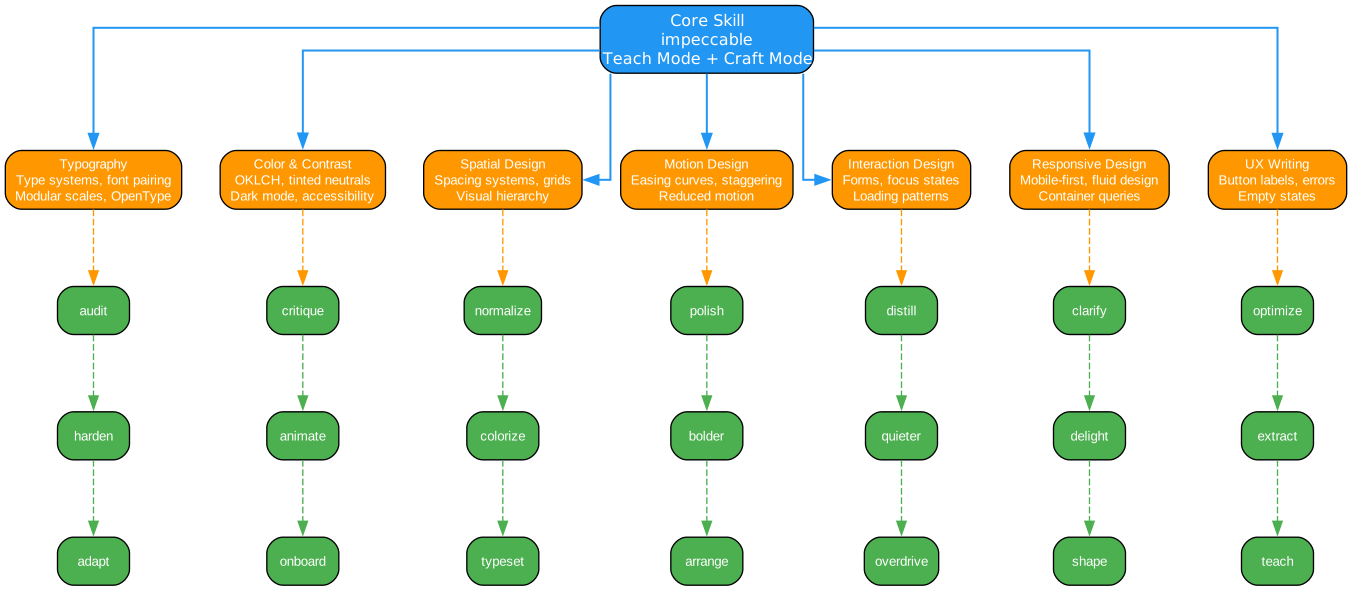
The skills system is organized around a core skill called “impeccable” that serves as the master reference for all design guidance. This skill is invoked when developers ask their AI agent to build web components, pages, artifacts, posters, or applications. It can operate in two modes: “craft” for the full shape-then-build flow, or “teach” for design context setup.
The Core Skill: Impeccable
The impeccable skill begins with a critical insight: design skills produce generic output without project context. Before any design work begins, the skill requires confirmation of essential context:
- Target Audience: Who uses this product and in what context?
- Use Cases: What jobs are they trying to get done?
- Brand Personality/Tone: How should the interface feel?
The skill explicitly states that this context cannot be inferred from the codebase. Code tells you what was built, not who it’s for or what it should feel like. Only the creator can provide this context, and the skill has a specific “teach” mode for gathering it.
Seven Domain References
The impeccable skill draws from seven specialized domain references, each providing deep expertise in a specific area of design:
| Reference | Coverage |
|---|---|
| Typography | Type systems, font pairing, modular scales, OpenType features, web font loading strategies |
| Color & Contrast | OKLCH color space, tinted neutrals, dark mode design, accessibility requirements |
| Spatial Design | Spacing systems, grid layouts, visual hierarchy, container queries |
| Motion Design | Easing curves, animation timing, staggering effects, reduced motion considerations |
| Interaction Design | Form patterns, focus states, loading indicators, feedback mechanisms |
| Responsive Design | Mobile-first approaches, fluid design techniques, container query patterns |
| UX Writing | Button labels, error messages, empty states, microcopy guidelines |
Each reference file contains not just rules, but the reasoning behind them. For example, the typography reference doesn’t just say “use a modular type scale” - it explains that a 5-step scale with at least a 1.25 ratio between steps creates clearer hierarchy than 8 sizes that are 1.1x apart. This depth allows AI agents to make informed decisions rather than blindly following rules.
Twenty-One Design Commands
Impeccable provides 21 specialized commands that allow developers to guide AI agents toward specific design outcomes:
| Command | Purpose |
|---|---|
/impeccable teach | One-time setup: gather design context, save to config |
/audit | Run technical quality checks (accessibility, performance, responsive) |
/critique | UX design review: hierarchy, clarity, emotional resonance |
/normalize | Align with design system standards |
/polish | Final pass before shipping |
/distill | Strip to essence, remove complexity |
/clarify | Improve unclear UX copy |
/optimize | Performance improvements |
/harden | Error handling, internationalization, edge cases |
/animate | Add purposeful motion |
/colorize | Introduce strategic color |
/bolder | Amplify boring designs |
/quieter | Tone down overly bold designs |
/delight | Add moments of joy |
/extract | Pull into reusable components |
/adapt | Adapt for different devices |
/onboard | Design onboarding flows |
/typeset | Fix font choices, hierarchy, sizing |
/arrange | Fix layout, spacing, visual rhythm |
/overdrive | Add technically extraordinary effects |
Each command accepts an optional argument to focus on a specific area. For example, /audit blog focuses quality checks on blog-related pages, while /polish checkout-form applies final refinements specifically to checkout forms.
Commands can also be combined for workflow efficiency: /audit /normalize /polish blog runs a full workflow from audit to final polish on blog pages.
Anti-Pattern Detection
Beyond providing positive design guidance, Impeccable includes a sophisticated anti-pattern detection system that identifies common AI design mistakes in existing code.
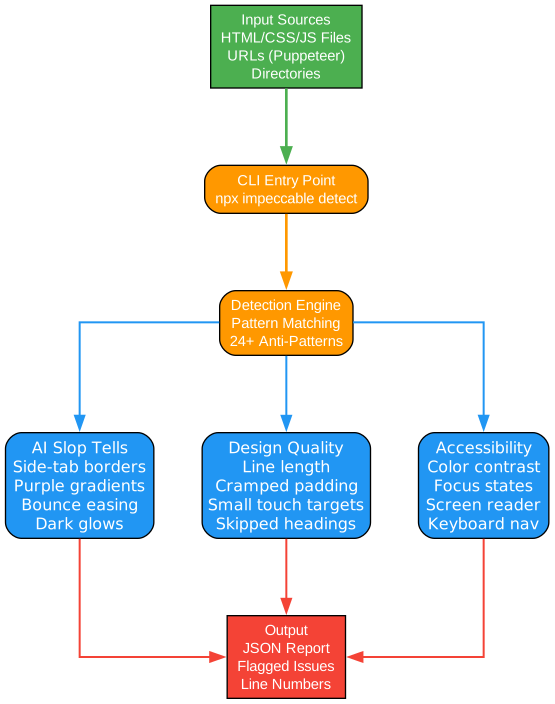
The anti-pattern detection system operates through both a standalone CLI tool and integration with AI coding agents. This dual approach allows developers to use detection in different contexts: as a pre-commit hook, as part of CI/CD pipelines, or as real-time feedback within their development environment.
CLI Detection Tool
The CLI tool can scan directories, individual files, or even URLs:
npx impeccable detect src/                   # scan a directory
npx impeccable detect index.html            # scan an HTML file
npx impeccable detect https://example.com   # scan a URL (Puppeteer)
npx impeccable detect --fast --json .       # regex-only, JSON output
The --fast flag enables regex-only detection for quick scans, while the default mode includes more sophisticated AST-based analysis for frameworks like React, Vue, Svelte, and Next.js.
Detected Anti-Patterns
The detection system identifies 24 distinct issues across two categories:
AI Slop Patterns (specific to AI-generated code):
- Side-tab borders on cards, list items, callouts, and alerts
- Purple gradients and cyan-on-dark color schemes
- Bounce/elastic easing animations
- Dark glows and glassmorphism overuse
- Icon tile stacks with generic drop shadows
General Design Quality Issues:
- Line length exceeding readability thresholds
- Cramped padding in containers
- Small touch targets below accessibility minimums
- Skipped heading levels in document structure
- Poor color contrast ratios
- CSS-in-JS patterns that hinder performance
The detection system understands framework-specific patterns. It can identify issues in Next.js CSS modules, Tailwind utility classes, styled-components, and other modern CSS-in-JS approaches. This framework awareness allows it to provide actionable feedback rather than false positives.
Integration with Development Workflow
For teams using AI coding agents, the anti-pattern detection integrates directly into the design workflow. When an AI agent generates code, developers can run detection to catch issues before they reach production. The system can also be used as a teaching tool - by reviewing detected patterns, developers learn to recognize AI design tells and make better choices in future prompts.
Installation
Impeccable offers multiple installation paths depending on your preferred AI coding platform.
Option 1: Download from Website (Recommended)
Visit impeccable.style to download ready-to-use bundles for your specific tool. The website provides pre-built packages that include all necessary configuration files and documentation.
Option 2: Copy from Repository
For developers who prefer working directly with the source, the repository provides distribution directories for each platform:
Cursor:
cp -r dist/cursor/.cursor your-project/
Note: Cursor skills require setup:
- Switch to Nightly channel in Cursor Settings > Beta
- Enable Agent Skills in Cursor Settings > Rules
Claude Code:
# Project-specific
cp -r dist/claude-code/.claude your-project/

# Or global (applies to all projects)
cp -r dist/claude-code/.claude/* ~/.claude/
Gemini CLI:
cp -r dist/gemini/.gemini your-project/
Note: Gemini CLI skills require the preview version: npm i -g @google/gemini-cli@preview, then enable Skills in settings.
Codex CLI:
cp -r dist/codex/.codex/* ~/.codex/
Trae:
# Trae China (domestic version)
cp -r dist/trae/.trae-cn/skills/* ~/.trae-cn/skills/

# Trae International
cp -r dist/trae/.trae/skills/* ~/.trae/skills/
Rovo Dev:
# Project-specific
cp -r dist/rovo-dev/.rovodev your-project/

# Or global
cp -r dist/rovo-dev/.rovodev/skills/* ~/.rovodev/skills/
Usage Examples
Once installed, Impeccable commands become available in your AI coding agent. Here are practical examples of how to use the system:
Quality Audit Workflow
/audit blog              # Audit blog hub + post pages
/audit dashboard         # Check dashboard components
/audit checkout flow     # Focus on checkout UX
The audit command runs technical quality checks without making edits. It examines accessibility compliance, performance implications, and responsive design issues. Use this before making changes to understand what needs fixing.
Design System Alignment
/normalize blog          # Apply design tokens, fix spacing
/normalize buttons       # Standardize button styles
The normalize command aligns existing code with design system standards. It applies consistent spacing, corrects typography scales, and ensures color usage follows established patterns.
UX Design Review
/critique landing page   # Review landing page UX
/critique onboarding     # Check onboarding flow
The critique command provides UX-focused feedback rather than technical fixes. It evaluates visual hierarchy, clarity of communication, and emotional resonance with users.
Final Polish
/polish feature modal    # Clean up modal before release
/polish settings page    # Final review of settings UI
The polish command is the last step before deploying to production. It addresses minor inconsistencies, refines spacing, and ensures every detail meets professional standards.
Combined Workflows
/audit /normalize /polish blog    # Full workflow: audit -> fix -> polish
/critique /harden checkout         # UX review + add error handling
Commands can be combined for efficient workflows. The combined approach ensures comprehensive coverage from initial assessment through final delivery.
Supported Frameworks
Impeccable supports a comprehensive range of AI coding platforms:
| Platform | Type | Integration Method |
|---|---|---|
| Cursor | IDE | .cursor/rules/ directory |
| Claude Code | CLI | .claude/ directory |
| Gemini CLI | CLI | .gemini/ directory |
| Codex CLI | CLI | .codex/ directory |
| OpenCode | Platform | .opencode/ directory |
| Pi | Platform | .pi/ directory |
| Trae | IDE | .trae/ or .trae-cn/ directory |
| Rovo Dev | Platform | .rovodev/ directory |
| Kiro | IDE | Native skill support |
| VS Code Copilot | IDE | Extension-based integration |
Each platform receives the same design guidance, formatted appropriately for its integration model. The Impeccable team actively maintains support for all listed platforms, updating distributions as platforms evolve their skill integration mechanisms.
Conclusion
Impeccable represents a significant advancement in the quest to improve AI-generated design. By providing a comprehensive design vocabulary, explicit anti-pattern detection, and multi-platform support, it addresses the root cause of generic AI aesthetics: the lack of contextual design knowledge in AI models.
The project’s approach is notable for its depth. Rather than offering superficial style tips, Impeccable provides domain-specific references that explain the reasoning behind design decisions. This allows AI agents to make informed choices rather than blindly following rules, resulting in interfaces that feel genuinely designed rather than assembled from templates.
For development teams using AI coding agents, Impeccable offers a practical path to better design outcomes. The 21 commands provide granular control over the design process, while the anti-pattern detection system catches common mistakes before they reach production. The multi-platform support ensures that teams can adopt Impeccable regardless of their preferred AI tool.
As AI coding agents become increasingly prevalent in software development, tools like Impeccable will play a crucial role in maintaining design quality. The project demonstrates that with the right guidance, AI can produce distinctive, professional interfaces rather than generic output. The key is providing that guidance through a structured vocabulary that AI can understand and apply consistently.
Links:
- GitHub Repository: https://github.com/pbakaus/impeccable
- Official Website: https://impeccable.style
- Blog Post: https://pyshine.com/Impeccable-Design-Language-for-AI/
