Introduction
The Learn Claude Code repository is a teaching project designed for developers who want to understand and build their own AI coding agent harness from scratch. With over 50,000 stars on GitHub, this project has captured the attention of developers worldwide who are eager to understand the mechanics behind modern AI coding assistants like Claude Code.
The repository focuses on the fundamental mechanisms that determine whether an agent system actually works. Rather than trying to mirror every product detail from a production codebase, it concentrates on the core design backbone: the agent loop, tools, planning, delegation, context control, permissions, hooks, memory, prompt assembly, tasks, teams, isolated execution lanes, and external capability routing.
The goal is simple yet profound: understand the real design backbone well enough that you can rebuild it yourself. This approach ensures that learners gain deep, transferable knowledge rather than surface-level familiarity with a specific implementation.
Architecture Overview
The Learn Claude Code project is structured around four dependency-driven stages that progressively build a complete agent system. Each stage introduces new capabilities while maintaining the core loop established in the first stage.

The architecture diagram above illustrates the four-stage learning progression that forms the backbone of this project. Understanding this progression is essential for anyone looking to build their own agent system.
Stage 1: Core Single-Agent (s01-s06)
The first stage focuses on building a single agent that can actually do work. This foundation includes the agent loop (s01), which establishes the fundamental pattern of sending messages to the model, executing tools, and feeding results back. The tool use chapter (s02) adds a dispatch map for routing tool names to handler functions. Session planning (s03) introduces a visible todo list that keeps the agent on track through complex multi-step tasks. Subagent isolation (s04) provides fresh context per delegated subtask. Skill discovery and loading (s05) enables on-demand knowledge injection. Context compaction (s06) keeps the active window small and coherent.
Stage 2: Hardening (s07-s11)
The second stage makes the loop safer, more stable, and easier to extend. A permission system (s07) adds a safety gate before execution. The hook system (s08) provides extension points around the loop. Durable memory (s09) enables selective long-term knowledge storage. Prompt assembly (s10) implements section-based input construction. Error recovery (s11) adds continuation and retry branches.
Stage 3: Runtime Work (s12-s14)
The third stage upgrades session work into durable, background, and scheduled runtime work. A persistent task graph (s12) provides durable work graphs. Runtime execution slots (s13) enable background execution with later write-back. Time-based triggers (s14) add cron scheduling capabilities.
Stage 4: Platform (s15-s19)
The final stage grows from one executor into a larger platform. Persistent teammates (s15) enable team coordination. Structured team protocols (s16) provide shared coordination rules. Autonomous claiming and resuming (s17) support self-directed work. Isolated execution lanes (s18) prevent cross-contamination. External capability routing (s19) integrates MCP plugins.
The Agent Loop: The Heart of Every Agent
The agent loop is the fundamental pattern that powers every AI coding assistant. Understanding this loop is essential for building any agent system.
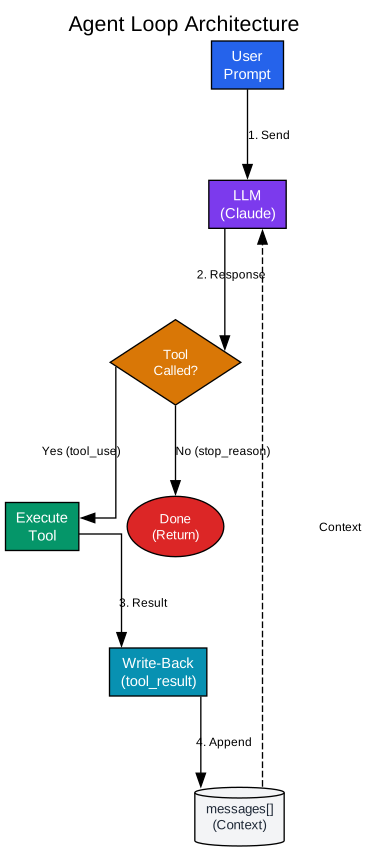
The agent loop diagram above shows the complete cycle that every agent must implement. This pattern is deceptively simple yet incredibly powerful when implemented correctly.
Step 1: Initialize Messages
The user’s prompt becomes the first message in the conversation. This message is stored in a messages array that accumulates throughout the conversation. The array serves as the agent’s working memory, containing all the context needed for the model to make informed decisions.
Step 2: Send to LLM
The conversation is sent to the language model along with tool definitions. The model processes the messages and decides what action to take. It can either respond with text (if it needs to ask a clarifying question or provide an answer) or call a tool (if it needs to perform an action like reading a file or running a command).
Step 3: Append Response
The model’s response is added to the messages array. This step is crucial because it maintains the conversation history. The agent then checks whether the model called a tool or finished its task. If the model didn’t call a tool, the task is complete and the loop exits.
Step 4: Execute Tools and Write Back
If the model called a tool, each tool call is executed, and the results are collected. These results are then written back into the conversation as a new message. This “write-back” step is the single most important idea in agent design. It allows the model to see the real-world results of its actions and make informed decisions about what to do next.
Step 5: Loop Back
The loop returns to Step 2, sending the updated conversation back to the model. This cycle continues until the model decides it’s done. The entire agent can be implemented in under 30 lines of Python, demonstrating the elegance of this fundamental pattern.
Tool Dispatch: The Agent’s Hands
While the agent loop provides the brain, tools provide the hands. The dispatch map pattern enables clean, extensible tool routing without modifying the core loop.
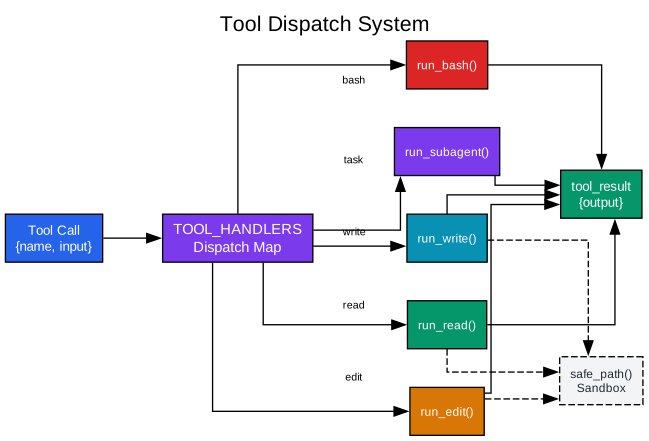
The tool dispatch diagram illustrates how a single dictionary routes tool names to handler functions. This pattern is fundamental to building maintainable agent systems.
The Dispatch Map Pattern
The dispatch map is a simple dictionary that maps tool names to handler functions. Adding a tool means adding one entry to the dictionary. The loop itself never changes, regardless of how many tools are added. This separation of concerns makes the codebase maintainable and extensible.
Path Sandboxing
Security is paramount when giving an AI agent access to your filesystem. Path sandboxing prevents the model from escaping its workspace. Every requested path is resolved and checked against the working directory before any I/O happens. This ensures that even if the model hallucinates a dangerous path, the system catches it before any damage occurs.
Tool Handlers
Each tool gets a dedicated handler function. The read_file handler reads files with line limits to avoid blowing up the context. The write_file handler writes content to files. The edit_file handler performs surgical edits. The bash handler runs shell commands with appropriate safety checks. Each handler is responsible for its own validation and error handling.
Extensibility
The dispatch map pattern makes it trivial to add new tools. You simply define a handler function and add an entry to the dictionary. No changes to the agent loop are required. This clean separation means that tools can be developed, tested, and deployed independently of the core agent logic.
Permission System: Safety Gates
Before giving an agent access to anything that matters, you need a gate between “the model wants to do X” and “the system actually does X.” The permission system provides this critical safety layer.
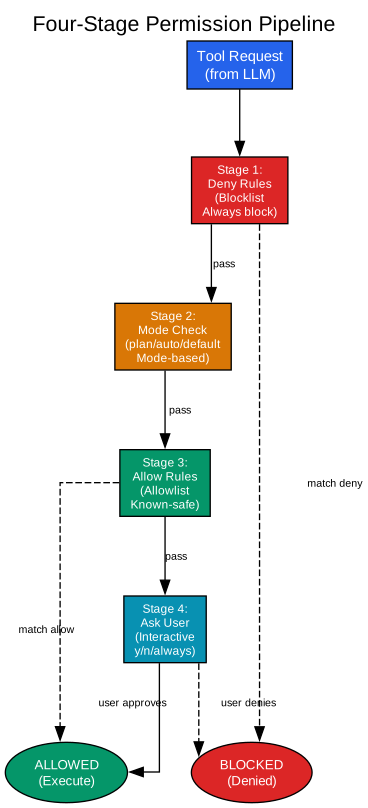
The permission pipeline diagram shows the four-stage check that every tool call must pass through before execution. This multi-layered approach provides defense in depth.
Stage 1: Deny Rules
Deny rules are the first line of defense. They catch dangerous patterns that should never execute, regardless of mode or allow rules. Examples include blocking rm -rf / or sudo commands. Deny rules are bypass-immune and always checked first, ensuring that dangerous operations are never accidentally approved.
Stage 2: Mode Check
Three permission modes control how aggressively the agent auto-approves actions. Default mode asks the user for every unmatched tool call, providing maximum safety. Plan mode blocks all writes outright, useful when you want the agent to explore without touching anything. Auto mode lets reads through silently and only asks about writes, good for fast exploration.
Stage 3: Allow Rules
Allow rules let known-safe operations pass without asking. These are typically configured for operations that are known to be safe in your specific context. When the user answers “always” at the interactive prompt, a permanent allow rule is added at runtime, building up a personalized safety profile over time.
Stage 4: Ask User
If a tool call doesn’t match any deny or allow rules, and isn’t automatically approved by mode settings, it falls through to an interactive prompt. The user can approve, deny, or approve permanently. This final checkpoint ensures that no action happens without explicit consent when needed.
Circuit Breaker
The permission system also includes denial tracking as a simple circuit breaker. After 3 consecutive denials, it suggests switching to plan mode. This prevents the agent from repeatedly hitting the same wall and wasting turns.
Skill Loading: On-Demand Knowledge
One of the most elegant patterns in Learn Claude Code is the two-layer skill loading system. This pattern dramatically reduces token usage while keeping domain knowledge available when needed.
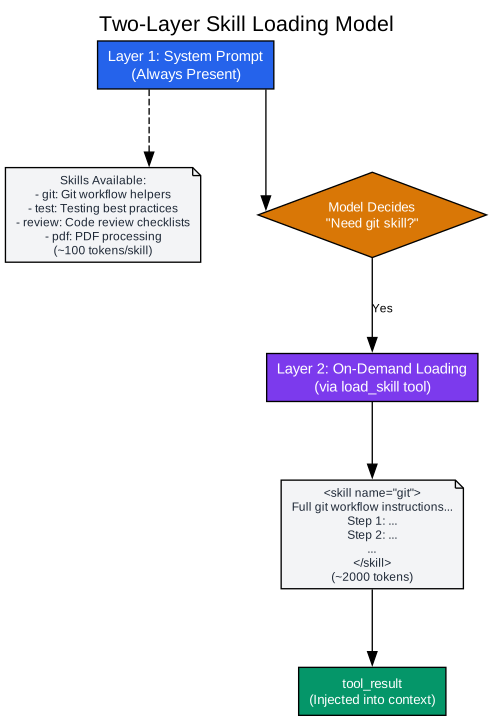
The skill loading diagram illustrates how knowledge is split into two layers: cheap descriptions always present, and expensive bodies loaded on demand.
Layer 1: System Prompt
The first layer lives in the system prompt and is always present. It contains just skill names and one-line descriptions, typically around 100 tokens per skill. This gives the model awareness of what skills exist without loading the full content. For example, the system prompt might include: “Skills available: git: Git workflow helpers, test: Testing best practices, code-review: Review checklist.”
Layer 2: On-Demand Loading
The second layer contains the full skill body, loaded through a tool call only when the model decides it needs that knowledge. Each skill body might be 2,000 tokens or more, but it’s only loaded when relevant. The model calls load_skill("git") and receives the full instructions as a tool_result.
The Economics of Token Usage
Consider an agent with 10 skills at 2,000 tokens each. Loading all of them into the system prompt on every request would cost 20,000 tokens per API call. With the two-layer pattern, only about 1,000 tokens of descriptions are always present, and typically only one skill body is loaded per turn. This represents a 10-20x reduction in token costs for domain knowledge.
Skill Discovery
Each skill is a directory containing a SKILL.md file. The file starts with YAML frontmatter that declares the skill’s name and description, followed by the full instruction body. The SkillLoader scans for all SKILL.md files at startup, parses the frontmatter, and stores the full body for later retrieval.
Agent Teams: Multi-Agent Coordination
As agent systems grow, they need to coordinate multiple specialized agents working together. The team communication pattern provides structured coordination.
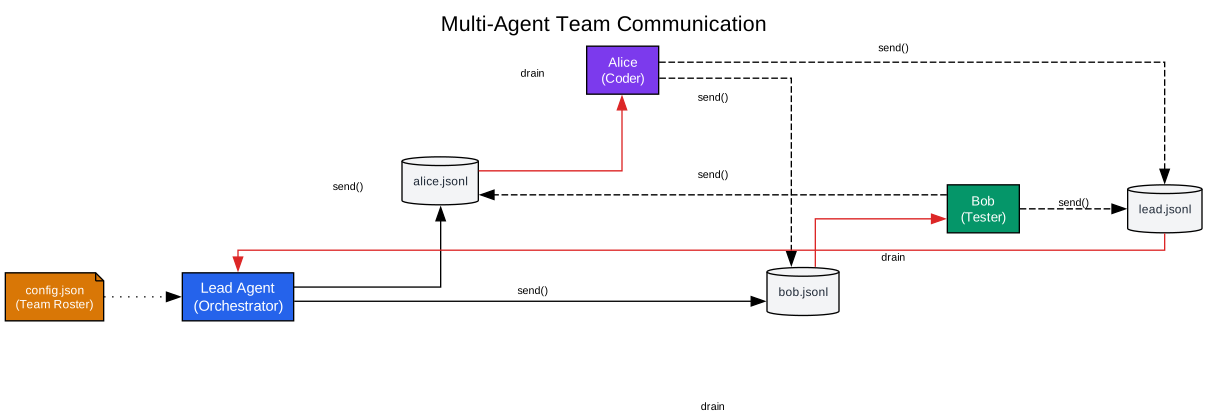
The team communication diagram shows how multiple agents coordinate through shared protocols and message passing.
Coordinator Agent
The coordinator agent acts as the team lead, receiving high-level tasks and delegating subtasks to specialized workers. It maintains an inbox for receiving messages and can send tasks to any worker’s inbox. The coordinator tracks progress and synthesizes results from multiple workers.
Worker Agents
Each worker agent specializes in a particular domain. A code expert handles implementation tasks. A test expert focuses on testing and validation. A documentation expert manages documentation. Each worker has its own inbox and can communicate with the coordinator and other workers.
Team Protocols
Shared coordination rules define how agents communicate. Protocols specify message formats, response expectations, and coordination patterns. This structured approach prevents chaos in multi-agent systems and ensures that all agents work toward the same goal.
Message Passing
Agents communicate through message passing rather than shared state. Each agent maintains its own context and processes messages from its inbox. This isolation prevents cross-contamination and makes the system more robust to failures in individual agents.
Key Features and Capabilities
Progressive Learning Path
The repository provides a clear, ordered progression from basic concepts to advanced capabilities. Each chapter builds on the previous one, ensuring that learners understand foundational concepts before tackling complex topics. The recommended reading order guides learners through the four stages in sequence.
Runnable Reference Implementations
Every chapter includes runnable Python code that demonstrates the concepts in action. Learners can run the code, modify it, and see the results immediately. This hands-on approach reinforces theoretical understanding with practical experience.
Bridge Documentation
Bridge documents connect related concepts and explain why certain decisions were made. These documents help learners understand the rationale behind the architecture, not just the implementation details. Topics include chapter order rationale, code reading order, and reference module maps.
Multi-Language Support
The documentation is available in English, Chinese, and Japanese. The Chinese version is the most reviewed and complete, while English and Japanese versions cover the main chapters and major bridge docs. This makes the material accessible to a global audience.
Web Learning Interface
A built-in teaching site provides visual ways to understand chapter order, stage boundaries, and chapter-to-chapter upgrades. The timeline view shows the cleanest view of the full mainline. The layers view shows the four-stage boundary map. The compare view enables adjacent-step comparison and jump diagnosis.
Installation and Quick Start
Getting started with Learn Claude Code is straightforward:
git clone https://github.com/shareAI-lab/learn-claude-code
cd learn-claude-code
pip install -r requirements.txt
cp .env.example .env
Configure your ANTHROPIC_API_KEY or a compatible endpoint in .env, then run:
python agents/s01_agent_loop.py
python agents/s18_worktree_task_isolation.py
python agents/s19_mcp_plugin.py
python agents/s_full.py
The suggested order is to start with s01 and ensure the minimal loop works, then read the architecture overview and move through s01-s11 in order. Only after the single-agent core plus its control plane feel stable, continue into s12-s19. Read s_full.py last, after the mechanisms already make sense separately.
Comparison to Claude Code
Learn Claude Code is not trying to be a production replacement for Claude Code. Instead, it’s a teaching tool that reconstructs the parts that determine whether an agent system actually works. The focus is on high fidelity to the design backbone, not 1:1 fidelity to every implementation detail.
What’s Included
The repository covers the main modules, how those modules cooperate, what each module is responsible for, where the important state lives, and how one request flows through the system. These are the concepts that transfer to any agent system.
What’s Deliberately Excluded
The repository deliberately excludes packaging and release mechanics, cross-platform compatibility layers, enterprise policy glue, telemetry and account wiring, historical compatibility branches, and product-specific naming accidents. These details may matter in production but don’t belong at the center of a learning path.
The Teaching Promise
The repository promises to teach the mainline in a clean order, explain unfamiliar concepts before relying on them, stay close to real system structure, and avoid drowning the learner in irrelevant product details. This focused approach ensures that learners gain deep, transferable knowledge.
Conclusion
Learn Claude Code represents a significant contribution to the AI agent development community. By distilling the essential mechanisms of agent systems into a clear, progressive learning path, it enables developers to understand and build their own AI coding assistants.
The four-stage architecture provides a solid foundation: building a working single-agent loop, hardening it with safety and memory, upgrading to durable runtime work, and finally growing into a multi-agent platform. Each stage introduces new capabilities while maintaining the core patterns established in previous stages.
The emphasis on understanding over copying ensures that learners can apply these concepts to their own projects, regardless of the specific technologies they use. Whether you’re building a simple automation script or a complex multi-agent system, the patterns in Learn Claude Code provide a solid foundation.
The repository’s success, with over 50,000 stars, demonstrates the demand for this kind of deep, practical education. As AI coding assistants become increasingly important in software development, understanding their core mechanisms becomes essential for any developer who wants to work effectively with these tools.
For those ready to dive deeper, the repository provides a clear path forward: start with the architecture overview, follow the chapter order, run the code examples, and rebuild the smallest version yourself after each stage. By the end, you’ll be able to answer the fundamental questions: what is the minimum state a coding agent needs, why is tool_result the center of the loop, when should you use a subagent, and when should a single-agent system grow into tasks, teams, worktrees, and MCP.
Resources
- GitHub Repository
- Architecture Overview Documentation
- Agent Loop Chapter
- Tool Use Chapter
- Permission System Chapter