MLX-VLM: Vision Language Models on Apple Silicon
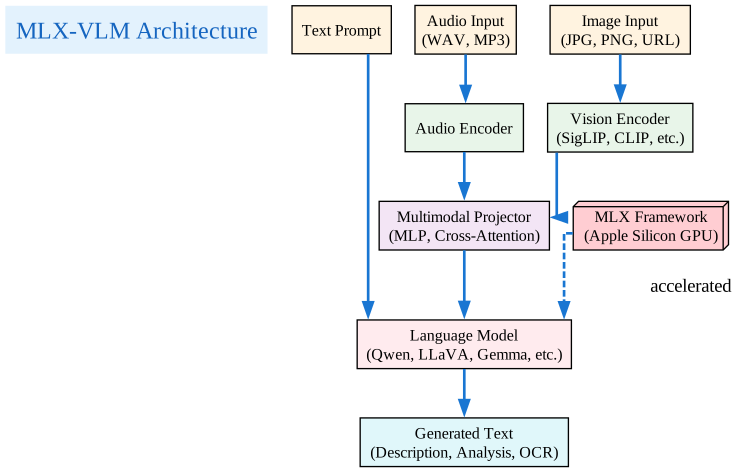
MLX-VLM is a powerful Python package for inference and fine-tuning of Vision Language Models (VLMs) and Omni Models (VLMs with audio and video support) on your Mac using Apple’s MLX framework. With nearly 4,000 GitHub stars and growing, it has become the go-to solution for running multimodal AI locally on Apple Silicon.
What is MLX-VLM?
MLX-VLM enables you to run state-of-the-art vision language models directly on your Mac, leveraging the power of Apple Silicon GPUs through the MLX framework. This means you can process images, videos, and audio without relying on cloud services - all while maintaining privacy and reducing costs.
Key Features
| Feature | Description |
|---|---|
| Multi-Modal Support | Images, audio, and video understanding |
| Apple Silicon Optimized | Native MLX acceleration for M-series chips |
| Extensive Model Support | 50+ models including Qwen, LLaVA, Gemma, and more |
| Fine-Tuning | LoRA and QLoRA support for customization |
| OpenAI Compatible | REST API server with familiar endpoints |
| Vision Feature Caching | 11x+ faster multi-turn conversations |
| TurboQuant KV Cache | 76% memory reduction for long contexts |
Supported Models
MLX-VLM supports an impressive range of models across different categories:

Vision Language Models
- Qwen2-VL and Qwen2.5-VL
- LLaVA series
- Idefics3
- Molmo and MolmoPoint
- Pixtral
- PaliGemma
- Gemma 4
- Phi-4 Multimodal
OCR Specialized Models
- DeepSeek-OCR and DeepSeek-OCR-2
- DOTS-OCR and DOTS-MOCR
- GLM-OCR
- Falcon-OCR
Omni Models (Audio + Video)
- MiniCPM-o
- Phi-4 Multimodal
- Gemma 3n
Installation
Getting started with MLX-VLM is straightforward:
pip install -U mlx-vlm
Usage
MLX-VLM provides multiple interfaces to suit different workflows:
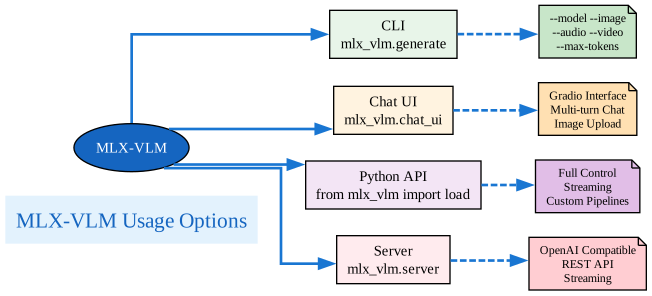
Command Line Interface
Generate text from images:
# Basic image description
mlx_vlm.generate --model mlx-community/Qwen2-VL-2B-Instruct-4bit \
  --max-tokens 100 \
  --temperature 0.0 \
  --image http://images.cocodataset.org/val2017/000000039769.jpg

# Audio understanding
mlx_vlm.generate --model mlx-community/gemma-3n-E2B-it-4bit \
  --max-tokens 100 \
  --prompt "Describe what you hear" \
  --audio /path/to/audio.wav

# Multi-modal (Image + Audio)
mlx_vlm.generate --model mlx-community/gemma-3n-E2B-it-4bit \
  --max-tokens 100 \
  --prompt "Describe what you see and hear" \
  --image /path/to/image.jpg \
  --audio /path/to/audio.wav
Chat UI with Gradio
Launch an interactive chat interface:
mlx_vlm.chat_ui --model mlx-community/Qwen2-VL-2B-Instruct-4bit
Python API
Use MLX-VLM in your Python scripts:
import mlx.core as mx
from mlx_vlm import load, generate
from mlx_vlm.prompt_utils import apply_chat_template
from mlx_vlm.utils import load_config

# Load the model
model_path = "mlx-community/Qwen2-VL-2B-Instruct-4bit"
model, processor = load(model_path)
config = load_config(model_path)

# Prepare input
image = ["http://images.cocodataset.org/val2017/000000039769.jpg"]
prompt = "Describe this image."

# Apply chat template
formatted_prompt = apply_chat_template(
    processor, config, prompt, num_images=len(image)
)

# Generate output
output = generate(model, processor, formatted_prompt, image, verbose=False)
print(output)
REST API Server
Start an OpenAI-compatible server:
# Basic server
mlx_vlm.server --port 8080

# With model preloaded
mlx_vlm.server --model mlx-community/Qwen2-VL-2B-Instruct-4bit

# With TurboQuant for memory efficiency
mlx_vlm.server --model google/gemma-4-26b-a4b-it \
  --kv-bits 3.5 \
  --kv-quant-scheme turboquant
The server provides these endpoints:
/v1/models- List available models/v1/chat/completions- OpenAI-compatible chat endpoint/v1/responses- OpenAI responses endpoint/health- Server status/unload- Unload current model
Advanced Features
Vision Feature Caching
In multi-turn conversations about an image, MLX-VLM caches vision features to avoid re-encoding the same image repeatedly:
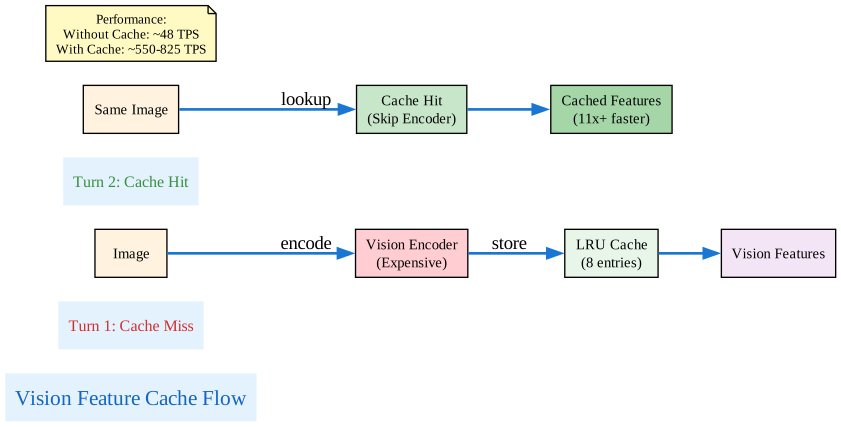
This results in dramatic performance improvements:
| Metric | Without Cache | With Cache |
|---|---|---|
| Prompt TPS | ~48 | ~550-825 |
| Speedup | – | 11x+ |
| Peak Memory | 52.66 GB | 52.66 GB (flat) |
TurboQuant KV Cache
For long-context scenarios, TurboQuant compresses the KV cache to enable longer conversations with less memory:
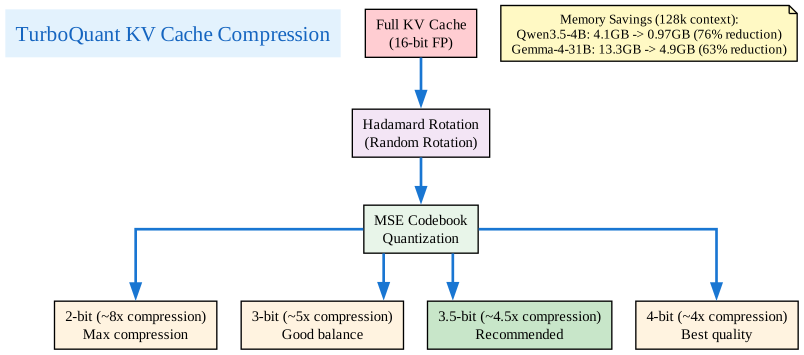
Memory savings at 128k context:
| Model | Baseline | TurboQuant 3.5-bit | Reduction |
|---|---|---|---|
| Qwen3.5-4B | 4.1 GB | 0.97 GB | 76% |
| Gemma-4-31B | 13.3 GB | 4.9 GB | 63% |
Thinking Budget
For reasoning models like Qwen3.5, you can control the thinking process:
mlx_vlm.generate --model mlx-community/Qwen3.5-2B-4bit \
  --thinking-budget 50 \
  --enable-thinking \
  --prompt "Solve 2+2"
Video Understanding
Analyze videos with supported models:
mlx_vlm.video_generate --model mlx-community/Qwen2-VL-2B-Instruct-4bit \
  --max-tokens 100 \
  --prompt "Describe this video" \
  --video path/to/video.mp4 \
  --max-pixels 224 224 \
  --fps 1.0
Fine-Tuning with LoRA
MLX-VLM supports fine-tuning models with LoRA and QLoRA for customization:
# Prepare your dataset and run LoRA training
mlx_vlm.lora --model mlx-community/Qwen2-VL-2B-Instruct-4bit \
  --train \
  --data /path/to/dataset \
  --batch-size 4 \
  --lora-layers 16
Troubleshooting
Common Issues
Model not loading: Ensure you have enough RAM. Quantized models (4-bit, 8-bit) require less memory.
Slow generation: Use --kv-bits 3.5 --kv-quant-scheme turboquant for faster long-context generation.
Image not processing: Check that the image URL or path is correct. Supported formats: JPG, PNG, WebP.
Audio not working: Ensure you’re using a model that supports audio (e.g., Gemma 3n, MiniCPM-o).
Why Choose MLX-VLM?
- Privacy First: Run everything locally without sending data to the cloud
- Cost Effective: No API fees or subscription costs
- High Performance: Optimized for Apple Silicon with Metal acceleration
- Flexible: Multiple interfaces from CLI to Python API to REST server
- Active Development: Regular updates with new models and features
Conclusion
MLX-VLM brings the power of vision language models to Apple Silicon, enabling developers and researchers to build multimodal AI applications locally. With support for 50+ models, advanced features like vision caching and TurboQuant, and multiple usage interfaces, it’s the most comprehensive solution for running VLMs on Mac.
Whether you’re building an image analysis tool, OCR system, or multimodal chat application, MLX-VLM provides the tools you need with the privacy and performance benefits of local execution.