MattPocock Skills: Structured AI Agent Workflows
In the rapidly evolving landscape of AI-assisted development, having structured workflows is essential for maintaining code quality and consistency. MattPocock’s skills repository provides a comprehensive collection of AI agent skills designed to enhance planning, development, and tooling workflows. This blog post explores these skills in depth, showing how they can transform your development process.
What is MattPocock Skills?
MattPocock Skills is an open-source repository that defines structured workflows for AI coding assistants. Each skill encapsulates a specific development workflow - from writing Product Requirements Documents (PRDs) to implementing Test-Driven Development (TDD) cycles. These skills provide a framework for consistent, high-quality AI-assisted development.
The repository is organized into four main categories:
| Category | Purpose | Skills Included |
|---|---|---|
| Planning & Design | Think through problems before coding | write-a-prd, prd-to-plan, prd-to-issues, grill-me, design-an-interface, request-refactor-plan |
| Development | Write, refactor, and fix code | tdd, triage-issue, improve-codebase-architecture, migrate-to-shoehorn, scaffold-exercises |
| Tooling & Setup | Configure development environment | setup-pre-commit, git-guardrails-claude-code |
| Writing & Knowledge | Manage documentation and knowledge | write-a-skill, edit-article, ubiquitous-language, obsidian-vault |
Skills Overview Architecture
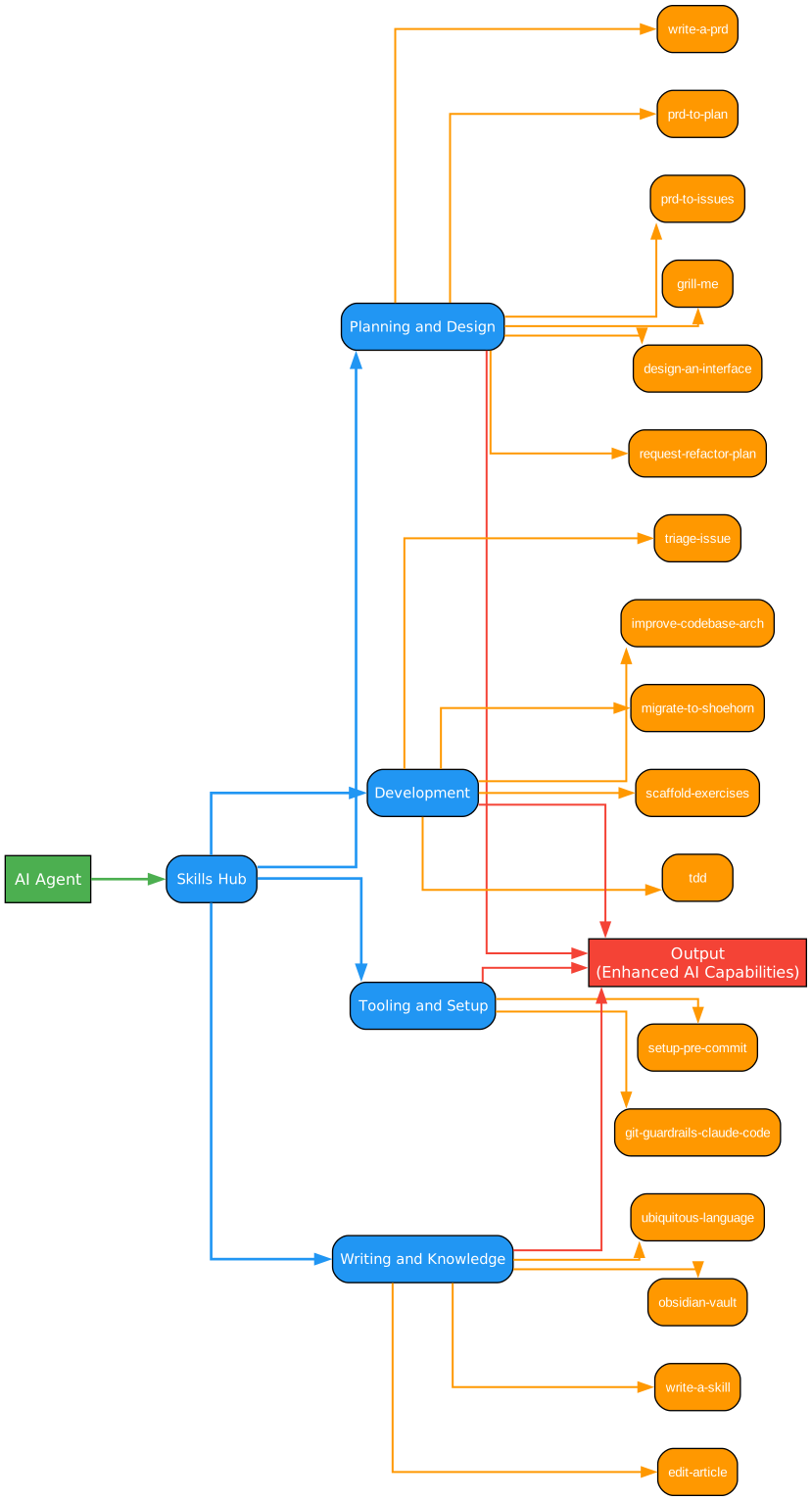
Understanding the Skills Architecture
The architecture diagram above illustrates how MattPocock’s skills repository organizes AI agent workflows into a cohesive system. This structure represents a paradigm shift in how developers interact with AI coding assistants, moving from ad-hoc prompts to structured, repeatable workflows.
Core Philosophy:
At the heart of this architecture lies the principle that AI assistants should follow consistent, well-defined processes rather than improvising solutions. Each skill acts as a blueprint that guides the AI through a series of steps, ensuring predictable and high-quality outcomes. This approach addresses a fundamental challenge in AI-assisted development: the tendency for AI models to produce inconsistent results when given open-ended instructions.
Planning & Design Layer:
The planning and design skills form the foundation of the workflow hierarchy. These skills emphasize thinking before coding - a principle that becomes even more critical when working with AI assistants. The write-a-prd skill initiates an interactive interview process where the AI explores the problem space, asks clarifying questions, and produces a comprehensive Product Requirements Document. This document then serves as the source of truth for subsequent development phases.
The prd-to-plan skill transforms these requirements into actionable implementation plans using the tracer bullet methodology. Rather than attempting to implement everything at once, this approach breaks work into thin vertical slices that cut through all layers of the application. Each slice delivers a complete, working feature that can be tested and validated independently.
Development Layer:
The development skills focus on implementation quality and maintainability. The flagship TDD skill implements a rigorous red-green-refactor cycle with specific constraints that prevent common anti-patterns. Unlike traditional approaches where developers might write all tests upfront (horizontal slicing), this skill enforces vertical slicing - one test, one implementation, repeat. This methodology ensures that each test validates actual behavior rather than imagined requirements.
The improve-codebase-architecture skill introduces the concept of “deep modules” from John Ousterhout’s “A Philosophy of Software Design.” Deep modules have small interfaces hiding large implementations, making them more testable and maintainable. The skill guides AI assistants to identify shallow modules and propose deepening refactor candidates.
Tooling & Setup Layer:
The tooling skills ensure consistent development environments across teams. The git-guardrails-claude-code skill is particularly valuable for AI-assisted development - it prevents dangerous git operations like force pushes or hard resets that could destroy work. This safety net becomes essential when AI assistants have write access to your repository.
Writing & Knowledge Layer:
These skills manage documentation and knowledge capture. The ubiquitous-language skill extracts Domain-Driven Design (DDD) glossaries from conversations, ensuring consistent terminology across the codebase. The obsidian-vault skill integrates with Obsidian note-taking, enabling AI assistants to search, create, and manage notes with wikilinks.
Integration Points:
The architecture shows how skills can chain together to form complete development workflows. A typical flow might start with write-a-prd to capture requirements, proceed through prd-to-plan for implementation planning, use tdd for actual development, and conclude with improve-codebase-architecture for ongoing refinement. Each skill produces artifacts that feed into subsequent skills, creating a seamless pipeline from idea to implementation.
Key Benefits:
This structured approach offers several advantages over ad-hoc AI interactions. First, it ensures consistency - every team member working with the AI follows the same process. Second, it captures institutional knowledge - the skills encode best practices that might otherwise be lost or inconsistently applied. Third, it enables progressive disclosure - complex workflows are broken into manageable steps with clear inputs and outputs. Fourth, it promotes quality - each skill includes specific checks and validation steps that prevent common mistakes.
Skill Structure
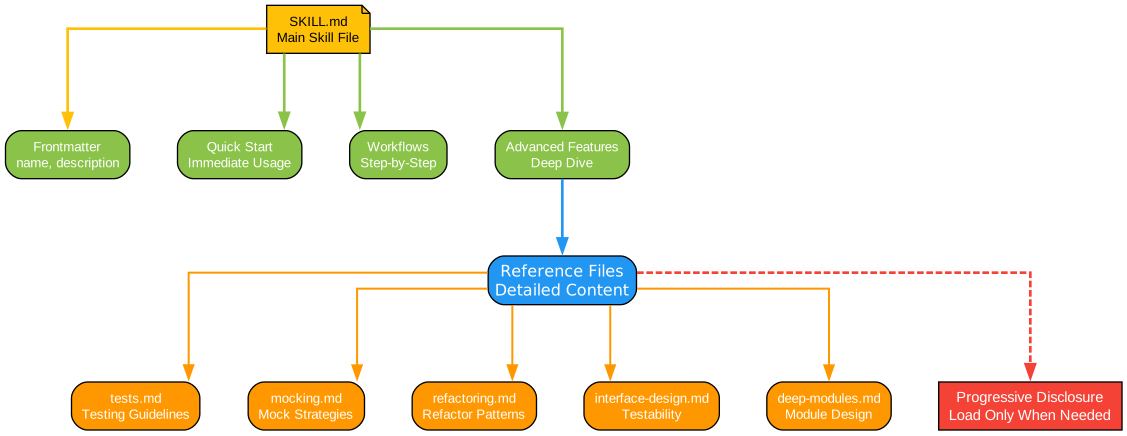
Understanding Skill Structure
The skill structure diagram reveals the anatomy of a MattPocock skill, showing how each workflow is packaged for consistent execution. This standardized format enables skills to be shared, versioned, and composed into larger workflows.
Frontmatter Metadata:
Every skill begins with YAML frontmatter containing essential metadata. The name field provides a unique identifier used when invoking the skill. The description field serves a dual purpose: it explains what the skill does and when to use it. This description is carefully crafted to include trigger phrases that help AI assistants recognize when to suggest the skill. For example, the TDD skill’s description includes phrases like “red-green-refactor” and “test-first development” to help the AI match user requests to the appropriate skill.
Core Content Sections:
The body of a skill follows a consistent structure that guides AI behavior:
Philosophy Section: This section establishes the guiding principles behind the workflow. For the TDD skill, this includes the core principle that tests should verify behavior through public interfaces, not implementation details. This philosophical foundation shapes all subsequent guidance and helps the AI make consistent decisions when facing ambiguous situations.
Anti-Patterns Section: Explicitly documenting what NOT to do is crucial for AI assistants. The TDD skill clearly states that writing all tests first (horizontal slicing) produces “crap tests” and explains why. This negative guidance prevents the AI from falling into common traps that might seem reasonable but lead to poor outcomes.
Workflow Section: The workflow provides step-by-step instructions for executing the skill. Each step includes specific actions, decision points, and validation criteria. The TDD workflow, for instance, includes a planning phase where the AI confirms interfaces and behaviors with the user before writing any code. This human-in-the-loop approach ensures alignment between AI output and developer intent.
Checklists: Skills include explicit checklists that the AI must verify at each stage. The TDD skill includes a “Checklist Per Cycle” that verifies each test describes behavior (not implementation), uses public interfaces only, would survive refactoring, and contains minimal code for the current test. These checklists act as quality gates that prevent the AI from skipping important steps.
Progressive Disclosure:
Skills use progressive disclosure to manage complexity. The main SKILL.md file contains the essential workflow, while additional reference files provide deeper guidance on specific topics. The TDD skill includes separate files for tests.md (examples of good and bad tests), mocking.md (mocking guidelines), deep-modules.md (module design principles), interface-design.md (designing for testability), and refactoring.md (refactor candidates). This structure allows the AI to access detailed information when needed without being overwhelmed by a single large document.
Linked Resources:
Skills can bundle resources that the AI uses during execution. These might include templates (like the PRD template in write-a-prd), reference documentation, or scripts (like the git guardrails script). By bundling these resources with the skill, the AI has everything it needs to execute the workflow without requiring additional context from the user.
Invocation Pattern:
Skills are invoked using the npx command: npx skills@latest add mattpocock/skills/[skill-name]. This pattern makes skills easy to discover and install. The @latest tag ensures you’re using the most recent version, and the scoped package name (mattpocock/skills) identifies the source. Once installed, the skill becomes available to AI assistants that support the skills protocol.
Composability:
The standardized structure enables skills to be composed into larger workflows. The output of one skill can serve as input to another. For example, the write-a-prd skill produces a GitHub issue containing the PRD. The prd-to-plan skill can then consume that PRD to produce an implementation plan. This composability allows teams to create custom workflows by chaining skills together.
Version Control:
Because skills are defined in markdown files with clear frontmatter, they can be versioned alongside code. Teams can fork the repository, customize skills to their specific needs, and track changes over time. This versioning capability is essential for teams that want to evolve their AI-assisted development practices systematically.
TDD Workflow
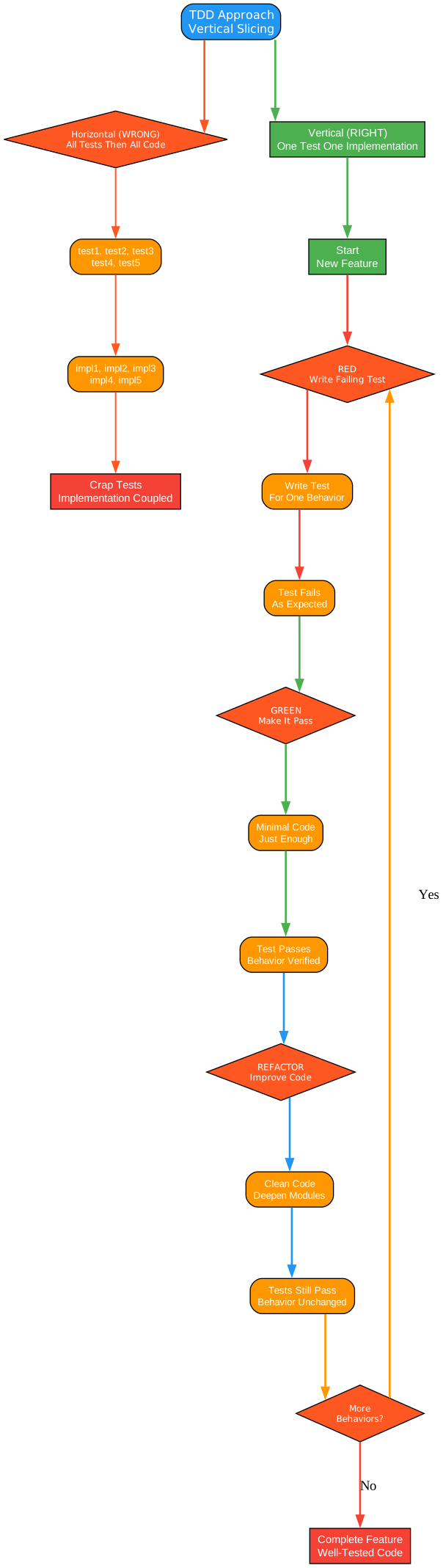
Understanding the TDD Workflow
The TDD workflow diagram illustrates the tracer bullet methodology that distinguishes MattPocock’s approach from traditional test-driven development. This vertical slicing pattern addresses fundamental problems with horizontal TDD approaches and produces tests that genuinely validate system behavior.
The Problem with Horizontal Slicing:
Traditional TDD often follows a horizontal pattern: write all tests first, then implement all code. This approach seems logical but produces several pathologies. First, tests written in bulk test imagined behavior rather than actual behavior - the developer anticipates what the code should do without the benefit of implementation insights. Second, these tests tend to verify the shape of things (data structures, function signatures) rather than user-facing behavior. Third, the tests become insensitive to real changes - they pass when behavior breaks and fail when behavior is fine. Finally, developers outrun their headlights, committing to test structure before understanding implementation complexity.
The Tracer Bullet Solution:
The tracer bullet methodology solves these problems by enforcing vertical slices. Each slice consists of one test followed by one implementation. This tight feedback loop ensures that tests respond to actual implementation insights. Because you just wrote the code, you know exactly what behavior matters and how to verify it. The tests become specifications that describe what the system does, not how it does it.
Planning Phase:
Before any code is written, the TDD skill requires explicit planning. This phase confirms with the user what interface changes are needed, which behaviors to test (prioritized), and opportunities for deep modules. Deep modules, a concept from John Ousterhout’s “A Philosophy of Software Design,” have small interfaces hiding large implementations. They’re more testable because you test at the boundary rather than inside. The planning phase also identifies testability considerations and lists behaviors to test (not implementation steps). Crucially, the AI must get user approval on the plan before proceeding.
The RED-GREEN Cycle:
The workflow begins with RED: write one test that confirms one thing about the system. The test must fail - if it passes, you’re not testing anything new. This failing test is your tracer bullet, proving the path works end-to-end. The test should exercise real code paths through public APIs, not mock internal collaborators or test private methods.
Then comes GREEN: write minimal code to pass the test. The emphasis on “minimal” is crucial - you should write only enough code to pass the current test, not anticipate future tests. This constraint prevents over-engineering and keeps the codebase lean. The test now passes, validating that the implementation satisfies the specified behavior.
Incremental Loop:
For each remaining behavior, repeat the RED-GREEN cycle. One test at a time, only enough code to pass. This discipline prevents scope creep and ensures each test adds meaningful coverage. The tests accumulate into a comprehensive specification that describes the system’s behavior from the user’s perspective.
Refactor Phase:
After all tests pass, the workflow enters the refactor phase. This is where you look for opportunities to improve code quality without changing behavior. The skill provides specific refactor candidates: extract duplication, deepen modules (move complexity behind simple interfaces), apply SOLID principles where natural, and consider what new code reveals about existing code. Critically, you must run tests after each refactor step to ensure behavior hasn’t changed.
The “Never Refactor While RED” Rule:
A fundamental rule of this workflow is to never refactor while tests are failing. Get to GREEN first, then refactor. This rule prevents the confusion that arises when you’re simultaneously trying to make tests pass and improve code structure. When tests are green, you have a safety net that catches any accidental behavior changes during refactoring.
Test Quality Criteria:
The TDD skill includes explicit criteria for test quality. Good tests verify behavior through public interfaces, not implementation details. They read like specifications - “user can checkout with valid cart” tells you exactly what capability exists. Good tests survive refactors because they don’t care about internal structure. Bad tests are coupled to implementation - they mock internal collaborators, test private methods, or verify through external means (like querying a database directly instead of using the interface). The warning sign: your test breaks when you refactor, but behavior hasn’t changed.
Integration-Style Testing:
The skill emphasizes integration-style tests over unit tests. Integration tests exercise real code paths through public APIs. They describe what the system does, not how it does it. This approach produces tests that are more resilient to refactoring and more valuable for catching real bugs. The skill explicitly warns against testing private methods or verifying through external means - these practices couple tests to implementation details.
Practical Application:
Consider implementing a shopping cart feature. The horizontal approach would write tests for add item, remove item, update quantity, calculate total, apply discount, and validate cart state - all before writing any implementation. The tracer bullet approach would instead write one test: “user can add item to cart.” Make it pass. Then write the next test: “user can remove item from cart.” Make it pass. Each cycle builds on the previous, with implementation insights informing test design.
PRD to Implementation Flow
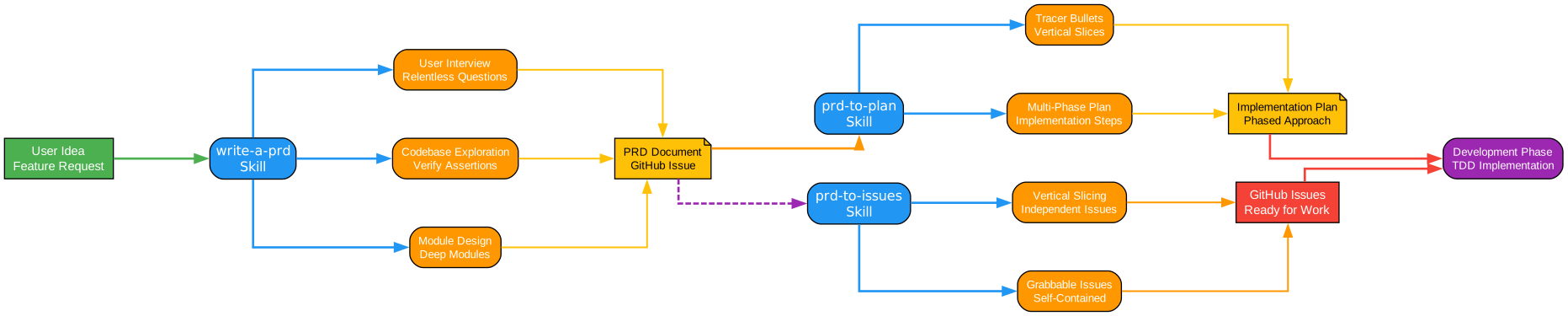
Understanding the PRD Flow
The PRD to Implementation flow diagram shows how MattPocock’s skills transform vague ideas into working software through a structured pipeline. This flow connects planning skills with development skills, ensuring that implementation stays aligned with requirements throughout the development lifecycle.
The PRD Writing Process:
The flow begins with the write-a-prd skill, which captures requirements through an interactive interview process. Unlike traditional requirements documents that might be written in isolation, this skill emphasizes relentless questioning. The AI interviews the user about every aspect of the plan until reaching a shared understanding, walking down each branch of the decision tree and resolving dependencies between decisions one by one.
This interview process serves multiple purposes. First, it ensures completeness - the AI won’t let the user skip important considerations. Second, it surfaces hidden assumptions - questions reveal constraints and preferences the user might not have articulated. Third, it creates alignment - by the end of the interview, both the user and AI share a mental model of the problem and solution.
Codebase Exploration:
During the PRD process, the AI explores the repository to verify user assertions and understand the current state of the codebase. This exploration is crucial for identifying integration points, existing patterns, and potential conflicts. The AI looks for opportunities to extract deep modules - modules with simple interfaces that can be tested in isolation. These modules become the building blocks of the implementation.
PRD Structure:
The resulting PRD follows a structured template that captures all essential information:
Problem Statement: Describes the problem from the user’s perspective, not technical jargon. This keeps the focus on user value rather than implementation details.
Solution: Describes the solution from the user’s perspective. Again, this maintains focus on outcomes rather than mechanisms.
User Stories: An extensive, numbered list of user stories in the format “As an [actor], I want [feature], so that [benefit].” This list should be extremely comprehensive, covering all aspects of the feature. Each story represents a testable slice of functionality.
Implementation Decisions: Documents decisions about modules, interfaces, technical clarifications, architectural decisions, schema changes, and API contracts. Critically, this section does NOT include specific file paths or code snippets - these become outdated quickly.
Testing Decisions: Describes what makes a good test (external behavior, not implementation details), which modules will be tested, and prior art for tests (similar tests in the codebase).
Out of Scope: Explicitly documents what is NOT included, preventing scope creep.
Further Notes: Any additional context or considerations.
From PRD to Plan:
The prd-to-plan skill transforms the PRD into a phased implementation plan using vertical slices. Each phase is a thin vertical slice that cuts through ALL integration layers end-to-end, NOT a horizontal slice of one layer. A completed slice is demoable or verifiable on its own.
The planning process identifies durable architectural decisions that are unlikely to change throughout implementation: route structures, database schema shape, key data models, authentication/authorization approach, and third-party service boundaries. These decisions go in the plan header so every phase can reference them.
Vertical Slice Principles:
Each slice delivers a narrow but COMPLETE path through every layer (schema, API, UI, tests). The skill prefers many thin slices over few thick ones. Slices do NOT include specific file names, function names, or implementation details that are likely to change. They DO include durable decisions: route paths, schema shapes, data model names.
User Validation:
The skill presents the proposed breakdown as a numbered list, showing for each phase the title and user stories covered. It asks the user about granularity, whether phases should be merged or split, and iterates until approval. This validation step ensures the plan matches user expectations before implementation begins.
From Plan to Issues:
The prd-to-issues skill breaks the plan into independently-grabbable GitHub issues using vertical slices. Each issue represents a self-contained unit of work that a developer (human or AI) can pick up and complete. This granularity enables parallel work and provides clear progress tracking.
Issue Structure:
Each issue includes context from the PRD, specific acceptance criteria, implementation notes, and links to related issues. The issues are ordered to respect dependencies - issues that must be completed before others are clearly marked.
The grill-me Skill:
At any point in this flow, the grill-me skill can stress-test plans and designs. This skill interviews the user relentlessly about every aspect of a plan until reaching shared understanding. It walks down each branch of the decision tree, resolving dependencies between decisions one by one. For each question, it provides a recommended answer based on its analysis.
This skill is particularly valuable for catching issues early. By forcing explicit consideration of edge cases, error handling, and integration points, it prevents costly rework later. The skill can also explore the codebase to answer questions that can be resolved through investigation rather than user input.
Integration with Development:
Once issues are created, the TDD skill takes over for implementation. Each issue becomes a series of RED-GREEN-REFactor cycles. The PRD and plan provide context for implementation decisions, ensuring that code stays aligned with requirements.
Continuous Refinement:
The improve-codebase-architecture skill can be applied at any point to identify refactoring opportunities. This skill explores the codebase like an AI would, noting where understanding one concept requires bouncing between many small files, where modules are so shallow that the interface is nearly as complex as the implementation, and where tightly-coupled modules create integration risk.
Feedback Loops:
The flow includes implicit feedback loops. As implementation progresses, new insights might require revisiting the PRD or plan. The structured documentation makes these updates straightforward - you can trace any change back to its originating requirement and forward to its implementing code.
Key Benefits:
This structured approach offers several advantages. First, it ensures completeness - the interview process catches requirements that might otherwise be missed. Second, it maintains alignment - the PRD serves as a single source of truth that all work references. Third, it enables parallel work - vertical slices and independent issues allow multiple developers to work simultaneously. Fourth, it provides traceability - you can trace any code back to its requirement and any requirement forward to its implementation.
Key Skills Deep Dive
Planning Skills
write-a-prd: Creates comprehensive Product Requirements Documents through interactive interviews. The skill explores the problem space, asks clarifying questions, and produces a structured document filed as a GitHub issue. This ensures requirements are complete before implementation begins.
prd-to-plan: Transforms PRDs into phased implementation plans using tracer bullet methodology. Each phase is a vertical slice that delivers working functionality end-to-end. The skill identifies durable architectural decisions and creates acceptance criteria for each phase.
prd-to-issues: Breaks implementation plans into independently-grabbable GitHub issues. Each issue is self-contained with clear acceptance criteria, enabling parallel development and clear progress tracking.
grill-me: Stress-tests plans and designs through relentless questioning. Walks through each branch of the decision tree, resolving dependencies one by one. Catches issues early before they become expensive to fix.
design-an-interface: Generates multiple radically different interface designs using parallel sub-agents. Based on the “Design It Twice” principle from “A Philosophy of Software Design” - your first idea is rarely the best. Each design explores different constraints, then compares trade-offs.
request-refactor-plan: Creates detailed refactor plans with tiny commits via user interview. Files the plan as a GitHub issue for tracking and collaboration.
Development Skills
tdd: Implements test-driven development with red-green-refactor loops. Enforces vertical slicing (one test, one implementation, repeat) rather than horizontal slicing (all tests, then all code). Includes comprehensive guidance on test quality, mocking, and refactoring.
triage-issue: Investigates bugs by exploring the codebase, identifying root causes, and filing GitHub issues with TDD-based fix plans. Provides structured approach to debugging that produces actionable fix plans.
improve-codebase-architecture: Explores codebase for architectural improvement opportunities, focusing on deepening shallow modules. Proposes module-deepening refactors as GitHub issue RFCs. Uses the concept of “deep modules” from John Ousterhout’s work.
migrate-to-shoehorn: Migrates test files from as type assertions to @total-typescript/shoehorn. Automates a specific TypeScript testing improvement.
scaffold-exercises: Creates exercise directory structures with sections, problems, solutions, and explainers. Useful for creating educational content or coding challenges.
Tooling Skills
setup-pre-commit: Sets up Husky pre-commit hooks with lint-staged, Prettier, type checking, and tests. Ensures code quality checks run automatically before commits.
git-guardrails-claude-code: Sets up Claude Code hooks to block dangerous git commands (push, reset –hard, clean, etc.) before they execute. Essential safety net for AI-assisted development.
Writing Skills
edit-article: Edits and improves articles by restructuring sections, improving clarity, and tightening prose. Useful for documentation and blog posts.
ubiquitous-language: Extracts DDD-style ubiquitous language glossary from conversations. Ensures consistent terminology across the codebase.
obsidian-vault: Searches, creates, and manages notes in an Obsidian vault with wikilinks and index notes. Integrates AI assistance with personal knowledge management.
Installation and Usage
Installing Skills
Skills are installed using the npx command:
# Install a specific skill
npx skills@latest add mattpocock/skills/tdd

# Install multiple skills
npx skills@latest add mattpocock/skills/write-a-prd
npx skills@latest add mattpocock/skills/prd-to-plan
npx skills@latest add mattpocock/skills/tdd
Prerequisites
Skills require an AI coding assistant that supports the skills protocol. The skills are designed to work with AI assistants that can:
- Read and follow structured instructions
- Execute multi-step workflows
- Ask clarifying questions
- Explore codebases
- Create and modify files
- Run commands and tests
Workflow Example
A typical workflow using multiple skills:
# 1. Create a PRD for a new feature
npx skills@latest add mattpocock/skills/write-a-prd
# AI interviews you about the feature and creates a GitHub issue

# 2. Convert PRD to implementation plan
npx skills@latest add mattpocock/skills/prd-to-plan
# AI creates phased plan with vertical slices

# 3. Break plan into issues
npx skills@latest add mattpocock/skills/prd-to-issues
# AI creates GitHub issues for each phase

# 4. Implement using TDD
npx skills@latest add mattpocock/skills/tdd
# AI implements feature with red-green-refactor cycles

# 5. Improve architecture
npx skills@latest add mattpocock/skills/improve-codebase-architecture
# AI identifies refactoring opportunities
Customizing Skills
Skills can be customized by forking the repository and modifying the SKILL.md files. Teams can:
- Add project-specific checklists
- Include company-specific templates
- Adjust workflows to match team processes
- Add references to internal documentation
Conclusion
MattPocock’s skills repository represents a significant advancement in AI-assisted development. By encoding structured workflows into reusable skills, it transforms ad-hoc AI interactions into consistent, repeatable processes. The emphasis on planning before coding, vertical slicing in TDD, and deep module design produces higher-quality code that’s easier to maintain and test.
The skills approach addresses a fundamental challenge in AI-assisted development: consistency. Without structured workflows, AI assistants might produce excellent code one day and problematic code the next, depending on how prompts are phrased. Skills provide a framework that ensures consistent quality regardless of how the user phrases their request.
For teams adopting AI-assisted development, this repository offers a starting point that embodies best practices from software engineering research. The TDD skill alone incorporates decades of testing wisdom, from Kent Beck’s original TDD concepts to contemporary insights about integration testing and module design.
Whether you’re new to AI-assisted development or looking to improve your existing workflows, MattPocock’s skills provide a comprehensive toolkit for building better software with AI assistance.