OpenScreen: Free Open-Source Screen Recording Studio
OpenScreen is a free, open-source alternative to Screen Studio that helps you create beautiful product demos and walkthroughs. If you don’t want to pay $29/month for Screen Studio but need a simpler solution for making professional screen recordings, OpenScreen is the perfect choice.
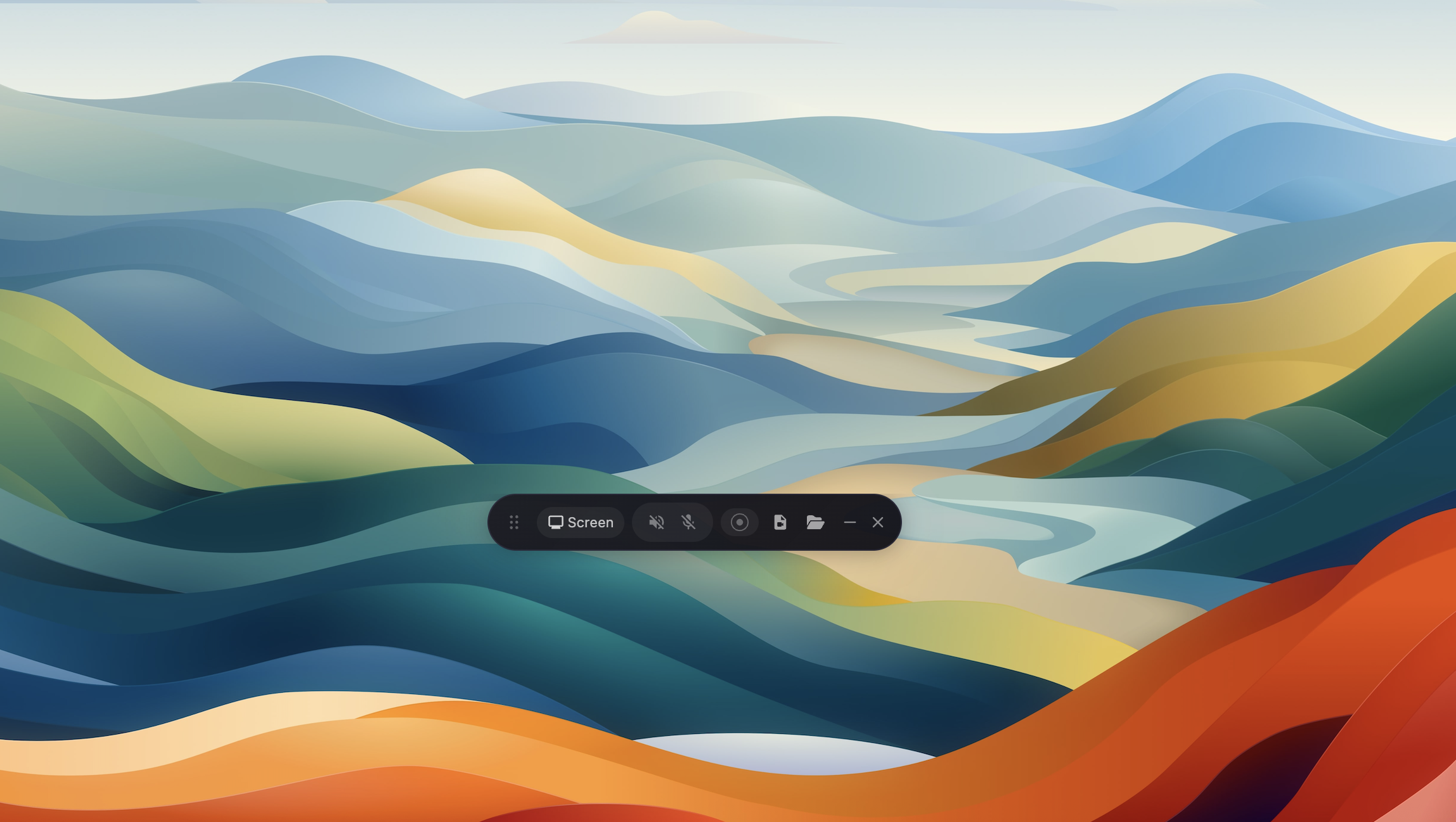
What is OpenScreen?
OpenScreen is an Electron-based desktop application built with React, TypeScript, and PixiJS that enables you to:
- Record your screen or specific windows
- Add automatic or manual zoom effects
- Record microphone and system audio
- Customize backgrounds with wallpapers, colors, or gradients
- Add annotations (text, arrows, images)
- Trim and adjust video speed
- Export in multiple formats
How Screen Recording Works
The screen recording process involves several components working together:
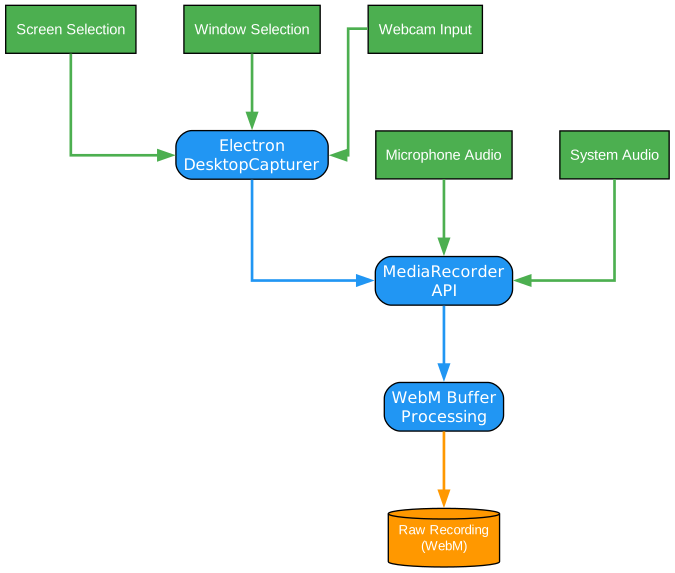
- Input Sources: Select screen, window, or webcam
- Audio Capture: Microphone and system audio
- DesktopCapturer: Electron’s API for capturing desktop content
- MediaRecorder: Web API for encoding video/audio
- WebM Buffer: Raw recording stored in WebM format
Editor Features Architecture
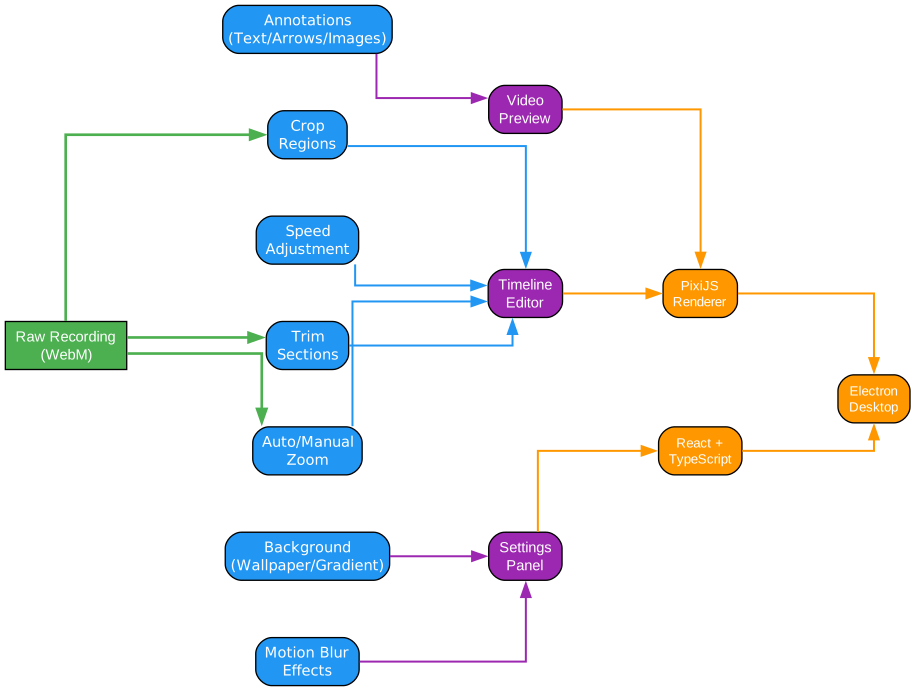
OpenScreen provides a comprehensive video editing experience:
Core Features
| Feature | Description |
|---|---|
| Auto/Manual Zoom | Automatic zoom on mouse clicks or manual zoom regions |
| Crop Regions | Hide parts of the recording |
| Trim Sections | Remove unwanted portions |
| Speed Adjustment | Customize playback speed at different segments |
| Annotations | Add text, arrows, and images |
| Backgrounds | Choose wallpapers, solid colors, or gradients |
| Motion Blur | Smooth pan and zoom effects |
Technology Stack
OpenScreen is built with modern web technologies:
- Electron - Cross-platform desktop application
- React - UI components and state management
- TypeScript - Type-safe development
- Vite - Fast build tooling
- PixiJS - High-performance 2D rendering
- dnd-timeline - Drag-and-drop timeline editing
Installation
Download Pre-built Binaries
Download the latest installer for your platform from the GitHub Releases page.
macOS
If you encounter issues with macOS Gatekeeper blocking the app, run:
xattr -rd com.apple.quarantine /Applications/Openscreen.app
Note: Grant Full Disk Access to your terminal in System Settings > Privacy & Security before running the command.
After installation, grant screen recording and accessibility permissions in System Preferences > Security & Privacy.
Linux
Download the .AppImage file and run:
chmod +x Openscreen-Linux-*.AppImage
./Openscreen-Linux-*.AppImage
If the app fails to launch due to a sandbox error:
./Openscreen-Linux-*.AppImage --no-sandbox
Windows
Download the .exe installer from the releases page and run it.
Building from Source
Prerequisites
- Node.js 22.22.1 or higher
- npm 10.9.4 or higher
Build Steps
# Clone the repository
git clone https://github.com/siddharthvaddem/openscreen.git
cd openscreen

# Install dependencies
npm install

# Run in development mode
npm run dev

# Build for your platform
npm run build        # Current platform
npm run build:mac    # macOS
npm run build:win    # Windows
npm run build:linux  # Linux
Export Process Flow
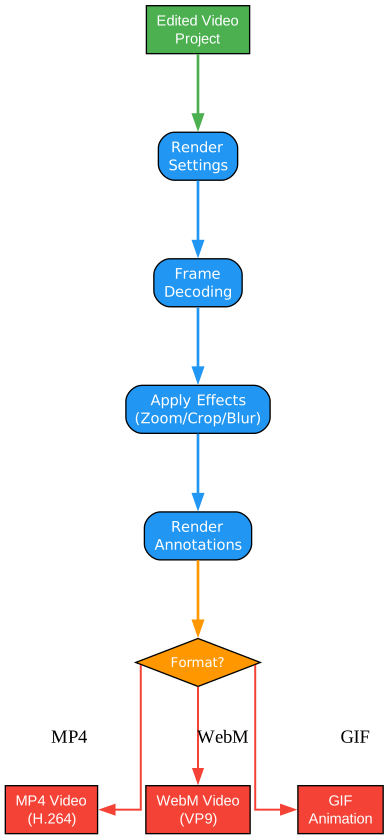
After editing your recording, export it in your preferred format:
Supported Export Formats
| Format | Use Case |
|---|---|
| MP4 (H.264) | Universal compatibility, social media |
| WebM (VP9) | Web embedding, smaller file sizes |
| GIF | Quick sharing, presentations |
Key Features in Detail
Automatic Zoom
OpenScreen automatically detects mouse clicks and creates smooth zoom effects to highlight important areas. You can customize:
- Zoom depth levels
- Animation duration
- Zoom position
Manual Zoom Regions
For precise control, manually define zoom regions:
- Click and drag to create a zoom region
- Adjust the depth and position
- Set duration for the zoom effect
Background Customization
Choose from multiple background options:
- Wallpapers: 18 built-in wallpapers included
- Solid Colors: Any color you want
- Gradients: Custom gradient backgrounds
- Custom: Use your own images
Annotations
Add professional annotations to your recordings:
- Text: Customizable fonts, sizes, and colors
- Arrows: Multiple arrow styles
- Images: Overlay logos or icons
Motion Blur
Enable motion blur for smoother pan and zoom transitions, giving your recordings a professional polish.
Platform-Specific Limitations
System audio capture has platform-specific requirements:
| Platform | Requirements |
|---|---|
| macOS | macOS 13+ required. macOS 14.2+ needs audio capture permission. |
| Windows | Works out of the box. |
| Linux | Requires PipeWire (default on Ubuntu 22.04+, Fedora 34+). |
Keyboard Shortcuts
OpenScreen supports customizable keyboard shortcuts for efficient editing:
- Space: Play/Pause
- Left/Right Arrow: Seek frames
- Delete: Remove selected region
- Ctrl+Z: Undo
- Ctrl+Shift+Z: Redo
Project Structure
openscreen/
├── electron/           # Electron main process
│   ├── main.ts        # Application entry
│   ├── preload.ts     # IPC bridge
│   └── windows.ts     # Window management
├── src/
│   ├── components/    # React components
│   │   ├── launch/    # Recording launch UI
│   │   ├── ui/        # Reusable UI components
│   │   └── video-editor/  # Editor components
│   ├── lib/           # Core libraries
│   │   ├── exporter/  # Video export logic
│   │   └── recordingSession.ts
│   ├── hooks/         # React hooks
│   └── i18n/          # Internationalization
└── public/            # Static assets
Internationalization
OpenScreen supports multiple languages:
- English (en)
- Spanish (es)
- Chinese Simplified (zh-CN)
Language files are located in src/i18n/locales/.
Contributing
Contributions are welcome! Check the project roadmap and open issues to find ways to contribute.
License
OpenScreen is licensed under the MIT License. Use it freely for personal and commercial projects.
Conclusion
OpenScreen provides a powerful, free alternative for creating professional screen recordings. With features like automatic zoom, annotations, background customization, and multiple export formats, it’s perfect for creating product demos, tutorials, and walkthroughs without the subscription cost.
For more information and updates, visit the official GitHub repository.
