Alibaba Page-Agent: Control Web Interfaces with Natural Language
In the rapidly evolving landscape of AI-powered automation, Alibaba’s Page-Agent stands out as a groundbreaking solution for web interface control. With over 16,330 stars on GitHub, this JavaScript in-page GUI agent enables developers to control web interfaces using natural language commands, eliminating the need for complex scripting or external browser automation tools.
What Makes Page-Agent Revolutionary?
Traditional web automation tools like Selenium or Puppeteer operate from outside the browser, requiring developers to manage browser instances, handle authentication separately, and deal with the complexity of cross-origin restrictions. Page-Agent takes a fundamentally different approach by embedding directly into your web application, operating from within the page itself.
This in-page architecture provides several compelling advantages:
Seamless Integration: Page-Agent becomes part of your application, sharing the same JavaScript context and DOM access. This means it can interact with your application’s state, call internal functions, and respond to events just like any other component.
No External Dependencies: Unlike browser-use solutions that require Python runtimes and headless browsers, Page-Agent runs entirely in JavaScript/TypeScript. Your users don’t need to install anything extra.
Enhanced Security: By operating within your application’s security context, Page-Agent respects your existing authentication and authorization mechanisms. You control exactly what it can access through allowlists and data masking.
Real-Time Responsiveness: Since Page-Agent operates directly on the DOM, it can respond to user interactions instantly without the latency of external browser control protocols.
Target Audience
Page-Agent is designed for:
- SaaS Developers: Embed AI assistants directly into your products to help users navigate complex workflows
- Web Application Builders: Add natural language interfaces to existing applications without rewriting code
- Accessibility Advocates: Provide alternative input methods for users with disabilities
- Product Teams: Create interactive demos and training experiences that respond to user commands
Architecture Overview
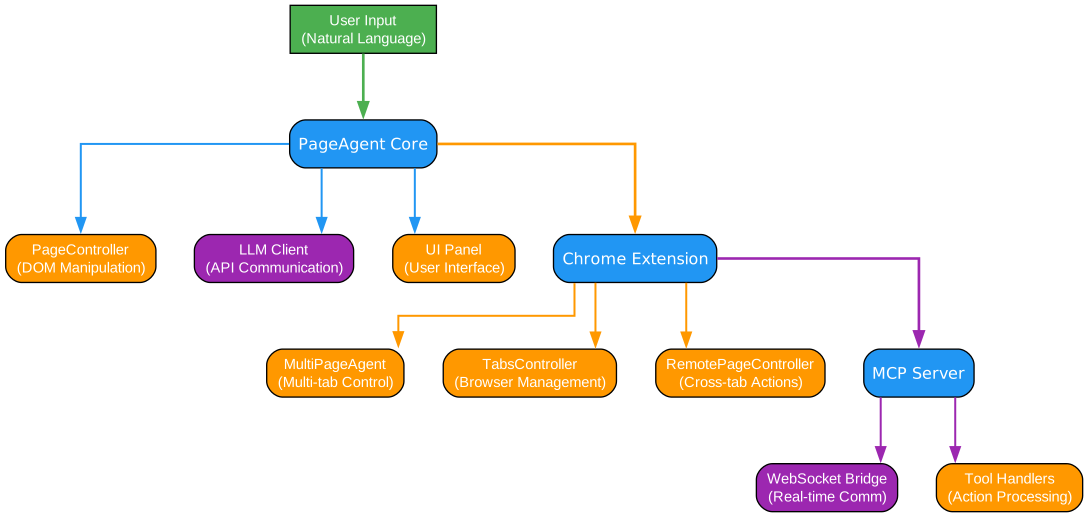
Understanding the Package Architecture
The architecture diagram above illustrates the modular package structure that makes Page-Agent both powerful and flexible. Let’s examine each component in detail:
1. page-controller Package
The page-controller package serves as the foundational layer for all DOM interactions. This package is responsible for:
- DOM Extraction: Converting the complex browser DOM into a simplified, LLM-friendly format that preserves essential information while reducing token usage
- Element Targeting: Providing robust element selection mechanisms that work even when elements lack stable identifiers
- Action Execution: Performing user actions like clicks, typing, scrolling, and form submissions with proper event simulation
- State Management: Tracking the current state of the page, including form values, scroll positions, and element visibility
The page-controller abstracts away the complexity of DOM manipulation, providing a clean API that higher-level components can rely on. It handles edge cases like dynamically loaded content, shadow DOM elements, and iframe boundaries.
2. page-agent Package
The page-agent package builds on top of page-controller to provide the core agent functionality:
- LLM Integration: Communicating with various language model providers (OpenAI, Anthropic, local models) to process natural language commands
- Tool Selection: Analyzing user requests and determining which tools/actions to invoke
- Execution Planning: Breaking down complex requests into sequences of atomic actions
- Error Recovery: Handling failures gracefully with retry logic and alternative strategies
This package implements the core intelligence loop: receive user input, reason about the best approach, execute actions, and provide feedback. It supports multiple LLM backends through a unified interface, making it easy to switch providers or use custom models.
3. ui Package
The ui package provides ready-to-use user interface components:
- Chat Interface: A polished chat panel that users can embed in their applications
- Motion Effects: Visual feedback showing which elements the agent is interacting with
- Internationalization: Support for multiple languages with easy translation integration
- Theming: Customizable styles that adapt to your application’s design system
The UI components are built with accessibility in mind, supporting keyboard navigation, screen readers, and high-contrast modes. They’re also fully typed with TypeScript for excellent developer experience.
4. llms Package
The llms package handles all communication with language model providers:
- Provider Abstraction: A unified interface for OpenAI, Anthropic, Google, and other LLM providers
- Streaming Support: Real-time response streaming for better user experience
- Error Handling: Robust retry logic and fallback mechanisms for API failures
- Cost Optimization: Token counting and caching to minimize API costs
This package isolates the complexity of working with different LLM APIs, allowing the rest of the system to focus on agent logic rather than API details.
5. extension Package
The extension package provides Chrome extension capabilities for multi-page automation:
- Background Scripts: Service workers that coordinate actions across multiple tabs
- Side Panel: A dedicated UI for controlling the agent across pages
- Hub Bridge: WebSocket communication for external agent control
- Tab Management: Tools for navigating between pages and managing browser state
This package enables Page-Agent to work across multiple pages and domains, extending its capabilities beyond single-page applications.
6. mcp Package
The mcp package implements the Model Context Protocol for external agent integration:
- Claude Desktop Integration: Allow Claude to control your browser directly
- Copilot Integration: Enable GitHub Copilot to interact with web pages
- WebSocket Server: Real-time bidirectional communication
- Tool Handlers: Standardized interface for agent actions
This package opens Page-Agent to the broader AI agent ecosystem, allowing external agents to leverage its capabilities.
Separation of Concerns
The modular architecture ensures that each package has a single, well-defined responsibility. This separation provides several benefits:
- Testability: Each package can be tested independently with mocked dependencies
- Flexibility: Use only the packages you need; the core works without the extension or mcp packages
- Maintainability: Changes to one package rarely affect others
- Extensibility: Add new LLM providers, UI components, or tools without modifying core logic
How It Works - Data Flow
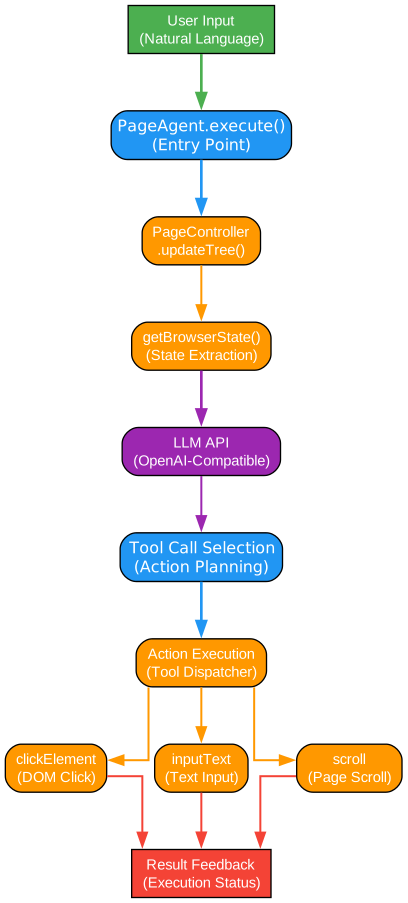
Understanding the Execution Pipeline
The data flow diagram illustrates how Page-Agent processes user requests from natural language input to executed actions. Let’s trace through each stage:
Stage 1: User Input Processing
When a user enters a natural language command like “Fill out the contact form with test data,” Page-Agent begins by:
- Input Validation: Checking that the input is non-empty and within reasonable length limits
- Context Enrichment: Adding relevant page context like current URL, form state, and recent actions
- Language Detection: Identifying the language of the input for proper processing
- Intent Classification: Categorizing the request type (navigation, form filling, data extraction, etc.)
This preprocessing ensures that the LLM receives clean, contextualized input that maximizes the chances of correct interpretation.
Stage 2: LLM Reasoning
The enriched input is sent to the configured LLM provider along with:
- System Prompt: Instructions defining the agent’s capabilities and constraints
- Available Tools: A schema of actions the agent can perform
- Page Context: Simplified DOM representation and current state
- Conversation History: Previous interactions for multi-turn conversations
The LLM processes this context and generates a response containing:
- Reasoning: Explanation of what it plans to do
- Tool Calls: Specific actions to execute with parameters
- Follow-up Questions: Requests for clarification if needed
Stage 3: Tool Selection
Based on the LLM’s response, Page-Agent’s tool selection mechanism:
- Validates Tool Calls: Ensures requested tools exist and parameters are valid
- Checks Permissions: Verifies the action is allowed by security policies
- Orders Actions: Sequences multiple actions in the correct order
- Prepares Parameters: Extracts and formats parameters for each tool
The tool selection layer acts as a safety boundary, preventing invalid or unauthorized actions from reaching the execution layer.
Stage 4: Action Execution
The page-controller executes each selected action:
- Element Resolution: Locates the target element using various strategies (ID, selector, text content, position)
- Action Simulation: Performs the action with proper event dispatching (click, input, scroll, etc.)
- State Updates: Updates internal state tracking after successful actions
- Error Handling: Catches and reports failures with detailed context
Each action is executed atomically, with proper cleanup if subsequent actions fail.
Stage 5: Result Feedback
After execution, Page-Agent provides feedback:
- Success/Failure Status: Clear indication of whether the request was completed
- Action Summary: List of actions performed with their outcomes
- Visual Feedback: Highlighting elements that were interacted with
- Error Messages: Detailed error information if something went wrong
This feedback loop helps users understand what happened and provides context for follow-up commands.
Continuous Improvement
The execution pipeline includes learning mechanisms:
- Action Logging: Recording successful and failed actions for analysis
- Pattern Recognition: Identifying common action sequences for optimization
- Error Recovery: Learning from failures to improve future attempts
- User Preferences: Adapting to individual user patterns over time
DOM Processing Pipeline
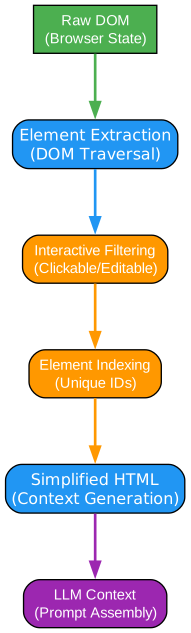
Understanding DOM Simplification
The DOM processing pipeline is one of Page-Agent’s most sophisticated features. It transforms complex browser DOM into LLM-friendly context while preserving essential information. Here’s how it works:
Step 1: Raw DOM Extraction
The pipeline begins by capturing the complete page state:
- Full DOM Tree: All elements including those in shadow DOM and iframes
- Computed Styles: Relevant styles that affect visibility and interaction
- Event Listeners: Information about attached event handlers
- Form State: Current values of all form inputs
- Scroll Position: Viewport position and scrollable containers
This comprehensive capture ensures no critical information is lost, but the raw data is too large and noisy for efficient LLM processing.
Step 2: Element Filtering
The filtering stage removes irrelevant elements:
- Hidden Elements: Elements with display:none or visibility:hidden
- Script/Style Tags: Non-visual elements that don’t affect interaction
- Invisible Elements: Elements outside viewport or behind overlays
- Duplicate Content: Repeated elements that add no new information
- Ad/Tracker Elements: Known non-content elements from blocklists
This filtering typically reduces the DOM size by 60-80% while preserving all interactive elements.
Step 3: Element Indexing
Each remaining element receives a unique, stable identifier:
- Index Generation: Creating unique IDs based on position in the filtered tree
- Attribute Preservation: Keeping essential attributes like type, name, placeholder
- Text Content: Extracting visible text while truncating excessively long content
- Hierarchy Information: Maintaining parent-child relationships for context
The indexing system ensures that elements can be reliably targeted even when the DOM changes slightly.
Step 4: Simplified HTML Generation
The pipeline generates a clean, LLM-friendly representation:
- Concise Format: Using short tag names and minimal attributes
- Semantic Preservation: Keeping semantic elements like button, input, a
- Text Summarization: Truncating long text while preserving meaning
- Structure Flattening: Reducing nesting depth where possible
The resulting HTML is typically 10-100x smaller than the original while containing all information needed for action planning.
Step 5: LLM Context Optimization
Final optimizations for LLM consumption:
- Token Budgeting: Ensuring the context fits within model limits
- Priority Ordering: Placing important elements first
- Context Windowing: Including only relevant portions for specific tasks
- Format Selection: Choosing optimal format (HTML, JSON, or custom)
This optimization ensures efficient token usage while maintaining action accuracy.
Step 6: Smart Element Targeting
When executing actions, Page-Agent uses multiple strategies to find elements:
- Primary Strategies: ID, name attribute, aria-label
- Secondary Strategies: CSS selectors, XPath expressions
- Fallback Strategies: Text content matching, position-based targeting
- Verification: Confirming the correct element before action
This multi-strategy approach ensures reliable targeting even when the DOM changes between planning and execution.
Key Features
Text-Based DOM Manipulation
Unlike solutions that rely on screenshots or visual recognition, Page-Agent works directly with the DOM. This approach provides:
- Lower Latency: No image processing overhead
- Lower Cost: Text tokens are cheaper than image tokens
- Higher Accuracy: Direct access to element properties
- Better Privacy: No need to capture potentially sensitive visual content
Easy CDN Integration
Adding Page-Agent to your project is straightforward:
<script src="https://cdn.jsdelivr.net/npm/page-agent/dist/page-agent.iife.js"></script>
<script>
  const agent = new PageAgent({
    model: 'gpt-4o',
    apiKey: 'your-api-key'
  });
</script>
The CDN build includes everything needed for basic functionality, with optional packages for advanced features.
Bring Your Own LLM
Page-Agent supports multiple LLM providers:
- OpenAI: GPT-4, GPT-3.5, and custom fine-tuned models
- Anthropic: Claude 3.5 Sonnet, Claude 3 Opus
- Google: Gemini Pro, Gemini Ultra
- Local Models: Any OpenAI-compatible API endpoint
- Custom Providers: Implement the simple LLM interface
Security Features
Page-Agent includes robust security controls:
- Action Allowlists: Define which actions are permitted
- Element Allowlists: Restrict interactions to specific elements
- Data Masking: Prevent sensitive data from being sent to LLMs
- Audit Logging: Track all agent actions for compliance
- Rate Limiting: Prevent abuse with configurable limits
Accessibility Support
Page-Agent is designed with accessibility in mind:
- Screen Reader Compatible: Works with assistive technologies
- Keyboard Navigation: Full keyboard support for all interactions
- High Contrast Mode: Visual indicators for users with low vision
- Reduced Motion: Respects user preferences for animations
Chrome Extension Architecture
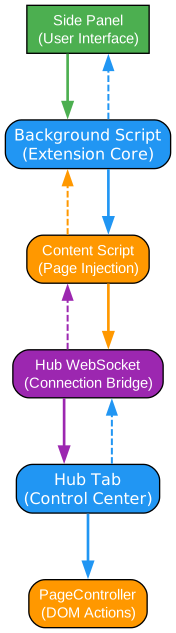
Understanding Multi-Page Automation
The Chrome extension package enables Page-Agent to work across multiple pages and domains. Let’s examine its architecture:
Background Script Architecture
The background script serves as the central coordinator:
- Service Worker: Persistent background process that manages state
- Tab Registry: Tracks all open tabs and their Page-Agent instances
- Action Queue: Sequences actions across tabs in the correct order
- State Synchronization: Keeps state consistent across browser sessions
The background script uses Chrome’s Manifest V3 architecture, ensuring compatibility with modern Chrome versions and better performance through service workers.
Side Panel Interface
The side panel provides the user interface:
- Chat Interface: Natural language input for controlling the agent
- Action History: Visual log of all performed actions
- Settings Panel: Configuration for LLM providers and preferences
- Status Indicators: Real-time feedback on agent state
The side panel is implemented as a React application with TypeScript, providing excellent type safety and developer experience.
Content Script Integration
Content scripts bridge the background and page contexts:
- Page Injection: Injects Page-Agent into web pages
- Message Passing: Relays messages between background and page
- DOM Access: Provides safe access to page DOM
- Event Handling: Captures and forwards relevant page events
Content scripts run in an isolated world, preventing conflicts with page JavaScript while still having full DOM access.
Hub WebSocket Bridge
The hub enables external agent control:
- WebSocket Server: Listens for connections from external agents
- Protocol Handler: Implements the MCP protocol for standardized communication
- Authentication: Verifies external agent credentials
- Action Routing: Routes external commands to appropriate tabs
This bridge allows tools like Claude Desktop or GitHub Copilot to control your browser through Page-Agent.
Cross-Tab Coordination
For multi-page workflows, the extension provides:
- Tab Tools: Actions for opening, closing, and switching tabs
- State Sharing: Share context between tabs for complex workflows
- Dependency Management: Wait for conditions in one tab before acting in another
- Error Propagation: Handle failures across tab boundaries
This coordination enables sophisticated workflows like “Fill out the form on page A, then submit and verify the result on page B.”
Security Considerations
The extension implements security at multiple levels:
- Permission Scoping: Request only necessary browser permissions
- Content Security Policy: Prevent XSS and code injection
- Secure Storage: Encrypt sensitive data like API keys
- Origin Validation: Verify commands come from authorized sources
MCP Integration
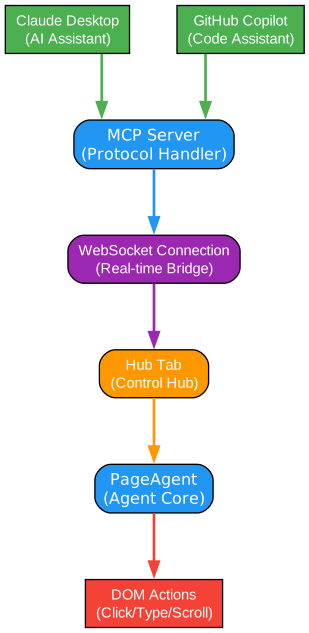
Understanding Model Context Protocol Support
The Model Context Protocol (MCP) integration allows external AI agents to control Page-Agent. Here’s how it works:
MCP Protocol Overview
MCP is a standardized protocol for AI agent communication:
- Tool Definitions: Standardized schema for available actions
- Request/Response: Structured format for commands and results
- Capability Negotiation: Dynamic discovery of supported features
- Error Handling: Consistent error reporting across implementations
Page-Agent implements MCP as both a client and server, enabling flexible integration patterns.
Claude Desktop Integration
With Claude Desktop, you can:
- Control Browser: Ask Claude to navigate websites and perform actions
- Extract Data: Request Claude to gather information from web pages
- Automate Workflows: Create complex multi-step automation sequences
- Debug Issues: Let Claude investigate and fix web application problems
The integration works through a local WebSocket connection, with Claude sending MCP commands that Page-Agent executes.
Copilot Integration
GitHub Copilot can leverage Page-Agent for:
- Code Generation: Generate code that interacts with web pages
- Testing: Automate UI testing through natural language descriptions
- Documentation: Create documentation with screenshots and interactions
- Development Assistance: Help developers navigate complex applications
The integration uses the same MCP protocol, allowing Copilot to discover and invoke Page-Agent tools.
WebSocket Communication
The MCP server uses WebSockets for real-time communication:
- Connection Management: Handle multiple simultaneous agent connections
- Message Queuing: Buffer messages when agents are busy
- Heartbeat Protocol: Detect and recover from dropped connections
- Reconnection Logic: Automatically reconnect on connection loss
This robust communication layer ensures reliable operation even in challenging network conditions.
Tool Handlers
Each Page-Agent capability is exposed as an MCP tool:
- click: Click on elements by selector or description
- type: Enter text into input fields
- scroll: Scroll the page or specific containers
- navigate: Go to URLs or follow links
- extract: Get text or data from elements
- wait: Wait for conditions before proceeding
Tool handlers validate parameters, execute actions, and return structured results.
Security Model
MCP integration includes security controls:
- Localhost Binding: Only accept connections from the local machine
- Token Authentication: Require authentication tokens for connections
- Action Allowlists: Restrict which tools external agents can invoke
- Rate Limiting: Prevent abuse through excessive requests
These controls ensure that external agent access doesn’t compromise security.
Installation and Usage
Basic Installation
Install Page-Agent via npm:
npm install page-agent
Basic Usage
import { PageAgent } from 'page-agent'

const agent = new PageAgent({
    model: 'gpt-4o',
    baseURL: 'https://api.openai.com/v1',
    apiKey: process.env.OPENAI_API_KEY,
    language: 'en-US',
})

// Execute a natural language command
await agent.execute('Fill out the contact form with test data')
With Custom Tools
const agent = new PageAgent({
    model: 'gpt-4o',
    apiKey: process.env.OPENAI_API_KEY,
    tools: [
        {
            name: 'submit_form',
            description: 'Submit the current form',
            parameters: {},
            execute: async () => {
                document.querySelector('form').submit()
            }
        }
    ]
})
With Security Controls
const agent = new PageAgent({
    model: 'gpt-4o',
    apiKey: process.env.OPENAI_API_KEY,
    security: {
        allowedActions: ['click', 'type', 'scroll'],
        allowedElements: ['#contact-form', '.navigation'],
        dataMasking: {
            patterns: [/password/i, /credit.card/i, /ssn/i],
            replacement: '[REDACTED]'
        }
    }
})
Use Cases
| Use Case | Description |
|---|---|
| SaaS AI Copilot | Embed an AI assistant in your product that helps users navigate complex workflows, fill forms, and discover features through natural language commands. |
| Smart Form Filling | Convert complex multi-step forms into single natural language commands. Users can say “Fill out my profile” instead of manually entering dozens of fields. |
| Accessibility | Provide natural language control for users with disabilities who may find traditional mouse/keyboard input challenging. |
| Product Training | Create interactive demos where users learn by telling the AI what to do, receiving guidance and feedback in real-time. |
| Multi-Page Automation | Use the Chrome extension to automate workflows that span multiple pages or domains, like comparing products across different sites. |
| External Agent Control | Let Claude Desktop or GitHub Copilot control your browser through MCP, enabling powerful AI-assisted workflows. |
Comparison with browser-use
| Aspect | page-agent | browser-use |
|---|---|---|
| Deployment | Embedded component in your web app | External tool controlling browser |
| Scope | Current page only | Entire browser including tabs |
| Target Users | Web developers building products | Scraper/agent developers |
| Use Case | UX enhancement, in-app assistance | Automation tasks, scraping |
| Requirements | JavaScript/TypeScript only | Python + headless browser |
| Integration | Native to your application | Separate process |
| Security | Inherits app security context | Requires separate auth handling |
| Latency | Direct DOM access, instant | Browser protocol overhead |
| Cost | Lower (text-based) | Higher (often uses screenshots) |
Conclusion
Alibaba’s Page-Agent represents a paradigm shift in web automation. By embedding directly into web applications, it eliminates the complexity of external browser control while providing powerful natural language interfaces. Its modular architecture, comprehensive security features, and support for external agent integration through MCP make it a versatile solution for developers looking to add AI-powered automation to their products.
Whether you’re building a SaaS product that needs an AI assistant, creating accessible web experiences, or developing sophisticated multi-page automation workflows, Page-Agent provides the tools you need. With its active development, strong community support, and comprehensive documentation, it’s an excellent choice for modern web development.
Resources:
Related Posts:
- AgentSkillOS: Skill Orchestration System
- MattPocock Skills: AI Agent Workflows
- DESIGN.md: AI-Powered Design Systems
