Awesome Design Systems: A Curated Collection
In the world of modern web development, design systems have become the cornerstone of building consistent, scalable, and maintainable user interfaces. The Awesome Design Systems repository by Alex Pate is a meticulously curated collection of over 200 design systems, UI libraries, and pattern libraries from organizations around the world. This comprehensive resource serves as a single reference point for developers, designers, and product teams looking to implement or draw inspiration from established design systems.
What is a Design System?
A design system is a collection of documentation on principles and best practices that helps guide a team to build digital products. They are often embodied in UI libraries and pattern libraries, but can extend to include guides on other areas such as “Voice and Tone”. Design systems provide a shared language and visual vocabulary that enables teams to work more efficiently and create cohesive user experiences across products and platforms.
The concept of design systems has evolved significantly over the past decade. What started as simple style guides has transformed into comprehensive ecosystems that include:
- Component Libraries: Reusable UI components with documented APIs
- Design Tokens: Platform-agnostic variables for colors, typography, spacing
- Pattern Libraries: Common UI patterns with usage guidelines
- Documentation: Implementation guides, best practices, and accessibility standards
- Design Tools: Sketch, Figma, and Adobe XD files for designers
Understanding Design System Categories
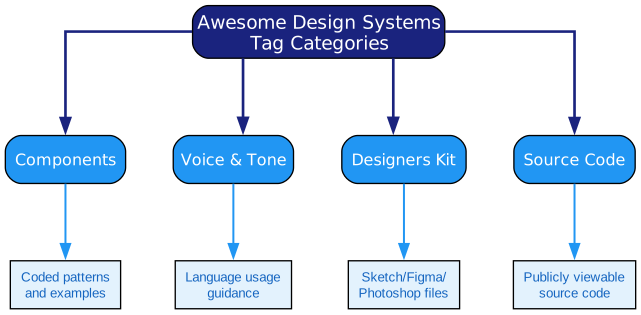
The Awesome Design Systems collection organizes entries using four primary tag categories. Each category helps users quickly identify what resources are available within each design system. Let’s explore each category in detail:
Components Tag
The Components tag indicates that a design system includes coded patterns and examples. This is perhaps the most valuable category for developers, as it means the design system provides actual implementation code that can be integrated into projects. These components typically include:
- Ready-to-use UI elements like buttons, forms, and navigation
- Framework-specific implementations (React, Vue, Angular, etc.)
- Accessibility features built into components
- Responsive design considerations
- State management for interactive elements
When a design system carries the Components tag, it signals that developers can expect production-ready code rather than just design specifications. This dramatically reduces development time and ensures consistency between design and implementation.
Voice & Tone Tag
The Voice & Tone tag indicates that a design system provides guidance on how language should be used throughout the product. This includes:
- Writing style guidelines for different contexts
- Tone recommendations for various user interactions
- Grammar and punctuation standards
- Inclusive language practices
- Error message writing conventions
Voice and tone guidelines are essential for creating cohesive user experiences, especially in products with multiple touchpoints. They ensure that whether a user is reading documentation, error messages, or marketing copy, the communication feels consistent and on-brand.
Designers Kit Tag
The Designers Kit tag indicates that a design system includes files for design tools like Sketch, Photoshop, or Figma. These resources enable designers to:
- Access pre-built UI components in their preferred design tools
- Maintain consistency between design files and implemented components
- Quickly prototype new features using approved design patterns
- Share design assets across teams
- Create design specifications for development handoff
Having a designers kit available means that design teams can work more efficiently and maintain alignment with the development implementation.
Source Code Tag
The Source Code tag indicates that the design system’s source code is publicly viewable. This transparency allows developers to:
- Study implementation patterns and best practices
- Contribute improvements back to the project
- Understand how components are built and styled
- Fork and customize for their own needs
- Learn from established codebases
Open source design systems are particularly valuable because they demonstrate real-world implementation patterns and allow for community contributions and improvements.
The Design System Ecosystem
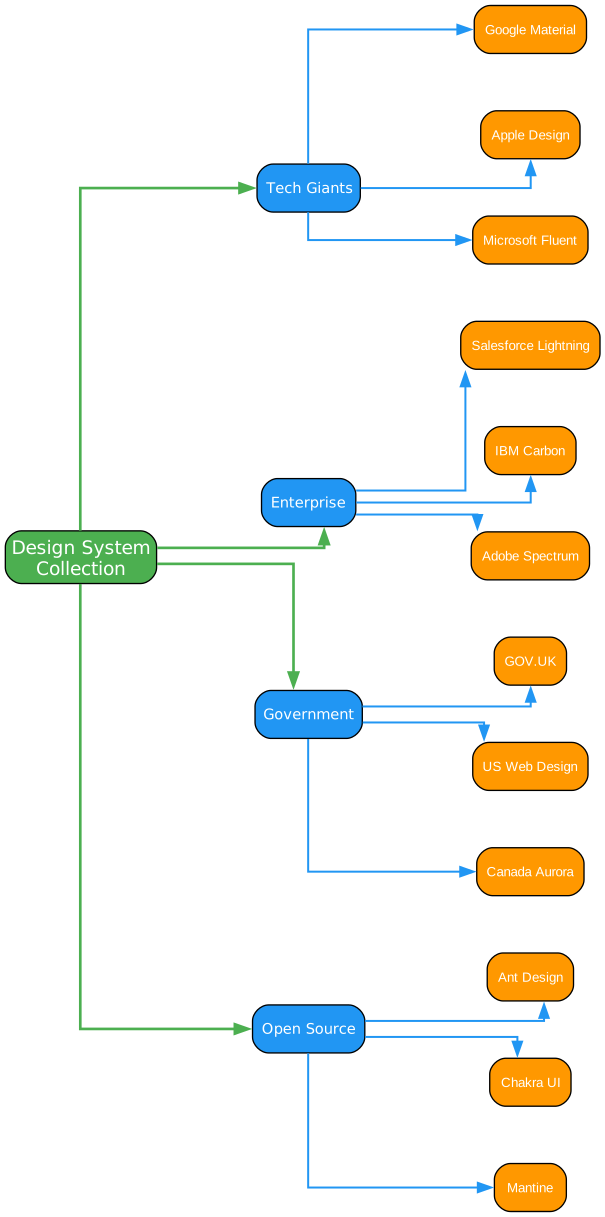
The design system landscape is vast and diverse, encompassing solutions from tech giants, enterprise companies, government organizations, and open source communities. Understanding this ecosystem helps teams make informed decisions about which systems to adopt or draw inspiration from.
Tech Giants
Major technology companies have invested heavily in design systems that reflect their brand identities and user experience philosophies. Google’s Material Design revolutionized the industry with its comprehensive approach to visual design, motion, and interaction patterns. Apple’s Human Interface Guidelines provide detailed guidance for creating experiences across all Apple platforms. Microsoft’s Fluent Design System brings a cohesive approach to cross-platform experiences with a focus on depth, light, and motion.
These tech giant design systems often serve as foundational references for the broader design community. They establish patterns and conventions that become industry standards. For example, Material Design’s card pattern and elevation system have been widely adopted beyond Google’s ecosystem.
Enterprise Design Systems
Enterprise-focused design systems address the unique challenges of business applications. Salesforce Lightning, IBM Carbon, and Adobe Spectrum are examples of systems designed for complex, data-intensive applications. These systems typically include:
- Extensive data visualization components
- Complex form handling patterns
- Enterprise-grade accessibility features
- Multi-tenant customization capabilities
- Integration with enterprise platforms
Enterprise design systems often prioritize efficiency and scalability over visual novelty. They provide patterns for common business workflows and help teams build professional applications quickly.
Government Design Systems
Government design systems focus on accessibility, inclusivity, and serving diverse populations. GOV.UK Design System, US Web Design Standards, and Canada’s Aurora are leading examples. These systems emphasize:
- WCAG accessibility compliance
- Plain language guidelines
- Mobile-first responsive design
- Performance optimization
- Inclusive design practices
Government design systems are particularly valuable for their rigorous approach to accessibility. They often serve as reference implementations for organizations that need to meet strict accessibility requirements.
Open Source Design Systems
The open source community has produced numerous high-quality design systems that rival commercial offerings. Ant Design, Chakra UI, and Mantine are popular choices that provide:
- Active community support
- Regular updates and improvements
- Extensive documentation
- Framework-specific implementations
- Customization capabilities
Open source design systems democratize access to professional-grade UI components. They enable startups and small teams to build polished applications without significant design resources.

Anatomy of a Design System
Understanding the typical components of a design system helps teams evaluate options and plan implementations. Most comprehensive design systems include four main sections: Foundations, Components, Patterns, and Guidelines.
Foundations
Foundations are the building blocks of visual design. They establish the core visual language that all components inherit. A typical foundations section includes:
- Colors: Primary, secondary, and semantic color palettes with accessibility considerations
- Typography: Font families, sizes, weights, and line heights for different contexts
- Spacing: Consistent spacing scales for margins, padding, and gaps
- Icons: Standardized icon sets that complement the visual language
Foundations ensure visual consistency across all components and patterns. They provide the design tokens that cascade throughout the system, making global changes manageable and systematic.
Components
Components are the reusable UI building blocks. They range from simple elements like buttons and inputs to complex components like data tables and navigation systems. Well-designed components share these characteristics:
- Composability: Components can be combined to create more complex interfaces
- Customizability: Components accept props or configuration for different use cases
- Accessibility: Components meet WCAG standards and support assistive technologies
- Responsiveness: Components adapt to different screen sizes and contexts
- Documentation: Components have clear usage guidelines and examples
The component layer is where most development teams spend their time. A robust component library can significantly accelerate development velocity.
Patterns
Patterns are reusable solutions to common design problems. They represent how components work together to accomplish user tasks. Common patterns include:
- Authentication: Sign in, sign up, password reset flows
- Search: Search input, results display, filtering, sorting
- Onboarding: User introduction, feature discovery, progressive disclosure
Patterns provide higher-level guidance than individual components. They help teams create consistent user flows and avoid reinventing solutions to common problems.
Guidelines
Guidelines provide overarching principles and best practices. They include:
- Accessibility: WCAG compliance, screen reader support, keyboard navigation
- Voice & Tone: Writing style, messaging conventions, content strategy
- Motion: Animation principles, timing, easing functions
Guidelines ensure that design decisions align with organizational values and user needs. They provide the rationale behind design system choices.
How to Use This Collection
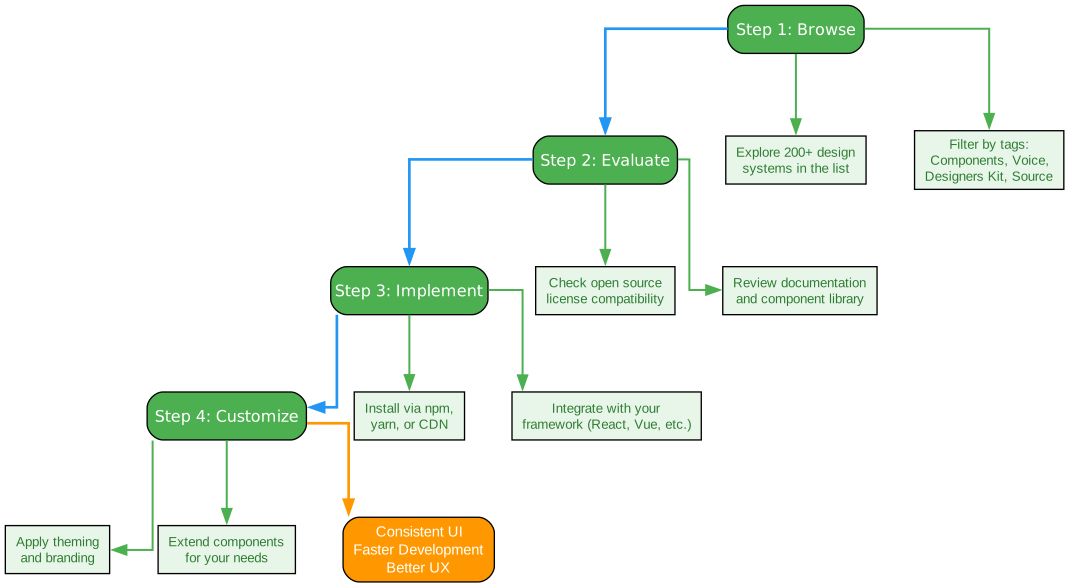
The Awesome Design Systems collection is designed to help teams discover and evaluate design systems for their projects. Here’s a recommended workflow for leveraging this resource:
Step 1: Browse
Start by exploring the extensive list of over 200 design systems. The collection includes entries from diverse industries and organizations, each with unique strengths and approaches. Use the tag system to filter based on your specific needs:
- Need implementation code? Filter for Components and Source Code tags
- Looking for design resources? Filter for Designers Kit
- Focused on content strategy? Filter for Voice & Tone
The breadth of the collection ensures that you’ll find design systems relevant to your industry, use case, and technology stack.
Step 2: Evaluate
Once you’ve identified potential design systems, evaluate them against your requirements:
- License Compatibility: Check that the open source license aligns with your project’s needs
- Documentation Quality: Review the documentation for clarity and completeness
- Component Coverage: Ensure the system includes the components you need
- Framework Support: Verify compatibility with your technology stack
- Maintenance Status: Check for recent updates and community activity
Take time to explore the design system’s website, documentation, and source code. A design system is a significant investment, so thorough evaluation pays dividends.
Step 3: Implement
After selecting a design system, follow its installation and setup instructions. Most modern design systems offer multiple installation methods:
- Package Managers: Install via npm, yarn, or other package managers
- CDN: Include via content delivery network for quick prototyping
- Framework Integration: Use framework-specific bindings for React, Vue, Angular
Follow the getting started guide carefully, and consider starting with a small subset of components before committing to the full system.
Step 4: Customize
Design systems are meant to be adapted to your brand and requirements. Common customization approaches include:
- Theming: Apply your brand colors, typography, and spacing
- Component Extension: Build custom components on top of the foundation
- Pattern Adaptation: Modify patterns to fit your specific workflows
Balance customization with maintainability. The more you customize, the harder it becomes to upgrade to new versions of the design system.
Notable Design Systems in the Collection
The Awesome Design Systems collection includes many industry-leading design systems. Here are some highlights:
Google Material Design
Material Design is one of the most influential design systems in the world. It provides comprehensive guidelines for visual design, motion, and interaction across platforms. The system includes extensive component libraries for web (Material Components for the Web), Android, iOS, and Flutter. Material Design’s approach to elevation, motion, and responsive design has shaped the entire industry.
Microsoft Fluent UI
Fluent UI is Microsoft’s design system for building experiences across Microsoft products. It emphasizes natural interactions, depth and layering, and cross-platform consistency. Fluent UI provides robust React component libraries and design resources for Figma. The system’s focus on inclusive design makes it particularly valuable for enterprise applications.
IBM Carbon Design System
Carbon is IBM’s open source design system for products and experiences. It’s built on a foundation of accessibility, modularity, and performance. Carbon provides comprehensive React components, design kits for Sketch and Figma, and extensive documentation. Its enterprise focus makes it ideal for complex business applications.
Salesforce Lightning Design System
Lightning is Salesforce’s design system for building enterprise applications on the Salesforce platform. It provides CSS frameworks, design tokens, and comprehensive component specifications. Lightning’s strength lies in its deep integration with the Salesforce ecosystem and its focus on enterprise workflows.
Ant Design
Ant Design is a popular React UI library that provides a comprehensive set of high-quality components. It’s widely used in enterprise applications and provides extensive documentation in multiple languages. Ant Design’s component coverage and active community make it a top choice for React developers.
Chakra UI
Chakra UI is a simple, modular, and accessible component library for React applications. It emphasizes developer experience with intuitive APIs and excellent TypeScript support. Chakra UI’s theming system makes customization straightforward, and its accessibility features are built-in from the ground up.
Benefits of Using Design Systems
Adopting a design system offers numerous benefits for organizations of all sizes:
Consistency
Design systems ensure visual and interaction consistency across products and teams. When everyone uses the same components and patterns, users experience a cohesive interface regardless of which feature they’re using. This consistency builds trust and reduces cognitive load.
Efficiency
Pre-built components dramatically reduce development time. Teams don’t need to design and build common UI elements from scratch. Instead, they can focus on unique features that differentiate their products. This efficiency compounds over time as the component library grows.
Quality
Design systems embed best practices into components. Accessibility, performance, and usability considerations are handled once at the component level, then inherited by all implementations. This approach reduces bugs and ensures consistent quality.
Collaboration
Design systems create a shared language between designers and developers. Instead of debating implementation details, teams can reference documented patterns and components. This shared understanding accelerates design-development handoff and reduces miscommunication.
Scalability
As organizations grow, design systems help maintain coherence across expanding product portfolios. New teams can quickly align with existing patterns, and updates propagate automatically across implementations. This scalability is essential for growing organizations.
Getting Started
To start exploring the Awesome Design Systems collection:
- Visit the repository at https://github.com/alexpate/awesome-design-systems
- Browse the table to find design systems relevant to your needs
- Use the tag indicators to filter for specific resource types
- Click through to explore individual design system websites and documentation
- Check source code availability for open source options
The collection is actively maintained and welcomes contributions. If you know of a design system that isn’t listed, you can submit a pull request to add it.
Conclusion
The Awesome Design Systems collection represents a valuable resource for anyone involved in building digital products. Whether you’re a developer looking for component libraries, a designer seeking inspiration, or a product manager evaluating options, this curated list provides a comprehensive starting point.
Design systems have become essential tools for modern product development. They enable teams to build better products faster while maintaining consistency and quality. The diversity of systems in this collection reflects the maturity of the design system field and the variety of approaches organizations have taken.
As you explore these design systems, remember that the best choice depends on your specific context. Consider your technology stack, team expertise, accessibility requirements, and customization needs. The right design system can accelerate your development and elevate your user experience.
The open source nature of many design systems in this collection demonstrates the collaborative spirit of the design and development community. By sharing their systems publicly, organizations contribute to the collective knowledge and help raise the bar for digital experiences everywhere.
Related Posts
- AgentSkillOS: Skill Orchestration System
- MattPocock Skills: AI Agent Workflows
- DESIGN.md: AI-Powered Design Systems

Enjoyed this post? Never miss out on future posts by following us
