Claude Code Best Practices: A Comprehensive Guide
Claude Code represents a paradigm shift in how developers interact with AI for software development. This comprehensive guide explores the best practices repository by shanraisshan, which has become the definitive resource for mastering Claude Code’s powerful features including subagents, skills, commands, hooks, and orchestration workflows.
What is Claude Code Best Practices?
The Claude Code Best Practices repository is a curated collection of patterns, tips, and implementation guides for maximizing productivity with Claude Code. Created and maintained by the community, it serves as both a reference implementation and a learning resource for developers looking to leverage AI-assisted development workflows effectively.
The repository covers essential concepts including:
- Subagents: Autonomous actors with isolated contexts, custom tools, and persistent identities
- Commands: User-invoked prompt templates for workflow orchestration
- Skills: Configurable, preloadable knowledge modules with progressive disclosure
- Hooks: Event-driven handlers that run outside the agentic loop
- MCP Servers: Model Context Protocol connections to external tools and APIs
- Memory: Persistent context via CLAUDE.md files and rule systems
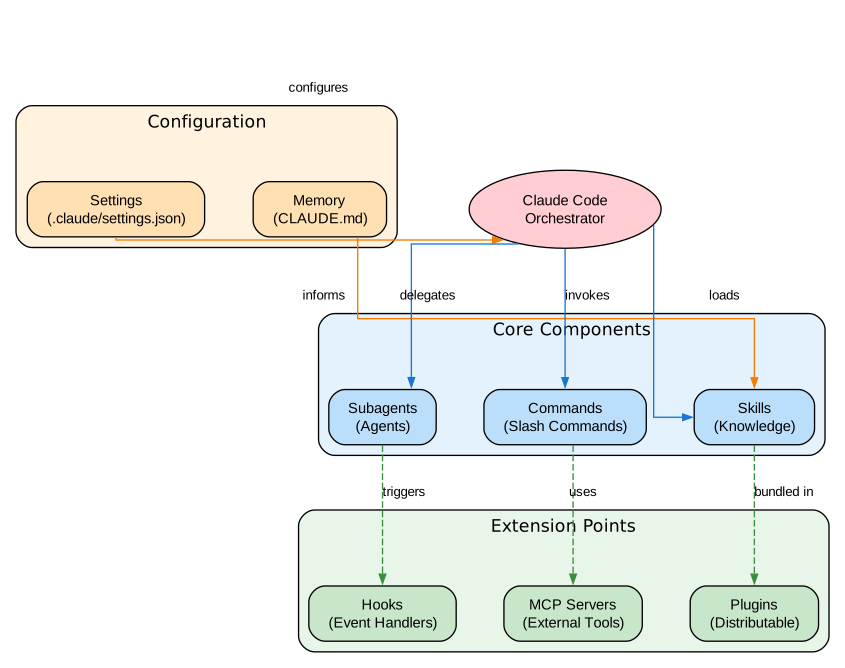
Understanding the Architecture
The architecture diagram above illustrates the core components of Claude Code and their relationships. Let’s break down each component in detail:
Core Components:
1. Subagents (Agents) Subagents are autonomous actors that operate in fresh, isolated contexts. Each subagent can have its own set of tools, permissions, model configuration, and persistent identity. They are ideal for complex multi-step tasks that require focused attention without polluting the main conversation context. Subagents inherit tools from the parent session but can be restricted using the tools and disallowedTools frontmatter fields.
The key advantage of subagents is context isolation. When you delegate a task to a subagent, it starts with a clean slate, preventing context pollution from previous conversations. This is particularly valuable for tasks like code review, testing, or research where you want fresh perspectives without the baggage of earlier discussions.
2. Commands (Slash Commands) Commands are user-invoked prompt templates that live in .claude/commands/ directories. They provide reusable workflows that can be triggered with /command-name syntax. Commands are ideal for “inner loop” workflows that you perform multiple times a day, such as running tests, creating PRs, or generating documentation.
Commands inject knowledge into the existing context rather than creating a new one. This makes them lightweight and fast, but also means they share context with the main conversation. For workflows that need isolation, use subagents instead.
3. Skills Skills are configurable knowledge modules that can be preloaded into contexts or invoked on demand. They support progressive disclosure through subdirectories like references/, scripts/, and examples/. Skills can be auto-discovered based on file patterns using the paths frontmatter field.
The skill system supports two invocation patterns: direct invocation via the Skill tool, and preloading into agent contexts using the skills: field in agent definitions. This flexibility allows skills to serve both as on-demand knowledge and as domain expertise for specialized agents.
Extension Points:
4. Hooks Hooks are event-driven handlers that execute outside the agentic loop. They can respond to events like PreToolUse, PostToolUse, Stop, and Notification. Hooks enable custom behaviors such as sound notifications, automated formatting, or permission routing without modifying the core agent behavior.
5. MCP Servers Model Context Protocol servers provide connections to external tools, databases, and APIs. They extend Claude Code’s capabilities beyond file operations, enabling integration with browsers, databases, cloud services, and custom tooling.
6. Plugins Plugins are distributable packages that bundle skills, subagents, hooks, MCP servers, and LSP servers. They enable sharing of complete development environments and workflows across teams and organizations.
Configuration Layer:
7. Settings and Memory The configuration system uses a hierarchical approach with managed settings at the top, followed by CLI arguments, local project settings, team-shared settings, and global user defaults. Memory is managed through CLAUDE.md files and rule systems that provide persistent context across sessions.
The Orchestration Workflow Pattern
One of the most powerful patterns in Claude Code is the Command - Agent - Skill orchestration workflow. This pattern demonstrates how to combine different Claude Code features to create sophisticated automation pipelines.
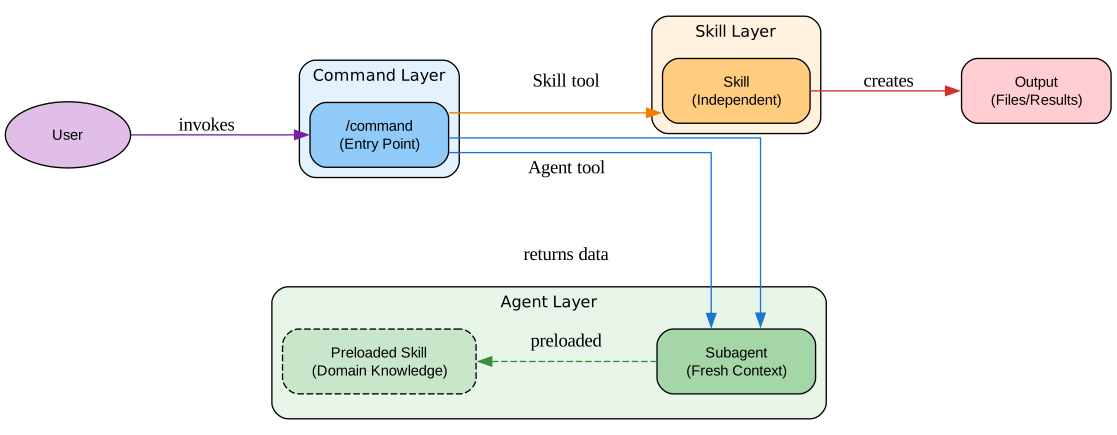
Understanding the Orchestration Workflow
The orchestration workflow diagram illustrates the flow of data and control through a typical Claude Code automation pipeline. This pattern is fundamental to building complex, multi-step workflows that leverage the strengths of each component type.
Command Layer (Entry Point):
The command serves as the entry point for user interaction. When a user invokes a slash command like /weather-orchestrator, the command takes control of the conversation and orchestrates the entire workflow. Commands are ideal for this role because they can:
- Handle user interaction through the AskUserQuestion tool
- Invoke agents via the Agent tool for isolated task execution
- Call skills via the Skill tool for specialized operations
- Coordinate multiple steps and aggregate results
The command pattern ensures that complex workflows remain accessible through simple slash commands, making them discoverable and easy to use.
Agent Layer (Isolated Execution):
Agents operate in fresh, isolated contexts with their own tool restrictions and model configurations. In the orchestration pattern, agents are used for tasks that benefit from context isolation, such as:
- Fetching data from external APIs without polluting main context
- Performing research or exploration with read-only tools
- Running parallel tasks that shouldn’t interfere with each other
- Executing potentially risky operations in a sandboxed environment
Agents can have skills preloaded into their context using the skills: frontmatter field. This is particularly powerful for domain-specific agents that need specialized knowledge to perform their tasks effectively.
Skill Layer (Specialized Operations):
Skills provide specialized functionality that can be invoked independently. Unlike agent skills (which are preloaded), directly invoked skills receive data from the calling context and return results to it. This makes them ideal for:
- Creating output artifacts (SVG files, reports, documentation)
- Performing transformations on data
- Executing well-defined operations with clear inputs and outputs
- Providing reusable functionality across multiple workflows
Data Flow:
The workflow follows a clear data flow pattern:
- User invokes the command
- Command asks for user preferences
- Command delegates to agent via Agent tool
- Agent uses preloaded skill knowledge to fetch data
- Agent returns data to command
- Command invokes skill via Skill tool
- Skill creates output files
- Results are presented to user
This separation of concerns ensures each component has a single responsibility, making the system easier to understand, test, and maintain.
Skill Patterns: Preloaded vs Direct Invocation
Understanding the two skill invocation patterns is crucial for designing effective Claude Code workflows. Each pattern has distinct advantages and use cases.
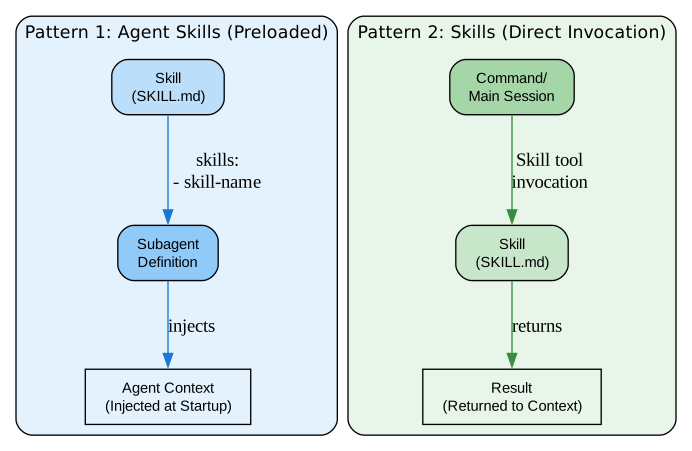
Understanding Skill Patterns
The skill patterns diagram illustrates the two fundamentally different ways skills can be used within Claude Code workflows. Choosing the right pattern for your use case is essential for building efficient and maintainable automation.
Pattern 1: Agent Skills (Preloaded)
When a skill is listed in an agent’s skills: frontmatter field, its entire content is injected into the agent’s context at startup. This pattern is ideal for:
- Domain knowledge that the agent needs to perform its tasks
- Reference material that should always be available to the agent
- Instructions and guidelines that shape agent behavior
- Technical specifications and API documentation
The preloaded pattern ensures the agent has immediate access to relevant knowledge without needing to search for it or have it passed explicitly. This reduces complexity and improves reliability since the knowledge is guaranteed to be present.
Key characteristics of preloaded skills:
- Content is injected at agent startup
- Agent uses skill content as reference material
- No dynamic invocation needed
- Best for domain expertise and reference material
Example agent definition with preloaded skill:
---
name: weather-agent
skills:
  - weather-fetcher
model: sonnet
tools: WebFetch, Read
---
Pattern 2: Skills (Direct Invocation)
When a skill is invoked via the Skill tool, it runs in the current context and returns results to the caller. This pattern is ideal for:
- Operations that transform inputs to outputs
- Creating files or artifacts
- Performing specific, well-defined tasks
- Functionality that should be available on-demand
The direct invocation pattern provides flexibility since skills can be called conditionally based on runtime conditions. They receive data from the context and return results to it.
Key characteristics of directly invoked skills:
- Invoked via Skill tool when needed
- Runs in the calling context
- Returns results to the caller
- Best for operations and transformations
Example skill invocation:
Skill(skill: "weather-svg-creator", args: {"temperature": "26", "unit": "Celsius"})
Choosing the Right Pattern:
Use preloaded skills when:
- The knowledge should always be available to the agent
- You want to reduce context management overhead
- The skill contains reference material or guidelines
Use direct invocation when:
- The skill performs a specific operation
- You need conditional execution
- The skill creates output artifacts
- Results need to be returned to the caller
Development Workflow: Research to Ship
All major Claude Code workflows converge on the same architectural pattern: Research - Plan - Execute - Review - Ship. This section explores how to implement this workflow effectively.
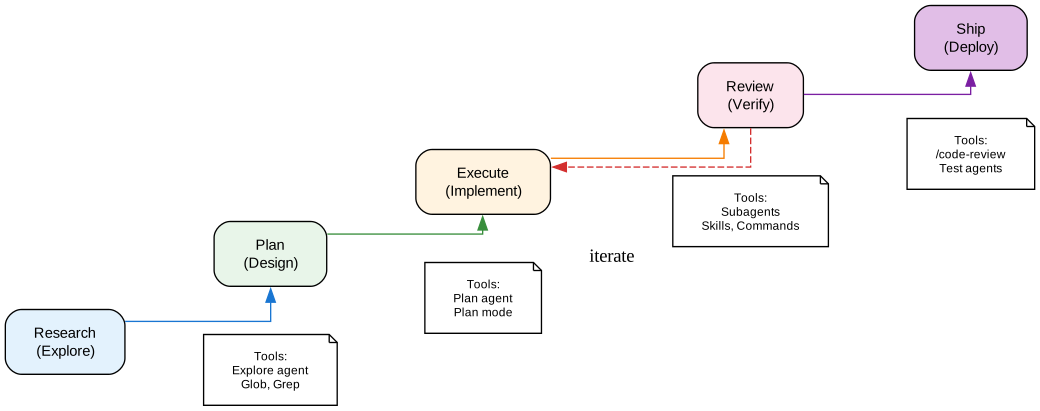
Understanding the Development Workflow
The development workflow diagram illustrates the five-stage process that transforms ideas into shipped code. Each stage has specific goals, tools, and best practices that maximize efficiency and quality.
Stage 1: Research (Explore)
The research stage focuses on understanding the problem space and gathering context. Key activities include:
- Exploring the codebase to understand existing patterns
- Searching for relevant files using Glob and Grep tools
- Reading documentation and understanding requirements
- Identifying dependencies and potential conflicts
The Explore agent is optimized for this stage, providing fast codebase search with read-only tools. It uses the haiku model for speed while maintaining accuracy.
Best practices for research:
- Use the Explore agent for initial codebase exploration
- Start with broad searches, then narrow down
- Document findings in CLAUDE.md for future reference
- Identify existing patterns to follow
Stage 2: Plan (Design)
The planning stage transforms research findings into actionable implementation plans. Key activities include:
- Designing the implementation approach
- Breaking down work into manageable tasks
- Identifying potential risks and edge cases
- Creating phase-wise gated plans with tests
The Plan agent operates in plan mode, exploring the codebase and designing approaches without making changes. This ensures thorough planning before implementation.
Best practices for planning:
- Always start with plan mode for complex tasks
- Create phase-wise gated plans with multiple test stages
- Have a second Claude review plans as a staff engineer
- Write detailed specs to reduce ambiguity
Stage 3: Execute (Implement)
The execution stage implements the planned changes. Key activities include:
- Writing code following established patterns
- Using subagents for parallel development
- Applying skills for specialized operations
- Committing frequently with clear messages
This stage benefits from subagents and skills working together. Subagents provide isolation for complex tasks, while skills provide specialized functionality.
Best practices for execution:
- Use subagents to throw more compute at problems
- Keep subtasks small enough to complete under 50% context
- Commit often, at least once per hour
- Use git worktrees for parallel development
Stage 4: Review (Verify)
The review stage validates the implementation. Key activities include:
- Running tests and linting
- Performing code review with /code-review
- Using cross-model review for fresh perspectives
- Verifying all acceptance criteria
The /code-review feature provides multi-agent PR analysis that catches bugs, security vulnerabilities, and regressions before merge.
Best practices for review:
- Use /code-review for multi-agent PR analysis
- Challenge Claude to prove solutions work
- Use cross-model review for QA
- Keep PRs small and focused
Stage 5: Ship (Deploy)
The shipping stage deploys validated changes. Key activities include:
- Squash merging PRs for clean history
- Running deployment pipelines
- Monitoring for issues
- Updating documentation
Best practices for shipping:
- Always squash merge PRs
- Keep one commit per feature
- Tag @claude for automated lint rule generation
- Update CLAUDE.md with new patterns
Configuration Hierarchy
Understanding Claude Code’s configuration hierarchy is essential for managing settings across teams and projects. The hierarchy determines which settings take precedence when conflicts occur.
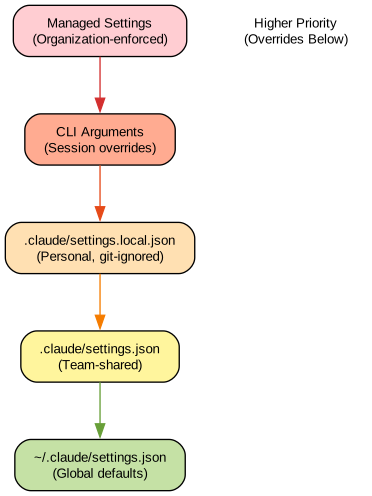
Understanding Configuration Priority
The configuration hierarchy diagram shows the priority order from highest (top) to lowest (bottom). Settings at higher levels override settings at lower levels, providing a flexible system for managing permissions, model selection, and behavior across different contexts.
Level 1: Managed Settings (Highest Priority)
Managed settings are organization-enforced configurations that cannot be overridden. They are typically set by IT departments or team leads to ensure compliance and security. Managed settings can be configured through:
managed-settings.jsonfile- MDM plist (macOS)
- Windows Registry
Use managed settings for:
- Security policies that must not be bypassed
- Organization-wide model restrictions
- Permission boundaries that ensure compliance
Level 2: CLI Arguments
Command-line arguments provide single-session overrides. They are useful for:
- Testing different model configurations
- One-off permission changes
- Debugging specific behaviors
Example:
claude --model opus --permission-mode auto
Level 3: Local Project Settings
.claude/settings.local.json contains personal project settings that are git-ignored. Use for:
- Personal preferences that shouldn’t be shared
- Experimental configurations
- Development-specific settings
Level 4: Team Project Settings
.claude/settings.json contains team-shared settings that are checked into git. Use for:
- Team-wide model selections
- Shared permission configurations
- Project-specific hooks and MCP servers
Level 5: Global User Settings
~/.claude/settings.json contains global defaults for all projects. Use for:
- Personal default model preferences
- Global permission settings
- User-wide hooks and configurations
Best Practices for Configuration:
- Use managed settings for security-critical policies
- Keep team settings in
.claude/settings.jsonfor consistency - Use local settings for personal experimentation
- Document configuration decisions in CLAUDE.md
- Use
attribution.commit: ""in settings instead of CLAUDE.md rules for deterministic behavior
Key Features and Capabilities
Subagents
Subagents are autonomous actors that operate in isolated contexts. They support 16 frontmatter fields for customization:
| Field | Type | Description |
|---|---|---|
name | string | Unique identifier |
description | string | When to invoke (use “PROACTIVELY” for auto-invocation) |
tools | string/list | Allowed tools (inherits all if omitted) |
disallowedTools | string/list | Tools to deny |
model | string | Model alias: sonnet, opus, haiku, or inherit |
permissionMode | string | Permission mode: default, acceptEdits, auto, etc. |
maxTurns | integer | Maximum agentic turns |
skills | list | Skills to preload at startup |
mcpServers | list | MCP servers for this subagent |
hooks | object | Lifecycle hooks |
memory | string | Memory scope: user, project, or local |
background | boolean | Run as background task |
effort | string | Effort level: low, medium, high, max |
isolation | string | Set to “worktree” for git worktree isolation |
initialPrompt | string | Auto-submitted first prompt |
color | string | Display color for visual distinction |
Skills
Skills are knowledge modules with 13 frontmatter fields:
| Field | Type | Description |
|---|---|---|
name | string | Display name and slash command |
description | string | What the skill does (for auto-discovery) |
argument-hint | string | Autocomplete hint |
disable-model-invocation | boolean | Prevent automatic invocation |
user-invocable | boolean | Hide from / menu (background knowledge) |
allowed-tools | string | Tools allowed without prompts |
model | string | Model to use |
effort | string | Effort level override |
context | string | Set to “fork” for isolated subagent |
agent | string | Subagent type for context: fork |
hooks | object | Lifecycle hooks |
paths | string/list | Glob patterns for auto-activation |
shell | string | Shell for command blocks |
Official Built-in Skills
Claude Code includes 5 official bundled skills:
- simplify - Review code for reuse, quality, and efficiency
- batch - Run commands across multiple files
- debug - Debug failing commands or code issues
- loop - Run prompts on recurring intervals (up to 3 days)
- claude-api - Build apps with Claude API (triggers on imports)
Tips and Best Practices
Prompting Tips
- Challenge Claude: “grill me on these changes and don’t make a PR until I pass your test”
- After mediocre fixes: “knowing everything you know now, scrap this and implement the elegant solution”
- Claude fixes most bugs by itself - paste the bug, say “fix”, don’t micromanage
Planning Tips
- Always start with plan mode
- Use AskUserQuestion to interview users, then execute in a new session
- Create phase-wise gated plans with multiple test stages
- Use cross-model review for plan validation
CLAUDE.md Tips
- Target under 200 lines per file
- Use
<important if="...">tags for conditional rules - Use multiple CLAUDE.md for monorepos
- Keep codebases clean and finish migrations
Skills Tips
- Use
context: forkfor isolated subagent execution - Build a Gotchas section in every skill
- Write descriptions for the model (“when should I fire?”)
- Include scripts and libraries so Claude composes rather than reconstructs
Workflow Tips
- Avoid agent dumb zone - do manual /compact at max 50%
- Use /model to select model and reasoning
- Use thinking mode true and Output Style Explanatory
- Use /rename and /resume for session management
Development Workflows Comparison
The repository documents 9 major development workflows with their unique approaches:
| Workflow | Stars | Key Features |
|---|---|---|
| Everything Claude Code | 148k | AgentShield, multi-lang rules, 47 agents |
| Superpowers | 143k | TDD-first, Iron Laws, whole-plan review |
| Spec Kit | 87k | Spec-driven, constitution, 22+ tools |
| gstack | 68k | Role personas, /codex review, parallel sprints |
| Get Shit Done | 50k | Fresh 200K contexts, wave execution, XML plans |
| BMAD-METHOD | 44k | Full SDLC, agent personas, 22+ platforms |
| OpenSpec | 39k | Delta specs, brownfield, artifact DAG |
| oh-my-claudecode | 27k | Teams orchestration, tmux workers, skill auto-inject |
| Compound Engineering | 14k | Compound Learning, Multi-Platform CLI, Plugin Marketplace |
Getting Started
Installation
- Install Claude Code:
npm install -g @anthropic-ai/claude-code - Clone the best practices repository:
git clone https://github.com/shanraisshan/claude-code-best-practice.git - Explore the examples:
cd claude-code-best-practice
claude
/weather-orchestrator
Usage
- Read the repository like a course - learn what commands, agents, skills, and hooks are
- Clone and play with examples - try /weather-orchestrator, listen to hook sounds
- Ask Claude to suggest best practices for your own project
Conclusion
Claude Code Best Practices represents the collective wisdom of the Claude Code community, distilled into actionable patterns and implementations. By understanding the architecture, mastering the orchestration workflow, and applying the tips and best practices documented in this repository, developers can significantly enhance their productivity with AI-assisted development.
The key takeaways are:
- Use the right tool for the job - Commands for workflows, Agents for isolated tasks, Skills for specialized knowledge
- Follow the Research-Plan-Execute-Review-Ship workflow - This pattern ensures quality and reduces rework
- Leverage context isolation - Subagents provide fresh perspectives without context pollution
- Configure hierarchically - Use the right configuration level for each setting
- Keep learning - The repository is constantly updated with new tips and patterns
For more information, visit the Claude Code Best Practices repository and explore the official Claude Code documentation.
Related Posts
- AgentSkillOS: Skill Orchestration System
- MattPocock Skills: AI Agent Workflows
- DESIGN.md: AI-Powered Design Systems

Enjoyed this post? Never miss out on future posts by following us