Claude HUD: Real-Time Statusline Plugin for Claude Code
Claude HUD is a powerful real-time statusline plugin designed specifically for Claude Code that transforms your terminal into an information-rich dashboard. With over 17,672 GitHub stars, this plugin has become an essential tool for developers who want to monitor their Claude Code sessions with unprecedented visibility and control.
Introduction
Claude Code has revolutionized how developers interact with AI assistants, but one challenge remained: understanding what’s happening behind the scenes during complex operations. Claude HUD solves this by providing a real-time heads-up display that shows context usage, active tools, running agents, todo progress, and much more - all without leaving your terminal.
The plugin integrates natively with Claude Code’s architecture, requiring no external dependencies or API calls. It reads directly from Claude’s own data streams, ensuring accurate and up-to-the-second information about your session state. Whether you’re working with massive context windows exceeding 1 million tokens or managing multiple concurrent agents, Claude HUD keeps you informed every step of the way.
Key benefits include:
- Native Integration: Works seamlessly with Claude Code’s plugin system
- Real-Time Updates: Instant feedback on context, tools, and agent status
- Zero Dependencies: No external packages or API calls required
- Cross-Platform: Works on Windows, macOS, and Linux
- Privacy-Focused: All processing happens locally on your machine
Understanding the Architecture
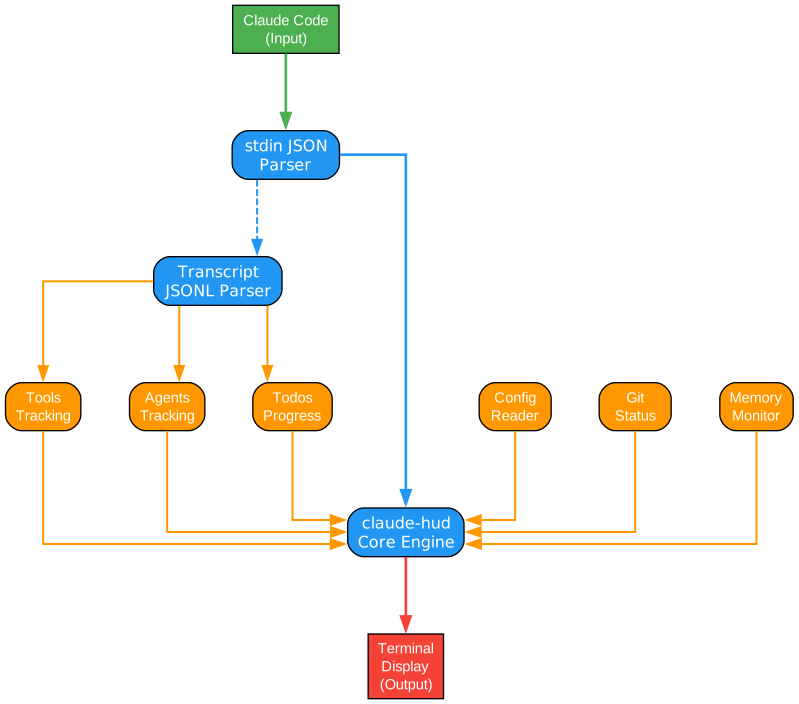
The architecture diagram above illustrates how Claude HUD integrates with Claude Code’s ecosystem. Let’s examine each component and understand the data flow that makes real-time monitoring possible.
Core Data Sources
Claude HUD taps into three primary data sources that Claude Code maintains during every session:
-
Standard Input Stream (stdin.ts): This component intercepts the JSON messages that Claude Code receives from the Claude API. Every response, tool use, and conversation turn passes through this stream. The stdin parser extracts structured data including token counts, message types, and content blocks. This provides the foundation for context tracking and usage statistics.
-
Transcript Files (transcript.ts): Claude Code maintains JSONL (JSON Lines) transcript files that record the complete conversation history. These files contain every message exchanged, every tool invocation, and every response generated. The transcript parser reads these files to reconstruct the session state, enabling Claude HUD to display historical context and track conversation progression.
-
Configuration Files (config-reader.ts): Claude Code’s configuration contains settings for context limits, model parameters, and feature flags. The config reader extracts these values to provide accurate context health calculations and display appropriate warnings when approaching limits.
Data Processing Pipeline
The data flows through a sophisticated processing pipeline:
- Parsing Layer: Raw JSON and JSONL data is parsed into structured TypeScript objects with type safety
- Aggregation Layer: Multiple data sources are combined to create a unified session view
- Calculation Layer: Token counts, percentages, and health metrics are computed
- Render Layer: The final display is generated using terminal escape codes for colors and formatting
State Management
Claude HUD maintains internal state caches to ensure smooth performance:
- Context Cache: Stores current token counts and calculates percentages against model limits
- Tool State: Tracks which tools are active, pending, or completed
- Agent Registry: Maintains information about running sub-agents and their progress
- Todo Tracker: Parses todo lists from conversation content and tracks completion status
Render System
The render system uses ANSI escape codes to create a dynamic, colorful display:
- Progress Bars: Visual representation of context usage with color-coded health indicators
- Status Indicators: Icons and text showing current tool and agent states
- Layout Engine: Configurable layouts that adapt to terminal width and user preferences
This architecture ensures that Claude HUD adds minimal overhead while providing maximum visibility into your Claude Code sessions.
Core Components
Understanding the Core Components
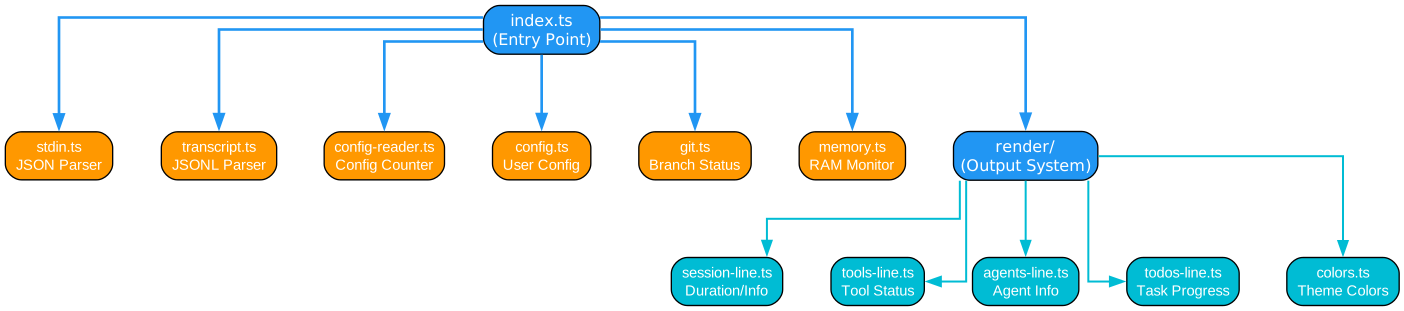
The components diagram reveals the modular architecture that makes Claude HUD both powerful and maintainable. Each component has a specific responsibility and communicates through well-defined interfaces.
index.ts - Entry Point
The index.ts file serves as the main entry point for the plugin. When Claude Code loads the plugin, it executes the initialization sequence:
- Plugin Registration: Registers the plugin with Claude Code’s plugin system using the
/plugincommand infrastructure - Hook Setup: Establishes hooks for stdin interception, file watching, and event handling
- Configuration Loading: Reads user preferences from the plugin configuration file
- Display Initialization: Prepares the terminal for real-time updates by setting up the render loop
The entry point also handles graceful shutdown, ensuring that all resources are properly cleaned up when the plugin is unloaded or Claude Code exits.
stdin.ts - JSON Parsing
This component is responsible for intercepting and parsing the JSON messages that flow between Claude Code and the Claude API:
- Stream Interception: Hooks into the stdin stream to capture incoming messages
- JSON Parsing: Parses raw JSON strings into structured objects with error handling
- Message Classification: Identifies message types (response, tool_use, tool_result, etc.)
- Token Extraction: Extracts token counts from API responses for context tracking
- Event Emission: Emits parsed events to subscribed components
The stdin parser handles edge cases like partial messages, malformed JSON, and streaming responses, ensuring robust operation even in challenging conditions.
transcript.ts - JSONL Parsing
The transcript parser reads Claude Code’s JSONL transcript files to reconstruct session history:
- File Watching: Monitors transcript files for changes using efficient file system watchers
- JSONL Parsing: Parses line-delimited JSON format with support for multi-line values
- Message Reconstruction: Rebuilds the complete conversation history from transcript entries
- Diff Calculation: Efficiently computes differences between reads to minimize processing
- Caching: Maintains a parsed cache to avoid re-reading unchanged content
This component enables Claude HUD to display historical context and track conversation progression across long sessions.
config-reader.ts - Configuration Counting
The configuration reader extracts and interprets Claude Code’s settings:
- Context Limit Detection: Identifies the maximum context window for the current model
- Feature Flag Reading: Determines which features are enabled (tools, agents, etc.)
- User Preference Extraction: Reads user-specific settings that affect display behavior
- Model Identification: Determines which Claude model is in use for accurate token counting
Understanding the configuration allows Claude HUD to provide accurate context health indicators and appropriate warnings.
Render System
The render system transforms processed data into the visual display:
- Layout Engine: Manages different layout configurations (compact, full, custom)
- Color Management: Applies ANSI color codes based on status and user preferences
- Progress Rendering: Draws progress bars and percentage indicators
- Icon Selection: Chooses appropriate icons for different states and statuses
- Update Loop: Manages efficient screen updates to minimize flicker
The render system supports multiple themes and can adapt to different terminal capabilities, ensuring a consistent experience across platforms.
Display Features
Understanding the Display Features
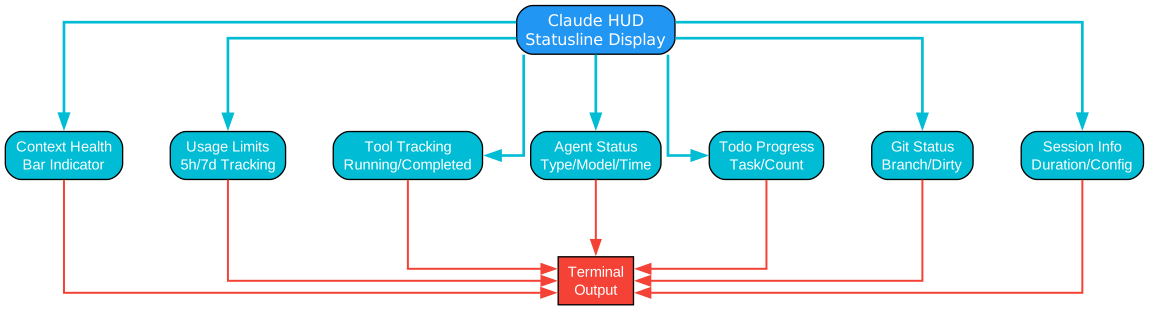
The display features diagram showcases the rich information panels that Claude HUD presents in your terminal. Each panel provides critical insights into your Claude Code session.
Context Health Bar
The context health bar is the centerpiece of Claude HUD’s display, providing instant visibility into your token usage:
- Visual Progress Bar: A color-coded bar that fills as context is consumed
- Token Count: Shows current tokens used out of the maximum available
- Percentage Display: Clear percentage indicator for quick assessment
- Health Indicator: Color transitions from green (healthy) through yellow (moderate) to red (critical)
- Warning Thresholds: Configurable warnings when approaching context limits
The health bar updates in real-time as you interact with Claude, giving you immediate feedback on how much context capacity remains. This is especially valuable when working with large codebases or long conversations where context management becomes critical.
Usage Limits Tracking
Claude HUD monitors your API usage limits:
- Rate Limit Status: Shows remaining calls before hitting rate limits
- Token Quota: Displays token usage against your plan limits
- Reset Timers: Countdown to limit resets
- Warning Alerts: Proactive notifications when approaching limits
This feature helps you plan your work sessions and avoid unexpected interruptions from rate limiting.
Tool Tracking
The tool tracking panel shows which Claude tools are currently active:
- Active Tools: Lists tools currently in use (file operations, web search, code execution, etc.)
- Tool Status: Indicates whether tools are pending, running, or completed
- Execution Time: Shows how long each tool has been running
- Result Preview: Brief preview of tool results when available
Understanding which tools are active helps you anticipate Claude’s actions and debug unexpected behavior.
Agent Status
For sessions involving sub-agents, the agent status panel provides:
- Agent List: Names and types of running sub-agents
- Task Assignment: What each agent is working on
- Progress Indicators: Completion status for each agent’s tasks
- Inter-Agent Communication: How agents are coordinating
This is particularly valuable when using Claude’s multi-agent capabilities for complex workflows.
Todo Progress
The todo progress panel tracks task completion:
- Task List: All todos extracted from the conversation
- Completion Status: Checkboxes showing done/pending items
- Progress Percentage: Overall completion rate
- Priority Indicators: Visual markers for high-priority items
This feature helps you track progress on complex, multi-step tasks that Claude is helping you accomplish.
Git Status
Claude HUD integrates with your Git repository:
- Branch Information: Current branch name
- Modified Files: Count of changed files
- Commit Status: Whether there are uncommitted changes
- Merge Status: Active merge conflicts if any
This integration keeps you aware of repository state without leaving Claude Code.
Session Info
The session information panel displays:
- Session Duration: How long the current session has been running
- Message Count: Number of messages exchanged
- Model Version: Which Claude model is in use
- Plugin Version: Current Claude HUD version
This metadata helps you understand the context of your current session.
Installation
Understanding the Installation Process
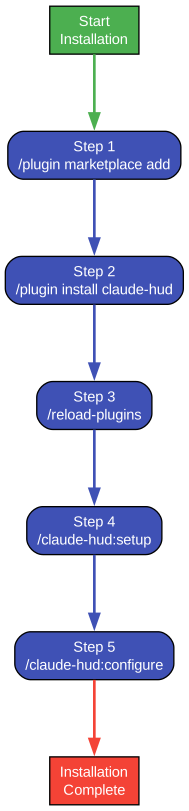
The installation diagram illustrates the straightforward process for installing Claude HUD through Claude Code’s plugin system. Let’s walk through each step in detail.
Step 1: Plugin Marketplace Add
The first command adds the plugin repository to Claude Code’s plugin marketplace:
/plugin marketplace add jarrodwatts/claude-hud
This command:
- Registers the GitHub repository as a plugin source
- Validates the repository contains a valid Claude Code plugin
- Adds the repository to your local plugin registry
- Enables future updates from the source
The marketplace system allows plugin developers to distribute their plugins directly through GitHub, making installation and updates seamless for users.
Step 2: Plugin Install
After adding the marketplace, install the plugin:
/plugin install claude-hud
This command:
- Downloads the plugin code from the registered repository
- Installs dependencies if any are required
- Registers the plugin with Claude Code’s plugin system
- Creates necessary configuration files with defaults
The installation process is designed to be zero-configuration - the plugin works immediately with sensible defaults.
Step 3: Reload Plugins
To activate the newly installed plugin:
/reload-plugins
This command:
- Unloads all currently active plugins
- Reloads plugin configurations
- Initializes newly installed plugins
- Refreshes the plugin state without restarting Claude Code
The reload is quick and preserves your current session state.
Step 4: Setup Command
Run the setup command to configure Claude HUD for your environment:
/claude-hud:setup
This command:
- Detects your terminal capabilities (color support, Unicode support)
- Configures optimal display settings for your environment
- Creates default configuration files
- Validates that all required features are available
The setup process ensures Claude HUD works correctly across different terminal emulators and operating systems.
Step 5: Configure Command
Customize Claude HUD to your preferences:
/claude-hud:configure
This command opens the configuration interface where you can:
- Choose display layout (compact, full, custom)
- Set color themes and preferences
- Configure warning thresholds
- Enable or disable specific panels
- Set update frequency
Configuration is stored in a local file and persists across sessions.
Configuration Options
Claude HUD offers extensive configuration options to tailor the display to your preferences:
Layout Options
- Compact Mode: Minimal display showing only essential information
- Full Mode: Complete display with all panels and detailed information
- Custom Mode: User-defined layout with selected panels
Color Themes
- Default: Standard color scheme with green/yellow/red indicators
- Dark Mode: Optimized for dark terminal backgrounds
- Light Mode: Enhanced contrast for light terminal themes
- Custom: User-defined color mappings
Panel Configuration
Each panel can be individually enabled or disabled:
- Context Health Bar (always shown in compact mode)
- Usage Limits
- Tool Tracking
- Agent Status
- Todo Progress
- Git Status
- Session Info
Update Frequency
Control how frequently the display updates:
- Real-time: Updates on every message (higher CPU usage)
- Normal: Updates every second (balanced)
- Economy: Updates every 5 seconds (lower resource usage)
Language Settings
Claude HUD supports internationalization:
- English (default)
- Chinese
- Japanese
- Spanish
- French
- German
Additional languages can be added through community contributions.
Unique Selling Points
Claude HUD stands out from other monitoring tools for several key reasons:
Native Token Data
Unlike third-party tools that estimate token usage, Claude HUD reads actual token counts directly from Claude API responses. This ensures:
- 100% accurate token counting
- Real-time updates without polling
- No additional API calls or costs
- Perfect synchronization with Claude’s internal state
1M+ Context Windows
Claude HUD is designed to handle Claude’s massive context windows:
- Supports models with 200K, 1M, and larger context windows
- Efficiently tracks usage across long conversations
- Provides early warnings before hitting limits
- Helps optimize context usage for complex tasks
Zero Dependencies
The plugin requires no external packages:
- No npm install required
- No external API calls
- No network dependencies
- Smaller attack surface for security
Cross-Platform
Works consistently across all major platforms:
- Windows (Command Prompt, PowerShell, Windows Terminal)
- macOS (Terminal.app, iTerm2, Warp)
- Linux (gnome-terminal, konsole, alacritty)
Privacy-Focused
All processing happens locally:
- No data sent to external servers
- No analytics or telemetry
- Complete control over your data
- Suitable for enterprise environments
Technical Details
Technology Stack
Claude HUD is built with modern technologies:
- TypeScript: Type-safe code with excellent IDE support
- Node.js: Runtime environment integrated with Claude Code
- ANSI Escape Codes: Terminal formatting and colors
- File System APIs: Efficient file watching and reading
Performance Optimizations
The plugin is designed for minimal overhead:
- Caching: Parsed data is cached to avoid redundant processing
- Incremental Updates: Only changed portions are re-rendered
- Efficient File Watching: Uses native OS file system events
- Lazy Loading: Components are initialized only when needed
Internationalization (i18n)
Claude HUD supports multiple languages through a robust i18n system:
- Translation Files: JSON-based translation files for each language
- Dynamic Loading: Languages are loaded on demand
- Fallback Chain: Falls back to English for missing translations
- Community Contributions: Easy to add new languages
Error Handling
Robust error handling ensures stability:
- Graceful Degradation: Continues working even if some features fail
- Error Logging: Detailed logs for debugging
- Recovery Mechanisms: Automatic recovery from transient errors
- User Notifications: Clear error messages when issues occur
Conclusion
Claude HUD represents a significant advancement in developer experience for Claude Code users. By providing real-time visibility into context usage, tool execution, and agent status, it transforms the terminal from a simple text interface into an information-rich dashboard.
The plugin’s native integration ensures accuracy and performance, while its modular architecture allows for extensibility and customization. Whether you’re working on simple scripts or complex multi-agent workflows, Claude HUD keeps you informed and in control.
With over 17,672 GitHub stars and active development, Claude HUD has become an essential tool for serious Claude Code users. Its zero-dependency approach, cross-platform support, and privacy-focused design make it suitable for individual developers and enterprise teams alike.
Key Takeaways:
- Real-time statusline with context, tools, agents, and todos
- Native integration with Claude Code’s data streams
- Zero dependencies and cross-platform support
- Extensive configuration options
- Active community and development
Links:
Related Posts
- AgentSkillOS: Skill Orchestration System
- MattPocock Skills: AI Agent Workflows
- DESIGN.md: AI-Powered Design Systems
