Claude HowTo: Master Claude Code from Beginner to Power User
In the rapidly evolving landscape of AI-powered development tools, Claude Code has emerged as one of the most sophisticated and capable coding assistants available. However, harnessing its full potential requires understanding its intricate features, configuration options, and best practices. Enter Claude HowTo - a visual, example-driven guide that transforms beginners into power users through hands-on tutorials and copy-paste templates.
With over 22,950 stars and 2,757 forks on GitHub, Claude HowTo has become the definitive resource for developers seeking to master Claude Code. The repository gained an impressive 10,745 stars in just one week, demonstrating its immediate value to the developer community.
What is Claude HowTo?
Claude HowTo is a comprehensive tutorial repository created by luongnv89 that provides a structured learning path for Claude Code users. Unlike traditional documentation that can be dense and theoretical, Claude HowTo takes a practical approach with:
- 10 tutorial modules covering every aspect of Claude Code
- 100+ ready-to-use files including commands, agents, skills, hooks, MCP configs, and plugins
- 3 complete plugins for PR Review, DevOps Automation, and Documentation
- 6 complete skills for Code Review, Brand Voice, Doc Generator, Refactor, Claude MD, and Blog Draft
- 8 example hooks for automation workflows
- Multi-language support in English, Vietnamese, and Chinese
The repository is designed to provide immediate value - every template can be copied and pasted directly into your projects, allowing you to see results instantly while learning the underlying concepts.
Architecture Overview
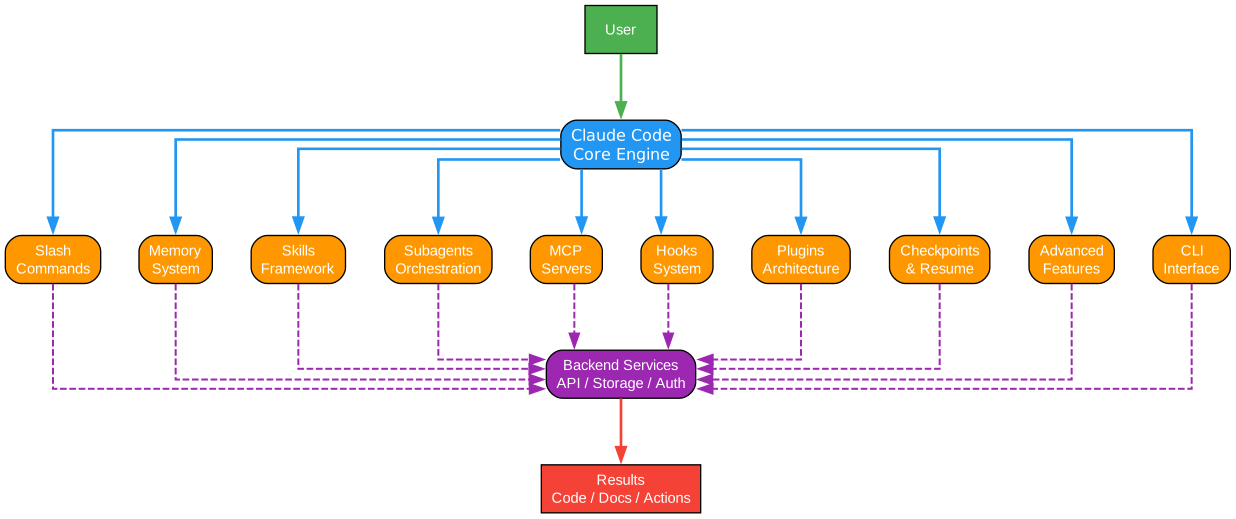
Understanding the Claude HowTo Architecture
The architecture diagram above illustrates the comprehensive structure of Claude HowTo, organized into ten interconnected modules that progressively build your Claude Code expertise. Let’s examine each component in detail:
Module 01: Slash Commands
The foundation of Claude Code efficiency lies in slash commands - predefined prompts that automate repetitive tasks. Claude HowTo provides production-ready commands for common operations like /commit for intelligent commit message generation, /pr for pull request creation, and /optimize for code performance improvements. Each command is crafted with best practices in mind, including proper context handling and error recovery.
The slash commands module teaches you how to create custom commands that encapsulate your team’s workflows. For example, the /setup-ci-cd command demonstrates how to scaffold entire CI/CD pipelines with proper stage definitions, environment configurations, and deployment strategies. This module alone can save hours of repetitive work per developer per week.
Module 02: Memory System
Claude Code’s memory system is revolutionary for maintaining context across sessions. The repository demonstrates three types of memory configurations: personal memory for individual preferences, project memory for team-wide conventions, and directory-specific memory for contextual awareness. Understanding these memory layers is crucial for building AI assistants that truly understand your codebase.
The memory system examples show how to encode coding standards, architectural decisions, and domain knowledge into formats that Claude can retrieve and apply automatically. This eliminates the need to repeatedly explain project context, making interactions more efficient and consistent.
Module 03: Skills
Skills represent reusable prompt templates that can be loaded on demand. Claude HowTo includes six complete skills that demonstrate different patterns: the Code Review skill for comprehensive code analysis, the Brand Voice skill for maintaining consistent communication style, the Doc Generator skill for automated documentation, the Refactor skill for safe code transformations, the Claude MD skill for markdown processing, and the Blog Draft skill for content creation.
Each skill follows a progressive disclosure pattern - loading only the necessary context when invoked. This approach prevents context window bloat while ensuring the AI has access to relevant information when needed. The skill templates include detailed instructions, examples, and edge case handling that you can customize for your specific needs.
Module 04: Subagents
Subagents are specialized AI personas that excel at specific tasks. The repository provides eight subagent definitions including a Code Reviewer for quality assurance, a Debugger for troubleshooting, a Documentation Writer for content creation, a Security Reviewer for vulnerability assessment, a Test Engineer for test strategy, a Data Scientist for analytics, a Clean Code Reviewer for code quality, and an Implementation Agent for feature development.
Each subagent is configured with specific instructions, evaluation criteria, and output formats. For example, the Security Reviewer subagent is programmed to think like a penetration tester, examining code for OWASP Top 10 vulnerabilities, authentication flaws, and data exposure risks. This specialization produces more accurate and actionable results than generic prompts.
Module 05: MCP (Model Context Protocol)
The Model Context Protocol integration enables Claude Code to interact with external tools and services. Claude HowTo provides configuration examples for connecting Claude to databases, APIs, file systems, and cloud services. This module transforms Claude from a code assistant into an integrated development environment partner.
The MCP configurations demonstrate secure credential handling, rate limiting, and error recovery patterns. You’ll learn how to expose custom tools to Claude while maintaining security boundaries and preventing unauthorized operations. The examples include both local development setups and production-ready configurations.
Module 06: Hooks
Hooks are event-driven automation scripts that execute at specific points in Claude’s workflow. The repository includes eight practical hooks for tasks like pre-commit validation, post-generation testing, automatic formatting, and notification systems. Hooks enable you to enforce team policies and maintain code quality automatically.
The hook examples show how to intercept Claude’s actions, validate outputs, and trigger external processes. For instance, the pre-push hook can run your full test suite before allowing code to be pushed, while the post-generation hook can automatically format code according to your style guide. These automations reduce human error and ensure consistent quality.
Module 07: Plugins
Plugins are comprehensive extensions that combine commands, agents, and hooks into cohesive workflows. Claude HowTo provides three complete plugins: PR Review for automated pull request analysis, DevOps Automation for deployment pipelines, and Documentation for automated documentation generation. Each plugin demonstrates how to build production-ready extensions.
The plugin architecture shows how to organize related functionality into maintainable packages. You’ll learn the plugin manifest format, dependency management, and versioning strategies. The examples include both simple plugins for single-purpose tasks and complex plugins that orchestrate multiple subagents and external services.
Module 08: Checkpoints
Checkpoints enable you to save and restore Claude Code state, creating restore points during complex operations. This module teaches you how to implement checkpointing for long-running tasks, multi-step refactoring, and experimental development. Checkpoints provide safety nets that encourage exploration and iteration.
The checkpoint examples demonstrate state serialization, storage strategies, and restoration procedures. You’ll learn when to create checkpoints, how to manage checkpoint storage, and how to implement rollback procedures. This feature is particularly valuable for complex refactoring operations where you want to preserve intermediate states.
Module 09: Advanced Features
The advanced features module covers cutting-edge capabilities like planning mode for complex task decomposition, auto-mode permissions for autonomous operation, and configuration management for team deployments. This module is designed for users who want to push Claude Code to its limits.
The planning mode examples show how to break down complex projects into manageable tasks, estimate effort, and track progress. Auto-mode permissions demonstrate how to configure Claude for autonomous operation while maintaining safety boundaries. Configuration examples provide templates for team-wide deployment with consistent settings.
Module 10: CLI Mastery
The command-line interface module teaches advanced CLI techniques for power users. Topics include session management, output formatting, integration with shell scripts, and automation workflows. Mastering the CLI enables you to incorporate Claude Code into existing development pipelines and CI/CD systems.
The CLI examples demonstrate batch processing, output parsing for integration with other tools, and custom output formats. You’ll learn how to script Claude Code interactions, create wrapper scripts for common workflows, and integrate Claude into your existing development environment.
Learning Path
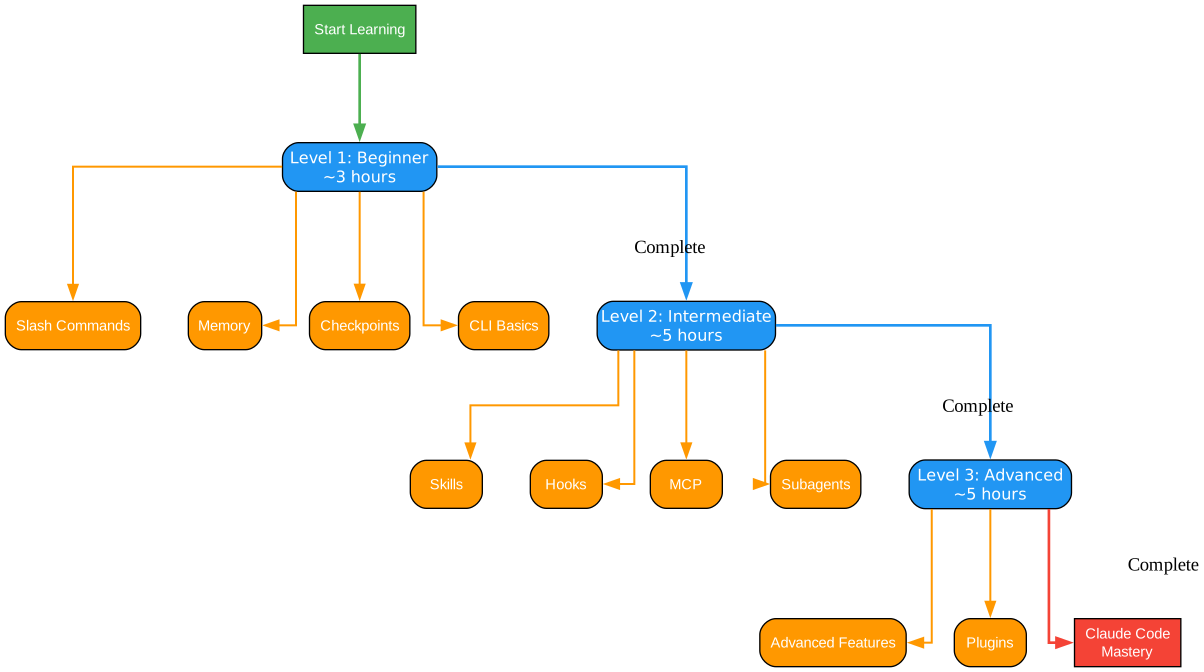
Understanding the Learning Path
The learning path diagram above presents a structured progression through Claude HowTo’s curriculum, designed to take developers from complete beginners to advanced practitioners. This carefully crafted journey ensures learners build foundational knowledge before tackling complex topics.
Beginner Track (Approximately 3 Hours)
The beginner track focuses on immediate productivity gains and fundamental concepts. New users start with slash commands, which provide instant value through automation of common tasks. The /commit command, for example, analyzes your staged changes and generates conventional commit messages following best practices. This immediate win builds confidence and demonstrates Claude Code’s capabilities.
Next, beginners explore the memory system, learning how to configure personal and project-level memory. The personal memory configuration teaches you to encode your coding preferences, such as preferred naming conventions, comment styles, and architectural patterns. Project memory extends this to team-wide standards, ensuring consistent code style across all contributors.
The beginner track concludes with an introduction to skills - understanding how to invoke pre-built skills and recognize when they’re applicable. Rather than creating custom skills immediately, beginners learn to leverage the six included skills for common tasks like code review and documentation generation. This foundation prepares learners for more advanced customization.
Intermediate Track (Approximately 5 Hours)
The intermediate track deepens understanding and introduces customization. Learners begin by creating custom slash commands tailored to their specific workflows. The repository provides templates for commands like /generate-api-docs which extracts API documentation from code, and /unit-test-expand which generates comprehensive test coverage for existing functions.
Subagents take center stage in the intermediate track, with learners configuring specialized AI personas for their teams. The repository includes detailed examples for each of the eight subagents, showing how to customize instructions, evaluation criteria, and output formats. Learners will understand when to use subagents versus skills and how to combine them effectively.
MCP integration marks a significant milestone in the intermediate track. Learners configure Claude Code to interact with external services like databases, APIs, and cloud platforms. The examples demonstrate secure credential management, rate limiting, and error handling patterns essential for production use.
The intermediate track concludes with hooks - implementing automation that enforces team policies. Learners create hooks for pre-commit validation, automatic testing, and notification systems. The eight included hook examples provide templates for common automation scenarios while teaching the underlying patterns.
Advanced Track (Approximately 5 Hours)
The advanced track transforms learners into Claude Code architects capable of building sophisticated extensions. Plugin development is the cornerstone, with learners studying the three complete plugins included in the repository. The PR Review plugin demonstrates multi-agent orchestration, the DevOps Automation plugin shows integration with deployment systems, and the Documentation plugin illustrates automated content generation.
Checkpoint implementation teaches advanced state management for complex operations. Learners implement checkpointing strategies for long-running tasks, learning when to create checkpoints, how to manage storage, and how to implement rollback procedures. This knowledge enables safe exploration during complex refactoring and experimentation.
The advanced track concludes with CLI mastery and planning mode. Learners script Claude Code interactions for batch processing, create wrapper scripts for common workflows, and configure planning mode for complex task decomposition. These skills enable integration of Claude Code into existing development pipelines and CI/CD systems.
Key Insights
The learning path is designed with several pedagogical principles in mind. First, it emphasizes immediate value - every module includes copy-paste templates that work immediately, allowing learners to see results while understanding the underlying concepts. Second, it builds progressively - each module assumes knowledge from previous modules, creating a coherent learning journey.
Third, the path balances breadth and depth - beginners get a comprehensive overview while advanced users dive deep into specific areas. Fourth, it emphasizes practical application - every concept is demonstrated through working examples that can be customized for real projects. This approach ensures learners can immediately apply what they’ve learned.
Practical Applications
Organizations can use this learning path to structure team training programs. New team members can complete the beginner track in their first week, achieving immediate productivity gains. The intermediate track can be spread across the first month, with team members customizing Claude Code for project-specific needs. Advanced users can complete the advanced track to become internal Claude Code experts who mentor others and develop custom extensions.
Individual developers can follow the path at their own pace, using the copy-paste templates to enhance their workflow immediately while building deeper understanding over time. The multi-language support (English, Vietnamese, Chinese) makes the content accessible to global teams.
Plugin Architecture
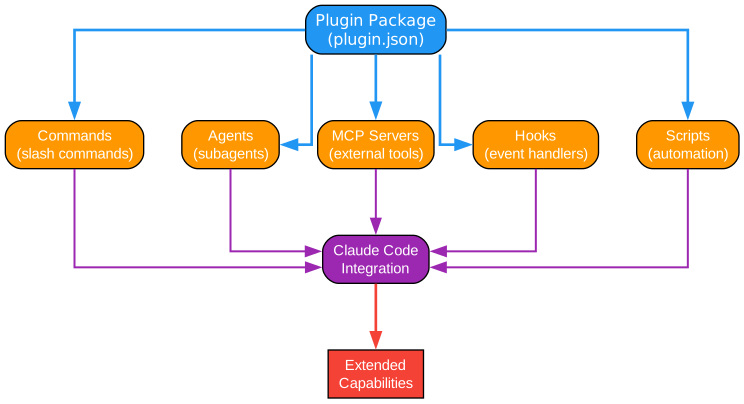
Understanding the Plugin Architecture
The plugin architecture diagram above illustrates how Claude HowTo’s three complete plugins are structured and how their components interact. This modular design enables developers to create sophisticated extensions that combine commands, agents, and hooks into cohesive workflows.
PR Review Plugin
The PR Review plugin is a comprehensive solution for automated pull request analysis. It combines three specialized agents - Security Reviewer, Performance Analyzer, and Test Checker - with commands for security analysis, test verification, and PR review orchestration. The plugin demonstrates how to coordinate multiple AI personas for comprehensive code review.
The Security Reviewer agent examines code for OWASP Top 10 vulnerabilities, authentication flaws, and data exposure risks. It’s configured with specific evaluation criteria derived from security best practices and produces structured findings with severity ratings and remediation suggestions. The Performance Analyzer focuses on algorithmic complexity, memory usage patterns, and potential bottlenecks. The Test Checker validates test coverage, identifies missing test cases, and ensures testing best practices are followed.
The plugin’s commands orchestrate these agents in sequence. The /check-security command invokes the Security Reviewer, /check-tests invokes the Test Checker, and /review-pr coordinates all three agents for comprehensive analysis. This architecture shows how to build multi-agent systems that leverage specialized expertise while maintaining coherent workflows.
DevOps Automation Plugin
The DevOps Automation plugin transforms Claude Code into a deployment assistant. It includes agents for Incident Command, Alert Analysis, and Deployment Specialization, along with commands for deployment, incident response, rollback, and status checking. This plugin demonstrates integration with external systems like monitoring platforms and deployment pipelines.
The Incident Commander agent is configured to handle production incidents, coordinating response efforts and suggesting remediation steps. The Alert Analyzer processes monitoring alerts, correlating events and identifying root causes. The Deployment Specialist manages release procedures, ensuring proper sequencing and validation gates.
The plugin’s commands integrate with common DevOps tools. The /deploy command triggers deployment pipelines with proper pre-flight checks, /incident initiates incident response workflows, /rollback safely reverts problematic deployments, and /status provides real-time system health information. This plugin shows how to extend Claude Code beyond code assistance into operational support.
Documentation Plugin
The Documentation plugin automates the often-neglected task of documentation maintenance. It includes agents for API Documentation, Code Commenting, and Example Generation, with commands for README generation, API doc synchronization, and documentation validation. This plugin ensures documentation stays synchronized with code changes.
The API Documenter agent extracts interface definitions, generates endpoint documentation, and maintains OpenAPI specifications. The Code Commenter adds inline documentation following language-specific conventions, ensuring code is self-documenting. The Example Generator creates usage examples and code snippets that demonstrate API usage patterns.
The plugin’s commands provide comprehensive documentation workflows. The /generate-readme command creates project READMEs with proper structure and badges, /generate-api-docs extracts and formats API documentation, /sync-docs ensures documentation matches current code, and /validate-docs checks for documentation completeness and accuracy.
Plugin Manifest Structure
Each plugin is defined by a manifest that specifies its components, dependencies, and configuration. The manifest includes metadata like name, version, and description, along with references to included commands, agents, and hooks. Dependencies specify required MCP servers and external tools, while configuration options allow customization for different environments.
The manifest format follows a modular design that enables plugins to be shared, versioned, and composed. Plugins can depend on other plugins, creating ecosystems of related functionality. The repository’s three plugins demonstrate different composition patterns - the PR Review plugin is self-contained, the DevOps plugin depends on external services, and the Documentation plugin can work standalone or integrate with documentation platforms.
Key Insights
The plugin architecture demonstrates several important design principles. First, it emphasizes separation of concerns - each agent has a focused responsibility, making it easier to test, maintain, and improve. Second, it shows composition patterns - complex workflows are built by orchestrating simple components. Third, it provides extension points - plugins can be customized through configuration without modifying core code.
The architecture also demonstrates integration patterns for external systems. The DevOps plugin shows how to connect to monitoring and deployment systems, the Documentation plugin shows integration with documentation platforms, and the PR Review plugin shows integration with version control systems. These patterns can be adapted for any external service integration.
Practical Applications
Organizations can use these plugins as starting points for custom extensions. The PR Review plugin can be enhanced with organization-specific security rules and coding standards. The DevOps plugin can be integrated with specific CI/CD platforms and incident management systems. The Documentation plugin can be customized for specific documentation formats and publishing workflows.
Teams can also create new plugins following the demonstrated patterns. A Testing plugin could combine test generation agents with coverage analysis commands. A Security plugin could combine vulnerability scanning agents with compliance checking commands. The modular architecture makes it straightforward to create plugins that address specific organizational needs.
Hook Event Flow

Understanding the Hook Event Flow
The hook event flow diagram above illustrates how Claude Code hooks intercept and process events throughout the development workflow. Understanding this flow is essential for implementing effective automation that enforces team policies and maintains code quality.
Hook Lifecycle
The hook lifecycle begins when Claude Code triggers an event - such as generating code, committing changes, or pushing to a repository. Each event type has corresponding hook points where custom scripts can execute. The diagram shows the progression from event trigger through hook execution to final action completion.
Pre-event hooks execute before the main action, allowing validation and modification. For example, a pre-commit hook can validate commit messages, run linters, or check for sensitive data. If the hook returns a non-zero exit code, the main action is aborted, preventing potentially problematic changes from being committed.
Post-event hooks execute after the main action completes, enabling follow-up operations. A post-generation hook might format generated code, run tests, or send notifications. Post-event hooks cannot abort the main action but can perform cleanup, logging, or notification tasks.
Hook Types and Use Cases
Claude HowTo demonstrates eight practical hook patterns. The pre-commit hook validates staged changes before committing, ensuring code meets quality standards. The post-generation hook formats AI-generated code according to project style guides. The pre-push hook runs comprehensive tests before allowing code to be pushed to remote repositories.
The post-merge hook updates dependencies and runs migrations after merging branches. The pre-review hook prepares code for review by generating summaries and checklists. The post-review hook processes review feedback and creates follow-up tasks. The validation hook checks outputs against schemas and conventions. The notification hook sends alerts to team channels for important events.
Each hook type addresses specific workflow needs. Pre-event hooks are ideal for validation and prevention - stopping problematic changes before they occur. Post-event hooks are suited for notification and follow-up - taking action after changes are confirmed. Understanding when to use each type is crucial for effective automation.
Hook Implementation Patterns
The repository demonstrates several implementation patterns for hooks. The simplest pattern is a shell script that performs a single check and returns success or failure. More complex patterns involve multiple checks, conditional logic, and integration with external tools. The examples progress from simple to complex, teaching patterns incrementally.
Error handling is critical in hook implementation. Hooks must handle failures gracefully, providing clear feedback about what went wrong and how to fix it. The examples demonstrate structured error messages, exit codes, and logging patterns that make debugging straightforward.
Performance considerations are also important. Hooks execute synchronously in the workflow, so slow hooks can impact developer productivity. The examples show how to implement fast checks for common issues while deferring comprehensive checks for appropriate moments. Caching, parallelization, and incremental checking patterns are demonstrated.
Hook Configuration
Hooks are configured through a manifest that specifies when they execute, what scripts they run, and what parameters they accept. The configuration includes conditions for hook execution - for example, only running certain hooks on specific file types or branches. This conditional execution prevents unnecessary overhead.
The configuration also specifies failure handling - whether failed hooks should block the main action, whether to prompt for user confirmation, and whether to log failures for later review. Different hooks may require different failure handling based on their criticality. Security-focused hooks might block unconditionally, while style-checking hooks might prompt for override.
Key Insights
The hook system demonstrates the principle of automation at the right level. Hooks should automate tasks that are clearly defined, frequently repeated, and important for code quality. They should not automate tasks that require human judgment, creativity, or context-specific decisions. The examples show this balance - automating linting and testing while leaving architectural decisions to developers.
The hook system also demonstrates defense in depth. Multiple hooks at different stages provide multiple opportunities to catch issues. Pre-commit hooks catch local issues early, pre-push hooks catch issues before sharing, and post-merge hooks catch issues that slip through. This layered approach ensures robust quality control.
Practical Applications
Organizations can implement hooks to enforce team policies automatically. A pre-commit hook can ensure all new code has corresponding tests. A pre-push hook can prevent pushing to protected branches without proper review. A post-merge hook can update project dependencies and run database migrations.
Teams can customize the included hooks for their specific needs. The examples provide templates that can be modified for different programming languages, testing frameworks, and deployment systems. The hook patterns are language-agnostic, making them applicable across diverse technology stacks.
Skill Progressive Disclosure
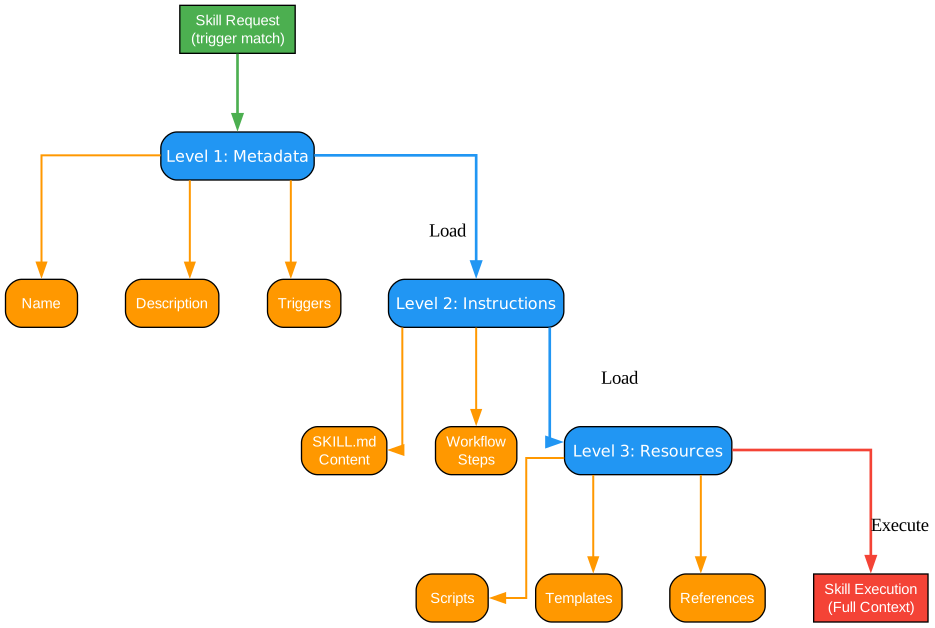
Understanding Skill Progressive Disclosure
The skill progressive disclosure diagram above illustrates how Claude Code loads and manages skills efficiently. This pattern is crucial for maintaining performance while providing access to extensive capabilities - loading only what’s needed, when it’s needed.
The Progressive Disclosure Pattern
Progressive disclosure is a design pattern that presents information incrementally, showing only what’s necessary at each stage of interaction. In Claude Code, this pattern prevents context window bloat - the problem of overwhelming the AI with too much information at once. Instead of loading all skill instructions simultaneously, skills are loaded on-demand.
The diagram shows the three-tier skill loading process. First, a skill registry maintains metadata about all available skills - their names, purposes, triggers, and file locations. This registry is lightweight and can be loaded quickly at startup. Second, when a skill is invoked, its core instructions are loaded - the essential prompts that define the skill’s behavior. Third, if the skill needs additional resources like templates or reference materials, those are loaded on demand.
Skill Registry Structure
The skill registry is a catalog of available skills with minimal metadata. Each entry includes the skill name, a brief description, trigger keywords, and the path to the skill definition file. The registry enables Claude to discover relevant skills without loading their full content.
For example, the Code Review skill registry entry might include: name “code-review”, description “Comprehensive code analysis for quality and security”, triggers [“review”, “analyze”, “check”], and path “skills/code-review/SKILL.md”. This minimal information allows Claude to determine when the skill is relevant without loading the full skill definition.
The registry also includes dependency information - what other skills or resources a skill requires. This enables Claude to load prerequisites before invoking a skill, ensuring all necessary context is available. The dependency graph ensures skills are loaded in the correct order.
On-Demand Loading
When Claude determines a skill is relevant to the current task, it loads the skill’s core instructions from the SKILL.md file. This file contains the detailed prompts, evaluation criteria, and output formats that define the skill’s behavior. Loading this file adds the skill’s instructions to Claude’s context.
The SKILL.md file follows a structured format that separates concerns. It begins with a description of the skill’s purpose and scope. It then defines the instructions Claude should follow when executing the skill. It specifies the expected input format and output format. Finally, it may reference additional resources that can be loaded if needed.
This on-demand loading ensures that Claude’s context window contains only relevant information. If you’re doing code review, only the Code Review skill is loaded - not the Documentation skill, the Refactor skill, or any other skills. This focused context improves response quality and reduces token usage.
Resource Loading
Some skills require additional resources beyond their core instructions. The Code Review skill might reference a checklist template for review findings. The Refactor skill might reference a catalog of refactoring patterns. The Blog Draft skill might reference style guidelines and templates.
These resources are loaded only when the skill needs them. The skill definition includes conditional logic that determines when to load resources. For example, the Code Review skill might load the finding template only when Claude is ready to output findings. This lazy loading minimizes context usage while ensuring necessary resources are available.
Resources are stored in separate files within the skill directory. This organization keeps the core skill definition focused while allowing extensive supporting materials. The repository demonstrates this pattern with each skill having a templates directory for output formats and a references directory for background information.
Context Management
Progressive disclosure is fundamentally about context management - ensuring Claude has the right information at the right time. Too little context leads to poor responses; too much context leads to confusion and wasted tokens. The skill system balances these concerns through careful information architecture.
The repository demonstrates context management best practices. Skills are scoped to specific tasks - the Code Review skill doesn’t try to also handle documentation. Skill instructions are concise - they provide guidance without overwhelming detail. Resources are loaded incrementally - only when their content is needed.
Key Insights
The progressive disclosure pattern demonstrates several important principles for AI system design. First, it shows that more information is not always better - focused context produces better results than comprehensive context. Second, it demonstrates the value of metadata - skill registries enable discovery without loading. Third, it shows the importance of lazy loading - defer work until it’s necessary.
The pattern also demonstrates separation of concerns. Each skill has a focused purpose, making it easier to understand, maintain, and improve. Skills can be combined for complex tasks, but each skill remains simple and focused. This modularity enables reuse and customization.
Practical Applications
Organizations can create custom skills following the progressive disclosure pattern. A Deployment skill might have core instructions for deployment procedures, with separate resources for different environments (development, staging, production). A Security skill might have core instructions for vulnerability assessment, with separate resources for different vulnerability types.
Teams can extend existing skills by adding custom resources. The Code Review skill can be enhanced with organization-specific checklists. The Documentation skill can be customized with company style guides. The progressive disclosure pattern ensures these extensions don’t impact performance until they’re needed.
Key Features Deep Dive
Comprehensive Tutorial Structure
Claude HowTo’s tutorial structure is designed for progressive learning. Each module builds on previous modules, creating a coherent learning journey from beginner to advanced topics. The structure includes:
- Conceptual explanations that teach the “why” behind features
- Practical examples that demonstrate the “how” of implementation
- Copy-paste templates that provide immediate value
- Best practices that guide proper usage
- Common pitfalls that help avoid mistakes
Production-Ready Templates
Every template in the repository is production-ready, meaning it can be used immediately in real projects. The templates include:
- Error handling for robust operation
- Configuration options for customization
- Documentation for understanding and maintenance
- Testing examples for validation
Multi-Language Support
The repository is available in three languages, making it accessible to global teams:
- English - Primary language with complete content
- Vietnamese - Full translation for Vietnamese developers
- Chinese - Full translation for Chinese developers
This multi-language support ensures teams can learn in their preferred language while maintaining consistency across the organization.
Active Development and Community
With 10,745 stars gained in a single week, Claude HowTo has demonstrated significant community interest. The repository is actively maintained with:
- Regular updates for new Claude Code features
- Community contributions and improvements
- Responsive issue handling
- Comprehensive documentation
Installation Guide
Prerequisites
Before using Claude HowTo templates, ensure you have:
- Claude Code installed - Follow Anthropic’s installation guide
- A Claude API key - Obtain from Anthropic’s console
- Git installed - For cloning the repository
- Basic terminal knowledge - For executing commands
Quick Start
- Clone the repository:
git clone https://github.com/luongnv89/claude-howto.git cd claude-howto - Choose your language: ```bash
For English
cd en
For Vietnamese
cd vi
For Chinese
cd zh
3. **Copy templates to your project:**
```bash
# Copy slash commands
cp -r 01-slash-commands/* ~/.claude/commands/

# Copy memory configuration
cp -r 02-memory/* ~/.claude/memory/

# Copy skills
cp -r 03-skills/* ~/.claude/skills/
- Start using immediately:
# In Claude Code
/commit    # Generate commit message
/review    # Review code
/optimize  # Optimize performance
Advanced Setup
For advanced features like plugins and hooks:
- Install plugins:
cp -r 07-plugins/* ~/.claude/plugins/ - Configure hooks:
cp -r 06-hooks/* ~/.claude/hooks/ - Set up MCP servers:
# Follow instructions in 05-mcp/
Usage Examples
Using Slash Commands
Slash commands are the simplest way to get started:
# Generate a conventional commit message
/commit

# Create a pull request with description
/pr

# Optimize code performance
/optimize

# Generate API documentation
/generate-api-docs
Using Skills
Skills provide more comprehensive capabilities:
# Load the code review skill
> Use the code-review skill to analyze this file

# Load the refactor skill
> Use the refactor skill to improve this function

# Load the documentation skill
> Use the doc-generator skill to document this module
Using Subagents
Subagents provide specialized expertise:
# Invoke the security reviewer
> Act as the security-reviewer subagent and audit this code

# Invoke the test engineer
> Act as the test-engineer subagent and create tests for this module

# Invoke the documentation writer
> Act as the documentation-writer subagent and create README
Using Plugins
Plugins combine multiple capabilities:
# Use the PR review plugin
> Use the pr-review plugin to analyze this pull request

# Use the DevOps plugin
> Use the devops-automation plugin to set up deployment

# Use the documentation plugin
> Use the documentation plugin to generate project docs
Conclusion
Claude HowTo represents a significant contribution to the Claude Code ecosystem. By providing a structured learning path, production-ready templates, and comprehensive documentation, it enables developers to harness the full power of Claude Code efficiently.
The repository’s rapid growth - 10,745 stars in one week - demonstrates the immediate value it provides to developers. Whether you’re a beginner looking to get started with Claude Code or an advanced user seeking to optimize your workflow, Claude HowTo has something to offer.
The modular architecture, progressive disclosure patterns, and comprehensive examples make this repository an essential resource for any team using Claude Code. By following the learning path and implementing the templates, teams can significantly improve their development velocity and code quality.
Repository: https://github.com/luongnv89/claude-howto
| Stars: 22,950+ | Forks: 2,757+ | Language: Multi-language support |
Related Posts
- AgentSkillOS: Skill Orchestration System
- MattPocock Skills: AI Agent Workflows
- DESIGN-md: AI-Powered Design Systems