Google AI Edge Gallery: On-Device AI for Mobile
Google AI Edge Gallery is a revolutionary mobile app that brings the power of Large Language Models (LLMs) directly to your smartphone. Experience high-performance Generative AI completely offline, with total privacy and lightning-fast responses.
What is Google AI Edge Gallery?
AI Edge Gallery is Google’s premier destination for running open-source LLMs on mobile devices. The app allows you to experience cutting-edge AI capabilities without sending your data to any server - everything runs locally on your device hardware.
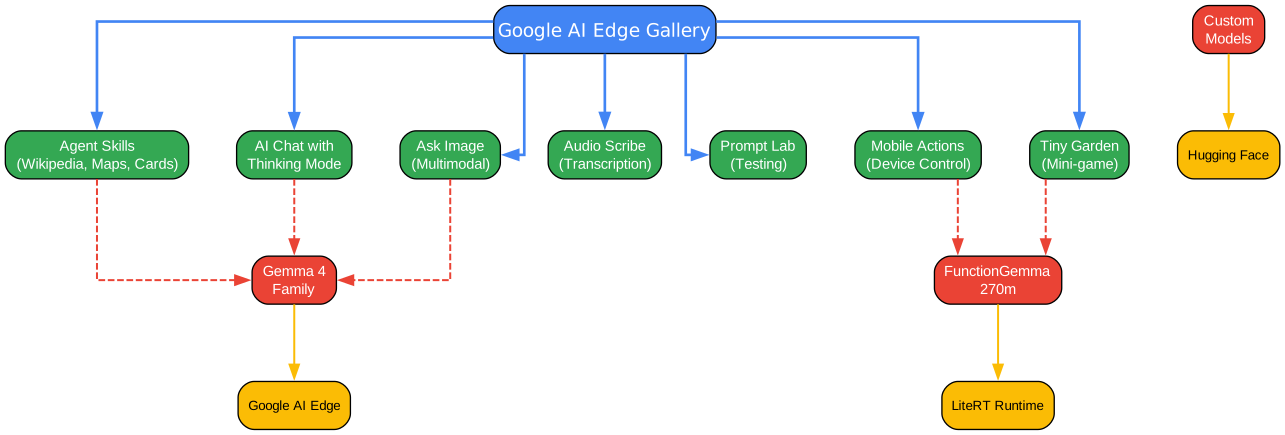
Now Featuring: Gemma 4
The latest version brings official support for the newly released Gemma 4 family, allowing you to test the cutting edge of on-device AI with advanced reasoning, logic, and creative capabilities.
Core Features
Agent Skills
Transform your LLM from a conversationalist into a proactive assistant. The Agent Skills tile augments model capabilities with:
- Wikipedia Integration: Fact-grounding for accurate responses
- Interactive Maps: Location-aware assistance
- Rich Visual Summary Cards: Beautiful formatted outputs
- Modular Skills: Load custom skills from URLs or browse community contributions
AI Chat with Thinking Mode
Engage in fluid, multi-turn conversations and toggle the new Thinking Mode to peek “under the hood.” This feature shows the model’s step-by-step reasoning process, perfect for understanding complex problem-solving.
Note: Thinking Mode currently works with supported models, starting with the Gemma 4 family.
Ask Image
Use multimodal power to:
- Identify objects in photos
- Solve visual puzzles
- Get detailed descriptions using your device’s camera or photo gallery
Audio Scribe
Transcribe and translate voice recordings into text in real-time using high-efficiency on-device language models.
Prompt Lab
A dedicated workspace to test different prompts and single-turn use cases with granular control over model parameters like:
- Temperature
- Top-k sampling
- Maximum output tokens
Mobile Actions
Unlock offline device controls and automated tasks powered entirely by a finetune of FunctionGemma 270m.
Tiny Garden
A fun, experimental mini-game that uses natural language to plant and harvest a virtual garden using a finetune of FunctionGemma 270m.
Model Management and Benchmark
Gallery is a flexible sandbox for a wide variety of open-source models:
- Download models from the curated list
- Load your own custom models
- Manage your model library effortlessly
- Run benchmark tests to understand performance on your specific hardware
On-Device AI Processing Flow
All AI processing happens directly on your device, ensuring complete privacy:
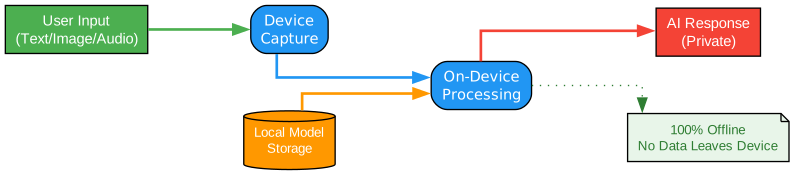
- User Input: Text, image, or audio input
- Device Capture: Local processing on your hardware
- On-Device Processing: Model inference runs locally
- AI Response: Private, instant results
100% On-Device Privacy: No internet required, ensuring total privacy for your prompts, images, and sensitive data.
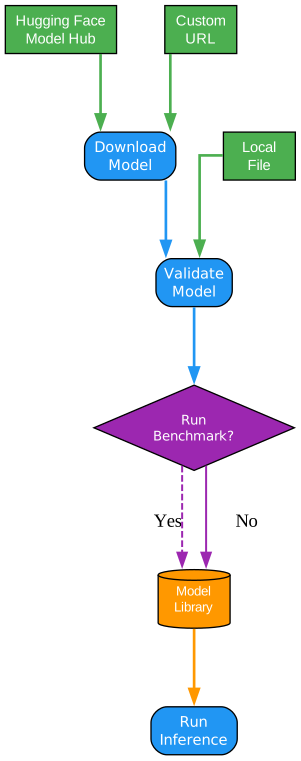
Model Management Workflow
| Source | Description |
|---|---|
| Hugging Face | Browse and download from the model hub |
| Custom URL | Load models from custom URLs |
| Local File | Import models from device storage |
Technology Stack
Google AI Edge Gallery is built on:
| Technology | Purpose |
|---|---|
| Google AI Edge | Core APIs and tools for on-device ML |
| LiteRT | Lightweight runtime for optimized model execution |
| Hugging Face Integration | Model discovery and download |
Installation
Requirements
- Android: Android 12 and up
- iOS: iOS 17 and up
Download
Install the app from your preferred store:
| Platform | Link |
|---|---|
| Google Play | AI Edge Gallery |
| App Store | AI Edge Gallery |
| APK | Latest Release |
Quick Start
- Download and install the app
- Open the app and explore the features
- Download a model from the list or load your own
- Start chatting with AI - completely offline!
For detailed installation instructions (including for corporate devices) and a full user guide, visit the Project Wiki.
Supported Models
The app supports a wide variety of open-source models:
- Gemma 4 Family: Latest generation with advanced reasoning
- FunctionGemma 270m: Optimized for device control and automation
- Custom Models: Load your own LiteRT-compatible models
Development
For developers interested in building locally:
# Clone the repository
git clone https://github.com/google-ai-edge/gallery.git
cd gallery

# Follow development instructions in DEVELOPMENT.md
Check out the development notes for detailed build instructions.
Privacy and Security
Google AI Edge Gallery prioritizes your privacy:
- All model inferences happen on your device
- No internet connection required for core features
- Your prompts, images, and data never leave your device
- Complete offline functionality
Feedback
This is an experimental Beta release. Your input is crucial:
- Found a bug? Report it here
- Have an idea? Suggest a feature
License
Licensed under the Apache License, Version 2.0. See the LICENSE file for details.
Useful Links
Conclusion
Google AI Edge Gallery represents a significant step forward in bringing powerful AI capabilities to mobile devices. With features like Agent Skills, Thinking Mode, and complete offline functionality, it demonstrates the future of on-device AI - private, fast, and accessible to everyone.
For more information and updates, visit the official GitHub repository.
Related Posts
- Deep-Live-Cam: Real-Time Face Swap
- OpenScreen: Free Screen Recording Studio
- Hermes Agent: Self-Improving AI Agent


