Google LiteRT-LM: Production-Ready Edge LLM Inference Framework
In the rapidly evolving landscape of artificial intelligence, deploying Large Language Models (LLMs) on edge devices has become a critical challenge. Google’s LiteRT-LM emerges as a production-ready, high-performance, open-source inference framework specifically designed to bring the power of LLMs to edge devices. With over 2,800 stars on GitHub and growing rapidly, this framework powers on-device GenAI experiences across Chrome, Chromebook Plus, Pixel Watch, and numerous other Google products.
What is LiteRT-LM?
LiteRT-LM is Google’s answer to the growing demand for running sophisticated AI models directly on consumer devices without relying on cloud infrastructure. This framework enables developers to deploy state-of-the-art language models on smartphones, tablets, wearables, and IoT devices while maintaining optimal performance and minimal latency.
The framework supports a wide range of models including Gemma (including Gemma 4), Llama, Phi-4, Qwen, and custom models in the specialized .litertlm format. What sets LiteRT-LM apart is its production-grade reliability, having been battle-tested in Google’s own products serving millions of users worldwide.
Architecture Overview
Understanding the Core Architecture
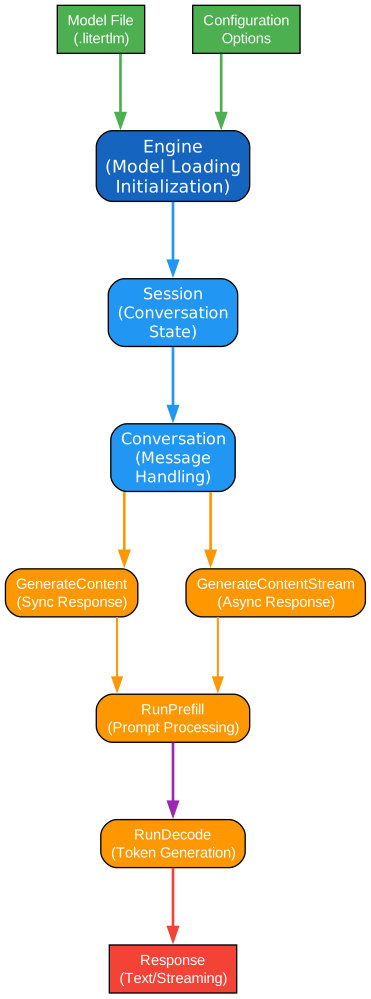
The architecture diagram above illustrates the fundamental components and their interactions within the LiteRT-LM framework. This design represents years of production experience distilled into a clean, modular architecture that balances performance with developer ergonomics.
Engine Class - The Foundation
The Engine class serves as the cornerstone of LiteRT-LM’s architecture, responsible for managing the entire lifecycle of LLM models. When you initialize an Engine instance, it handles critical tasks such as:
- Loading and validating model weights from .litertlm files
- Initializing the tokenizer (typically SentencePiece-based) for text processing
- Allocating GPU/NPU memory resources based on available hardware
- Configuring the inference backend (CPU, GPU, or NPU) optimally
The Engine maintains a singleton pattern for model instances, ensuring efficient memory usage when multiple components need access to the same model. This design choice reflects production requirements where resource constraints are paramount.
Session Class - Stateful Interactions
The Session class provides stateful conversation management, hosting internal state for each interaction. This separation between Engine and Session is crucial for multi-turn conversations where context must be preserved:
- Maintains conversation history across multiple turns
- Manages the KV-cache for efficient token generation
- Handles prefill and decode phases separately for optimization
- Supports concurrent sessions from a single Engine instance
Each Session operates independently, allowing applications to serve multiple users or maintain separate conversation contexts without interference. This architecture enables sophisticated use cases like chatbots serving thousands of concurrent users.
Conversation Class - Chat-Style Interface
The Conversation class abstracts the complexity of chat-style interactions, providing a high-level API that developers can easily integrate:
- Manages message history with role-based formatting (user, assistant, system)
- Supports async Flow patterns for non-blocking operations
- Handles tool calling and function execution seamlessly
- Provides streaming callbacks for real-time response delivery
Key Operations Breakdown
The framework exposes several core operations that map directly to LLM inference phases:
- GenerateContent() - Complete response generation in a single call
- GenerateContentStream() - Streaming responses via non-blocking callbacks
- RunPrefill() - Process input tokens and populate KV-cache
- RunDecode() - Generate output tokens autoregressively
- RunTextScoring() - Evaluate text quality for specific use cases
Model and Tokenizer Integration
At the lowest level, the Model component works with the Tokenizer to transform raw text into model inputs. The .litertlm format encapsulates both model weights and tokenizer configuration, ensuring compatibility and reducing deployment complexity. This bundled approach eliminates version mismatches between models and tokenizers that often plague production deployments.
Multi-Language API Support
Comprehensive Language Bindings for Every Platform
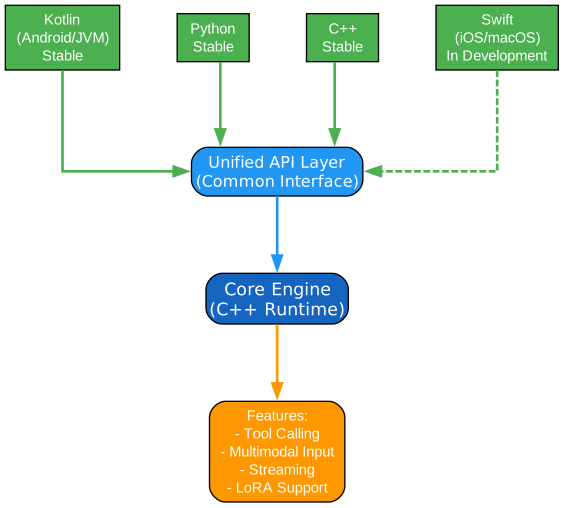
LiteRT-LM provides first-class API support across multiple programming languages, ensuring developers can integrate LLM capabilities regardless of their preferred technology stack. This multi-language approach reflects Google’s commitment to making edge AI accessible to the broadest possible developer community.
Kotlin API - Production-Ready Android Development
The Kotlin API represents the most mature and battle-tested binding, specifically optimized for Android application development:
- Seamless integration with Android lifecycle management
- Coroutines-based async patterns for responsive UIs
- Direct interoperability with JVM ecosystem libraries
- Production deployment in Chrome, Chromebook Plus, and Pixel Watch
Kotlin developers benefit from type-safe APIs that leverage language features like extension functions and data classes. The API handles complex threading scenarios automatically, ensuring smooth user experiences even during intensive inference operations. For Android developers, this means LLM capabilities can be added to existing apps with minimal code changes.
Python API - Rapid Prototyping and Scripting
The Python API serves as the primary interface for prototyping, experimentation, and scripting workflows:
- Intuitive API design following Python conventions
- Rich integration with NumPy, Pandas, and ML ecosystems
- Jupyter notebook support for interactive development
- CLI tools for quick model testing and deployment
Python’s dynamic nature makes it ideal for exploring model capabilities, testing prompts, and developing proof-of-concept applications. The API maintains consistency with popular frameworks like Hugging Face Transformers, reducing the learning curve for developers already familiar with the ML ecosystem.
C++ API - High-Performance Native Development
The C++ API provides maximum performance and control for native application development:
- Zero-overhead abstractions for performance-critical applications
- Direct memory management for resource-constrained environments
- Cross-platform compilation for embedded systems
- Integration with existing C++ codebases without overhead
This API is particularly valuable for game engines, embedded systems, and applications where every millisecond of latency matters. The C++ implementation forms the foundation upon which other language bindings are built, ensuring consistent behavior across all platforms.
Swift API - Native iOS and macOS Development
Currently in active development, the Swift API brings LLM capabilities to Apple’s ecosystem:
- Native Swift idioms and async/await patterns
- SwiftUI integration for declarative UI development
- Core ML interoperability for hybrid inference strategies
- Metal backend support for GPU acceleration
While still maturing, the Swift API demonstrates Google’s commitment to platform parity, ensuring iOS developers can leverage the same powerful inference capabilities as their Android counterparts.
Language Selection Guidance
Choosing the right API depends on your use case:
| Language | Best For | Maturity | Platform Focus |
|---|---|---|---|
| Kotlin | Android apps, JVM backends | Stable | Android, JVM |
| Python | Prototyping, scripting, research | Stable | Cross-platform |
| C++ | Games, embedded, performance-critical | Stable | Native |
| Swift | iOS, macOS apps | In Development | Apple platforms |
Hardware Acceleration Backends
Optimized Performance Across Diverse Hardware
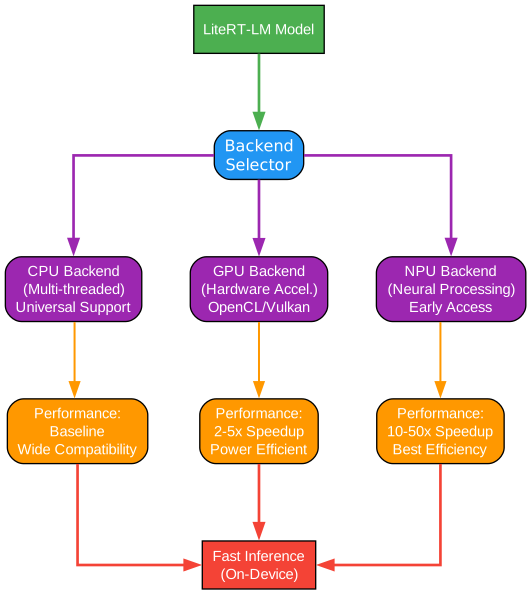
LiteRT-LM’s hardware acceleration architecture enables developers to leverage the full computational power of modern devices. The framework abstracts hardware complexity while providing fine-grained control when needed, supporting three primary acceleration backends.
CPU Backend - Universal Compatibility
The CPU backend provides the foundation for universal compatibility across all platforms:
- Multi-threaded execution using optimized BLAS libraries
- SIMD vectorization (AVX, NEON) for parallel computation
- Dynamic batch sizing based on available cores
- Graceful fallback when specialized hardware is unavailable
While CPU inference may seem less performant than GPU alternatives, modern mobile CPUs with 8+ cores can achieve impressive throughput for smaller models. The CPU backend excels at prefill operations where parallel processing of input tokens benefits from multiple cores. Additionally, CPU inference offers predictable latency characteristics important for real-time applications.
GPU Backend - Hardware-Accelerated Inference
The GPU backend harnesses graphics processors for dramatically faster inference:
- OpenCL support for cross-vendor compatibility
- Vulkan backend for modern mobile GPUs
- Metal integration for Apple devices
- WebGL/WebGPU for browser-based inference
GPU acceleration shines during the decode phase, where sequential token generation benefits from the GPU’s ability to handle matrix operations efficiently. For models with billions of parameters, GPU acceleration can provide 5-10x speedup compared to CPU-only inference. The framework automatically manages GPU memory, handling model loading, intermediate activations, and KV-cache storage.
NPU Backend - Neural Processing Unit Support
The NPU backend represents the cutting edge of edge AI acceleration (currently in Early Access):
- Qualcomm Hexagon DSP integration for Snapdragon devices
- Apple Neural Engine support for A-series and M-series chips
- Google Edge TPU compatibility for specialized hardware
- Samsung NPU support for Exynos processors
NPUs are purpose-built for neural network operations, offering superior energy efficiency compared to general-purpose processors. This makes NPU acceleration ideal for battery-powered devices where power consumption is critical. Early benchmarks show NPU inference can achieve similar throughput to GPU while consuming significantly less power.
Backend Selection Strategy
The framework provides intelligent backend selection:
# Automatic backend selection
engine = litertlm.Engine(model_path)  # Auto-selects best available

# Explicit backend specification
engine = litertlm.Engine(model_path, backend="gpu")  # Force GPU
engine = litertlm.Engine(model_path, backend="npu")   # Force NPU (early access)
Performance Considerations
| Backend | Latency | Power | Availability | Best Use Case |
|---|---|---|---|---|
| CPU | Moderate | High | Universal | Development, fallback |
| GPU | Low | Medium | Most devices | Production apps |
| NPU | Very Low | Very Low | Select devices | Battery-critical apps |
Tool Calling and Function Calling
Enabling Agentic AI on Edge Devices
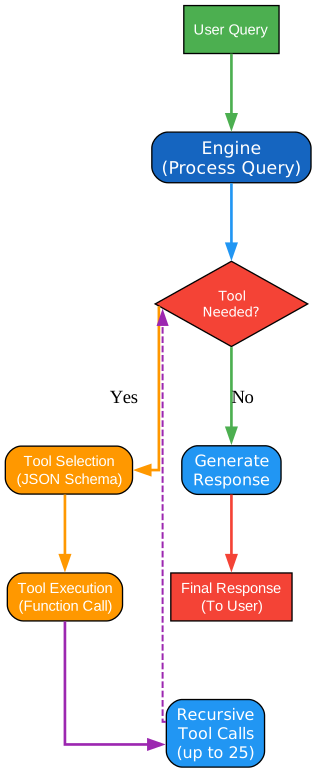
Tool calling represents one of LiteRT-LM’s most powerful features, enabling LLMs to interact with external systems and perform real-world actions. This capability transforms static language models into dynamic agents capable of executing complex workflows.
Understanding Tool Calling Architecture
The tool calling workflow follows a sophisticated pattern that balances flexibility with safety:
- Tool Registration - Developers register Python functions or native methods as available tools
- Prompt Processing - The model receives user input along with available tool definitions
- Tool Selection - The model determines which tool(s) to call based on context
- Parameter Extraction - Structured parameters are extracted from natural language
- Execution - The tool is executed with extracted parameters
- Result Integration - Tool outputs are fed back to the model for response generation
Python Function-to-Tool Conversion
LiteRT-LM simplifies tool creation by automatically converting Python functions:
from litert_lm import tools

@tools.tool
def get_weather(location: str, unit: str = "celsius") -> dict:
    """Get current weather for a location.

    Args:
        location: City name or coordinates
        unit: Temperature unit (celsius or fahrenheit)

    Returns:
        Weather data including temperature, conditions, humidity
    """
    # Implementation here
    return {"temperature": 22, "conditions": "sunny", "humidity": 45}

# Register with engine
engine.register_tool(get_weather)
The framework automatically generates JSON schemas from function signatures, enabling the model to understand tool capabilities without manual specification.
Automatic Tool Execution Loop
The framework implements an intelligent execution loop that handles complex multi-step operations:
- Supports up to 25 recurring tool calls in a single session
- Maintains conversation context across tool invocations
- Handles tool errors gracefully with retry mechanisms
- Provides visibility into the reasoning process
Safety and Control Mechanisms
Tool calling includes several safety features:
- Human-in-the-loop - Optional approval prompts before execution
- Sandboxed execution - Tools run in isolated environments
- Rate limiting - Prevents runaway tool calls
- Audit logging - Complete record of all tool invocations
Real-World Applications
Tool calling enables sophisticated edge AI applications:
| Application | Tools Used | Benefit |
|---|---|---|
| Smart Home Control | Device APIs, sensors | Voice-controlled automation |
| Personal Assistant | Calendar, email, contacts | Contextual task management |
| Code Assistant | File system, git, terminal | On-device code generation |
| Travel Planner | Maps, booking APIs, weather | Offline-capable planning |
Cross-Platform Deployment
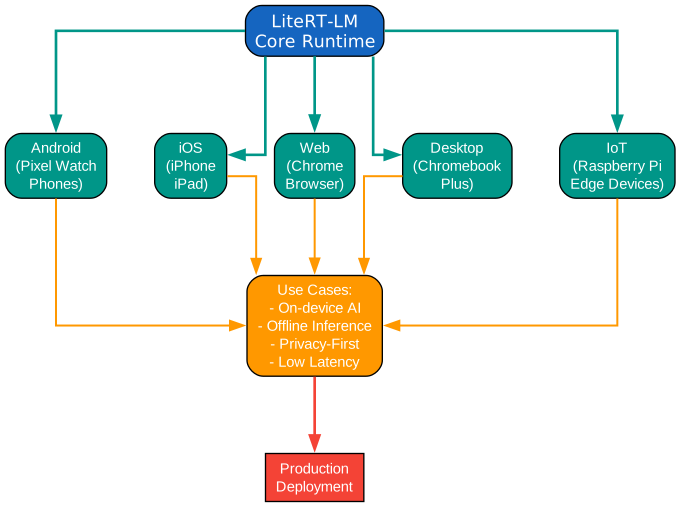
Universal Deployment Across Devices
LiteRT-LM’s cross-platform architecture enables developers to write once and deploy everywhere, from powerful desktop workstations to resource-constrained IoT devices. This universality stems from a carefully designed abstraction layer that adapts to each platform’s unique characteristics.
Mobile Platforms - Android and iOS
Mobile deployment represents the primary use case for LiteRT-LM, with comprehensive support for both major platforms:
Android:
- Native Kotlin/Java integration via AAR packages
- GPU acceleration through RenderScript and Vulkan
- NPU support on Qualcomm and Samsung devices
- Background service support for always-available AI
iOS:
- Swift framework with async/await patterns
- Metal backend for GPU acceleration
- Core ML integration for hybrid inference
- App Store compliant deployment
Mobile applications benefit from LiteRT-LM’s efficient memory management, enabling models to run alongside other apps without causing system instability. The framework handles low-memory conditions gracefully, releasing resources when the system requests them.
Web Platform - Browser-Based AI
Web deployment brings LLM capabilities directly to browsers:
- WebAssembly compilation for near-native performance
- WebGPU backend for GPU acceleration
- Service Worker integration for offline capability
- Progressive Web App (PWA) support
Browser-based inference eliminates app installation barriers while maintaining user privacy by processing data locally. Chrome’s integration demonstrates production readiness, serving millions of users with on-device AI features.
Desktop Platforms - Linux, macOS, Windows
Desktop deployment offers maximum flexibility for development and production:
- Native library packages for each platform
- CUDA support for NVIDIA GPUs on Linux/Windows
- Metal support for Apple Silicon Macs
- Direct integration with desktop application frameworks
Desktop applications can leverage significantly more computational resources than mobile, enabling larger models and more complex workflows. The framework scales automatically based on available hardware.
IoT and Embedded - Raspberry Pi and Beyond
Edge deployment extends to resource-constrained devices:
- ARM Cortex optimization for embedded processors
- Quantized model support for reduced memory footprint
- Headless operation for autonomous systems
- Real-time inference for time-sensitive applications
Raspberry Pi deployment demonstrates LiteRT-LM’s efficiency, running 2B parameter models on devices with just 4GB RAM. This opens possibilities for smart home hubs, industrial sensors, and autonomous robots.
Platform-Specific Optimizations
| Platform | Key Optimization | Memory Model | Typical Model Size |
|---|---|---|---|
| Android | NPU acceleration | Shared memory | 2B-7B params |
| iOS | Metal backend | Unified memory | 2B-7B params |
| Web | WebGPU | WASM heap | 1B-3B params |
| Desktop | CUDA/Metal | System RAM | 7B-13B params |
| IoT | Quantization | Limited RAM | 1B-2B params |
Installation and Quick Start
Getting started with LiteRT-LM is straightforward, with multiple installation options to suit different development workflows.
CLI Installation
The fastest way to start experimenting with LiteRT-LM is through the command-line interface:
# Install using uv (recommended)
uv tool install litert-lm

# Run a model directly
litert-lm run \
  --from-huggingface-repo=google/gemma-3n-E2B-it-litert-lm \
  gemma-3n-E2B-it-int4 \
  --prompt="What is the capital of France?"
Python Installation
For Python development, install the package via pip:
pip install litert-lm
Android Integration
Add the dependency to your build.gradle:
dependencies {
    implementation 'com.google.ai.edge:litert-lm:1.0.0'
}
Model Preparation
LiteRT-LM uses the specialized .litertlm format for optimized inference:
# Convert from Hugging Face
litert-lm convert --from-huggingface-repo=google/gemma-2b-it \
  --output=gemma-2b-it.litertlm

# Or download pre-converted models
litert-lm download google/gemma-3n-E2B-it-litert-lm
Code Examples
Python Example - Basic Generation
from litert_lm import Engine

# Initialize the engine
engine = Engine(model_path="gemma-2b-it.litertlm")

# Create a session for conversation
session = engine.create_session()

# Generate response
response = session.generate_content("Explain quantum computing in simple terms")
print(response.text)

# Streaming generation
for chunk in session.generate_content_stream("Tell me a story"):
    print(chunk.text, end="", flush=True)
Python Example - Tool Calling
from litert_lm import Engine, tools

@tools.tool
def search_web(query: str) -> str:
    """Search the web for information."""
    # Implementation
    return f"Results for: {query}"

@tools.tool
def calculate(expression: str) -> float:
    """Evaluate a mathematical expression."""
    return eval(expression)

# Register tools
engine = Engine(model_path="gemma-2b-it.litertlm")
engine.register_tools([search_web, calculate])

# Model can now use tools
session = engine.create_session()
response = session.generate_content(
    "What's the weather in Paris and convert 20 Celsius to Fahrenheit?"
)
Kotlin Example - Android Integration
import com.google.ai.edge.litertlm.Engine
import com.google.ai.edge.litertlm.Session

// Initialize engine
val engine = Engine.Builder(modelPath = "gemma-2b-it.litertlm")
    .setBackend(Engine.Backend.GPU)
    .build()

// Create session
val session = engine.createSession()

// Generate response
lifecycleScope.launch {
    val response = session.generateContent("Hello, how are you?")
    textView.text = response.text
}

// Streaming with Flow
session.generateContentStream("Tell me a joke")
    .collect { chunk ->
        withContext(Dispatchers.Main) {
            textView.append(chunk.text)
        }
    }
C++ Example - Native Integration
#include "litert_lm/engine.h"
#include "litert_lm/session.h"

// Initialize engine
auto engine = litert_lm::Engine::Create("gemma-2b-it.litertlm");
if (!engine.ok()) {
    std::cerr << "Failed to create engine: " << engine.status() << std::endl;
    return;
}

// Create session
auto session = (*engine)->CreateSession();
if (!session.ok()) {
    std::cerr << "Failed to create session: " << session.status() << std::endl;
    return;
}

// Generate content
std::string prompt = "What is machine learning?";
auto result = (*session)->GenerateContent(prompt);
if (result.ok()) {
    std::cout << "Response: " << *result << std::endl;
}
Use Cases and Production Deployment
Production Deployments
LiteRT-LM powers AI experiences across Google’s product portfolio:
Chrome Browser
- Smart compose for email and documents
- Translation assistance
- Content summarization
- Privacy-preserving AI features
Chromebook Plus
- Enhanced productivity features
- Offline-capable AI assistants
- Real-time collaboration tools
- Intelligent notifications
Pixel Watch
- On-device voice recognition
- Contextual suggestions
- Health insights generation
- Quick response generation
Google AI Edge Gallery
- Demo application showcasing capabilities
- Model exploration and testing
- Performance benchmarking
- Developer reference implementation
Real-World Applications
Smart Home Assistants Local voice processing without cloud dependency enables faster responses and enhanced privacy. LiteRT-LM processes voice commands entirely on-device, from speech recognition to action execution.
Mobile Code Editors AI-powered code completion and generation running locally provides instant suggestions without network latency. Developers can write code faster while maintaining privacy of proprietary codebases.
Healthcare Applications On-device processing of medical queries ensures sensitive health data never leaves the device. LiteRT-LM enables symptom checking, medication reminders, and health insights with complete data sovereignty.
Industrial IoT Edge deployment on factory floors enables real-time anomaly detection and predictive maintenance without network connectivity requirements. Models run on industrial controllers with limited resources.
Performance Benchmarking
LiteRT-LM provides comprehensive performance metrics for optimization:
Time-to-First-Token (TTFT) Measures latency from input to first output token, critical for perceived responsiveness. GPU backends typically achieve TTFT under 100ms for 2B models.
Prefill Tokens per Second Measures input processing speed during the prefill phase. Higher values indicate faster context processing, important for long conversations.
Decode Tokens per Second Measures generation speed during the decode phase. This metric directly impacts user experience for long-form generation.
Memory Footprint Tracks RAM and VRAM usage during inference. Efficient memory management enables larger models on constrained devices.
Conclusion
Google’s LiteRT-LM represents a significant milestone in bringing production-grade LLM inference to edge devices. Its multi-language API support, hardware acceleration backends, and cross-platform deployment capabilities make it an essential tool for developers building the next generation of AI-powered applications.
The framework’s production heritage, powering millions of devices through Chrome, Chromebook Plus, and Pixel Watch, provides confidence in its reliability and performance. With comprehensive documentation, active development, and growing community support, LiteRT-LM is positioned to become the standard for edge LLM deployment.
Whether you’re building mobile apps, web applications, desktop software, or IoT solutions, LiteRT-LM provides the tools needed to bring AI capabilities directly to users while maintaining privacy, reducing latency, and eliminating cloud dependency.
Related Posts
- Andrej Karpathy Skills: LLM Coding Guidelines
- AgentSkillOS: Skill Orchestration System
- MattPocock Skills: AI Agent Workflows

