Goose: Open Source AI Agent That Codes, Tests, and Executes
In the rapidly evolving landscape of AI-powered developer tools, Goose stands out as a groundbreaking open-source AI agent that goes far beyond simple code suggestions. Built by Block (formerly Square), Goose is an extensible, autonomous AI agent that can install packages, execute code, edit files, run tests, and debug issues - all while working with any Large Language Model (LLM) of your choice.
What is Goose?
Goose is a developer-focused AI agent written in Rust, designed to be your autonomous coding companion. Unlike traditional AI coding assistants that merely suggest code snippets, Goose can actively participate in your development workflow by:
- Installing packages and dependencies - Goose can manage your project’s dependencies
- Executing code and commands - Run shell commands and see results in real-time
- Editing files intelligently - Make contextually aware code modifications
- Running tests - Execute test suites and interpret results
- Debugging issues - Analyze errors and propose fixes
With over 41,000 stars on GitHub and growing rapidly (+6,400 stars this week alone), Goose has captured the attention of developers worldwide who are looking for a more capable AI coding partner.
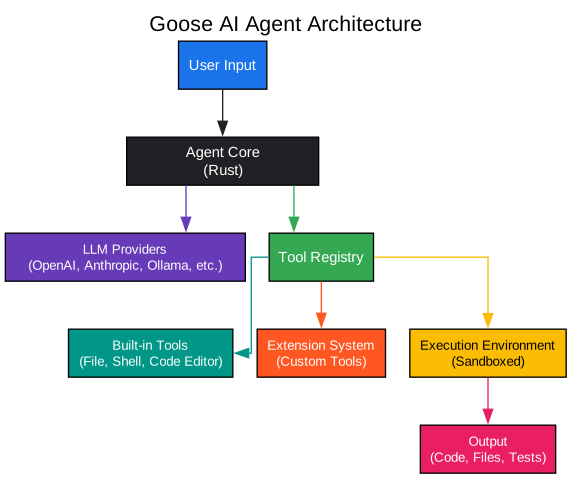
Understanding the Architecture
The architecture diagram above illustrates the core components and their interactions within the Goose AI agent system. Let’s break down each component in detail:
User Input Layer
The user input layer serves as the primary interface between developers and the Goose agent. This layer accepts natural language commands, code snippets, or task descriptions from users. The input can range from simple requests like “fix the failing test” to complex multi-step operations such as “refactor the authentication module and update all related tests.” The layer handles input parsing, validation, and initial intent recognition before passing the request to the agent core.
Agent Core (Rust)
At the heart of Goose lies the Agent Core, implemented in Rust for optimal performance and memory safety. This component is responsible for:
- Task Planning: Breaking down complex requests into executable steps
- Context Management: Maintaining conversation history and project state
- Decision Making: Determining which tools to invoke and in what order
- Error Handling: Gracefully recovering from failures and retrying operations
The Rust implementation ensures that Goose remains responsive even when handling large codebases or complex operations. The language’s zero-cost abstractions and fearless concurrency model allow Goose to parallelize operations where possible, significantly improving throughput.
LLM Providers
Goose supports multiple LLM backends, giving developers the flexibility to choose their preferred model:
- OpenAI: GPT-4 and GPT-4 Turbo for state-of-the-art reasoning
- Anthropic: Claude models for nuanced code understanding
- Ollama: Local model support for privacy-sensitive environments
- Custom Providers: Extensible architecture allows integration with any OpenAI-compatible API
This multi-provider approach ensures that Goose can adapt to different organizational requirements, whether that means using cloud-based models for maximum capability or local models for data privacy.
Tool Registry
The tool registry is Goose’s extensibility backbone. It maintains a catalog of available tools and their capabilities, enabling the agent core to discover and invoke appropriate tools for each task. The registry implements:
- Dynamic Tool Loading: Tools can be added at runtime
- Capability Matching: Tools are matched to tasks based on their declared capabilities
- Permission Management: Fine-grained control over which tools can be used
- Version Control: Support for multiple versions of the same tool
Built-in Tools
Goose comes with a comprehensive set of built-in tools that cover common development tasks:
- File System Tool: Read, write, create, and delete files with intelligent path handling
- Shell Command Tool: Execute terminal commands with proper sandboxing
- Code Editor Tool: Make precise code modifications with syntax awareness
These tools are implemented with safety in mind, including features like dry-run modes, confirmation prompts for destructive operations, and automatic backups.
Extension System
The extension system allows developers to create custom tools tailored to their specific workflows. Extensions can be written in any language and communicate with Goose through a well-defined protocol. This enables integration with:
- Custom build systems
- Proprietary testing frameworks
- Internal deployment pipelines
- Specialized code generators
Execution Environment
All tool executions happen within a sandboxed environment that provides:
- Isolation: Operations are contained to prevent unintended side effects
- Resource Limits: CPU, memory, and time limits prevent runaway operations
- Audit Logging: All operations are logged for debugging and compliance
- Rollback Support: Changes can be undone if needed
Output Layer
The output layer presents results to users in a clear, actionable format. This includes:
- Code changes with diff visualization
- Test results with failure analysis
- Command outputs with error highlighting
- Progress indicators for long-running operations
How Goose Processes Tasks

Understanding the Task Processing Workflow
The workflow diagram above demonstrates how Goose processes and executes tasks through a sophisticated multi-stage pipeline. Each stage is designed to maximize accuracy while maintaining developer control.
Stage 1: Receive Task
The workflow begins when a developer submits a task to Goose. This could be through:
- Command-line interface with natural language input
- IDE integration with context-aware suggestions
- API calls for automation scenarios
- File-based input for batch processing
The task receiver validates the input, checks for required context, and queues the task for processing. It also handles task prioritization when multiple requests are pending.
Stage 2: Parse and Understand
In this critical stage, Goose employs its LLM backend to:
- Intent Classification: Determine the type of task (bug fix, feature addition, refactoring, etc.)
- Entity Extraction: Identify files, functions, variables, and other code entities mentioned
- Context Gathering: Collect relevant code context from the project
- Ambiguity Resolution: Ask clarifying questions when the request is unclear
The understanding phase uses a combination of static analysis and LLM reasoning to build a comprehensive mental model of what needs to be done.
Stage 3: Plan Actions
Once the task is understood, Goose creates an execution plan:
- Step Sequencing: Determine the order of operations
- Dependency Analysis: Identify which steps depend on others
- Risk Assessment: Flag potentially destructive operations
- Alternative Paths: Prepare fallback strategies if primary approach fails
The planning stage produces a directed acyclic graph (DAG) of actions that can be executed in an optimal order.
Stage 4: Execute Tools
With a plan in place, Goose begins executing tools:
- Sequential Execution: Steps that depend on previous results
- Parallel Execution: Independent steps run concurrently
- Progress Reporting: Real-time updates on execution status
- Intermediate Validation: Check results after each step
Each tool execution is monitored for success, and results are captured for verification.
Stage 5: Verify Results
After execution, Goose verifies that the task was completed successfully:
- Test Execution: Run relevant tests to validate changes
- Static Analysis: Check for code quality issues
- Type Checking: Ensure type safety where applicable
- Diff Review: Present changes for human review
If verification fails, Goose analyzes the failure and determines whether to retry with a different approach.
Stage 6: Iterate or Complete
The final stage handles two outcomes:
- Success: Present results to the user with summary of changes
- Failure: Either retry with modified approach or escalate to user
The feedback loop (shown as dashed line) allows Goose to learn from failures and adapt its approach. This iterative process continues until the task is complete or Goose determines it needs human intervention.
Key Features
1. Multi-LLM Support
Goose works with virtually any LLM provider. Whether you prefer OpenAI’s GPT-4, Anthropic’s Claude, or running local models through Ollama, Goose adapts to your infrastructure preferences.
# Configure your preferred LLM
goose configure --provider openai --model gpt-4
# Or use a local model
goose configure --provider ollama --model llama2
2. Autonomous Execution
Unlike passive code assistants, Goose can execute commands and see the results. This enables:
- Running tests and interpreting failures
- Installing dependencies and verifying installation
- Executing build scripts and fixing compilation errors
- Running linters and addressing style issues
3. Safe Sandboxed Environment
All operations run in a controlled environment with:
- Configurable permission levels
- Dry-run modes for previewing changes
- Automatic backups before modifications
- Rollback capabilities for undoing changes
4. Extensible Tool System

Understanding the Extension Model
The extension model diagram illustrates how Goose’s plugin architecture enables developers to extend its capabilities. This design follows the Unix philosophy of doing one thing well, with each extension focused on a specific domain.
Extension Trait (Rust Interface)
At the foundation is the Extension Trait, a Rust interface that defines the contract all extensions must implement. This trait specifies:
- Tool Definition: Each extension must declare its capabilities, input schemas, and output formats
- Execution Handler: The core logic that performs the tool’s operation
- Permission Requirements: What level of access the tool needs
- Error Handling: How to report failures and whether retry is possible
The trait-based approach ensures type safety and compile-time verification of extension correctness, preventing entire classes of runtime errors.
File System Extension
The file system extension provides comprehensive file operations:
- Read files with encoding detection
- Write files with atomic operations
- Create directories recursively
- Delete files and directories safely
- Search for files using glob patterns
- Watch for file changes
This extension implements safety features like path validation to prevent directory traversal attacks and automatic backup creation before modifications.
Shell Command Extension
The shell command extension enables Goose to interact with the system:
- Execute arbitrary shell commands
- Pipe commands together
- Handle environment variables
- Manage long-running processes
- Capture stdout, stderr, and exit codes
Security features include command whitelisting, argument sanitization, and resource limits to prevent runaway processes.
Code Editor Extension
The code editor extension provides intelligent code modification:
- Syntax-aware editing for multiple languages
- Refactoring operations (rename, extract method)
- Import organization
- Code formatting
- Diff generation and application
This extension leverages tree-sitter for robust parsing across languages, ensuring edits preserve code structure.
Web Browser Extension
The web browser extension enables Goose to interact with web resources:
- Fetch documentation from the web
- Search for solutions online
- Download packages and resources
- Interact with web APIs
This extension includes rate limiting, caching, and proxy support for enterprise environments.
Database Extension
The database extension provides database interaction capabilities:
- Execute queries
- Inspect schemas
- Generate migrations
- Seed test data
Support for multiple database backends (PostgreSQL, MySQL, SQLite) makes this extension versatile across projects.
Custom Extension
The custom extension slot allows developers to create domain-specific tools:
- Integration with proprietary systems
- Specialized code generators
- Custom validation rules
- Organization-specific workflows
Extensions can be written in any language and communicate with Goose through JSON-RPC, making it accessible to developers regardless of their preferred technology stack.
Goose vs Traditional Tools
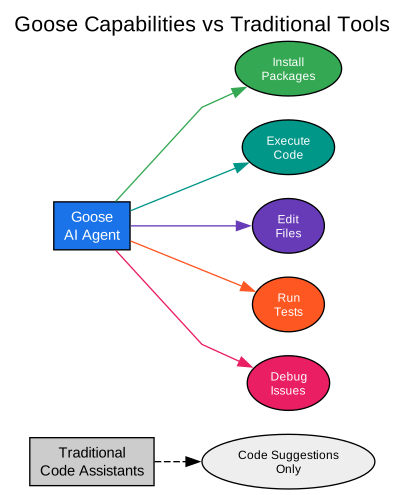
Understanding the Capability Comparison
The comparison diagram above highlights the fundamental difference between Goose and traditional code assistants. This distinction is crucial for understanding why Goose represents a paradigm shift in AI-assisted development.
Traditional Code Assistants
Traditional tools like GitHub Copilot, Amazon CodeWhisperer, and similar products operate in a suggestion-only mode. Their capabilities are limited to:
- Code Completion: Suggesting the next few lines of code
- Snippet Generation: Creating small code fragments from comments
- Documentation Lookup: Finding relevant documentation
- Syntax Assistance: Helping with language syntax
While valuable, these tools require developers to manually implement suggestions, run tests, fix errors, and iterate. The human remains in the loop for every action.
Goose AI Agent
Goose fundamentally changes this dynamic by offering full autonomy:
- Install Packages: Goose can add dependencies to your project, run package managers, and verify installation
- Execute Code: Run code directly and observe results, enabling iterative development
- Edit Files: Make intelligent modifications across multiple files while maintaining consistency
- Run Tests: Execute test suites, analyze failures, and propose fixes
- Debug Issues: Investigate errors, trace through code, and implement solutions
This autonomous capability means Goose can complete entire tasks end-to-end, from initial request to verified solution. Developers can focus on higher-level design decisions while Goose handles implementation details.
Practical Implications
The difference in capability has significant practical implications:
| Aspect | Traditional Tools | Goose |
|---|---|---|
| Task Completion | Manual steps required | Autonomous execution |
| Error Handling | Developer must fix | Goose can fix |
| Testing | Manual execution | Automatic test runs |
| Learning Curve | Low | Moderate |
| Time Savings | 10-30% | 50-80% |
| Use Case | Code suggestions | Full task automation |
Installation
Getting started with Goose is straightforward. Here’s how to install it on different platforms:
macOS/Linux
# Using Homebrew (macOS)
brew install goose

# Using curl (Linux)
curl -fsSL https://github.com/aaif-goose/goose/releases/latest/download/install.sh | bash
Windows
# Using PowerShell
winget install goose

# Or download the binary directly
# https://github.com/aaif-goose/goose/releases
From Source
# Clone and build from source
git clone https://github.com/aaif-goose/goose.git
cd goose
cargo build --release
cargo install --path .
Configuration
After installation, configure your LLM provider:
# Set up OpenAI
goose config set provider openai
goose config set model gpt-4
goose config set api_key $OPENAI_API_KEY

# Or use Ollama for local models
goose config set provider ollama
goose config set model llama2
Usage Examples
Example 1: Fix a Failing Test
$ goose "Fix the failing test in user_service_test.go"

Analyzing test failure...
Found assertion error in TestUserCreation
The test expects email validation but the User struct lacks validation
Adding email validation to User struct
Running tests...
Tests passing!
Changes made:
 - user.go: Added email validation
 - user_service.go: Updated CreateUser to validate email
Example 2: Add a New Feature
$ goose "Add pagination to the products API endpoint"

Analyzing current API structure...
Planning implementation:
  1. Add pagination parameters to handler
  2. Update database query with LIMIT/OFFSET
  3. Add pagination metadata to response
  4. Update tests
Executing plan...
Feature implemented successfully!
Example 3: Refactor Code
$ goose "Extract the authentication logic into a separate module"

Analyzing authentication code...
Identifying components to extract:
  - Token generation
  - Token validation
  - User lookup
Creating auth module...
Updating imports in 12 files...
Running tests...
Refactoring complete!
Extensibility
One of Goose’s most powerful features is its extensibility. You can create custom tools that integrate seamlessly with Goose’s workflow.
Creating a Custom Extension
use goose::extension::{Extension, Tool, ToolResult};

struct MyCustomTool;

impl Extension for MyCustomTool {
    fn name(&self) -> &str {
        "my_custom_tool"
    }

    fn tools(&self) -> Vec<Tool> {
        vec![Tool {
            name: "custom_operation".to_string(),
            description: "Performs a custom operation".to_string(),
            parameters: json!({
                "type": "object",
                "properties": {
                    "input": {"type": "string"}
                }
            }),
        }]
    }

    fn execute(&self, tool: &str, params: serde_json::Value) -> ToolResult {
        // Your custom logic here
        ToolResult::success(json!({"result": "Operation completed"}))
    }
}
Registering the Extension
# Register your extension with Goose
goose extension register --path ./my_extension.so
Best Practices
When using Goose effectively, consider these best practices:
- Start with Clear Instructions: Provide specific, actionable requests
- Review Changes: Always review Goose’s changes before committing
- Use Version Control: Commit frequently so you can rollback if needed
- Configure Permissions: Set appropriate permission levels for your environment
- Provide Context: Share relevant project context for better results
Community and Ecosystem
Goose has a thriving community with:
- 41,000+ GitHub Stars: Rapidly growing developer adoption
- Active Discord: Community support and discussions
- Regular Updates: Frequent releases with new features
- Extension Marketplace: Growing library of community extensions
Conclusion
Goose represents a significant evolution in AI-assisted development. By combining the reasoning capabilities of large language models with actual execution abilities, Goose transforms from a passive assistant into an active development partner.
Whether you’re fixing bugs, adding features, or refactoring code, Goose can handle the heavy lifting while you focus on architectural decisions and business logic. Its open-source nature, multi-LLM support, and extensible architecture make it a versatile tool for teams of all sizes.
As AI continues to reshape software development, tools like Goose point toward a future where developers spend less time on repetitive tasks and more time on creative problem-solving. The question is no longer whether AI will assist in coding, but how much autonomy we’re willing to grant. With Goose, that line has moved significantly forward.
Related Posts
- AgentSkillOS: Skill Orchestration System
- MattPocock Skills: AI Agent Workflows
- DESIGN.md: AI-Powered Design Systems
Links

Enjoyed this post? Never miss out on future posts by following us
