Hermes Agent: The Self-Improving AI Agent That Learns From Experience
In the rapidly evolving landscape of AI assistants, most tools remain static—capable at a moment in time but never truly growing with their users. Hermes Agent, developed by Nous Research, shatters this paradigm by introducing genuine self-improvement. Unlike conventional chatbots, Hermes actively learns from its interactions, autonomously creating and refining reusable skills, persisting knowledge across sessions, and building a deepening model of its users over time.
This isn’t science fiction. Hermes Agent is production-ready, mobile-first, and cloud-native, running everywhere from a $5 VPS to a GPU cluster. It connects to your favorite messaging platforms while the agent works autonomously on remote cloud infrastructure.
The Self-Improving Learning Loop
What truly sets Hermes Agent apart is its闭环反馈 system that enables genuine self-improvement:
Autonomous Skill Creation
After completing complex tasks, Hermes doesn’t just finish—it reflects. The agent autonomously creates reusable skills that capture the patterns and approaches that worked. These skills become part of its permanent toolkit, improving with each subsequent use based on real-world outcomes.
Memory Persistence & Cross-Session Recall
Hermes employs sophisticated memory systems that go beyond simple conversation history:
- Periodic Memory Nudges: The system periodically encourages the agent to remember important information
- FTS5 Session Search: Fast full-text search across all historical sessions
- LLM Summarization: Automatic summarization of past interactions for efficient recall
- User Modeling via Honcho: Deep integration with Honcho for dialectic user profiling
# Hermes remembers your preferences across sessions
# Example: User preference stored and recalled
hermes = HermesAgent()

# First interaction
hermes.interact("I prefer detailed explanations with code examples")

# Later session - Hermes recalls your preference
hermes.interact("Explain async/await in Python")
# → Responds with detailed explanations AND code examples automatically
Full Terminal Interface
For developers and power users, Hermes provides a rich terminal interface that rivals modern IDEs:
- Multiline Editing: Write and edit complex prompts with ease
- Slash-Command Autocomplete: Quick access to commands as you type
- Conversation History Navigation: Browse and resume previous sessions
- Interrupt-and-Redirect: Stop ongoing operations and redirect mid-execution
- Streaming Tool Output: Watch tool execution results in real-time
- Reasoning/Thinking Block Display: Transparent visibility into the agent’s reasoning process
# Launch the interactive terminal interface
hermes run

# Slash commands available
/skill create    # Create a new skill from current session
/skill list      # View all available skills
/context         # View current conversation context
/model          # Switch between LLM providers
/schedule       # Set up automated tasks
Multi-Platform Messaging Gateway
Hermes Agent connects seamlessly to over 12 messaging platforms, enabling you to interact with your AI assistant wherever you communicate:
| Platform | Use Case |
|---|---|
| Telegram | Personal AI assistant on the go |
| Discord | Team AI collaborator |
| Slack | Workplace productivity |
| Casual conversations | |
| Signal | Privacy-focused communication |
| Matrix | Self-hosted messaging |
| Mattermost | Enterprise teams |
| DingTalk | Chinese enterprise |
| Feishu/Lark | International enterprise |
| WeCom | Chinese business |
| Asynchronous communication | |
| SMS | Basic mobile access |
| Home Assistant | Smart home control |
| Webhooks | Custom integrations |
# gateway.yaml configuration example
gateway:
  adapters:
    telegram:
      enabled: true
      bot_token: ${TELEGRAM_BOT_TOKEN}
    discord:
      enabled: true
      bot_token: ${DISCORD_BOT_TOKEN}
    slack:
      enabled: true
      bot_token: ${SLACK_BOT_TOKEN}
Extensive Tool System
With 40+ built-in tools, Hermes Agent can accomplish virtually any digital task:
Core Tool Categories
| Category | Tools |
|---|---|
| Terminal | Command execution, process management |
| File Operations | Read, write, search, organize files |
| Browser | Web browsing, form filling, scraping |
| Web Search | Information retrieval, research |
| MCP Integration | Model Context Protocol servers |
| Code Execution | Run code in multiple languages |
| Delegation | Spawn sub-agents for parallel tasks |
| TTS/STT | Text-to-speech, speech-to-text |
Model Context Protocol (MCP) Integration
Hermes supports the MCP standard, enabling connection to thousands of external tools and services:
# Install an MCP server
hermes mcp install npx -y @modelcontextprotocol/server-filesystem

# Configure MCP in your settings
hermes mcp list    # View installed MCP servers
hermes mcp enable  # Enable specific servers
hermes mcp disable # Disable servers
Flexible Model Support
One of Hermes’s greatest strengths is its provider-agnostic architecture. Use any LLM you prefer:
| Provider | Model Access |
|---|---|
| Nous Portal | 400+ models |
| OpenRouter | 200+ models |
| OpenAI | GPT-4, GPT-3.5 |
| Anthropic | Claude 3.5, Claude 3 |
| Google AI | Gemini Pro, Flash |
| Hugging Face | Open source models |
| GitHub Copilot | Code completion |
# Switch models on the fly
hermes model list                    # List available models
hermes model set openrouter:deepseek-3  # Switch to DeepSeek via OpenRouter
hermes model set anthropic:claude-3-5-sonnet  # Switch to Claude
Scheduled Automations
Hermes includes a built-in cron scheduler with natural language task definition:
# Schedule a task using natural language
hermes schedule "Every Monday at 9 AM, summarize my weekend emails"
hermes schedule "Every Friday at 6 PM, generate a weekly status report"
hermes schedule "Daily at 8 AM, check GitHub for Hermes updates"

# List and manage scheduled tasks
hermes schedule list
hermes schedule delete <task-id>
Deployment Flexibility
Run Hermes wherever you need it:
| Backend | Best For |
|---|---|
| Local | Development, testing |
| Docker | Production, easy deployment |
| SSH | Remote servers |
| Daytona | Managed dev environments |
| Singularity | HPC clusters |
| Modal | Serverless GPU workloads |
Docker Deployment
# Pull and run with Docker
docker pull nousresearch/hermes-agent:latest
docker run -d \
  --name hermes \
  -v hermes-data:/root/.hermes \
  -e HERMES_API_KEY=${HERMES_API_KEY} \
  -p 8080:8080 \
  nousresearch/hermes-agent:latest
🔌 Plugin & Skills Ecosystem
Plugin System
Extend Hermes with custom plugins for specialized functionality:
# Install plugins
hermes plugin install memory/openviking  # Memory plugin
hermes plugin install memory/retaindb    # Database-backed memory

# List installed plugins
hermes plugin list
Skills Hub
Discover and share skills created by the community at agentskills.io:
# Browse available skills
hermes skills hub browse

# Install a skill
hermes skills hub install code-review

# Share your skill
hermes skills hub publish my-custom-skill
MCP Server Mode
Run Hermes as a full MCP server, making it available to any MCP-compatible client:
# Start Hermes as an MCP server
hermes mcp-server

# Now any MCP client can connect
Security Hardening
Hermes Agent takes security seriously with multiple protection layers:
- SSRF Protection: Prevents requests to internal services
- Shell Injection Prevention: Sanitizes all command inputs
- Dangerous Command Detection: Warns or blocks potentially harmful operations
- Permission System: Fine-grained access controls
- Audit Logging: Complete activity tracking
# Run security check
hermes doctor security

# Configure security settings
hermes config set security.strict_mode=true
hermes config set security.allow_dangerous_commands=false
Installation
Get started with Hermes Agent in seconds:
Quick Install (Recommended)
curl -fsSL https://raw.githubusercontent.com/NousResearch/hermes-agent/main/scripts/install.sh | bash
From Source
# Requires Python 3.11+ and uv
uv clone https://github.com/NousResearch/hermes-agent
cd hermes-agent
uv sync
hermes run
Docker
docker pull nousresearch/hermes-agent:latest
docker run -it nousresearch/hermes-agent:latest hermes run
Version History
| Version | Key Features |
|---|---|
| v0.6.0 | Profiles, MCP server mode, Docker container, Feishu/WeCom |
| v0.5.0 | Hugging Face provider, Telegram chat topics, Modal SDK |
| v0.4.0 | Signal, DingTalk, SMS, Mattermost, Matrix adapters, API server |
Architecture Overview
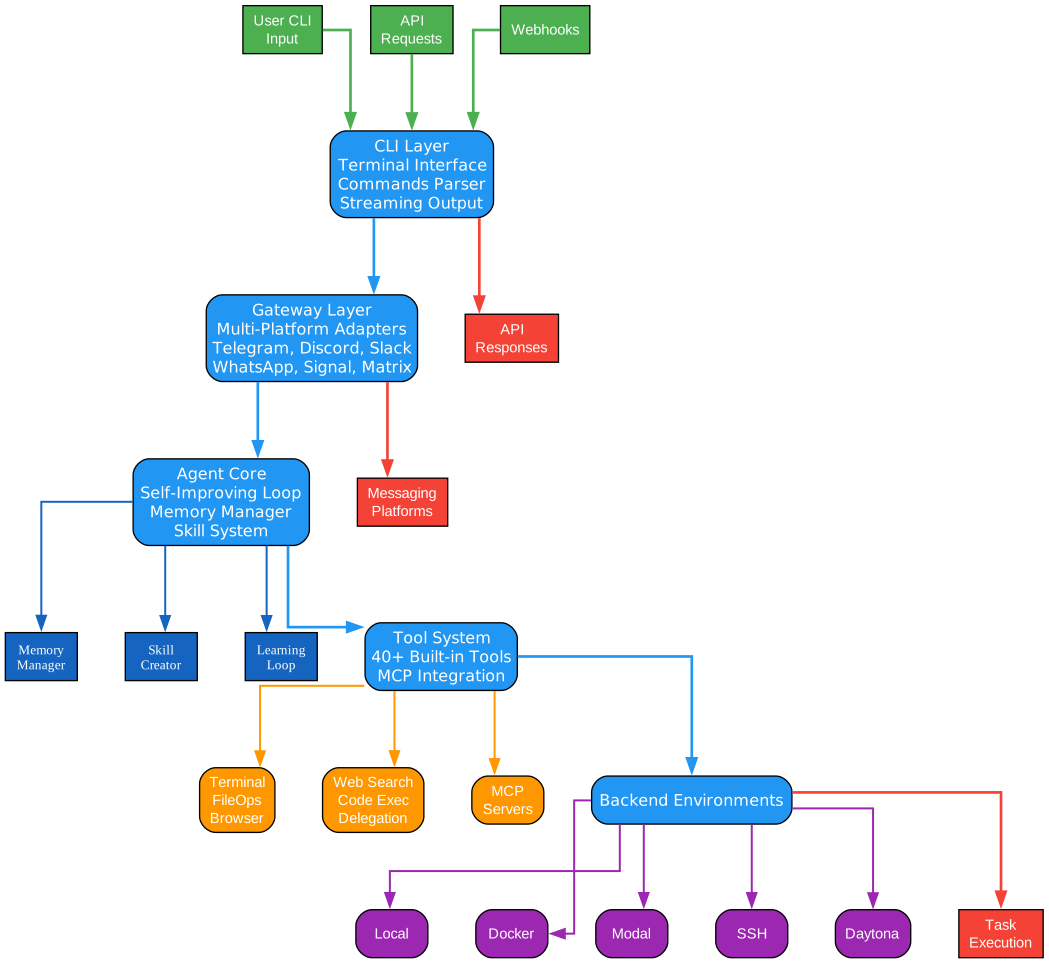
System Flow Diagram
The Hermes Agent architecture follows a clear data flow from inputs to outputs through five distinct layers:
| Layer | Function | Components |
|---|---|---|
| CLI Layer | User input handling | Terminal Interface, Commands Parser, Streaming Output |
| Gateway Layer | Multi-platform message normalization | Telegram, Discord, Slack, WhatsApp, Signal, Matrix |
| Agent Core | Decision making & learning | Self-Improving Loop, Memory Manager, Skill System |
| Tool System | Task execution | 40+ Built-in Tools, MCP Integration |
| Backend Environments | Execution environment | Local, Modal, Docker, Daytona, SSH, Singularity |
Key Inputs: User CLI Input, API Requests, Webhooks
Key Outputs: Messaging Platform Responses, API Responses, Task Execution Results
Component Details
CLI Layer
Processes user commands and manages the interactive terminal experience with multiline editing, slash-command autocomplete, and streaming output. This layer handles the user interaction model and command parsing.
Gateway Layer
Normalizes messages from diverse messaging platforms into a unified protocol, enabling consistent agent interaction regardless of the communication channel. Supports 12+ platforms including Telegram, Discord, Slack, WhatsApp, Signal, and Matrix.
Agent Core
The intelligence center where the self-improving learning loop, memory management, and skill creation systems work together to process requests and generate responses. This is where Hermes truly excels—continuously learning and improving from each interaction.
Tool System
Provides the agent with capabilities to interact with the outside world through terminal commands, file operations, web browsing, code execution, and MCP server integrations. The router intelligently selects the appropriate tool for each task.
Backend Environments
Flexible deployment options allowing Hermes to run locally for development, in Docker for production, on Modal for serverless GPU workloads, via SSH on remote servers, on Daytona for managed dev environments, or on Singularity for HPC clusters.
Resources and Links
- Documentation: hermes-agent.nousresearch.com/docs
- GitHub Repository: github.com/NousResearch/hermes-agent
- Discord Community: discord.gg/NousResearch
- Skills Hub: agentskills.io
- Nous Research: nousresearch.com
Architecture Diagrams
The following diagrams show the key architectural components of Hermes Agent using orthogonal routing (no diagonal lines) for clean, professional visualizations.
Available Diagrams
| Diagram | Description |
|---|---|
| Architecture | Full system architecture showing CLI Layer → Gateway → Agent Core → Tools → Backend |
| Self-Improving Loop | Closed feedback loop showing task execution, outcome recording, analysis, and skill improvement |
| Messaging Gateway | Multi-platform adapter architecture connecting 12+ messaging platforms |
| Tool System | 40+ tools organized by category with router architecture |
| Memory System | FTS5 indexing, LLM summarization, Honcho profiling, and cross-session recall |
| Deployment Options | Backend environment options: Local, Docker, Modal, SSH, Daytona, Singularity |
| Model Routing | Smart routing to Nous Portal (400+), OpenRouter (200+), OpenAI, Anthropic, Google, HuggingFace |
Architecture Diagram Preview
Figure 1: Hermes Agent System Architecture showing the five main layers and data flow from inputs to outputs.
Self-Improving Loop Diagram
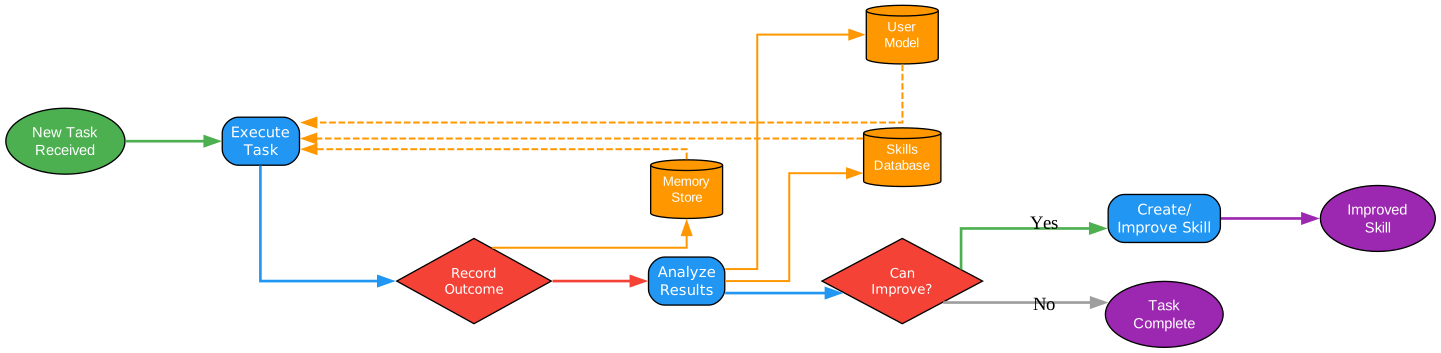
Figure 2: The closed feedback loop that enables Hermes to continuously learn and improve from task outcomes.
Key Architectural Patterns
-
Layered Architecture: Clear separation of concerns from CLI input handling through gateway normalization to agent core processing and tool execution
-
Provider Abstraction: Smart model routing abstracts away the complexity of managing multiple LLM providers
-
Storage Independence: Memory systems support multiple backends (FTS5, SQLite, vector stores) through a common interface
-
Plugin Extensibility: Skills and plugins can extend Hermes functionality without modifying core code
-
Deployment Flexibility: Backend abstraction allows running the same agent code in different environments
Generating Diagrams
To regenerate the architecture diagrams yourself, use the Hermes Agent Diagrams Generator skill available at: agentskills.io
This skill provides the pydot-based diagram generation script with orthogonal routing for professional visualizations.
Conclusion
Hermes Agent represents a fundamental shift in how we think about AI assistants. Rather than static tools that perform predefined tasks, Hermes is a truly dynamic agent that grows alongside its users—creating skills from experience, remembering important details, and continuously improving its approach based on outcomes.
Whether you’re a developer looking for a powerful CLI assistant, a team seeking a collaborative AI agent, or an organization wanting to deploy AI capabilities across your infrastructure, Hermes Agent provides the flexibility, extensibility, and self-improvement that modern AI demands.
Ready to experience the future of AI assistance?
# Install Hermes Agent now
curl -fsSL https://raw.githubusercontent.com/NousResearch/hermes-agent/main/scripts/install.sh | bash

# Join the community
# Discord: discord.gg/NousResearch
The agent that learns. The agent that remembers. The agent that improves.
Hermes Agent—built by Nous Research, powered by the open-source community.