Introduction
The landscape of web automation and AI agents is undergoing a fundamental shift. Traditional browsers like Chrome and Firefox were designed for human users, with graphical interfaces, extensive rendering pipelines, and resource-intensive processes. But what if we could build a browser specifically designed for AI agents and automation workflows? Enter Lightpanda, a groundbreaking headless browser that reimagines web browsing from the ground up for the AI era.
Lightpanda represents a paradigm shift in how we think about browser technology. With over 27,500 stars on GitHub, this open-source project has captured the attention of developers and AI engineers worldwide. Built entirely from scratch in Zig 0.15.2, Lightpanda achieves remarkable performance metrics: approximately 16 times less memory consumption and 9 times faster execution compared to Chrome when processing 100 pages. These aren’t incremental improvements - they’re transformational gains that enable entirely new categories of AI-powered applications.
The browser’s architecture is specifically optimized for programmatic access, featuring native support for the Model Context Protocol (MCP) and a comprehensive implementation of the Chrome DevTools Protocol (CDP). This dual-protocol approach means Lightpanda can seamlessly integrate with existing automation tools while providing cutting-edge capabilities for AI agents that need to understand and interact with web content at a semantic level.
Architecture Overview
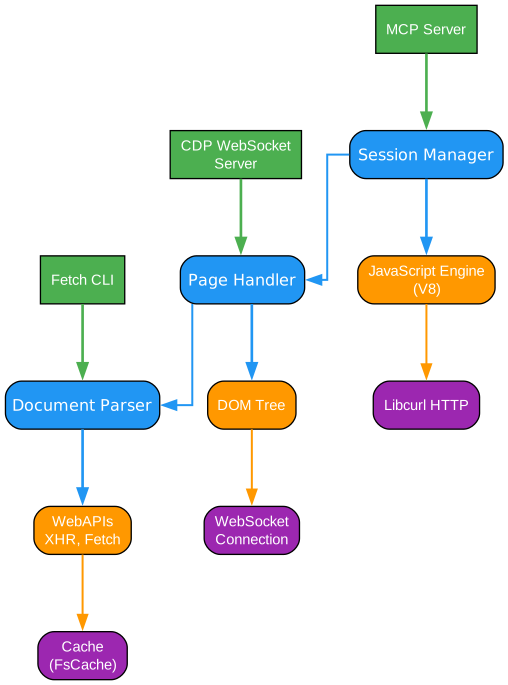
The architecture of Lightpanda represents a clean-sheet design that prioritizes efficiency, modularity, and AI-first functionality. At its foundation lies Zig 0.15.2, a modern systems programming language known for its compile-time code execution, manual memory management with safety guarantees, and exceptional performance characteristics. Unlike traditional browsers that carry decades of legacy code, Lightpanda’s architecture is unencumbered by backward compatibility constraints, allowing it to leverage contemporary best practices throughout its stack.
The core engine integrates several carefully selected components that form the backbone of its web processing capabilities. The V8 JavaScript engine, Google’s high-performance JavaScript and WebAssembly implementation, provides industry-standard script execution with JIT compilation for optimal performance. This choice ensures compatibility with the modern web while benefiting from decades of optimization work. For HTML parsing, Lightpanda employs html5ever, a browser-grade HTML parser written in Rust that adheres to the HTML5 specification, ensuring accurate document tree construction even with malformed markup.
Network operations are handled by libcurl, a battle-tested library for transferring data with URL syntax. This choice provides robust HTTP/HTTPS support, connection pooling, and proper handling of cookies, redirects, and authentication. The networking layer is designed to be efficient and non-blocking, allowing Lightpanda to handle multiple concurrent requests without the overhead of traditional browser networking stacks. Additionally, libcrypto provides cryptographic functions for secure communications and data integrity verification.
The architecture separates concerns into distinct layers: the network layer handles all HTTP/HTTPS communication and caching; the parsing layer transforms raw HTML into structured DOM trees; the JavaScript runtime executes scripts and maintains the execution context; and the CDP/MCP layer provides standardized interfaces for external control and AI agent integration. This modular design allows each component to be optimized independently while maintaining clean interfaces between layers.
A key innovation in Lightpanda’s architecture is its semantic tree extraction capability. Unlike traditional browsers that focus primarily on visual rendering, Lightpanda can extract meaningful semantic structures from web pages, making it invaluable for AI agents that need to understand content rather than just display it. This feature enables AI systems to quickly identify interactive elements, extract structured data, and navigate complex web applications without the overhead of full visual rendering.
MCP Integration
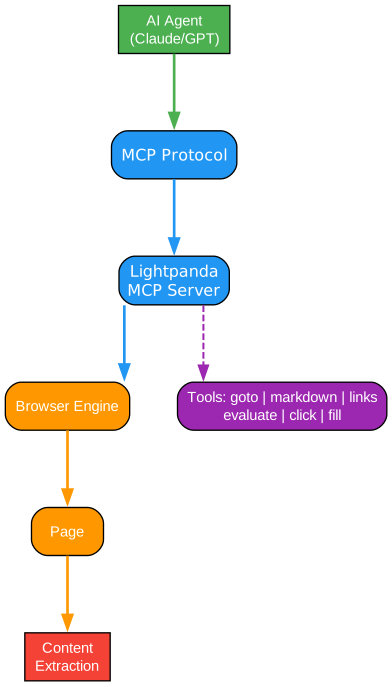
The Model Context Protocol (MCP) integration in Lightpanda represents one of its most significant innovations for AI agent workflows. MCP is an open protocol that standardizes how AI models interact with external tools and data sources, and Lightpanda’s native implementation makes it uniquely positioned as a first-class citizen in the AI ecosystem. Rather than requiring wrapper layers or translation middleware, Lightpanda speaks MCP directly, enabling seamless communication with AI agents and language models.
The MCP server implementation in Lightpanda exposes a comprehensive suite of tools designed specifically for web interaction and content extraction. Navigation tools like goto and navigate allow AI agents to move between pages while respecting robots.txt rules and web authentication protocols. Content extraction tools such as markdown, links, and semantic_tree enable agents to retrieve structured representations of page content without dealing with raw HTML parsing. The markdown tool is particularly valuable, converting complex web pages into clean, readable text that language models can process efficiently.
Interactive manipulation tools form another crucial category in the MCP toolkit. The click, fill, hover, press, and scroll tools allow AI agents to interact with web pages programmatically, filling forms, clicking buttons, and navigating interfaces just as a human user would. These tools are essential for tasks like automated testing, data entry, and workflow automation. The waitForSelector tool provides synchronization capabilities, ensuring that dynamic content has loaded before proceeding with operations.
The semantic extraction tools represent Lightpanda’s AI-first philosophy. The semantic_tree tool returns a hierarchical representation of page content that captures meaning rather than just structure. The nodeDetails tool provides detailed information about specific DOM elements, while interactiveElements identifies all clickable, fillable, or otherwise interactive components on a page. The structuredData tool extracts JSON-LD, microdata, and other semantic markup, and detectForms identifies form elements and their fields for automated form handling.
The MCP integration also includes the evaluate tool, which allows AI agents to execute arbitrary JavaScript within the page context. This capability is essential for extracting data from dynamic applications, triggering custom events, or manipulating page state. Combined with the other MCP tools, this creates a powerful toolkit for AI agents that need to understand and interact with the web at a deep level, all through a standardized protocol that integrates cleanly with modern AI frameworks and language model interfaces.
Performance Benchmarks
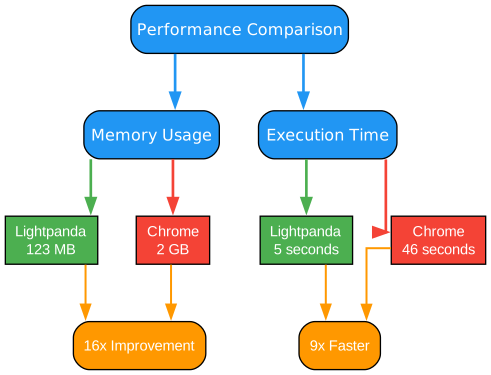
The performance characteristics of Lightpanda are nothing short of remarkable, representing a fundamental rethinking of what a browser can achieve when freed from the constraints of human-centric design. In benchmark tests processing 100 pages, Lightpanda demonstrates approximately 16 times lower memory consumption compared to Chrome, using only 123MB versus Chrome’s 2GB. This dramatic reduction in memory footprint translates directly to cost savings in cloud deployments and enables running more concurrent instances on the same hardware.
The execution speed improvements are equally impressive. Lightpanda completes the same 100-page workload in approximately 5 seconds, compared to Chrome’s 46 seconds - a roughly 9x speedup. These measurements aren’t synthetic benchmarks but real-world workloads that demonstrate practical benefits for automation pipelines, web scraping operations, and AI agent workflows. The speed advantage comes from Lightpanda’s streamlined architecture that eliminates unnecessary rendering, UI updates, and background processes that traditional browsers maintain.
Memory efficiency is achieved through several architectural decisions. First, Lightpanda doesn’t maintain a visual rendering pipeline, eliminating the memory overhead of compositing layers, graphics buffers, and display lists. Second, its Zig-based implementation provides fine-grained control over memory allocation, avoiding the garbage collection pauses and memory bloat common in languages like JavaScript or Python. Third, the modular architecture allows components to be loaded only when needed, reducing the baseline memory footprint.
The speed improvements stem from similar optimizations. Without the need to render pixels to a screen, Lightpanda skips expensive layout calculations, paint operations, and compositing steps. The JavaScript execution is optimized for headless operation, and the network layer is designed for high-throughput concurrent requests. Additionally, Lightpanda’s semantic extraction capabilities allow AI agents to skip unnecessary processing - rather than rendering a page visually and then using OCR or computer vision to extract text, agents can directly request the semantic content they need.
These performance gains have practical implications beyond raw numbers. For AI agents processing thousands of pages, the reduced execution time translates to faster response times and lower latency. For cloud deployments, the memory efficiency means more instances per server and lower infrastructure costs. For real-time applications, the speed improvements enable use cases that would be impractical with traditional browsers. Lightpanda isn’t just faster - it enables entirely new categories of AI-powered applications that require rapid, efficient web interaction at scale.
CDP Domain Coverage
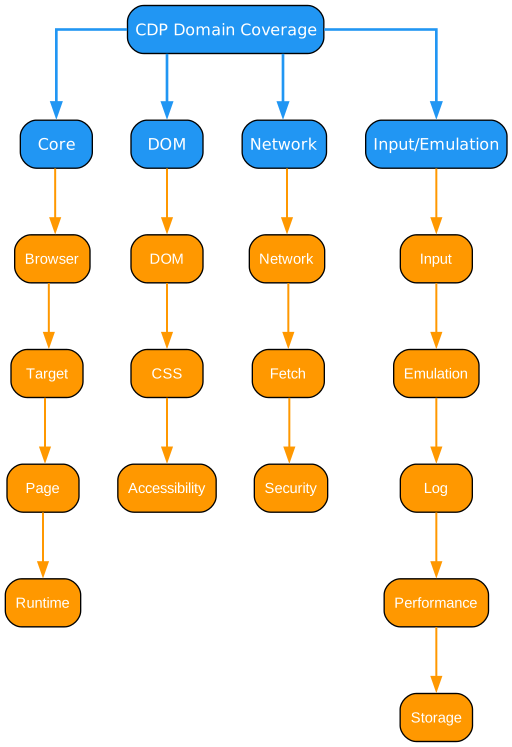
The Chrome DevTools Protocol (CDP) implementation in Lightpanda provides comprehensive coverage across multiple domains, ensuring compatibility with existing automation tools and frameworks. CDP has become the de facto standard for browser automation, used by tools like Puppeteer, Playwright, and Selenium. Lightpanda’s implementation allows these tools to work seamlessly with minimal changes, while providing the performance benefits of its optimized architecture.
The Browser domain provides lifecycle management capabilities, allowing automation scripts to start, stop, and configure browser instances. The Target domain enables working with multiple contexts, including pages, workers, and service workers. This multi-target support is essential for modern web applications that use service workers, web workers, and iframe-based architectures. The Page domain offers comprehensive page-level operations including navigation, screenshot capture, PDF generation, and script execution.
The Runtime domain is particularly important for AI agent workflows, providing direct access to JavaScript execution contexts. This domain enables evaluating arbitrary JavaScript, monitoring console output, handling exceptions, and inspecting objects. For AI agents that need to extract data from dynamic applications or trigger custom behavior, the Runtime domain provides the necessary low-level access.
The DOM and CSS domains provide structural and styling access to page content. The DOM domain allows querying elements, modifying attributes, and manipulating the document tree. The CSS domain enables inspection and modification of stylesheets, crucial for handling responsive designs and dynamic styling. The Accessibility domain provides access to the accessibility tree, which can be valuable for AI agents that need to understand page structure from a semantic perspective.
Network operations are covered by the Network, Fetch, and Security domains. The Network domain monitors and controls network requests, allowing automation scripts to intercept, modify, or block requests. The Fetch domain provides more fine-grained request interception and modification capabilities. The Security domain handles certificate errors and security state management. These domains are essential for testing, debugging, and data extraction scenarios.
The Input, Emulation, Log, Performance, and Storage domains round out the CDP implementation. The Input domain simulates user interactions like mouse movements, clicks, and keyboard input. The Emulation domain allows simulating different devices, network conditions, and geolocations. The Log domain captures console output and error messages. The Performance domain provides metrics and profiling capabilities. The Storage domain manages cookies, local storage, and session storage. Together, these domains provide a complete automation toolkit that matches Chrome’s capabilities while delivering superior performance.
Use Cases
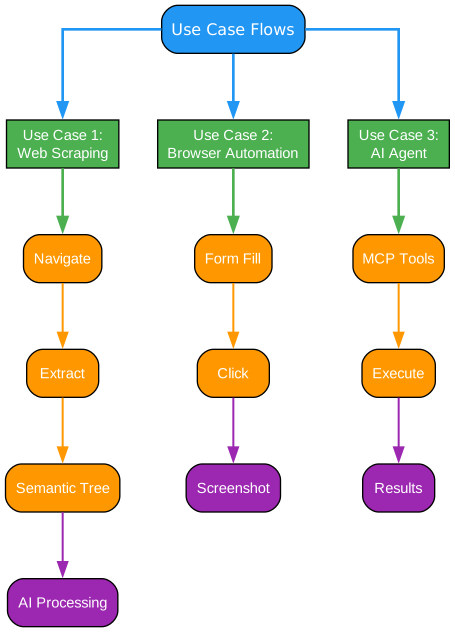
Lightpanda’s unique combination of performance, MCP integration, and CDP support enables a wide range of use cases that were previously impractical or inefficient with traditional browsers. Understanding these use cases helps illustrate why Lightpanda has generated such significant interest in the AI and automation communities.
AI-powered web agents represent perhaps the most transformative use case. Large language models and AI agents need to interact with web content to perform research, execute tasks, and gather information. Traditional browsers are resource-intensive and slow for these workloads, limiting the scale at which AI agents can operate. Lightpanda’s semantic extraction capabilities, combined with MCP integration, allow AI agents to efficiently navigate, understand, and interact with web content. The semantic_tree and markdown tools provide clean, structured input for language models, while the interactive tools enable agents to perform actions on behalf of users.
Web scraping and data extraction at scale benefit enormously from Lightpanda’s performance characteristics. Organizations that need to process millions of pages for competitive intelligence, price monitoring, or data aggregation can achieve dramatically higher throughput with lower infrastructure costs. The 16x memory reduction means more concurrent instances per server, while the 9x speed improvement reduces processing time. The robots.txt compliance features ensure ethical scraping practices, and the structured data extraction tools simplify the parsing of complex page layouts.
Automated testing and quality assurance workflows can leverage Lightpanda’s CDP implementation to run existing Puppeteer or Playwright test suites with improved performance. The faster execution times mean quicker feedback loops for developers, enabling more comprehensive test coverage within existing CI/CD time constraints. The headless nature eliminates the need for display infrastructure in CI environments, and the reduced resource consumption allows running more tests in parallel.
Content indexing and search engine operations represent another compelling use case. Search engines and content aggregators need to process billions of pages efficiently. Lightpanda’s ability to extract semantic content without full rendering provides significant efficiency gains. The JavaScript execution ensures that dynamic content is properly processed, while the memory efficiency allows scaling to handle large crawl volumes.
Research and academic applications benefit from Lightpanda’s reproducibility and efficiency. Researchers studying web content, social media, or online behavior can collect data more efficiently and with better control over the collection process. The deterministic behavior and comprehensive logging support rigorous methodology requirements, while the open-source nature allows full transparency into how data is collected.
Installation
Installing Lightpanda is straightforward, with multiple options available depending on your platform and use case. The project provides pre-built binaries for major platforms, Docker images for containerized deployments, and source builds for those who need customization.
Pre-built Binaries
For Linux and macOS, you can download pre-built binaries from the GitHub releases page:
# Download the latest release
wget https://github.com/lightpanda-io/browser/releases/latest/download/lightpanda-linux-x64.tar.gz

# Extract the archive
tar -xzf lightpanda-linux-x64.tar.gz

# Make it executable
chmod +x lightpanda

# Move to a directory in your PATH
sudo mv lightpanda /usr/local/bin/
Building from Source
Building from source requires Zig 0.15.2 or later:
# Clone the repository
git clone https://github.com/lightpanda-io/browser.git
cd browser

# Build the project
zig build -Doptimize=ReleaseFast

# The binary will be available at zig-out/bin/lightpanda
Docker Installation
For containerized deployments, Lightpanda provides official Docker images:
# Pull the nightly image
docker pull lightpanda/browser:nightly

# Run a container
docker run -d --name lightpanda -p 9222:9222 lightpanda/browser:nightly
The Docker image is ideal for cloud deployments and CI/CD pipelines. It includes all necessary dependencies and is configured for optimal performance in containerized environments.
Usage Examples
Lightpanda supports multiple operating modes to accommodate different use cases. Understanding these modes helps you choose the right approach for your specific requirements.
Fetch Mode
The simplest mode is fetch, which retrieves and processes a single URL:
# Basic fetch
./lightpanda fetch https://example.com

# Fetch with robots.txt compliance
./lightpanda fetch --obey-robots https://example.com

# Dump output in different formats
./lightpanda fetch --dump html https://example.com
./lightpanda fetch --dump markdown https://example.com
./lightpanda fetch --dump semantic https://example.com
Fetch mode is ideal for one-off page retrieval, testing, and simple automation tasks. The --obey-robots flag ensures compliance with robots.txt directives, which is important for ethical web scraping.
Serve Mode (CDP)
For integration with existing automation tools, serve mode provides a CDP-compatible WebSocket endpoint:
# Start the CDP server
./lightpanda serve --host 127.0.0.1 --port 9222

# The endpoint is available at ws://127.0.0.1:9222
You can then connect with Puppeteer, Playwright, or any CDP-compatible tool:
// Puppeteer example
const puppeteer = require('puppeteer');

const browser = await puppeteer.connect({
  browserWSEndpoint: 'ws://127.0.0.1:9222'
});

const page = await browser.newPage();
await page.goto('https://example.com');
const content = await page.content();
console.log(content);
await browser.close();
MCP Mode
For AI agent integration, MCP mode starts a Model Context Protocol server:
# Start the MCP server
./lightpanda mcp
The MCP server can be integrated with AI frameworks and language models that support the Model Context Protocol, enabling seamless web interaction capabilities for AI agents.
Docker Usage
When running in Docker, you can use any of the modes:
# Fetch mode in Docker
docker run --rm lightpanda/browser:nightly fetch https://example.com

# Serve mode with port mapping
docker run -d --name lightpanda -p 9222:9222 lightpanda/browser:nightly serve

# MCP mode
docker run --rm -i lightpanda/browser:nightly mcp
Conclusion
Lightpanda represents a significant advancement in browser technology for the AI era. By building from scratch with a focus on AI agents and automation, it achieves performance levels that traditional browsers cannot match. The 16x memory reduction and 9x speed improvement aren’t just numbers - they enable new categories of applications and workflows that were previously impractical.
The native MCP integration positions Lightpanda as a first-class tool for AI agent development, while the comprehensive CDP implementation ensures compatibility with existing automation ecosystems. Whether you’re building AI-powered web agents, scaling data extraction pipelines, or optimizing automated testing workflows, Lightpanda provides the performance and capabilities needed for modern applications.
As AI continues to transform how we interact with information and automate tasks, tools like Lightpanda will become increasingly essential. The project’s open-source nature and active development community ensure that it will continue to evolve and improve. For developers and organizations working at the intersection of AI and web technology, Lightpanda offers a compelling solution that combines cutting-edge performance with practical compatibility.
Links: