MoneyPrinterV2: Automate Your Online Income with AI
In the rapidly evolving landscape of digital entrepreneurship, automation has become the cornerstone of scalable online income generation. MoneyPrinterV2 (MPV2) represents a significant leap forward in this domain, offering a comprehensive Python-based solution that leverages artificial intelligence to automate multiple revenue streams. With over 28,000 stars on GitHub, this open-source project has captured the attention of developers, content creators, and digital marketers alike.
The project is a complete rewrite of the original MoneyPrinter, designed with modularity and extensibility at its core. It integrates cutting-edge AI technologies including Large Language Models (LLMs) through Ollama, text-to-speech synthesis via KittenTTS, speech-to-text with Whisper, and AI-powered image generation through the Gemini API. This powerful combination enables users to create, manage, and distribute content across multiple platforms with minimal manual intervention.
Core Features Overview
MoneyPrinterV2 provides four primary automation modules:
| Feature | Description | Platform |
|---|---|---|
| YouTube Shorts Automator | AI-powered short video generation with script, images, TTS, and subtitles | YouTube |
| Twitter Bot | Automated posting with AI-generated content and CRON scheduling | Twitter/X |
| Affiliate Marketing | Amazon product promotion with AI-generated pitches | |
| Business Outreach | Google Maps scraper for lead generation and cold outreach emails |
Architecture Overview
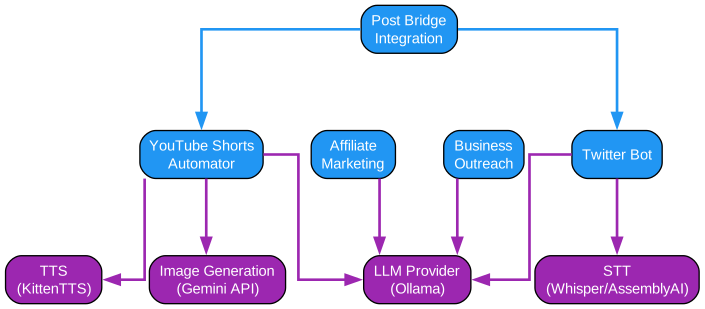
Understanding the Architecture
The architecture diagram above illustrates the comprehensive modular design of MoneyPrinterV2, showcasing how different components interact to create a seamless automation pipeline. Let’s examine each component in detail:
Core Application Layer
At the heart of MPV2 lies the main application orchestrator, responsible for coordinating all automation workflows. This layer manages the execution flow, handles user interactions, and ensures proper sequencing of operations. The application uses a configuration-driven approach where all settings are centralized in a config.json file, making it easy to customize behavior without modifying code.
The main entry point (src/main.py) initializes the application, loads configuration, and presents users with an interactive menu to select their desired automation module. This design pattern follows the principle of separation of concerns, where each module operates independently while sharing common utilities and services.
LLM Provider Integration
The LLM Provider module serves as the intelligence engine of MPV2, interfacing with Ollama for local Large Language Model inference. This approach offers several advantages:
- Privacy: All text generation happens locally, ensuring sensitive data never leaves your machine
- Cost Efficiency: No API fees for LLM usage, making it economical for high-volume content generation
- Customization: Users can select from various models like Llama 3.2, Mistral, or any Ollama-compatible model
- Offline Operation: Once models are downloaded, the system works without internet connectivity for the LLM component
The LLM provider abstracts away the complexity of prompt engineering, offering a clean interface for generating scripts, tweets, and marketing copy. It handles model selection, prompt templating, and response parsing automatically.
Text-to-Speech Engine
KittenTTS integration provides high-quality voice synthesis for video content. The engine supports multiple voices including:
- Jasper (default): Clear, professional male voice
- Bella: Natural female voice
- Luna: Soft female voice
- Bruno: Deep male voice
- Rosie: Energetic female voice
- Hugo: Authoritative male voice
- Kiki: Friendly female voice
- Leo: Warm male voice
The TTS engine processes generated scripts, applies appropriate pacing and intonation, and produces audio files synchronized with video content. This eliminates the need for manual voice recording while maintaining professional quality output.
Speech-to-Text Module
For subtitle generation, MPV2 offers two provider options:
-
Local Whisper: Uses OpenAI’s Whisper model running locally for privacy-focused transcription. Supports multiple model sizes (base, small, medium, large-v3) with configurable compute types (int8, float16) and device selection (auto, cpu, cuda).
-
AssemblyAI: Third-party API for cloud-based transcription, offering higher accuracy at the cost of sending audio data to external servers.
The STT module analyzes generated audio to create accurate subtitles, enhancing video accessibility and engagement metrics on platforms like YouTube Shorts.
Image Generation Pipeline
The Nano Banana 2 module interfaces with Google’s Gemini API for AI-powered image generation. This replaces the stock footage approach from MoneyPrinter V1, creating unique, copyright-free visuals for each video. Key features include:
- Aspect Ratio Control: Configurable output (default 9:16 for vertical shorts)
- Model Selection: Uses Gemini 3.1 Flash for fast, high-quality generation
- API Key Management: Supports both direct configuration and environment variable fallback
Browser Automation Layer
Selenium WebDriver with Firefox integration enables automated interaction with social media platforms. The system uses Firefox profiles to maintain login sessions, eliminating the need for repeated authentication. This layer handles:
- YouTube video uploads with metadata
- Twitter posting and engagement
- Amazon product page scraping for affiliate marketing
- Google Maps data extraction for business outreach
Data Flow Architecture
The architecture follows a pipeline pattern where data flows through distinct stages:
- Input Stage: User provides configuration, subject matter, or product URLs
- Generation Stage: LLM creates scripts, tweets, or marketing copy
- Enhancement Stage: TTS converts text to audio, Gemini generates images
- Assembly Stage: MoviePy combines audio, images, and effects into final video
- Distribution Stage: Selenium uploads to platforms or sends emails
Each stage is modular, allowing users to customize or replace components as needed. The threaded execution model (configurable thread count) enables parallel processing for improved throughput.
Key Architectural Insights
The design philosophy behind MPV2 emphasizes:
- Extensibility: New modules can be added without modifying existing code
- Maintainability: Clear separation between concerns makes debugging easier
- Scalability: Thread-based parallelism handles multiple content pieces simultaneously
- User Control: Extensive configuration options allow fine-tuning without coding
This architecture represents a significant evolution from V1, moving from a monolithic design to a service-oriented approach that can adapt to changing platform requirements and new AI capabilities.
YouTube Shorts Automation Pipeline

Understanding the YouTube Shorts Pipeline
The YouTube Shorts automation pipeline represents one of the most sophisticated modules in MoneyPrinterV2, transforming simple text prompts into fully-produced vertical videos ready for upload. This section provides an in-depth analysis of each stage in the pipeline.
Stage 1: Script Generation
The pipeline begins with script generation using the configured LLM provider. The system takes a user-provided subject or topic and generates a structured script optimized for short-form video content. The script_sentence_length configuration parameter (default: 4 sentences) controls the script length, ensuring videos remain within the optimal 30-60 second duration for YouTube Shorts.
The script generation process incorporates several best practices:
- Hook-First Structure: Opening lines are designed to capture attention within the first 3 seconds
- Clear Narrative Arc: Each script follows a beginning-middle-end structure despite its brevity
- Call-to-Action Integration: Scripts naturally incorporate engagement prompts
- Keyword Optimization: LLM is prompted to include relevant keywords for discoverability
Stage 2: Text-to-Speech Synthesis
Once the script is finalized, the TTS engine converts text to audio. KittenTTS provides several advantages over alternatives:
- Local Processing: No API calls required, reducing latency and cost
- Voice Consistency: Same voice across all videos builds channel identity
- Natural Prosody: Advanced models produce human-like intonation patterns
- Speed Control: Audio pacing can be adjusted to match video timing
The TTS module outputs high-quality audio files (typically MP3 or WAV format) that serve as the audio foundation for the video. Audio quality directly impacts viewer retention, making this stage critical for success.
Stage 3: AI Image Generation
Unlike V1 which used stock footage, V2 generates unique images using the Gemini API. For each sentence in the script, the system:
- Extracts key visual concepts from the text
- Constructs a detailed image generation prompt
- Calls the Gemini API with aspect ratio specifications (9:16 for vertical)
- Downloads and caches the generated image
- Applies any necessary post-processing
This approach offers several benefits:
- Copyright Safety: AI-generated images avoid licensing issues
- Visual Consistency: Images match the script content precisely
- Uniqueness: Each video has original visuals, avoiding content ID matches
- Scalability: No manual image sourcing required
Stage 4: Audio Transcription for Subtitles
The STT module analyzes the generated audio to create accurate subtitles. Using Whisper (local or via AssemblyAI), the system:
- Transcribes speech with word-level timestamps
- Segments text into readable subtitle chunks
- Applies timing offsets for proper display
- Exports in SRT or VTT format
Subtitles are crucial for accessibility and engagement, as many users watch Shorts without sound. The local Whisper option provides privacy for sensitive content, while AssemblyAI offers higher accuracy for complex audio.
Stage 5: Video Assembly with MoviePy
MoviePy orchestrates the final video assembly, combining:
- Generated images as video frames
- TTS audio as the soundtrack
- Subtitles as overlay text
- Background music (optional, from configured sources)
- Transitions and effects between scenes
The assembly process handles:
- Frame Timing: Images display for duration matching their corresponding script segment
- Audio Synchronization: Subtitles align with spoken words
- Quality Settings: Output resolution and bitrate optimization
- Format Conversion: Export to MP4 with H.264 codec for YouTube compatibility
Stage 6: YouTube Upload via Selenium
The final stage automates YouTube upload using browser automation:
- Profile Loading: Firefox profile with existing YouTube session
- Navigation: Automated navigation to YouTube Studio
- File Upload: Video file selection and upload
- Metadata Entry: Title, description, and tags from generated content
- Settings Configuration: Privacy, category, and audience settings
- Publishing: Final video publication
The is_for_kids configuration determines whether videos are marked as child-directed content, affecting YouTube’s recommendation algorithm and comment policies.
CRON Scheduling for Automation
For fully automated content pipelines, MPV2 includes CRON job support:
# Example CRON configuration
# Post daily at 9 AM
scheduler.add_job(upload_short, 'cron', hour=9, minute=0)
This enables “set and forget” operation where videos are generated and uploaded on schedule without manual intervention. The scheduler integrates with all pipeline stages, ensuring reliable execution.
Performance Optimization
The pipeline includes several optimizations:
- Thread Pool: Configurable thread count for parallel processing
- Caching: Generated assets cached to avoid regeneration
- Error Recovery: Automatic retry for failed API calls
- Progress Tracking: Real-time status updates during generation
Quality Assurance
Each stage includes validation checks:
- Script length within YouTube limits
- Audio quality meets minimum thresholds
- Image dimensions match required aspect ratio
- Subtitle timing accuracy
- Video file size within upload limits
This comprehensive pipeline transforms what would typically require hours of manual work into an automated process completing in minutes, enabling content creators to scale their output significantly.
Multi-Platform Integration with Post Bridge
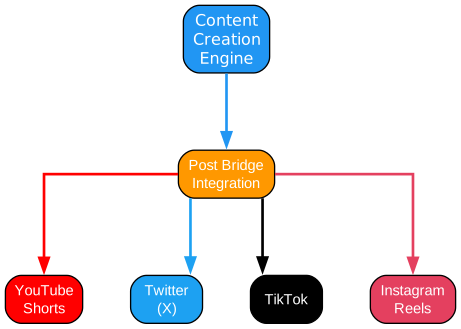
Understanding Multi-Platform Distribution
The multi-platform integration diagram illustrates how MoneyPrinterV2 extends its reach beyond YouTube through Post Bridge, a publishing API that enables simultaneous distribution to TikTok and Instagram. This section explores the technical implementation and strategic benefits of cross-platform publishing.
Post Bridge Architecture
Post Bridge serves as an abstraction layer between MPV2 and multiple social media platforms. Rather than implementing separate integrations for each platform’s API, MPV2 hands off completed video assets to Post Bridge, which handles the complexity of multi-platform publishing. This architecture offers several advantages:
- Single Integration Point: One API connection instead of multiple platform-specific implementations
- Unified Authentication: Post Bridge manages OAuth tokens and session handling for all platforms
- Platform Adaptation: Automatic format conversion for different platform requirements
- Centralized Analytics: Unified dashboard for cross-platform performance metrics
Integration Flow
The integration follows a sequential process:
- YouTube Upload Completion: Post Bridge integration activates only after successful YouTube upload
- Account Discovery: MPV2 queries Post Bridge for connected accounts on specified platforms
- Asset Transfer: Video file uploaded to Post Bridge storage via signed URL
- Platform Selection: User selects target accounts (TikTok, Instagram, or both)
- Cross-Posting: Post Bridge publishes to selected platforms with appropriate metadata
Configuration Options
The Post Bridge integration offers granular control through config.json:
{
  "post_bridge": {
    "enabled": true,
    "api_key": "pb_your_api_key_here",
    "platforms": ["tiktok", "instagram"],
    "account_ids": [],
    "auto_crosspost": false
  }
}
Each configuration parameter serves a specific purpose:
- enabled: Master switch for Post Bridge functionality
- api_key: Authentication credential (can also use
POST_BRIDGE_API_KEYenvironment variable) - platforms: Array of target platforms for cross-posting
- account_ids: Specific account IDs to target (skips account discovery)
- auto_crosspost: Enables automatic cross-posting without prompts
Interactive vs. Automated Modes
The integration behaves differently based on execution context:
Interactive Mode (manual execution):
- Prompts user to select accounts if multiple are available
- Asks confirmation before cross-posting
- Displays selected account IDs for future configuration
- Provides real-time feedback on upload progress
Automated Mode (CRON/scheduled execution):
- Requires
auto_crosspost: truefor automatic publishing - Uses pre-configured
account_idsto avoid interactive prompts - Logs detailed status for troubleshooting
- Skips cross-posting if configuration is incomplete
Platform-Specific Adaptations
Post Bridge handles platform differences automatically:
| Platform | Video Format | Caption Handling | Additional Notes |
|---|---|---|---|
| TikTok | Native support | Title from YouTube | Optimized for vertical video |
| Reels format | YouTube title as caption | Cover image customization available |
Error Handling and Recovery
The integration includes robust error handling:
- API Failures: Automatic retry with exponential backoff
- Authentication Issues: Clear error messages for token refresh
- Account Not Found: Guidance on connecting accounts in Post Bridge
- Upload Failures: Partial upload recovery without re-uploading
Strategic Benefits
Cross-platform distribution offers significant advantages:
- Audience Diversification: Reach different demographics on each platform
- Algorithm Independence: Reduce reliance on any single platform’s algorithm
- Content Efficiency: Single video production serves multiple channels
- Time Zone Coverage: Different platforms peak at different times
- Risk Mitigation: Platform-specific issues don’t affect all channels
Best Practices for Multi-Platform Publishing
To maximize effectiveness:
- Optimal Timing: Schedule posts for each platform’s peak engagement hours
- Platform-Specific Captions: Customize messaging for each audience
- Hashtag Strategy: Research trending hashtags per platform
- Engagement Monitoring: Track performance across platforms
- Iterative Improvement: Analyze metrics to refine content strategy
Technical Implementation Details
The Post Bridge client in MPV2 handles:
# Simplified integration flow
class PostBridge:
    def __init__(self, config):
        self.enabled = config.get('enabled', False)
        self.api_key = config.get('api_key') or os.getenv('POST_BRIDGE_API_KEY')
        self.platforms = config.get('platforms', ['tiktok', 'instagram'])

    def crosspost(self, video_path, title):
        # 1. Get upload URL
        upload_url = self.get_signed_url()
        # 2. Upload video
        self.upload_video(video_path, upload_url)
        # 3. Create posts
        for platform in self.platforms:
            self.create_post(platform, title)
This abstraction allows MPV2 to remain platform-agnostic while Post Bridge handles the complexity of maintaining integrations with multiple social media APIs.
Future Platform Support
Post Bridge’s architecture allows for easy addition of new platforms. As new social media platforms emerge or existing ones update their APIs, Post Bridge can add support without requiring changes to MPV2’s codebase. This future-proofs the integration and ensures continued functionality as the social media landscape evolves.
Business Outreach and Lead Generation

Understanding the Business Outreach System
The business outreach module represents a powerful B2B lead generation and cold outreach automation system. This diagram illustrates how MPV2 leverages Google Maps data to identify potential business clients and automate initial contact. Let’s examine each component and its role in the lead generation pipeline.
Google Maps Scraper Integration
The outreach process begins with the Google Maps scraper, a specialized tool that extracts business information from Google Maps listings. The scraper operates through the following mechanism:
- Niche Specification: User defines the target business category (e.g., “restaurants,” “plumbers,” “dentists”)
- Location Targeting: Geographic scope for lead generation
- Data Extraction: Scrapes business name, address, phone, email, and website
- Result Aggregation: Compiles data into structured format for processing
The scraper uses the google_maps_scraper configuration parameter, which points to a specific version of the scraping tool. This approach ensures reproducibility and allows for updates without code changes.
Data Processing Pipeline
Once raw business data is collected, MPV2 processes it through several stages:
Stage 1: Data Cleaning
- Removes duplicate entries
- Validates email addresses
- Normalizes phone numbers
- Filters out incomplete records
Stage 2: Company Analysis
- Extracts company name from scraped data
- Identifies business type and services
- Determines potential needs based on category
- Creates personalization tokens for outreach
Stage 3: Lead Scoring (Optional Enhancement)
- Prioritizes leads based on completeness
- Ranks by estimated value or likelihood to convert
- Filters based on user-defined criteria
Email Composition Engine
The LLM-powered email composition system generates personalized outreach messages:
{
  "outreach_message_subject": "I have a question...",
  "outreach_message_body_file": "outreach_message.html"
}
The system supports template-based messaging with dynamic placeholders:
- ``: Automatically replaced with actual business name
- ``: Populated based on business category
- ``: Geographic reference for local businesses
Email Template Example
<!-- outreach_message.html -->
<html>
<body>
<p>Dear  Team,</p>

<p>I noticed your business on Google Maps and was impressed by
your offerings. I wanted to reach out because...</p>

<p>[Personalized pitch generated by LLM]</p>

<p>Best regards,<br>Your Name</p>
</body>
</html>
SMTP Configuration
The email sending system requires SMTP configuration:
{
  "email": {
    "smtp_server": "smtp.gmail.com",
    "smtp_port": 587,
    "username": "your_email@gmail.com",
    "password": "your_app_password"
  }
}
For Gmail users, this requires generating an App Password rather than using the account password directly. The system supports any SMTP provider, including:
- Gmail (smtp.gmail.com)
- Outlook (smtp-mail.outlook.com)
- Custom SMTP servers
- Transactional email services (SendGrid, Mailgun)
Outreach Workflow
The complete outreach workflow follows this sequence:
- Scraping Phase
- User specifies niche and location
- Scraper runs for configured timeout (default: 300 seconds)
- Results saved to local database
- Analysis Phase
- LLM analyzes each business listing
- Generates personalized pitch based on business type
- Creates subject line and body content
- Composition Phase
- Email template loaded from file
- Placeholders replaced with personalized content
- HTML formatted for professional appearance
- Sending Phase
- SMTP connection established
- Emails queued for delivery
- Rate limiting applied to avoid spam filters
- Delivery status tracked
Anti-Spam Considerations
The system includes several features to maintain sender reputation:
- Rate Limiting: Configurable delays between emails
- Personalization: Unique content for each recipient
- Opt-Out Handling: Respects unsubscribe requests
- Domain Warmup: Gradual volume increase for new domains
Go Programming Language Requirement
For email outreach functionality, MPV2 requires the Go programming language:
Note: If you are planning to reach out to scraped businesses per E-Mail, please first install the Go Programming Language from golang.org.
This requirement stems from the underlying email sending library, which uses Go for efficient SMTP handling and delivery tracking.
Lead Management
The outreach module includes basic CRM functionality:
- Contact Storage: Saves all scraped contacts
- Response Tracking: Monitors replies and engagement
- Follow-up Scheduling: Plans subsequent outreach
- Conversion Metrics: Tracks success rates
Compliance and Ethics
When using the outreach system, consider:
- CAN-SPAM Compliance: Include physical address and opt-out mechanism
- GDPR Considerations: For EU businesses, ensure consent-based contact
- Platform Terms: Google Maps scraping may violate terms of service
- Local Regulations: Varies by jurisdiction
Best Practices for Cold Outreach
To maximize response rates:
- Personalization: Use LLM-generated content specific to each business
- Value Proposition: Lead with benefit to the recipient
- Clear CTA: Single, specific call-to-action
- Mobile Optimization: Ensure emails render well on mobile
- A/B Testing: Experiment with subject lines and content
- Timing: Send during business hours in recipient’s timezone
Integration with Other Modules
The outreach system can work in conjunction with other MPV2 modules:
- Twitter Bot: Follow up with leads on social media
- Affiliate Marketing: Promote relevant products to leads
- YouTube Shorts: Create video content for lead nurturing
This creates a multi-channel approach to business development, where initial contact via email is followed by social media engagement and content marketing.
Installation and Setup
Prerequisites
Before installing MoneyPrinterV2, ensure you have:
- Python 3.12 or higher
- Firefox browser installed
- Go programming language (for email outreach)
- ImageMagick (for video processing)
- Ollama with desired LLM model
Step-by-Step Installation
# Clone the repository
git clone https://github.com/FujiwaraChoki/MoneyPrinterV2.git

# Navigate to project directory
cd MoneyPrinterV2

# Copy example configuration
cp config.example.json config.json

# Create virtual environment
python -m venv venv

# Activate virtual environment (Windows)
.\venv\Scripts\activate

# Activate virtual environment (Unix/macOS)
source venv/bin/activate

# Install dependencies
pip install -r requirements.txt
Configuration
Edit config.json with your settings:
{
  "verbose": true,
  "firefox_profile": "path/to/firefox/profile",
  "headless": false,
  "ollama_base_url": "http://127.0.0.1:11434",
  "ollama_model": "llama3.2:3b",
  "twitter_language": "English",
  "nanobanana2_api_key": "your_gemini_api_key",
  "threads": 4,
  "is_for_kids": false,
  "tts_voice": "Jasper",
  "font": "bold_font.ttf",
  "imagemagick_path": "/usr/bin/convert",
  "script_sentence_length": 4
}
Running the Application
# Start the application
python src/main.py
The interactive menu will guide you through available options.
Usage Examples
Creating YouTube Shorts
- Select “YouTube Shorts Automator” from the main menu
- Enter your video topic or subject
- The system will:
- Generate a script using LLM
- Create AI images for each scene
- Convert script to speech with TTS
- Add subtitles using Whisper
- Assemble the final video
- Upload to YouTube (if configured)
Running the Twitter Bot
- Configure
twitter_languageinconfig.json - Set up Firefox profile with Twitter login
- Select “Twitter Bot” from the main menu
- The bot will automatically post AI-generated tweets
Affiliate Marketing Campaign
- Configure Amazon affiliate settings
- Provide product URLs to promote
- The system will:
- Scrape product information
- Generate compelling pitch tweets
- Post to Twitter with affiliate links
Business Outreach
- Configure SMTP settings in
config.json - Set
google_maps_scraper_nicheto your target market - Create HTML email template in
outreach_message.html - Run the outreach module to:
- Scrape business listings
- Generate personalized emails
- Send outreach messages
Troubleshooting
Common Issues and Solutions
| Issue | Solution |
|---|---|
| Ollama connection failed | Ensure Ollama is running: ollama serve |
| Firefox profile not found | Check path in config.json, use forward slashes |
| Image generation fails | Verify Gemini API key is valid |
| Video upload fails | Check Firefox profile has YouTube login |
| Email sending fails | Verify SMTP credentials and app password |
| Subtitles out of sync | Adjust script_sentence_length parameter |
| Low audio quality | Try different TTS voice options |
| Image aspect ratio wrong | Set nanobanana2_aspect_ratio to “9:16” |
Debug Mode
Enable verbose logging for troubleshooting:
{
  "verbose": true
}
This provides detailed output for each operation, helping identify issues.
Performance Optimization
For better performance:
- Increase
threadsvalue for parallel processing - Use GPU acceleration for Whisper (
whisper_device: "cuda") - Use smaller Whisper models for faster transcription
- Enable headless mode for background operation
Conclusion
MoneyPrinterV2 represents a significant advancement in automated content creation and online income generation. By combining multiple AI technologies into a unified platform, it enables entrepreneurs, content creators, and marketers to scale their operations without proportional increases in manual effort.
The modular architecture allows users to adopt individual components or leverage the full pipeline, depending on their needs. Whether you’re building a YouTube Shorts channel, growing a Twitter following, promoting affiliate products, or conducting B2B outreach, MPV2 provides the tools to automate these processes effectively.
With its open-source nature and active community, MoneyPrinterV2 continues to evolve, incorporating new features and improvements. The project serves as an excellent example of how AI can be practically applied to business automation, offering both educational value and practical utility.
Resources
- GitHub Repository: https://github.com/FujiwaraChoki/MoneyPrinterV2
- Documentation: Available in the
docs/directory - Discord Community: Join via the badge in README
- Related Projects: MoneyPrinterTurbo (Chinese version)
Related Posts
- AgentSkillOS: Skill Orchestration System
- MattPocock Skills: AI Agent Workflows
- DESIGN.md: AI-Powered Design Systems