Newton Physics Engine: GPU-Accelerated Simulation for Robotics
Newton is an open-source, GPU-accelerated physics simulation engine built upon NVIDIA Warp, specifically targeting roboticists and simulation researchers. Initiated as a Linux Foundation project by Disney Research, Google DeepMind, and NVIDIA, Newton represents a significant advancement in physics simulation technology, offering unprecedented performance and flexibility for robotics development and research.
The project addresses a critical need in the robotics and simulation community: the ability to run complex physics simulations at speeds that enable real-time interaction and large-scale training. Traditional physics engines often struggle with the computational demands of modern robotics applications, particularly when simulating soft bodies, fluids, or complex contact dynamics. Newton leverages GPU parallelization to overcome these limitations, making it possible to simulate thousands of environments simultaneously for reinforcement learning or to run detailed contact-rich manipulations in real-time.
With nearly 4,000 GitHub stars and strong industry backing, Newton has quickly become a go-to solution for researchers and engineers working on cutting-edge robotics applications. Its modular architecture supports multiple physics solvers, allowing users to choose the best algorithm for their specific use case, whether that’s high-speed rigid body simulation, deformable cloth, or particle-based materials.
Understanding the Newton Architecture
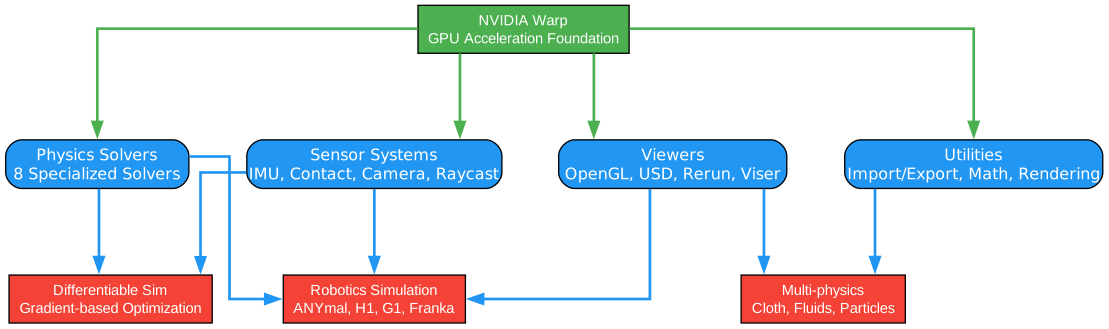
The architecture diagram above illustrates the layered design of Newton Physics Engine, showcasing how different components interact to provide a comprehensive simulation platform. Let’s examine each layer and component in detail:
Core Foundation: NVIDIA Warp
At the base of Newton’s architecture lies NVIDIA Warp, a Python framework for GPU-accelerated computing. Warp provides the fundamental building blocks that enable Newton’s high-performance simulation capabilities. This foundation allows Newton to leverage CUDA kernels for massively parallel computation, translating Python code into optimized GPU operations automatically.
Warp’s significance cannot be overstated - it bridges the gap between Python’s ease of use and CUDA’s raw performance. Developers can write simulation logic in Python while Warp handles the compilation to efficient GPU kernels. This approach eliminates the traditional trade-off between development speed and runtime performance.
Solver Layer: Multi-Physics Support
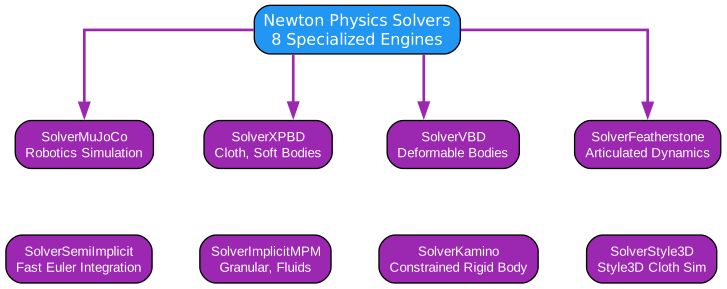
The solver layer represents Newton’s most distinctive feature: support for eight specialized physics solvers. Each solver is optimized for specific simulation scenarios:
-
MuJoCo Solver: Derived from the popular MuJoCo physics engine, this solver excels at contact-rich robotic manipulation. It uses efficient constraint-based algorithms that handle complex contact geometries with remarkable speed.
-
XPBD Solver: Extended Position Based Dynamics provides stable simulation for cloth, soft bodies, and articulated structures. XPBD’s iterative constraint solving approach offers excellent stability even with large time steps.
-
VBD Solver: Velocity Based Dynamics solver focuses on real-time simulation of deformable bodies. It’s particularly effective for cloth simulation and soft robotics applications.
-
Featherstone Solver: Implements the classic Featherstone algorithm for articulated body dynamics. This solver is ideal for robotic arms and legged robots with well-defined kinematic chains.
-
SemiImplicit Solver: A general-purpose solver using semi-implicit integration for stability. Works well for particle systems and basic rigid body dynamics.
-
MPM Solver: Material Point Method solver handles continuum mechanics problems including sand, snow, and other granular materials. Essential for terrain interaction simulations.
-
Kamino Solver: Specialized for fluid simulation using position-based methods. Enables realistic water and liquid interactions in robotic scenarios.
-
Style3D Solver: Advanced cloth simulation with sophisticated collision handling. Used for textile manipulation and virtual try-on applications.
Sensor Systems
Newton includes comprehensive sensor simulation capabilities that mirror real-world robotic sensors:
- IMU Sensors: Simulate inertial measurement units with realistic noise models
- Contact Sensors: Detect and report contact forces and locations
- Tiled Camera: Efficient multi-camera rendering for vision systems
- Raycast Sensors: Simulate LIDAR and depth sensors for navigation
Model Import and USD Integration
The architecture supports seamless integration with industry-standard formats:
- URDF (Unified Robot Description Format) for ROS compatibility
- MJCF (MuJoCo XML Format) for MuJoCo model import
- OpenUSD for scene description and interchange
This integration layer ensures Newton fits into existing robotics workflows without requiring model conversion or re-engineering.
Viewer and Visualization
Newton provides multiple visualization backends:
- OpenGL viewer for high-performance local visualization
- Viser-based web viewer for remote monitoring
- USD recording for offline rendering and analysis
- Rerun integration for time-series visualization
Data Flow Architecture
The simulation pipeline follows a clear data flow pattern:
- Model Loading: Import robot and environment descriptions from URDF/MJCF/USD
- Solver Selection: Choose appropriate solver based on simulation requirements
- State Initialization: Set initial positions, velocities, and parameters
- Simulation Step: Advance simulation by specified time step
- Sensor Update: Update sensor readings based on new state
- Rendering: Visualize current state through selected viewer
Key Architectural Insights
Newton’s architecture embodies several important design principles:
- Modularity: Each solver is independent, allowing users to switch between them without code changes
- Extensibility: New solvers and sensors can be added through well-defined interfaces
- Performance: GPU acceleration is built into the foundation, not added as an afterthought
- Interoperability: Standard format support ensures compatibility with existing tools
Practical Applications
This architecture enables several advanced use cases:
- Reinforcement Learning: Run thousands of parallel environments for policy training
- Motion Planning: Validate planned trajectories with physics-accurate simulation
- Sensor Development: Test perception algorithms with realistic sensor models
- Soft Robotics: Simulate deformable materials and their interactions
Physics Solvers Deep Dive
The solvers diagram presents a comprehensive view of Newton’s multi-physics capabilities, showing how different simulation paradigms are unified under a common framework. Understanding these solvers is crucial for selecting the right approach for your application.
Rigid Body Solvers
MuJoCo Solver
The MuJoCo solver brings the battle-tested algorithms from DeepMind’s MuJoCo physics engine into Newton’s GPU-accelerated environment. Key characteristics include:
- Contact Dynamics: Uses convex optimization for contact resolution, handling complex contact geometries efficiently
- Constraint Formulation: Models joints, tendons, and contacts as constraints in a unified optimization problem
- Numerical Integration: Employs Euler or Runge-Kutta integration with adaptive step sizes
- Performance: Achieves 10-100x speedup over CPU MuJoCo through GPU parallelization
The MuJoCo solver is ideal for:
- Robotic manipulation with complex contact scenarios
- Legged locomotion research
- Reinforcement learning environments
- Benchmark comparisons with existing MuJoCo code
Featherstone Solver
The Featherstone solver implements the classic articulated body algorithm, optimized for kinematic chains:
- Algorithm Complexity: O(n) where n is the number of joints, making it efficient for long kinematic chains
- Joint Types: Supports revolute, prismatic, spherical, and free joints
- Contact Handling: Can be combined with contact solvers for manipulation tasks
- Use Cases: Industrial robot arms, humanoid robots, manipulators
Soft Body and Cloth Solvers
XPBD Solver
Extended Position Based Dynamics (XPBD) provides a versatile approach to soft body simulation:
- Constraint-Based: Models all dynamics as position constraints, ensuring stability
- Iterative Solving: Multiple iterations improve accuracy while maintaining real-time performance
- Material Properties: Supports stiffness, damping, and mass distribution parameters
- Applications: Cloth simulation, soft robotics, deformable objects
The XPBD approach is particularly valuable because it handles large deformations gracefully and remains stable even with relatively large time steps. This makes it suitable for real-time applications where simulation speed is critical.
VBD Solver
Velocity Based Dynamics offers an alternative approach to deformable body simulation:
- Velocity Formulation: Uses velocity constraints rather than position constraints
- Energy Conservation: Better energy behavior for oscillating systems
- Damping Control: Fine-grained control over damping behavior
- Use Cases: Real-time cloth, elastic objects, soft body characters
Style3D Solver
Style3D represents the state-of-the-art in cloth simulation:
- Advanced Collision: Sophisticated self-collision detection and response
- Material Modeling: Accurate fabric behavior including stretching, shearing, and bending
- GPU Optimization: Highly optimized CUDA kernels for cloth-specific operations
- Industry Standard: Used in fashion and textile industry applications
Particle and Continuum Solvers
MPM Solver
The Material Point Method solver handles continuum mechanics:
- Particle Representation: Materials are represented as particles carrying material properties
- Grid Transfer: Information transfers between particles and background grid
- Material Models: Supports elastic, plastic, and granular materials
- Applications: Terrain simulation, granular materials, snow, sand
MPM is essential for robotics applications involving:
- Walking robots on sand or soil
- Excavation and earth-moving equipment
- Agricultural robotics
- Planetary exploration
Kamino Solver
Kamino provides fluid simulation capabilities:
- Position-Based Fluids: Uses position-based dynamics for incompressible fluids
- Surface Reconstruction: Generates smooth fluid surfaces for rendering
- Interaction: Handles fluid-solid coupling for realistic interactions
- Use Cases: Underwater robotics, fluid manipulation, cooling systems
Semi-Implicit Solver
The semi-implicit solver offers a balance between stability and performance:
- Integration Method: Semi-implicit Euler integration for improved stability
- Particle Systems: Efficient handling of large particle counts
- Simplicity: Easy to configure with predictable behavior
- Applications: Basic simulations, educational purposes, prototyping
Solver Selection Guide
Choosing the right solver depends on your application requirements:
| Solver | Best For | Performance | Stability |
|---|---|---|---|
| MuJoCo | Contact-rich manipulation | Excellent | Excellent |
| Featherstone | Articulated robots | Excellent | Excellent |
| XPBD | Soft bodies, cloth | Very Good | Very Good |
| VBD | Real-time cloth | Very Good | Good |
| Style3D | High-quality cloth | Good | Excellent |
| MPM | Granular materials | Good | Good |
| Kamino | Fluids | Good | Good |
| SemiImplicit | Basic simulations | Excellent | Good |
Solver Integration
Newton’s architecture allows seamless switching between solvers:
# Example: Switching between solvers
import newton

# Create model
model = newton.Model()

# Use MuJoCo solver for manipulation
solver = newton.MuJoCoSolver(model)

# Or switch to XPBD for soft body
# solver = newton.XPBDSolver(model)

# Simulation step remains the same
state = solver.step(state, dt=0.01)
This unified interface means you can experiment with different solvers without rewriting your simulation code.
Robot Simulation Pipeline
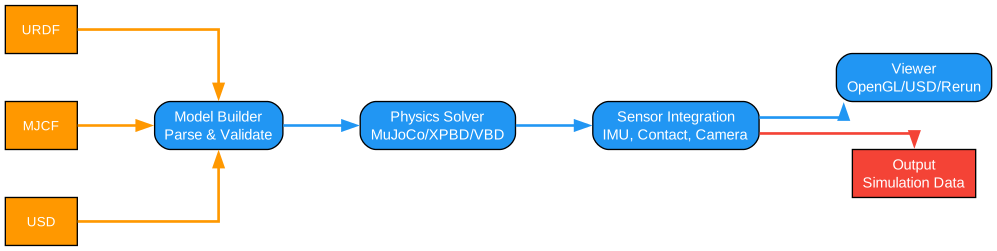
The robot simulation pipeline diagram illustrates how Newton handles the complete workflow from robot model import to simulation execution. This pipeline is designed to support the most common robotics workflows while providing flexibility for custom applications.
Model Import Stage
The pipeline begins with model import, supporting multiple industry-standard formats:
URDF Import
URDF (Unified Robot Description Format) is the standard format for ROS robots:
- Joint Definitions: Supports continuous, revolute, prismatic, and fixed joints
- Link Properties: Mass, inertia, and visual/collision geometries
- Material Properties: Friction coefficients, damping ratios
- ROS Integration: Direct compatibility with ROS-based workflows
Newton’s URDF importer handles common URDF extensions including:
- SRDF (Semantic Robot Description) for planning groups
- Transmission elements for actuator modeling
- Calibration information for sensor offsets
MJCF Import
MJCF (MuJoCo XML Format) provides rich physics modeling capabilities:
- Advanced Contacts: Detailed contact parameters including friction cones
- Tendons and Muscles: Modeling of cable-driven and bio-inspired robots
- Equality Constraints: Coupling between joints and degrees of freedom
- Composite Objects: Automatic generation of complex geometries
The MJCF importer preserves all physics properties, enabling direct use of existing MuJoCo models in Newton’s GPU-accelerated environment.
USD Import
OpenUSD (Universal Scene Description) provides scene-level modeling:
- Hierarchy: Nested assemblies and references
- Layers: Non-destructive composition of scene elements
- Variants: Multiple configurations within a single file
- Animation: Time-sampled properties for dynamic scenes
USD support enables Newton to integrate with modern production pipelines used in film, games, and industrial digital twins.
Model Processing
After import, Newton processes the model for efficient simulation:
Kinematic Analysis
- Joint parent-child relationships
- Degree of freedom counting
- Loop closure detection for parallel mechanisms
Inertia Computation
- Composite inertia for links
- Articulated body inertia propagation
- Efficient caching for repeated queries
Collision Setup
- Bounding volume hierarchy construction
- Collision pair filtering
- Contact parameter assignment
State Management
Newton maintains comprehensive simulation state:
Dynamic State
- Joint positions (q)
- Joint velocities (qdot)
- Joint accelerations (qddot)
- Applied forces and torques
Sensor State
- IMU readings (acceleration, angular velocity)
- Contact forces and locations
- Camera images and depth maps
- Raycast distances
Control Interface
The control interface connects simulation to robot controllers:
Actuator Models
- Position-controlled servos
- Velocity-controlled motors
- Torque-controlled actuators
- Pneumatic/hydraulic models
Control Modes
- Position control for trajectory tracking
- Velocity control for wheeled robots
- Torque control for dynamic manipulation
- Hybrid control for complex tasks
Sensor Feedback
- Real-time sensor updates
- Configurable noise models
- Latency simulation
- Multi-rate sampling
Simulation Execution
The execution engine manages the simulation loop:
Time Stepping
- Fixed time step for deterministic behavior
- Adaptive stepping for stability
- Sub-stepping for stiff contacts
Parallel Execution
- Environment parallelization for RL training
- Multi-GPU scaling for large simulations
- Asynchronous execution for real-time applications
Recording and Playback
- State trajectory recording
- Keyframe extraction
- Playback with variable speed
Key Pipeline Features
Deterministic Execution
Newton ensures deterministic simulation:
- Identical initial conditions produce identical results
- Essential for debugging and reproducibility
- Enables distributed training with consistent environments
Checkpoint/Restore
Save and restore simulation state:
- Training episode checkpoints
- State initialization from files
- Hot-starting simulations
Multi-Environment Support
Run multiple environments simultaneously:
- Vectorized environment creation
- Efficient GPU memory management
- Synchronized stepping for batch processing
Practical Example: Robot Arm Simulation
import newton

# Load URDF model
model = newton.import_urdf("franka_panda.urdf")

# Create MuJoCo solver
solver = newton.MuJoCoSolver(model)

# Initialize state
state = model.default_state()
state.qpos[:] = initial_configuration

# Simulation loop
for _ in range(1000):
    # Apply control
    state.qfrc_applied[:] = controller.compute(state)

    # Step simulation
    state = solver.step(state, dt=0.002)

    # Read sensors
    joint_positions = state.qpos
    joint_velocities = state.qdot
    contact_forces = solver.get_contact_forces(state)
Differentiable Simulation
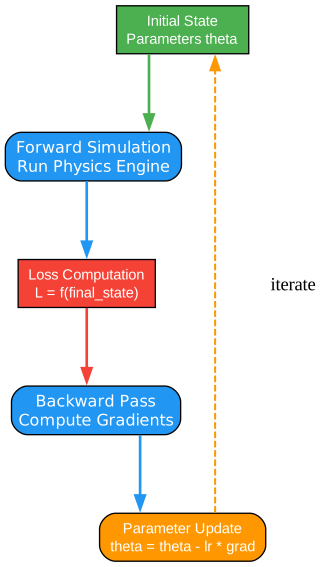
The differentiable simulation diagram reveals one of Newton’s most powerful capabilities: the ability to compute gradients through the entire simulation pipeline. This feature enables gradient-based optimization for robot learning and control.
What is Differentiable Simulation?
Differentiable simulation allows gradients to flow backward through simulation steps, enabling:
- Trajectory Optimization: Find optimal control sequences
- System Identification: Learn physical parameters from data
- Policy Learning: Train neural network policies with gradient descent
- Inverse Dynamics: Compute required actions for desired motions
Traditional simulation treats the physics engine as a black box - you can observe outputs but cannot compute how inputs affect outputs through gradients. Newton breaks this barrier by implementing differentiable versions of all core operations.
Gradient Computation Pipeline
The diagram shows how gradients flow through the simulation:
Forward Pass
- State Input: Initial configuration and control inputs
- Physics Step: Advance simulation using differentiable operations
- Loss Computation: Evaluate objective function on final state
- State Output: Resulting trajectory and observations
Backward Pass
- Loss Gradient: Derivative of loss with respect to outputs
- Physics Backward: Propagate gradients through physics operations
- Control Gradient: Derivative of loss with respect to control inputs
- Parameter Gradient: Derivative of loss with respect to model parameters
Automatic Differentiation
Newton leverages automatic differentiation (autodiff) for gradient computation:
JAX Integration
Newton integrates with JAX for automatic differentiation:
import newton
import jax

# Create differentiable simulation
model = newton.import_urdf("robot.urdf")
solver = newton.MuJoCoSolver(model)

# Define loss function
def loss_fn(qpos_init, controls):
    state = model.default_state()
    state.qpos[:] = qpos_init

    for t in range(horizon):
        state = solver.step(state, controls[t])

    # Loss: reach target position
    target = jax.numpy.array([1.0, 0.5, 0.0])
    return jax.numpy.sum((state.qpos[:3] - target) ** 2)

# Compute gradients
grad_fn = jax.grad(loss_fn, argnums=(0, 1))
initial_grad, control_grad = grad_fn(qpos_init, controls)
Warp Autodiff
For GPU-accelerated differentiation, Newton uses Warp’s built-in autodiff:
- Forward Mode: Efficient for few outputs
- Reverse Mode: Efficient for many outputs (typical in optimization)
- GPU Acceleration: Gradients computed on GPU for speed
Applications of Differentiable Simulation
Trajectory Optimization
Find optimal control sequences for complex tasks:
- Motion Planning: Generate smooth, collision-free trajectories
- Energy Minimization: Find energy-efficient motions
- Time Optimal: Minimize task completion time
System Identification
Learn unknown physical parameters from observations:
- Mass Estimation: Identify object masses from interaction
- Friction Learning: Estimate friction coefficients
- Stiffness Calibration: Determine joint stiffness values
Policy Learning
Train neural network policies with gradients:
- End-to-End Learning: Gradients flow from simulation to policy
- Sample Efficiency: Gradient-based methods need fewer samples
- Stable Training: Avoid exploration instability
Inverse Kinematics/Dynamics
Compute required inputs for desired outputs:
- Reaching Tasks: Find joint angles to reach targets
- Force Control: Compute forces for desired contact behavior
- Motion Retargeting: Adapt motions between different robots
Gradient-Based Control
Use gradients directly for control:
# Model Predictive Control with gradients
def mpc_step(current_state, horizon, dt):
    # Initialize controls
    controls = jax.numpy.zeros((horizon, model.nu))

    # Gradient descent optimization
    for _ in range(optimization_steps):
        loss, grads = loss_and_grad_fn(current_state, controls)
        controls = controls - learning_rate * grads

    return controls[0]  # Return first action
Advantages Over Model-Free Methods
Differentiable simulation offers significant advantages:
| Aspect | Differentiable Sim | Model-Free RL |
|---|---|---|
| Sample Efficiency | High | Low |
| Gradient Information | Exact | Estimated |
| Convergence Speed | Fast | Slow |
| Interpretability | High | Low |
| Generalization | Good | Variable |
Challenges and Solutions
Gradient Accuracy
Physics discontinuities can cause gradient issues:
- Contact Events: Discrete contact changes
- Collision Detection: Non-differentiable geometry queries
- Solutions: Soft contact models, continuous collision detection
Computational Cost
Backward pass requires storing forward computation:
- Memory: Store intermediate states
- Computation: Reverse operations
- Solutions: Checkpointing, gradient checkpointing
Local Minima
Gradient descent can get stuck:
- Non-convex Optimization: Multiple local minima
- Solutions: Multiple restarts, momentum methods, global optimization
Best Practices
Gradient Clipping
Prevent gradient explosion:
grads = jax.grad(loss_fn)(params)
clipped_grads = jax.numpy.clip(grads, -1.0, 1.0)
Learning Rate Scheduling
Adapt learning rate during optimization:
lr_schedule = jax.optimizers.exponential_decay(0.01, 1000, 0.9)
Multi-Start Optimization
Avoid local minima:
best_loss = float('inf')
for init in random_initializations:
    result = optimize(init)
    if result.loss < best_loss:
        best_result = result
Installation
Installing Newton is straightforward using pip:
# Install Newton with core dependencies
pip install newton-physics

# For GPU support, ensure CUDA is installed
# Newton requires CUDA 11.8+ for GPU acceleration

# Install with optional dependencies
pip install newton-physics[all]  # Includes all solvers and viewers
Prerequisites
- Python 3.8 or higher
- CUDA 11.8+ (for GPU acceleration)
- NVIDIA GPU with compute capability 7.0+
Verify Installation
import newton

# Check GPU availability
print(f"Warp device: {newton.get_device()}")

# Create simple simulation
model = newton.Model()
solver = newton.MuJoCoSolver(model)
print("Newton installed successfully!")
Usage Examples
Basic Simulation
import newton

# Load a robot model
model = newton.import_urdf("path/to/robot.urdf")

# Create solver
solver = newton.MuJoCoSolver(model)

# Initialize state
state = model.default_state()

# Run simulation
for i in range(1000):
    state = solver.step(state, dt=0.002)
    print(f"Step {i}: Position = {state.qpos[:3]}")
Reinforcement Learning Environment
import newton
import gymnasium as gym

class NewtonEnv(gym.Env):
    def __init__(self):
        self.model = newton.import_urdf("robot.urdf")
        self.solver = newton.MuJoCoSolver(self.model)
        self.state = self.model.default_state()

    def step(self, action):
        # Apply action
        self.state.qfrc_applied[:] = action
        self.state = self.solver.step(self.state, dt=0.02)

        # Compute reward
        reward = self._compute_reward()
        done = self._check_done()

        return self.state, reward, done, {}

    def reset(self):
        self.state = self.model.default_state()
        return self.state
Soft Body Simulation
import newton

# Create cloth model
model = newton.create_cloth(width=1.0, height=1.0, resolution=50)

# Use XPBD solver for cloth
solver = newton.XPBDSolver(model)

# Simulate falling cloth
state = model.default_state()
for _ in range(500):
    state = solver.step(state, dt=0.001)
Key Features
| Feature | Description |
|---|---|
| GPU Acceleration | Leverages NVIDIA Warp for massive parallelization |
| Multiple Solvers | 8 specialized solvers for different physics domains |
| Differentiable | Full gradient support through simulation |
| Robot Models | Built-in support for URDF, MJCF, USD formats |
| Sensor Simulation | IMU, contact, camera, and raycast sensors |
| Viewers | OpenGL, web-based, and USD recording options |
| Open Source | Apache 2.0 license, Linux Foundation project |
| Python API | Clean Python interface with JAX integration |
| Pre-built Models | ANYmal, H1, G1, Franka Panda, UR10 included |
Supported Robots
Newton includes pre-configured models for popular research robots:
- ANYmal: Quadruped robot from ANYbotics
- H1: Humanoid robot from Unitree
- G1: Compact humanoid from Unitree
- Franka Panda: 7-DOF manipulator arm
- UR10: Universal Robots industrial arm
These models are ready for simulation with appropriate contact parameters and joint configurations.
Conclusion
Newton Physics Engine represents a significant advancement in physics simulation for robotics and research. By combining GPU acceleration through NVIDIA Warp with a modular multi-solver architecture, Newton enables applications that were previously impractical:
- Large-Scale RL Training: Run thousands of parallel environments
- Real-Time Soft Body: Simulate deformable objects at interactive rates
- Differentiable Physics: Enable gradient-based learning and optimization
- Multi-Physics: Combine rigid bodies, soft bodies, and fluids in one simulation
The strong industry backing from Disney Research, Google DeepMind, and NVIDIA, combined with the Linux Foundation governance, ensures Newton will continue to evolve and improve. The open-source Apache 2.0 license makes it accessible for both research and commercial applications.
For roboticists and simulation researchers, Newton provides the tools needed to push the boundaries of what’s possible in robot learning, control, and simulation. Whether you’re training reinforcement learning policies, developing new control algorithms, or simulating complex multi-physics scenarios, Newton offers the performance and flexibility required for cutting-edge work.
Resources
Related Posts
- AgentSkillOS: Skill Orchestration System
- MattPocock Skills: AI Agent Workflows
- DESIGN.md: AI-Powered Design Systems
