Oh My Codex (OMX): Multi-Agent Orchestration Layer for AI Development
In the rapidly evolving landscape of AI-assisted software development, managing complex workflows and coordinating multiple AI agents has become a critical challenge. Enter oh-my-codex (OMX), a groundbreaking workflow layer for OpenAI Codex CLI that has captured the attention of developers worldwide with over 18,775 GitHub stars and 1,744 forks. This trending project transforms how developers interact with AI coding assistants by providing structured workflows, specialized agent roles, and coordinated multi-agent execution capabilities.
What is OMX?
OMX is not a replacement for Codex CLI - it is a powerful orchestration layer that wraps around it. Think of OMX as an intelligent project manager that sits between you and your AI coding assistant, ensuring that tasks are properly clarified, plans are thoroughly reviewed, and execution happens in a coordinated, efficient manner. The project maintains Codex as the execution engine while adding:
- Standard workflows built around canonical skills like
$deep-interview,$ralplan,$team, and$ralph - Specialist roles and supporting skills when tasks require domain-specific expertise
- Project guidance through scoped
AGENTS.mdfiles that serve as the orchestration brain - Durable state management under
.omx/directory for plans, logs, memory, and mode tracking
The beauty of OMX lies in its philosophy: “Start Codex stronger, then let OMX add better prompts, workflows, and runtime help when the work grows.” This approach ensures developers can start quickly while having the infrastructure to handle increasingly complex development tasks.
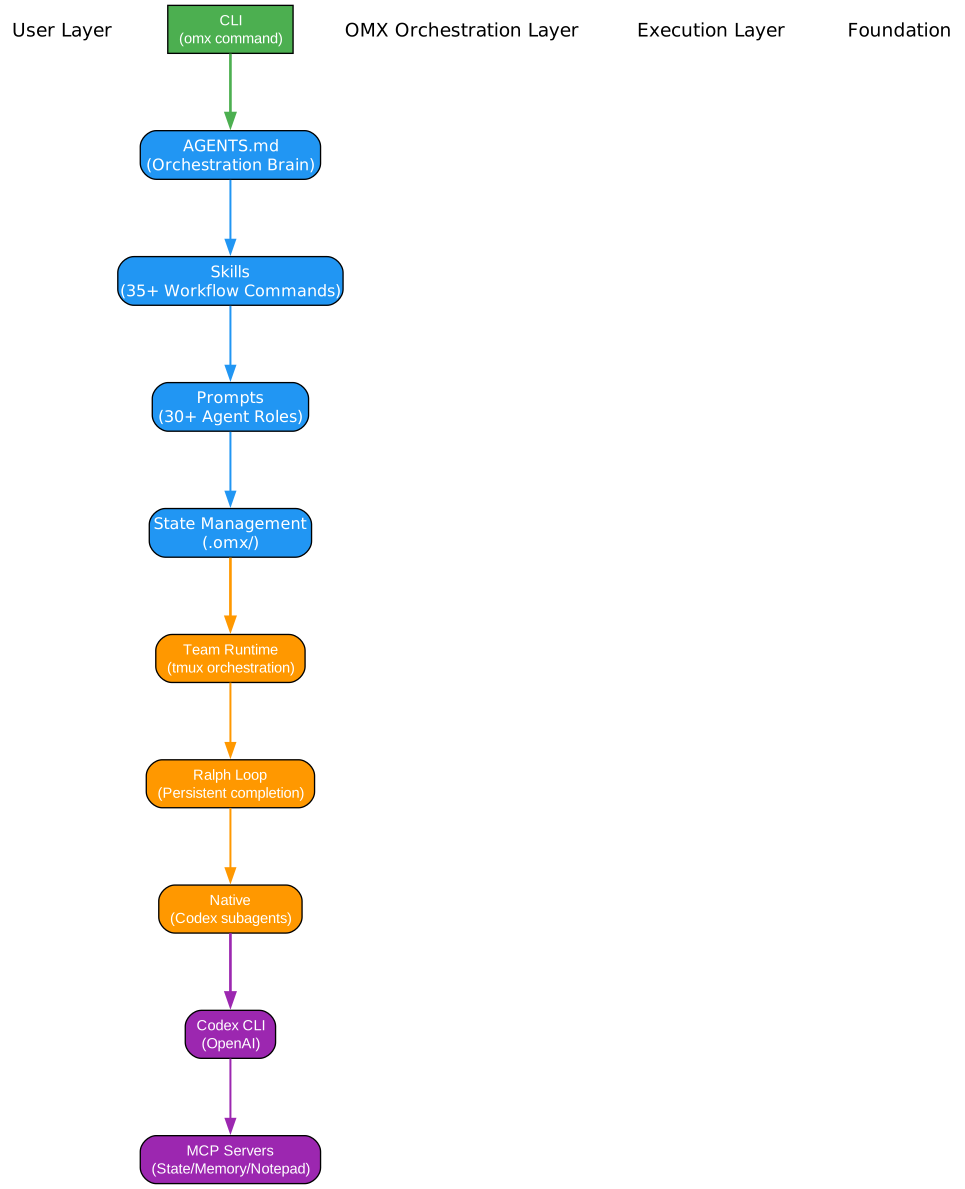
Understanding the OMX Architecture
The architecture diagram above illustrates the multi-layered design of oh-my-codex and how it orchestrates AI development workflows. Let’s examine each component in detail:
Core Layer: Codex CLI Integration
At the foundation, OMX maintains a tight integration with OpenAI’s Codex CLI. This design choice is intentional - OMX does not attempt to replace or fork Codex, but rather enhances it with structured workflows. The Codex CLI remains the execution engine, handling all actual code generation, file manipulation, and command execution. This separation of concerns ensures that OMX can evolve independently while benefiting from all improvements to the underlying Codex engine.
Workflow Layer: Skills and Prompts
The workflow layer sits above the core and provides the primary interface for developers. This layer contains:
-
Canonical Skills: The four primary skills (
$deep-interview,$ralplan,$ralph,$team) form the backbone of the OMX workflow. Each skill is designed for a specific phase of development, from clarification to execution. -
Agent Shortcuts: Over 30 specialized agent roles like
$tdd,$code-review,$security-review, and$frontend-ui-uxprovide domain-specific expertise on demand. -
Utility Skills: Supporting skills like
$doctor,$help,$note, and$traceprovide debugging and monitoring capabilities.
State Management Layer: .omx/ Directory
The state management layer persists all workflow data in a structured .omx/ directory:
- Plans: Approved implementation plans generated by
$ralplan - Logs: Execution logs and session history
- Memory: Context and learning data for persistent sessions
- Mode Tracking: Current workflow state and active skills
This durable state enables OMX to resume sessions, track progress across multiple invocations, and maintain context for long-running projects.
Orchestration Brain: AGENTS.md
The AGENTS.md file serves as the orchestration brain, providing project-specific guidance that shapes how OMX approaches tasks. This file can define:
- Project architecture and conventions
- Coding standards and best practices
- Domain-specific knowledge and constraints
- Integration points and dependencies
Team Runtime: Multi-Agent Coordination
For complex tasks requiring parallel execution, OMX provides a sophisticated team runtime built on tmux (macOS/Linux) or psmux (Windows). This runtime enables:
- Coordinated parallel execution across multiple agent instances
- Git worktree isolation for each agent
- Inter-agent communication through message passing
- Leader-worker coordination patterns
The architecture demonstrates a thoughtful balance between simplicity for common tasks and power for complex workflows, making OMX suitable for both individual developers and large teams.
Workflow Skills
OMX provides over 35 workflow skills organized into logical categories. These skills transform how developers interact with AI assistants, turning ad-hoc requests into structured, repeatable workflows.
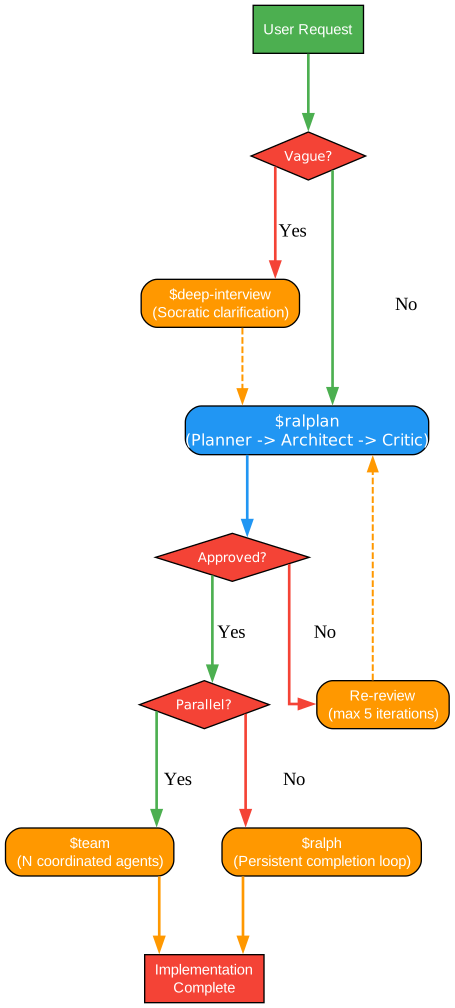
Understanding the Workflow Skills
The workflow diagram above showcases the comprehensive skill ecosystem available in OMX. Let’s explore each category and understand how these skills work together:
Canonical Workflow: The Four Pillars
The canonical workflow represents the recommended path for most development tasks:
- $deep-interview: This skill initiates a structured clarification process when the task boundaries are unclear. Instead of jumping into implementation,
$deep-interviewasks probing questions to understand:- The true intent behind the request
- Scope boundaries and non-goals
- Existing constraints and dependencies
- Success criteria and acceptance conditions
This upfront investment in clarity prevents costly rework and ensures all stakeholders align on objectives before execution begins.
- $ralplan: Once requirements are clarified,
$ralplanorchestrates a planner/architect/critic consensus process to:- Generate multiple implementation approaches
- Evaluate tradeoffs between approaches
- Identify potential risks and mitigation strategies
- Produce an approved, documented plan
The skill name combines “ral” (review-approve-loop) with “plan”, emphasizing the iterative approval process that ensures plans are robust before execution.
- $ralph: For tasks requiring persistent ownership,
$ralphprovides a completion loop that:- Takes ownership of the approved plan
- Executes tasks systematically
- Verifies completion at each step
- Handles blockers and escalations
- Continues until full completion
The name “ralph” represents the persistent “ral” (review-approve-loop) plus “ph” for phase handling, indicating its role in seeing phases through to completion.
- $team: When work is substantial enough to benefit from parallel execution,
$teamcoordinates multiple agents:- Spawns worker agents with specific roles
- Distributes tasks based on dependencies
- Monitors progress and handles failures
- Merges results and resolves conflicts
Execution Modes: Tailored Runtime Behavior
Beyond the canonical workflow, OMX offers specialized execution modes:
- $autopilot: Full autonomous execution for well-defined tasks where the standard workflow would be unnecessary overhead
- $ultrawork: Maximum parallel execution for time-critical tasks with clear boundaries
- $visual-verdict: Structured visual QA loop for tasks involving screenshots or reference images, with a 90+ threshold for visual matching
- $ecomode: Token-efficient model routing that optimizes cost while maintaining quality
- $ultraqa: Continuous test/verify/fix loop for quality-critical development
Planning and Clarification Skills
Supporting the canonical workflow are additional planning skills:
- $plan: Strategic planning when not following the canonical path
- $deepsearch: Deep investigation and research capabilities
- $analyze: Structured analysis of codebases and problems
Agent Shortcuts: Domain Expertise On Demand
OMX provides over 30 agent shortcuts for specialized tasks:
| Skill | Purpose |
|---|---|
$tdd | Test-driven development workflow |
$build-fix | Build error resolution |
$code-review | Comprehensive code review |
$security-review | Security vulnerability assessment |
$frontend-ui-ux | Frontend and UX optimization |
$git-master | Git workflow management |
$review | General review capabilities |
Utility Skills: Supporting Infrastructure
Essential utilities complete the skill ecosystem:
- $cancel: Gracefully cancel ongoing operations
- $doctor: Diagnose and fix installation issues
- $help: Access documentation and guidance
- $note: Add persistent notes to session context
- $trace: Debug and trace execution paths
- $hud: Monitor status and progress
- $configure-notifications: Set up notification preferences
The skill system demonstrates OMX’s philosophy of providing structured, repeatable workflows while remaining flexible enough to handle diverse development scenarios.
Team Runtime
For complex projects requiring coordinated multi-agent execution, OMX provides a sophisticated team runtime that enables parallel development with proper isolation and coordination.
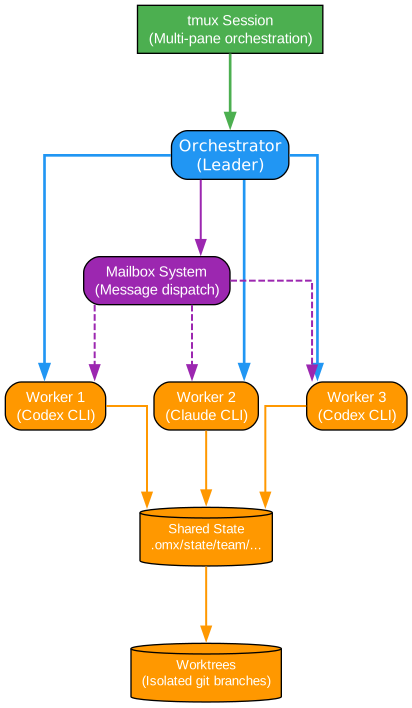
Understanding the Team Runtime
The team runtime diagram above illustrates how OMX orchestrates multiple AI agents working in parallel. This architecture draws inspiration from distributed systems patterns while adapting them for AI agent coordination:
Leader-Worker Architecture
The team runtime implements a leader-worker pattern where:
-
Leader Agent: Orchestrates the overall workflow, distributes tasks, monitors progress, and handles escalations. The leader maintains the global view and makes coordination decisions.
-
Worker Agents: Execute assigned tasks in isolation. Each worker operates in its own git worktree, preventing conflicts and enabling true parallel development.
Git Worktree Isolation
A key innovation in OMX’s team runtime is the use of git worktrees for isolation:
- Each worker agent gets its own worktree, a separate working directory pointing to the same repository
- Workers can make changes independently without interfering with each other
- The leader coordinates merging through a structured process
- Conflicts are detected and resolved systematically
This approach enables true parallel development while maintaining a single source of truth in the git repository.
tmux/psmux Session Management
The runtime leverages terminal multiplexers for session management:
- macOS/Linux: Uses tmux for persistent sessions that survive disconnections
- Windows: Uses psmux for native Windows support
Each agent runs in its own pane or window, with the leader having visibility into all workers. This architecture provides:
- Persistent sessions that can be resumed after disconnection
- Real-time monitoring of all agent activities
- Clean separation of agent outputs and logs
- Easy switching between agent contexts
Inter-Agent Communication
Workers communicate through a structured message passing system:
- Mailbox System: Each agent has a mailbox for receiving messages
- State Files: Shared state stored in
.omx/directory - Event Broadcasting: Leader broadcasts coordination events to all workers
- Task Queue: Prioritized task queue managed by the leader
Coordination Protocols
The team runtime implements several coordination protocols:
- Task Distribution: Leader analyzes dependencies and distributes tasks to maximize parallelism
- Progress Monitoring: Continuous monitoring of worker progress with timeout handling
- Failure Recovery: Automatic retry and reassignment when workers fail
- Merge Coordination: Structured merge process with conflict detection and resolution
Practical Applications
The team runtime excels in scenarios such as:
- Large Refactoring: Breaking down massive refactoring into parallel workstreams
- Feature Development: Multiple developers working on independent features simultaneously
- Bug Fixing: Parallel investigation and fixing of related bugs
- Testing: Running different test suites in parallel across workers
The team runtime represents a significant advancement in AI-assisted development, enabling coordination patterns previously only available in human teams.
RALPLAN Process
The RALPLAN process is OMX’s flagship planning methodology, combining structured decision-making with iterative refinement to produce robust implementation plans.
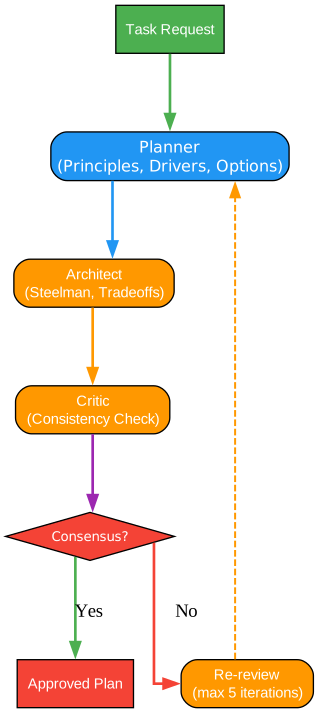
Understanding the RALPLAN Process
The RALPLAN diagram above illustrates the iterative planning process that ensures thorough analysis and stakeholder alignment before execution begins. Let’s examine each phase:
Phase 1: Requirements Gathering
The process begins with comprehensive requirements gathering:
- Input Collection: Gather all available context including user requests, existing codebase analysis, and constraints
- Stakeholder Identification: Identify all parties affected by the change
- Success Criteria Definition: Establish clear, measurable success criteria
- Constraint Analysis: Document technical, business, and resource constraints
This phase ensures no critical information is missed before planning begins.
Phase 2: Solution Generation
With requirements clear, the process moves to solution generation:
- Multiple Approaches: Generate at least three distinct implementation approaches
- Tradeoff Analysis: For each approach, analyze:
- Implementation complexity
- Risk factors
- Resource requirements
- Time estimates
- Maintenance implications
- Alternative Exploration: Consider hybrid approaches combining the best aspects of different solutions
Phase 3: Review-Approve Loop (RAL)
The core innovation of RALPLAN is the iterative review-approve loop:
- Review: Each proposed solution undergoes thorough review by the planner, architect, and critic roles
- Analyze: The architect analyzes technical feasibility and integration points
- Critique: The critic identifies potential issues, edge cases, and risks
- Refine: Based on feedback, solutions are refined or alternatives proposed
This loop continues until consensus is reached, ensuring no solution is approved without thorough scrutiny.
Phase 4: Plan Approval
Once consensus is reached:
- Final Plan Documentation: The approved approach is documented with:
- Implementation steps
- Dependencies and sequencing
- Risk mitigation strategies
- Rollback procedures
- Resource Allocation: Assign resources and responsibilities
- Timeline Creation: Establish milestones and deadlines
- Sign-off: Obtain formal approval from all stakeholders
Phase 5: Execution Handoff
The approved plan is handed off for execution:
- Context Transfer: All planning artifacts are preserved for execution context
- Progress Tracking: Mechanisms for tracking progress against the plan
- Escalation Paths: Clear procedures for handling blockers and changes
- Completion Criteria: Unambiguous definition of done
Key Benefits of RALPLAN
The RALPLAN process provides several advantages over ad-hoc planning:
- Reduced Rework: Thorough upfront analysis prevents costly mid-execution changes
- Stakeholder Alignment: Consensus-building ensures all parties agree on the approach
- Risk Mitigation: Systematic risk identification enables proactive mitigation
- Knowledge Capture: Planning artifacts serve as documentation for future reference
- Quality Assurance: Multiple review cycles catch issues early
When to Use RALPLAN
RALPLAN is most valuable for:
- Complex features with multiple integration points
- Architectural changes affecting multiple components
- High-risk changes where failure is costly
- Team projects requiring coordination
- Projects with regulatory or compliance requirements
For simpler tasks, the $autopilot or $ralph skills may be more appropriate, avoiding the overhead of full RALPLAN process.
State Management
OMX maintains all workflow state in a structured .omx/ directory, enabling persistent sessions, progress tracking, and context preservation across invocations.
Directory Structure
.omx/
├── plans/           # Approved implementation plans
│   ├── active/      # Currently executing plans
│   └── archive/     # Completed plan history
├── logs/            # Execution logs and session history
│   ├── session/     # Per-session logs
│   └── team/        # Team runtime logs
├── memory/          # Context and learning data
│   ├── context/     # Session context
│   └── learning/    # Persistent learnings
├── state/           # Runtime state
│   ├── mode/        # Current workflow mode
│   └── skills/      # Active skill state
└── agents.md        # Project-specific guidance
Key State Files
| File | Purpose |
|---|---|
plans/active/*.md | Current implementation plans |
logs/session/*.log | Detailed execution logs |
memory/context/*.json | Session context and variables |
state/mode/*.json | Current workflow state |
AGENTS.md | Project orchestration brain |
This state management approach enables OMX to:
- Resume interrupted sessions
- Track progress across multiple invocations
- Maintain context for long-running projects
- Enable team coordination through shared state
- Provide audit trails for all activities
Installation
Getting started with OMX is straightforward. Follow these steps to set up your environment:
Prerequisites
- Node.js 20+: Required for running OMX
- Codex CLI: Install with
npm install -g @openai/codex - Codex Auth: Configure your OpenAI credentials
- tmux (macOS/Linux): For team runtime support
- psmux (Windows): For Windows team mode
Installation Steps
# Install OMX globally
npm install -g oh-my-codex

# Run setup to configure environment
omx setup

# Launch with recommended settings
omx --madmax --high
The --madmax flag enables maximum capability mode, while --high sets high concurrency for parallel execution.
Platform-Specific Setup
For team mode, install the appropriate terminal multiplexer:
| Platform | Command |
|---|---|
| macOS | brew install tmux |
| Ubuntu/Debian | sudo apt install tmux |
| Fedora | sudo dnf install tmux |
| Arch | sudo pacman -S tmux |
| Windows | winget install psmux |
| Windows (WSL2) | sudo apt install tmux |
Usage Examples
Basic Workflow
# Start OMX session
omx --madmax --high

# Clarify requirements
$deep-interview "clarify the authentication change"

# Create and approve plan
$ralplan "approve the auth plan and review tradeoffs"

# Execute with persistent completion
$ralph "carry the approved plan to completion"

# Or use team for parallel execution
$team 3:executor "execute the approved plan in parallel"
Code Review
# Run comprehensive code review
$code-review "review current branch"

# Security-focused review
$security-review "check for vulnerabilities in auth module"
Test-Driven Development
# Start TDD workflow
$tdd "implement user registration with validation"
Team Operations
# Launch team with 3 workers
omx team 3:executor "fix the failing tests with verification"

# Check team status
omx team status <team-name>

# Resume team session
omx team resume <team-name>

# Shutdown team
omx team shutdown <team-name>
Conclusion
Oh My Codex (OMX) represents a significant advancement in AI-assisted software development. By wrapping Codex CLI with structured workflows, specialized agent roles, and coordinated multi-agent execution, OMX transforms how developers interact with AI coding assistants. The project’s impressive 18,775+ GitHub stars demonstrate the strong community adoption and the value it provides to developers worldwide.
Key takeaways from OMX:
- Structured Workflows: The canonical workflow (
$deep-interview->$ralplan->$team/$ralph) ensures thorough planning before execution - Specialized Skills: Over 35 workflow skills provide domain-specific expertise on demand
- Team Runtime: Sophisticated multi-agent coordination enables parallel development with proper isolation
- State Management: Durable
.omx/directory preserves context and enables session resumption - Flexible Architecture: Works with simple tasks through complex multi-agent projects
Whether you’re an individual developer looking to improve your AI-assisted workflow or a team coordinating complex development projects, OMX provides the infrastructure to make AI coding assistants more effective and reliable.
Resources
- Repository: https://github.com/Yeachan-Heo/oh-my-codex
- Website: https://yeachan-heo.github.io/oh-my-codex-website/
- Documentation: Getting Started
- Discord: Join Community
- NPM Package: oh-my-codex
Related Posts
- AgentSkillOS: Skill Orchestration System
- MattPocock Skills: AI Agent Workflows
- DESIGN.md: AI-Powered Design Systems
