Onyx: Open Source AI Chat Platform with 26K Stars
Onyx is a powerful open source AI chat platform that has gained significant traction in the developer community, amassing over 26,000 stars on GitHub. This comprehensive platform serves as the application layer for Large Language Models (LLMs), bringing a feature-rich interface that can be easily hosted by anyone. Onyx enables LLMs through advanced capabilities like Retrieval-Augmented Generation (RAG), web search, code execution, file creation, deep research, and much more.
What is Onyx?
Onyx, formerly known as Danswer, is an open-source Gen-AI and Enterprise Search platform that connects to company documents, applications, and people. It features a modular architecture with both Community Edition (MIT licensed) and Enterprise Edition offerings, making it suitable for individual developers and large enterprises alike.
The platform supports over 50+ indexing-based connectors out of the box, enabling seamless integration with various data sources. Whether you need to connect to Slack, Confluence, GitHub, Google Drive, or Jira, Onyx has you covered. Additionally, it supports the Model Context Protocol (MCP) for extended connectivity.
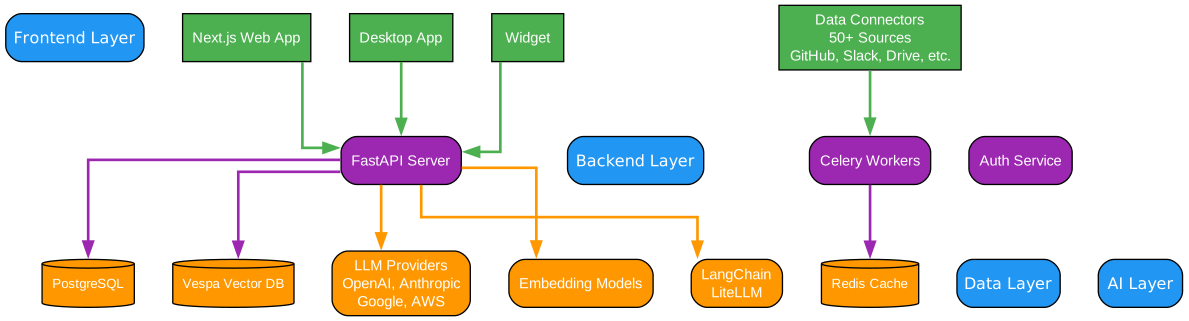
Understanding the Onyx Architecture
The architecture diagram above illustrates the core components and their interactions within the Onyx platform. Let’s break down each component:
User Interface Layer The user interface serves as the primary entry point for all interactions with Onyx. It provides multiple access methods including a web-based interface, desktop applications, and embeddable widgets. This flexibility ensures that users can interact with Onyx through their preferred medium, whether it’s a full-featured web dashboard or a lightweight widget embedded in existing applications.
The UI is built with modern technologies including Next.js 15+ and React 18, providing a responsive and intuitive experience. TypeScript ensures type safety throughout the frontend codebase, while Tailwind CSS delivers consistent styling and rapid UI development.
API Gateway (FastAPI Backend) The API Gateway serves as the central orchestration layer, handling all incoming requests and routing them to appropriate services. Built on FastAPI, it provides high-performance asynchronous request handling with automatic API documentation through OpenAPI/Swagger.
The gateway implements comprehensive authentication and authorization through OAuth2, SAML, and multi-provider support. It also handles rate limiting, request validation, and response caching to ensure optimal performance under load.
Core Services
The platform is organized around three primary services:
-
Chat Service (LLM Interactions): Manages all conversational interactions with LLMs. It handles message threading, context management, and streaming responses for real-time user feedback. The service supports multiple LLM providers through LiteLLM, enabling seamless switching between OpenAI, Anthropic, Gemini, Ollama, vLLM, and other providers.
-
RAG Engine (Hybrid Search): Implements the Retrieval-Augmented Generation pipeline, combining vector similarity search with keyword-based retrieval for optimal document discovery. This hybrid approach ensures both semantic understanding and precise keyword matching, delivering superior search results compared to single-method approaches.
-
Agent System (Custom Agents): Provides a flexible framework for creating specialized AI agents with unique instructions, knowledge bases, and action capabilities. Agents can be configured for specific tasks like deep research, code execution, or web browsing, each with tailored prompts and tool access.
LLM Providers Integration Onyx supports all major LLM providers, both self-hosted and proprietary. This includes OpenAI, Anthropic, and Gemini for cloud-based solutions, as well as Ollama, vLLM, and LiteLLM for self-hosted deployments. The platform abstracts away provider-specific differences, allowing users to switch models without changing application code.
Storage Layer
The storage layer consists of three primary components:
-
PostgreSQL: Stores user data, metadata, chat history, and configuration. It serves as the source of truth for all relational data and supports multi-tenant deployments through schema isolation.
-
Vespa Vector Database: Provides high-performance vector similarity search combined with traditional keyword indexing. Vespa’s hybrid search capabilities enable both semantic and lexical retrieval, making it ideal for RAG applications.
-
Redis Cache: Manages session state, caching frequently accessed data, and coordinating between distributed services. Redis also serves as the message broker for Celery background workers.
Key Features
Onyx offers an impressive array of features that make it stand out in the crowded AI chat platform space:
Agentic RAG
Onyx delivers best-in-class search and answer quality through a combination of hybrid indexing and AI agents for information retrieval. The platform uses both vector embeddings and keyword indexing to ensure comprehensive document discovery, while AI agents help refine queries and synthesize information from multiple sources.
The RAG pipeline is designed for enterprise-scale deployments, handling millions of documents with sub-second response times. Benchmark results are expected to be released soon, demonstrating Onyx’s superior performance compared to other open-source RAG solutions.
Deep Research
The deep research feature generates in-depth reports through a multi-step research flow. This capability has achieved top rankings on the leaderboard as of February 2026, showcasing Onyx’s ability to conduct comprehensive research across multiple data sources and synthesize findings into coherent reports.
Custom Agents
Users can build AI agents with unique instructions, knowledge bases, and actions. These agents can be configured for specific domains or tasks, with access to relevant tools and data sources. The agent system supports complex workflows including multi-step reasoning, tool calling, and result verification.
Web Search
Onyx can browse the web to retrieve up-to-date information, supporting multiple search providers including Serper, Google PSE, Brave, and SearXNG. The platform also includes an in-house web crawler and supports Firecrawl/Exa for enhanced web scraping capabilities.
Artifacts
Generate documents, graphics, and other downloadable artifacts directly within the chat interface. This feature enables users to create reports, visualizations, and other outputs without leaving the platform.
Actions and MCP
Let Onyx agents interact with external applications through flexible authentication options. The Model Context Protocol (MCP) support enables integration with a wide range of external tools and services, extending the platform’s capabilities beyond built-in features.
Code Execution
Execute code in a sandboxed environment to analyze data, render graphs, or modify files. This feature is particularly useful for data analysis tasks, allowing users to run Python, JavaScript, and other languages safely within the platform.
Voice Mode
Chat with Onyx via text-to-speech and speech-to-text capabilities, making the platform accessible through voice interactions. This feature is ideal for hands-free operation and accessibility requirements.
Image Generation
Generate images based on user prompts, enabling creative applications and visual content creation directly within the chat interface.
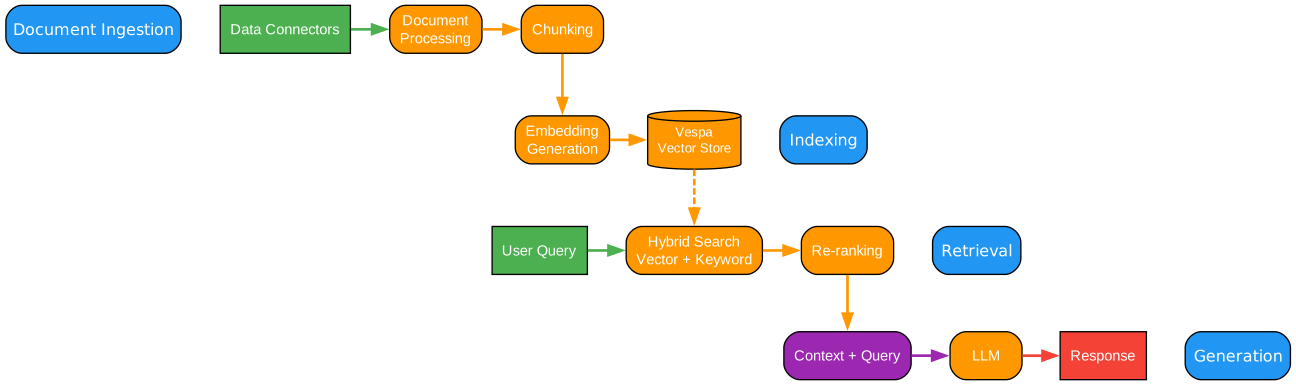
Understanding the RAG Pipeline
The RAG (Retrieval-Augmented Generation) pipeline is the heart of Onyx’s intelligent information retrieval system. This diagram illustrates how user queries are transformed into accurate, citation-backed responses through a sophisticated multi-stage process.
Document Retrieval (Hybrid Search)
The pipeline begins when a user submits a query. The retrieval stage employs a hybrid search approach that combines two complementary methods:
-
Vector Similarity Search: Documents are embedded into high-dimensional vectors using state-of-the-art embedding models. When a query arrives, it’s similarly embedded, and the system finds documents with similar semantic meaning, even if they don’t contain the exact keywords.
-
Keyword-Based Retrieval: Traditional inverted index techniques identify documents containing specific terms from the query. This ensures that exact matches and domain-specific terminology are not missed.
The hybrid approach leverages the strengths of both methods: vector search excels at understanding semantic relationships and finding conceptually similar content, while keyword search ensures precision for specific terms and phrases.
Result Ranking (Relevance Scoring)
Once candidate documents are retrieved, they undergo a sophisticated ranking process. The relevance scoring algorithm considers multiple factors:
- Semantic Similarity Score: How closely the document’s meaning aligns with the query intent
- Keyword Match Quality: The precision and coverage of keyword matches
- Document Freshness: More recent documents may be prioritized for time-sensitive queries
- User Context: Previous interactions and user preferences influence ranking
- Source Authority: Documents from authoritative sources receive higher scores
The ranking model is continuously refined through user feedback, learning to prioritize results that lead to successful outcomes.
Context Building (Chunk Assembly)
Top-ranked documents are then processed for context building. Rather than feeding entire documents to the LLM, Onyx employs intelligent chunking:
- Semantic Chunking: Documents are split at natural boundaries (paragraphs, sections) rather than arbitrary character counts
- Contextual Overlap: Adjacent chunks include overlapping context to maintain coherence
- Metadata Enrichment: Each chunk includes relevant metadata (source, date, author) for proper attribution
- Size Optimization: Chunks are sized to maximize information density while staying within token limits
The assembled context provides the LLM with precisely the information needed to answer the query accurately.
Answer Generation (LLM Processing)
With the context prepared, the LLM generates a comprehensive response. Onyx’s generation process includes:
- Prompt Engineering: Carefully crafted prompts guide the LLM to use provided context effectively
- Citation Integration: The LLM is instructed to reference specific sources when making claims
- Streaming Responses: Answers are streamed in real-time, providing immediate feedback
- Confidence Indicators: When appropriate, the system indicates uncertainty about certain claims
Data Sources: 50+ Connectors
Onyx’s connector ecosystem is one of its strongest features. The platform supports over 50 pre-built connectors for popular data sources:
- Collaboration Tools: Slack, Microsoft Teams, Discord
- Documentation: Confluence, Notion, GitBook
- Development: GitHub, GitLab, Bitbucket, Jira
- Storage: Google Drive, Dropbox, OneDrive, S3
- Databases: PostgreSQL, MySQL, MongoDB, Elasticsearch
- And Many More: Custom connectors can be built using the MCP protocol
These connectors continuously sync data into the Vespa index, ensuring the knowledge base stays current with source systems.
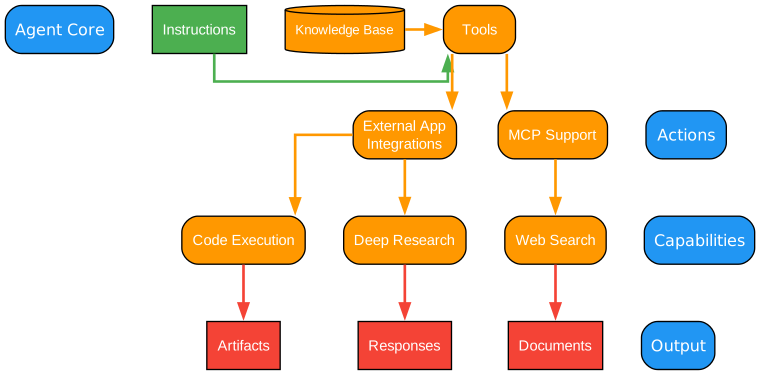
Understanding the Agent System
The agent system diagram showcases Onyx’s sophisticated approach to AI agent orchestration. This architecture enables specialized agents to work independently or collaboratively, each optimized for specific task types.
Agent Router (Intent Classification)
The journey begins at the Agent Router, which serves as the intelligent dispatcher for all incoming requests. Using advanced natural language understanding, the router analyzes each user request to determine:
- Intent Recognition: What type of task is the user requesting?
- Complexity Assessment: How many steps will this task require?
- Resource Requirements: Which tools and knowledge bases are needed?
- Agent Selection: Which specialized agent is best suited for this task?
The router employs a combination of rule-based classification and ML models to achieve high accuracy in intent detection. This ensures that requests are routed to the most appropriate agent, minimizing processing time and maximizing response quality.
Specialized Agents
Onyx provides several pre-built specialized agents, each designed for specific task categories:
Research Agent (Deep Analysis) The Research Agent excels at comprehensive information gathering and synthesis. When activated, it:
- Formulates multiple search queries to explore different aspects of the topic
- Iteratively refines searches based on initial findings
- Synthesizes information from diverse sources into coherent reports
- Provides citations and source attribution for all claims
- Identifies gaps in available information and suggests further investigation
This agent is ideal for literature reviews, market research, competitive analysis, and any task requiring thorough information synthesis.
Code Agent (Execution Sandbox) The Code Agent provides a secure environment for executing code and analyzing data. Key capabilities include:
- Multi-language support (Python, JavaScript, SQL, and more)
- Sandboxed execution with resource limits
- File system access for reading and writing data
- Visualization capabilities for charts and graphs
- Integration with the knowledge base for context-aware code generation
Security is paramount: code runs in isolated containers with strict resource limits, ensuring that malicious or buggy code cannot affect the host system.
Web Agent (Search and Browse) The Web Agent extends Onyx’s capabilities beyond the indexed knowledge base to the live internet. It can:
- Perform real-time web searches using multiple search engines
- Navigate to specific URLs and extract content
- Handle JavaScript-rendered pages through headless browser capabilities
- Summarize and synthesize information from multiple web sources
- Track and cite sources for transparency
This agent is essential for queries requiring current information not yet indexed in the knowledge base.
Custom Agent (User Defined) Organizations can create custom agents tailored to their specific needs. Custom agents can be configured with:
- Specialized prompts and instructions
- Access to specific knowledge bases and tools
- Custom action definitions and workflows
- Domain-specific reasoning patterns
- Integration with internal systems and APIs
Tools and Actions
Agents have access to a rich toolkit through the MCP (Model Context Protocol):
MCP Tools (External Actions) The MCP protocol enables agents to interact with external systems:
- API integrations for retrieving or updating data
- Database queries for structured data access
- File operations for reading and writing documents
- Webhook triggers for event-driven workflows
- Custom actions defined by organization administrators
Knowledge Base (RAG Retrieval) All agents can access the indexed knowledge base through RAG retrieval:
- Semantic search across all indexed documents
- Filtered search by source, date, or custom metadata
- Hybrid retrieval combining vector and keyword search
- Real-time updates as new documents are indexed
Agent Response (with Actions)
The final output from any agent includes not just the textual response, but also:
- Citations: Links to source documents for verification
- Action Logs: Record of any external actions taken
- Confidence Scores: Indication of certainty in the response
- Follow-up Suggestions: Recommended next steps for the user
This comprehensive response format ensures transparency and enables users to verify information and take further action.
Deployment Modes
Onyx supports two deployment modes to accommodate different use cases and resource requirements:
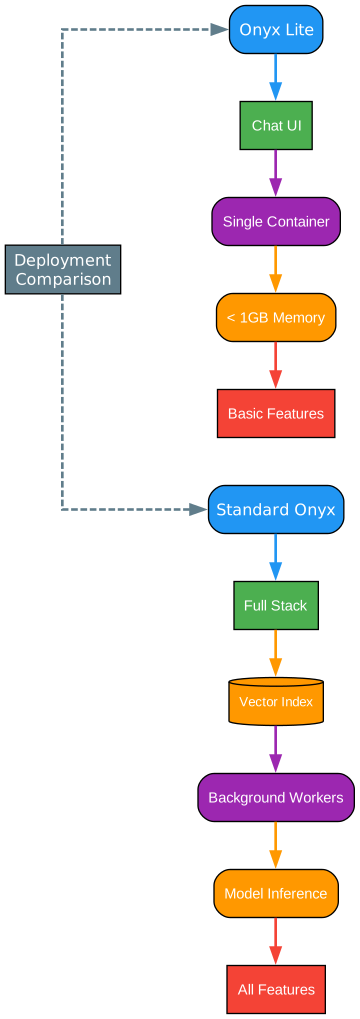
Understanding Deployment Modes
The deployment modes diagram illustrates the two primary ways to deploy Onyx, each optimized for different scenarios and organizational needs.
Onyx Lite: Lightweight Deployment
Onyx Lite is designed for quick testing and teams primarily interested in chat UI and agent functionalities. This deployment mode offers:
Minimal Resource Requirements
- Under 1GB memory footprint
- Simplified architecture with fewer components
- Quick startup time for rapid prototyping
- Ideal for development and testing environments
Core Components
- Chat UI (Lightweight): A streamlined web interface focused on essential chat functionality
- API Server (Minimal): Core API endpoints without background processing
- SQLite (Local DB): File-based database for persistence without external dependencies
Use Cases for Onyx Lite
- Individual developers testing the platform
- Small teams exploring AI chat capabilities
- Proof-of-concept projects
- Development and staging environments
- Resource-constrained deployments
Limitations
- No vector indexing for RAG
- Limited to single-user or small team usage
- No background job processing
- Reduced scalability for large document sets
Standard Onyx: Full Feature Deployment
Standard Onyx provides the complete feature set, recommended for serious users and larger teams. This deployment includes all components from Lite plus:
Additional Components
Celery Workers (Background Jobs) The worker infrastructure handles asynchronous tasks:
- Document indexing and re-indexing
- Connector synchronization jobs
- Scheduled maintenance tasks
- Long-running research queries
- Batch processing operations
Workers are organized into specialized queues:
- Primary Worker: Core system operations
- Docfetching Worker: Document retrieval from connectors
- Docprocessing Worker: Document processing pipeline
- Heavy Worker: Resource-intensive operations
- Light Worker: Quick operations
- KG Processing Worker: Knowledge graph operations
- Monitoring Worker: System health checks
- User File Processing Worker: User-uploaded file handling
PostgreSQL (Relational DB) The production-grade database provides:
- Multi-tenant support through schema isolation
- ACID compliance for data integrity
- Advanced querying capabilities
- Connection pooling for performance
- Backup and recovery options
Vespa (Vector Index) The vector database enables:
- Hybrid search (vector + keyword)
- Real-time indexing and updates
- Distributed search across clusters
- Advanced ranking and relevance scoring
- High query throughput
Redis (Cache) The caching layer provides:
- Session state management
- Frequently accessed data caching
- Message broker for Celery
- Real-time collaboration support
- Rate limiting implementation
Use Cases for Standard Onyx
- Production deployments
- Enterprise environments
- Large-scale document indexing
- Multi-tenant SaaS applications
- High-availability requirements
Resource Considerations Standard Onyx requires more resources:
- Minimum 8GB RAM recommended
- Persistent storage for databases
- Network connectivity between components
- Monitoring and logging infrastructure
Installation
Getting started with Onyx is straightforward. The platform offers multiple installation methods to suit different environments:
Quick Start (Recommended)
The fastest way to deploy Onyx is using the installation script:
curl -fsSL https://onyx.app/install_onyx.sh | bash
This script handles all dependencies and configuration automatically.
Docker Deployment
For containerized environments:
# Clone the repository
git clone https://github.com/onyx-dot-app/onyx.git
cd onyx

# Start with Docker Compose
docker-compose up -d
Kubernetes Deployment
For production Kubernetes environments, Onyx provides Helm charts and Terraform configurations. Detailed deployment guides are available in the official documentation.
Technology Stack
Onyx is built on modern, battle-tested technologies:
Backend
- Python 3.11
- FastAPI for API endpoints
- SQLAlchemy for database ORM
- Alembic for migrations
- Celery for background task processing
Frontend
- Next.js 15+
- React 18
- TypeScript
- Tailwind CSS
Data Storage
- PostgreSQL for relational data
- Redis for caching and queuing
- Vespa for vector search
AI/ML
- LangChain for LLM orchestration
- LiteLLM for multi-provider support
- Multiple embedding models
Authentication
- OAuth2
- SAML
- Multi-provider support
Enterprise Features
Onyx is built for teams of all sizes, from individual users to the largest global enterprises:
- Collaboration: Share chats and agents with other members of your organization
- Single Sign On: SSO via Google OAuth, OIDC, or SAML. Group syncing and user provisioning via SCIM
- Role Based Access Control: RBAC for sensitive resources like access to agents, actions, etc.
- Analytics: Usage graphs broken down by teams, LLMs, or agents
- Query History: Audit usage to ensure safe adoption of AI in your organization
- Custom Code: Run custom code to remove PII, reject sensitive queries, or run custom analysis
- Whitelabeling: Customize the look and feel of Onyx with custom naming, icons, banners, and more
Licensing
Onyx offers two editions:
Onyx Community Edition (CE)
- MIT licensed
- Freely available
- Core features for Chat, RAG, Agents, and Actions
Onyx Enterprise Edition (EE)
- Additional features for larger organizations
- Advanced security and compliance features
- Enterprise support options
For feature details, visit the Onyx pricing page.
Community and Support
Join the Onyx community:
- Discord: https://discord.gg/TDJ59cGV2X
- Documentation: https://docs.onyx.app
- GitHub: https://github.com/onyx-dot-app/onyx
Contributing
Looking to contribute? Check out the Contribution Guide for development setup, coding standards, and pull request guidelines.
Conclusion
Onyx represents a significant advancement in open-source AI chat platforms. With its comprehensive feature set, flexible deployment options, and enterprise-ready architecture, it’s an excellent choice for organizations looking to implement AI-powered chat and search capabilities. The platform’s modular design, extensive connector ecosystem, and support for all major LLM providers make it a versatile solution for a wide range of use cases.
Whether you’re a developer exploring AI chat for the first time or an enterprise architect building a production deployment, Onyx provides the tools and flexibility needed to succeed. The active community and comprehensive documentation ensure you’ll have support throughout your journey.
Related Posts
- AgentSkillOS: Skill Orchestration System
- MattPocock Skills: AI Agent Workflows
- DESIGN.md: AI-Powered Design Systems

