OpenDataLoader PDF: Parser for AI-Ready Data
In the era of large language models and retrieval-augmented generation (RAG), extracting structured data from PDFs has become a critical challenge. OpenDataLoader PDF emerges as the leading open-source solution, ranking #1 in extraction benchmarks with a 0.907 overall accuracy score. This powerful tool transforms PDFs into AI-ready data while pioneering automated accessibility compliance.
What is OpenDataLoader PDF?
OpenDataLoader PDF is an open-source PDF parser specifically designed for AI data extraction and accessibility automation. Built in Java with Python, Node.js, and Java SDKs, it provides deterministic local processing without requiring GPU resources. The tool excels at extracting structured content from PDFs while preserving document semantics, making it ideal for RAG pipelines, LLM context windows, and compliance workflows.
The project addresses two major challenges: extracting structured data from PDFs for AI applications, and automating PDF accessibility compliance for regulatory requirements. With 15,500+ GitHub stars and growing adoption, OpenDataLoader PDF has become the go-to solution for organizations processing document collections at scale.
Architecture Overview
Understanding the Architecture
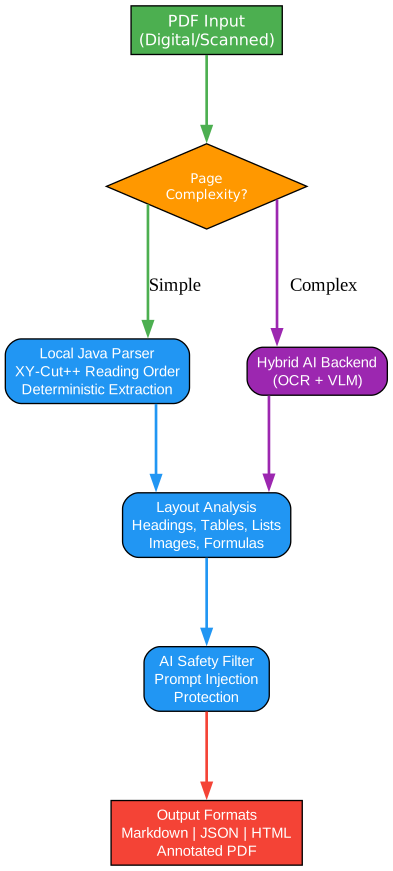
The architecture diagram above illustrates how OpenDataLoader PDF processes documents through a sophisticated multi-stage pipeline. Let’s examine each component in detail:
PDF Input Layer
The input layer accepts multiple PDF formats including digital PDFs with selectable text, scanned documents requiring OCR, and tagged PDFs with existing structure. This flexibility ensures compatibility with diverse document sources from legacy archives to modern digital workflows. The system automatically detects document type and routes content to appropriate processing paths.
Local Java Engine
At the core sits a high-performance Java engine delivering deterministic extraction at remarkable speed. Processing 60+ pages per second on CPU (0.02s/page), this engine handles standard documents without external dependencies. The deterministic nature ensures consistent output across runs, critical for reproducible data pipelines and audit trails.
Hybrid Router
The intelligent hybrid router classifies pages by complexity, routing simple content to local processing while directing complex pages (tables, formulas, charts) to the AI backend. This classification happens in milliseconds, optimizing the trade-off between speed and accuracy. Simple pages stay local for instant processing; complex pages leverage AI for superior extraction quality.
AI Backend Integration
For challenging content, the hybrid mode connects to AI backends like Docling-Fast running locally on your infrastructure. This ensures sensitive documents never leave your environment while gaining access to advanced capabilities: complex table extraction (0.928 TEDS accuracy), OCR for 80+ languages, LaTeX formula extraction, and AI-generated image descriptions.
Processing Components
The layout analysis module employs XY-Cut++ algorithm for reading order detection, correctly sequencing text across multi-column layouts, sidebars, and mixed-format pages. Table extraction uses border analysis and text clustering to preserve row/column structure, handling both bordered and borderless tables. The OCR module processes scanned documents with support for multiple languages including Korean, Japanese, Chinese, and Arabic.
Output Generation
Multiple output formats serve different use cases: JSON with bounding boxes for source citations, Markdown for LLM context, HTML for web display, and Tagged PDF for accessibility compliance. Each format preserves semantic structure, enabling downstream systems to understand document organization without manual interpretation.
PDF Parsing Pipeline

Understanding the Parsing Pipeline
The parsing pipeline demonstrates how OpenDataLoader PDF transforms raw PDF input into structured, AI-ready output through a series of intelligent processing stages.
Stage 1: Document Type Detection
Upon receiving a PDF, the system first analyzes its characteristics to determine the optimal processing strategy. The detection algorithm examines:
- Presence of embedded text streams (digital vs. scanned)
- Existing structure tags (tagged vs. untagged)
- Content complexity indicators (tables, formulas, images)
- Language detection for OCR configuration
This classification determines whether the document can be processed locally at 0.02s/page or requires hybrid mode for complex content. The decision happens in milliseconds, ensuring optimal resource allocation.
Stage 2: Processing Path Selection
For simple documents (standard text, basic formatting), local processing delivers instant results without external dependencies. Complex documents route to hybrid processing, where AI-enhanced extraction handles:
- Borderless and nested tables
- Mathematical formulas requiring LaTeX conversion
- Charts and figures needing description generation
- Scanned content requiring OCR
The hybrid mode processes at 0.46s/page, still remarkably fast while achieving #1 benchmark accuracy.
Stage 3: Layout Detection
The XY-Cut++ algorithm recursively partitions the page space, identifying logical regions and their reading order. Unlike naive top-to-bottom extraction, this approach correctly handles:
- Multi-column newspaper layouts
- Sidebars and callout boxes
- Headers and footers
- Figure captions and table notes
The result is a semantic understanding of document structure, not just text extraction.
Stage 4: Element Extraction
Each identified region undergoes specialized extraction:
- Text blocks preserve font information, heading levels, and paragraph boundaries
- Tables maintain cell relationships, merged cells, and nested structures
- Images capture coordinates for bounding box references
- Formulas convert to LaTeX notation for mathematical content
The extraction process includes AI safety filters, detecting and removing hidden text, off-page content, and potential prompt injection attacks embedded in PDFs.
Stage 5: Structured Output
The final stage generates output in the requested format(s), each optimized for specific use cases:
- JSON includes bounding boxes for every element, enabling source citations in RAG responses
- Markdown provides clean text suitable for LLM context windows and semantic chunking
- HTML preserves styling for web display and document preservation
- Tagged PDF adds accessibility structure for compliance requirements
Output Formats
Understanding Output Format Options
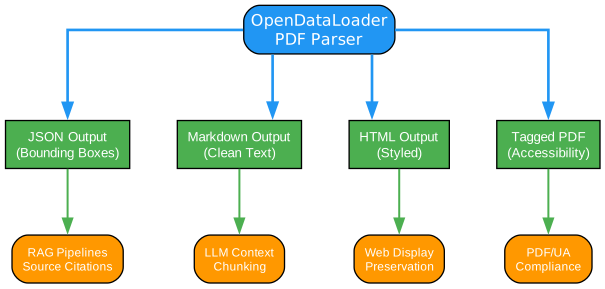
OpenDataLoader PDF generates multiple output formats, each serving distinct use cases in modern document processing workflows.
JSON Output with Bounding Boxes
The JSON format provides the most comprehensive extraction, including:
- Element type (heading, paragraph, table, image, formula)
- Unique identifier for cross-referencing
- Page number and bounding box coordinates
- Font information and styling details
- Extracted text content
This structured output enables precise source citations in RAG applications. When an LLM generates a response, you can highlight the exact location in the original PDF where the information originated, building user trust and enabling verification.
Markdown for LLM Context
Markdown output strips formatting complexity while preserving semantic structure:
- Heading hierarchy maintained with # markers
- Tables rendered in pipe format
- Lists preserved with proper indentation
- Code blocks and formulas where applicable
This clean text feeds directly into LLM context windows or chunking pipelines. The preserved structure enables intelligent splitting by section or semantic boundary rather than arbitrary character counts.
HTML for Web Display
HTML output maintains visual styling for web applications:
- Font families and sizes
- Color information
- Table borders and cell alignment
- Image positioning
This format suits applications requiring document preservation or web-based viewing while maintaining the original visual presentation.
Tagged PDF for Accessibility
The accessibility pipeline generates Tagged PDFs following the PDF Association’s Well-Tagged PDF specification:
- Structure tree with proper element nesting
- Reading order for assistive technologies
- Alternative text for images
- Table headers and relationships
This output addresses regulatory compliance requirements including EAA, ADA, and Section 508, converting untagged PDFs into accessible documents automatically.
Key Features
Understanding Key Features
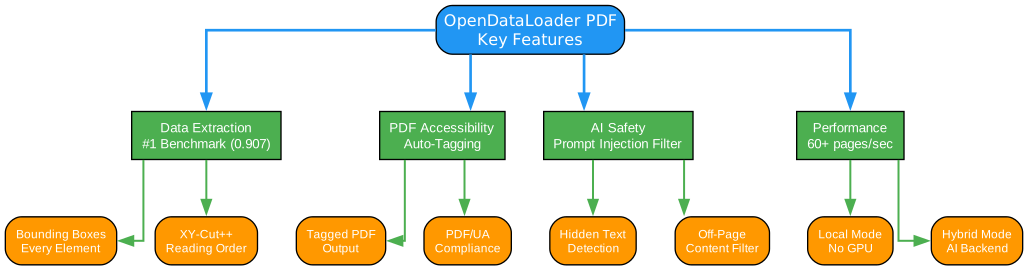
OpenDataLoader PDF distinguishes itself through four major feature categories, each addressing critical needs in document processing workflows.
Data Extraction Excellence
Ranking #1 in extraction benchmarks (0.907 overall accuracy), OpenDataLoader outperforms alternatives across reading order, table, and heading extraction:
- Reading order accuracy: 0.934 (correctly sequences multi-column layouts)
- Table extraction accuracy: 0.928 (handles complex/borderless tables)
- Heading detection: 0.821 (identifies document hierarchy)
The bounding box feature provides coordinates for every extracted element, enabling “click to source” functionality in RAG applications. Users can see exactly which paragraph, table cell, or figure the AI response references.
PDF Accessibility Automation
OpenDataLoader pioneers automated accessibility compliance:
- Auto-tagging converts untagged PDFs to Tagged PDFs (Q2 2026, Apache 2.0)
- PDF/UA export for full regulatory compliance (enterprise)
- Built in collaboration with PDF Association and Dual Lab (veraPDF developers)
- Validated against Well-Tagged PDF specification
This addresses the $50-200 per document cost of manual remediation, making accessibility scalable for organizations with large document collections.
AI Safety Features
PDFs can contain hidden prompt injection attacks. OpenDataLoader automatically filters:
- Hidden text (transparent, zero-size fonts)
- Off-page content positioned outside visible areas
- Suspicious invisible layers
For sensitive data, optional sanitization replaces emails, URLs, and phone numbers with placeholders, protecting against data leakage in AI pipelines.
Performance Optimization
The dual-mode architecture optimizes for different use cases:
- Local mode: 60+ pages/second on CPU, no GPU required
- Hybrid mode: 2+ pages/second with AI-enhanced accuracy
- Multi-process batch processing exceeds 100 pages/second on 8+ core machines
This flexibility allows organizations to choose between speed and accuracy based on document complexity, without requiring specialized hardware.
Installation
Prerequisites
OpenDataLoader PDF requires Java 11+ and Python 3.10+. Check your Java installation:
java -version
If not found, install JDK 11+ from Adoptium.
Python Installation
pip install -U opendataloader-pdf
For hybrid mode with AI capabilities:
pip install -U "opendataloader-pdf[hybrid]"
Node.js Installation
npm install @opendataloader/pdf
Java Installation
Add to your Maven project:
<dependency>
  <groupId>org.opendataloader</groupId>
  <artifactId>opendataloader-pdf-core</artifactId>
</dependency>
Usage
Basic Usage (Python)
import opendataloader_pdf

# Batch all files in one call - each convert() spawns a JVM process
opendataloader_pdf.convert(
    input_path=["file1.pdf", "file2.pdf", "folder/"],
    output_dir="output/",
    format="markdown,json"
)
Hybrid Mode for Complex Documents
For complex tables, scanned PDFs, or mathematical formulas:
# Terminal 1 - Start the backend server
opendataloader-pdf-hybrid --port 5002

# Terminal 2 - Process PDFs
opendataloader-pdf --hybrid docling-fast file1.pdf file2.pdf folder/
Python hybrid mode:
opendataloader_pdf.convert(
    input_path=["file1.pdf", "file2.pdf", "folder/"],
    output_dir="output/",
    hybrid="docling-fast"
)
OCR for Scanned PDFs
# Start backend with OCR enabled
opendataloader-pdf-hybrid --port 5002 --force-ocr

# For non-English documents
opendataloader-pdf-hybrid --port 5002 --force-ocr --ocr-lang "ko,en"
Formula Extraction (LaTeX)
# Server: enable formula enrichment
opendataloader-pdf-hybrid --enrich-formula

# Client: process with full mode
opendataloader-pdf --hybrid docling-fast --hybrid-mode full file1.pdf
Output includes LaTeX formulas:
{
  "type": "formula",
  "page number": 1,
  "bounding box": [226.2, 144.7, 377.1, 168.7],
  "content": "\\frac{f(x+h) - f(x)}{h}"
}
LangChain Integration
pip install -U langchain-opendataloader-pdf
from langchain_opendataloader_pdf import OpenDataLoaderPDFLoader

loader = OpenDataLoaderPDFLoader(
    file_path=["file1.pdf", "file2.pdf", "folder/"],
    format="text"
)
documents = loader.load()
Extraction Benchmarks
OpenDataLoader PDF ranks #1 overall in extraction accuracy:
| Engine | Overall | Reading Order | Table | Heading | Speed (s/page) |
|---|---|---|---|---|---|
| OpenDataLoader [hybrid] | 0.907 | 0.934 | 0.928 | 0.821 | 0.463 |
| docling | 0.882 | 0.898 | 0.887 | 0.824 | 0.762 |
| nutrient | 0.880 | 0.924 | 0.662 | 0.811 | 0.230 |
| marker | 0.861 | 0.890 | 0.808 | 0.796 | 53.932 |
| OpenDataLoader [local] | 0.831 | 0.902 | 0.489 | 0.739 | 0.015 |
Key insights:
- Hybrid mode achieves #1 overall accuracy (0.907)
- Local mode is fastest (0.015s/page, 60+ pages/second)
- Table extraction excels in hybrid mode (0.928 TEDS score)
- No GPU required for any mode
PDF Accessibility Compliance
Regulatory Requirements
| Regulation | Deadline | Requirement |
|---|---|---|
| European Accessibility Act (EAA) | June 28, 2025 | Accessible digital products across EU |
| ADA & Section 508 | In effect | U.S. federal agencies and public accommodations |
| Digital Inclusion Act | In effect | South Korea digital service accessibility |
Accessibility Pipeline
OpenDataLoader provides an end-to-end compliance workflow:
- Audit - Check existing PDFs for tags (available now)
- Auto-Tag - Generate structure tags for untagged PDFs (Q2 2026, free)
- Export PDF/UA - Convert to PDF/UA-1 or PDF/UA-2 (enterprise)
- Visual Editor - Review and fix tags in accessibility studio (enterprise)
The auto-tagging feature, built in collaboration with PDF Association and Dual Lab (veraPDF developers), follows the Well-Tagged PDF specification and is validated programmatically using veraPDF.
Advanced Features
Tagged PDF Support
When a PDF has structure tags, OpenDataLoader extracts the exact layout the author intended:
opendataloader_pdf.convert(
    input_path=["file1.pdf", "file2.pdf", "folder/"],
    output_dir="output/",
    use_struct_tree=True  # Use native PDF structure tags
)
AI Safety: Prompt Injection Protection
OpenDataLoader automatically filters potential attacks:
opendataloader-pdf file1.pdf file2.pdf folder/ --sanitize
This removes:
- Hidden text (transparent, zero-size fonts)
- Off-page content
- Suspicious invisible layers
- Emails, URLs, phone numbers (with –sanitize flag)
Advanced Options
opendataloader_pdf.convert(
    input_path=["file1.pdf", "file2.pdf", "folder/"],
    output_dir="output/",
    format="json,markdown,pdf",
    image_output="embedded",      # "off", "embedded" (Base64), or "external"
    image_format="jpeg",          # "png" or "jpeg"
    use_struct_tree=True,         # Use native PDF structure
)
Frequently Asked Questions
What is the best PDF parser for RAG?
For RAG pipelines, you need a parser that preserves document structure, maintains correct reading order, and provides element coordinates for citations. OpenDataLoader is designed specifically for this - it outputs structured JSON with bounding boxes, handles multi-column layouts with XY-Cut++, and runs locally without GPU. In hybrid mode, it ranks #1 overall (0.907) in benchmarks.
Can I use this without sending data to the cloud?
Yes. OpenDataLoader runs 100% locally. No API calls, no data transmission - your documents never leave your environment. The hybrid mode backend also runs locally on your machine. Ideal for legal, healthcare, and financial documents.
Does it support OCR for scanned PDFs?
Yes, via hybrid mode. Install with pip install "opendataloader-pdf[hybrid]", start the backend with --force-ocr, then process as usual. Supports multiple languages including Korean, Japanese, Chinese, Arabic, and more via --ocr-lang.
How fast is it?
Local mode processes 60+ pages per second on CPU (0.02s/page). Hybrid mode processes 2+ pages per second (0.46s/page) with significantly higher accuracy for complex documents. No GPU required. With multi-process batch processing, throughput exceeds 100 pages per second on 8+ core machines.
Is OpenDataLoader PDF free?
The core library is open-source under Apache 2.0 - free for commercial use. This includes all extraction features (text, tables, images, OCR, formulas, charts via hybrid mode), AI safety filters, Tagged PDF support, and auto-tagging to Tagged PDF (Q2 2026). Enterprise add-ons (PDF/UA export, accessibility studio) are available for organizations needing end-to-end regulatory compliance.
Conclusion
OpenDataLoader PDF represents a significant advancement in PDF processing for AI applications. With its #1 ranking in extraction benchmarks, comprehensive output formats, and pioneering accessibility automation, it addresses critical needs in modern document workflows.
Key takeaways:
- Best-in-class extraction with 0.907 overall accuracy and 0.928 table accuracy
- Flexible deployment with local-only processing or hybrid AI enhancement
- Multiple output formats including JSON with bounding boxes for RAG citations
- Accessibility compliance with auto-tagging and PDF/UA support
- Open source under Apache 2.0 license
Whether you’re building RAG pipelines, processing scanned documents, or ensuring accessibility compliance, OpenDataLoader PDF provides the tools you need with the performance and accuracy your applications demand.
Resources
Related Posts
- AgentSkillOS: Skill Orchestration System
- MattPocock Skills: AI Agent Workflows
- DESIGN.md: AI-Powered Design Systems

Enjoyed this post? Never miss out on future posts by following us
