Ralph: Autonomous AI Agent Loop for Complete PRD Execution
In the rapidly evolving landscape of AI-powered development tools, one of the most significant challenges is maintaining context across complex, multi-step tasks. Traditional AI coding assistants excel at individual tasks but struggle when asked to complete entire features that span multiple files, require sequential decisions, and need consistent quality checks. Enter Ralph - an innovative autonomous AI agent loop that solves this problem by running AI coding tools repeatedly until all Product Requirements Document (PRD) items are complete.
What is Ralph?
Ralph is an autonomous AI agent loop that runs AI coding tools (Amp or Claude Code) repeatedly until all PRD items are complete. Each iteration spawns a fresh AI instance with clean context, while memory persists through git history, progress tracking files, and structured PRD JSON documents. This approach enables the completion of complex, multi-step development tasks that would otherwise exceed the context window limitations of current AI models.
The project is based on Geoffrey Huntley’s Ralph pattern and has been refined by the open-source community to provide a robust, production-ready solution for autonomous software development. Ralph represents a paradigm shift in how we think about AI-assisted coding - moving from single-turn interactions to autonomous, goal-driven workflows.
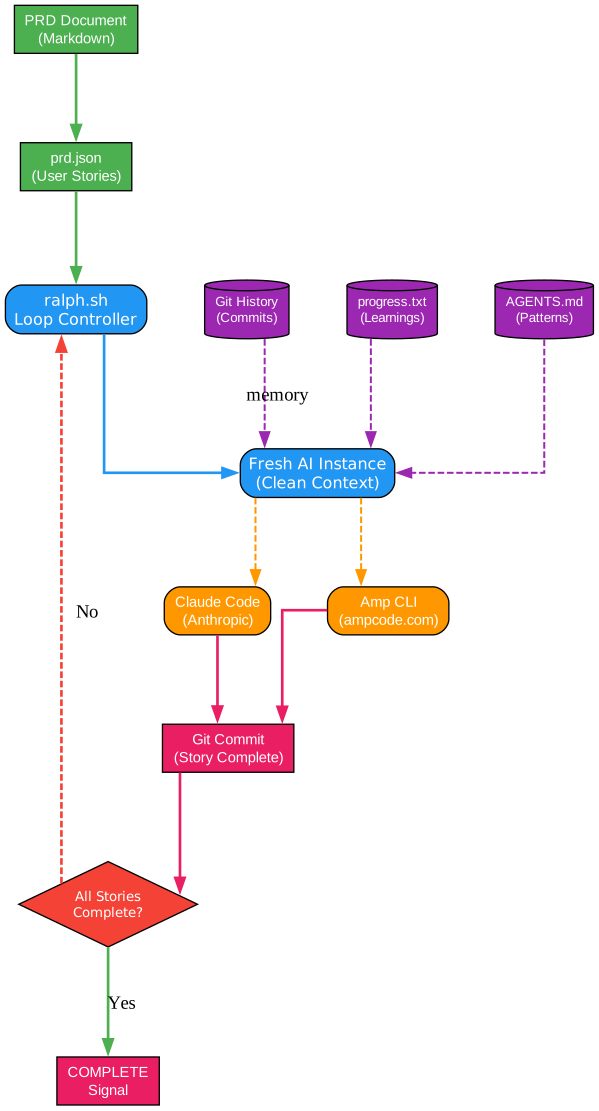
Understanding the Ralph Architecture
The architecture diagram above illustrates the core components and data flow of the Ralph autonomous agent system. Let’s examine each component in detail:
PRD Document Input (Markdown)
The workflow begins with a Product Requirements Document written in markdown format. This document serves as the human-readable specification for the feature or project to be implemented. The PRD contains detailed requirements, user stories, acceptance criteria, and technical considerations. This document is typically created through collaboration between product managers, developers, and stakeholders, ensuring that all requirements are captured before development begins.
The PRD follows a structured format that includes an introduction, goals, user stories with acceptance criteria, functional requirements, non-goals, and success metrics. This structure ensures that the AI agent has clear, unambiguous instructions for implementation.
prd.json (User Stories)
The PRD markdown is converted to a structured JSON format that Ralph can process programmatically. This JSON file contains an array of user stories, each with:
- A unique identifier (US-001, US-002, etc.)
- Title and description
- Acceptance criteria as a checklist
- Priority ordering based on dependencies
- A
passesboolean flag to track completion status
The JSON format enables Ralph to programmatically track which stories are complete and which remain to be implemented. Each story is designed to be small enough to complete in a single iteration, typically representing 30 minutes to 2 hours of focused work.
ralph.sh Loop Controller
The bash script serves as the orchestrator for the entire autonomous workflow. It manages the iteration loop, spawns fresh AI instances, and handles the stop condition detection. The controller supports both Amp and Claude Code as backend AI tools, providing flexibility for different development environments.
Key responsibilities of the loop controller include:
- Parsing command-line arguments for tool selection and iteration limits
- Archiving previous runs when starting new features
- Tracking the current branch for workflow continuity
- Detecting the completion signal to exit the loop gracefully
Fresh AI Instance (Clean Context)
Each iteration spawns a completely new AI instance with no memory of previous work. This is a critical design decision that addresses the context window limitations of current LLMs. Instead of trying to maintain context across a long-running session, Ralph embraces the constraint by starting fresh each time.
The fresh instance approach provides several benefits:
- No context pollution from previous iterations
- Consistent, predictable behavior for each story
- Ability to handle large projects that would exceed single-session context limits
- Natural error recovery through clean restarts
AI Tool Selection (Amp CLI or Claude Code)
Ralph supports two leading AI coding tools: Amp CLI from ampcode.com and Claude Code from Anthropic. Both tools provide autonomous coding capabilities but differ in their specific features and integration patterns.
Amp CLI is the default tool, offering seamless integration with the Ralph workflow and automatic handoff capabilities when context fills up. Claude Code provides an alternative for teams already invested in the Anthropic ecosystem, with similar autonomous capabilities.
Persistent Memory Layer
The magic of Ralph lies in how it maintains continuity across fresh instances. Three key files serve as the persistent memory:
-
Git History (Commits): Each completed story results in a git commit with a standardized message format. Future iterations can review the commit history to understand what was implemented previously.
-
progress.txt (Learnings): An append-only log that captures insights, patterns discovered, and gotchas encountered during each iteration. This file grows over time and provides invaluable context for future work.
-
AGENTS.md (Patterns): Directory-specific documentation files that capture reusable patterns, conventions, and important notes for each area of the codebase. AI tools automatically read these files, making them an effective way to propagate knowledge.
Decision Point: All Stories Complete?
After each iteration, Ralph checks whether all user stories have their passes flag set to true. If all stories are complete, the workflow outputs the <promise>COMPLETE</promise> signal and exits. If stories remain, the loop continues with the next highest-priority incomplete story.
Output: Git Commits and Completion Signal
Each successful iteration produces a git commit with a standardized message format: feat: [Story ID] - [Story Title]. This creates a clean, traceable history of all changes made by the autonomous agent. The completion signal provides a clear indicator that all work is finished.
How Ralph Works: The Iteration Loop
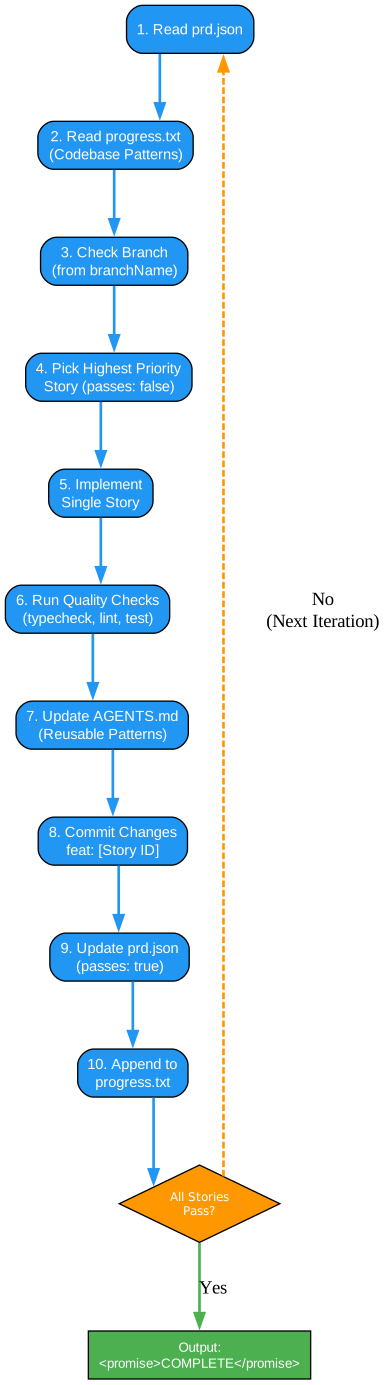
Understanding the Ralph Workflow
The workflow diagram above shows the step-by-step process that Ralph follows during each iteration. Let’s break down each step:
Step 1: Read prd.json
Each iteration begins by reading the PRD JSON file to understand the current state of the project. The agent identifies which stories have been completed (passes: true) and which remain to be done (passes: false). This provides a clear picture of progress and remaining work.
Step 2: Read progress.txt (Codebase Patterns)
Before starting any work, the agent reads the progress log to understand patterns discovered in previous iterations. The Codebase Patterns section at the top of this file contains consolidated learnings that help the agent make better decisions. This might include information like “Use sql template for aggregations” or “Always use IF NOT EXISTS for migrations.”
Step 3: Check Branch (from branchName)
The PRD JSON includes a branchName field that specifies where work should be done. The agent verifies it’s on the correct branch, creating it from main if necessary. This ensures all work is properly isolated and can be reviewed before merging.
Step 4: Pick Highest Priority Story (passes: false)
Ralph selects the highest-priority incomplete story based on the priority field in the PRD JSON. Stories are ordered by dependency - database changes before backend logic, backend before UI, and so on. This ensures that each story has the prerequisites it needs to succeed.
Step 5: Implement Single Story
The agent implements just one story per iteration. This focused approach ensures that each commit represents a complete, testable unit of work. The implementation follows the acceptance criteria defined in the PRD, creating exactly what was specified.
Step 6: Run Quality Checks (typecheck, lint, test)
Before committing, the agent runs the project’s quality checks. This typically includes:
- TypeScript type checking
- ESLint for code quality
- Unit and integration tests
These checks must pass before any code is committed. This ensures that CI stays green and broken code doesn’t compound across iterations.
Step 7: Update AGENTS.md (Reusable Patterns)
If the agent discovered any reusable patterns during implementation, it updates the relevant AGENTS.md files. These updates capture knowledge that will help future iterations (and human developers) work more effectively in that area of the codebase.
Step 8: Commit Changes (feat: [Story ID])
All changes are committed with a standardized message format. This creates a clean git history that’s easy to review and understand. Each commit represents one complete story from the PRD.
Step 9: Update prd.json (passes: true)
The PRD JSON is updated to mark the completed story as passing. This signals to future iterations that the story is done and prevents duplicate work.
Step 10: Append to progress.txt
A progress entry is appended to progress.txt, documenting what was done, files changed, and learnings for future iterations. This creates a comprehensive log of all work performed.
Decision: All Stories Pass?
The workflow checks if all stories now have passes: true. If yes, it outputs the completion signal and exits. If no, it loops back to step 1 for the next iteration.
Memory Persistence: The Key Innovation
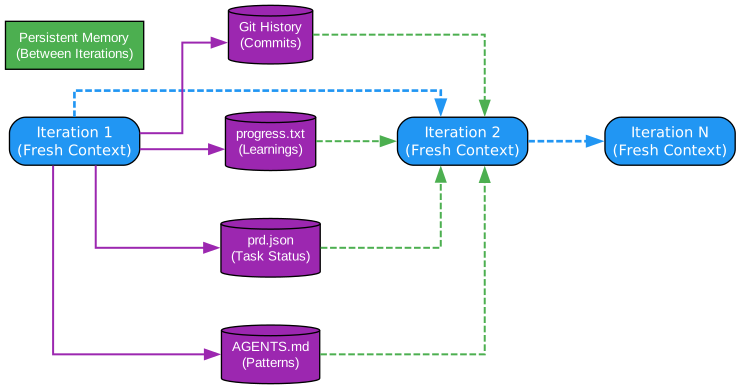
Understanding Ralph’s Memory Model
The memory model diagram illustrates how Ralph maintains continuity across fresh AI instances. This is the key innovation that makes autonomous multi-step development possible:
The Problem: Context Window Limitations
Current LLMs have finite context windows - typically 128K to 200K tokens. When working on complex features, this context fills up quickly with:
- The entire conversation history
- Code files read and modified
- Error messages and debugging output
- Planning and reasoning steps
Once context fills, the model’s performance degrades. It may forget earlier decisions, repeat work, or produce lower-quality output. This makes long-running autonomous tasks impractical in a single session.
Ralph’s Solution: External Memory
Instead of trying to fit everything in context, Ralph uses external files as persistent memory:
Git History (Commits)
Each completed story results in a commit. Future iterations can:
- Review the commit log to understand what was done
- Read specific commits to see implementation details
- Understand the sequence of changes
This provides a complete record of all work performed, accessible through standard git commands.
progress.txt (Learnings)
The progress file serves as an append-only log of insights. Each iteration adds:
- What was implemented
- Files changed
- Learnings for future iterations
- Patterns discovered
- Gotchas encountered
The Codebase Patterns section at the top consolidates the most important learnings, making them immediately visible to each new iteration.
prd.json (Task Status)
The PRD JSON tracks which stories are complete. This simple boolean flag (passes: true/false) provides unambiguous state tracking. The agent always knows exactly what remains to be done.
AGENTS.md (Patterns)
Directory-specific documentation files capture local patterns and conventions. These files are automatically read by AI coding tools, making them an effective way to propagate knowledge without explicit instructions.
Fresh Context Benefits
Starting fresh each iteration provides several advantages:
- No accumulated errors or confusion
- Clean, focused reasoning for each task
- Natural handling of large projects
- Built-in error recovery
The trade-off is that each iteration must rebuild context from the external memory files. This is why well-structured progress.txt and AGENTS.md files are critical to Ralph’s success.
Ralph Skills: PRD Generation and Conversion
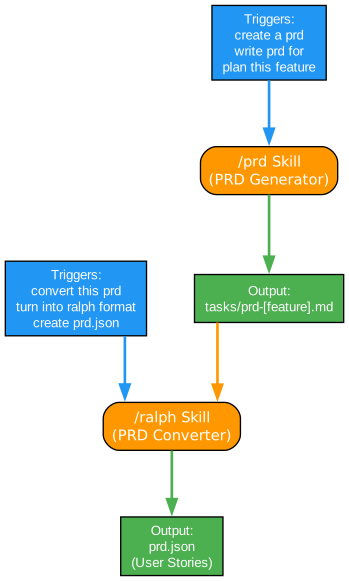
Understanding Ralph’s Skill System
Ralph includes two powerful skills that streamline the PRD workflow:
/prd Skill (PRD Generator)
The PRD skill helps create structured Product Requirements Documents from feature descriptions. It:
- Receives a feature description from the user
- Asks 3-5 clarifying questions with lettered options for quick responses
- Generates a structured PRD with all required sections
- Saves to
tasks/prd-[feature-name].md
The skill triggers on phrases like “create a prd”, “write prd for”, or “plan this feature”. This makes it easy to invoke without remembering exact commands.
Key Features of the PRD Skill:
- Clarifying Questions: Asks only critical questions where the initial prompt is ambiguous
- Structured Output: Generates consistent PRD format with all required sections
- User Stories: Each story includes acceptance criteria that are verifiable
- Non-Goals Section: Clearly defines what’s out of scope
/ralph Skill (PRD Converter)
The Ralph skill converts markdown PRDs to the JSON format that Ralph uses for autonomous execution. It:
- Reads the markdown PRD
- Splits large features into appropriately-sized stories
- Orders stories by dependency
- Adds required acceptance criteria (typecheck, tests, browser verification)
- Saves to
prd.json
Story Sizing Rules:
The converter enforces the critical rule that each story must be completable in one iteration. Right-sized stories include:
- Add a database column and migration
- Add a UI component to an existing page
- Update a server action with new logic
- Add a filter dropdown to a list
Stories that are too big (build entire dashboard, add authentication) are automatically split into smaller, focused tasks.
Installation Options:
Skills can be installed:
- Per-project: Copy to
scripts/ralph/in your project - Globally for Amp: Copy to
~/.config/amp/skills/ - Globally for Claude: Copy to
~/.claude/skills/ - Via Claude Code Marketplace:
/plugin marketplace add snarktank/ralph
Installation
Prerequisites
Before installing Ralph, ensure you have:
- AI Coding Tool: One of the following installed and authenticated:
- Amp CLI (from ampcode.com)
- Claude Code (
npm install -g @anthropic-ai/claude-code)
- jq: JSON processor for parsing prd.json
- macOS:
brew install jq - Linux:
sudo apt-get install jq - Windows:
choco install jq
- macOS:
- Git Repository: Ralph works within a git repository
Option 1: Copy to Your Project
Copy the Ralph files directly into your project:
# From your project root
mkdir -p scripts/ralph
cp /path/to/ralph/ralph.sh scripts/ralph/

# Copy the prompt template for your AI tool
cp /path/to/ralph/prompt.md scripts/ralph/prompt.md    # For Amp
# OR
cp /path/to/ralph/CLAUDE.md scripts/ralph/CLAUDE.md    # For Claude Code

chmod +x scripts/ralph/ralph.sh
Option 2: Install Skills Globally (Amp)
For use across all projects with Amp:
cp -r skills/prd ~/.config/amp/skills/
cp -r skills/ralph ~/.config/amp/skills/
Option 3: Install Skills Globally (Claude Code)
For use across all projects with Claude Code:
cp -r skills/prd ~/.claude/skills/
cp -r skills/ralph ~/.claude/skills/
Option 4: Claude Code Marketplace
Add Ralph as a marketplace plugin:
/plugin marketplace add snarktank/ralph
/plugin install ralph-skills@ralph-marketplace
Configure Amp Auto-Handoff (Recommended)
For Amp users, enable automatic handoff when context fills up:
{
  "amp.experimental.autoHandoff": { "context": 90 }
}
Add this to ~/.config/amp/settings.json. This allows Ralph to handle large stories that exceed a single context window.
Usage
Step 1: Create a PRD
Use the PRD skill to generate a detailed requirements document:
Load the prd skill and create a PRD for [your feature description]
Answer the clarifying questions. The skill saves output to tasks/prd-[feature-name].md.
Step 2: Convert PRD to Ralph Format
Use the Ralph skill to convert the markdown PRD to JSON:
Load the ralph skill and convert tasks/prd-[feature-name].md to prd.json
This creates prd.json with user stories structured for autonomous execution.
Step 3: Run Ralph
Execute the autonomous loop:
# Using Amp (default)
./scripts/ralph/ralph.sh [max_iterations]

# Using Claude Code
./scripts/ralph/ralph.sh --tool claude [max_iterations]
Default is 10 iterations. Ralph will:
- Create a feature branch (from PRD
branchName) - Pick the highest priority story where
passes: false - Implement that single story
- Run quality checks (typecheck, tests)
- Commit if checks pass
- Update
prd.jsonto mark story aspasses: true - Append learnings to
progress.txt - Repeat until all stories pass or max iterations reached
Debugging
Check current state during execution:
# See which stories are done
cat prd.json | jq '.userStories[] | {id, title, passes}'

# See learnings from previous iterations
cat progress.txt

# Check git history
git log --oneline -10
Key Features
| Feature | Description |
|---|---|
| Autonomous Execution | Runs AI coding tools repeatedly until all PRD items complete |
| Fresh Context Per Iteration | Each iteration starts with clean context, avoiding pollution |
| Persistent Memory | Git history, progress.txt, and AGENTS.md maintain continuity |
| Multi-Tool Support | Works with both Amp CLI and Claude Code |
| PRD Skills | Built-in skills for PRD generation and JSON conversion |
| Quality Gates | Typecheck, lint, and test checks before each commit |
| Browser Verification | UI stories verified through dev-browser skill |
| Auto-Archiving | Previous runs archived when starting new features |
| Dependency Ordering | Stories ordered by dependencies automatically |
| Stop Condition Detection | Exits cleanly when all stories pass |
Critical Concepts
Each Iteration = Fresh Context
Each iteration spawns a new AI instance with clean context. The only memory between iterations is:
- Git history (commits from previous iterations)
- progress.txt (learnings and context)
- prd.json (which stories are done)
This design decision is fundamental to Ralph’s approach and enables handling of projects that would exceed any single context window.
Small Tasks
Each PRD item should be small enough to complete in one context window. If a task is too big, the LLM runs out of context before finishing and produces poor code.
Right-sized stories:
- Add a database column and migration
- Add a UI component to an existing page
- Update a server action with new logic
- Add a filter dropdown to a list
Too big (split these):
- “Build the entire dashboard”
- “Add authentication”
- “Refactor the API”
AGENTS.md Updates Are Critical
After each iteration, Ralph updates the relevant AGENTS.md files with learnings. This is key because AI coding tools automatically read these files, so future iterations (and future human developers) benefit from discovered patterns, gotchas, and conventions.
Examples of what to add to AGENTS.md:
- Patterns discovered (“this codebase uses X for Y”)
- Gotchas (“do not forget to update Z when changing W”)
- Useful context (“the settings panel is in component X”)
Feedback Loops
Ralph only works if there are feedback loops:
- Typecheck catches type errors
- Tests verify behavior
- CI must stay green (broken code compounds across iterations)
Without these checks, the autonomous agent can introduce bugs that compound across iterations, making the codebase progressively worse.
Browser Verification for UI Stories
Frontend stories must include “Verify in browser using dev-browser skill” in acceptance criteria. Ralph will use the dev-browser skill to navigate to the page, interact with the UI, and confirm changes work.
Stop Condition
When all stories have passes: true, Ralph outputs <promise>COMPLETE</promise> and the loop exits.
Conclusion
Ralph represents a significant advancement in AI-assisted software development. By embracing the context window limitations of current LLMs and designing around them with external memory persistence, Ralph enables autonomous completion of complex, multi-step development tasks that would be impossible with traditional single-session AI interactions.
The key innovations - fresh context per iteration, persistent memory through files, structured PRD workflow, and quality gates - combine to create a system that can reliably implement entire features from requirements to completion. While not suitable for every task, Ralph excels at well-defined features with clear acceptance criteria and existing test infrastructure.
For teams looking to leverage AI for more than code suggestions, Ralph provides a production-ready framework for autonomous development workflows. The skills system makes it easy to integrate into existing processes, and the support for both Amp and Claude Code provides flexibility for different development environments.
Related Posts
- AgentSkillOS: Skill Orchestration System
- MattPocock Skills: AI Agent Workflows
- DESIGN.md: AI-Powered Design Systems

Enjoyed this post? Never miss out on future posts by following us
