Fireworks Tech Graph: Production-Ready SVG Diagrams From Plain English
Stop drawing diagrams by hand. Describe your system in English or Chinese and get publication-ready SVG + PNG technical diagrams in seconds. That is the promise of Fireworks Tech Graph, an open-source skill from yizhiyanhua-ai/fireworks-tech-graph that has garnered over 3,700 stars on GitHub. It is a comprehensive diagram generation system designed for AI coding agents, providing structured workflows, semantic shape vocabularies, and seven distinct visual styles.
What Is Fireworks Tech Graph?
Fireworks Tech Graph is a skill – a reusable instruction set for AI coding agents like Claude Code, Codex, and similar tools. When installed, it teaches the agent how to generate production-quality SVG technical diagrams that are validated, exported as PNG at 1920px retina resolution, and ready for blogs, documentation, presentations, or product pages.
Unlike ad-hoc diagram generation where an LLM might produce inconsistent or broken SVG, Fireworks Tech Graph enforces a rigorous 10-step workflow, a semantic shape vocabulary, arrow semantics with color coding, and layout validation rules. The result is diagrams that are structurally correct, visually consistent, and semantically meaningful.
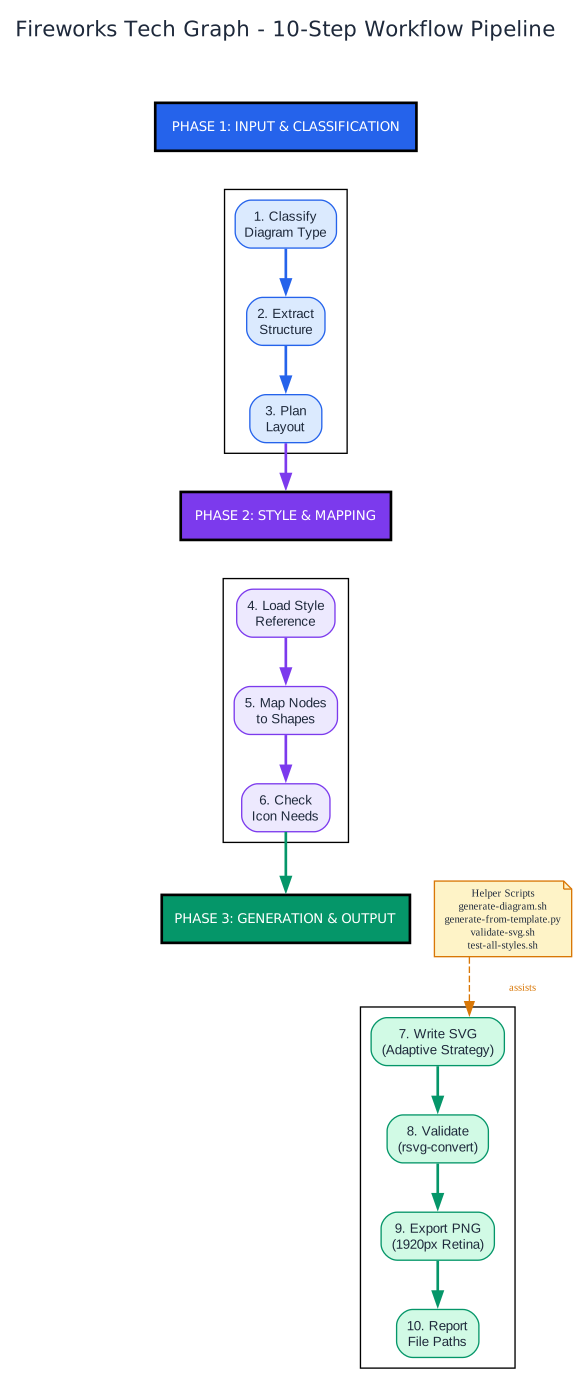
The diagram above illustrates the complete 10-step workflow pipeline that Fireworks Tech Graph follows for every diagram generation request. The pipeline is organized into three phases: Input and Classification (steps 1-3), Style and Mapping (steps 4-6), and Generation and Output (steps 7-10). Each phase builds on the previous one, ensuring that the final SVG is both structurally sound and visually polished. The helper scripts – generate-diagram.sh, generate-from-template.py, validate-svg.sh, and test-all-styles.sh – assist primarily during the SVG writing and validation steps, providing automated syntax checking and batch testing capabilities.
Seven Visual Styles for Every Context
One of the standout features of Fireworks Tech Graph is its seven distinct visual styles, each optimized for different publishing contexts. Whether you are writing a blog post, creating architecture documentation, or building a product keynote, there is a style that fits.
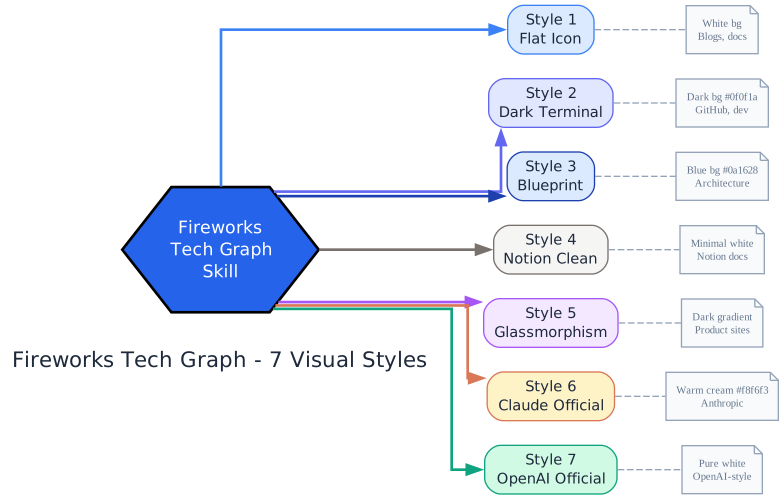
The diagram above shows all seven styles radiating from the central Fireworks Tech Graph skill hub. Style 1 (Flat Icon) is the default with a white background, ideal for blogs and documentation. Style 2 (Dark Terminal) uses a dark #0f0f1a background that is popular on GitHub and developer articles. Style 3 (Blueprint) features a deep blue #0a1628 background perfect for formal architecture documentation. Style 4 (Notion Clean) is minimal and white, designed for embedding in Notion pages. Style 5 (Glassmorphism) uses dark gradients for striking product site visuals. Style 6 (Claude Official) employs a warm cream #f8f6f3 background matching Anthropic’s design language. Style 7 (OpenAI Official) uses pure white with minimal borders and brand green accents matching OpenAI’s aesthetic.
The style-to-diagram-type adaptation is not arbitrary. The project includes a detailed style-diagram matrix that recommends the best style for each diagram type. For example, Blueprint style is excellent for architecture diagrams, class diagrams, and state machines, but poor for mind maps where the grid conflicts with radial layout. Glassmorphism is stunning for agent architecture diagrams and mind maps but distracting for comparison matrices and sequence diagrams where structural clarity matters more.
Full UML Coverage: 14 Diagram Types
Fireworks Tech Graph supports all 14 UML diagram types, organized into four categories: Structural, Behavioral, Data and AI, and Planning and Comparison.
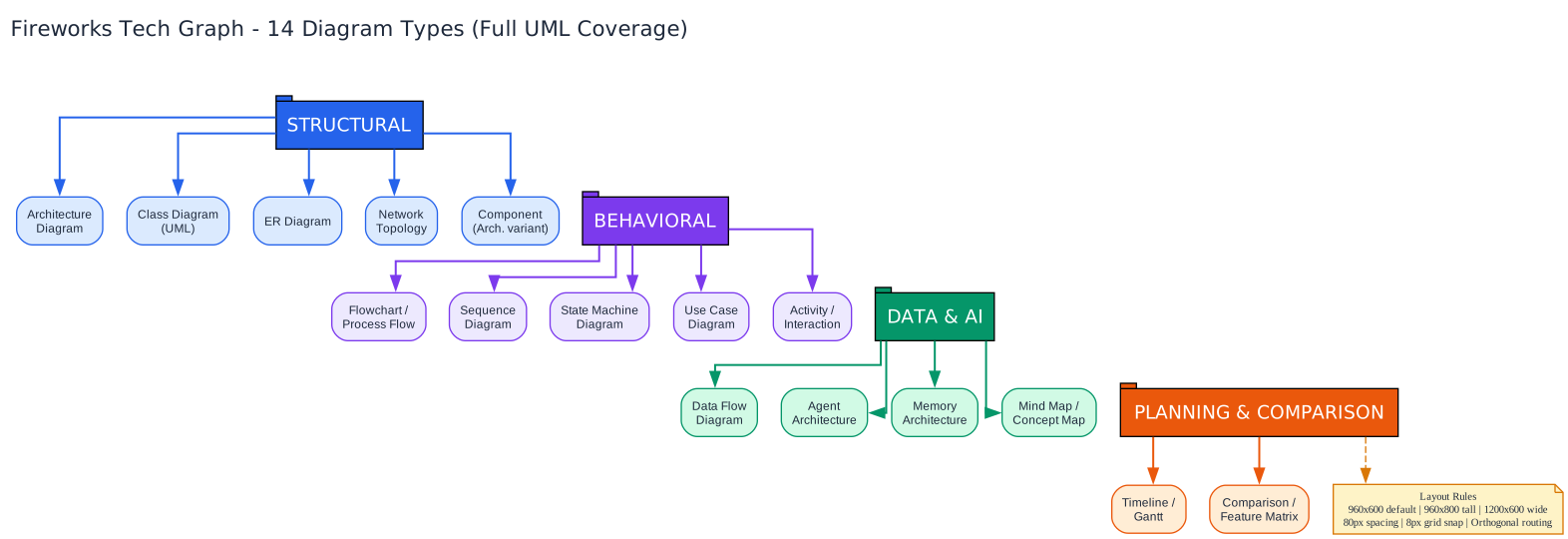
The diagram above categorizes all supported diagram types. The Structural category includes Architecture diagrams, Class diagrams (with full UML notation including visibility markers, inheritance, and composition), ER diagrams (with Chen/Crow’s foot notation), Network Topology, and Component diagrams. The Behavioral category covers Flowcharts and Process Flows, Sequence diagrams (with lifelines, activation boxes, and alt/opt/loop frames), State Machine diagrams (with initial/final states, choice nodes, and composite states), Use Case diagrams (with actors, ellipses, and include/extend relationships), and Activity diagrams. The Data and AI category includes Data Flow diagrams, Agent Architecture diagrams, Memory Architecture diagrams, and Mind Maps. The Planning category covers Timeline/Gantt charts and Comparison/Feature Matrix diagrams.
Each diagram type has specific layout rules. Architecture diagrams use horizontal layers with dashed container grouping. Sequence diagrams calculate ViewBox height as 80 + (num_messages x 50). Flowcharts snap nodes to a grid with 120px horizontal and 80px vertical intervals. The layout rules node at the bottom of the diagram summarizes the universal constraints: 960x600 default ViewBox, 80px minimum component spacing, 8px grid snapping, and orthogonal arrow routing.
Built-in AI Domain Patterns
What truly sets Fireworks Tech Graph apart from generic diagram tools is its deep understanding of AI and machine learning system patterns. The skill includes pre-defined patterns for the most common AI architectures, ensuring that agents generate semantically correct diagrams without needing to reinvent the layout each time.

The diagram above illustrates the five built-in AI domain patterns. The RAG Pipeline pattern follows the standard retrieval-augmented generation flow: Query, Embed, Vector Search, Retrieve, Augment, LLM, Response. This is the most common AI diagram pattern and Fireworks Tech Graph knows exactly how to lay it out with proper data flow arrows and color coding.
The Agentic Search pattern extends the basic query-response flow with a Planner that orchestrates multiple tools (Search, Calculator, Code execution) and a Synthesizer that combines results. The dashed iterate arrow from tools back to the Planner captures the iterative reasoning loop that distinguishes agentic search from simple retrieval.
The Memory Layer (Mem0) pattern separates the write path and read path with distinct arrow colors. The Memory Manager handles both operations: writing to VectorDB and GraphDB on the write path, and retrieving and ranking on the read path. This dual-path visualization is critical for understanding memory-augmented AI systems.
The Multi-Agent pattern shows the classic Orchestrator-to-SubAgents-to-Aggregator-to-Output topology. The fan-out from the Orchestrator to SubAgents A, B, and C, followed by the fan-in to the Aggregator, is the canonical multi-agent coordination pattern.
The Tool Call Flow pattern captures the LLM-to-Tool-Selector-to-Execution-to-Parser loop that underlies all tool-using AI systems. The dashed loop arrow from the Result Parser back to the LLM represents the iterative tool call cycle that continues until the task is complete.
The two reference notes at the bottom summarize the semantic shape vocabulary (LLM = rounded rect, Agent = hexagon, Memory = dashed rect, DB = cylinder, Tool = gear rect, API = hexagon, Queue = pipe) and the arrow semantics (blue = data flow, orange = control, green = memory read, green dashed = memory write, purple = transform, gray = async).
The Semantic Shape Vocabulary
Consistency across diagrams is achieved through a rigorous semantic shape vocabulary. Every concept maps to a specific shape: Users are circles with body paths, LLMs are rounded rects with brain icons, Agents are hexagons with double borders, short-term Memory uses dashed-border rounded rects, long-term Memory uses cylinders, Vector Stores use cylinders with grid lines, Graph DBs use circle clusters, Tools use gear-like rects, APIs use hexagons, Queues use horizontal pipe shapes, and Decisions use diamonds.
This vocabulary is not just cosmetic. It encodes semantic meaning into visual form. When you see a hexagon in a Fireworks Tech Graph diagram, you immediately know it represents an active controller or orchestrator. A dashed-border rect signals ephemeral, short-term storage. A cylinder means persistent, long-term storage. This consistency makes diagrams instantly readable across different projects and teams.
Arrow Semantics and Validation
Arrows are equally semantic. The color and dash pattern of every arrow carries meaning: blue solid arrows represent primary data flow, orange solid arrows represent control and trigger flows, green solid arrows represent memory read operations, green dashed arrows represent memory write operations, purple solid arrows represent data transformations, purple curved arrows represent feedback and iterative reasoning loops, and gray dashed arrows represent async and event-driven flows.
A legend is mandatory whenever two or more arrow types appear in the same diagram. This rule, along with the validation checklist that checks for arrow-component collisions, text overflow, arrow-text alignment, and container discipline, ensures that every generated diagram is production-ready.
Helper Scripts and Validation
The project includes four helper scripts that provide stable SVG generation and validation. generate-diagram.sh validates an existing SVG file and exports PNG after validation. generate-from-template.py creates starter SVGs from templates by loading built-in SVG templates and rendering nodes, arrows, and legend entries from JSON input. validate-svg.sh performs comprehensive validation including XML syntax checking, tag balance verification, marker reference validation, attribute completeness checking, and path data validation. test-all-styles.sh batch tests all styles across multiple diagram sizes and generates a test report.
The mandatory Python list method for SVG generation prevents the most common errors: character truncation, typos, and syntax errors. Each SVG line is appended independently to a list, making it easy to verify and debug. The error recovery protocol is equally disciplined: first error gets a targeted fix, second error triggers a method switch, and third error stops the process and reports to the user.
Getting Started
Install the skill from GitHub:
npx skills add yizhiyanhua-ai/fireworks-tech-graph
Or update to the latest version:
npx skills add yizhiyanhua-ai/fireworks-tech-graph --force -g -y
The public package is also available on npm as @yizhiyanhua-ai/fireworks-tech-graph, though the CLI expects a GitHub or local repository source rather than the npm package name directly.
Once installed, simply describe your system in natural language – English or Chinese – and the skill will classify the diagram type, extract the structure, plan the layout, load the appropriate style reference, map nodes to shapes, check icon needs, write the SVG, validate it, export the PNG, and report the file paths. The entire pipeline is automated and deterministic.
Conclusion
Fireworks Tech Graph represents a significant step forward in AI-assisted diagram generation. By combining a rigorous 10-step workflow, seven visual styles, full UML coverage, built-in AI domain patterns, a semantic shape vocabulary, and comprehensive validation, it transforms the ad-hoc process of LLM diagram generation into a reliable, production-quality pipeline. For developers, technical writers, and AI engineers who need consistent, publication-ready diagrams, this skill eliminates the gap between describing a system and visualizing it.
The project is open source and actively maintained at github.com/yizhiyanhua-ai/fireworks-tech-graph.
Related guides
Fireworks Tech Graph generates diagrams for AI agents — these adjacent open-source AI tooling guides may also be useful:
- Open CoDesign: Open-Source Claude Design Alternative — turn prompts into polished HTML prototypes, slide decks, and dashboards locally.
- Designlang: Extract Design Systems From Any Website — extract design systems and tokens from existing websites for reuse.
- jcode: Next-Generation Coding Agent Harness — a Rust coding agent harness with semantic memory and multi-agent swarms.

Enjoyed this post? Never miss out on future posts by following us


