Introduction
Browser automation for AI agents has long been dominated by heavyweight frameworks – Selenium, Playwright, Puppeteer – each adding layers of abstraction between the agent and the browser. Browser Harness takes the opposite approach: a 592-line Python package that gives LLM agents like Claude Code and Codex direct, unmediated control over a real browser through Chrome DevTools Protocol (CDP). No page object models, no selector strategies, no abstraction tax. Just the raw primitives an agent needs to see and act.
The project embodies what its author calls “the bitter lesson” of agent design: the thinnest possible harness wins. Rather than building sophisticated planning layers or DOM traversal engines, Browser Harness trusts the LLM to figure out what to do and provides only the mechanical interface to do it. The result is a system where agents can browse, click, type, and navigate with the same directness a human user has – including the ability to modify the harness itself at runtime when it encounters gaps.
What makes Browser Harness distinctive is not just its minimalism but its self-healing architecture. When an agent discovers a missing capability – say, the ability to handle file downloads or interact with shadow DOM – it can edit helpers.py directly, adding the function it needs. The harness becomes a living artifact that evolves with each session. Combined with a community-driven skills system of 50+ domain-specific guides and 16 interaction technique documents, Browser Harness offers a pragmatic alternative to the framework-heavy approach that has dominated AI browser automation.
Architecture Overview
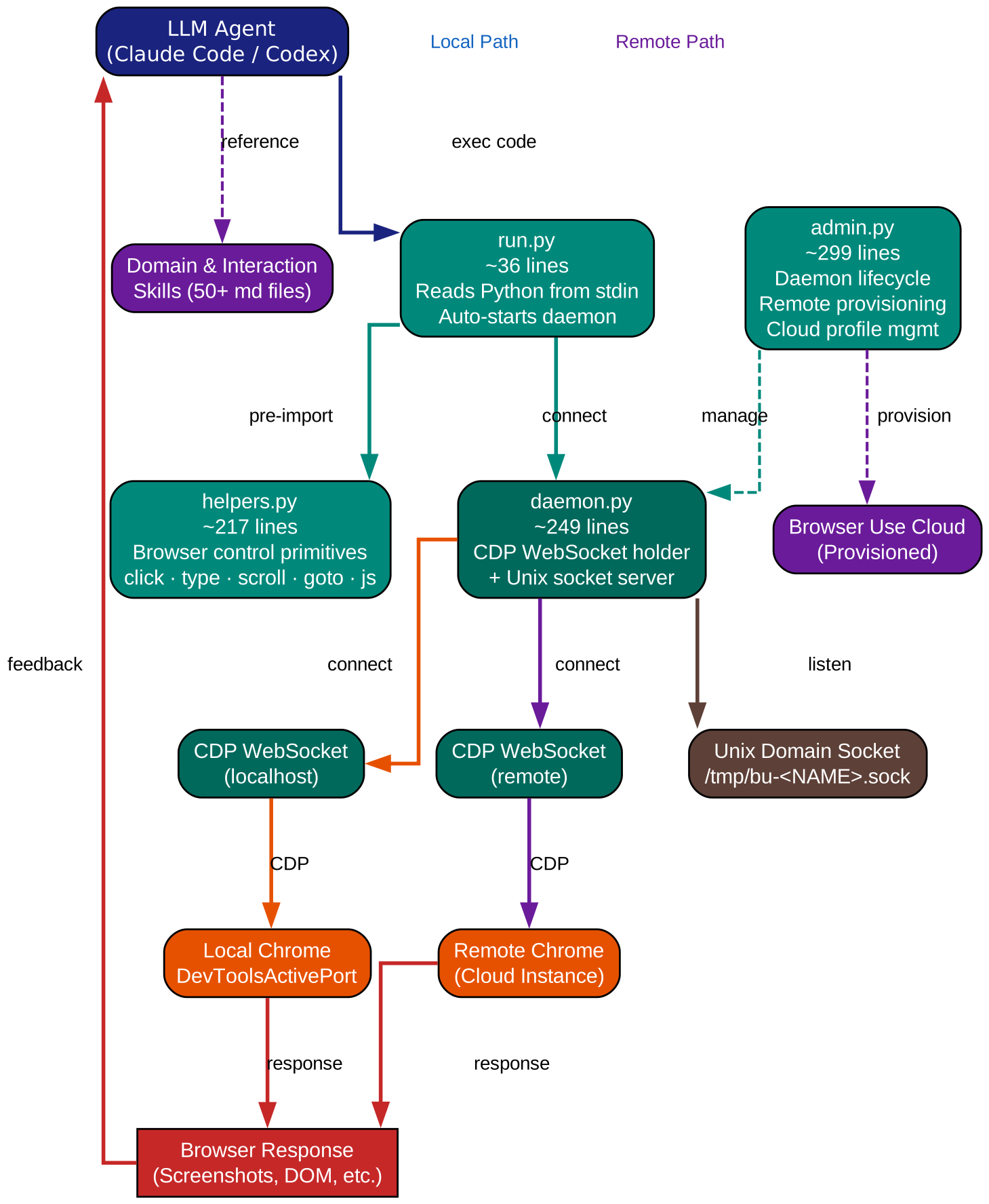
The architecture diagram illustrates the complete data flow from an LLM agent through to the browser and back. At the top, the agent (Claude Code, Codex, or any LLM) invokes run.py, which serves as the entry point. run.py is approximately 36 lines of code and handles a critical bootstrapping sequence: it reads Python code from stdin, ensures the daemon is running via admin.py, and then executes the provided code with all helper functions pre-imported into the namespace.
The daemon layer, implemented in daemon.py (~249 lines), is the central nervous system of the harness. It maintains a persistent WebSocket connection to the browser’s CDP endpoint and exposes a Unix domain socket at /tmp/bu-<NAME>.sock for local IPC. The daemon handles several responsibilities simultaneously: it manages the CDP session lifecycle, buffers incoming CDP events so agents never miss notifications, recovers from stale sessions when the browser disconnects, and orchestrates the remote browser lifecycle when using Browser Use cloud instances.
On the right side of the diagram, helpers.py (~217 lines) provides the browser control primitives that agents call directly. These functions – click(), type_text(), press_key(), scroll(), screenshot(), goto(), js(), new_tab(), switch_tab(), upload_file(), http_get(), and wait_for_load() – translate high-level intent into CDP commands that flow through the daemon to the browser. The admin.py module (~299 lines) sits alongside the daemon, handling lifecycle management, remote browser provisioning through the Browser Use cloud API, and Chrome profile synchronization for authenticated sessions.
The key architectural insight is the separation between the control plane (daemon + admin) and the action plane (helpers). The daemon holds the connection; the helpers provide the vocabulary. This separation means agents can focus on what to do rather than how to maintain a browser session, while the daemon transparently handles reconnection, session recovery, and event buffering.
Self-Healing Design
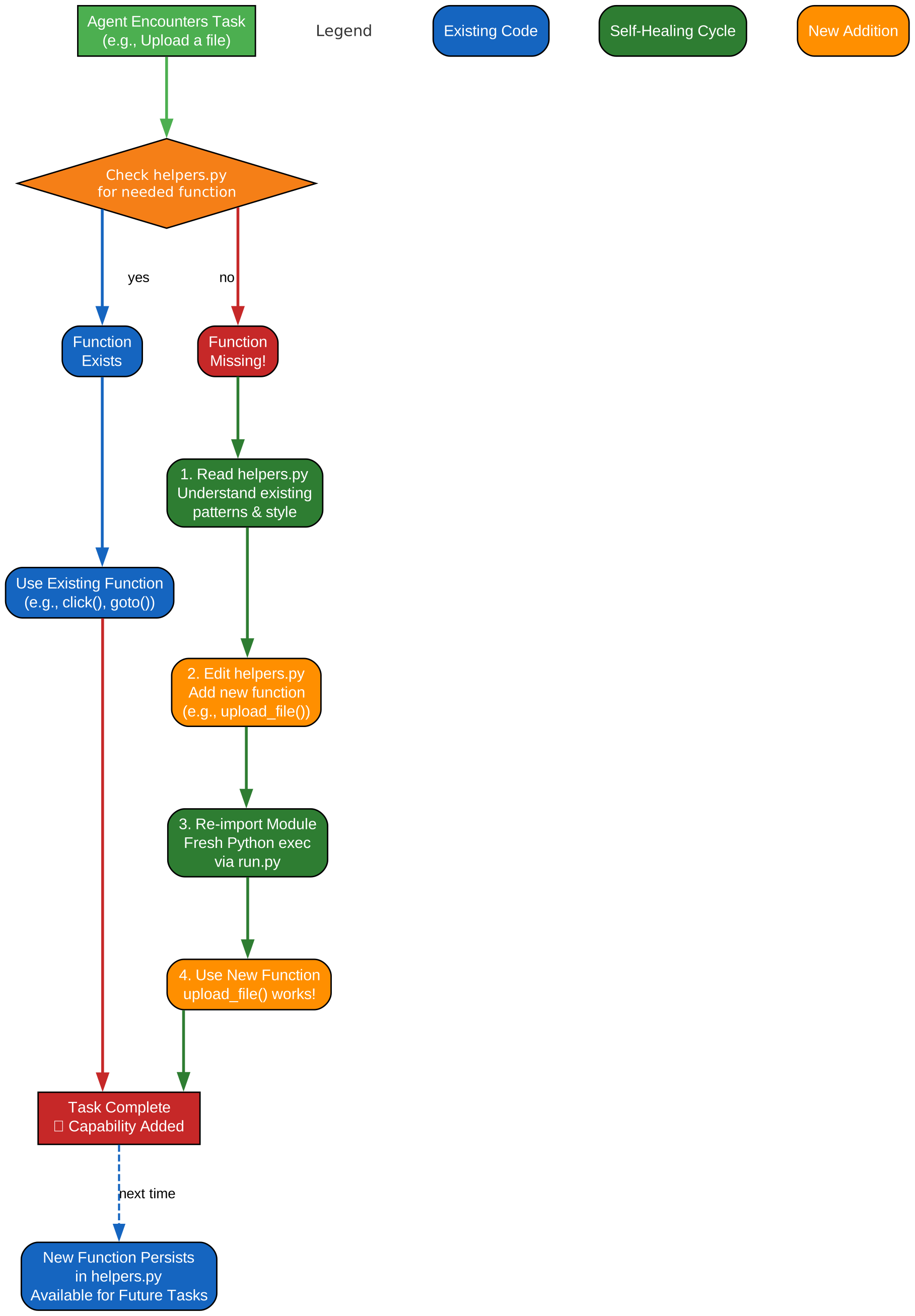
The self-healing diagram depicts the feedback loop that makes Browser Harness fundamentally different from traditional automation frameworks. The process begins when an LLM agent encounters a task that requires a browser capability not present in helpers.py – for example, dragging and dropping elements, handling browser dialogs, or extracting network request data.
In a conventional framework, this would be a dead end: the agent would report failure, and a human developer would need to extend the framework. Browser Harness inverts this relationship. The agent, recognizing the gap, reads the current helpers.py source code, understands the pattern of how existing functions translate intent into CDP commands, and then writes a new function following the same pattern. This new function is written directly into helpers.py during the session.
The diagram shows this as a cycle: the agent attempts an action, discovers a missing capability, reads the helpers source, authors a new function, and then immediately uses it. The harness grows organically with each session. Functions that prove broadly useful can be contributed back to the project, while session-specific functions simply exist for the duration they are needed.
This design philosophy has practical implications. First, it eliminates the “framework gap” problem where agents are limited by what the framework authors anticipated. Second, it leverages the LLM’s code generation capability as a first-class extension mechanism rather than treating it as an external consumer. Third, it creates a natural selection pressure: only functions that agents actually need survive, preventing the bloat that plagues comprehensive frameworks. The harness stays thin because it only grows when a real agent encounters a real need.
Skills System
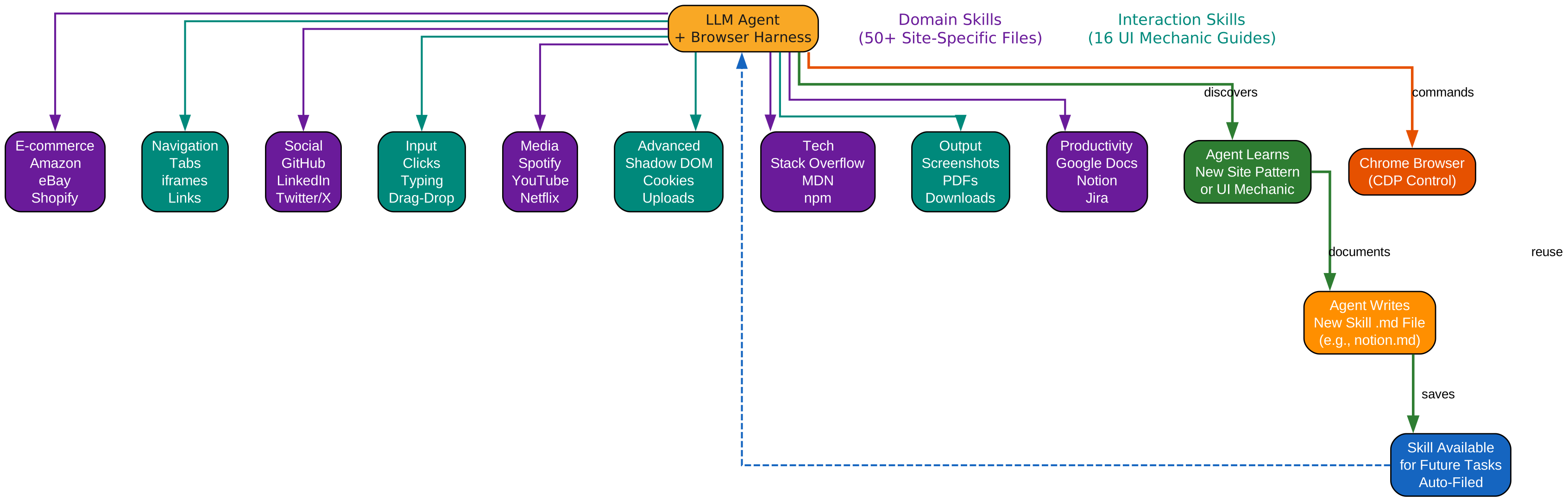
The skills system diagram shows the two-tier knowledge architecture that supplements the core harness. Rather than encoding site-specific logic into Python code, Browser Harness externalizes this knowledge into markdown files that agents can read on demand. This approach keeps the harness thin while providing rich contextual guidance when needed.
The first tier consists of Domain Skills – over 50 markdown files covering site-specific knowledge for popular platforms. Each domain skill document describes the structure, navigation patterns, and interaction quirks of a particular website. For example, the Amazon skill might describe how to navigate product categories, handle the search autocomplete, and work with the cart interface. The GitHub skill covers repository navigation, issue management, and pull request workflows. Other domains include LinkedIn, Spotify, Steam, Zillow, and many more. These are not scripts; they are descriptive guides that an LLM can read and adapt to its current task.
The second tier consists of Interaction Skills – 16 markdown guides covering universal UI mechanics that apply across websites. These include techniques for working with tabs, iframes, shadow DOM, browser dialogs, dropdowns, drag-and-drop interactions, cookies, screenshots, file uploads, network requests, viewport manipulation, cross-origin iframes, scrolling, downloads, print-as-PDF, and profile synchronization. Each interaction skill explains the CDP-level mechanics of the technique and provides practical guidance on when and how to use it.
The diagram illustrates how agents access these skills: when a task involves a specific domain or interaction pattern, the agent reads the relevant markdown file, internalizes the guidance, and then applies it through the helper functions. This progressive disclosure model means the agent only loads the knowledge it needs for the current task, keeping the context window focused. The skills system also serves as a community contribution vector – anyone can author a new domain skill for a website they know well, and the project benefits from collective expertise without any code changes to the core harness.
Daemon Lifecycle
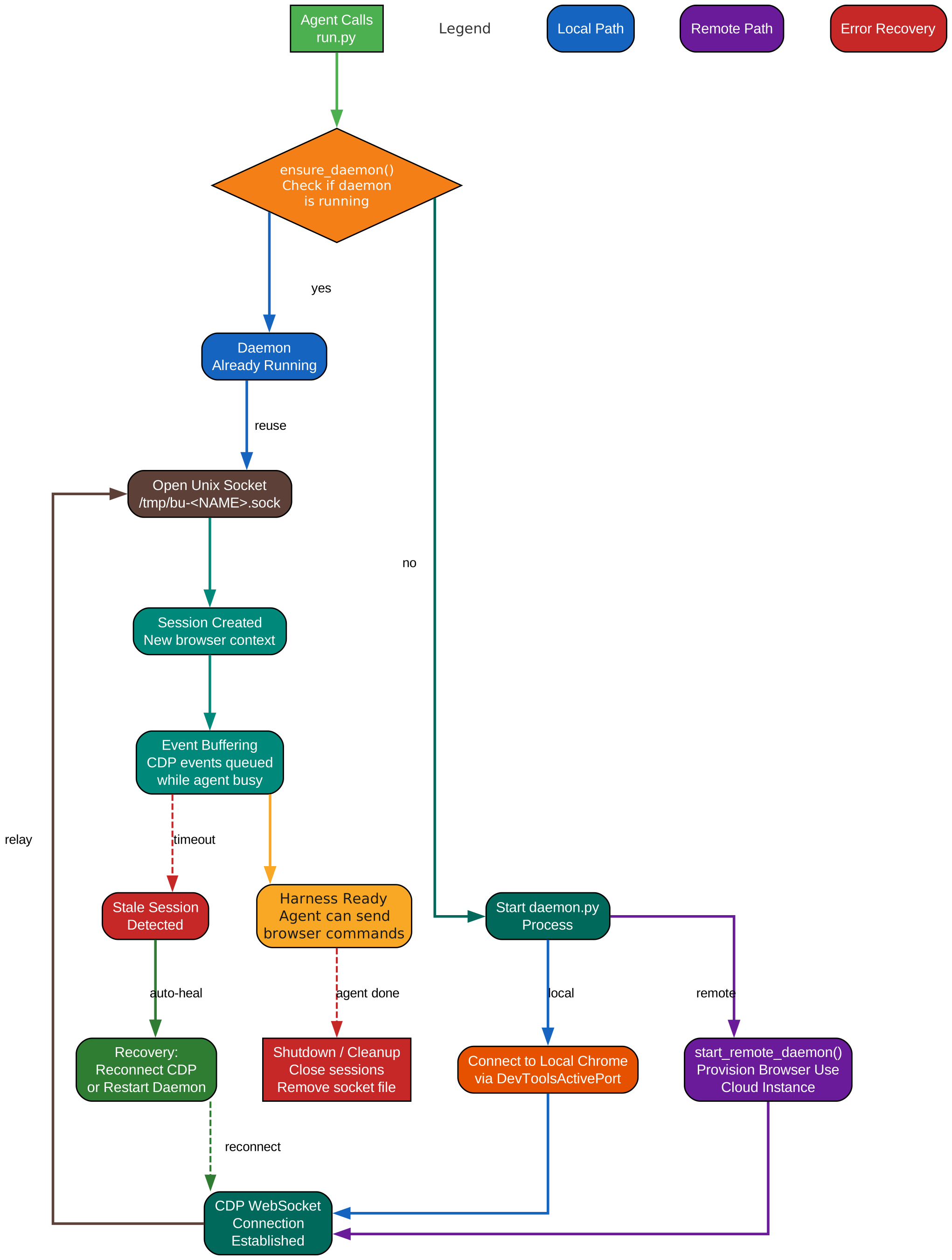
The daemon lifecycle diagram details the state machine that governs how the Browser Harness daemon starts, runs, recovers, and shuts down. Understanding this lifecycle is essential for anyone deploying Browser Harness in production or debugging connection issues.
The lifecycle begins with the ensure_daemon() call from admin.py, which checks whether a daemon is already running for the current BU_NAME namespace. If no daemon exists, the system provisions one. For local operation, this means connecting to an existing Chrome instance with remote debugging enabled. For remote operation, start_remote_daemon() provisions a Browser Use cloud browser instance, establishes the CDP WebSocket connection, and optionally synchronizes a local Chrome profile to the cloud browser for authenticated sessions.
Once running, the daemon enters its steady state: listening on the Unix domain socket for commands from run.py or direct helper calls, while simultaneously maintaining the CDP WebSocket connection and buffering incoming events. The event buffer is a critical design feature – it ensures that agents never miss CDP events (such as page load completions or navigation events) even if they are not actively listening at the moment the event fires.
The diagram also shows the recovery paths. When the browser disconnects or the CDP session becomes stale, the daemon detects the failure and initiates recovery. For local browsers, this typically means reconnecting to the same Chrome instance. For remote browsers, it may involve provisioning a new cloud instance. The restart_daemon() function provides a clean restart path that tears down the existing session and starts fresh.
The BU_NAME namespacing system is shown at the bottom of the diagram. Each daemon instance is identified by a unique name, stored in the socket path /tmp/bu-<NAME>.sock. This allows multiple daemons to run concurrently, each controlling a different browser session. An agent working on multiple tasks can maintain separate browser contexts without interference, and different agents on the same machine can each have their own isolated browser harness.
Getting Started
Installing Browser Harness is straightforward:
pip install browser-harness
For local browser control, start Chrome with remote debugging enabled:
google-chrome --remote-debugging-port=9222
Then use the harness directly from Python:
from helpers import click, type_text, screenshot, goto

goto("https://github.com/trending")
screenshot("trending.png")
With Claude Code, the integration is even simpler. The --browser flag automatically provisions a browser session:
claude "go to github.com/trending and screenshot the top 5 repos" --browser
Daemon management is handled through admin.py:
from admin import ensure_daemon, restart_daemon

ensure_daemon()   # Start daemon if not running
restart_daemon()  # Restart for clean session
For remote browser sessions using the Browser Use cloud (free tier available, no credit card required):
from admin import start_remote_daemon

start_remote_daemon()  # Provision Browser Use cloud browser
The remote browser provisioning includes profile synchronization, which uploads your local Chrome cookies to the cloud browser. This means authenticated sessions on sites like GitHub or Amazon carry over seamlessly to the remote instance, eliminating the need to re-login in every new cloud session.
Key Design Decisions
Coordinate-click over DOM-based interaction. Browser Harness uses Input.dispatchMouseEvent with absolute viewport coordinates rather than DOM selector-based clicking. This is a deliberate choice with significant implications. Coordinate clicks pass through iframes, shadow DOM, and cross-origin boundaries at the compositor level – the same way a human user’s mouse clicks work. DOM-based approaches require traversing iframe boundaries, piercing shadow roots, and handling cross-origin restrictions. The coordinate approach trades selector precision for universal reach, and in practice, LLM agents with screenshot capabilities can determine coordinates reliably.
http_get() for bulk data retrieval. Not every task requires a browser. The http_get() function performs pure HTTP requests without any browser involvement, making it ideal for scraping static pages or querying APIs. The project documentation cites a striking example: fetching 249 Netflix pages in 2.8 seconds using http_get() versus the much slower approach of navigating each page in a browser. This dual-mode design lets agents choose the right tool for each subtask – browser interaction for dynamic content, HTTP for bulk static data.
Unix domain sockets for IPC. The daemon communicates with run.py through Unix domain sockets at /tmp/bu-<NAME>.sock rather than TCP ports. This choice provides several advantages: no port conflicts, no firewall concerns, filesystem-based permissions, and natural namespacing through the socket filename. The BU_NAME environment variable determines the socket path, enabling multiple concurrent daemons without coordination overhead.
Progressive disclosure of skills. The markdown-based skills system avoids loading all domain knowledge into the agent’s context at once. Instead, agents read only the skill files relevant to their current task. This keeps the context window lean and focused, which is particularly important for LLMs where context length directly impacts both cost and performance.
Conclusion
Browser Harness represents a compelling experiment in minimalist agent infrastructure. By providing only the thinnest possible layer between an LLM and a real browser, it avoids the abstraction tax that heavier frameworks impose. The self-healing design – where agents extend the harness at runtime – turns the traditional framework limitation problem on its head. Combined with a community-driven skills system that externalizes domain knowledge into readable markdown, Browser Harness demonstrates that sometimes the best framework is barely a framework at all.
For developers building AI agent systems that need browser interaction, Browser Harness offers a pragmatic starting point: install it, connect to a browser, and let the agent figure out the rest. The harness will grow to meet the agent’s needs, and the skills library will provide the domain expertise that raw browser control alone cannot offer. Enjoyed this post? Never miss out on future posts by following us 


