learn-claude-code: Building Production AI Agent Harness from Scratch
In the rapidly evolving landscape of AI development, understanding how to build robust agent systems is becoming essential. The learn-claude-code repository, with over 50,000 stars on GitHub, offers a unique opportunity: a progressive, 19-chapter curriculum that teaches you how to build a production-grade AI agent harness from the ground up. This is not a tutorial on using Claude Code - it is a deep dive into building your own agent infrastructure, understanding every component that makes modern AI agents work.
What is learn-claude-code?
The learn-claude-code project describes itself as “Bash is all you need - A nano claude code-like agent harness, built from 0 to 1.” It is a teaching repository that reconstructs the essential components of a production AI agent system, layer by layer. Each chapter adds exactly one new mechanism, building on everything that came before.
The project is written in TypeScript for the production implementation, with Python teaching implementations that make the core concepts accessible to developers of all backgrounds. The curriculum follows a carefully designed progression where each mechanism grows naturally out of the previous one.
The Four Learning Stages
The curriculum is organized into four distinct stages, each building on the previous:
Stage 1: Core Single-Agent (s01-s06)
This stage builds a single agent that can actually do work. You start with the fundamental agent loop and progressively add capabilities:
| Chapter | New Layer |
|---|---|
| s01 | Loop and write-back |
| s02 | Tools and dispatch |
| s03 | Session planning |
| s04 | Delegated subtask isolation |
| s05 | Skill discovery and loading |
| s06 | Context compaction |
Stage 2: Hardening (s07-s11)
This stage makes the loop safer, more stable, and easier to extend:
| Chapter | New Layer |
|---|---|
| s07 | Permission gate |
| s08 | Hooks and side effects |
| s09 | Durable memory |
| s10 | Prompt assembly |
| s11 | Recovery and continuation |
Stage 3: Runtime Work (s12-s14)
This stage upgrades session work into durable, background, and scheduled runtime work:
| Chapter | New Layer |
|---|---|
| s12 | Persistent task graph |
| s13 | Runtime execution slots |
| s14 | Time-based triggers |
Stage 4: Platform (s15-s19)
This stage grows from one executor into a larger platform:
| Chapter | New Layer |
|---|---|
| s15 | Persistent teammates |
| s16 | Structured team protocols |
| s17 | Autonomous claiming and resuming |
| s18 | Isolated execution lanes |
| s19 | External capability routing |
The Agent Loop: The Heart of Every AI Agent
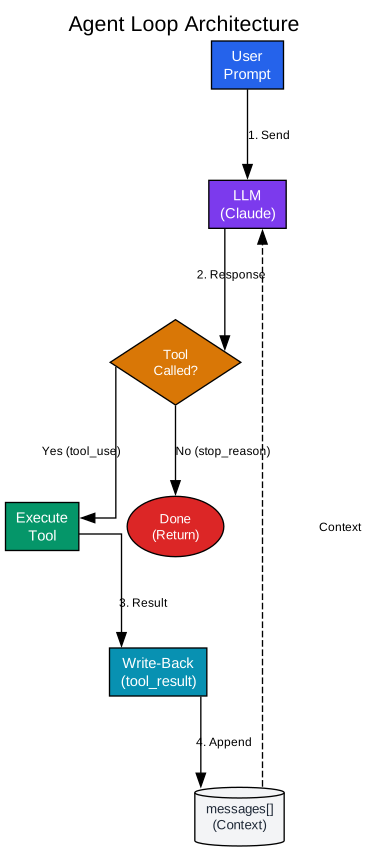
Understanding the Agent Loop Architecture
The agent loop is the fundamental pattern that powers every AI agent system. Without this loop, an AI model is simply a question-answering system - it can reason and respond, but it cannot take action in the world. The agent loop transforms a passive model into an active participant that can execute commands, read files, and modify systems.
The Core Components:
1. User Prompt Entry Point The loop begins with a user prompt that becomes the first message in the conversation. This initial message sets the context and goal for the entire agent session. The prompt is not just a question - it is a task specification that the agent will work to complete through multiple iterations.
2. LLM Processing The Language Model (LLM) receives the entire conversation history along with tool definitions. This is where reasoning happens - the model analyzes the current state, determines what actions are needed, and produces either a text response or a tool call. The model does not execute anything directly; it proposes actions.
3. Tool Call Detection After the LLM responds, the system checks whether the model requested a tool call. This is determined by examining the stop_reason field in the response. If the model called a tool, the stop_reason will be "tool_use". If the model is done with the task, it returns a different stop reason, and the loop terminates.
4. Tool Execution When a tool call is detected, the system executes the requested tool. This could be running a bash command, reading a file, writing code, or any other action the agent is capable of. The execution happens in the real world - files are modified, commands run, and side effects occur.
5. The Write-Back Pattern This is the single most important concept in agent design. After executing a tool, the result must be written back into the conversation as a new message. This tool_result message allows the model to see what happened and make informed decisions about what to do next. Without the write-back, the model is blind to the consequences of its actions.
6. Context Accumulation The messages[] array grows with each turn. Every user message, assistant response, tool call, and tool result is appended to this array. This accumulating context is both the agent’s memory and its potential bottleneck - too much context leads to degraded performance and eventual token limits.
The Loop in Action:
def agent_loop(query):
    messages = [{"role": "user", "content": query}]
    while True:
        response = client.messages.create(
            model=MODEL, system=SYSTEM, messages=messages,
            tools=TOOLS, max_tokens=8000,
        )
        messages.append({"role": "assistant", "content": response.content})

        if response.stop_reason != "tool_use":
            return  # model is done

        results = []
        for block in response.content:
            if block.type == "tool_use":
                output = run_bash(block.input["command"])
                results.append({
                    "type": "tool_result",
                    "tool_use_id": block.id,
                    "content": output,
                })
        messages.append({"role": "user", "content": results})
Key Insight: The entire agent fits in under 30 lines of Python. Everything else in the 19-chapter curriculum layers on top of this loop without changing its core shape. The loop is the foundation upon which all other capabilities are built.
Tool Dispatch: From Chaos to Order
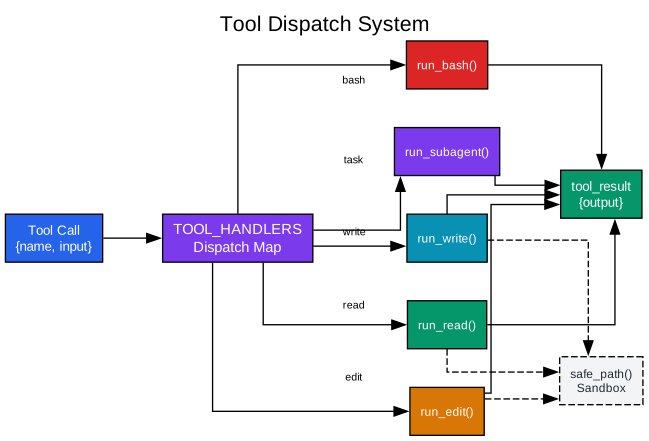
Understanding the Tool Dispatch System
The tool dispatch system transforms a single bash-only agent into a capable software engineer with purpose-built tools. Without a dispatch system, every action must go through the shell - reading files uses cat, editing uses sed, and there are no safety boundaries. The dispatch map provides clean routing and path sandboxing.
The Dispatch Map Architecture:
1. Tool Call Structure Every tool call from the LLM contains two essential pieces of information: the tool name and the input parameters. This standardized structure means the agent loop does not need to know the details of any specific tool - it only needs to route the call to the appropriate handler.
2. The TOOL_HANDLERS Dictionary The dispatch map is a simple Python dictionary that maps tool names to handler functions. This design is elegant in its simplicity: adding a new tool means adding one entry to the dictionary. No if/elif chains, no class hierarchies, no complex routing logic. The loop itself never changes.
TOOL_HANDLERS = {
    "bash":       lambda **kw: run_bash(kw["command"]),
    "read_file":  lambda **kw: run_read(kw["path"], kw.get("limit")),
    "write_file": lambda **kw: run_write(kw["path"], kw["content"]),
    "edit_file":  lambda **kw: run_edit(kw["path"], kw["old_text"],
                                        kw["new_text"]),
}
3. Path Sandboxing Each tool handler includes safety checks. The safe_path() function resolves paths and verifies they fall within the workspace directory. This prevents the model from escaping its designated area - reading SSH keys, modifying system files, or writing to arbitrary locations.
def safe_path(p: str) -> Path:
    path = (WORKDIR / p).resolve()
    if not path.is_relative_to(WORKDIR):
        raise ValueError(f"Path escapes workspace: {p}")
    return path
4. Handler Functions Each tool has a dedicated handler function that implements its logic. The read_file handler includes a line limit to prevent massive outputs from consuming the context window. The write_file handler creates directories as needed. The edit_file handler performs precise string replacement rather than full file rewrites.
5. Output Size Management Tool outputs are capped at reasonable sizes. A 50,000 character limit prevents any single tool result from overwhelming the context. For bash commands specifically, a lower 30,000 character threshold applies because shell output tends to be verbose.
Why This Matters:
The dispatch system embodies a critical principle: the loop should not care how a tool works internally. It only needs a reliable route from tool name to handler. This separation of concerns means:
- New tools can be added without touching the agent loop
- Each tool can have its own safety checks and output formatting
- Tools can be tested independently
- The system remains comprehensible even as it grows
From Chaos to Order:
Without tools, the agent must use bash for everything. With the dispatch system, the agent gains purpose-built capabilities:
| Before (Bash Only) | After (Dispatch System) |
|---|---|
cat file.txt | read_file("file.txt") |
sed -i 's/old/new/g' file | edit_file("file", "old", "new") |
| No safety checks | Path sandboxing enforced |
| Unlimited output | Size caps prevent context explosion |
The Permission Pipeline: Safety as Architecture
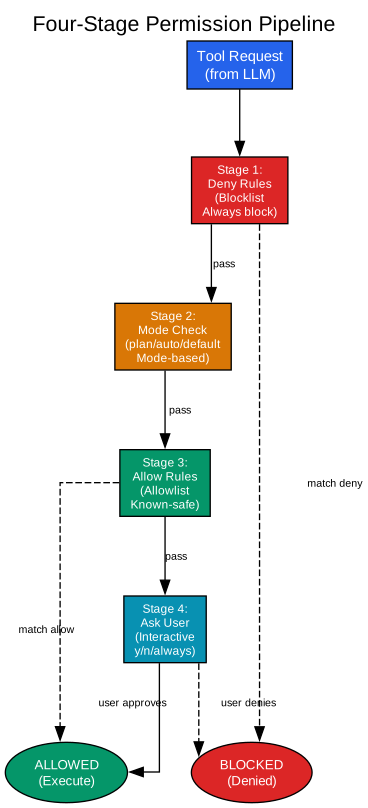
Understanding the Permission Pipeline
The permission system represents a fundamental shift in agent design: from “the model wants to do X” to “the system actually does X.” This pipeline ensures that every tool call passes through multiple safety checks before execution. It is not a simple yes/no gate - it is a sophisticated decision system with multiple stages, modes, and override capabilities.
The Four-Stage Architecture:
Stage 1: Deny Rules (The Blocklist) The first stage is the most critical: deny rules that can never be bypassed. These rules catch dangerous patterns that should never execute, regardless of mode or user preference. Examples include blocking rm -rf / commands, preventing sudo usage, and stopping any attempt to access sensitive files.
rules = [
    {"tool": "bash", "content": "rm -rf /", "behavior": "deny"},
    {"tool": "bash", "content": "sudo *", "behavior": "deny"},
    {"tool": "read_file", "path": "/etc/shadow", "behavior": "deny"},
]
The deny stage runs first and cannot be overridden. This is intentional - no matter what mode you are in or what allow rules exist, a deny rule always wins. This provides a hard safety boundary that protects against both model mistakes and malicious prompts.
Stage 2: Mode-Based Decisions The second stage considers the current permission mode. Three modes provide different safety/speed tradeoffs:
| Mode | Behavior | Use Case |
|---|---|---|
default | Ask user for every unmatched tool call | Normal interactive use |
plan | Block all writes, allow reads | Planning/review mode |
auto | Auto-allow reads, ask for writes | Fast exploration mode |
Plan mode is particularly useful when you want the agent to explore a codebase without making any changes. It can read files, run non-destructive commands, and build understanding - but every write operation is blocked automatically.
Stage 3: Allow Rules (The Allowlist) The third stage checks allow rules. These are patterns that have been explicitly approved. When a user answers “always” to an interactive prompt, a permanent allow rule is added at runtime. This creates a growing list of known-safe operations that can proceed without interruption.
# After user says "always" to reading Python files:
rules.append({"tool": "read_file", "path": "*.py", "behavior": "allow"})
Allow rules make the agent more efficient over time. As you work with it, the agent learns what you consider safe and stops asking for permission on those operations.
Stage 4: Interactive User Approval The final stage is the interactive prompt. If a tool call has not been denied by rules, blocked by mode, or allowed by previous decisions, the system asks the user directly. The prompt offers three options:
- Yes: Execute this time only
- No: Deny this time only
- Always: Execute now and add an allow rule for future
The Circuit Breaker:
The permission system includes a simple but effective safety mechanism: denial tracking. After three consecutive denials, the system suggests switching to plan mode. This prevents the agent from repeatedly hitting the same wall and wasting turns on operations that will never be approved.
Why This Matters:
The four-stage pipeline embodies a critical principle: safety is not a boolean. It is a nuanced decision process that considers:
- Hard boundaries that can never be crossed (deny rules)
- Context-dependent policies (mode-based decisions)
- Learned preferences (allow rules)
- Human judgment (interactive approval)
This layered approach provides both safety and efficiency. Dangerous operations are blocked immediately. Known-safe operations proceed without interruption. Uncertain cases fall back to human judgment.
Skill Loading: Knowledge on Demand
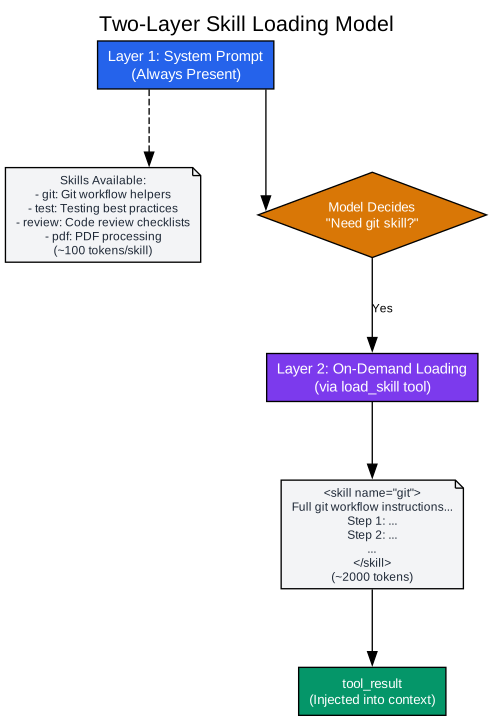
Understanding the Two-Layer Skill Model
The skill loading system solves a fundamental problem in agent design: how to provide domain expertise without bloating the context window. The naive approach - stuffing all knowledge into the system prompt - wastes tokens and competes for the model’s attention. The two-layer model provides a elegant solution: advertise cheaply, load on demand.
The Problem with Monolithic Prompts:
Imagine an agent with 10 domain skills: git workflows, testing patterns, code review checklists, PDF processing, API design, database optimization, security auditing, documentation standards, deployment procedures, and monitoring setup. Each skill requires about 2,000 tokens of detailed instructions.
Loading all 10 skills into the system prompt means 20,000 tokens of instructions on every API call. Most of these tokens are irrelevant to any given task. When you ask the agent to fix a bug, it does not need deployment procedures. When you ask for a code review, it does not need PDF processing instructions.
This bloat has two costs:
- Token Cost: You pay for those tokens on every API call
- Attention Cost: Irrelevant text competes with relevant content for the model’s attention
Layer 1: Cheap Advertisements:
The first layer lives in the system prompt and contains only skill names and one-line descriptions. Each skill costs about 100 tokens to advertise - a 20x reduction from the full skill body.
Skills available:
  - git: Git workflow helpers
  - test: Testing best practices
  - review: Code review checklists
  - pdf: PDF processing
  - api: API design patterns
This list is always present, giving the model awareness of available capabilities without the overhead of full instructions. The model can see what skills exist and decide for itself which ones are relevant to the current task.
Layer 2: On-Demand Loading:
When the model decides it needs a skill, it calls the load_skill tool with the skill name. The system returns the full skill body as a tool_result, injecting the detailed instructions into the conversation context.
def get_content(self, name: str) -> str:
    skill = self.skills.get(name)
    if not skill:
        return f"Error: Unknown skill '{name}'."
    return f"<skill name=\"{name}\">\n{skill['body']}\n</skill>"
On a typical turn, only one skill is loaded instead of all ten. The model gets exactly the knowledge it needs, when it needs it, without carrying irrelevant instructions from previous turns.
The SKILL.md Format:
Each skill is a directory containing a SKILL.md file with YAML frontmatter:
skills/
  git/
    SKILL.md
  test/
    SKILL.md
  review/
    SKILL.md
The frontmatter provides metadata for discovery:
---
name: git
description: Git workflow helpers
---
[Full skill instructions here...]
The SkillLoader Component:
The SkillLoader class handles discovery and retrieval:
class SkillLoader:
    def __init__(self, skills_dir: Path):
        self.skills = {}
        for f in sorted(skills_dir.rglob("SKILL.md")):
            text = f.read_text()
            meta, body = self._parse_frontmatter(text)
            name = meta.get("name", f.parent.name)
            self.skills[name] = {"meta": meta, "body": body}

    def get_descriptions(self) -> str:
        """Layer 1: cheap one-liners for the system prompt."""
        lines = []
        for name, skill in self.skills.items():
            desc = skill["meta"].get("description", "")
            lines.append(f"  - {name}: {desc}")
        return "\n".join(lines)

    def get_content(self, name: str) -> str:
        """Layer 2: full body, returned as a tool_result."""
        skill = self.skills.get(name)
        return f"<skill name=\"{name}\">\n{skill['body']}\n</skill>"
Why This Matters:
The two-layer model embodies a principle that applies beyond skills: lazy loading. Do not load what you might need; load what you actually need. This principle appears throughout software engineering:
- Database indexes are not loaded until queried
- JavaScript modules are dynamically imported
- Images are lazy-loaded as they enter the viewport
Skills follow the same pattern. The model learns what capabilities exist (cheap) and loads the details only when relevant (expensive). This keeps the context window focused and the token costs manageable.
Multi-Agent Teams: Beyond Single Agents
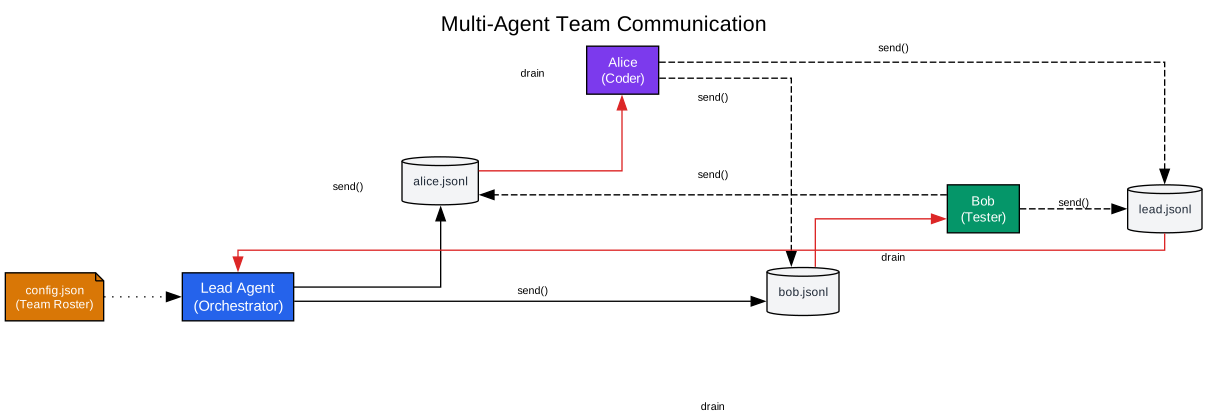
Understanding Multi-Agent Communication
The team system represents a significant evolution in agent architecture: moving from a single agent to multiple persistent workers that can coordinate through structured communication. This is not just running multiple agents - it is creating teammates with identity, memory, and the ability to work in parallel.
The Problem with Single Agents:
Complex projects often require multiple perspectives. A feature might need frontend work, backend changes, test coverage, and documentation. A single agent working sequentially must context-switch between these domains, potentially losing focus or making inconsistent decisions.
Subagents from earlier chapters are disposable - they spawn, work, and return a summary. They have no identity and no memory between invocations. Real teamwork needs more: persistent agents that outlive a single prompt, maintain their own context, and can communicate without the lead manually relaying every message.
The Team Architecture:
1. Teammate Lifecycle Each teammate has a lifecycle that persists beyond a single task:
spawn -> WORKING -> IDLE -> WORKING -> ... -> SHUTDOWN
A teammate can go idle when its current work is complete, then resume when new work arrives. This persistence enables long-running collaboration that would be impossible with disposable subagents.
2. The Team Roster (config.json) A shared configuration file tracks every teammate’s name, role, and current status:
{
  "members": [
    {"name": "alice", "role": "coder", "status": "working"},
    {"name": "bob", "role": "tester", "status": "idle"}
  ]
}
This roster provides visibility into the team state. The lead agent can check who is available, what roles are represented, and which teammates are actively working.
3. JSONL Inboxes Communication happens through append-only JSONL files. Each teammate has an inbox file:
.team/
  config.json
  inbox/
    alice.jsonl
    bob.jsonl
    lead.jsonl
When one agent sends a message to another, it appends a JSON line to the recipient’s inbox:
def send(self, sender, to, content, msg_type="message"):
    msg = {
        "type": msg_type,
        "from": sender,
        "content": content,
        "timestamp": time.time()
    }
    with open(self.dir / f"{to}.jsonl", "a") as f:
        f.write(json.dumps(msg) + "\n")
4. Drain-on-Read Pattern Before every LLM call, each teammate checks its inbox and drains it:
def read_inbox(self, name):
    path = self.dir / f"{name}.jsonl"
    if not path.exists(): return "[]"
    msgs = [json.loads(l) for l in path.read_text().strip().splitlines() if l]
    path.write_text("")  # drain - empty the file
    return json.dumps(msgs, indent=2)
The drain pattern ensures messages are not processed twice. Once read, the inbox is cleared. The messages are injected into the conversation context so the model can see and respond to them.
5. Independent Agent Loops Each teammate runs its own agent loop in a separate thread:
def _teammate_loop(self, name, role, prompt):
    messages = [{"role": "user", "content": prompt}]
    for _ in range(50):
        inbox = BUS.read_inbox(name)
        if inbox != "[]":
            messages.append({"role": "user",
                "content": f"<inbox>{inbox}</inbox>"})
            messages.append({"role": "assistant",
                "content": "Noted inbox messages."})
        response = client.messages.create(...)
        # ... tool execution ...
    self._find_member(name)["status"] = "idle"
This independence is crucial. Each teammate has its own conversation history, its own tool calls, and its own LLM interactions. They can work in parallel without blocking each other.
Why File-Based Communication?
The JSONL inbox approach might seem primitive compared to message queues or databases. But it has important advantages:
- Simplicity: No external dependencies, no setup required
- Debuggability: Messages are human-readable files
- Persistence: Messages survive restarts
- Isolation: Each agent’s state is independent
Teammate vs Subagent vs Runtime Slot:
| Mechanism | Think of it as | Lifecycle | Main Boundary |
|---|---|---|---|
| subagent | disposable helper | spawn -> work -> summary -> gone | isolates one exploratory branch |
| runtime slot | live execution slot | exists while background work runs | tracks long-running execution |
| teammate | durable worker | can go idle, resume, keep receiving work | has name, inbox, independent loop |
Why This Matters:
The team system enables a fundamentally different style of work. Instead of one agent sequentially handling every aspect of a task, multiple specialists can work in parallel. The lead agent coordinates, delegates, and integrates - but does not need to context-switch between domains.
This architecture scales naturally. Need more testing capacity? Spawn another tester teammate. Need documentation support? Add a documentation specialist. The communication pattern remains the same regardless of team size.
Key Innovations Summary
The learn-claude-code curriculum teaches several key innovations that distinguish production agent systems from simple prototypes:
Context Isolation via Subagents
Subagents provide a clean boundary for exploratory work. When an agent needs to investigate a side question, it spawns a child with a fresh messages=[]. The child does all the messy exploration, then returns only a summary. The parent’s context stays clean.
Two-Layer Skill Model
Skills are advertised cheaply in the system prompt and loaded on demand through tool calls. This prevents context bloat while ensuring domain expertise is available when needed.
Four-Stage Permission Pipeline
Safety is not a boolean - it is a pipeline. Deny rules run first and cannot be bypassed. Mode-based decisions provide context-dependent policies. Allow rules enable learned preferences. Interactive approval handles uncertain cases.
Hook Exit Code Protocol
Hooks enable extension without modification. External scripts can observe and influence tool calls through a standardized exit code protocol. This provides a plugin architecture without requiring changes to the core agent loop.
JSONL Inbox Communication
Multi-agent teams communicate through append-only JSONL files. This simple approach provides persistence, debuggability, and isolation without external dependencies.
Unified Tool Router
All tools - native, plugin, and MCP - route through a single dispatch mechanism. This provides consistent handling for permissions, hooks, and error recovery regardless of tool source.
Getting Started
To explore the learn-claude-code curriculum:
# Clone the repository
git clone https://github.com/shareAI-lab/learn-claude-code.git

# Navigate to the teaching implementations
cd learn-claude-code

# Start with the agent loop
python agents/s01_agent_loop.py

# Progress through each chapter
python agents/s02_tool_use.py
python agents/s03_todo_write.py
# ... and so on
Each chapter builds on the previous one. The teaching implementations are designed to be read in order, with each adding exactly one new concept.
Conclusion
The learn-claude-code project represents a significant contribution to AI agent education. By breaking down a production agent system into 19 progressive chapters, it makes complex architecture accessible to developers at all levels. The curriculum does not just show you what to build - it shows you why each component exists and how it fits into the larger system.
Whether you are building your first agent or architecting a multi-agent platform, the principles taught in this curriculum apply: the agent loop as foundation, the dispatch map for clean routing, the permission pipeline for safety, the two-layer skill model for efficient knowledge management, and the JSONL inbox for team communication.
The project demonstrates that production AI agents are not magic - they are carefully designed systems built from understandable components. Each layer adds capability without changing the core loop. Each mechanism solves a specific problem that arises at scale.
For developers looking to understand modern AI agent architecture, learn-claude-code provides the roadmap. Start with the loop, add tools, plan sessions, delegate subtasks, load skills, compress context, gate permissions, hook extensions, persist memory, assemble prompts, recover from errors, schedule tasks, coordinate teams, and route capabilities. That is the journey from a bare API call to a production agent platform.
Related Posts
- AgentSkillOS: Skill Orchestration System
- MattPocock Skills: AI Agent Workflows
- DESIGN.md: AI-Powered Design Systems