oh-my-claudecode: Multi-Agent Orchestration for Claude Code
In the rapidly evolving landscape of AI-assisted development, Claude Code has emerged as a powerful tool for developers. However, as projects grow in complexity, the need for specialized expertise and coordinated workflows becomes increasingly apparent. Enter oh-my-claudecode, a groundbreaking open-source project that transforms Claude Code from a single assistant into a coordinated team of 19 specialized agents.
With over 26,000 stars on GitHub and 7,500+ stars gained just this week, oh-my-claudecode has captured the attention of the developer community. This TypeScript-based framework introduces teams-first multi-agent orchestration, bringing enterprise-grade capabilities to Claude Code workflows.
What is oh-my-claudecode?
oh-my-claudecode is a multi-agent orchestration framework designed specifically for Claude Code. It addresses a fundamental challenge in AI-assisted development: while general-purpose AI assistants are versatile, they often lack the specialized expertise needed for complex software engineering tasks.
The framework provides:
- 19 Specialized Agents organized into 4 functional lanes
- 31 Workflow Skills for complex task automation
- 3-Tier Model Routing for cost-optimized AI usage
- 11 Hook Lifecycle Events for extensibility
- 5-Stage Team Pipeline for structured project execution
Key Features Overview
19 Specialized Agents in 4 Lanes
The framework organizes its agents into four distinct lanes, each serving a specific purpose in the development lifecycle:
Build/Analysis Lane (8 agents):
- explore: Navigates codebases to understand structure and relationships
- analyst: Performs deep analysis of requirements and specifications
- planner: Creates detailed implementation plans and task breakdowns
- architect: Designs system architecture and component interactions
- debugger: Identifies and resolves bugs and issues
- executor: Implements planned changes and features
- verifier: Validates implementations against requirements
- tracer: Tracks execution flow and data dependencies
Review Lane (2 agents):
- security-reviewer: Analyzes code for security vulnerabilities
- code-reviewer: Reviews code quality, style, and best practices
Domain Lane (8 agents):
- test-engineer: Creates and maintains test suites
- designer: Designs user interfaces and experiences
- writer: Creates documentation and content
- qa-tester: Performs quality assurance testing
- scientist: Conducts research and experiments
- git-master: Manages version control operations
- document-specialist: Maintains project documentation
- code-simplifier: Refactors code for simplicity and clarity
Coordination Lane (1 agent):
- critic: Reviews and critiques agent outputs for quality
31 Workflow Skills
oh-my-claudecode includes 31 pre-built workflow skills that automate common development tasks:
| Skill | Purpose |
|---|---|
| autopilot | Autonomous task execution with minimal supervision |
| ralph | Requirements analysis and planning workflow |
| ultrawork | High-throughput task processing |
| team | Multi-agent team coordination |
| ralplan | Rapid planning and execution |
| deep-interview | Comprehensive requirement gathering |
| ccg | Claude Code guidance system |
3-Tier Model Routing
The framework implements intelligent model routing to optimize cost and performance:
- LOW (Haiku): Fast lookups, simple tasks, quick responses
- MEDIUM (Sonnet): Implementation, debugging, standard operations
- HIGH (Opus): Architecture decisions, strategic analysis, complex reasoning
Architecture Overview

Understanding the Multi-Agent Architecture
The architecture diagram above illustrates how oh-my-claudecode orchestrates multiple specialized agents to handle complex development tasks. This design represents a paradigm shift from single-agent AI assistants to coordinated multi-agent teams.
Core Components:
1. Agent Registry The agent registry serves as the central repository for all 19 specialized agents. Each agent is registered with comprehensive metadata including:
- Capabilities and specialization areas
- Input/output schemas for type-safe communication
- Dependencies on other agents or tools
- Execution parameters and resource requirements
The registry enables dynamic agent discovery based on task requirements. When a new task arrives, the system queries the registry to identify the most suitable agents for the job, considering factors like expertise match, current workload, and historical performance.
2. Task Router The task router is the brain of the orchestration system. It analyzes incoming tasks and determines:
- Which agents should be involved
- What sequence of operations is optimal
- How to parallelize independent subtasks
- When to escalate to higher-tier models
The router uses a combination of rule-based logic and AI-powered analysis to make routing decisions. Simple tasks are routed directly to specialized agents, while complex tasks trigger multi-agent workflows.
3. Execution Engine The execution engine manages the actual agent invocations:
- Spawning and managing agent processes
- Handling inter-agent communication
- Implementing retry logic for transient failures
- Managing resource allocation and cleanup
The engine supports both synchronous and asynchronous execution patterns, allowing agents to work independently while maintaining coordination through shared state.
4. State Manager The state manager maintains the shared context across all agents:
- Current task status and progress
- Intermediate results and artifacts
- Agent-specific working memory
- Cross-agent communication channels
This component ensures that agents can collaborate effectively without duplicating work or losing context between handoffs.
Data Flow:
When a user submits a request, the system follows a structured flow:
- Task Ingestion: The request is parsed and validated against known task patterns
- Agent Selection: The router identifies relevant agents based on task requirements
- Plan Generation: A workflow plan is created, specifying agent interactions
- Execution: Agents execute their assigned tasks in the planned sequence
- Aggregation: Results from multiple agents are combined into a coherent output
- Delivery: The final result is presented to the user with relevant context
Key Insights:
This architecture draws inspiration from several established paradigms:
- Microservices: Each agent operates as an independent service with clear boundaries
- Actor Model: Agents communicate through message passing, ensuring isolation
- Workflow Orchestration: Complex tasks are decomposed into manageable steps
The multi-agent approach offers several advantages over single-agent systems:
- Specialization: Each agent can be optimized for its specific domain
- Parallelism: Independent tasks can execute concurrently
- Resilience: Failures in one agent don’t cascade to others
- Scalability: New agents can be added without modifying existing ones
Practical Applications:
Development teams can leverage this architecture to:
- Handle complex refactoring tasks with specialized agents
- Implement comprehensive code review workflows
- Automate documentation generation and maintenance
- Coordinate multi-file changes across large codebases
Team Pipeline Stages

Understanding the 5-Stage Team Pipeline
The team pipeline diagram illustrates the structured approach oh-my-claudecode uses to execute complex development projects. This five-stage pipeline ensures thorough planning, execution, and validation of all work.
Stage 1: team-plan
The planning stage is where the magic begins. When a task enters the pipeline, the team-plan stage performs comprehensive analysis:
- Requirement Analysis: The planner agent examines the task requirements, identifying explicit needs and implicit constraints
- Stakeholder Mapping: Key stakeholders and their expectations are documented
- Success Criteria: Clear, measurable success criteria are established
- Risk Assessment: Potential risks and mitigation strategies are identified
- Resource Estimation: Time, agent, and tool requirements are estimated
The output of this stage is a detailed project plan that guides all subsequent stages. This plan includes task breakdowns, agent assignments, and dependency graphs.
Stage 2: team-prd
The Product Requirements Document (PRD) stage transforms the plan into actionable specifications:
- Feature Specifications: Each feature is described in detail with acceptance criteria
- Technical Requirements: Architecture decisions and technology choices are documented
- Interface Contracts: API specifications and data models are defined
- Integration Points: How components interact is clearly specified
- Quality Gates: Checkpoints for validating implementation completeness
The PRD serves as the contract between planning and execution, ensuring all stakeholders have a shared understanding of what will be built.
Stage 3: team-exec
The execution stage is where the actual work happens. Multiple agents collaborate to implement the specifications:
- Parallel Execution: Independent tasks are executed concurrently by specialized agents
- Incremental Delivery: Work is delivered in small, reviewable increments
- Progress Tracking: Real-time visibility into execution progress
- Adaptive Planning: Plans are adjusted based on execution learnings
- Artifact Generation: Code, tests, and documentation are produced
The executor agent coordinates this stage, ensuring agents work in harmony and dependencies are respected.
Stage 4: team-verify
Verification ensures the implementation meets all requirements:
- Functional Testing: All features are tested against specifications
- Integration Testing: Component interactions are validated
- Performance Testing: System performance meets defined benchmarks
- Security Review: Security vulnerabilities are identified and addressed
- Code Quality: Code meets style and quality standards
The verifier agent leads this stage, coordinating with test-engineer and security-reviewer agents.
Stage 5: team-fix
The fix stage addresses any issues discovered during verification:
- Issue Prioritization: Issues are ranked by severity and impact
- Root Cause Analysis: Underlying causes are identified
- Fix Implementation: Corrective changes are made
- Regression Testing: Fixes don’t introduce new issues
- Documentation Updates: Documentation reflects changes
This stage ensures the final deliverable meets all quality standards before release.
Key Insights:
The pipeline approach offers several benefits:
- Predictability: Each stage has clear inputs, outputs, and success criteria
- Traceability: Every change can be traced back to requirements
- Quality Assurance: Built-in verification catches issues early
- Collaboration: Clear handoffs between stages improve coordination
Practical Applications:
Teams can customize the pipeline for different project types:
- Feature Development: Full pipeline for new features
- Bug Fixes: Abbreviated pipeline focusing on exec-verify-fix
- Refactoring: Pipeline emphasizing planning and verification
- Documentation: Pipeline focused on planning and writing stages
Skill Layer Composition
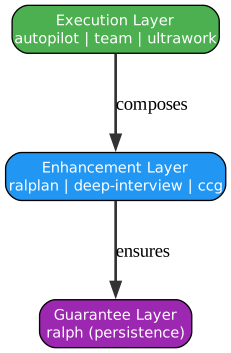
Understanding the Skill Layer Architecture
The skill layers diagram demonstrates how oh-my-claudecode organizes its 31 workflow skills into a hierarchical structure. This layered approach enables progressive capability building and efficient skill reuse.
Layer 1: Foundation Skills
The foundation layer provides the building blocks for all higher-level skills:
- Core Utilities: Basic operations like file I/O, string manipulation, and data transformation
- Agent Primitives: Fundamental agent operations including spawning, messaging, and termination
- State Management: Persistent storage and retrieval of execution state
- Communication: Inter-agent messaging and coordination protocols
These skills are designed to be highly reusable and form the foundation upon which all other skills are built. They handle the “plumbing” of the system, allowing higher layers to focus on domain-specific logic.
Layer 2: Domain Skills
Domain skills encapsulate specialized knowledge for specific development domains:
- Code Analysis: Parsing, analyzing, and understanding source code
- Testing: Test generation, execution, and result analysis
- Documentation: Creating and maintaining technical documentation
- Version Control: Git operations and branch management
- Security: Vulnerability scanning and security analysis
Each domain skill is designed to be self-contained and can operate independently or as part of larger workflows. They encapsulate best practices and domain expertise.
Layer 3: Workflow Skills
Workflow skills combine domain skills into coherent processes:
- autopilot: End-to-end autonomous task execution
- ralph: Requirements gathering and analysis workflow
- ultrawork: High-throughput batch processing
- team: Multi-agent coordination workflow
- ralplan: Rapid planning and execution cycle
These skills represent complete workflows that can handle complex tasks from start to finish. They orchestrate multiple domain skills and manage the overall execution flow.
Layer 4: Orchestration Skills
The top layer handles meta-orchestration across workflows:
- Pipeline Orchestration: Managing multi-stage pipelines
- Resource Allocation: Optimizing agent and model usage
- Conflict Resolution: Handling competing resource demands
- Quality Gates: Enforcing quality standards across workflows
These skills ensure that multiple workflows can operate concurrently without interference while maintaining overall system quality.
Key Insights:
The layered architecture provides several advantages:
- Modularity: Each layer has clear responsibilities and interfaces
- Reusability: Lower layers can be reused across multiple workflows
- Testability: Each skill can be tested in isolation
- Extensibility: New skills can be added at any layer
Skill Composition Pattern:
Skills are composed using a declarative syntax:
skill: autopilot
  uses:
    - code-analysis
    - planner
    - executor
    - verifier
  config:
    max_iterations: 10
    quality_threshold: 0.95
This composition pattern allows skills to be combined in powerful ways while maintaining clarity about dependencies.
Practical Applications:
Teams can create custom skills by composing existing ones:
- Code Review Workflow: Combine code-analysis, security-reviewer, and code-reviewer
- Documentation Pipeline: Combine code-analysis, document-specialist, and writer
- Release Process: Combine git-master, test-engineer, and verifier
Hook Lifecycle Events
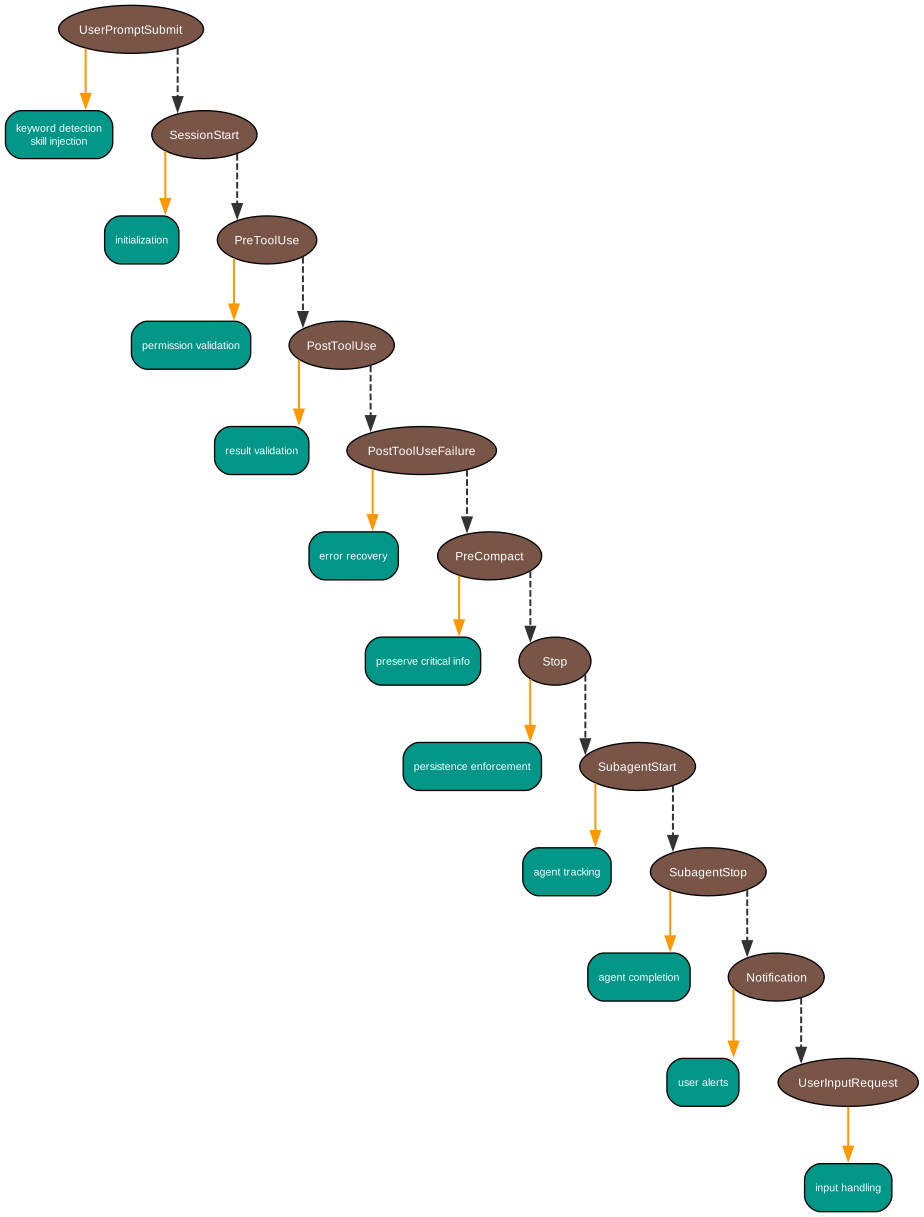
Understanding the Hook System
The hooks diagram illustrates the 11 lifecycle events that enable extensibility and customization in oh-my-claudecode. Hooks allow developers to inject custom logic at critical points in the execution flow.
UserPromptSubmit Hook
This hook fires when a user submits a prompt to the system:
- Purpose: Pre-process user input before agent processing
- Use Cases: Input validation, prompt enhancement, context injection
- Capabilities: Modify prompt, add context, reject inappropriate requests
- Timing: Synchronous, blocks until complete
Common uses include sanitizing user input, adding project context, and implementing prompt templates.
SessionStart Hook
Triggered at the beginning of a new session:
- Purpose: Initialize session state and resources
- Use Cases: Load configuration, restore previous context, setup logging
- Capabilities: Set session parameters, load saved state, configure agents
- Timing: Synchronous, must complete before session begins
This hook is essential for maintaining continuity across sessions and implementing custom initialization logic.
PreToolUse Hook
Fires before any tool is invoked:
- Purpose: Validate and potentially modify tool usage
- Use Cases: Permission checks, input validation, audit logging
- Capabilities: Approve, deny, or modify tool parameters
- Timing: Synchronous, blocks tool execution
Security-conscious implementations use this hook to enforce access controls and prevent unauthorized operations.
PostToolUse Hook
Triggers after successful tool execution:
- Purpose: Process tool results and update state
- Use Cases: Result caching, state updates, notification triggers
- Capabilities: Modify results, trigger actions, update metrics
- Timing: Synchronous, must complete before next operation
This hook enables result processing and side effects like notifications or logging.
PostToolUseFailure Hook
Fires when a tool execution fails:
- Purpose: Handle errors and implement recovery logic
- Use Cases: Error logging, retry logic, fallback execution
- Capabilities: Retry, fallback, or escalate error
- Timing: Synchronous, must complete before error propagation
Implementing robust error handling through this hook improves system resilience.
PreCompact Hook
Triggers before context compaction:
- Purpose: Prepare for context reduction
- Use Cases: Save important state, summarize progress, archive artifacts
- Capabilities: Select what to preserve, trigger archival
- Timing: Synchronous, must complete before compaction
This hook helps manage long-running sessions by preserving critical information.
Stop Hook
Fires when a session stops:
- Purpose: Cleanup and finalization
- Use Cases: Save state, cleanup resources, generate reports
- Capabilities: Final state persistence, resource cleanup
- Timing: Synchronous, must complete for clean shutdown
Proper implementation ensures no resource leaks and clean session termination.
SubagentStart Hook
Triggers when a sub-agent begins execution:
- Purpose: Track and coordinate sub-agent activity
- Use Cases: Logging, resource allocation, dependency tracking
- Capabilities: Configure sub-agent, set parameters
- Timing: Synchronous, must complete before sub-agent starts
This hook enables fine-grained control over multi-agent coordination.
SubagentStop Hook
Fires when a sub-agent completes:
- Purpose: Process sub-agent results
- Use Cases: Result aggregation, state updates, progress tracking
- Capabilities: Process results, trigger follow-up actions
- Timing: Synchronous, must complete before parent continues
Essential for coordinating complex multi-agent workflows.
Notification Hook
Triggers for system notifications:
- Purpose: Handle alerts and notifications
- Use Cases: User alerts, system monitoring, external integrations
- Capabilities: Send notifications, trigger webhooks, update dashboards
- Timing: Asynchronous, doesn’t block execution
This hook enables integration with external monitoring and alerting systems.
UserInputRequest Hook
Fires when user input is requested:
- Purpose: Customize input requests
- Use Cases: Provide context, format prompts, add suggestions
- Capabilities: Modify prompt, provide suggestions, set timeout
- Timing: Synchronous, must complete before prompt shown
This hook improves user experience by providing context-aware input requests.
Key Insights:
The hook system provides powerful extensibility:
- Non-Invasive: Custom logic without modifying core code
- Composable: Multiple hooks can be registered for the same event
- Ordered: Hooks execute in priority order
- Isolated: Hook failures don’t crash the system
Practical Applications:
Teams can implement custom hooks for:
- Security: Enforce policies through PreToolUse hooks
- Compliance: Audit logging through PostToolUse hooks
- Integration: Connect to external systems through Notification hooks
- Quality: Enforce standards through SubagentStop hooks
Model Routing Decision Tree
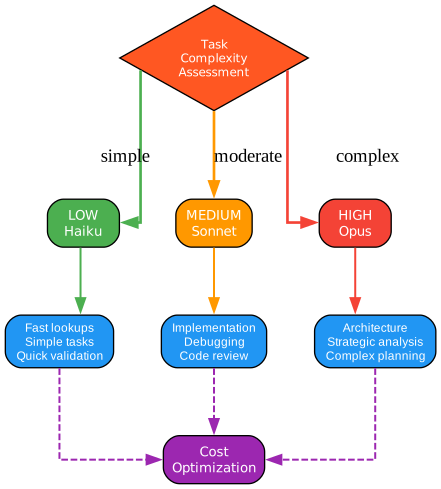
Understanding Intelligent Model Routing
The model routing diagram shows how oh-my-claudecode optimizes AI model usage by routing tasks to appropriate model tiers. This 3-tier system balances cost, speed, and capability.
Tier 1: LOW (Haiku) - Fast Operations
Haiku-level routing handles quick, simple operations:
- Use Cases: Code lookups, simple queries, format conversions
- Characteristics: Sub-second response times, minimal cost
- Examples: “Find all uses of function X”, “Format this JSON”, “What does this variable do?”
The system routes to Haiku when:
- Task complexity is low
- Quick response is prioritized
- Cost optimization is important
- No complex reasoning required
Tier 2: MEDIUM (Sonnet) - Standard Operations
Sonnet-level routing handles most development tasks:
- Use Cases: Code implementation, debugging, refactoring
- Characteristics: Balanced speed and capability, moderate cost
- Examples: “Implement this feature”, “Fix this bug”, “Refactor this module”
The system routes to Sonnet when:
- Task requires implementation work
- Moderate complexity reasoning needed
- Standard development operations
- Balance of speed and quality needed
Tier 3: HIGH (Opus) - Strategic Operations
Opus-level routing handles complex, strategic tasks:
- Use Cases: Architecture design, strategic planning, complex analysis
- Characteristics: Maximum capability, higher cost, slower response
- Examples: “Design the system architecture”, “Analyze security implications”, “Plan the migration strategy”
The system routes to Opus when:
- Strategic decisions are needed
- Complex reasoning required
- Architecture-level analysis
- High-stakes decisions with significant impact
Routing Decision Logic:
The routing system uses multiple factors to determine the appropriate tier:
- Task Analysis: Parse the task to understand complexity and requirements
- Context Evaluation: Consider current context and available information
- Capability Matching: Match task needs to model capabilities
- Cost Consideration: Factor in cost constraints and budget
- Historical Performance: Learn from past routing decisions
Dynamic Tier Escalation:
The system can escalate between tiers during execution:
- Upward Escalation: When Sonnet encounters complexity beyond its capability
- Downward Delegation: When Opus identifies simple subtasks for Haiku
- Parallel Processing: Different subtasks routed to different tiers
Key Insights:
Intelligent routing provides significant benefits:
- Cost Optimization: 60-80% cost reduction vs. always using highest tier
- Speed Improvement: Simple tasks complete faster with appropriate tier
- Quality Assurance: Complex tasks get the attention they need
- Resource Efficiency: Better utilization of AI resources
Routing Configuration:
Teams can customize routing rules:
routing:
  rules:
    - pattern: "find *"
      tier: LOW
    - pattern: "implement *"
      tier: MEDIUM
    - pattern: "design architecture"
      tier: HIGH
  defaults:
    unknown_task: MEDIUM
    timeout_escalation: true
Practical Applications:
Organizations can optimize routing for their needs:
- Cost-Conscious: Route more tasks to lower tiers
- Quality-Focused: Route more tasks to higher tiers
- Balanced: Use intelligent routing with escalation
- Custom: Define domain-specific routing rules
Installation Guide
Getting started with oh-my-claudecode is straightforward. Follow these steps to set up the framework:
Prerequisites
- Node.js 18 or higher
- npm or yarn package manager
- Claude Code CLI installed
- Git for version control operations
Installation Steps
# Clone the repository
git clone https://github.com/Yeachan-Heo/oh-my-claudecode.git
cd oh-my-claudecode

# Install dependencies
npm install

# Build the project
npm run build

# Configure Claude Code integration
npm run setup
Configuration
Create a configuration file at ~/.oh-my-claudecode/config.yaml:
# Model routing configuration
routing:
  default_tier: MEDIUM
  cost_optimization: true

# Agent configuration
agents:
  enabled:
    - explore
    - planner
    - architect
    - executor
    - verifier

# Hook configuration
hooks:
  session_start: ./hooks/init.sh
  post_tool_use: ./hooks/log.sh
Usage Examples
Basic Agent Invocation
# Run the explore agent to understand a codebase
omc run explore --target ./src

# Execute a planning workflow
omc run planner --task "Add user authentication"

# Run the architect for system design
omc run architect --requirements ./requirements.md
Team Pipeline Execution
# Execute a full team pipeline
omc team start --task "Implement REST API"

# Run specific pipeline stages
omc team plan --task "Add payment processing"
omc team exec --plan ./plan.json
omc team verify --execution ./results.json
Skill Invocation
# Run autopilot for autonomous execution
omc skill autopilot --task "Fix all TypeScript errors"

# Execute deep-interview for requirements
omc skill deep-interview --project ./project.md

# Run ralph for requirements analysis
omc skill ralph --input ./requirements.txt
Unique Selling Points
oh-my-claudecode stands out from other AI development tools in several key ways:
1. True Multi-Agent Orchestration
Unlike single-agent systems, oh-my-claudecode coordinates multiple specialized agents working together. This enables:
- Parallel task execution
- Specialized expertise for each domain
- Clear separation of concerns
- Better handling of complex projects
2. Intelligent Model Routing
The 3-tier routing system optimizes cost and performance:
- Automatic task complexity analysis
- Dynamic tier escalation
- Cost-aware routing decisions
- Performance optimization
3. Extensible Hook System
11 lifecycle hooks enable deep customization:
- Non-invasive extensibility
- Security policy enforcement
- Custom workflow integration
- Comprehensive audit logging
4. Structured Team Pipeline
The 5-stage pipeline ensures quality:
- Clear stage definitions
- Built-in verification
- Quality gates at each stage
- Traceable execution
5. Rich Skill Library
31 pre-built skills accelerate development:
- Ready-to-use workflows
- Composable skill architecture
- Domain-specific expertise
- Custom skill creation
Conclusion
oh-my-claudecode represents a significant advancement in AI-assisted development. By transforming Claude Code into a coordinated team of specialized agents, it addresses the complexity challenges that modern software projects face.
The framework’s intelligent model routing ensures cost-effective AI usage, while the extensible hook system allows teams to customize behavior to their specific needs. The structured team pipeline brings engineering rigor to AI-assisted development, ensuring quality and traceability.
With over 26,000 GitHub stars and rapid adoption, oh-my-claudecode has proven its value to the developer community. Whether you’re working on a small project or a large enterprise codebase, this framework provides the tools needed to leverage AI effectively.
Key Takeaways:
- 19 specialized agents organized into 4 functional lanes
- 31 workflow skills for common development tasks
- 3-tier model routing for cost optimization
- 11 hook lifecycle events for extensibility
- 5-stage team pipeline for structured execution
For more information, visit the GitHub repository and explore the documentation.
Related Posts
- AgentSkillOS: Skill Orchestration System
- MattPocock Skills: AI Agent Workflows
- DESIGN-md: AI-Powered Design Systems
