Introduction
In the rapidly evolving landscape of AI-powered development tools, oh-my-codex (OMX) stands out as a sophisticated workflow layer designed to enhance the OpenAI Codex CLI experience. With over 20,000 GitHub stars and growing rapidly, this project represents a significant advancement in how developers can orchestrate AI coding agents for complex software development tasks.
oh-my-codex is not a replacement for Codex CLI but rather a powerful coordination layer that sits on top of it. Think of it as a mission control center that transforms raw AI capabilities into structured, repeatable workflows. The project provides a comprehensive framework for managing AI coding sessions, from initial requirement clarification through final verification, with built-in support for multi-agent coordination, persistent state management, and real-time monitoring.
The core philosophy behind OMX is elegantly simple: start Codex stronger, then let OMX add better prompts, workflows, and runtime help when the work grows. This approach allows developers to leverage the full power of AI coding assistants while maintaining control over the development process and ensuring consistent, high-quality outcomes.
Architecture Overview
The architecture of oh-my-codex reveals a carefully designed system that separates concerns while maintaining seamless integration with the underlying Codex CLI engine.
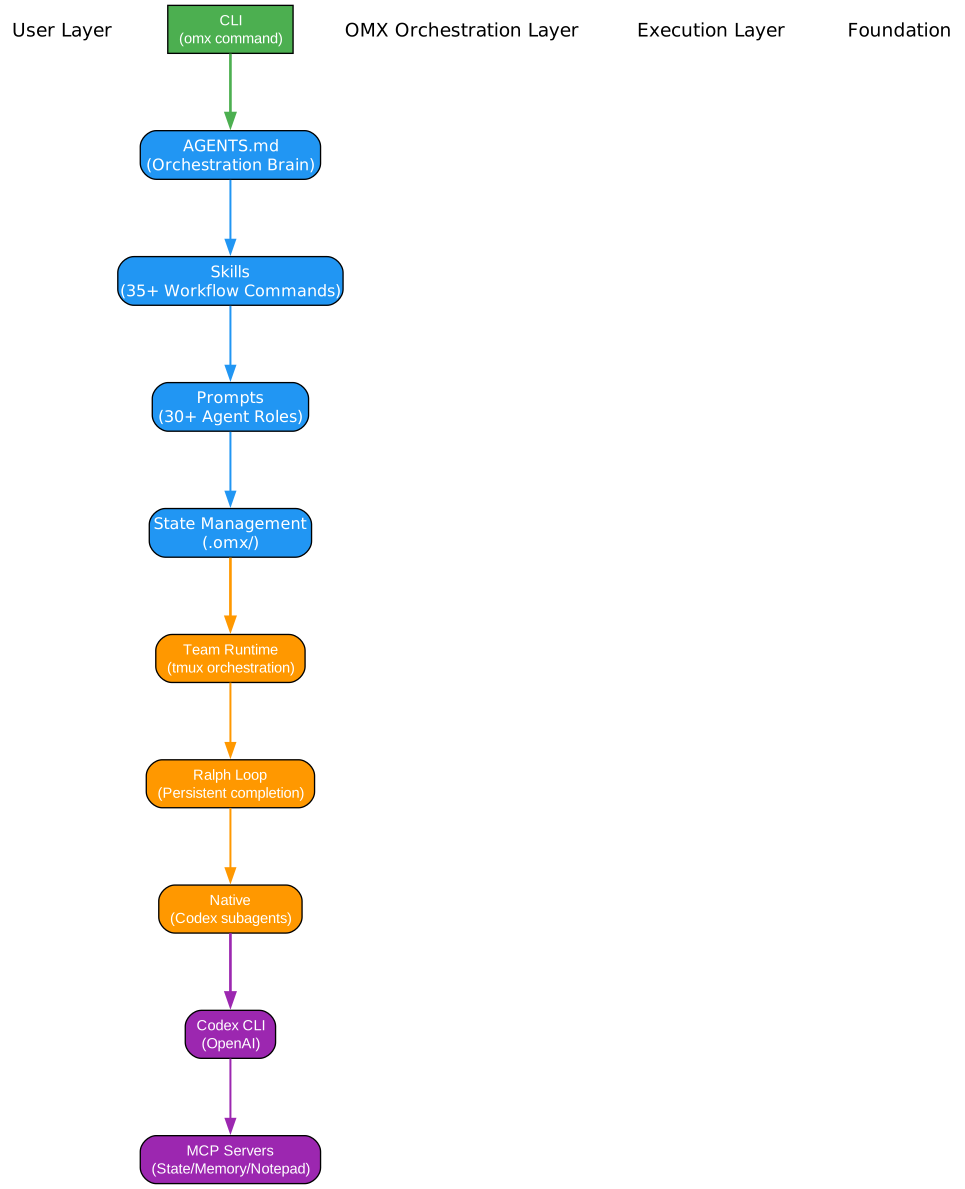
The architecture diagram illustrates the layered approach that OMX takes to orchestrate AI coding workflows. At the top level, user requests enter the system and are immediately intercepted by the OMX Workflow Layer, which serves as the central coordination engine. This layer is responsible for analyzing incoming requests, determining the appropriate execution strategy, and routing tasks to the most suitable components.
The OMX Workflow Layer connects to several key subsystems that work in concert to deliver a comprehensive development experience. The Skills System provides a rich vocabulary of workflow commands including $deep-interview for requirement clarification, $ralplan for consensus planning, and $team/$ralph for execution coordination. These skills are not mere templates but intelligent workflows that adapt to the context of each task.
The Hooks System enables lifecycle event management and plugin extensions, allowing developers to customize behavior at critical points in the execution pipeline. This extensibility ensures that OMX can be adapted to various development workflows and organizational requirements without modifying the core system.
The Agent Teams subsystem implements a sophisticated leader/worker protocol that enables coordinated parallel execution across multiple AI agents. This is particularly valuable for complex tasks that benefit from decomposition into independent subtasks, each handled by specialized agents working in concert.
The HUD Display provides real-time monitoring and status dashboards, giving developers visibility into the progress and state of their AI coding sessions. This transparency is crucial for understanding what the AI is doing and for making informed decisions about when to intervene.
At the foundation, the Codex CLI Execution Engine handles the actual AI-powered code generation and manipulation. OMX maintains state in the .omx/ directory, persisting plans, logs, memory, and mode information across sessions. This state management enables long-running projects to maintain context and continuity even when sessions are interrupted or span multiple days.
The Canonical Workflow
Understanding the canonical workflow is essential for effectively using oh-my-codex. The project prescribes a structured approach that guides tasks from initial ambiguity to verified completion.
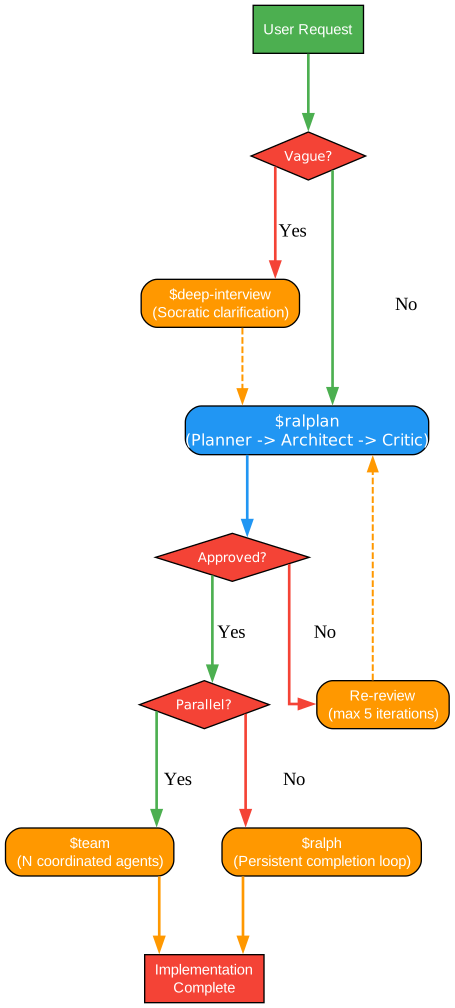
The workflow diagram demonstrates the decision-driven approach that OMX takes to task execution. Every engagement begins with the $deep-interview phase, which serves as a Socratic clarification process. This phase is crucial for tasks where the intent, boundaries, or non-goals are not immediately clear. The system asks probing questions, explores edge cases, and ensures that all stakeholders have a shared understanding of what needs to be accomplished.
The decision point after deep interviewing determines whether the requirements are sufficiently clear to proceed. If ambiguity remains, the system loops back to continue clarification. This prevents the common pitfall of rushing into implementation with incomplete understanding, which often leads to wasted effort and rework.
Once requirements are clear, the $ralplan phase takes over. This is where consensus planning happens, involving planner, architect, and critic roles in a structured deliberation process. The goal is to produce an approved implementation plan with clearly identified tradeoffs. This phase ensures that all stakeholders agree on the approach before any code is written, reducing the risk of divergent expectations and costly mid-project pivots.
The next decision point determines whether the approved plan requires coordinated parallel execution. If the work is substantial enough to benefit from multiple agents working simultaneously, the $team workflow is invoked. This creates a structured multi-agent environment where a leader coordinates workers, each responsible for a bounded slice of the overall task. The leader maintains the global context, delegates work, and integrates results, while workers focus on their assigned portions without needing to understand the full picture.
For tasks that are better suited to a single persistent owner, the $ralph workflow provides a completion loop that continuously works toward the goal, verifying progress at each iteration. This is ideal for tasks that require sustained focus and iterative refinement rather than parallel decomposition.
Both paths converge at the verification phase, where tests must pass and zero known errors must remain. The completion decision determines whether the task is truly done or whether additional iteration is needed. This rigorous verification ensures that completed tasks meet quality standards and that no loose ends are left behind.
Key Features and Capabilities
The feature set of oh-my-codex extends far beyond simple task execution, providing a comprehensive toolkit for AI-assisted development.

Workflow Skills
The Workflow Skills category represents the core vocabulary for task orchestration. The $deep-interview skill implements a Socratic clarification process that systematically explores requirements, identifies boundaries, and surfaces non-goals. This is not a simple question-answering session but a structured inquiry that ensures all stakeholders have a shared mental model of the task at hand.
The $ralplan skill brings together planner, architect, and critic perspectives to produce consensus plans. This multi-perspective approach catches issues that any single viewpoint might miss and ensures that plans are robust, implementable, and aligned with project constraints. The skill supports both quick deliberation for routine tasks and extended analysis for high-risk decisions.
The $team skill enables coordinated multi-agent execution. When a plan has multiple independent lanes, shared blockers, or requires durable coordination, the team workflow creates a structured environment where agents can work in parallel while maintaining coherence. The leader/worker protocol ensures that each agent knows their scope and that conflicts are detected and resolved early.
The $ralph skill provides a persistent completion loop. Unlike fire-and-forget execution, $ralph continuously monitors progress, verifies results, and iterates until the task is truly complete. This is particularly valuable for tasks where the path to completion is not entirely predictable and requires adaptive problem-solving.
Agent System
The Agent System provides a rich catalog of specialized roles that can be invoked as needed. Role prompts make useful roles reusable, allowing developers to quickly bring the right expertise to bear on specific aspects of a task. The executor role handles implementation and refactoring work, while the architect role focuses on read-only analysis, diagnosis, and tradeoff evaluation.
Specialists extend the core roles with domain-specific expertise. The debugger role specializes in root-cause analysis, the test-engineer focuses on verification strategies, and the security-reviewer conducts security audits. These specialists can be invoked through skill/keyword routing when the task clearly benefits from their expertise.
The smart delegation system implements a leader/worker protocol that ensures efficient coordination. Leaders choose the mode, keep the brief current, delegate bounded work, and own verification. Workers execute their assigned slice, stay within their write scope, and report blockers upward. This clear separation of responsibilities prevents confusion and ensures accountability.
Runtime Features
The Runtime Features category encompasses the infrastructure that supports reliable, observable execution. Native hooks provide lifecycle event management, allowing developers to inject custom behavior at critical points in the execution pipeline. The .codex/hooks.json configuration enables registration of hooks that can respond to session start, tool use, completion, and other events.
The HUD Display offers real-time monitoring through the omx hud --watch command. This visibility into agent activity is crucial for understanding what the AI is doing, diagnosing issues, and making informed decisions about when to intervene. The dashboard shows current mode, active agents, progress indicators, and relevant state information.
State management through the .omx/ directory ensures continuity across sessions. Plans, logs, memory, and mode tracking persist in a structured format that enables resumption of interrupted work and provides an audit trail of agent decisions. This durability is essential for long-running projects that span multiple sessions.
The tmux integration provides durable session management for team mode. When agents need to work over extended periods or when coordination requires persistent terminals, tmux ensures that sessions survive network interruptions and can be resumed from any machine.
Installation and Setup
Getting started with oh-my-codex requires a few prerequisites and a straightforward installation process.
Requirements
Before installing OMX, ensure your system meets these requirements:
- Node.js 20+: The runtime environment for both Codex CLI and OMX
- Codex CLI: Install with
npm install -g @openai/codex - Codex authentication: Configure your OpenAI credentials
- tmux (macOS/Linux): For durable team runtime sessions
- psmux (Windows): For the less-supported Windows team path
Installation Steps
# Install both Codex CLI and OMX globally
npm install -g @openai/codex oh-my-codex

# Run setup to install prompts, skills, and configurations
omx setup

# Launch the recommended default session
omx --madmax --high
The omx setup command installs prompts, skills, AGENTS scaffolding, .codex/config.toml, and OMX-managed native Codex hooks in .codex/hooks.json. This setup is designed to be non-destructive, preserving non-OMX hook entries and only rewriting OMX-managed wrappers.
Platform-Specific Notes
For macOS/Linux users, the recommended path is well-supported with tmux integration. Windows users should consider WSL2 for the best experience, as native Windows remains a secondary path with less support. Intel Mac users may experience high syspolicyd/trustd CPU usage during startup due to macOS Gatekeeper validation; this can be mitigated with xattr -dr com.apple.quarantine $(which omx).
Usage Examples
The power of oh-my-codex becomes apparent through practical application. Here are common usage patterns:
Starting a New Feature
$deep-interview "clarify the authentication change"
$ralplan "approve the safest implementation path"
$ralph "carry the approved plan to completion"
This sequence represents the canonical path for feature development. The deep interview clarifies scope and boundaries, the ralplan produces an approved architecture, and ralph executes to completion with continuous verification.
Coordinated Parallel Execution
$team 3:executor "execute the approved plan in parallel"
When the approved plan has multiple independent components, the team workflow creates three executor agents working in parallel under leader coordination. This is particularly effective for large refactoring efforts or feature sets with clear boundaries.
Quick Analysis
$analyze "investigate the performance regression"
For tasks that need deep analysis without immediate implementation, the analyze skill provides structured investigation with findings and recommendations.
Code Review
$code-review "review current branch"
The code review skill runs a comprehensive review of changes, checking for style issues, potential bugs, and alignment with project standards.
Comparison with oh-my-claudecode
oh-my-codex is part of a family of AI coding harnesses, with oh-my-claudecode being its companion project for Anthropic’s Claude. While both share similar philosophies and workflow patterns, there are key differences:
Execution Engine: oh-my-codex builds on OpenAI’s Codex CLI, while oh-my-claudecode integrates with Claude’s capabilities. This affects the underlying model behavior, tool use patterns, and available features.
Native Hooks: oh-my-codex leverages Codex’s native hook system (.codex/hooks.json), providing deeper integration with the execution lifecycle. oh-my-claudecode uses a different hook mechanism appropriate to Claude’s architecture.
Team Runtime: Both support multi-agent coordination, but oh-my-codex’s tmux integration provides durable session management that persists across network interruptions and terminal restarts.
Model Routing: oh-my-codex includes sophisticated model routing that matches role complexity to appropriate models, optimizing for both quality and cost. Lower complexity tasks use spark models, while high complexity tasks invoke frontier models.
State Management: Both maintain state in their respective directories (.omx/ for oh-my-codex), but the specific artifacts and formats differ based on the underlying platform’s capabilities.
Best Practices
To maximize the value of oh-my-codex, consider these best practices:
-
Start with deep-interview: Even when requirements seem clear, the clarification process often surfaces important edge cases and non-goals that would otherwise cause rework.
-
Use ralplan for non-trivial tasks: The consensus planning process catches issues early and ensures all stakeholders are aligned before implementation begins.
-
Choose team vs ralph wisely: Use
$teamwhen work can be cleanly decomposed into parallel lanes. Use$ralphwhen a single persistent owner should drive to completion. -
Leverage the agent catalog: Don’t default to generic execution. Invoke specialists (debugger, security-reviewer, architect) when their expertise is relevant.
-
Monitor with HUD: Use
omx hud --watchto maintain visibility into agent activity, especially for long-running tasks. -
Trust but verify: Always review the verification phase results. Tests passing and zero errors are the criteria for true completion.
-
Preserve state: The
.omx/directory contains valuable context. Commit it to version control for long-running projects to enable session resumption.
Conclusion
oh-my-codex represents a significant advancement in AI-assisted software development, providing a structured workflow layer that transforms raw AI capabilities into reliable, repeatable development processes. Its combination of workflow skills, agent coordination, and runtime infrastructure addresses the key challenges of working with AI coding assistants: maintaining context, ensuring quality, and scaling to complex tasks.
The project’s rapid growth to over 20,000 GitHub stars reflects the developer community’s recognition of these capabilities. As AI coding assistants become increasingly central to software development, tools like oh-my-codex that provide structure, coordination, and visibility will be essential for teams looking to maximize productivity while maintaining quality.
For developers already using Codex CLI, oh-my-codex offers a natural evolution that preserves existing workflows while adding powerful coordination capabilities. For teams considering AI-assisted development, it provides a mature, well-documented entry point with clear patterns and best practices.
The canonical workflow of $deep-interview -> $ralplan -> $team/$ralph embodies hard-won lessons about effective AI collaboration: clarify before implementing, plan before executing, and verify before declaring done. These principles, combined with sophisticated tooling, make oh-my-codex a compelling choice for teams serious about AI-assisted development.
Resources
- GitHub Repository: https://github.com/Yeachan-Heo/oh-my-codex
- Documentation: Getting Started
- Discord Community: Join the discussion
- npm Package:
oh-my-codex
oh-my-codex demonstrates that the future of AI-assisted development lies not just in more powerful models, but in better orchestration of AI capabilities. By providing structured workflows, clear roles, and robust infrastructure, it enables teams to harness AI coding assistants effectively and reliably.
