Introduction
In the rapidly evolving landscape of AI-assisted software development, one of the biggest challenges has been making AI coding agents deterministic and repeatable. When you ask an AI agent to “fix this bug,” the outcome often depends on the model’s mood - it might skip planning, forget to run tests, or write a PR description that ignores your template. Every run is different, leading to unpredictable results and frustrated developers.
Archon emerges as the solution to this fundamental problem. As the first open-source harness builder specifically designed for AI coding workflows, Archon brings the same level of reliability and reproducibility to AI-assisted development that Dockerfiles brought to infrastructure and GitHub Actions brought to CI/CD. Think of it as n8n, but specifically tailored for software development workflows.
What is Archon?
Archon is a workflow engine for AI coding agents that allows you to define your development processes as YAML workflows. These workflows encompass planning, implementation, validation, code review, and PR creation - all running reliably across your projects. The key insight is that while the AI provides intelligence at each step, the structure remains deterministic and owned by you, the developer.
The project has gained significant traction in the developer community, amassing over 14,000 stars on GitHub with active development and a growing ecosystem of users. Built with TypeScript and Bun, Archon leverages modern JavaScript tooling for performance and developer experience.
Core Features
Repeatable Workflows
Same workflow, same sequence, every time. Whether you’re fixing a bug, implementing a feature, or conducting code reviews, Archon ensures consistent execution through well-defined phases: plan, implement, validate, review, and create PR.
Isolated Environments
Every workflow run gets its own git worktree, enabling you to run 5 fixes in parallel without any conflicts. This isolation ensures that different tasks don’t interfere with each other, making parallel development safe and efficient.
Fire and Forget
Kick off a workflow and go do other work. Come back to a finished PR with review comments already incorporated. Archon handles the entire process autonomously, only pausing for human input when explicitly configured.
Composable Architecture
Mix deterministic nodes (bash scripts, tests, git operations) with AI nodes (planning, code generation, review). The AI only runs where it adds value, while deterministic operations ensure reliability and speed.
Portable Workflows
Define workflows once in .archon/workflows/, commit them to your repo, and they work identically from CLI, Web UI, Slack, Telegram, or GitHub. This portability ensures your team runs the same process regardless of their preferred interface.
Architecture Overview
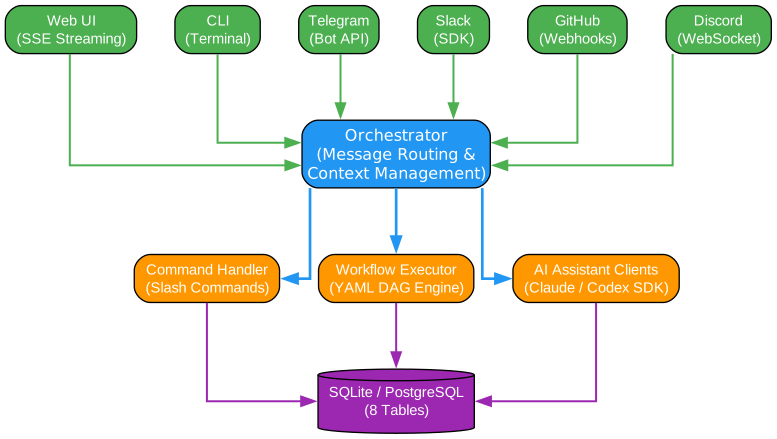
The architecture diagram above illustrates Archon’s layered design, which separates concerns cleanly and enables extensibility across multiple platforms.
Platform Adapters Layer (Top): The top layer consists of six platform adapters that provide unified access to Archon from different interfaces. The Web UI uses Server-Sent Events (SSE) for real-time streaming, while the CLI provides terminal-based interaction. Chat platforms include Telegram (Bot API), Slack (SDK), and Discord (WebSocket), with GitHub integration via webhooks. Each adapter implements the IPlatformAdapter interface, ensuring consistent behavior across all platforms.
Orchestrator Layer (Middle): The orchestrator serves as the central hub for message routing and context management. It receives messages from any platform adapter, manages conversation state, and routes requests to the appropriate handlers. The orchestrator maintains session state, handles variable substitution, and ensures proper context is passed to AI clients.
Engine Components Layer (Lower): Three core engines handle different aspects of workflow execution. The Command Handler processes deterministic slash commands without AI involvement. The Workflow Executor manages YAML-based DAG (Directed Acyclic Graph) workflows with support for loops, conditions, and parallel execution. The AI Assistant Clients interface with Claude and Codex SDKs for intelligent operations.
Database Layer (Bottom): SQLite or PostgreSQL stores all persistent data across 8 tables: codebases, conversations, sessions, isolation_environments, workflow_runs, workflow_events, messages, and codebase_env_vars. This flexible storage layer supports both local development (SQLite) and production deployments (PostgreSQL).
Workflow Execution Flow
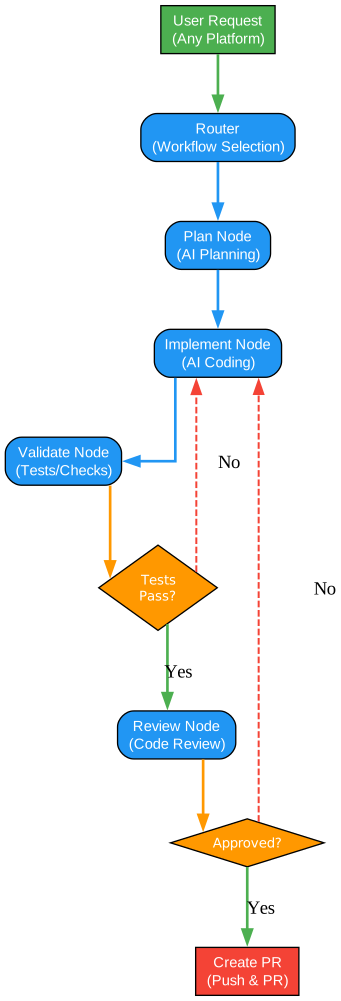
The workflow execution diagram demonstrates a typical feature development cycle in Archon, showing how different node types work together to produce a complete, validated pull request.
User Request Entry: The process begins when a user submits a request through any supported platform. The Router analyzes the request and selects the appropriate workflow based on the task type and available workflows in the project.
Planning Phase: The Plan Node engages the AI to explore the codebase and create a detailed implementation plan. This phase ensures that subsequent steps have clear direction and context about what needs to be built.
Implementation Loop: The Implement Node executes the plan by writing actual code. After implementation, the Validate Node runs tests and checks to verify correctness. If tests fail, the workflow loops back to the Implement Node for fixes. This iterative loop continues until all tests pass, ensuring code quality before proceeding.
Review and Approval: Once tests pass, the Review Node performs code review, checking for issues, style violations, and potential improvements. The workflow then reaches an approval gate where human review is required. If not approved, feedback is incorporated and implementation continues. Only after approval does the workflow proceed to PR creation.
PR Creation: The final step pushes changes to the remote repository and creates a pull request with a well-formatted description. The entire process is tracked in the database, providing full auditability of what was done and why.
Package Structure

Archon is organized as a monorepo using Bun workspaces, with clear separation of concerns and dependency relationships between packages.
Foundation Packages (Blue): The architecture starts with @archon/paths which has zero dependencies and provides path resolution utilities and logging. @archon/git builds on this to provide git operations including worktree management, branch operations, and repository handling. @archon/isolation depends on both git and paths to provide worktree isolation capabilities. @archon/workflows is the core workflow engine that handles YAML parsing, DAG execution, and workflow discovery.
Application Packages (Green): @archon/core contains the business logic, database operations, and orchestration. It depends on the workflow engine and provides the createWorkflowStore() adapter. @archon/adapters implements platform-specific adapters for Slack, Telegram, GitHub, and Discord. @archon/server provides the HTTP server with OpenAPI spec generation and Web UI static serving. @archon/web is the React frontend built with Vite, Tailwind v4, and shadcn/ui. @archon/cli provides the command-line interface for running workflows and starting the web server.
This layered architecture ensures that core functionality can be used independently of specific platforms or interfaces, promoting code reuse and maintainability.
Workflow Node Types
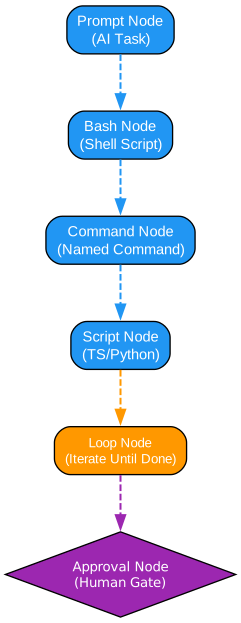
Archon supports multiple node types that can be combined to create sophisticated workflows. Each node type serves a specific purpose in the workflow pipeline.
Prompt Node (Blue): The most common node type, Prompt Nodes send instructions to the AI assistant. These nodes can include variable substitution using $nodeId.output syntax to reference outputs from previous nodes. The AI processes the prompt and produces output that becomes available to downstream nodes.
Bash Node (Blue): For deterministic operations, Bash Nodes execute shell scripts without AI involvement. These are ideal for running tests, linting, or any command-line operation. The stdout output is captured and made available as $nodeId.output for subsequent nodes.
Command Node (Blue): Command Nodes reference named command files stored in .archon/commands/. These reusable command definitions can be shared across workflows and projects, promoting consistency and reducing duplication.
Script Node (Blue): Script Nodes execute TypeScript or Python code directly within the workflow. Using bun for TypeScript or uv for Python, these nodes provide flexibility for custom logic that doesn’t fit other node types. They support dependency installation and timeout configuration.
Loop Node (Orange): Loop Nodes enable iterative execution until a completion condition is met. Each iteration can use fresh context or build upon previous iterations. This is particularly useful for tasks like “keep implementing until all tests pass” or “iterate until code review finds no issues.”
Approval Node (Purple): Approval Nodes create human gates in the workflow. The workflow pauses and waits for user approval before continuing. This is essential for workflows that require human oversight, such as PR creation or deployment. The node can capture the user’s response for downstream processing.
Getting Started
Prerequisites
Before installing Archon, ensure you have the following tools:
Bun - The JavaScript runtime:
# macOS/Linux
curl -fsSL https://bun.sh/install | bash

# Windows (PowerShell)
irm bun.sh/install.ps1 | iex
GitHub CLI - For repository operations:
# macOS
brew install gh

# Windows (via winget)
winget install GitHub.cli

# Linux (Debian/Ubuntu)
sudo apt install gh
Claude Code - The AI coding assistant:
# macOS/Linux/WSL
curl -fsSL https://claude.ai/install.sh | bash

# Windows (PowerShell)
irm https://claude.ai/install.ps1 | iex
Full Setup (5 minutes)
Clone the repository and use the guided setup wizard:
git clone https://github.com/coleam00/Archon
cd Archon
bun install
claude
Then say: “Set up Archon”
The setup wizard walks you through CLI installation, authentication, platform selection, and copies the Archon skill to your target repository.
Quick Install (30 seconds)
If you already have Claude Code set up, install the standalone CLI:
macOS / Linux:
curl -fsSL https://archon.diy/install | bash
Windows (PowerShell):
irm https://archon.diy/install.ps1 | iex
Homebrew:
brew install coleam00/archon/archon
Built-in Workflows
Archon ships with 17 default workflows covering common development tasks:
| Workflow | Description |
|---|---|
archon-assist | General Q&A, debugging, exploration with full Claude Code agent |
archon-fix-github-issue | Classify, investigate, plan, implement, validate, PR, review, self-fix |
archon-idea-to-pr | Feature idea to PR with 5 parallel reviews and self-fix |
archon-plan-to-pr | Execute existing plan, implement, validate, PR, review, self-fix |
archon-issue-review-full | Comprehensive fix with full multi-agent review pipeline |
archon-smart-pr-review | Classify PR complexity, run targeted review agents, synthesize findings |
archon-comprehensive-pr-review | Multi-agent PR review with 5 parallel reviewers and automatic fixes |
archon-create-issue | Classify problem, gather context, investigate, create GitHub issue |
archon-validate-pr | Thorough PR validation testing both main and feature branches |
archon-resolve-conflicts | Detect merge conflicts, analyze, resolve, validate, commit |
archon-feature-development | Implement feature from plan, validate, create PR |
archon-architect | Architectural sweep, complexity reduction, codebase health improvement |
archon-refactor-safely | Safe refactoring with type-check hooks and behavior verification |
archon-ralph-dag | PRD implementation loop - iterate through stories until done |
archon-remotion-generate | Generate or modify Remotion video compositions with AI |
archon-test-loop-dag | Loop node test workflow - iterative counter until completion |
archon-piv-loop | Guided Plan-Implement-Validate loop with human review |
Web UI
Archon includes a comprehensive web dashboard for managing workflows and monitoring activity. The interface provides:
Chat Interface: A conversation interface with real-time streaming and tool call visualization. You can interact with your coding agent just like in the terminal, but with rich visual feedback.
Dashboard: Mission Control for monitoring running workflows with filterable history by project, status, and date. See all your workflow runs at a glance and drill down into specific executions.
Workflow Builder: A visual drag-and-drop editor for creating DAG workflows with loop nodes. Design complex workflows visually without writing YAML.
Workflow Execution: Step-by-step progress view for any running or completed workflow. See exactly where each workflow is in its execution and what each node produced.
The sidebar shows conversations from all platforms - not just the web. Workflows kicked off from the CLI, messages from Slack or Telegram, GitHub issue interactions - everything appears in one unified interface.
Platform Integrations
Archon supports multiple platforms out of the box:
| Platform | Setup Time | Features |
|---|---|---|
| Web UI | Built-in | Real-time SSE streaming, visual workflow builder |
| CLI | Built-in | Terminal-based workflow execution |
| Telegram | 5 min | Bot API with polling, remote workflow triggering |
| Slack | 15 min | SDK integration, team collaboration |
| GitHub | 15 min | Webhooks for issue/PR automation |
| Discord | 5 min | WebSocket integration, community workflows |
Example Workflow
Here’s a complete example of an Archon workflow that plans, implements in a loop until tests pass, gets approval, then creates the PR:
# .archon/workflows/build-feature.yaml
nodes:
  - id: plan
    prompt: "Explore the codebase and create an implementation plan"

  - id: implement
    depends_on: [plan]
    loop:                                      # AI loop - iterate until done
      prompt: "Read the plan. Implement the next task. Run validation."
      until: ALL_TASKS_COMPLETE
      fresh_context: true                      # Fresh session each iteration

  - id: run-tests
    depends_on: [implement]
    bash: "bun run validate"                   # Deterministic - no AI

  - id: review
    depends_on: [run-tests]
    prompt: "Review all changes against the plan. Fix any issues."

  - id: approve
    depends_on: [review]
    loop:                                      # Human approval gate
      prompt: "Present the changes for review. Address any feedback."
      until: APPROVED
      interactive: true                        # Pauses for human input

  - id: create-pr
    depends_on: [approve]
    prompt: "Push changes and create a pull request"
Technical Deep Dive
Database Schema
Archon uses 8 tables (all prefixed with remote_agent_):
- codebases - Repository metadata and commands (JSONB)
- conversations - Track platform conversations with titles and soft-delete
- sessions - Track AI SDK sessions with resume capability
- isolation_environments - Git worktree isolation tracking
- workflow_runs - Workflow execution tracking and state
- workflow_events - Step-level workflow event log
- messages - Conversation message history with tool call metadata
- codebase_env_vars - Per-project environment variables
Session Management
Sessions are immutable - transitions create new linked sessions. Each transition has an explicit TransitionTrigger reason (first-message, plan-to-execute, reset-requested, etc.). An audit trail links sessions via parent_session_id and records transition_reason.
Git Worktree Isolation
Worktrees enable parallel development per conversation without branch conflicts. Workspaces automatically sync with origin before worktree creation, ensuring you always work with the latest code. The system handles cleanup automatically, removing merged branches and stale environments.
Documentation
Full documentation is available at archon.diy:
| Topic | Description |
|---|---|
| Getting Started | Setup guide (Web UI or CLI) |
| The Book of Archon | 10-chapter narrative tutorial |
| CLI Reference | Full CLI reference |
| Authoring Workflows | Create custom YAML workflows |
| Authoring Commands | Create reusable AI commands |
| Configuration | All config options, env vars |
| AI Assistants | Claude and Codex setup details |
| Deployment | Docker, VPS, production setup |
| Architecture | System design and internals |
| Troubleshooting | Common issues and fixes |
Contributing
Contributions are welcome! See the open issues for things to work on. Please read CONTRIBUTING.md before submitting a pull request.
License
Archon is released under the MIT License, making it free for both personal and commercial use.
Conclusion
Archon represents a significant step forward in making AI-assisted development reliable and reproducible. By encoding development processes as workflows, teams can ensure consistent execution while still leveraging the intelligence of AI coding assistants. The combination of deterministic operations with AI-powered decision making creates a powerful tool for modern software development.
Whether you’re a solo developer looking to streamline your workflow or a team wanting to standardize your development process, Archon provides the tools to make AI coding deterministic and repeatable. With support for multiple platforms, a visual workflow builder, and a rich set of built-in workflows, Archon is ready to transform how you work with AI coding assistants.
Links:
- GitHub Repository: https://github.com/coleam00/Archon
- Documentation: https://archon.diy
- Star Count: 14,000+

Enjoyed this post? Never miss out on future posts by following us

