Caveman: Cut 75% of LLM Output Tokens While Keeping Full Accuracy
If you use AI coding agents like Claude Code, Cursor, or Gemini CLI, you have probably noticed a pattern: the agent talks too much. It says “Sure! I’d be happy to help you with that” before every answer. It wraps every fix in paragraphs of explanation when you just need the code. It hedges and qualifies when the solution is obvious. All those extra tokens cost you time, money, and patience.
Caveman is an open-source skill/plugin that makes your AI agent talk like a caveman – cutting approximately 75% of output tokens while keeping full technical accuracy. Created by Julius Brussee, it has rapidly gained over 38,000 GitHub stars since its release in April 2026, becoming one of the most popular agent optimization tools in the ecosystem.
The core insight is simple: LLMs generate verbose responses by default, but brevity does not sacrifice accuracy. In fact, a March 2026 paper titled “Brevity Constraints Reverse Performance Hierarchies in Language Models” found that constraining large models to brief responses improved accuracy by 26 percentage points on certain benchmarks. Sometimes less words means more correct.
Before and After
To understand the impact, consider these real examples from the Caveman project:
Normal Claude (69 tokens):
“The reason your React component is re-rendering is likely because you’re creating a new object reference on each render cycle. When you pass an inline object as a prop, React’s shallow comparison sees it as a different object every time, which triggers a re-render. I’d recommend using useMemo to memoize the object.”
Caveman Claude (19 tokens):
“New object ref each render. Inline object prop = new ref = re-render. Wrap in
useMemo.”
Same fix. Same technical accuracy. 75% fewer tokens. The response is also faster to read and faster to generate.
Understanding the Architecture
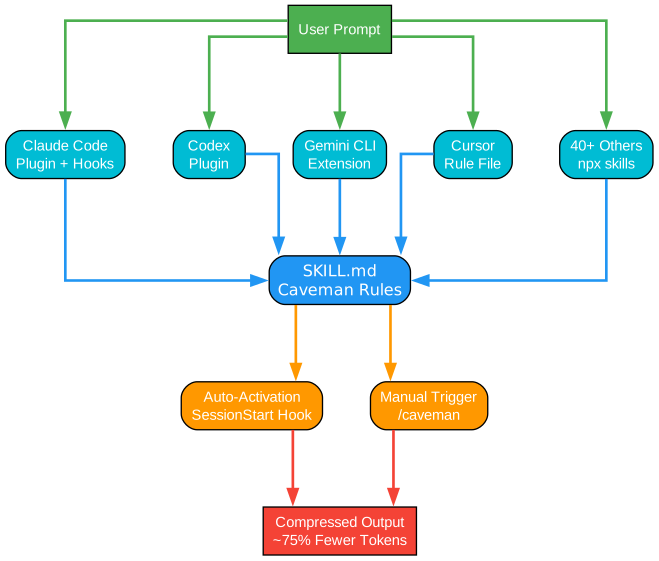
The architecture diagram above illustrates how Caveman integrates across multiple AI coding agents. Let us break down each component:
Agent Layer (Top Row) Caveman supports five primary integration paths: Claude Code (via plugin and hooks), Codex (via plugin), Gemini CLI (via extension), Cursor (via rule files), and 40+ other agents through the npx skills system. Each agent receives the same core SKILL.md ruleset but activates it through different mechanisms depending on what the agent supports.
Core Skill (Center) The SKILL.md file is the single source of truth for Caveman behavior. It defines the intensity levels, persistence rules, auto-clarity boundaries, and the compression patterns. All agent-specific copies are auto-generated from this file via CI, ensuring consistency across the entire ecosystem.
Activation Mechanisms Caveman offers two activation paths: auto-activation through SessionStart hooks (available in Claude Code, Codex, and Gemini CLI) and manual activation via the /caveman command or natural language triggers like “talk like caveman.” Auto-activation means the skill is active from the first message of every session without any user action.
Compressed Output The result is a compressed response that drops filler words, articles, pleasantries, and hedging while preserving all technical substance: code blocks, error messages, file paths, and technical terms remain exactly as they should be.
Intensity Levels
Caveman offers six intensity levels so you can choose how much compression you want:
| Level | Trigger | What Changes |
|---|---|---|
| Lite | /caveman lite | Drop filler and hedging. Keep articles and full sentences. Professional but tight |
| Full | /caveman full | Default. Drop articles, fragments OK, short synonyms. Classic caveman |
| Ultra | /caveman ultra | Maximum compression. Abbreviate everything, arrows for causality |
| Wenyan-Lite | /caveman wenyan-lite | Semi-classical Chinese. Grammar intact, filler gone |
| Wenyan-Full | /caveman wenyan | Full classical Chinese terseness. 80-90% character reduction |
| Wenyan-Ultra | /caveman wenyan-ultra | Extreme abbreviation in classical Chinese style |
Understanding the Intensity Levels
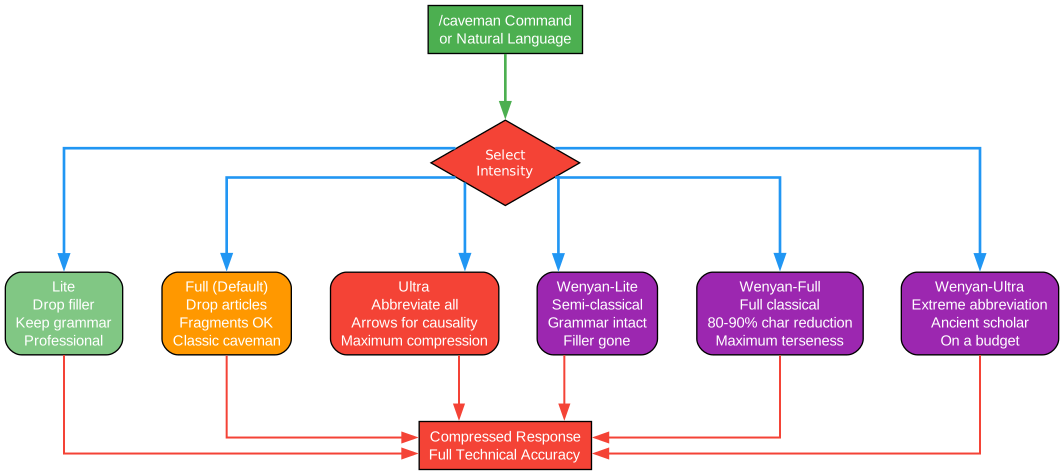
The intensity levels diagram shows how Caveman routes user input through a decision node to select the appropriate compression mode. Here is a detailed breakdown:
English Modes (Left Branch)
Lite mode is the gentlest compression. It removes filler words like “just,” “really,” “basically,” and “actually” while preserving complete sentences and articles. This is ideal for professional communication where you want concise but grammatically correct output. Example: “Your component re-renders because you create a new object reference each render. Wrap it in useMemo.”
Full mode is the default Caveman experience. It drops articles (a/an/the), uses fragments instead of complete sentences, and replaces verbose phrases with short synonyms. This is where the iconic caveman voice emerges. Example: “New object ref each render. Inline object prop = new ref = re-render. Wrap in useMemo.”
Ultra mode is maximum compression for experienced users who want the absolute minimum token count. It abbreviates common terms (DB for database, auth for authentication, config for configuration), strips conjunctions, and uses arrows for causality (X causes Y becomes “X -> Y”). Example: “Inline obj prop -> new ref -> re-render. useMemo.”
Wenyan Modes (Right Branch)
The Wenyan modes are a unique innovation: they compress output using Classical Chinese literary style, which is inherently one of the most token-efficient written languages ever developed by humans. The three sub-levels (Lite, Full, Ultra) mirror the English modes but apply classical Chinese grammar patterns, classical particles, and subject omission to achieve 80-90% character reduction while maintaining full technical accuracy.
All six levels converge on the same output: a compressed response with full technical accuracy. The level persists until you change it or the session ends.
Installation
Pick your agent. One command. Done.
| Agent | Install Command |
|---|---|
| Claude Code | claude plugin marketplace add JuliusBrussee/caveman && claude plugin install caveman@caveman |
| Codex | Clone repo, then /plugins, search “Caveman”, install |
| Gemini CLI | gemini extensions install https://github.com/JuliusBrussee/caveman |
| Cursor | npx skills add JuliusBrussee/caveman -a cursor |
| Windsurf | npx skills add JuliusBrussee/caveman -a windsurf |
| Copilot | npx skills add JuliusBrussee/caveman -a github-copilot |
| Cline | npx skills add JuliusBrussee/caveman -a cline |
| Any other | npx skills add JuliusBrussee/caveman |
For agents without hook systems (Cursor, Windsurf, Cline, Copilot), Caveman does not auto-start by default. You can make it always-on by adding this snippet to your agent’s system prompt or rules file:
Terse like caveman. Technical substance exact. Only fluff die.
Drop: articles, filler (just/really/basically), pleasantries, hedging.
Fragments OK. Short synonyms. Code unchanged.
Pattern: [thing] [action] [reason]. [next step].
ACTIVE EVERY RESPONSE. No revert after many turns. No filler drift.
Code/commits/PRs: normal. Off: "stop caveman" / "normal mode".
The Hook System (Claude Code)
For Claude Code users, Caveman provides a sophisticated hook system that enables automatic activation and mode tracking across sessions.
Understanding the Hook System
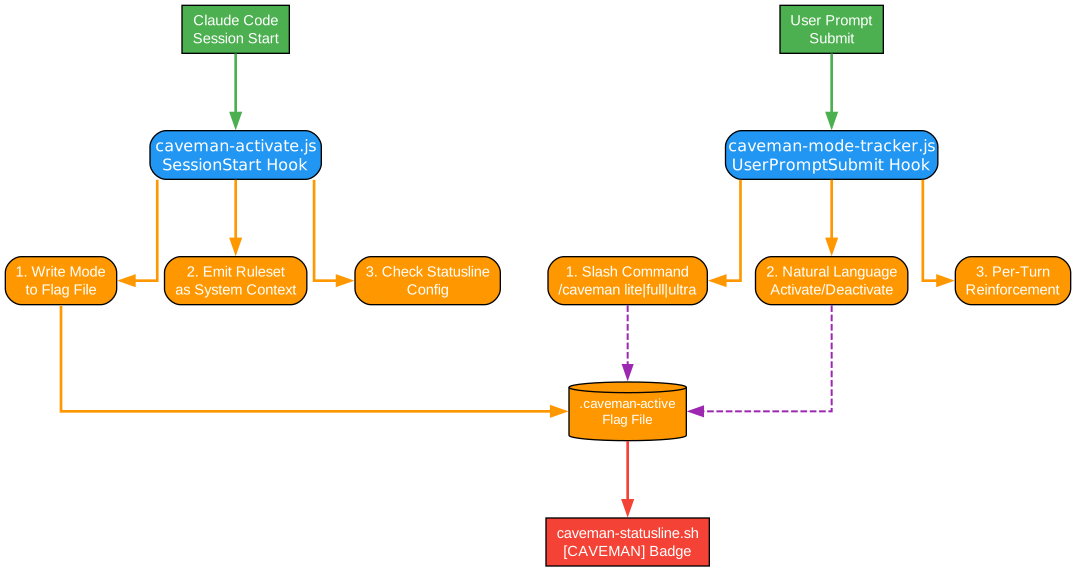
The hook system diagram illustrates the three-component architecture that powers Caveman’s automatic behavior in Claude Code. Let us examine each component:
caveman-activate.js (SessionStart Hook)
This hook runs once per Claude Code session start and has three responsibilities:
-
Write Mode to Flag File: It writes the active mode (defaulting to “full”) to a flag file at
$CLAUDE_CONFIG_DIR/.caveman-active. This flag file serves as the persistent state mechanism across the hook system. The write operation usessafeWriteFlag(), a symlink-safe function that refuses to write if the target or its parent is a symlink, uses atomic temp+rename, and creates files with 0600 permissions. This protects against local attackers who might replace the predictable flag path with a symlink to clobber files. -
Emit Ruleset as System Context: The hook outputs the Caveman ruleset to stdout, which Claude Code injects as system context. This is invisible to the user but ensures the model follows Caveman rules from the very first message.
-
Check Statusline Config: If no custom
statusLineis configured insettings.json, the hook appends a nudge to offer statusline badge setup on the first interaction.
caveman-mode-tracker.js (UserPromptSubmit Hook)
This hook reads JSON from stdin on every user prompt and handles three things:
-
Slash Command Activation: If the prompt starts with
/caveman, it writes the appropriate mode to the flag file. Supports all intensity levels plus special modes like/caveman-commitand/caveman-review. -
Natural Language Activation/Deactivation: Matches phrases like “activate caveman,” “talk like caveman,” “less tokens please” to activate, and “stop caveman,” “normal mode,” “deactivate caveman” to deactivate (deleting the flag file).
-
Per-Turn Reinforcement: When the flag is set to a persistent mode (not commit/review/compress), it emits a small
hookSpecificOutputJSON reminder so the model maintains Caveman style even when other plugins inject competing instructions mid-conversation.
caveman-statusline.sh (Statusline Badge)
Reads the flag file and outputs a colored badge for the Claude Code status bar: [CAVEMAN] for full mode, [CAVEMAN:ULTRA] for ultra mode, etc. A PowerShell counterpart (caveman-statusline.ps1) is available for Windows users.
Caveman Skills
Beyond the core compression mode, Caveman ships with four specialized skills:
caveman-commit
/caveman-commit generates terse commit messages following Conventional Commits format. Subject lines are limited to 50 characters. The focus is on why the change was made, not what was changed.
caveman-review
/caveman-review produces one-line PR comments in the format: L42: severity: problem. fix. No throat-clearing, no “I noticed that,” just the line number, severity indicator, problem, and suggested fix.
caveman-help
/caveman-help displays a quick-reference card showing all modes, skills, and commands in one compact view.
caveman-compress
/caveman:compress <filepath> is a unique sub-skill that compresses your CLAUDE.md and other memory files into Caveman-speak. Since CLAUDE.md loads on every session start, reducing its token count means Claude reads less context every time – saving input tokens without losing information.
The tool preserves code blocks, URLs, file paths, commands, headings, dates, and version numbers untouched. Only prose gets compressed. It creates a backup at <filename>.original.md so you always have the human-readable version.
| File | Original Tokens | Compressed Tokens | Saved |
|---|---|---|---|
| claude-md-preferences.md | 706 | 285 | 59.6% |
| project-notes.md | 1145 | 535 | 53.3% |
| claude-md-project.md | 1122 | 636 | 43.3% |
| todo-list.md | 627 | 388 | 38.1% |
| mixed-with-code.md | 888 | 560 | 36.9% |
| Average | 898 | 481 | 46% |
Benchmarks
Real token counts from the Claude API (reproducible via the benchmarks/ directory):
| Task | Normal (tokens) | Caveman (tokens) | Saved |
|---|---|---|---|
| Explain React re-render bug | 1180 | 159 | 87% |
| Fix auth middleware token expiry | 704 | 121 | 83% |
| Set up PostgreSQL connection pool | 2347 | 380 | 84% |
| Explain git rebase vs merge | 702 | 292 | 58% |
| Refactor callback to async/await | 387 | 301 | 22% |
| Architecture: microservices vs monolith | 446 | 310 | 30% |
| Review PR for security issues | 678 | 398 | 41% |
| Docker multi-stage build | 1042 | 290 | 72% |
| Debug PostgreSQL race condition | 1200 | 232 | 81% |
| Implement React error boundary | 3454 | 456 | 87% |
| Average | 1214 | 294 | 65% |
Important: Caveman only affects output tokens. Thinking and reasoning tokens are untouched. The biggest practical win is readability and speed; cost savings are a bonus.
The Caveman Ecosystem
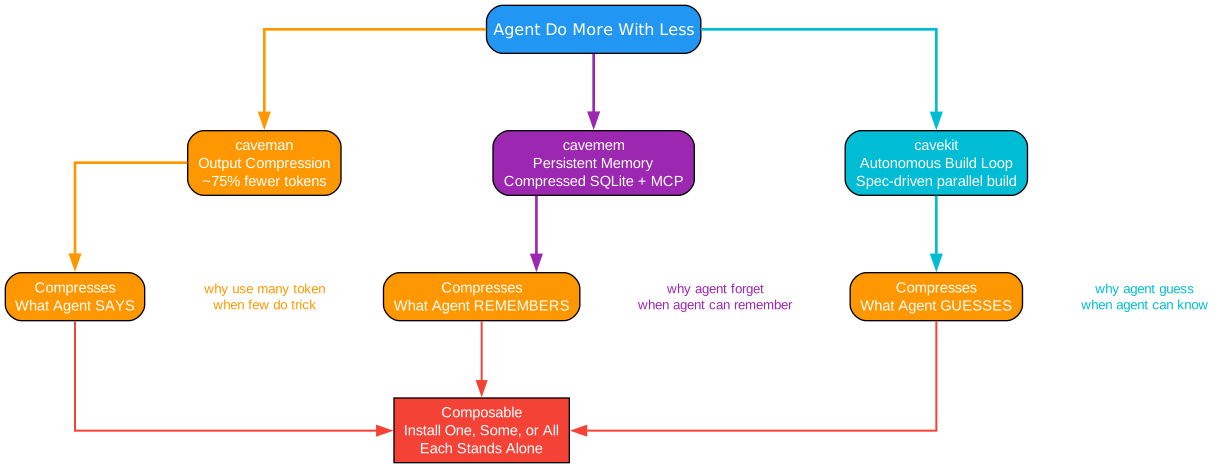
Caveman is part of a three-tool ecosystem built on the same philosophy: agents should do more with less.
Understanding the Ecosystem
The ecosystem diagram shows how three complementary tools address different aspects of AI agent efficiency:
caveman (Output Compression) compresses what the agent says. By stripping filler words, articles, and hedging from responses, it reduces output tokens by approximately 75%. This is the tool covered in this blog post, and it works across Claude Code, Cursor, Gemini CLI, Codex, and 40+ other agents.
cavemem (Persistent Memory) compresses what the agent remembers. It provides cross-agent persistent memory using compressed SQLite with MCP (Model Context Protocol), local by default. Instead of losing context between sessions, the agent can store and retrieve compressed memories efficiently.
cavekit (Autonomous Build Loop) compresses what the agent guesses. It implements a spec-driven autonomous build loop where natural language specifications are converted into kits, built in parallel, and verified against the original spec. This eliminates the guesswork that leads to wasted tokens on incorrect approaches.
The three tools are composable: cavekit orchestrates the build, caveman compresses the agent’s output, and cavemem compresses the agent’s memory. You can install one, some, or all of them – each stands alone and works independently.
Auto-Clarity: When Caveman Steps Back
One of the most thoughtful design decisions in Caveman is the auto-clarity rule. Caveman automatically drops back to normal prose for:
- Security warnings – when a destructive operation could cause data loss
- Irreversible action confirmations – when the user needs to understand exactly what will happen
- Multi-step sequences – where fragment ambiguity could lead to misread instructions
- User confusion – when the user asks to clarify or repeats a question
After the clear part is done, Caveman resumes. This is not a limitation; it is a safety feature that ensures compression never gets in the way of understanding when it matters most.
Example of auto-clarity in action:
Warning: This will permanently delete all rows in the
userstable and cannot be undone.DROP TABLE users;Caveman resume. Verify backup exist first.
Usage
Trigger Caveman with any of these:
/cavemanor Codex$caveman- “talk like caveman”
- “caveman mode”
- “less tokens please”
Stop with: “stop caveman” or “normal mode”
The mode persists until you change it or the session ends. No need to re-activate every turn.
Troubleshooting
| Issue | Solution |
|---|---|
| Caveman not activating on session start | Check that hooks are installed: ls ~/.claude/hooks/caveman-* |
| Statusline badge not showing | Run hooks/install.sh or hooks/install.ps1 to configure |
npx skills symlink errors on Windows | Add --copy flag: npx skills add JuliusBrussee/caveman --copy |
| Codex not auto-starting on Windows | Windows Codex hooks are disabled; use $caveman manually |
| Mode reverting after many turns | Per-turn reinforcement should prevent this; check hook is running |
| Compress tool security warning from Snyk | False positive due to subprocess/file patterns; see SECURITY.md |
Conclusion
Caveman solves a real problem in AI-assisted development: the gap between what agents say and what you need to hear. By cutting 65-75% of output tokens with zero loss in technical accuracy, it makes AI coding sessions faster, cheaper, and easier to read. The multi-agent support (Claude Code, Codex, Gemini CLI, Cursor, Windsurf, Cline, Copilot, and 40+ more) means you can use it everywhere. The one-command install and auto-activation hooks mean it works from the first message without any configuration.
The project also demonstrates excellent engineering: a single source of truth (SKILL.md) that syncs to all agent-specific copies via CI, symlink-safe file operations in the hook system, a three-arm eval harness that compares against terse controls (not just verbose baselines), and the auto-clarity rule that prioritizes safety over compression.
If you spend significant time with AI coding agents, Caveman is one of those tools that changes your workflow permanently. Try it for a day and you will find normal verbose output hard to go back to.
Repository: github.com/JuliusBrussee/caveman
License: MIT Enjoyed this post? Never miss out on future posts by following us 


