Agentic Stack: One Brain, Many Harnesses
Every AI coding assistant has its own way of storing preferences, memory, and skills. When you switch from Claude Code to Cursor, or from Windsurf to OpenCode, you start from zero. Your carefully crafted instructions, learned lessons, and custom skills vanish. Agentic Stack solves this with a radical idea: one portable .agent/ folder that plugs into any harness and keeps its knowledge when you switch.
Created by codejunkie99 and built with Minimax-M2.7 in the Claude Code harness, Agentic Stack is a MIT-licensed project that defines a standard for portable agent intelligence. Let us explore how it works, why it matters, and how to get started.
Understanding the Architecture
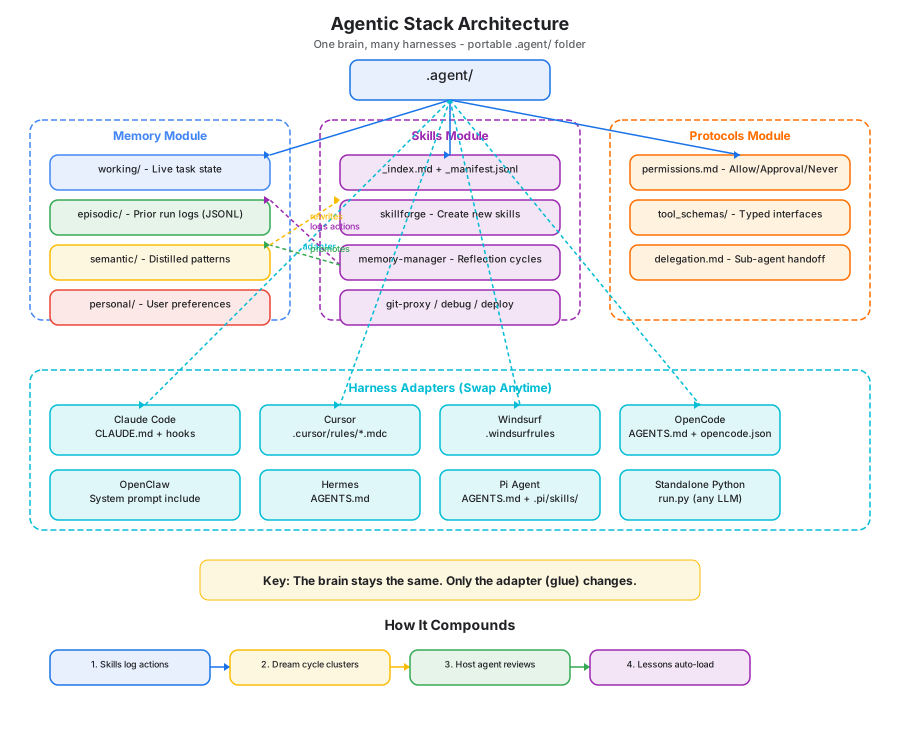
The architecture diagram above illustrates the three core modules that make up the Agentic Stack portable brain, along with the harness adapters that connect it to different AI coding tools. Let us break down each component:
Memory Module (Blue Zone)
The memory module implements a four-layer memory system inspired by cognitive science:
- working/ - Live task state that is volatile and archived after 2 days. Think of this as short-term memory: what the agent is actively working on right now.
- episodic/ - Prior run logs stored in JSONL format, scored by salience. This is like remembering what happened yesterday - not every detail, but the important moments.
- semantic/ - Distilled patterns that outlive individual episodes. These are the lessons the agent has internalized, like “always run tests before committing” or “this project uses conventional commits.”
- personal/ - User-specific preferences that are never merged into semantic memory. Your name, your preferred language, your explanation style - these stay personal and private.
The separation between episodic and semantic is crucial. Episodic memory records what happened; semantic memory records what was learned. The dream cycle (discussed below) is the bridge between them.
Skills Module (Purple Zone)
Skills use a progressive disclosure pattern:
_index.mdand_manifest.jsonlare always loaded into context (tiny footprint)- A full
SKILL.mdfile loads only when its triggers match the current task - Every skill has a self-rewrite hook at the bottom, enabling the agent to improve its own skills over time
The five seed skills are: skillforge (creates new skills from recurring patterns), memory-manager (runs reflection cycles), git-proxy (safe git operations), debug-investigator (systematic debugging), and deploy-checklist (staging/production fence).
Protocols Module (Orange Zone)
Protocols define the contracts between the agent and external systems:
permissions.md- Allow/Approval-required/Never-allowed action categoriestool_schemas/- Typed interfaces for every external tool the agent can usedelegation.md- Rules for sub-agent handoff, ensuring delegated tasks follow the same safety constraints
Harness Adapters (Cyan Zone)
The bottom row shows eight supported harnesses, each with a thin adapter that translates the portable brain into the format that harness expects. The key insight: the brain stays the same; only the adapter (glue) changes.
How It Compounds
The diagram also shows the compounding loop: Skills log actions to episodic memory, the dream cycle clusters patterns into candidate lessons, the host agent reviews and graduates them, and those lessons auto-load in future sessions. This creates a flywheel where the agent gets smarter over time without any manual configuration.
The Memory Lifecycle and Dream Cycle
The most innovative aspect of Agentic Stack is its dream cycle - an unattended nightly process that mechanically clusters episodic memories into candidate lessons, without any AI reasoning involved.

Understanding the Memory Lifecycle
The memory lifecycle diagram shows the three phases of how knowledge flows through the Agentic Stack system:
Phase 1: Daytime Active Session (Blue)
During an active coding session, the agent:
- Starts by reading
PREFERENCES.mdand relevant lessons from semantic memory - Executes tasks using its skills, logging every action to episodic memory
- Records actions and results in JSONL format with salience scores
This is the “awake” phase where the agent is actively working and accumulating raw experience data. Every tool call, every file edit, every test run gets logged with context about what happened and why.
Phase 2: Nighttime Dream Cycle (Yellow)
At 3 AM (or whatever you schedule via cron), auto_dream.py runs unattended:
- cluster.py - Uses Jaccard similarity with single-linkage clustering and bridge merging to group similar episodic entries
- promote.py - Stages candidate lessons from clustered patterns
- validate.py - Applies heuristic prefiltering (length checks, exact duplicate detection) to remove noise
- Results land in a “Pending Candidates” state - staged but NOT accepted
The critical design decision: auto_dream.py performs only mechanical file operations. No git commits, no network calls, no AI reasoning. This makes it safe to run unattended. The dream cycle does not mark anything as accepted or modify semantic memory directly.
Phase 3: Host Agent Review (Green)
When you return to your coding session, the host agent reviews candidates:
list_candidates.py- Shows pending candidates sorted by prioritygraduate.py- Accepts a candidate with a required rationale (rubber-stamping is structurally impossible)reject.py- Rejects with a required reason, preserving decision historyreopen.py- Requeues a previously rejected candidate
Graduated lessons land in lessons.jsonl (the source of truth) and are rendered to LESSONS.md. Rejected candidates retain full decision history so recurring churn is visible, not fresh.
The Feedback Loop
The diagram shows how this creates a virtuous cycle: lessons from the review phase feed back into the active session, where they are loaded at the start of each new session. Over time, the agent accumulates project-specific knowledge that makes it increasingly effective.
Harness Portability: Swap Anytime, Lose Nothing
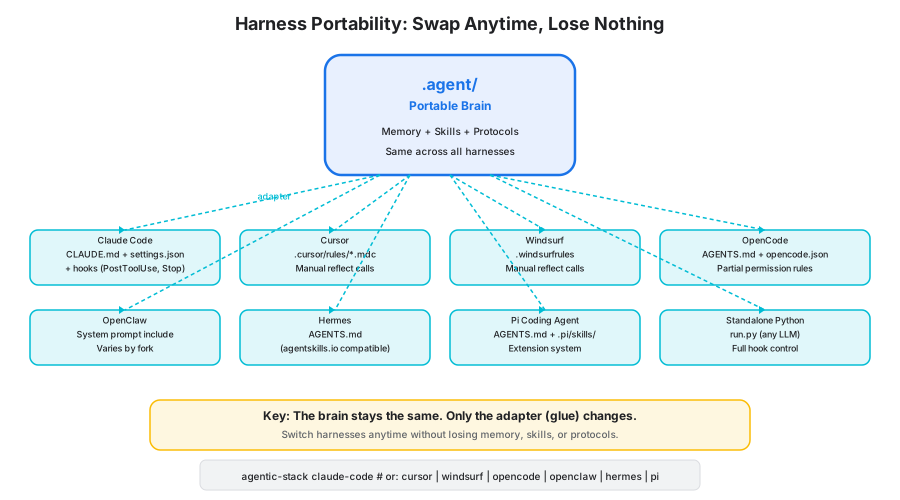
The core promise of Agentic Stack is that you can switch AI coding tools without losing your accumulated knowledge. The .agent/ folder stays the same; only the thin adapter layer changes.
Understanding Harness Portability
The harness portability diagram shows how the same portable brain connects to eight different AI coding tools through thin adapter layers:
The Portable Brain (Center)
The .agent/ folder contains your complete agent intelligence: memory (working, episodic, semantic, personal), skills (with progressive disclosure), and protocols (permissions, tool schemas, delegation). This folder is identical regardless of which harness you use.
Supported Harnesses
| Harness | Config File | Hook Support |
|---|---|---|
| Claude Code | CLAUDE.md + .claude/settings.json | Full (PostToolUse, Stop) |
| Cursor | .cursor/rules/*.mdc | Manual reflect calls |
| Windsurf | .windsurfrules | Manual reflect calls |
| OpenCode | AGENTS.md + opencode.json | Partial (permission rules) |
| OpenClaw | System prompt include | Varies by fork |
| Hermes Agent | AGENTS.md (agentskills.io compatible) | Partial (own memory) |
| Pi Coding Agent | AGENTS.md + .pi/skills/ | Extension system |
| Standalone Python | run.py (any LLM) | Full control |
Key Insight
The adapter layer is intentionally thin. For Claude Code, it generates CLAUDE.md and hooks configuration. For Cursor, it writes .mdc rule files. For standalone Python, it provides a run.py entry point that works with any LLM. The brain never changes - only the glue does.
Installation Command
agentic-stack claude-code # or: cursor | windsurf | opencode | openclaw | hermes | pi
This single command drops the appropriate adapter files into your project, symlinks where needed, and runs the onboarding wizard.
Installation
macOS / Linux
# Tap + install (one-time - both lines required)
brew tap codejunkie99/agentic-stack https://github.com/codejunkie99/agentic-stack
brew install agentic-stack

# Drop the brain into any project - the onboarding wizard runs automatically
cd your-project
agentic-stack claude-code
# or: cursor | windsurf | opencode | openclaw | hermes | pi | standalone-python
Windows (PowerShell)
# Clone + run the native installer
git clone https://github.com/codejunkie99/agentic-stack.git
cd agentic-stack
.\install.ps1 claude-code C:\path\to\your-project
Clone Instead
git clone https://github.com/codejunkie99/agentic-stack.git
cd agentic-stack && ./install.sh claude-code
# or on Windows PowerShell: .\install.ps1 claude-code
# adapters: claude-code | cursor | windsurf | opencode | openclaw | hermes | pi | standalone-python
Already Installed?
brew update && brew upgrade agentic-stack
Onboarding Wizard
After the adapter is installed, a terminal wizard populates .agent/memory/personal/PREFERENCES.md - the first file your AI reads at the start of every session. It also writes a feature-toggle file at .agent/memory/.features.json.
Six preference questions (each skippable with Enter):
| Question | Default |
|---|---|
| What should I call you? | (skip) |
| Primary language(s)? | unspecified |
| Explanation style? | concise |
| Test strategy? | test-after |
| Commit message style? | conventional commits |
| Code review depth? | critical issues only |
Plus one optional features step (opt-in, off by default):
| Feature | Default |
|---|---|
| Enable FTS memory search [BETA] | no |
Flags:
agentic-stack claude-code --yes          # accept all defaults, beta off (CI/scripted)
agentic-stack claude-code --reconfigure  # re-run the wizard on an existing project
Edit .agent/memory/personal/PREFERENCES.md any time to refine your conventions, or .agent/memory/.features.json to flip feature toggles.
Review Protocol
The nightly auto_dream.py cycle only stages candidate lessons. It does not mark anything accepted or modify semantic memory. Your host agent does the review in-session:
# List pending candidates, sorted by priority
python3 .agent/tools/list_candidates.py

# Accept with rationale (required)
python3 .agent/tools/graduate.py <id> --rationale "evidence holds, matches PREFERENCES"

# Reject with reason (required); preserves decision history
python3 .agent/tools/reject.py <id> --reason "too specific to generalize"

# Requeue a previously-rejected candidate
python3 .agent/tools/reopen.py <id>
Graduated lessons land in semantic/lessons.jsonl (source of truth) and are rendered to semantic/LESSONS.md. Rejected candidates retain full decision history so recurring churn is visible, not fresh.
Memory Search (Beta)
Opt-in FTS5 keyword search over all memory documents:
# Enable during onboarding (or set manually in .agent/memory/.features.json)
python3 .agent/memory/memory_search.py "deploy failure"
python3 .agent/memory/memory_search.py --status
python3 .agent/memory/memory_search.py --rebuild
Falls back to ripgrep (rg) if installed, then to grep - both restricted to .md / .jsonl so source files never pollute results. The index is stored at .agent/memory/.index/ and gitignored.
Seed Skills
Agentic Stack ships with five seed skills that cover the most common agent workflows:
| Skill | Purpose |
|---|---|
| skillforge | Creates new skills from recurring patterns detected in episodic memory |
| memory-manager | Runs reflection cycles and surfaces candidate lessons for review |
| git-proxy | Handles all git operations with built-in safety constraints |
| debug-investigator | Systematic debugging: reproduce, isolate, hypothesize, verify |
| deploy-checklist | The fence between staging and production deployments |
Each skill uses progressive disclosure: a lightweight manifest always loads, and the full SKILL.md only loads when its triggers match the current task. Every skill includes a self-rewrite hook that enables the agent to improve its own capabilities over time.
How It Compounds Over Time
The real power of Agentic Stack emerges after weeks of use:
- Skills log every action to episodic memory
auto_dream.pyclusters recurring patterns into candidate lessons- The host agent reviews candidates with
graduate.py/reject.py - Graduated lessons append to
lessons.jsonl;LESSONS.mdre-renders - Future sessions load query-relevant accepted lessons automatically
on_failureflags skills that fail 3+ times in 14 days for rewritegit log .agent/memory/becomes the agent’s autobiography
After about two weeks of use, you will notice your agent checking past lessons, logging failures with reflection, and proposing skill rewrites - all without any manual configuration.
Run the Staging Cycle Nightly
crontab -e
# Nightly at 3am:
0 3 * * * python3 /path/to/project/.agent/memory/auto_dream.py >> /path/to/project/.agent/memory/dream.log 2>&1
auto_dream.py resolves its paths absolutely and performs only mechanical file operations (cluster, stage, prefilter, decay). No git commits, no network, no reasoning - safe to run unattended.
What is New in v0.6.0
- Pi Coding Agent adapter.
./install.sh pidropsAGENTS.mdand symlinks.pi/skillsto.agent/skillsso pi sees the full brain with zero duplication. Safe to install alongside hermes/opencode (they all readAGENTS.md; the installer skips the overwrite if one exists). - OpenClient renamed to OpenClaw. Adapter renamed across the board. Installed file changed:
.openclient-system.mdto.openclaw-system.md. Breaking for existing OpenClient users - re-run./install.sh openclaw.
What is New in v0.5.0
- Host-agent review protocol. Python handles filing (cluster, stage, heuristic prefilter, decay). The host agent handles reasoning via
list_candidates.py/graduate.py/reject.py/reopen.py. Graduation requires--rationaleso rubber-stamping is structurally impossible. - Structured
lessons.jsonlas source of truth.LESSONS.mdis rendered from it. Hand-curated content above the sentinel is preserved across renders; legacy bullets auto-migrate on first run. - Content clustering. Proper single-linkage Jaccard with bridge merging. Pattern IDs derived from canonical claim + conditions, stable across cluster-membership changes.
- [BETA] FTS5 memory search. Opt-in full-text search over all
.md/.jsonlmemory documents. Default off; enable during onboarding or edit.agent/memory/.features.jsondirectly. - Windows-native installer.
install.ps1runs natively in PowerShell;install.shcontinues to work under Git Bash / WSL.
Repo Layout
.agent/                         # the portable brain (same across harnesses)
├── AGENTS.md                   # the map
├── harness/                    # conductor + hooks (standalone path)
├── memory/                     # working / episodic / semantic / personal
│   ├── auto_dream.py           # staging-only dream cycle
│   ├── cluster.py              # content clustering + pattern extraction
│   ├── promote.py              # stage candidates
│   ├── validate.py             # heuristic prefilter (length + exact duplicate)
│   ├── review_state.py         # candidate lifecycle + decision log
│   ├── render_lessons.py       # lessons.jsonl -> LESSONS.md
│   └── memory_search.py        # [BETA] FTS5 search (opt-in)
├── skills/                     # _index.md + _manifest.jsonl + SKILL.md files
├── protocols/                  # permissions + tool schemas + delegation
└── tools/                      # host-agent CLI + memory_reflect + skill_loader
    ├── list_candidates.py
    ├── graduate.py
    ├── reject.py
    └── reopen.py

adapters/                       # one small shim per harness
├── claude-code/   (CLAUDE.md + settings.json hooks)
├── cursor/        (.cursor/rules/*.mdc)
├── windsurf/      (.windsurfrules)
├── opencode/      (AGENTS.md + opencode.json)
├── openclaw/      (system-prompt include)
├── hermes/        (AGENTS.md)
├── pi/            (AGENTS.md + .pi/skills symlink)
└── standalone-python/  (DIY conductor entrypoint)

docs/                           # architecture, getting-started, per-harness
install.sh                      # mac / linux / git-bash installer
install.ps1                     # Windows PowerShell installer
onboard.py                      # onboarding wizard entry point
onboard_features.py             # .features.json read/write
onboard_ui.py                   # ANSI palette, banner, clack-style layout
onboard_widgets.py              # arrow-key prompts (text, select, confirm)
onboard_render.py               # answers -> PREFERENCES.md content
onboard_write.py                # atomic file write with backup
Troubleshooting
| Issue | Solution |
|---|---|
| Memory files not being read | Run python3 .agent/tools/budget_tracker.py "commit and push" - if tokens_used is 0, check paths |
| Dream cycle not running | Check crontab -l and verify the path to auto_dream.py is absolute |
| Onboarding wizard not starting | Ensure you ran the install command for your specific harness |
| Skills not loading | Check that _manifest.jsonl and _index.md exist in .agent/skills/ |
| FTS5 search not working | Enable in .agent/memory/.features.json or re-run agentic-stack --reconfigure |
Conclusion
Agentic Stack represents a fundamental shift in how we think about AI coding assistants. Instead of treating each tool as a silo with its own configuration, it creates a portable brain that travels with you across tools. The four-layer memory system, progressive skill disclosure, and host-agent review protocol create a compounding knowledge flywheel that makes your agent smarter over time.
The key insight is that harness-agnosticism is the point. Your preferences, learned lessons, and custom skills should not be locked into one tool. With Agentic Stack, they live in a .agent/ folder that works everywhere.
Links:
- GitHub: https://github.com/codejunkie99/agentic-stack
- Article: The Agentic Stack

Enjoyed this post? Never miss out on future posts by following us


