Introduction
AI coding agents have become indispensable tools in modern software development. Claude Code, Codex, Cursor, Windsurf, Copilot, Aider, Devin – the list grows every month. But anyone who has spent serious time with these tools knows the frustration: agents that agree with bad ideas, fabricate file paths, produce 200-line diffs when 50 would do, and claim “done” on code that never runs. The problem is not the model. The problem is the operating instructions.
Agents.md by Sean Donahoe is a single file that fixes this. Drop it into any repository and every major coding agent starts behaving like a senior engineer – pushing back when you are wrong, writing verification before claiming success, and producing the minimal diff that solves the problem. No plugins. No config. No setup rituals. It just works.
The repository has quickly gained traction with over 460 stars, resonating with developers who have experienced the pain of sycophantic AI assistants firsthand. Built on the AGENTS.md open standard stewarded by the Linux Foundation’s Agentic AI Foundation, it works across every major coding agent without modification.
How It Works
The core insight behind Agents.md is simple: coding agents read instruction files at the start of every session. By placing a well-crafted AGENTS.md file at the project root, you inject behavioral rules that override the agent’s default tendencies. The file is approximately 200 lines – deliberately short so that every rule stays loaded in context. Bloated instruction files get ignored wholesale, which is why brevity is a feature, not a limitation.
The file is organized into 12 sections. Sections 0 through 9 form the behavioral scaffold – rules about anti-sycophancy, verification, simplicity, surgical changes, and communication style. Section 10 is where you fill in project-specific context: stack, build commands, test commands, directory layout, and forbidden areas. Section 11 starts empty and accumulates one-line corrections over time as the agent makes mistakes and you correct them. This is the section that compounds – Boris Cherny, the creator of Claude Code, runs his team’s version at around 100 learnings accumulated over months.
For agents that look for different filenames, you simply symlink:
ln -s AGENTS.md CLAUDE.md
ln -s AGENTS.md GEMINI.md
One source of truth. Every agent reads the same file.
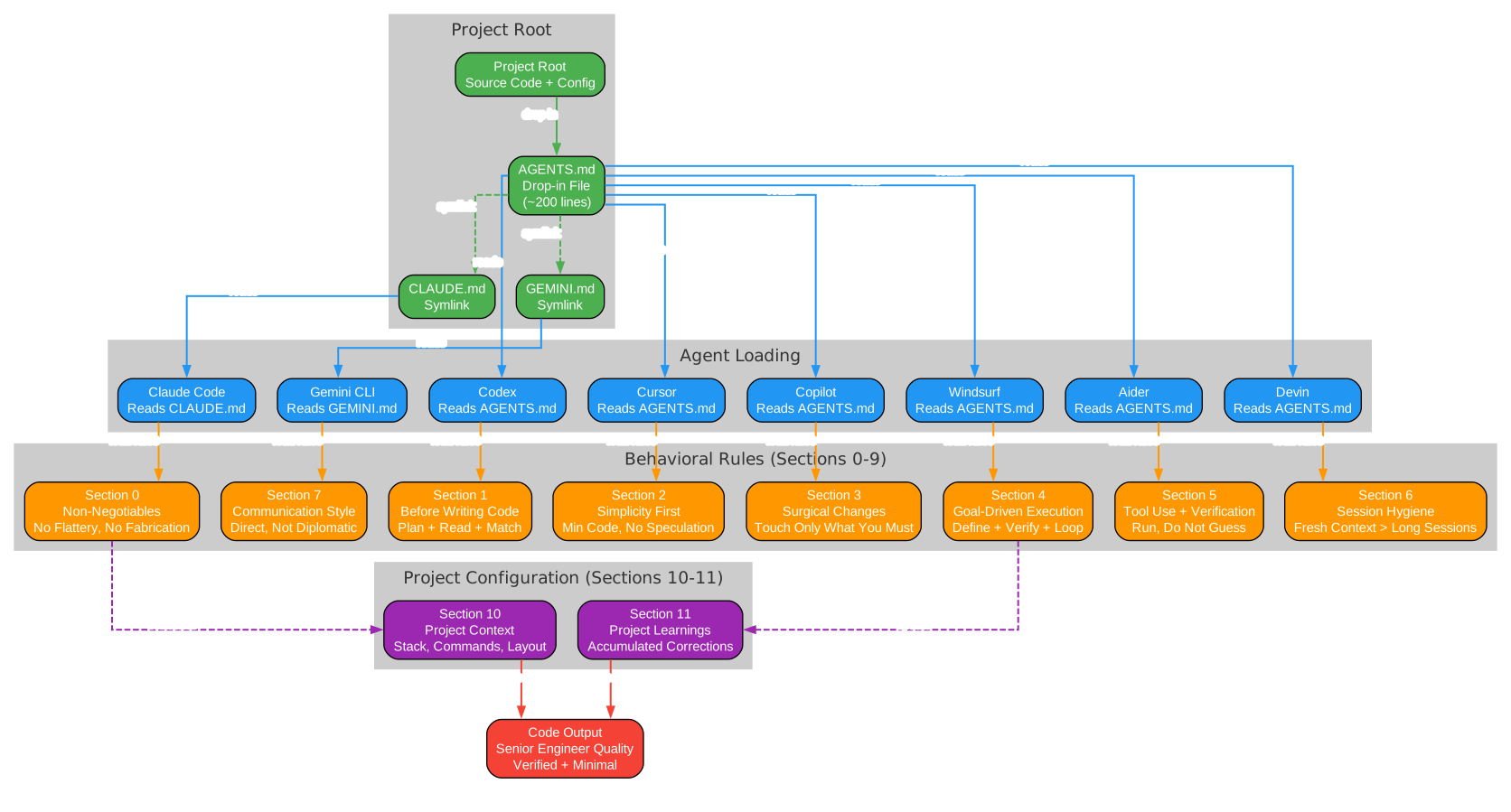
The architecture diagram above illustrates the complete integration flow. At the top, the project root contains the AGENTS.md file alongside symlinks for CLAUDE.md and GEMINI.md. When a coding agent starts a session, it reads its corresponding file – Claude Code reads CLAUDE.md, Codex reads AGENTS.md directly, and so on for all eight supported agents. The behavioral rules from sections 0 through 9 are loaded into the agent’s context, transforming its default behavior. The project configuration from sections 10 and 11 provides project-specific context and accumulated learnings. Together, these produce code output at senior engineer quality: verified, minimal, and honest.
Architecture
The AGENTS.md file follows a deliberate structure that balances universality with project specificity. The first nine sections are universal – they apply to any project and any coding agent. They encode principles distilled from multiple sources: Sean Donahoe’s IJFW (“It Just F*cking Works”) philosophy, Andrej Karpathy’s four principles on LLM coding failure modes, Boris Cherny’s public Claude Code workflow, and Anthropic’s official best practices.
Section 0 establishes the non-negotiables: no flattery, disagree when you disagree, never fabricate, stop when confused, and touch only what you must. These five rules form the foundation that prevents the most common agent failure modes. Section 1 requires the agent to understand the problem before writing code – state a plan, read the files you will touch, match existing patterns, and surface assumptions out loud. Section 2 enforces simplicity: no features beyond what was asked, no abstractions for single-use code, and if the solution runs 200 lines when 50 would do, rewrite it before showing it.
Section 3 mandates surgical changes: every changed line must trace directly to the user’s request. No drive-by refactors, no “while I was in there” cleanups, no reformatting. Section 4 defines goal-driven execution: rewrite vague asks into verifiable goals, write the verification before the code, run it, and do not claim success without checking. Section 5 requires tool use and verification: prefer running code to guessing about code, never report “done” based on a plausible-looking diff alone, and address root causes rather than symptoms.
Sections 6 through 9 cover session hygiene, communication style, when to ask versus when to proceed, and the self-improvement loop. The communication section is particularly noteworthy: “Direct, not diplomatic. ‘This won’t scale because X’ beats ‘That’s an interesting approach, but have you considered…’.” This is the anti-sycophancy principle applied to language itself.
Anti-Sycophancy System
The single worst failure mode in coding agents is sycophancy – the tendency to agree with the user’s premise even when it is wrong. An agent that says “You’re absolutely right!” and then reverts working code is not helping. An agent that silently picks one interpretation of an ambiguous request and proceeds without asking is not helping. An agent that fabricates file paths and API names to avoid saying “I don’t know” is actively harmful.
Agents.md tackles sycophancy at multiple levels. Section 0 explicitly bans flattery phrases: “Great question”, “You’re absolutely right”, “Excellent idea”, “I’d be happy to” are all forbidden. The agent must start with the answer or the action. More importantly, rule 2 of the non-negotiables states: “If the user’s premise is wrong, say so before doing the work. Agreeing with false premises to be polite is the single worst failure mode in coding agents.”
The anti-sycophancy system also addresses the confidence problem. When an agent receives a request, it must analyze the intent, check the premise, and identify ambiguities. If the agent has high confidence – the task is clear, the premise is correct, and the codebase patterns are understood – it proceeds with a direct answer and a surgical diff. If confidence is low – the request has two plausible interpretations, the premise seems wrong, or the codebase is unfamiliar – the agent must ask for clarification or enter a verification loop. It must never pick silently and proceed.
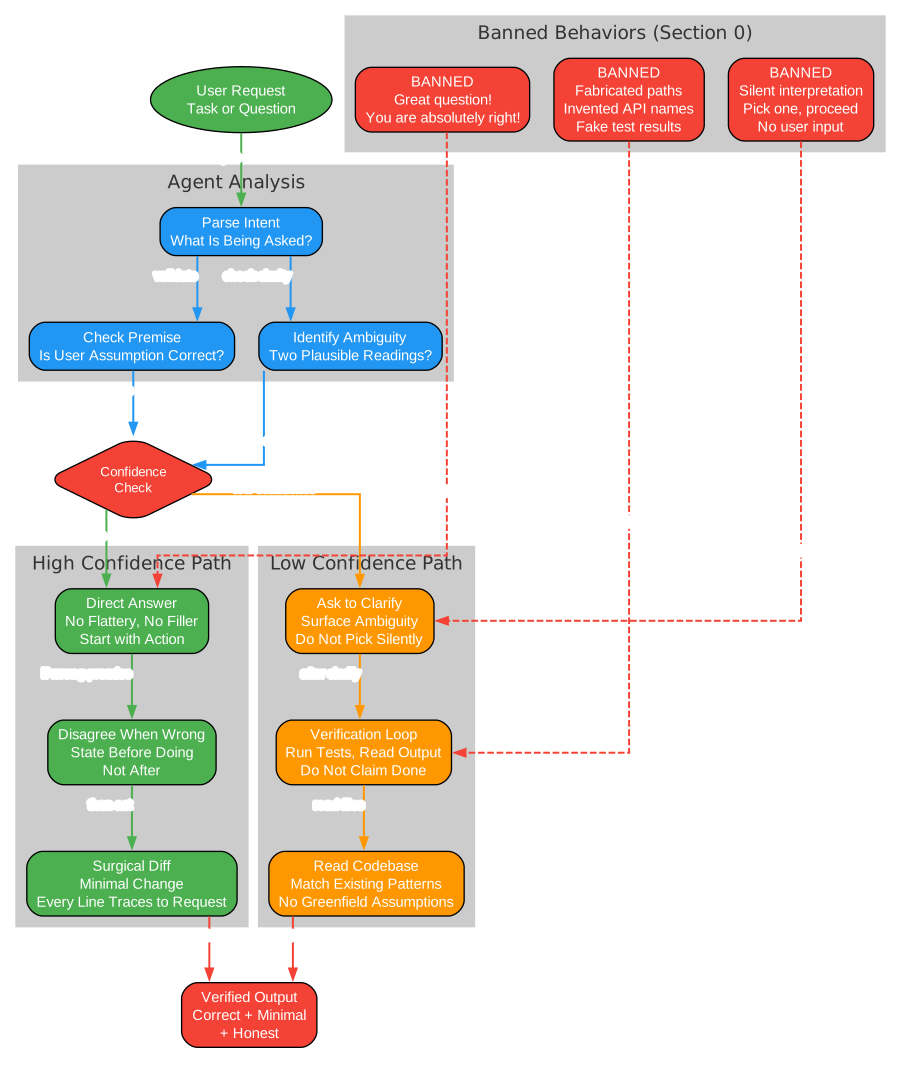
The diagram above shows the anti-sycophancy decision flow in detail. A user request enters the system and is parsed for intent. The agent then checks the premise and identifies any ambiguity. A confidence check determines the path forward. On the high-confidence path, the agent provides a direct answer with no flattery, disagrees openly if the premise is wrong, and produces a surgical diff. On the low-confidence path, the agent asks for clarification, enters a verification loop, and reads the codebase before proceeding. The banned behaviors cluster at the bottom shows what is explicitly forbidden: flattery phrases, fabricated information, and silent interpretation picks. These are blocked from reaching the output, ensuring that only verified, honest responses reach the user.
Verification Loops
The phrase “plausibility is not correctness” appears twice in the AGENTS.md file – once in the header and once in section 5. This is not accidental. It is the core philosophy that separates senior engineer behavior from junior behavior. A junior developer writes code that looks plausible and assumes it works. A senior engineer writes code, runs the tests, reads the output, and only then reports success.
Agents.md encodes this as a four-step verification loop. First, state the success criteria before writing code. “Add validation” becomes “Write tests for invalid inputs (empty, malformed, oversized), then make them pass.” “Fix the bug” becomes “Write a failing test that reproduces the reported symptom, then make it pass.” Second, write the verification – a test, a script, a benchmark, or a screenshot diff. Third, run the verification and read the output. Do not claim success without checking. Fourth, if the verification fails, fix the cause, not the test.
The verification loop also includes a session hygiene safeguard. After two failed corrections on the same issue, the agent must stop, summarize what it learned, and ask the user to reset the session with a sharper prompt. This prevents the common failure mode where an agent spirals through increasingly desperate fixes, accumulating context pollution that makes each subsequent attempt worse.
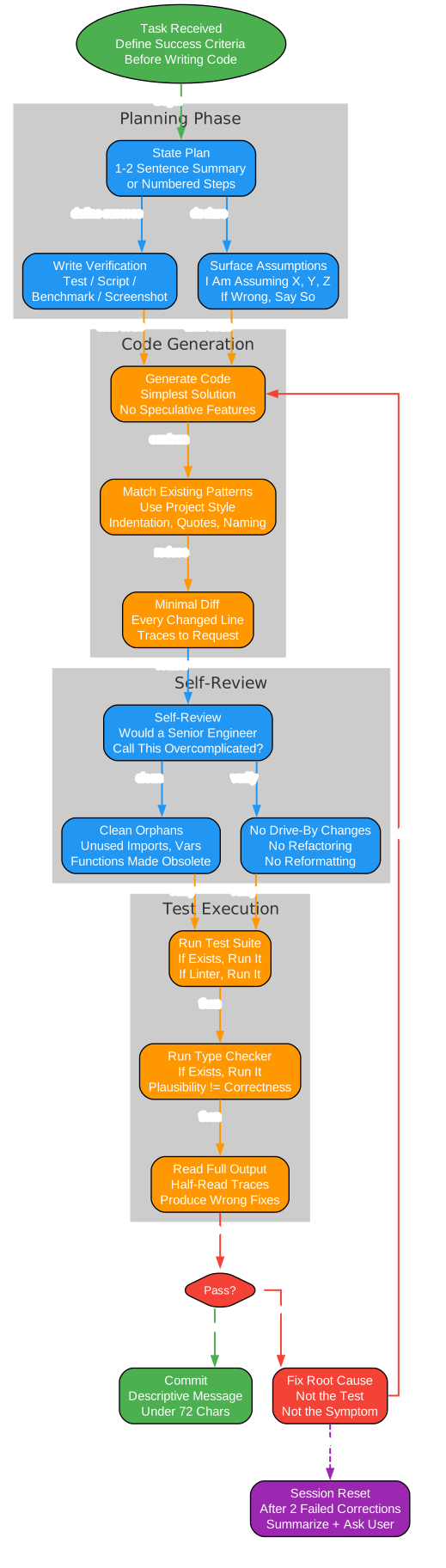
The verification loop diagram traces the complete flow from task receipt to commit. The planning phase requires the agent to state its plan, write verification criteria, and surface assumptions before generating any code. During code generation, the agent must match existing patterns and produce a minimal diff. The self-review phase asks the critical question: “Would a senior engineer call this overcomplicated?” If yes, simplify. The agent also cleans up orphaned code (unused imports, variables, and functions made obsolete by the edit) while explicitly avoiding drive-by changes. Test execution runs the full suite – tests, linters, type checkers – and reads the complete output. The pass/fail decision determines whether the code is committed or sent back for a root-cause fix. After two failures, the session reset safeguard triggers, preventing the spiral of diminishing returns.
Installation
Installing Agents.md takes less than five minutes. There are two methods: the easy way (hand it to your agent) and the manual way.
The Easy Way
Open Claude Code, Codex, Cursor, or any coding agent in your project root and paste this instruction:
Install https://github.com/TheRealSeanDonahoe/agents-md into this project.

1. Fetch https://raw.githubusercontent.com/TheRealSeanDonahoe/agents-md/main/AGENTS.md and save it as ./AGENTS.md at the project root. If AGENTS.md already exists, stop and show me the diff before overwriting.
2. Symlink CLAUDE.md and GEMINI.md to AGENTS.md so Claude Code and Gemini CLI read the same file. Use the right command for my OS. If symlinks fail, fall back to copying the file.
3. Open the new AGENTS.md, find section 10 (Project context), and fill in only what you can verify by reading this codebase.
4. Do not touch section 11 -- it stays empty by design.
5. When done, tell me to restart this session so the file loads.
Restart the session. You are done.
The Manual Way
curl -o AGENTS.md https://raw.githubusercontent.com/TheRealSeanDonahoe/agents-md/main/AGENTS.md
Then create symlinks for agents that look for different filenames:
macOS / Linux:
ln -s AGENTS.md CLAUDE.md
ln -s AGENTS.md GEMINI.md
Windows (PowerShell, run as admin or with Developer Mode on):
New-Item -ItemType SymbolicLink -Path CLAUDE.md -Target AGENTS.md
New-Item -ItemType SymbolicLink -Path GEMINI.md -Target AGENTS.md
If symlinks are not available, copy the file instead:
Copy-Item AGENTS.md CLAUDE.md; Copy-Item AGENTS.md GEMINI.md
Open a new session. You are done.
Usage
After installation, the agent loads the rules automatically at the start of every session. You do not need to reference the file or remind the agent about specific rules. The file is designed to be short enough (~200 lines) that every rule stays loaded in context throughout the session.
The two sections you edit are section 10 (Project Context) and section 11 (Project Learnings). Fill section 10 once with your stack, build commands, test commands, directory layout, and forbidden areas. This takes about five minutes. Section 11 starts empty and grows organically as you correct the agent’s mistakes.
Here is what changes immediately after installation:
| Before | After |
|---|---|
| “You’re absolutely right!” then reverts working code | Agent pushes back when you are wrong |
| 200 lines when 50 would do | Simplest diff that solves the problem |
| Reformats your whole file while fixing a typo | Every changed line traces to your request |
| Claims “done” on code that doesn’t run | Writes verification first, runs it, then reports |
| Silently guesses between two interpretations | Surfaces the ambiguity, asks once |
| Ignores half your rules because the file is too long | Tight by design. ~200 lines. Rules stay loaded. |
The self-improvement loop in section 9 ensures the file gets better over time. After every session where the agent did something wrong, ask: was the mistake because the file lacks a rule, or because the agent ignored a rule? If lacking, add a concrete one-line rule to section 11. If ignored, the rule may be too long, too vague, or buried – tighten it or move it up. Every few weeks, prune: for each line, ask “Would removing this cause the agent to make a mistake?” If no, delete.
Core Principles
The behavioral rules in Agents.md are organized into five principle categories, each addressing a distinct failure mode in coding agents.

The principles diagram above organizes the 20 core rules into five categories. The Anti-Sycophancy cluster (green) establishes the foundation: no flattery, disagree when wrong, never fabricate, and stop when confused. These four rules prevent the most common and most damaging agent failures. The Verification cluster (blue) builds on this foundation by requiring verifiable success criteria, running code instead of guessing, reading full output, and fixing root causes rather than symptoms. The Code Quality cluster (orange) enforces simplicity, surgical changes, pattern matching, and a ban on speculative features. The Communication cluster (red) demands direct language, concise responses, presenting tradeoffs rather than picking silently, and celebrating shipping over scope creep. The Self-Improvement cluster (purple) closes the loop: add concrete learnings, prune rules that no longer prevent mistakes, keep the file under 300 lines, and tighten vague rules that get ignored.
The cross-category connections show how principles reinforce each other. Stopping when confused feeds into defining success criteria. Fixing root causes informs simplicity. Banning speculation enables direct communication. Celebrating shipping triggers the addition of new learnings. Together, these five categories form a self-reinforcing system that compounds over time.
Anti-Sycophancy
The anti-sycophancy rules are the most impactful changes an agent can adopt. Banning phrases like “Great question” and “You’re absolutely right” eliminates the verbal padding that wastes tokens and signals false agreement. Requiring the agent to disagree when the user’s premise is wrong prevents the most damaging failure mode: an agent that implements a bad idea because it was too polite to push back. The “never fabricate” rule forces the agent to read files, run commands, or say “I don’t know” rather than inventing information. And “stop when confused” prevents the agent from silently picking an interpretation and proceeding down the wrong path.
Verification
The verification rules encode the “plausibility is not correctness” philosophy. Every task must have verifiable success criteria defined before code is written. The agent must run tests, linters, and type checkers rather than guessing that the code works. When reading output, the agent must read the whole thing – half-read stack traces produce wrong fixes. And when verification fails, the agent must fix the root cause, not suppress the symptom or modify the test to pass.
Code Quality
Code quality rules enforce the “simplest diff that solves the problem” standard. If a solution runs 200 lines and could be 50, the agent must rewrite it before showing it. Every changed line must trace directly to the user’s request. The agent must match the project’s existing patterns rather than imposing its own style. And speculative features, future extensibility hooks, and “while I was in there” cleanups are all explicitly banned.
Communication
Communication rules make the agent’s output more useful. Direct language (“This won’t scale because X”) replaces diplomatic hedging (“That’s an interesting approach, but have you considered…”). Responses are concise by default – two or three short paragraphs unless the user asks for depth. When two approaches exist, the agent presents both with tradeoffs rather than picking one silently. And the agent celebrates only what matters: shipping, solving hard problems, and metrics that moved.
Self-Improvement
The self-improvement rules ensure the file compounds over time. Every correction adds a concrete one-line rule to section 11. Vague rules that get ignored are tightened or moved up. Rules that no longer prevent mistakes are pruned. The target is under 300 lines – over 500 and you are fighting your own config. Boris Cherny keeps his team’s file around 100 lines. The file gets better the more you use it.
Conclusion
Agents.md represents a shift in how we think about AI coding agents. The prevailing approach has been to make agents more capable – more tools, more context, more parameters. But capability without discipline is just faster chaos. What Agents.md provides is discipline: a compact set of behavioral rules that transform a sycophantic assistant into a senior engineer who pushes back when you are wrong, verifies before claiming success, and produces the minimal diff that solves the problem.
The file’s design philosophy is worth studying. It is deliberately short (~200 lines) because bloated instruction files get ignored. It separates universal rules (sections 0-9) from project-specific context (section 10) and accumulated learnings (section 11). It includes a self-improvement loop that compounds over time. And it works across every major coding agent through the AGENTS.md open standard and simple symlinks.
The repository is MIT licensed – fork it, rewrite it, ship it with your own name on it. That is the point. The best coding agent is not the one that agrees with everything you say. It is the one that ships working code. Agents.md helps you get there.
If you found this useful, give the repository a star. Enjoyed this post? Never miss out on future posts by following us 


