Claw Code: Open-Source Rust AI Agent Harness for Autonomous Development
Claw Code is an open-source Rust-based CLI agent harness that reimagines how humans and AI agents collaborate on software development. With over 185,000 stars on GitHub, it has emerged as one of the most ambitious projects in the autonomous coding space, demonstrating that repositories can be built, tested, and maintained by coordinated AI agents under human direction.
Unlike traditional coding assistants that require constant human micromanagement, Claw Code operates on a philosophy where humans provide direction and AI agents perform the labor. The project is part of the broader UltraWorkers ecosystem, which includes three complementary systems: OmX for workflow orchestration, clawhip for event routing, and OmO for multi-agent coordination.
Understanding the Architecture
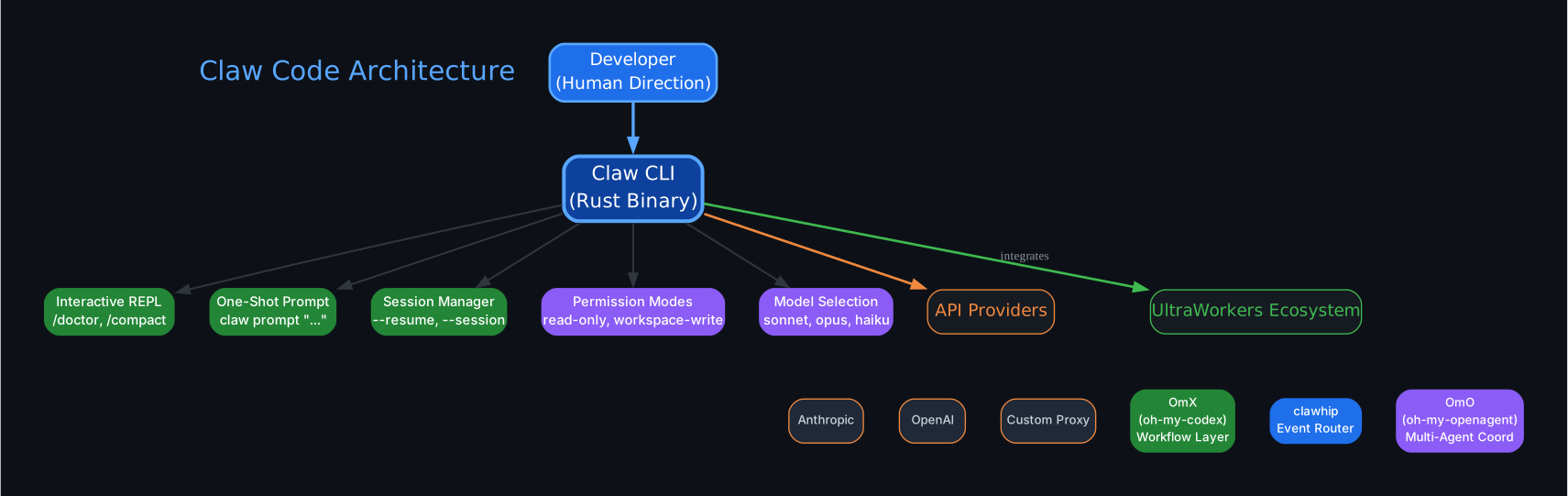
The architecture diagram above illustrates the core components of Claw Code and how they interact. Let us break down each component:
CLI Binary (claw) The claw binary is the primary interface for interacting with the agent harness. Built in Rust for performance and reliability, it provides an interactive REPL, one-shot prompt mode, session management, and a built-in health check system. The binary is compiled from the rust/ workspace and supports multiple authentication methods and provider backends.
Provider Router The Provider Router automatically selects the correct backend based on model name and available credentials. It supports four provider backends: Anthropic (direct API), xAI (Grok models), OpenAI-compatible (including OpenRouter and Ollama), and DashScope (Alibaba Qwen models). Model-name prefix routing ensures requests are sent to the right provider even when multiple credentials exist in the environment.
Permission System Claw Code implements a three-tier permission model that controls what the agent can do: read-only for safe inspection tasks, workspace-write for modifying project files, and danger-full-access for unrestricted operations. This graduated approach lets you start with minimal permissions and expand as needed.
Session Manager Sessions are persisted under .claw/sessions/ in the current workspace. You can resume the latest session, inspect conversation history, and run commands like /status, /cost, /config, and /export to manage your interactions. Sessions maintain context across multiple turns, enabling complex multi-step workflows.
Config Resolution Runtime configuration is loaded in a layered cascade: ~/.claw.json, then ~/.config/claw/settings.json, then repository-level .claw.json, .claw/settings.json, and .claw/settings.local.json. Later entries override earlier ones, giving you flexible control from global defaults down to per-project customization.
The UltraWorkers Ecosystem

Claw Code is not a standalone tool. It is one component of a three-part system designed for autonomous software development:
1. OmX (oh-my-codex) – The Workflow Layer
OmX provides the workflow orchestration that turns short human directives into structured execution. It handles planning keywords, execution modes, persistent verification loops, and parallel multi-agent workflows. When a human types a sentence describing what they want built, OmX converts that into a repeatable work protocol that agents can follow.
2. clawhip – The Event Router
clawhip is the event and notification router that keeps monitoring and delivery outside the coding agent’s context window. It watches git commits, tmux sessions, GitHub issues and PRs, agent lifecycle events, and channel delivery. By offloading status formatting and notification routing from the agents, clawhip ensures that agents stay focused on implementation rather than status reporting.
3. OmO (oh-my-openagent) – The Coordination Layer
OmO handles multi-agent coordination, including planning, handoffs, disagreement resolution, and verification loops across agents. When Architect, Executor, and Reviewer agents disagree, OmO provides the structure for that loop to converge instead of collapse. This is what makes autonomous development possible: agents can argue, recover, and converge without human intervention.
Getting Started with Claw Code
Prerequisites
Before you begin, you need:
- Rust toolchain with
cargo(install from https://rustup.rs/) - An Anthropic API key (
ANTHROPIC_API_KEY) or an alternative provider credential
Important: Claw Code is build-from-source only. Do not use cargo install claw-code as that installs a deprecated stub. You must clone and build from the repository.
Installation and First Run
# 1. Clone and build
git clone https://github.com/ultraworkers/claw-code
cd claw-code/rust
cargo build --workspace

# 2. Set your API key (Anthropic API key -- not a Claude subscription)
export ANTHROPIC_API_KEY="sk-ant-..."

# 3. Verify everything is wired correctly
./target/debug/claw doctor

# 4. Run a prompt
./target/debug/claw prompt "say hello"
Windows Setup
Claw Code fully supports Windows with PowerShell:
# Install Rust from https://rustup.rs/, then reopen terminal
cargo --version

# Clone and build
git clone https://github.com/ultraworkers/claw-code
cd claw-code/rust
cargo build --workspace

# Set API key and run
$env:ANTHROPIC_API_KEY = "sk-ant-..."
.\target\debug\claw.exe prompt "say hello"
Note that on Windows the binary is claw.exe, not claw. Use .\target\debug\claw.exe or run cargo run -- prompt "say hello" to skip the path lookup.
The /doctor Health Check
The /doctor command is your first stop after building Claw Code. It runs a comprehensive preflight diagnostic that verifies your API key is configured correctly, checks network connectivity to the provider backend, validates your Rust workspace, and confirms all required dependencies are in place.
cd rust
./target/debug/claw
# Inside the REPL, run:
/doctor
Once you have a saved session, you can rerun the doctor check with:
./target/debug/claw --resume latest /doctor
Multi-Provider Support
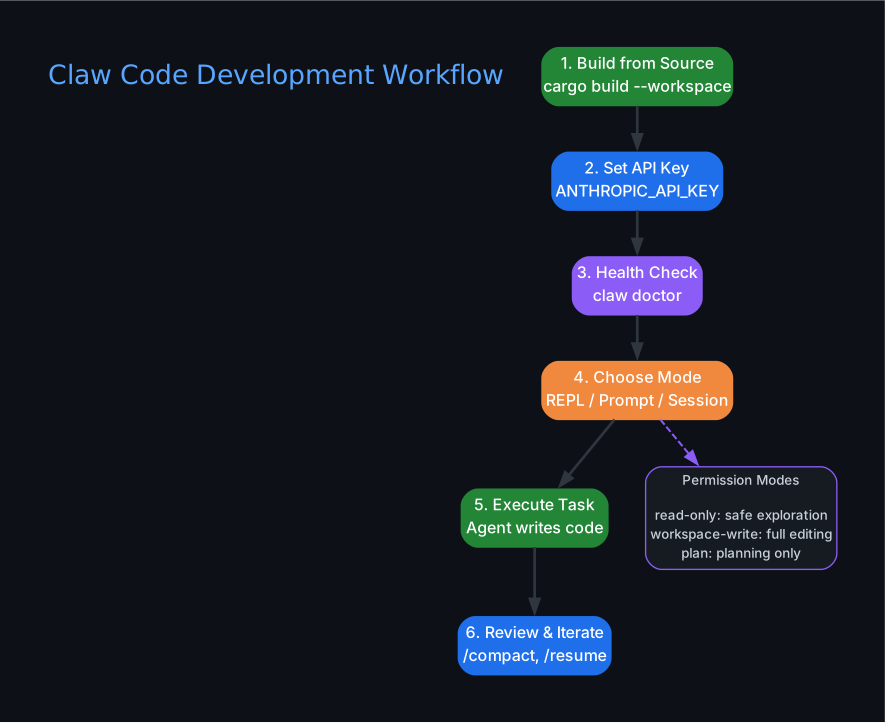
One of Claw Code’s most powerful features is its built-in support for multiple AI providers. The provider is selected automatically based on the model name and available credentials:
Provider Matrix
| Provider | Protocol | Auth Env Var | Base URL Env Var | Default Base URL |
|---|---|---|---|---|
| Anthropic (direct) | Anthropic Messages API | ANTHROPIC_API_KEY or ANTHROPIC_AUTH_TOKEN | ANTHROPIC_BASE_URL | https://api.anthropic.com |
| xAI | OpenAI-compatible | XAI_API_KEY | XAI_BASE_URL | https://api.x.ai/v1 |
| OpenAI-compatible | OpenAI Chat Completions | OPENAI_API_KEY | OPENAI_BASE_URL | https://api.openai.com/v1 |
| DashScope (Alibaba) | OpenAI-compatible | DASHSCOPE_API_KEY | DASHSCOPE_BASE_URL | https://dashscope.aliyuncs.com/compatible-mode/v1 |
Using Local Models
Claw Code can connect to local AI servers through Anthropic-compatible or OpenAI-compatible endpoints:
# Anthropic-compatible (e.g., local proxy)
export ANTHROPIC_BASE_URL="http://127.0.0.1:8080"
export ANTHROPIC_AUTH_TOKEN="local-dev-token"
./target/debug/claw --model "claude-sonnet-4-6" prompt "reply with the word ready"

# OpenAI-compatible (e.g., vLLM, LocalAI)
export OPENAI_BASE_URL="http://127.0.0.1:8000/v1"
export OPENAI_API_KEY="local-dev-token"
./target/debug/claw --model "qwen2.5-coder" prompt "reply with the word ready"

# Ollama
export OPENAI_BASE_URL="http://127.0.0.1:11434/v1"
unset OPENAI_API_KEY
./target/debug/claw --model "llama3.2" prompt "summarize this repository"

# OpenRouter
export OPENAI_BASE_URL="https://openrouter.ai/api/v1"
export OPENAI_API_KEY="sk-or-v1-..."
./target/debug/claw --model "openai/gpt-4.1-mini" prompt "summarize this repository"
Model Aliases
Claw Code includes built-in model aliases for convenience:
| Alias | Resolved Model | Provider | Max Output | Context Window |
|---|---|---|---|---|
opus | claude-opus-4-6 | Anthropic | 32,000 | 200,000 |
sonnet | claude-sonnet-4-6 | Anthropic | 64,000 | 200,000 |
haiku | claude-haiku-4-5-20251213 | Anthropic | 64,000 | 200,000 |
grok / grok-3 | grok-3 | xAI | 64,000 | 131,072 |
grok-mini / grok-3-mini | grok-3-mini | xAI | 64,000 | 131,072 |
You can also define custom aliases in your settings file:
{
  "aliases": {
    "fast": "claude-haiku-4-5-20251213",
    "smart": "claude-opus-4-6",
    "cheap": "grok-3-mini"
  }
}
Permission Modes
Claw Code provides three permission modes that control what the agent can do in your workspace:
# Read-only: agent can inspect but not modify files
./target/debug/claw --permission-mode read-only prompt "summarize Cargo.toml"

# Workspace-write: agent can modify files in the project directory
./target/debug/claw --permission-mode workspace-write prompt "update README.md"

# Danger-full-access: agent has unrestricted access (use with caution)
./target/debug/claw --permission-mode danger-full-access prompt "refactor the entire codebase"
The permission system also supports tool-level restrictions:
# Only allow read and glob tools
./target/debug/claw --allowedTools read,glob "inspect the runtime crate"
Authentication Guide
Claw Code supports multiple authentication methods, and it is important to use the correct environment variable for each credential type:
| Credential Shape | Env Var | HTTP Header | Typical Source |
|---|---|---|---|
sk-ant-* API key | ANTHROPIC_API_KEY | x-api-key: sk-ant-... | console.anthropic.com |
| OAuth access token (opaque) | ANTHROPIC_AUTH_TOKEN | Authorization: Bearer ... | Anthropic-compatible proxy or OAuth flow |
OpenRouter key (sk-or-v1-*) | OPENAI_API_KEY + OPENAI_BASE_URL | Authorization: Bearer ... | openrouter.ai/keys |
Common pitfall: If you paste an sk-ant-* key into ANTHROPIC_AUTH_TOKEN, Anthropic’s API will return a 401 error because API keys are rejected over the Bearer header. The fix is simple: move the key to ANTHROPIC_API_KEY. Recent claw builds detect this exact mistake and append a hint to the error message.
Session Management
REPL turns are persisted under .claw/sessions/ in the current workspace, enabling you to resume conversations across multiple interactions:
# Resume the latest session
./target/debug/claw --resume latest

# Resume and run commands
./target/debug/claw --resume latest /status /diff
Useful interactive commands inside the REPL include /help, /status, /cost, /config, /session, /model, /permissions, and /export.
HTTP Proxy Support
Claw Code respects standard proxy environment variables for corporate and restricted network environments:
export HTTPS_PROXY="http://proxy.corp.example:3128"
export HTTP_PROXY="http://proxy.corp.example:3128"
export NO_PROXY="localhost,127.0.0.1,.corp.example"

./target/debug/claw prompt "hello via the corporate proxy"
For programmatic configuration, the ProxyConfig type in Rust exposes a proxy_url field that acts as a unified proxy for both HTTP and HTTPS traffic.
The Philosophy: Humans Set Direction, Claws Perform the Labor
Claw Code’s philosophy document makes a compelling case for the future of software development. The core insight is that the bottleneck in software development has shifted. When agent systems can rebuild a codebase in hours, the scarce resource becomes:
- Architectural clarity – knowing what to build and how to structure it
- Task decomposition – breaking complex goals into parallelizable work units
- Judgment – deciding which trade-offs are acceptable
- Taste – understanding what good software looks like
- Conviction – knowing which parts can be parallelized and which must stay constrained
A fast agent team does not remove the need for thinking. It makes clear thinking even more valuable. The human interface is not a terminal. It is a Discord channel where a person can type a sentence from a phone, walk away, and the claws read the directive, break it into tasks, assign roles, write code, run tests, argue over failures, recover, and push when the work passes.
Rust Workspace Structure
The canonical Rust workspace lives in rust/ and contains the following crates:
| Crate | Purpose |
|---|---|
api | HTTP client, provider routing, proxy configuration |
commands | CLI command definitions and handlers |
compat-harness | Compatibility testing infrastructure |
mock-anthropic-service | Deterministic mock Anthropic API for testing |
plugins | Plugin system for extending agent capabilities |
runtime | Core agent runtime and execution engine |
rusty-claude-cli | Main CLI binary (claw) |
telemetry | Observability and metrics collection |
tools | Built-in tool implementations |
The companion Python/reference workspace in src/ and tests/ provides audit helpers and reference implementations, but is not the primary runtime surface.
Running Tests
cd rust
cargo test --workspace
The workspace also includes a deterministic mock parity harness for testing agent behavior without hitting real API endpoints:
cd rust
./scripts/run_mock_parity_harness.sh
Key Takeaways
Claw Code represents a paradigm shift in how we think about AI-assisted development. Rather than treating AI as a fancy autocomplete that requires constant human supervision, it demonstrates that autonomous agent systems can handle the full development lifecycle when given clear direction and proper coordination infrastructure.
The three-part UltraWorkers ecosystem – OmX for workflow, clawhip for event routing, and OmO for multi-agent coordination – provides the scaffolding that makes this possible. Humans provide the vision; the claws handle the execution.
If you are interested in autonomous software development, multi-agent coordination, or simply want a powerful Rust-based CLI agent that supports multiple providers and local models, Claw Code is worth exploring. Start with claw doctor and see where it takes you.
Repository: github.com/ultraworkers/claw-code
Ecosystem:
- clawhip – Event and notification router
- oh-my-codex (OmX) – Workflow and plugin layer
- oh-my-openagent (OmO) – Multi-agent coordination
- UltraWorkers Discord

Enjoyed this post? Never miss out on future posts by following us


