Designlang: Extract Complete Design Systems From Any Website
Designlang (the CLI behind the design-extract repository) is an open-source tool that crawls any website with a headless browser, extracts every computed style from the live DOM, and generates 8 output files – including an AI-optimized markdown file, visual HTML preview, Tailwind config, React theme, shadcn/ui theme, Figma variables, W3C design tokens, and CSS custom properties. With 892 stars on GitHub, it has quickly become the most comprehensive design extraction tool available.
Unlike other tools that only give you colors and fonts, designlang extracts layout patterns, captures responsive behavior across 4 breakpoints, records interaction states, scores WCAG accessibility, and lets you compare multiple brands or sync live sites to local tokens. It is the difference between getting the paint and getting the architecture.

How It Works
The extraction pipeline follows five stages:
1. Crawl – Launches headless Chromium via Playwright, waits for network idle and fonts to load. This ensures all dynamically-loaded styles are captured, including CSS-in-JS, Tailwind utility classes, and runtime-injected stylesheets.
2. Extract – A single page.evaluate() walks up to 5,000 DOM elements collecting 25+ computed style properties, layout data, inline SVGs, font sources, and image metadata. This is not a static CSS parser – it captures the actual rendered styles as the browser computed them.
3. Process – 17 extractor modules parse, deduplicate, cluster, and classify the raw data. This includes specialized extractors for gradients, z-index layers, icons, fonts, image patterns, semantic regions, and component clusters.
4. Score – The accessibility extractor calculates WCAG 2.1 contrast ratios for all foreground/background color pairs, and the design scoring module rates the site across 7 categories with actionable issues.
5. Format – 8 formatter modules generate the output files, each tailored for a specific consumption pattern: AI agents, visual review, design tools, or code integration.
8 Output Files
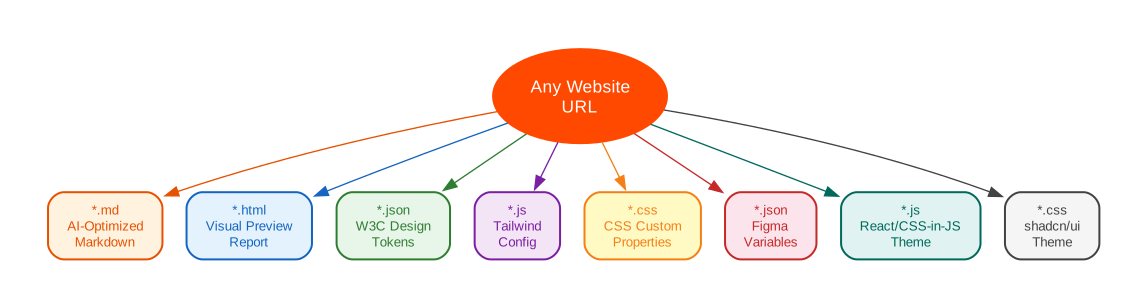
Every extraction produces 8 files, each serving a different purpose:
| File | Purpose |
|---|---|
*-design-language.md | AI-optimized markdown with 19 sections – feed it to any LLM to recreate the design |
*-preview.html | Visual report with swatches, type scale, shadows, and accessibility score |
*-design-tokens.json | W3C Design Tokens format with semantic and composite layers |
*-tailwind.config.js | Drop-in Tailwind CSS theme |
*-variables.css | CSS custom properties |
*-figma-variables.json | Figma Variables import (with dark mode support) |
*-theme.js | React/CSS-in-JS theme (Chakra, Stitches, Vanilla Extract) |
*-shadcn-theme.css | shadcn/ui globals.css variables |
The markdown output contains 19 sections: Color Palette, Typography, Spacing, Border Radii, Box Shadows, CSS Custom Properties, Breakpoints, Transitions and Animations, Component Patterns (with full CSS snippets), Layout System, Responsive Design, Interaction States, Accessibility (WCAG 2.1), Gradients, Z-Index Map, SVG Icons, Font Files, Image Style Patterns, and Quick Start.
What Makes Designlang Different

Layout System Extraction
Most design extraction tools give you colors and fonts. Designlang also extracts the structural skeleton – grid column patterns, flex direction usage, container widths, gap values, and justify/align patterns:
Layout: 55 grids, 492 flex containers
Responsive Multi-Breakpoint Capture
Crawl the site at 4 viewports (mobile, tablet, desktop, wide) and map exactly what changes:
designlang https://vercel.com --responsive
Responsive: 4 viewports, 3 breakpoint changes
  375px -> 768px: Nav visibility hidden -> visible, Hamburger shown -> hidden
  768px -> 1280px: Max grid columns 1 -> 3, H1 size 32px -> 48px
Interaction State Capture
Programmatically hover and focus interactive elements, capturing the actual style transitions:
designlang https://stripe.com --interactions
/* Button Hover */
background-color: rgb(83, 58, 253) -> rgb(67, 47, 202);
box-shadow: none -> 0 4px 12px rgba(83, 58, 253, 0.4);

/* Input Focus */
border-color: rgb(200, 200, 200) -> rgb(83, 58, 253);
outline: none -> 2px solid rgb(83, 58, 253);
Design System Scoring
Rate any site’s design quality across 7 categories:
designlang score https://vercel.com
  68/100  Grade: D

  Color Discipline     50
  Typography           70
  Spacing System       80
  Shadows              50
  Border Radii         40
  Accessibility        94
  Tokenization        100
Live Site Sync
Treat the deployed site as your source of truth:
designlang sync https://stripe.com --out ./src/tokens
Detects design changes and auto-updates your local design-tokens.json, tailwind.config.js, and variables.css.
Multi-Brand Comparison
Compare N brands side-by-side:
designlang brands stripe.com vercel.com github.com linear.app
Generates a matrix with color overlap analysis, typography comparison, spacing systems, and accessibility scores.
Quick Start
The fastest way to try designlang is with npx (requires Node.js):
# Basic extraction
npx designlang https://stripe.com

# Full extraction (screenshots + responsive + interactions)
npx designlang https://stripe.com --full

# Install globally
npm install -g designlang
CLI Commands
Designlang provides a rich set of commands beyond basic extraction:
| Command | Description |
|---|---|
designlang <url> | Base extraction with all 8 output files |
designlang apply <url> | Extract and apply design directly to your project |
designlang clone <url> | Generate a working Next.js starter from extracted design |
designlang score <url> | Rate design quality (7 categories, A-F) |
designlang watch <url> | Monitor for design changes on interval |
designlang diff <A> <B> | Compare two sites’ design languages |
designlang brands <urls...> | Multi-brand comparison matrix |
designlang sync <url> | Sync local tokens with live site |
designlang history <url> | View design change history |
designlang mcp | Launch stdio MCP server |
Key CLI Options
designlang <url> [options]

Options:
  -o, --out <dir>         Output directory (default: ./design-extract-output)
  -n, --name <name>       Output file prefix (default: derived from URL)
  -w, --width <px>        Viewport width (default: 1280)
  --height <px>           Viewport height (default: 800)
  --wait <ms>             Wait after page load for SPAs (default: 0)
  --dark                  Also extract dark mode styles
  --depth <n>             Internal pages to crawl (default: 0)
  --screenshots           Capture component screenshots
  --responsive            Capture at multiple breakpoints
  --interactions          Capture hover/focus/active states
  --full                  Enable all captures
  --cookie <cookies...>   Cookies for authenticated pages
  --header <headers...>   Custom headers
  --platforms <csv>       Additional platforms: ios,android,flutter,wordpress,all
  --emit-agent-rules      Emit Cursor / Claude Code / agents.md rule files
MCP Server Integration
Designlang v7 includes a built-in MCP (Model Context Protocol) server that exposes the extracted design as resources and tools for AI agents:
designlang mcp --output-dir ./design-extract-output
This launches a stdio JSON-RPC server with:
Resources:
designlang://tokens/primitive– primitive token layerdesignlang://tokens/semantic– semantic token layer (with DTCG alias references)designlang://regions– classified page regions (nav, hero, pricing, etc.)designlang://components– reusable component clusters with variantsdesignlang://health– CSS health audit
Tools:
search_tokens– query tokens by name, value, or typefind_nearest_color– snap any color to the nearest palette tokenget_region– fetch a classified region by nameget_component– fetch a component cluster by idlist_failing_contrast_pairs– list every WCAG-failing fg/bg pair with remediation suggestions
Multi-Platform Output
Emit iOS SwiftUI, Android Compose, Flutter, and WordPress block-theme files in a single run:
designlang https://stripe.com --platforms all
Resulting tree:
design-extract-output/
  stripe-com-*.{md,json,css,js,html}    (default web output)
  ios/
    DesignTokens.swift
  android/
    Theme.kt
    colors.xml
    dimens.xml
  flutter/
    design_tokens.dart               (+ buildDesignlangTheme())
  wordpress-theme/
    theme.json
    style.css
    functions.php
    index.php
    templates/index.html
Agent Rules Emitter
Write agent-facing rule files generated from the resolved semantic tokens:
designlang https://stripe.com --emit-agent-rules
This creates:
.cursor/rules/designlang.mdc– Cursor rule.claude/skills/designlang/SKILL.md– Claude Code skillCLAUDE.md.fragment– snippet for your project’s CLAUDE.mdagents.md– generic, vendor-neutral agent guidance
Each file is templated from the semantic layer of the extracted token set, so the agent sees real token names and values – not placeholders.
Agent Skill Integration
Designlang works with Claude Code, Cursor, Codex, and 40+ AI coding agents via the skills ecosystem:
npx skills add Manavarya09/design-extract
In Claude Code, use /extract-design <url> to extract a site’s design directly within your coding session.
Key Takeaways
Designlang fills a gap that no other tool addresses: comprehensive design extraction that goes beyond colors and fonts to capture the full design system – layout patterns, responsive behavior, interaction states, accessibility scoring, and multi-brand comparison. The 8 output files ensure that whether you are feeding an AI agent, building a Tailwind theme, importing into Figma, or generating a React component library, you have the exact format you need.
The MCP server integration and agent rules emitter make it particularly powerful for AI-assisted development workflows. Instead of manually inspecting a website’s CSS, you can extract the complete design language in one command and have it available as structured data for your AI tools.
With 892 stars and active development (v7 adds MCP server, multi-platform output, agent rules, stack fingerprinting, and CSS health auditing), designlang is rapidly becoming the standard tool for design system extraction and synchronization.
Repository: github.com/Manavarya09/design-extract
Website: designlang.manavaryasingh.com
Resources:

Enjoyed this post? Never miss out on future posts by following us


