Graphify: Turn Any Codebase Into a Knowledge Graph With 71.5x Fewer Tokens
If you have ever pointed an AI coding agent at a large codebase and asked “how does authentication work?”, you know the problem. The agent greps through hundreds of files, reads chunks of code, and tries to piece together the answer from scratch. It misses cross-file connections, ignores design rationale buried in comments, and has no structural understanding of how the pieces fit together. Every query starts from zero.
Graphify is an open-source AI coding assistant skill that solves this problem by building a persistent knowledge graph from your codebase. Created by Safi Shamsi and boasting over 30,000 GitHub stars since its April 2026 release, it reads your files, extracts concepts and relationships, clusters them with Leiden community detection, and exports the result as an interactive HTML graph, a queryable JSON file, and a plain-language audit report. The result: 71.5x fewer tokens per query compared to reading raw files.
The key insight is that a knowledge graph is a persistent, compounding artifact. You build it once, and then every subsequent query navigates the compact graph instead of re-reading the raw files. The SHA256 cache means re-runs only process changed files. The graph keeps getting richer as you add more sources.
The Seven-Stage Pipeline
Graphify processes your codebase through a deterministic seven-stage pipeline. Each stage is a single function in its own module, communicating through plain Python dicts and NetworkX graphs with no shared state.

Understanding the Pipeline
The pipeline diagram shows the seven stages that transform raw files into a navigable knowledge graph. Here is a detailed walkthrough:
detect() – Collect Files
The first stage scans your directory and filters files by extension. It recognizes 25 programming languages via tree-sitter AST, plus markdown, PDFs, images, video, and audio files. You can exclude paths with a .graphifyignore file (same syntax as .gitignore). The output is a filtered list of file paths ready for extraction.
extract() – AST + LLM Extraction
The second stage is the heart of graphify. It runs a three-pass extraction process: first, a deterministic AST pass extracts structure from code files (classes, functions, imports, call graphs, docstrings, rationale comments) with no LLM needed. Second, video and audio files are transcribed locally with faster-whisper using a domain-aware prompt derived from corpus god nodes. Third, Claude subagents run in parallel over docs, papers, images, and transcripts to extract concepts, relationships, and design rationale. The SHA256 cache (shown as a dashed feedback arrow) ensures that re-runs only process changed files.
build_graph() – Merge into NetworkX
All extraction results are merged into a single NetworkX graph. Nodes represent concepts, classes, functions, and entities. Edges represent relationships between them. Every edge is tagged with a confidence label: EXTRACTED (found directly in source, confidence 1.0), INFERRED (reasonable inference, with a 0.0-1.0 confidence score), or AMBIGUOUS (flagged for human review).
cluster() – Leiden Community Detection
The graph is clustered using Leiden community detection based on edge density. This is a graph-topology-based approach – no embeddings or vector databases needed. The semantic similarity edges that Claude extracts (marked INFERRED) are already in the graph, so they influence community detection directly. The graph structure itself is the similarity signal.
analyze() – God Nodes and Surprises
The analysis stage identifies god nodes (highest-degree concepts that everything connects through), surprising connections (ranked by composite score, with code-paper edges ranking higher than code-code), and suggested questions (4-5 questions the graph is uniquely positioned to answer). It also extracts the “why” – docstrings, inline comments marked with # NOTE:, # IMPORTANT:, # HACK:, # WHY:, and design rationale from docs become rationale_for nodes.
report() – GRAPH_REPORT.md
The report stage renders a plain-language markdown file that summarizes the entire graph: god nodes, community structure, surprising connections, and suggested questions. This is what your AI assistant reads before answering architecture questions, so it navigates by structure instead of keyword matching.
export() – Multiple Output Formats
The final stage exports the graph in multiple formats: interactive HTML (vis.js), queryable JSON, Obsidian vault, SVG, GraphML (for Gephi and yEd), Neo4j cypher, and an MCP server for structured graph access.
The Three-Pass Extraction
The extraction stage is where graphify’s intelligence lives. It uses three distinct passes, each optimized for a different type of input.
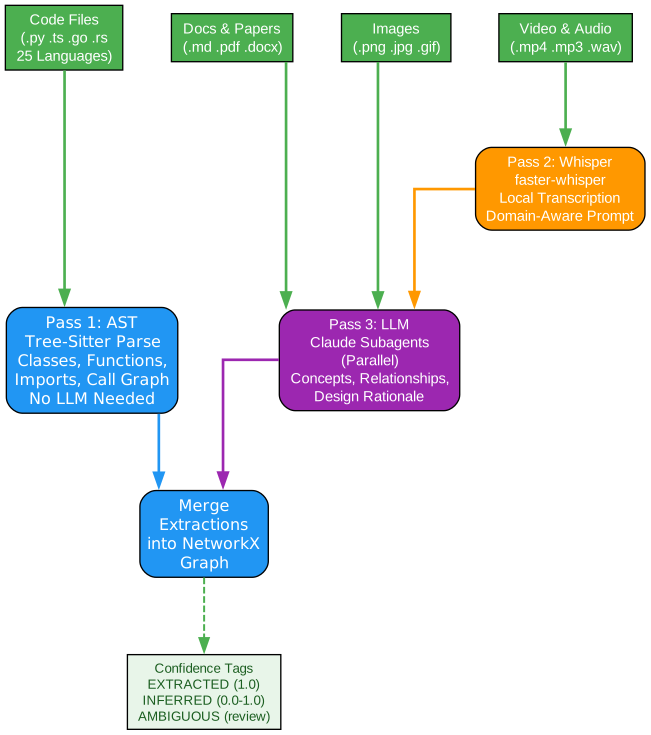
Understanding the Extraction Passes
The extraction diagram shows how different file types flow through three specialized extraction passes. Here is a detailed breakdown:
Pass 1: AST (Tree-Sitter) – Code Files
Code files in 25 languages (Python, JavaScript, TypeScript, Go, Rust, Java, C, C++, Ruby, C#, Kotlin, Scala, PHP, Swift, Lua, Zig, PowerShell, Elixir, Objective-C, Julia, Verilog, SystemVerilog, Vue, Svelte, Dart) are processed through tree-sitter AST parsing. This pass extracts classes, functions, imports, call graphs, docstrings, and rationale comments entirely deterministically – no LLM is needed. This means code extraction is instant, free, and completely private. No file contents leave your machine for code files.
Pass 2: Whisper (faster-whisper) – Video and Audio
Video and audio files (.mp4, .mov, .mkv, .webm, .avi, .m4v, .mp3, .wav, .m4a, .ogg) are transcribed locally using faster-whisper. The transcription uses a domain-aware prompt derived from the corpus god nodes – meaning the Whisper model gets hints about technical vocabulary specific to your project. Transcripts are cached in graphify-out/transcripts/ so re-runs skip already-transcribed files. Audio never leaves your machine.
Pass 3: LLM (Claude Subagents) – Docs, Papers, Images, Transcripts
Documents, PDFs, images, and the transcripts from Pass 2 are processed by Claude subagents running in parallel. This pass extracts concepts, relationships, design rationale, and semantic similarity edges. It also handles multimodal input: screenshots, diagrams, whiteboard photos, and images in other languages are all processed through Claude’s vision capabilities. The subagents run in parallel for speed, and the results are merged into the same extraction format.
Confidence Tags
Every relationship extracted through any pass is tagged with a confidence label. EXTRACTED edges (confidence 1.0) are found directly in the source – an import statement, a direct function call. INFERRED edges (confidence 0.0-1.0) are reasonable deductions – a call-graph second pass, co-occurrence in context. AMBIGUOUS edges are uncertain and flagged for human review in GRAPH_REPORT.md. This transparency means you always know what was found versus what was guessed.
What You Get
Graphify produces multiple output artifacts, each designed for a different use case.
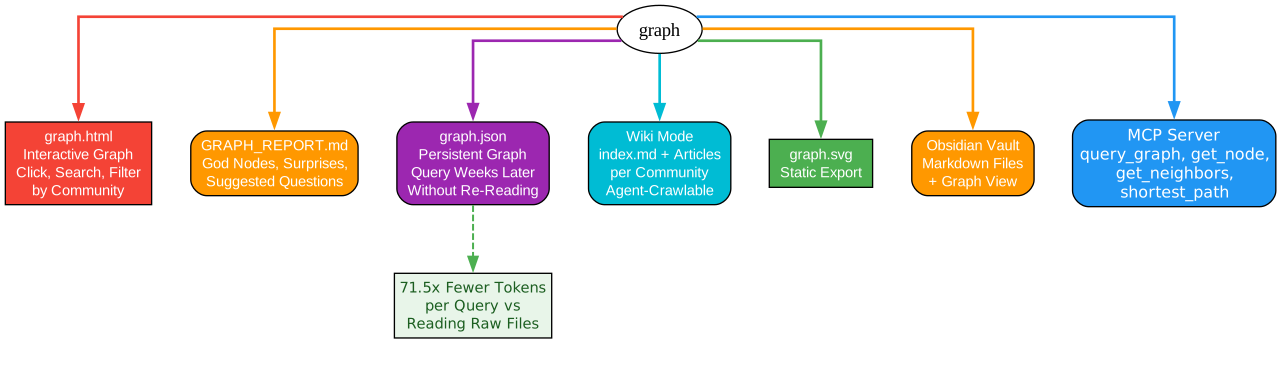
Understanding the Output Artifacts
The output diagram shows the seven artifacts that graphify produces from your knowledge graph. Here is what each one gives you:
graph.html – Interactive Graph
An interactive HTML visualization powered by vis.js. Open it in any browser, click nodes to explore, search for specific concepts, and filter by community. This is the most visual way to understand your codebase’s structure. You can see which nodes are hubs, which communities exist, and how concepts connect across module boundaries.
GRAPH_REPORT.md – Plain-Language Report
A markdown file that summarizes the entire graph in plain language. It lists god nodes (the highest-degree concepts that everything connects through), surprising connections (ranked by composite score with explanations of why they are surprising), and suggested questions (4-5 questions the graph is uniquely positioned to answer). This is what your AI assistant reads before answering architecture questions.
graph.json – Persistent Graph
A JSON file containing the complete graph structure. This is the key to the 71.5x token reduction. Instead of re-reading all your raw files for every query, your assistant reads the compact graph.json. The graph persists across sessions – query it weeks later without re-reading the source files. You can query it from the CLI with graphify query, traverse paths with graphify path, or get plain-language explanations with graphify explain.
Wiki Mode – Agent-Crawlable Articles
When you run with --wiki, graphify generates Wikipedia-style markdown articles per community and god node, with an index.md entry point. Point any agent at index.md and it can navigate the knowledge base by reading files instead of parsing JSON. This is ideal for agents that work better with natural language than structured data.
Obsidian Vault
With --obsidian, graphify generates an Obsidian-compatible vault with markdown files and graph view. You can browse the knowledge graph in Obsidian’s visual interface, following links between concepts and exploring communities.
MCP Server
Run python -m graphify.serve graphify-out/graph.json to expose the graph as an MCP server with tools like query_graph, get_node, get_neighbors, and shortest_path. Any MCP-compatible agent can use these tools for structured graph access instead of pasting text into prompts.
graph.svg – Static Export
A static SVG export of the graph for documentation, presentations, or embedding in blog posts.
Platform Integrations
Graphify works with 15+ AI coding platforms, each with its own always-on mechanism.

Understanding the Platform Integrations
The integrations diagram shows how graphify connects to 15+ AI coding platforms. Here is a detailed breakdown:
Hook-Based Platforms (Claude Code, Codex, OpenCode, Gemini CLI)
These platforms support PreToolUse or BeforeTool hooks that fire before file-search operations. When a knowledge graph exists, the hook injects a reminder: “graphify: Knowledge graph exists. Read GRAPH_REPORT.md for god nodes and community structure before searching raw files.” This means your assistant automatically navigates via the graph instead of grepping through every file. No manual intervention needed.
Rules-Based Platforms (Cursor, Kiro, Google Antigravity)
These platforms use always-apply rules files. Cursor uses .cursor/rules/graphify.mdc with alwaysApply: true. Kiro uses .kiro/steering/graphify.md with inclusion: always. Google Antigravity uses .agent/rules/graphify.md. In each case, the platform injects the graph context into every conversation automatically.
AGENTS.md Platforms (Aider, OpenClaw, Factory Droid, Trae, Hermes)
These platforms read AGENTS.md in your project root. Graphify writes the same rules to this file, making graph context always-on. These platforms do not support tool hooks, so AGENTS.md is the always-on mechanism.
Copilot (CLI + VS Code Chat)
GitHub Copilot CLI uses a skill file at ~/.copilot/skills/graphify/SKILL.md. VS Code Copilot Chat writes .github/copilot-instructions.md in your project root, which VS Code reads automatically every session.
Always-On vs Explicit Trigger
The always-on hook gives your assistant a map (GRAPH_REPORT.md). The /graphify commands let it navigate the map precisely. Use /graphify query for specific questions, /graphify path to trace exact paths between nodes, and /graphify explain for plain-language explanations of individual concepts.
Getting Started
Install graphify and set it up for your platform:
pip install graphifyy && graphify install
Then run it on any folder:
/graphify . # works on any folder - your codebase, notes, papers, anything
For the always-on experience, install the platform-specific integration:
graphify claude install            # Claude Code
graphify codex install             # Codex
graphify cursor install            # Cursor
graphify gemini install            # Gemini CLI
Add content from the web:
/graphify add https://arxiv.org/abs/1706.03762        # fetch a paper
/graphify add https://x.com/karpathy/status/...       # fetch a tweet
/graphify add <video-url>                              # download, transcribe, add to graph
Query the graph directly from the terminal:
graphify query "what connects attention to the optimizer?"
graphify path "DigestAuth" "Response"
graphify explain "SwinTransformer"
Team Workflows
graphify-out/ is designed to be committed to git so every teammate starts with a fresh map. One person runs /graphify . to build the initial graph and commits the output. Everyone else pulls and their assistant reads GRAPH_REPORT.md immediately with no extra steps. Install the post-commit hook (graphify hook install) so the graph rebuilds automatically after code changes – no LLM calls needed for code-only updates.
Privacy
Graphify sends file contents to your AI coding assistant’s underlying model API for semantic extraction of docs, papers, and images. Code files are processed locally via tree-sitter AST – no file contents leave your machine for code. Video and audio files are transcribed locally with faster-whisper – audio never leaves your machine. No telemetry, usage tracking, or analytics of any kind.
Tech Stack
NetworkX + Leiden (graspologic) + tree-sitter + vis.js. Semantic extraction via Claude (Claude Code), GPT-4 (Codex), or whichever model your platform runs. Video transcription via faster-whisper + yt-dlp (optional). No Neo4j required, no server, runs entirely locally.
Check out the Graphify GitHub repository to get started. Enjoyed this post? Never miss out on future posts by following us 


