CloakBrowser: Stealth Chromium That Passes All Bot Detection Tests
CloakBrowser is a stealth Chromium browser that passes every bot detection test by modifying fingerprints at the C++ source level rather than injecting JavaScript patches. Unlike traditional anti-detection tools like playwright-stealth or undetected-chromedriver that rely on config-level tweaks and JS injection, CloakBrowser compiles 57 source-level patches directly into the Chromium binary, making it indistinguishable from a real browser to detection services like FingerprintJS, BrowserScan, and Cloudflare Turnstile. With over 10,800 GitHub stars and a drop-in Playwright/Puppeteer replacement API, CloakBrowser lets developers automate web interactions without getting blocked.
Key Insight: CloakBrowser achieves a 0.9 reCAPTCHA v3 score – the highest among all anti-detection tools – because its 57 C++ patches modify browser fingerprints at the binary level, not through detectable JavaScript injection. Detection sites see a normal browser because it is a normal browser.
How It Works
CloakBrowser is a thin Python and JavaScript wrapper around a custom-built Chromium binary. The architecture is straightforward: you install the package, the binary auto-downloads on first launch, and every subsequent launch starts Playwright or Puppeteer with the stealth binary and fingerprint flags pre-configured. There is nothing new to learn – the API is identical to what you already use.
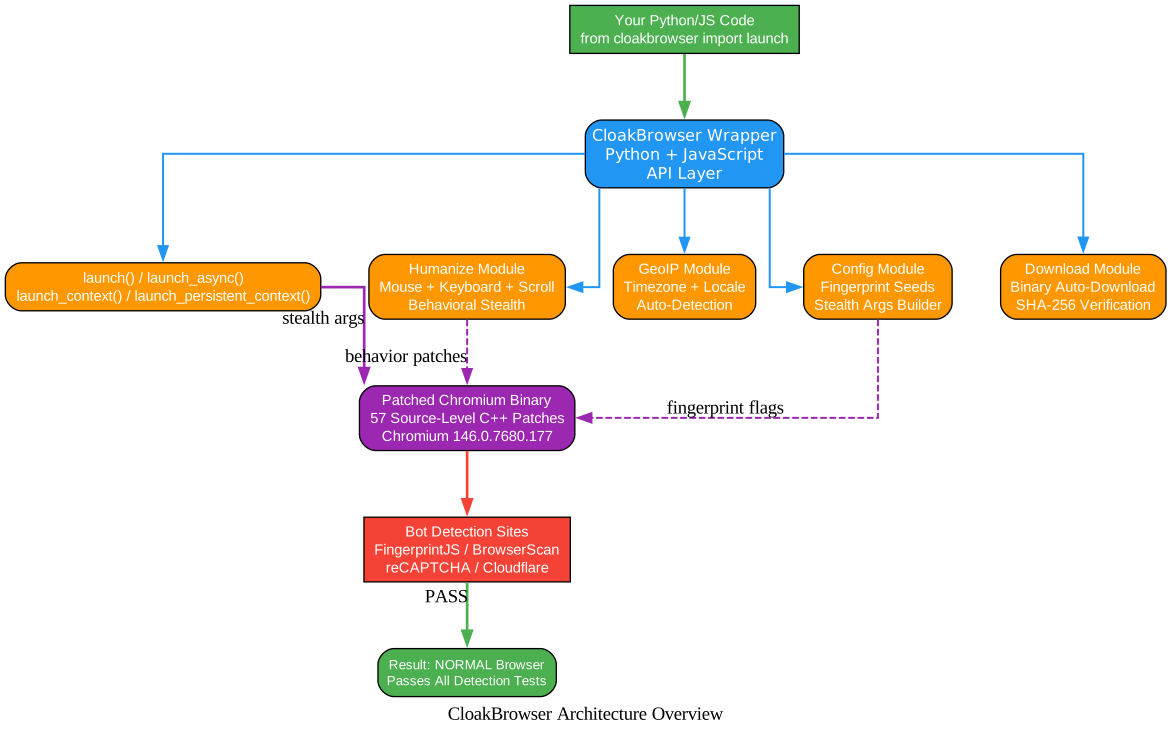
Understanding the Architecture
The architecture diagram above illustrates how CloakBrowser layers its stealth capabilities on top of the standard Playwright/Puppeteer workflow. Let us break down each component:
Your Python/JS Code – This is the entry point. You simply replace from playwright.sync_api import sync_playwright with from cloakbrowser import launch and the rest of your code works unchanged. The wrapper handles everything below this layer transparently.
CloakBrowser Wrapper (Python + JavaScript) – The API layer provides multiple launch functions: launch() and launch_async() for basic browser control, launch_context() and launch_context_async() for pre-configured contexts with user agent and viewport settings, and launch_persistent_context() for sessions that survive across restarts with cookies and localStorage intact.
Sub-Modules:
- Launch API – Manages browser lifecycle, proxy configuration, and stealth argument construction. It builds the correct Chromium flags from your parameters and handles SOCKS5/HTTP proxy normalization.
- Humanize Module – Patches Playwright/Puppeteer mouse, keyboard, and scroll interactions with human-like behavior: Bezier curves for mouse movement, per-character typing delays with occasional typos, and realistic scroll acceleration patterns.
- GeoIP Module – Auto-detects timezone and locale from your proxy IP address using the MaxMind GeoLite2 database, eliminating the common bot signal of mismatched timezone/locale pairs.
- Config Module – Generates random fingerprint seeds and platform-aware stealth arguments. On Linux it spoofs as Windows for a more common fingerprint; on macOS it runs natively.
- Download Module – Auto-downloads the correct Chromium binary for your platform with SHA-256 checksum verification, caching it locally for subsequent runs.
Patched Chromium Binary – The core of CloakBrowser. This is a real Chromium 146 binary with 57 source-level C++ patches compiled in. These patches handle canvas noise, WebGL rendering, audio context, font enumeration, screen properties, hardware reporting, WebRTC IP spoofing, network timing normalization, and automation signal removal – all at the binary level, invisible to detection scripts.
Bot Detection Sites – When the patched browser visits FingerprintJS, BrowserScan, reCAPTCHA, or Cloudflare Turnstile, it appears as a genuine Chrome browser because the fingerprints are real – they are generated by the binary itself, not injected via JavaScript.
57 Source-Level C++ Patches
The fundamental difference between CloakBrowser and every other stealth tool is the patch level. Config-level patches (like playwright-stealth) inject JavaScript to override browser APIs. Detection scripts can detect these overrides. Source-level patches modify the Chromium C++ code before compilation, so the fingerprints are part of the browser itself.

Understanding the Patch Coverage
The diagram above shows the 12 major categories of fingerprint patches that CloakBrowser applies to the Chromium binary. Each category addresses a specific detection vector that bot detection services use to identify automated browsers:
Canvas Fingerprint – Injects deterministic noise into canvas rendering operations and spoofs the resulting hash. Canvas fingerprinting works by drawing invisible graphics and measuring pixel-level differences; CloakBrowser makes each seed produce a unique, consistent canvas hash.
WebGL – Overrides UNMASKED_VENDOR_WEBGL and UNMASKED_RENDERER_WEBGL with realistic GPU profiles from a curated database. The binary auto-generates GPU models from the fingerprint seed, ensuring consistency across all WebGL queries.
Audio Context – Patches the AAC audio encoder and AudioContext API to produce consistent, non-identifying audio fingerprints. Audio fingerprinting measures oscillator output differences; CloakBrowser normalizes these at the C++ level.
Font Enumeration – Spoofs platform-specific font lists and font metrics. On Linux servers with minimal fonts, this prevents the “missing emoji fonts” detection that aggressive anti-bot systems like Kasada use.
Screen Properties – Overrides screen dimensions, DPI, and taskbar height to match the spoofed platform. A headless browser on a Linux server reporting 0x0 screen dimensions is an instant bot signal; CloakBrowser reports realistic 1920x1080 dimensions.
Hardware Reporting – Spoofs navigator.hardwareConcurrency (CPU cores) and navigator.deviceMemory (RAM) to match the fingerprint seed. These values are auto-generated and consistent across all queries.
WebRTC IP – The --fingerprint-webrtc-ip flag spoofs WebRTC ICE candidate IPs to match your proxy exit IP, preventing WebRTC-based IP leaks that reveal your real location even through a proxy.
Network Signals – Zeroes out DNS/connect/SSL timing, strips proxy cache headers, and removes the Proxy-Connection header leak. These timing signals are a common way to detect proxy usage.
Automation Removal – Sets navigator.webdriver to false, removes window.chrome undefined, and patches CDP detection. The binary also removes the --enable-automation flag that stock Playwright sets.
Browser Identity – Overrides User-Agent string, Client Hints, plugin list (reports 5 plugins instead of 0), and ensures window.chrome is present as a real object rather than undefined.
Storage Quota – Normalizes navigator.storage.estimate() and related APIs to prevent incognito detection. Persistent contexts can optionally set a custom quota to appear as regular browsing sessions.
WebAuthn – Spoofs WebAuthn capabilities to match the fingerprint platform, preventing detection through hardware authentication API probing.
Amazing: CloakBrowser patches 57 distinct detection vectors at the C++ source level – compared to
playwright-stealthwhich patches roughly 10-15 via JavaScript injection. The binary-level approach means detection scripts cannot distinguish CloakBrowser from a real Chrome browser because the fingerprints are generated by the browser itself, not injected after page load.
Human Behavior System
One of CloakBrowser’s most powerful features is the humanize=True flag, which replaces all Playwright/Puppeteer mouse, keyboard, and scroll interactions with human-like equivalents. No code changes are needed – just add the flag to your launch() call.
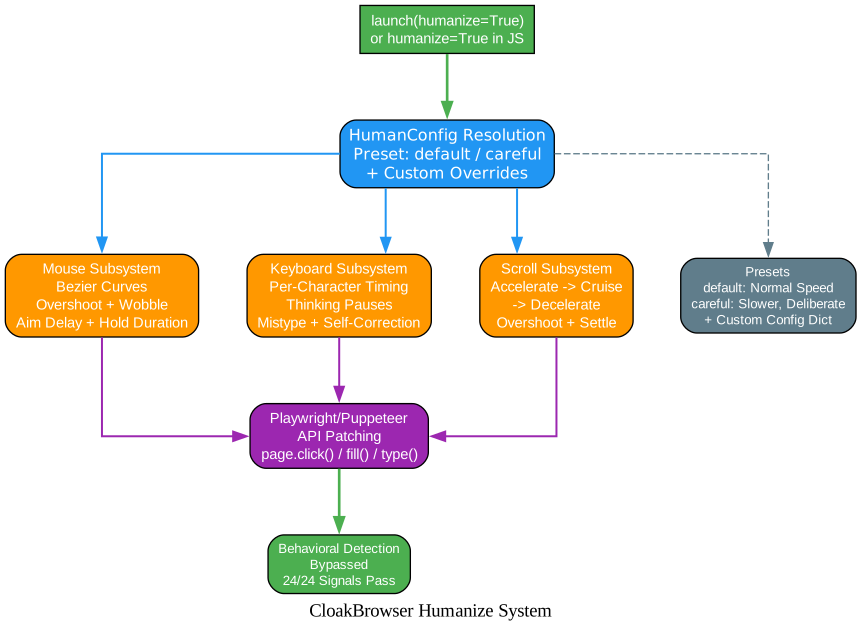
Understanding the Humanize System
The diagram above shows how CloakBrowser’s humanize system transforms robotic automation interactions into human-like behavior that passes behavioral bot detection. Here is how each subsystem works:
HumanConfig Resolution – When you pass humanize=True, CloakBrowser resolves the configuration from one of two presets: default (normal human speed) or careful (slower, more deliberate movements with idle micro-pauses between actions). You can also provide a custom human_config dictionary to override any individual parameter.
Mouse Subsystem – Instead of teleporting the cursor to a target element instantly, CloakBrowser generates Bezier curves with natural easing and slight overshoot. The mouse movement includes wobble (random deviation from the path), burst patterns (groups of rapid micro-movements), and aim delay (a brief pause before clicking, simulating the time a real user takes to aim).
Keyboard Subsystem – Rather than setting input values instantly, CloakBrowser types character by character with per-character timing delays (default 70ms with 40ms spread), thinking pauses (10% chance of a 400-1000ms pause between characters), and even occasional typos with self-correction (2% mistype chance by default). The shift_down and shift_up delays simulate real key press behavior for capital letters.
Scroll Subsystem – Instead of jumping to a scroll position, CloakBrowser implements a three-phase scroll pattern: accelerate (2-3 steps), cruise, and decelerate (2-3 steps). It includes overshoot (10% chance of scrolling past the target and settling back) and pre-move delay (100-300ms before starting to scroll, simulating the time a user takes to decide to scroll).
Playwright/Puppeteer API Patching – All standard API calls like page.click(), page.fill(), page.type(), page.mouse.*, page.keyboard.*, and Locator methods are automatically replaced with human-like equivalents. You do not need to change any of your existing code.
Behavioral Detection Bypass – The result is that behavioral bot detection systems like deviceandbrowserinfo.com score CloakBrowser as “You are human!” with 24/24 signals passing. This is because the mouse movements, typing patterns, and scroll behavior are statistically indistinguishable from real user interactions.
Takeaway: With just
launch(humanize=True), CloakBrowser replaces all Playwright/Puppeteer interactions with human-like behavior – Bezier curve mouse movements, per-character typing with occasional typos, and realistic scroll acceleration. No code changes needed beyond adding the flag.
Detection Test Results
CloakBrowser has been tested against 30+ detection services with consistently passing results. The comparison below shows how stock Playwright fails every major detection test, while CloakBrowser passes them all.
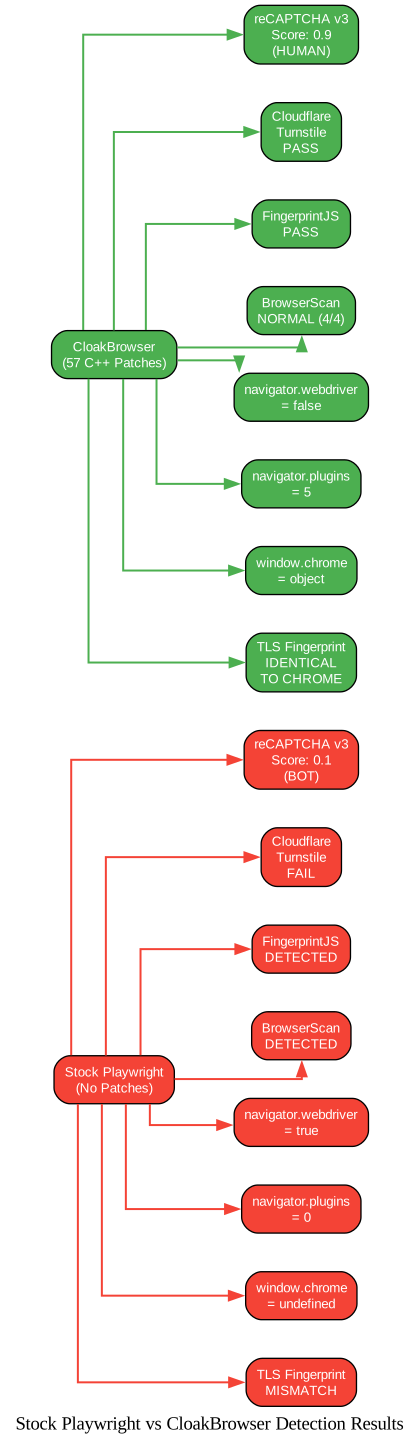
Understanding the Comparison
The diagram above contrasts the detection results of stock Playwright (left, red) versus CloakBrowser (right, green) across eight key detection vectors. Each vector represents a specific technique that bot detection services use to identify automated browsers:
reCAPTCHA v3 – Stock Playwright scores 0.1 (clearly a bot), while CloakBrowser scores 0.9 (human-level). This is the most commercially significant test because reCAPTCHA v3 is used by millions of websites. The 0.9 score means CloakBrowser can access reCAPTCHA-protected sites without solving CAPTCHAs.
Cloudflare Turnstile – Stock Playwright fails both non-interactive and managed challenges. CloakBrowser passes both, including the non-interactive challenge that resolves automatically without user interaction.
FingerprintJS – Stock Playwright is detected as a bot. CloakBrowser passes the FingerprintJS web-scraping demo and is served data rather than being blocked.
BrowserScan – Stock Playwright is flagged as detected. CloakBrowser scores NORMAL across all 4 checks (4/4), including the notPrivate check that penalizes incognito mode.
navigator.webdriver – Stock Playwright reports true (the most basic bot signal). CloakBrowser reports false because the binary patches this at the C++ level.
navigator.plugins – Stock Playwright reports 0 plugins (a headless browser signal). CloakBrowser reports 5 plugins matching a real Chrome installation.
window.chrome – Stock Playwright reports undefined (headless browsers do not have this object). CloakBrowser reports object, matching real Chrome.
TLS Fingerprint – Stock Playwright’s TLS fingerprint (ja3n/ja4/akamai) does not match real Chrome. CloakBrowser’s TLS fingerprint is identical to real Chrome because it uses the actual Chromium TLS stack.
| Detection Service | Stock Playwright | CloakBrowser | Notes |
|---|---|---|---|
| reCAPTCHA v3 | 0.1 (bot) | 0.9 (human) | Server-side verified |
| Cloudflare Turnstile (non-interactive) | FAIL | PASS | Auto-resolve |
| Cloudflare Turnstile (managed) | FAIL | PASS | Single click |
| ShieldSquare | BLOCKED | PASS | Production site |
| FingerprintJS bot detection | DETECTED | PASS | demo.fingerprint.com |
| BrowserScan bot detection | DETECTED | NORMAL (4/4) | browserscan.net |
| bot.incolumitas.com | 13 fails | 1 fail | WEBDRIVER spec only |
| deviceandbrowserinfo.com | 6 true flags | 0 true flags | isBot: false |
navigator.webdriver | true | false | Source-level patch |
navigator.plugins.length | 0 | 5 | Real plugin list |
window.chrome | undefined | object | Present like real Chrome |
| UA string | HeadlessChrome | Chrome/146.0.0.0 | No headless leak |
| CDP detection | Detected | Not detected | isAutomatedWithCDP: false |
| TLS fingerprint | Mismatch | Identical to Chrome | ja3n/ja4/akamai match |
Installation
Python
pip install cloakbrowser
On first run, the stealth Chromium binary is automatically downloaded (approximately 200MB, cached locally in ~/.cloakbrowser/).
For GeoIP auto-detection (timezone and locale from proxy IP):
pip install cloakbrowser[geoip]
For the Patchright backend (alternative to Playwright, suppresses additional CDP signals):
pip install cloakbrowser[patchright]
JavaScript / Node.js
# With Playwright
npm install cloakbrowser playwright-core

# With Puppeteer
npm install cloakbrowser puppeteer-core
Docker
# Quick test -- no install needed
docker run --rm cloakhq/cloakbrowser cloaktest
Verifying Installation
# Check binary info
python -m cloakbrowser info

# Pre-download binary (useful for Docker builds)
python -m cloakbrowser install
Important: You do NOT need to run
playwright install chromium. CloakBrowser downloads its own patched Chromium binary. You only need Playwright’s system dependencies:playwright install-deps chromium.
Quick Start
Python – Basic Usage
from cloakbrowser import launch

browser = launch()
page = browser.new_page()
page.goto("https://protected-site.com")  # no more blocks
browser.close()
Python – With Proxy and Humanize
from cloakbrowser import launch

browser = launch(
    proxy="http://user:pass@proxy:8080",
    geoip=True,        # auto-detect timezone/locale from proxy IP
    humanize=True,     # human-like mouse, keyboard, scroll
    headless=False,    # headed mode for maximum stealth
)
page = browser.new_page()
page.goto("https://heavily-protected-site.com")
browser.close()
Python – Persistent Context (Cookies Survive Restarts)
from cloakbrowser import launch_persistent_context

# First run -- creates the profile
ctx = launch_persistent_context("./my-profile", headless=False)
page = ctx.new_page()
page.goto("https://example.com")
ctx.close()  # profile saved

# Next run -- cookies, localStorage restored automatically
ctx = launch_persistent_context("./my-profile", headless=False)
JavaScript (Playwright)
import { launch } from 'cloakbrowser';

const browser = await launch({
  headless: false,
  proxy: 'http://user:pass@proxy:8080',
  humanize: true,
});
const page = await browser.newPage();
await page.goto('https://protected-site.com');
await browser.close();
JavaScript (Puppeteer)
import { launch } from 'cloakbrowser/puppeteer';

const browser = await launch({ headless: true });
const page = await browser.newPage();
await page.goto('https://example.com');
await browser.close();
Features
| Feature | Description |
|---|---|
| 57 C++ Source Patches | Canvas, WebGL, audio, fonts, GPU, screen, WebRTC, network timing, automation signals, CDP behavior patched at binary level |
| Human-like Behavior | humanize=True adds Bezier curve mouse, per-character typing with typos, realistic scroll patterns |
| 0.9 reCAPTCHA v3 Score | Human-level, server-verified score without CAPTCHA-solving services |
| Cloudflare Turnstile Pass | Passes both non-interactive and managed Turnstile challenges |
| Drop-in Playwright/Puppeteer API | Same API you already know – just swap the import |
| Auto-Download Binary | Chromium binary downloads automatically on first run with SHA-256 verification |
| GeoIP Auto-Detection | geoip=True auto-detects timezone and locale from proxy IP |
| WebRTC IP Spoofing | Prevents WebRTC IP leaks through proxy with --fingerprint-webrtc-ip |
| Persistent Contexts | Cookies and localStorage survive across sessions with launch_persistent_context() |
| SOCKS5 Proxy Support | Native SOCKS5 with UDP ASSOCIATE for QUIC/HTTP3 tunneling |
| Docker Support | Pre-built image with Xvfb, fonts, and all dependencies |
| CDP Server Mode | cloakserve multiplexer with per-connection fingerprint seeds |
| Python + JavaScript | Full API parity across both languages |
| Cross-Platform | Linux x64/arm64, macOS arm64/x64, Windows x64 |
Fingerprint Management
CloakBrowser is stealthy by default – no flags needed. The binary auto-generates a random fingerprint seed at startup and spoofs all detectable values. Every launch produces a fresh, coherent identity.
No flags (random seed each launch):
browser = launch() # fresh identity each time
Fixed seed for persistent identity (returning visitor):
browser = launch(args=["--fingerprint=12345"]) # same fingerprint each time
Full control – disable defaults, set everything yourself:
browser = launch(stealth_args=False, args=[
    "--fingerprint=42069",
    "--fingerprint-platform=windows",
    "--fingerprint-gpu-vendor=Intel Inc.",
    "--fingerprint-gpu-renderer=Intel Iris OpenGL Engine",
])
WebRTC IP spoofing (auto-detect from proxy):
browser = launch(proxy="http://proxy:8080", args=["--fingerprint-webrtc-ip=auto"])
Framework Integrations
CloakBrowser works with any framework that uses Playwright or Chromium. Here are the most popular integrations:
| Framework | Stars | Integration Method |
|---|---|---|
| browser-use | 70K | CDP connection with --remote-debugging-port |
| Crawl4AI | 58K | CDP connection with --remote-debugging-port |
| Crawlee | 8.6K | CDP connection with --remote-debugging-port |
| Scrapling | 21K | Direct binary launch with ensure_binary() |
| Stagehand | 21K | CDP connection with --remote-debugging-port |
| LangChain | 100K+ | Direct binary launch with ensure_binary() |
| Selenium | – | Direct binary launch with ensure_binary() |
Option 1: Framework launches our binary directly:
from cloakbrowser.download import ensure_binary
from cloakbrowser.config import get_default_stealth_args

binary_path = ensure_binary()           # auto-downloads if needed
stealth_args = get_default_stealth_args()  # all fingerprint flags
Option 2: CloakBrowser launches first, framework connects via CDP:
from cloakbrowser import launch_async

browser = await launch_async(args=["--remote-debugging-port=9242"])
# Connect your framework to http://127.0.0.1:9242
Docker Deployment
Quick Test
docker run --rm cloakhq/cloakbrowser cloaktest
Run a Script
docker run --rm cloakhq/cloakbrowser python -c "
from cloakbrowser import launch
browser = launch()
page = browser.new_page()
page.goto('https://example.com')
print(page.title())
browser.close()
"
CDP Server Mode
docker run -d --name cloak -p 127.0.0.1:9222:9222 cloakhq/cloakbrowser cloakserve
Then connect from your host:
from playwright.sync_api import sync_playwright

pw = sync_playwright().start()
browser = pw.chromium.connect_over_cdp("http://localhost:9222")
page = browser.new_page()
page.goto("https://example.com")
print(page.title())
browser.close()
Docker Compose
services:
  cloakbrowser:
    image: cloakhq/cloakbrowser
    command: cloakserve
    restart: unless-stopped
    ports:
      - "127.0.0.1:9222:9222"
    healthcheck:
      test: ["CMD", "curl", "-f", "http://localhost:9222/json/version"]
      interval: 30s
      timeout: 5s
      retries: 3
      start_period: 10s
Troubleshooting
Still Getting Blocked on Aggressive Sites (DataDome, Turnstile)?
Some sites detect headless mode even with C++ patches. Run in headed mode with a virtual display:
# Install Xvfb (virtual framebuffer)
sudo apt install xvfb

# Start virtual display
Xvfb :99 -screen 0 1920x1080x24 &
export DISPLAY=:99
from cloakbrowser import launch

# Headed mode + residential proxy for maximum stealth
browser = launch(headless=False, proxy="http://your-residential-proxy:port")
page = browser.new_page()
page.goto("https://heavily-protected-site.com")
browser.close()
Recommended Config for Anti-Bot Sites
Most blocks come from missing one of these three things, not from browser fingerprint detection:
browser = launch(
    proxy="http://your-residential-proxy:port",  # residential IP
    geoip=True,      # matches timezone + locale to proxy exit IP
    headless=False,   # headed mode -- some sites detect headless
    humanize=True,    # human-like mouse, keyboard, scroll behavior
)
Blocked on Kasada / Akamai Despite Correct Config?
On minimal Linux environments, missing font packages cause canvas emoji rendering to produce hashes that anti-bot systems do not recognize. Install the required fonts:
sudo apt install -y fonts-noto-color-emoji fonts-freefont-ttf fonts-unifont \
    fonts-ipafont-gothic fonts-wqy-zenhei fonts-tlwg-loma-otf
The Docker image (cloakhq/cloakbrowser) ships with these pre-installed.
Sites Challenge Fresh Sessions but Work After First Visit
Use a persistent profile to warm up cookies:
from cloakbrowser import launch_persistent_context

# First run: warm up with --disable-http2
ctx = launch_persistent_context("./profile", args=["--disable-http2"])
page = ctx.new_page()
page.goto("https://example.com")  # warms up cookies
ctx.close()

# Future runs -- no --disable-http2 needed
ctx = launch_persistent_context("./profile")
page = ctx.new_page()
page.goto("https://example.com")  # passes with saved cookies
reCAPTCHA v3 Scores Are Low (0.1-0.3)?
Avoid page.wait_for_timeout() – it sends CDP protocol commands that reCAPTCHA detects. Use native sleep instead:
# Bad -- sends CDP commands, reCAPTCHA detects this
page.wait_for_timeout(3000)

# Good -- invisible to the browser
import time
time.sleep(3)
Additional tips for maximizing reCAPTCHA scores:
- Use Playwright, not Puppeteer (Puppeteer sends more CDP traffic)
- Use residential proxies (datacenter IPs are flagged by IP reputation)
- Spend 15+ seconds on the page before triggering reCAPTCHA
- Use a fixed fingerprint seed for consistent device identity across sessions
- Use
page.type()instead ofpage.fill()for form filling
macOS: “App is Damaged” or Gatekeeper Blocks Launch
xattr -cr ~/.cloakbrowser/chromium-*/Chromium.app
Binary Download Fails / Timeout
Set a custom download URL or use a local binary:
export CLOAKBROWSER_BINARY_PATH=/path/to/your/chrome
Something Not Working? Update to Latest Version
pip install -U cloakbrowser          # Python
npm install cloakbrowser@latest       # JavaScript
docker pull cloakhq/cloakbrowser:latest  # Docker
Comparison with Alternatives
| Feature | Playwright | playwright-stealth | undetected-chromedriver | Camoufox | CloakBrowser |
|---|---|---|---|---|---|
| reCAPTCHA v3 score | 0.1 | 0.3-0.5 | 0.3-0.7 | 0.7-0.9 | 0.9 |
| Cloudflare Turnstile | Fail | Sometimes | Sometimes | Pass | Pass |
| Patch level | None | JS injection | Config patches | C++ (Firefox) | C++ (Chromium) |
| Survives Chrome updates | N/A | Breaks often | Breaks often | Yes | Yes |
| Maintained | Yes | Stale | Stale | Unstable | Active |
| Browser engine | Chromium | Chromium | Chrome | Firefox | Chromium |
| Playwright API | Native | Native | No (Selenium) | No | Native |
| Human-like behavior | No | No | No | No | Yes |
| SOCKS5 proxy | Via config | Via config | Via config | Via config | Native |
| GeoIP auto-detect | No | No | No | No | Yes |
Important: CloakBrowser does not solve CAPTCHAs – it prevents them from appearing. No CAPTCHA-solving services, no proxy rotation built in. Bring your own proxies and use the Playwright API you already know.
Configuration Reference
Environment Variables
| Variable | Default | Description |
|---|---|---|
CLOAKBROWSER_BINARY_PATH | – | Skip download, use a local Chromium binary |
CLOAKBROWSER_CACHE_DIR | ~/.cloakbrowser | Binary cache directory |
CLOAKBROWSER_DOWNLOAD_URL | cloakbrowser.dev | Custom download URL for binary |
CLOAKBROWSER_AUTO_UPDATE | true | Set to false to disable background update checks |
CLOAKBROWSER_SKIP_CHECKSUM | false | Set to true to skip SHA-256 verification |
CLOAKBROWSER_GEOIP_TIMEOUT_SECONDS | 5 | Max seconds for GeoIP resolution |
Fingerprint Flags
| Flag | Controls |
|---|---|
--fingerprint=SEED | Master seed for canvas, WebGL, audio, fonts, client rects |
--fingerprint-platform=OS | navigator.platform, UA OS, GPU pool selection |
--fingerprint-gpu-vendor | WebGL UNMASKED_VENDOR_WEBGL |
--fingerprint-gpu-renderer | WebGL UNMASKED_RENDERER_WEBGL |
--fingerprint-hardware-concurrency | navigator.hardwareConcurrency |
--fingerprint-device-memory | navigator.deviceMemory in GB |
--fingerprint-screen-width | Screen width |
--fingerprint-screen-height | Screen height |
--fingerprint-webrtc-ip=auto | WebRTC IP spoofing from proxy exit IP |
--fingerprint-timezone | Timezone (e.g. America/New_York) |
--fingerprint-locale | Locale (e.g. en-US) |
--fingerprint-storage-quota | Override storage quota in MB |
--fingerprint-noise=false | Disable noise injection while keeping seed |
Links
- GitHub Repository – https://github.com/CloakHQ/CloakBrowser
- PyPI Package – https://pypi.org/project/cloakbrowser/
- npm Package – https://www.npmjs.com/package/cloakbrowser
- Docker Image – https://hub.docker.com/r/cloakhq/cloakbrowser
- Website – https://cloakbrowser.dev
- Changelog – https://github.com/CloakHQ/CloakBrowser/blob/main/CHANGELOG.md
Conclusion
CloakBrowser represents a fundamental shift in anti-detection technology: instead of patching browser APIs with JavaScript injection that detection scripts can uncover, it modifies the Chromium source code itself. The result is a browser that detection services identify as genuine because it genuinely is one – just with fingerprints that you control. With a 0.9 reCAPTCHA v3 score, Cloudflare Turnstile bypass, and human-like behavioral automation built in, CloakBrowser is the most capable open-source stealth browser available for Python and JavaScript developers. Whether you are building web scrapers, automation pipelines, or AI agent browsers, CloakBrowser provides the stealth layer that lets your automation run without getting blocked. Enjoyed this post? Never miss out on future posts by following us 


