Easy-Vibe: Interactive Vibe Coding Course for Beginners
Easy-Vibe is an interactive vibe coding course that teaches beginners how to build real applications using AI-assisted programming. With over 10,800 stars on GitHub and a progressive 3+1 stage curriculum covering 80+ interactive topics, Easy-Vibe removes the traditional barriers to software development by embracing the philosophy that if you can describe what you want, you can build it. Built on VitePress with Vue 3 components, the platform delivers animated tutorials, simulated coding environments, and visual AI concept explanations that make learning to code feel more like playing a game than studying a textbook.
Why Easy-Vibe Matters
The traditional path to becoming a developer is long and intimidating. You need to learn syntax, understand data structures, master frameworks, and deploy applications – all before you ever ship something real. Easy-Vibe flips this model on its head. Instead of starting with theory, you start by building. The AI handles the heavy lifting while you learn the concepts naturally through hands-on projects.
Key Insight: Easy-Vibe has accumulated over 10,800 GitHub stars and 2,869 stars per week at its peak, making it one of the fastest-growing open source education platforms for AI-assisted coding. The project offers 100+ articles across 9 knowledge areas with 10-language support.
The platform targets five distinct audiences: complete beginners who want their first win, product managers and founders who need to validate ideas fast, students developing practical AI-era skills, junior developers learning the full path from idea to launch, and senior developers upgrading their AI collaboration workflows. Each audience has a tailored learning path that meets them where they are.
Understanding the Architecture
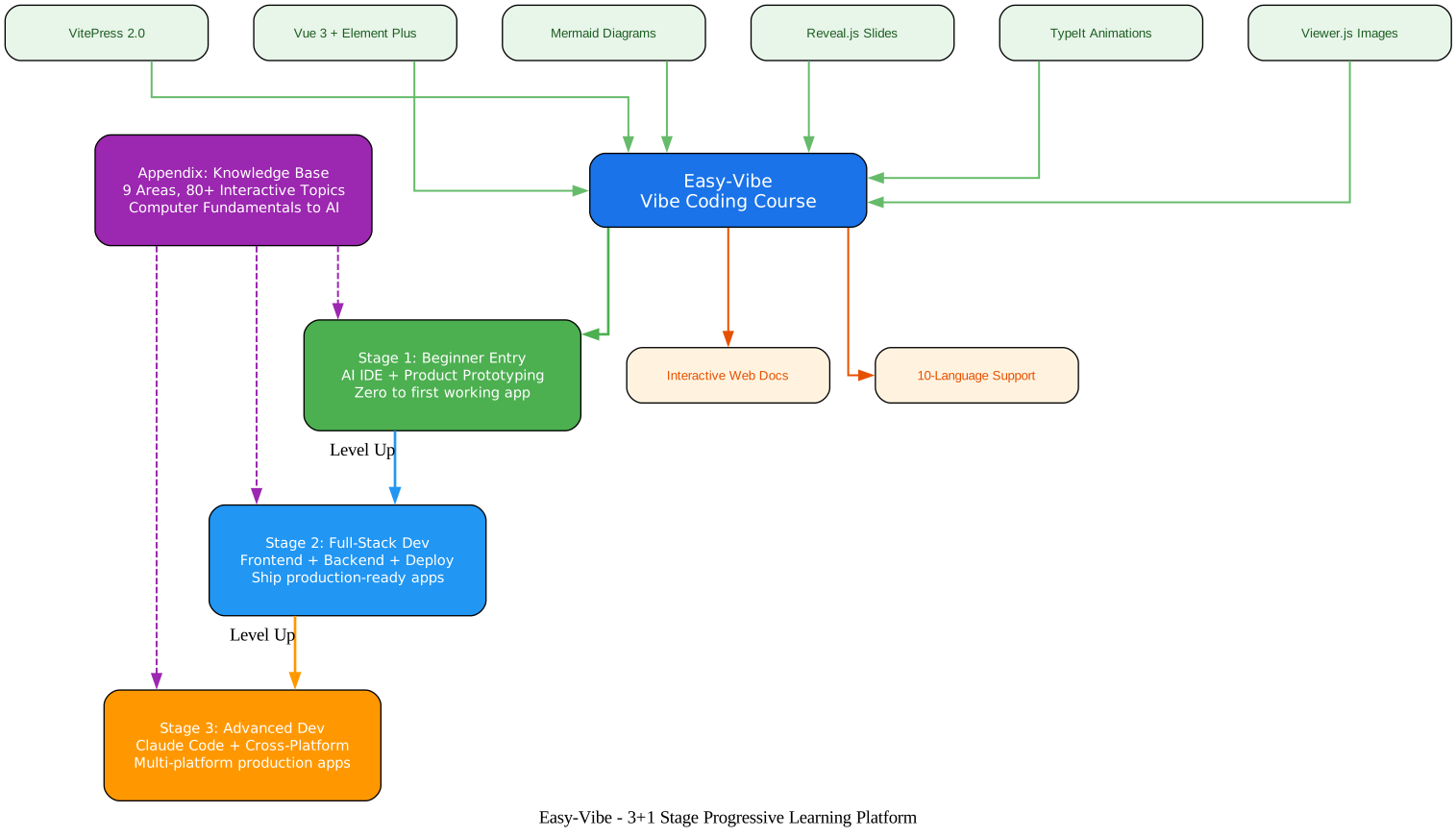
The architecture diagram above illustrates how Easy-Vibe organizes its learning platform around a central VitePress + Vue 3 core, with progressive stages branching outward and an appendix knowledge base providing foundational support at every level.
Core Platform: VitePress + Vue 3
The entire course runs on VitePress 2.0, a modern static site generator that delivers fast page loads and excellent developer experience. Vue 3 powers the interactive components that make Easy-Vibe stand out from traditional documentation sites. Element Plus provides the UI component library for settings panels and interactive elements, while Mermaid renders architecture diagrams inline, Reveal.js powers presentation slides, TypeIt creates typewriter animations, and Viewer.js enables image zoom and inspection.
Stage 1: Beginner Entry
The first stage focuses on getting users to their first working application as quickly as possible. It covers AI IDE tools (Cursor, Claude Code, Trae), idea validation, product prototyping, and AI capability integration. The goal is simple: build something real, then understand how it works.
Stage 2: Full-Stack Development
Once users have a working prototype, Stage 2 deepens their skills with frontend design (Figma, UI guidelines, component libraries), backend development (Supabase, Git, API design, Stripe payments), and deployment (Zeabur). The capstone project is building a complete SaaS application – an AI copywriting website with login, generation, billing, and admin management.
Stage 3: Advanced Development
For developers ready to go beyond web apps, Stage 3 covers Claude Code deep dives (MCP, Skills, Agent Teams, Spec Coding), cross-platform development (WeChat Mini Programs, Android, iOS, Electron, PWA, VS Code extensions), and advanced AI topics (RAG, LangGraph).
Appendix: Knowledge Base
The appendix provides a comprehensive reference library covering 9 major knowledge areas: computer fundamentals, development tools, browser and frontend, server and backend, data, architecture and system design, infrastructure and operations, artificial intelligence, and engineering excellence. Each area contains multiple interactive topics with animated explanations.
The 3+1 Stage Curriculum
Easy-Vibe uses a progressive learning model called “3+1 stages” – three main stages of skill development plus an appendix knowledge base that supports all stages. This structure ensures learners never hit a wall where they lack prerequisite knowledge.

Understanding the Features and Course Modules
The features diagram above shows how Easy-Vibe organizes its platform capabilities into four pillars: progressive learning methodology, interactive demonstrations, multi-language accessibility, and AI-first approach. Each pillar connects to specific course modules and interactive components.
Progressive Learning: The 3+1 Model
The curriculum follows a carefully designed progression. Stage 1 gives beginners their first win through a Snake game built with AI assistance, then moves to product prototyping. Stage 2 builds full-stack competence with real projects. Stage 3 pushes into advanced territory with cross-platform apps and AI agent workflows. The appendix knowledge base sits alongside all stages, providing on-demand reference material for any concept you encounter.
Interactive Demos: Vue 3 Components
What sets Easy-Vibe apart from static documentation is its rich set of interactive Vue 3 components. The LLM Quick Start demo lets you experiment with language model behavior directly in the browser. The Tokenization Visual Explorer shows how text gets broken into tokens. The Git Workflow visualizer walks you through branching and merging step by step. The Terminal Simulator provides an animated command-line experience with guided mouse movements. The Auth Design interactive flow demonstrates authentication patterns visually. The Cache Strategy visualizer shows how different caching approaches work.
Multi-Language Support
The platform supports 10 languages: Simplified Chinese (primary), Traditional Chinese, English, Japanese, Korean, Spanish, French, German, Arabic, and Vietnamese. This makes the curriculum accessible to a global audience and is particularly valuable for non-English speakers who often struggle to find quality coding education in their native language.
AI-First Approach
Every module in Easy-Vibe is designed around the premise that AI is your coding partner, not just a tool. The course teaches you how to describe what you want in natural language, how to iterate with AI on your designs, and how to progressively take more control as your skills grow. This is the “vibe coding” philosophy: start by vibing with AI, then learn the underlying mechanics.
Learning Workflow: From Zero to Production
Understanding the Learning Workflow
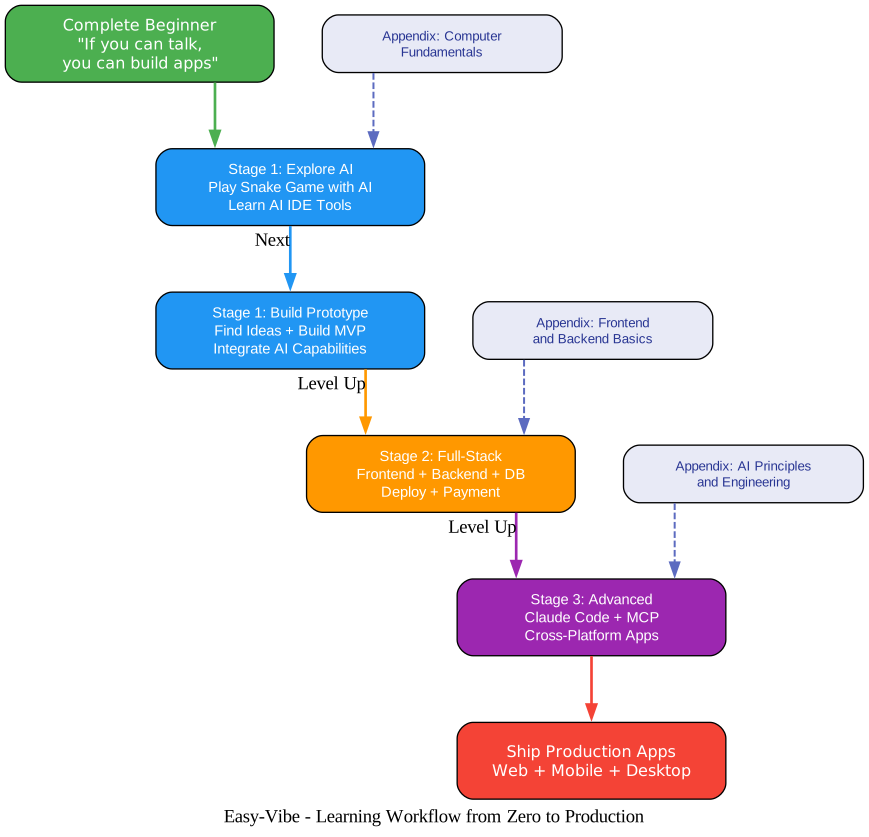
The workflow diagram above maps the complete journey from complete beginner to shipping production applications. Each stage builds on the previous one, with the appendix knowledge base providing foundational support at every level.
Stage 1: Explore AI and Build Prototypes
The journey begins with a simple but powerful experience: building a Snake game using AI. This is not about learning JavaScript syntax – it is about experiencing what it feels like to describe what you want and watch AI build it. From there, you learn to use AI IDE tools (Cursor, Claude Code, Trae), find product ideas worth building, create prototypes, integrate AI capabilities like text and image generation, and complete a full project with user feedback and iteration.
The appendix supports Stage 1 with product thinking frameworks, industry and consumer scenario inspiration, user research methods (Double Diamond, Jobs to Be Done, The Mom Test), and common error troubleshooting guides.
Stage 2: Full-Stack Development
Stage 2 is where you learn to build production-quality applications. The frontend track covers Figma and MasterGo basics, UI design foundations, multi-product design systems, LLM-powered UI enhancement, and modern component libraries. The backend track covers Git workflows, Supabase databases, API design and development, Zeabur deployment, modern CLI tools, and Stripe payment integration.
Takeaway: The Stage 2 capstone project has you build a complete SaaS application – an AI copywriting website with user authentication, content generation, Stripe billing, and admin management. This is not a toy project; it is the kind of application you could actually launch as a product.
The appendix supports Stage 2 with deep dives into frontend frameworks, backend architectures, database fundamentals, and deployment strategies.
Stage 3: Advanced Development
Stage 3 is for developers who want to push beyond web applications. It covers Claude Code in depth (MCP, Skills, Agent Teams, long-running tasks, Spec Coding, workflow best practices), cross-platform development (WeChat Mini Programs, Android, iOS, PWA, browser extensions, Electron, VS Code extensions, Qt industrial HMI, NFT minting), and advanced AI topics (RAG introduction, LangGraph advanced RAG).
Amazing: Stage 3 includes tutorials for building 11 different types of cross-platform applications, from WeChat Mini Programs to industrial Qt HMI systems, making it one of the most comprehensive cross-platform development curricula available in any open source project.
Appendix: The Knowledge Base
The appendix is not an afterthought – it is a core part of the curriculum. With 9 major knowledge areas and 80+ interactive topics, it covers everything from how transistors work to how to design distributed systems. Each topic uses animations and interactive components to make abstract concepts tangible. You can click through a RAG data flow, watch how a CPU processes instructions, or see how different caching strategies perform under load.
Interactive Learning Ecosystem

Understanding the Interactive Ecosystem
The ecosystem diagram above shows how Easy-Vibe’s VitePress + Vue 3 platform connects to six categories of interactive components, three content areas, three platform features, and two deployment targets.
Interactive Vue 3 Components
The platform includes over a dozen custom Vue 3 components that turn passive reading into active learning. The LLM Quick Start demo lets you interact with language model concepts directly. The Tokenization Visual Explorer breaks down how text becomes tokens. The Git Workflow visualizer shows branching and merging in real time. The Terminal Simulator provides guided mouse movements that teach IDE workflows. The Auth Design interactive flow demonstrates authentication patterns. The Cache Strategy visualizer shows different caching approaches in action.
Content Depth: 100+ Articles
The course contains over 100 articles organized across the three stages and appendix. Each article is written with beginners in mind, using clear language and progressive complexity. The articles are not just text – they embed interactive components, code examples, and visual explanations that make complex topics approachable.
Platform Features
The VitePress platform includes built-in dark mode, local search powered by MiniSearch, and a reading settings panel that lets you adjust font size (12-18px) and line height (1.25-1.8) with localStorage persistence. These features ensure the content is accessible and comfortable to read for extended study sessions.
Deployment: Vercel and GitHub Pages
The site deploys to both Vercel (with automatic builds) and GitHub Pages, with the base path configuration automatically switching between environments. This dual-deployment approach ensures high availability and fast loading times for users worldwide.
Installation and Setup
Prerequisites
- Node.js 18.0.0 or higher
- npm (comes with Node.js)
- Git
Running Locally
Clone the repository and start the development server:
git clone https://github.com/datawhalechina/easy-vibe.git
cd easy-vibe
npm install
npm run dev
Open http://localhost:5173 in your browser to access the interactive course.
Alternative: AI IDE Method
In an AI IDE chat window (VS Code, Cursor, or Trae), you can simply say:
Please help me run this project locally.
The AI will handle the installation and setup for you.
Build for Production
npm run build
npm run preview
The build command generates a static site in docs/.vitepress/dist that can be deployed to any static hosting service.
Features Comparison
| Feature | Easy-Vibe | Traditional Bootcamps | Other Coding Courses |
|---|---|---|---|
| AI-First Approach | Yes - vibe coding methodology | No - traditional syntax-first | Limited - AI as supplement |
| Interactive Components | 80+ Vue 3 interactive demos | Mostly video lectures | Some interactive exercises |
| Multi-Language Support | 10 languages | Usually English only | 1-3 languages |
| Progressive Curriculum | 3+1 stages, zero to production | Fixed curriculum | Topic-based, no clear path |
| Cross-Platform Projects | 11 platforms (WeChat, Android, iOS, etc.) | Usually web only | 1-2 platforms |
| Cost | Free and open source | $5,000-$20,000 | $10-$50/month |
| Real Projects | SaaS app, exam system, mini programs | 1-2 capstone projects | Toy projects |
| Knowledge Base | 9 areas, 80+ topics | Limited reference | Separate courses |
| Claude Code Coverage | MCP, Skills, Agent Teams, Spec Coding | None | Basic prompt engineering |
| Vibe Stories | Real user journeys from diverse backgrounds | None | None |
Key Technologies
| Technology | Purpose | Version |
|---|---|---|
| VitePress | Static site generator | 2.0.0-alpha.16 |
| Vue 3 | Interactive components | 3.5.0+ |
| Element Plus | UI component library | 2.13.1 |
| Mermaid | Diagram rendering | 11.13.0 |
| Reveal.js | Presentation slides | 6.0.1 |
| TypeIt | Typewriter animations | 8.8.7 |
| Viewer.js | Image zoom and inspection | 1.11.7 |
| Prettier | Code formatting | 3.7.4 |
| ESLint | Code linting | 9.0.0+ |
Troubleshooting
npm install fails with dependency errors
If you encounter dependency conflicts during npm install, try clearing the npm cache and reinstalling:
npm cache clean --force
rm -rf node_modules package-lock.json
npm install
If the issue persists, ensure you are using Node.js 18.0.0 or higher. You can check your version with node -v.
Dev server port conflicts
The VitePress dev server defaults to port 5173. If that port is already in use, VitePress will automatically try the next available port. Check the terminal output for the actual URL.
Build errors with VitePress alpha version
Since Easy-Vibe uses VitePress 2.0.0-alpha.16, you may encounter breaking changes. If the build fails, try:
npm run build:force
This forces a rebuild even if there are cache issues.
Interactive components not rendering
If Vue 3 interactive components do not render correctly, ensure JavaScript is enabled in your browser and that you are not using a content blocker that might interfere with the scripts. The components require client-side JavaScript to function.
Images not loading in local development
The project uses a symlink from docs/assets to ../assets. If images are not loading, verify the symlink exists:
ls -la docs/assets
If the symlink is broken, recreate it:
cd docs
rm assets
ln -s ../assets assets
Search not working
The local search uses MiniSearch, which is built into VitePress. If search is not working, try rebuilding the site:
npm run build
npm run preview
Important: Easy-Vibe uses a VitePress configuration that automatically sets the base path based on the deployment environment. On Vercel, it uses
/as the base. On GitHub Pages or local development, it uses/easy-vibe/. If you are deploying to a custom domain, you may need to adjust thebaseconfiguration indocs/.vitepress/config.mjs.
Who Should Use Easy-Vibe
Complete beginners who have never written a line of code will find the Stage 1 curriculum perfectly calibrated for their level. The Snake game project gives an immediate sense of accomplishment, and the AI IDE tutorials make the learning curve feel gentle rather than steep.
Product managers and founders who need to validate ideas quickly will appreciate the rapid prototyping focus in Stage 1. You can go from an idea to a working prototype in a single afternoon, then iterate based on user feedback.
Students looking to develop practical skills for the AI era will find the curriculum covers both the “how” and the “why.” The interactive components make abstract concepts tangible, and the real-world projects build a portfolio you can show to employers.
Junior developers who want to level up to full-stack will find Stage 2 invaluable. The SaaS capstone project covers everything from database design to payment integration, giving you the skills to ship complete applications independently.
Senior developers exploring AI-native workflows will find Stage 3’s deep dives into Claude Code, MCP, and Agent Teams immediately applicable to their daily work. The cross-platform tutorials also provide practical guides for expanding beyond web development.
Conclusion
Easy-Vibe represents a paradigm shift in coding education. Instead of teaching syntax first and building later, it starts with building and teaches concepts along the way. The 3+1 stage curriculum, 80+ interactive topics, 10-language support, and real-world project focus make it one of the most comprehensive free coding curricula available. Whether you are a complete beginner who has never written code or an experienced developer looking to integrate AI into your workflow, Easy-Vibe provides a structured, interactive, and genuinely enjoyable path forward.
The project is actively maintained by the Datawhale community, with regular updates adding new content, interactive components, and language translations. With its CC BY-NC-SA 4.0 license, you are free to use, share, and adapt the material for non-commercial purposes.
Links:
- GitHub Repository: https://github.com/datawhalechina/easy-vibe
- Live Course: https://datawhalechina.github.io/easy-vibe/welcome.html
- English Documentation: https://datawhalechina.github.io/easy-vibe/en/appendix/

Enjoyed this post? Never miss out on future posts by following us


