Repomix: Pack Your Entire Repository Into a Single AI-Friendly File
Feeding code to Large Language Models has become a daily workflow for developers working with AI assistants like Claude, ChatGPT, DeepSeek, and Gemini. But there is a fundamental problem: LLMs consume text, not directory trees. Copy-pasting individual files is tedious, missing context breaks reasoning, and sensitive data can accidentally leak into prompts. Repomix solves all of these problems by packing an entire repository into a single, structured, AI-optimized file – complete with security checks, token counting, and configurable output formats.
With over 23,000 stars on GitHub, Repomix has become the go-to tool for developers who need to provide comprehensive codebase context to AI systems. Whether you are requesting a code review, generating documentation, or debugging a complex issue across multiple files, Repomix ensures the AI receives your entire project in a format it can understand.
What is Repomix?
Repomix is an open-source tool created by Kazuki Yamada that consolidates an entire repository into a single file optimized for AI consumption. It is not just a file concatenator – it is a purpose-built pipeline that understands git repositories, filters sensitive data, counts tokens, and generates output in formats specifically designed for LLM comprehension.
The tool supports multiple interfaces: a command-line tool, a programmatic Node.js API, an MCP (Model Context Protocol) server for AI agent integration, a web interface at repomix.com, browser extensions for Chrome and Firefox, and a community-maintained VSCode extension. This flexibility means you can use Repomix in whatever workflow suits you best.
Understanding the Architecture
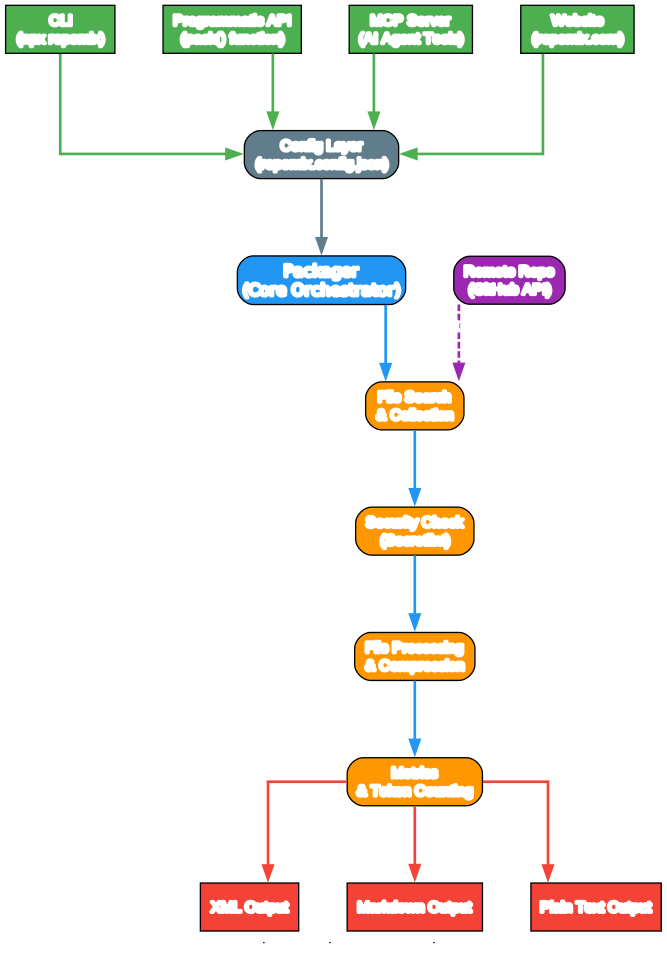
The architecture diagram above illustrates how Repomix’s components interact. Let us break down each layer:
Input Layer (Green) The four entry points – CLI, Programmatic API, MCP Server, and Website – all feed into the same configuration layer. This means regardless of how you invoke Repomix, the same processing pipeline handles your request. The CLI is the most common interface (npx repomix), while the MCP Server enables direct integration with AI agents like Claude.
Configuration Layer (Gray) The repomix.config.json file controls every aspect of the packing process: which files to include or exclude, output format, compression settings, and security thresholds. This centralized configuration ensures consistent behavior across all interfaces.
Core Packager (Blue) The Packager orchestrates the entire pipeline, coordinating file search, security checks, content processing, and metrics calculation. It runs stages concurrently where possible – for example, security checks and file processing execute in parallel since they do not compete for the same CPU resources.
Processing Modules (Orange) File Search discovers files using globby with git-aware filtering. Security Check runs Secretlint in worker threads. File Processing handles compression via Tree-sitter and comment stripping. Metrics calculates token counts using GPT tokenizers.
Output Layer (Red) Three output formats are available: XML (the default, optimized for Claude’s XML tag parsing), Markdown (human-readable), and Plain Text (compact). The XML format is particularly effective because Anthropic’s documentation confirms that XML tags help Claude parse prompts more accurately.
Remote Support (Purple) The Remote Repo module fetches repositories directly from GitHub via the GitHub API, enabling you to pack any public repository without cloning it first.
How It Works: The Packing Pipeline
Understanding the packing pipeline is key to getting the most out of Repomix. Each stage performs a specific transformation, and the pipeline is designed for both correctness and performance.
Understanding the Packing Pipeline
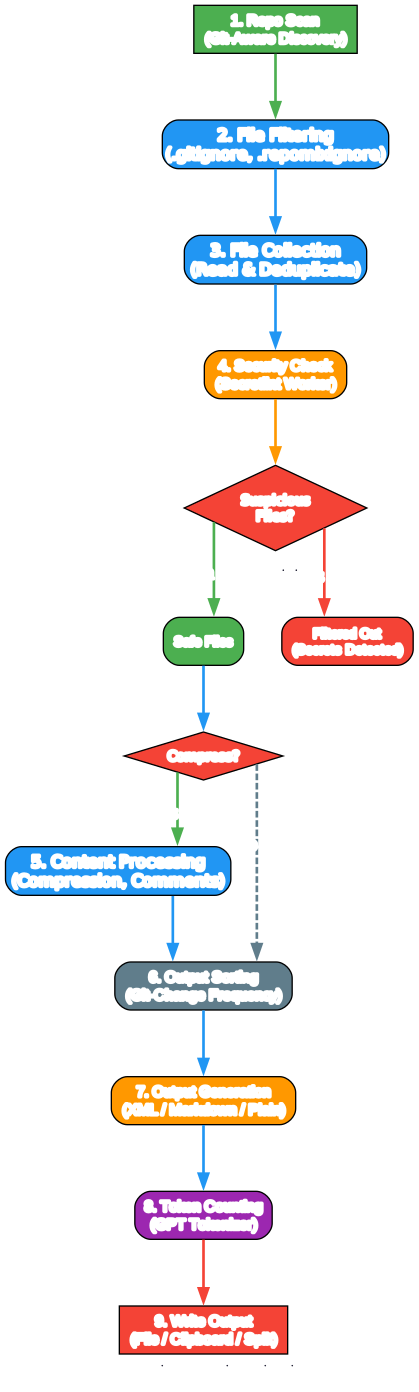
The pipeline diagram shows the nine stages that transform a raw repository into an AI-optimized output file. Here is what happens at each stage:
Stage 1: Repo Scan Repomix performs a git-aware discovery of files in your repository. It respects .gitignore, .ignore, and .repomixignore files automatically, so build artifacts, node_modules, and other non-essential files are excluded by default. This is critical because including generated files wastes tokens and can confuse AI models.
Stage 2: File Filtering Beyond gitignore rules, you can specify custom include and exclude patterns using glob syntax. For example, --include "src/**/*.ts,**/*.md" packs only TypeScript source files and Markdown documents. The --ignore flag lets you exclude additional patterns.
Stage 3: File Collection Files are read from disk and deduplicated. For remote repositories, Repomix fetches the GitHub archive and extracts files. The collection stage also handles encoding detection (using jschardet and iconv-lite) to correctly read files in various character encodings.
Stage 4: Security Check This is where Repomix distinguishes itself from simple file concatenators. The security check runs Secretlint in worker threads, scanning every file for sensitive data like API keys, passwords, and tokens. Files containing secrets are flagged and excluded from the output. The check also scans git diffs and git logs for leaked credentials.
Stage 5: Content Processing When the --compress flag is enabled, Repomix uses Tree-sitter to parse source code and extract key structural elements – function signatures, class definitions, type declarations, and imports – while removing implementation details like function bodies and comments. This can reduce token count by 60-70% while preserving the information AI needs most. It supports 16+ languages including TypeScript, Python, Go, Rust, Java, C++, and more.
Stage 6: Output Sorting Files are sorted by git-change frequency, meaning the most actively modified files appear first in the output. This prioritization helps AI models focus on the most important parts of the codebase.
Stage 7: Output Generation The sorted, processed files are assembled into the chosen output format (XML, Markdown, Plain Text, or JSON). Each format includes a directory tree, file contents with clear separators, and optional custom instructions.
Stage 8: Token Counting Repomix uses the GPT tokenizer (supporting o200k_base, cl100k_base, and other encodings) to count tokens for each file and the total output. This information is displayed in the CLI report and helps you stay within LLM context limits.
Stage 9: Write Output The final output is written to disk, copied to clipboard (if enabled), or split into multiple files if the output exceeds a configured size limit.
Key Features
Understanding the Key Features
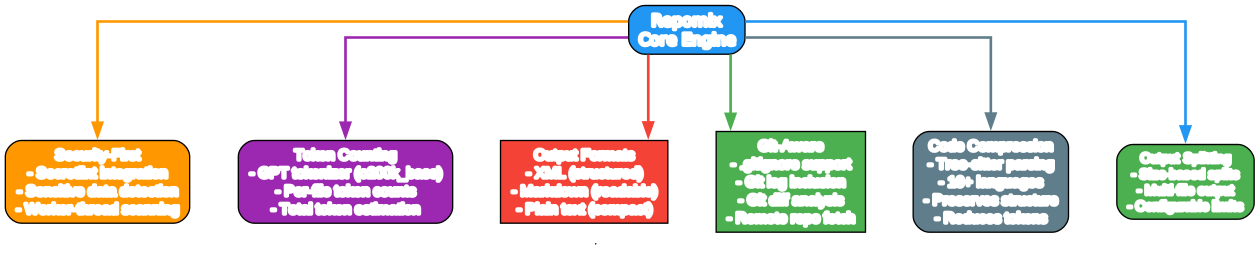
The features diagram shows the six major capability areas radiating from the Repomix core engine. Each feature addresses a specific challenge in the AI-code workflow:
Security-First (Orange) The Secretlint integration is not optional – it runs by default on every pack operation. It uses worker threads for parallel scanning, processing files in batches of 50 to reduce IPC overhead. When suspicious files are detected, they are excluded from the output and reported separately. This prevents accidental exposure of API keys, database credentials, and other secrets to AI services.
Token Counting (Purple) Token counting uses the same tokenizer that GPT models use internally (via the gpt-tokenizer library). This means the token counts Repomix reports are accurate representations of how many tokens your output will consume when sent to an LLM. The lazy-loaded encoding system supports multiple encoding schemes: o200k_base (GPT-4o), cl100k_base (GPT-4), p50k_base, and r50k_base.
Output Formats (Red) The three output formats serve different purposes. XML is the default and most effective for Claude, which explicitly benefits from XML-tagged content. Markdown is ideal for human review and tools that render Markdown. Plain text is the most compact option. A JSON format is also available for programmatic consumption.
Git-Aware (Green) Repomix’s git awareness goes beyond just respecting .gitignore. It can include git logs (commit history with dates and messages) and git diffs (working tree and staged changes) in the output, providing AI models with valuable context about code evolution and recent changes. Remote repository support lets you pack any public GitHub repo by URL.
Code Compression (Gray) The Tree-sitter-based compression system is one of Repomix’s most powerful features. Instead of including full file contents, it parses the abstract syntax tree and extracts only the structural elements – function signatures, class definitions, type annotations, imports, and exports. This preserves the information architecture of your code while dramatically reducing token count.
Output Splitting (Blue) For large repositories that exceed LLM context windows, Repomix can split the output into multiple files based on a configurable byte limit. Each split file is a complete, well-formed output that can be fed to an AI independently.
Getting Started
Installation
The fastest way to use Repomix is with npx – no installation required:
npx repomix@latest
For repeated use, install globally:
# Using npm
npm install -g repomix

# Using yarn
yarn global add repomix

# Using bun
bun add -g repomix

# Using Homebrew (macOS/Linux)
brew install repomix
Basic Usage
Pack your current directory:
repomix
Pack a specific directory:
repomix path/to/directory
Pack specific files using glob patterns:
repomix --include "src/**/*.ts,**/*.md"
Pack a remote GitHub repository:
repomix --remote https://github.com/yamadashy/repomix

# Or use GitHub shorthand:
repomix --remote yamadashy/repomix
Pack with compression to reduce token count:
repomix --compress
Pipe files from other tools:
# Using find
find src -name "*.ts" -type f | repomix --stdin

# Using ripgrep
rg -l "TODO|FIXME" --type ts | repomix --stdin

# Using fzf for interactive selection
fzf -m | repomix --stdin
Programmatic API
For Node.js integration, Repomix exposes a pack() function:
import { pack, loadFileConfig, mergeConfigs } from 'repomix';

// Load configuration
const fileConfig = await loadFileConfig('./');
const config = mergeConfigs(fileConfig, {
  output: {
    style: 'xml',
    filePath: 'my-output.xml',
  },
});

// Run the pack operation
const result = await pack(['./src'], config);

console.log(`Total files: ${result.totalFiles}`);
console.log(`Total tokens: ${result.totalTokens}`);
console.log(`Suspicious files: ${result.suspiciousFilesResults.length}`);
MCP Server for AI Agents
Repomix includes a built-in MCP (Model Context Protocol) server that enables AI agents to directly pack and analyze codebases:
# Start the MCP server
repomix --mcp
The MCP server exposes these tools to AI agents:
pack_codebase- Pack a local directorypack_remote_repository- Pack a GitHub repositoryread_repomix_output- Read a packed output filegrep_repomix_output- Search within a packed outputgenerate_skill- Create Claude Agent Skills from codebasesfile_system_read_file- Read individual filesfile_system_read_directory- List directory contents
This is particularly powerful when used with Claude Desktop or other MCP-compatible AI tools, as the AI can autonomously pack, read, and analyze codebases without manual file management.
Docker Usage
For isolated environments:
# Pack current directory
docker run -v .:/app -it --rm ghcr.io/yamadashy/repomix

# Pack a remote repository
docker run -v ./output:/app -it --rm ghcr.io/yamadashy/repomix --remote https://github.com/yamadashy/repomix
Use Cases
Code Review and Refactoring
Pack your codebase and ask an LLM for a comprehensive review:
This file contains my entire codebase. Please review the overall structure
and suggest any improvements or refactoring opportunities, focusing on
maintainability and scalability.
Documentation Generation
Generate project documentation from code:
Based on the codebase in this file, please generate a detailed README.md
that includes an overview of the project, its main features, setup
instructions, and usage examples.
Test Case Generation
Generate comprehensive test cases:
Analyze the code in this file and suggest a comprehensive set of unit tests
for the main functions and classes. Include edge cases and potential error
scenarios.
Understanding Unfamiliar Codebases
When joining a new project or reviewing an open-source library:
# Pack a remote repo for analysis
repomix --remote facebook/react --compress
The compressed output preserves the API surface and type signatures while reducing token count, making it feasible to feed large projects to LLMs.
CI/CD Integration
Use Repomix in CI pipelines to automatically generate codebase context for AI-powered code review:
# In a CI script
repomix --include "src/**/*.ts" --style xml --output repomix-context.xml
# Feed repomix-context.xml to an AI review tool
Ecosystem and Integrations
Understanding the Ecosystem
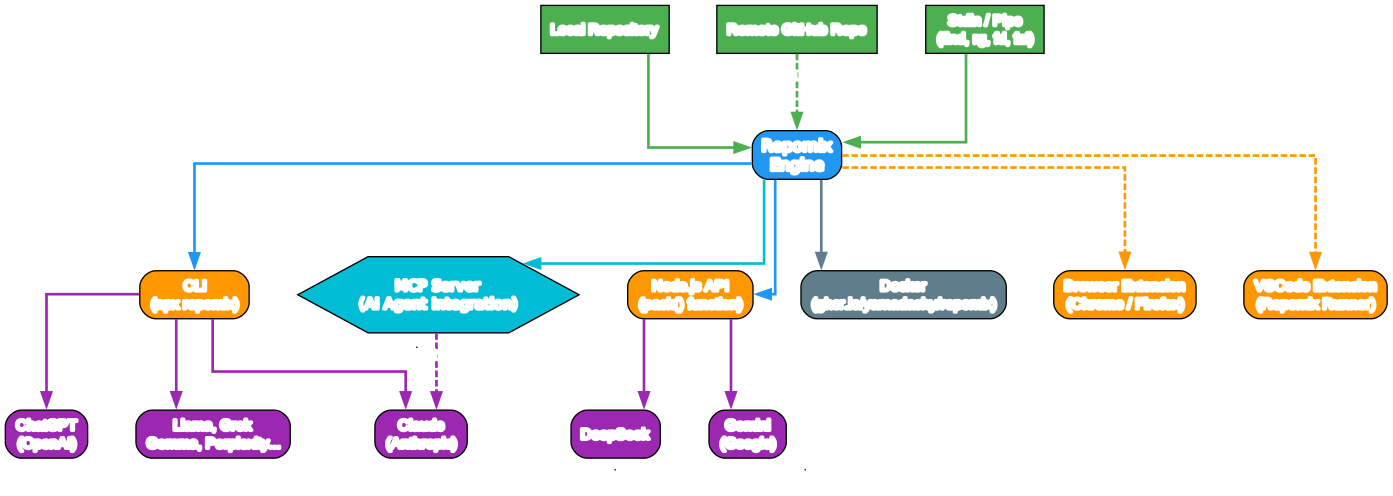
The ecosystem diagram illustrates how Repomix connects code sources to LLM consumers through multiple interfaces:
Input Sources (Green) Three primary input sources feed into Repomix: local repositories (the most common), remote GitHub repositories (fetched via the GitHub API), and stdin/pipe (for integration with Unix tools like find, ripgrep, fd, and fzf). The stdin option is particularly powerful because it lets you use any file-discovery tool to select exactly which files to pack.
Integration Interfaces Repomix provides six ways to access its functionality. The CLI (npx repomix) is the simplest and most common. The Node.js API enables programmatic integration in build scripts and tools. The MCP Server provides native AI agent integration – this is the most forward-looking interface, enabling AI tools to autonomously pack and analyze code. Docker support ensures reproducible runs in any environment. Browser extensions (Chrome and Firefox) add a one-click “Repomix” button to GitHub repository pages. The VSCode extension (Repomix Runner) integrates directly into the editor workflow.
LLM Consumers (Purple) The packed output works with all major LLMs: Claude (which benefits most from the XML format), ChatGPT, DeepSeek, Gemini, Llama, Grok, Gemma, and Perplexity. The MCP Server provides native integration with Claude through the Model Context Protocol, enabling seamless agent-to-tool communication.
Comparison with Similar Tools
| Feature | Repomix | Gitingest | File concatenation |
|---|---|---|---|
| Security scanning | Yes (Secretlint) | No | No |
| Token counting | Yes (GPT tokenizer) | No | No |
| Code compression | Yes (Tree-sitter) | No | No |
| Output formats | XML, Markdown, Plain, JSON | Text | Raw text |
| Git-aware filtering | Yes | Limited | No |
| Remote repo support | Yes | Yes | No |
| MCP Server | Yes | No | No |
| Git log/diff inclusion | Yes | No | No |
| Output splitting | Yes | No | No |
| Programmatic API | Yes (Node.js) | Yes (Python) | No |
Repomix’s key differentiator is its security-first approach and token awareness. While tools like Gitingest serve the Python ecosystem well, Repomix provides a more comprehensive solution for the JavaScript/TypeScript ecosystem with features specifically designed for the LLM workflow.
Configuration
Create a repomix.config.json to customize behavior:
repomix --init
Example configuration:
{
  "include": ["src/**/*.ts", "tests/**/*.ts"],
  "ignore": ["**/*.test.ts", "dist/**"],
  "output": {
    "style": "xml",
    "filePath": "repomix-output.xml",
    "instructionFilePath": "repomix-instruction.md",
    "includeEmptyDirectories": false
  },
  "security": {
    "enableSecurityCheck": true
  },
  "tokenCount": {
    "encoding": "o200k_base"
  },
  "compress": true
}
The instructionFilePath option lets you include custom instructions in the output that guide the AI on how to interpret the packed codebase. This is useful for providing project-specific context, coding conventions, or analysis instructions.
Conclusion
Repomix fills a critical gap in the AI-assisted development workflow: getting the right code context into LLMs efficiently and safely. Its combination of security scanning, token counting, code compression, and multiple output formats makes it more than just a file packer – it is a purpose-built tool for the LLM era.
The MCP Server integration is particularly noteworthy, as it enables AI agents to autonomously pack and analyze codebases, paving the way for more sophisticated AI-assisted development workflows. As LLMs continue to grow in capability and adoption, tools like Repomix that bridge the gap between code repositories and AI context windows will become increasingly essential.
Whether you are doing code reviews, generating documentation, debugging across multiple files, or onboarding to a new codebase, Repomix provides the structured, secure, and token-efficient output that modern AI workflows demand.
Links
- GitHub: https://github.com/yamadashy/repomix
- Website: https://repomix.com
- npm: https://www.npmjs.com/package/repomix
- Discord: https://discord.gg/wNYzTwZFku

Enjoyed this post? Never miss out on future posts by following us


