DeepTutor: Agent-Native Personalized Learning Assistant
In the rapidly evolving landscape of AI-powered education, DeepTutor emerges as a groundbreaking open-source project from HKUDS (Data Intelligence Lab at The University of Hong Kong). With over 15,000 GitHub stars and growing rapidly, this agent-native personalized learning assistant represents a paradigm shift in how we think about AI-driven tutoring systems.
What is DeepTutor?
DeepTutor is not just another chatbot wrapper around an LLM. It is a comprehensive, agent-native intelligent learning companion built around a sophisticated two-layer plugin model (Tools + Capabilities) with three distinct entry points: CLI, WebSocket API, and Python SDK. The system is designed to provide personalized, adaptive learning experiences that evolve with the user.
The project reached a significant milestone with version 1.0.0, featuring a ground-up architecture rewrite, TutorBot functionality, and flexible mode switching under the Apache-2.0 license. This release marks a new chapter in AI-powered education technology.
Key Features
DeepTutor offers a rich set of features designed to transform how people learn:
Unified Chat Workspace - Five distinct modes coexist in a single workspace: Chat, Deep Solve, Quiz Generation, Deep Research, and Math Animator. All share the same context, allowing seamless transitions between conversation, problem-solving, assessment, and research.
Personal TutorBots - Unlike traditional chatbots, TutorBots are autonomous agents with independent workspaces, memory, and personality. Each bot can set reminders, learn new abilities, and evolve alongside the learner.
AI Co-Writer - A Markdown editor where AI is a first-class collaborator. Select text to rewrite, expand, or summarize, drawing from your knowledge base and the web.
Guided Learning - Transform materials into structured, visual learning journeys with multi-step plans and interactive pages for each knowledge point.
Knowledge Hub - Upload PDFs, Markdown, and text files to build RAG-ready knowledge bases that actively power every conversation and research session.
Persistent Memory - DeepTutor builds a living profile of your learning journey, shared across all features and TutorBots, getting sharper with every interaction.
Agent-Native Architecture
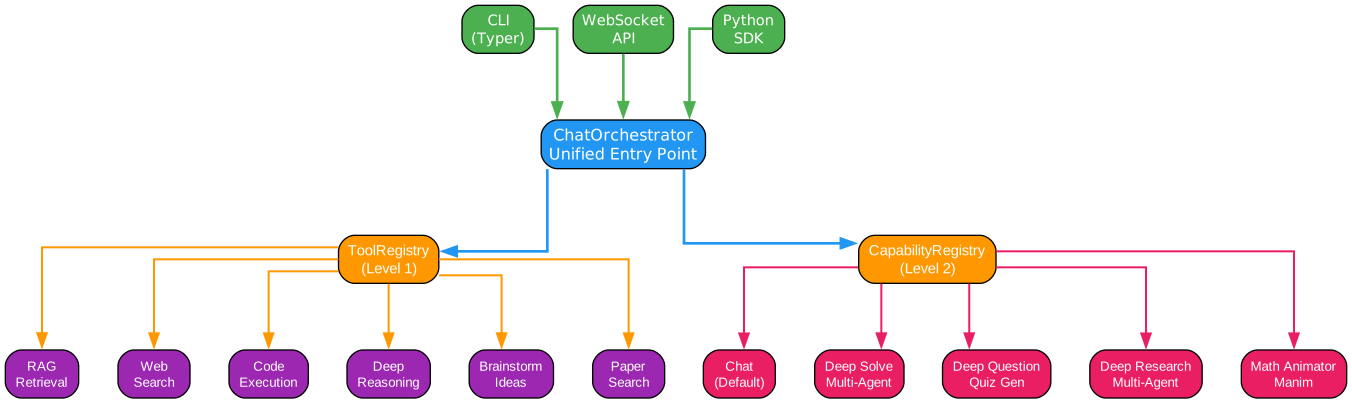
Understanding the Agent-Native Architecture
The architecture diagram above illustrates DeepTutor’s sophisticated two-layer plugin model that separates lightweight tools from complex multi-step capabilities. This design enables unprecedented flexibility while maintaining clean separation of concerns.
Entry Points Layer
The architecture begins with three distinct entry points, each serving different use cases:
-
CLI (Typer) - A command-line interface for terminal-native users and automation pipelines. The CLI provides both interactive REPL mode and one-shot execution capabilities, making it ideal for scripting and CI/CD integration.
-
WebSocket API - Real-time bidirectional communication for web applications and browser clients. This enables the responsive, streaming experience users expect from modern AI interfaces.
-
Python SDK - Direct programmatic access for developers building custom integrations or embedding DeepTutor into existing applications. The SDK provides the same capabilities as other entry points but with full Python flexibility.
All three entry points converge at the ChatOrchestrator, which serves as the unified entry point for all requests. This design ensures consistent behavior regardless of how users interact with the system.
ChatOrchestrator
The orchestrator is the central routing hub that directs requests to the appropriate capability. It maintains conversation context, manages session state, and coordinates between tools and capabilities. When a request arrives, the orchestrator determines whether to route it to the default Chat capability or to a specialized deep capability like Deep Solve or Deep Research.
The orchestrator’s intelligence lies in its ability to seamlessly switch between modes while preserving context. A user might start with a simple chat question, escalate to Deep Solve when complexity increases, generate quiz questions to test understanding, and then launch Deep Research for deeper exploration - all within one continuous thread.
Level 1 - Tools
The first layer consists of lightweight, single-function tools that the LLM can call on demand. These are atomic operations that perform specific tasks:
-
RAG Retrieval - Knowledge base retrieval using vector similarity search. This tool queries your uploaded documents and returns relevant context to augment the LLM’s responses.
-
Web Search - Real-time web search with proper citations. Supports multiple providers including Brave, Tavily, Jina, SearXNG, DuckDuckGo, and Perplexity.
-
Code Execution - Sandboxed Python execution for computational tasks. This enables the system to run code safely, perform calculations, and generate dynamic content.
-
Deep Reasoning - Dedicated deep-reasoning LLM call for complex problems. This tool invokes a more thorough reasoning process for challenging questions.
-
Brainstorm - Breadth-first idea exploration with rationale. Generates multiple perspectives and approaches to a problem.
-
Paper Search - arXiv academic paper search for research-oriented queries. Enables access to cutting-edge scientific literature.
Level 2 - Capabilities
The second layer contains multi-step agent pipelines that take over the conversation with sophisticated workflows:
-
Chat - The default capability providing tool-augmented conversation. Users can enable any combination of tools depending on their needs.
-
Deep Solve - A multi-agent problem-solving pipeline with planning, reasoning, and writing stages. Produces detailed solutions with precise source citations.
-
Deep Question - Quiz generation with ideation, evaluation, generation, and validation stages. Creates assessments grounded in your knowledge base.
-
Deep Research - Multi-agent research and reporting system. Decomposes topics into subtopics, dispatches parallel research agents across RAG, web, and academic papers.
-
Math Animator - Mathematical visualization using Manim. Turns mathematical concepts into visual animations and storyboards.
Key Architectural Insights
This two-layer design draws inspiration from modern microservices architecture but applies it to AI agent design. Tools are stateless and composable - they can be mixed and matched freely. Capabilities are stateful orchestrators that manage complex workflows across multiple tool invocations.
The separation enables powerful extensibility. Developers can add new tools without touching capability logic, or add new capabilities that leverage existing tools. The plugin system makes this even more flexible - playground plugins can extend functionality without modifying core code.
TutorBot Architecture
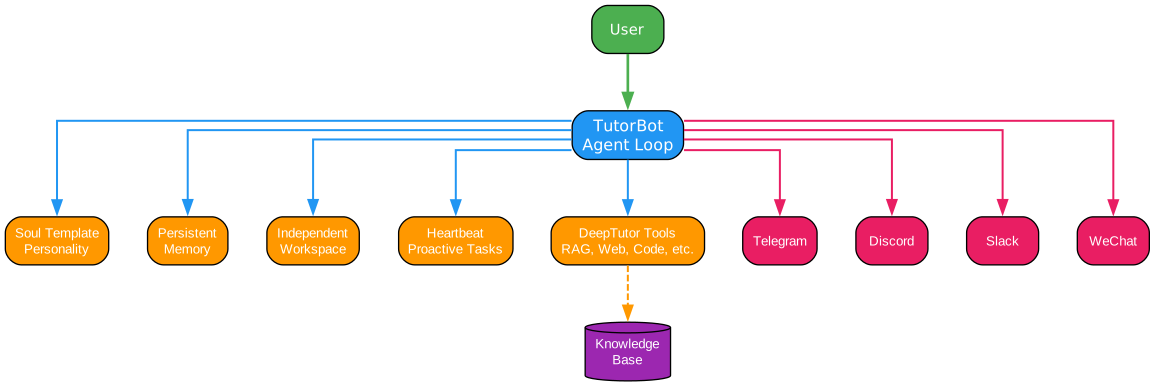
Understanding TutorBot Architecture
TutorBot represents a fundamental shift from chatbot to autonomous tutor. Built on the nanobot framework, each TutorBot runs its own agent loop with independent workspace, memory, and personality. This architecture enables truly personalized learning experiences.
Core Components
Soul Templates - Define your tutor’s personality, tone, and teaching philosophy through editable Soul files. Choose from built-in archetypes (Socratic, encouraging, rigorous) or craft your own. The soul shapes every response, creating consistent and authentic tutoring experiences.
A Socratic tutor might ask probing questions that guide learners to discover answers themselves. An encouraging tutor provides positive reinforcement and breaks complex topics into manageable steps. A rigorous tutor challenges assumptions and demands precision. The soul system makes these personalities configurable and persistent.
Independent Workspace - Each bot has its own directory with separate memory, sessions, skills, and configuration. This isolation ensures that different tutors don’t interfere with each other while still being able to access DeepTutor’s shared knowledge layer.
The workspace architecture means you can have multiple specialized tutors running simultaneously - a math tutor, a writing coach, and a research advisor - each maintaining its own context and learning history.
Persistent Memory - TutorBots maintain evolving profiles of their learners. This includes what topics have been studied, how the learner prefers to receive information, areas of strength and weakness, and communication preferences. The memory persists across sessions and gets refined with every interaction.
Proactive Heartbeat - Unlike reactive chatbots, TutorBots can initiate interactions. The built-in Heartbeat system enables recurring study check-ins, review reminders, and scheduled tasks. Your tutor shows up even when you don’t, helping maintain learning momentum.
Full Tool Access - Every bot reaches into DeepTutor’s complete toolkit: RAG retrieval, code execution, web search, academic paper search, deep reasoning, and brainstorming. This means your math tutor can search for relevant papers, your writing coach can execute code to check grammar patterns, and your research advisor can pull from your knowledge base.
Multi-Channel Presence - Connect bots to Telegram, Discord, Slack, Feishu, WeChat Work, DingTalk, Email, and more. Your tutor meets you wherever you are, eliminating friction between intention and action.
Team and Sub-Agents - Advanced users can spawn background sub-agents or orchestrate multi-agent teams within a single bot for complex, long-running tasks. This enables sophisticated workflows like parallel research, iterative refinement, and collaborative problem-solving.
Practical Applications
The TutorBot architecture enables use cases impossible with traditional chatbots:
- A language tutor that remembers your vocabulary progress and introduces new words at optimal intervals
- A coding mentor that tracks your project history and suggests relevant challenges
- A research advisor that proactively shares relevant papers based on your reading history
- A writing coach that maintains consistent voice across months of feedback
CLI Architecture
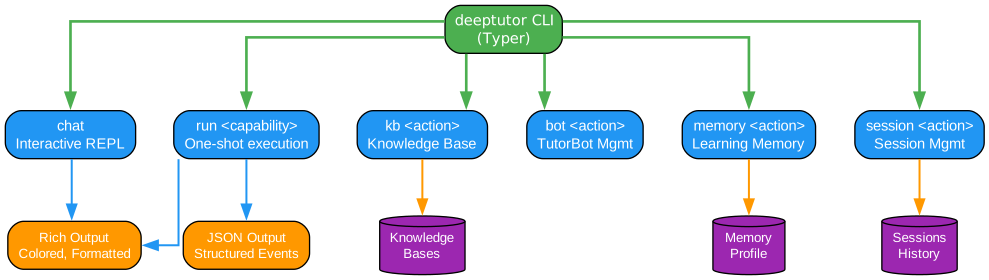
Understanding the CLI Architecture
DeepTutor’s CLI is fully native, providing complete access to every capability, knowledge base, session, memory, and TutorBot through the terminal. The architecture serves both humans (with rich terminal rendering) and AI agents (with structured JSON output).
Command Categories
**run
deeptutor run chat "Explain Fourier transform"
deeptutor run deep_solve "Solve x^2 = 4" --tool rag --kb textbook
deeptutor run deep_question "Linear algebra" --config num_questions=5
deeptutor run deep_research "Attention mechanisms" --kb papers
The run command supports extensive options including session resumption, tool selection, knowledge base specification, notebook references, history references, language settings, and output format control.
chat - Interactive REPL with live mode switching. Inside the REPL, users can toggle tools, switch capabilities, manage knowledge bases, and control sessions using slash commands:
deeptutor chat --capability deep_solve --kb my-kb --tool rag --tool web_search
# Inside REPL: /cap, /tool, /kb, /history, /notebook, /config
**kb
deeptutor kb create my-kb --doc textbook.pdf
deeptutor kb add my-kb --docs-dir ./papers/
deeptutor kb search my-kb "gradient descent"
deeptutor kb set-default my-kb
**bot
deeptutor bot create math-tutor --persona "Socratic math teacher"
deeptutor bot list
deeptutor bot stop math-tutor
**memory
deeptutor memory show summary
deeptutor memory show profile
deeptutor memory clear all --force
**session
deeptutor session list
deeptutor session open <id>
deeptutor session rename <id> --title "Linear Algebra Review"
Dual Output Mode
The CLI supports two output formats:
-
Rich Output - Colored, formatted terminal output for human consumption. Uses colors, tables, and formatting to make information easily scannable.
-
JSON Output - Line-delimited JSON events for programmatic consumption. Perfect for AI agents, pipelines, and automation scripts.
This dual-mode design means the same CLI can serve both interactive users and automated systems. Hand the SKILL.md file to any tool-using agent, and it can configure and operate DeepTutor autonomously.
Guided Learning Workflow
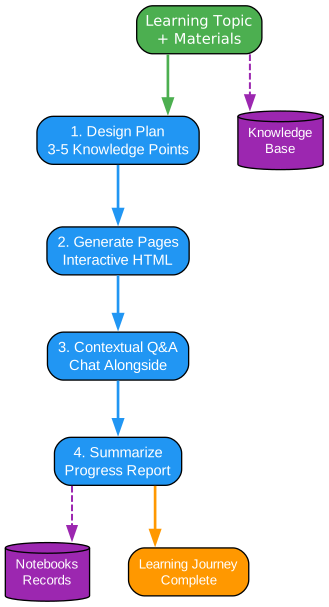
Understanding the Guided Learning Workflow
Guided Learning transforms your personal materials into structured, multi-step learning journeys. This feature represents one of DeepTutor’s most powerful capabilities for self-directed education.
Step 1: Design Plan
The workflow begins with topic and material input. DeepTutor analyzes your uploaded documents and identifies 3-5 progressive knowledge points that form a coherent learning path. The system considers prerequisite relationships, difficulty progression, and your existing knowledge level.
The planning algorithm uses your persistent memory to avoid redundant content and focus on areas that need attention. If you’ve studied related topics before, the plan builds on that foundation rather than starting from scratch.
Step 2: Generate Pages
Each knowledge point becomes a rich visual HTML page with explanations, diagrams, and examples. The generation process pulls from your knowledge base, ensuring that examples and explanations are relevant to your specific materials.
Pages are interactive, not static. They include embedded visualizations, expandable sections, and links to related concepts. The Math Animator can even generate dynamic mathematical visualizations for complex topics.
Step 3: Contextual Q&A
Chat alongside each step for deeper exploration. The Q&A system maintains context from the current page, your knowledge base, and your learning history. Ask clarifying questions, request alternative explanations, or dive deeper into specific aspects.
This conversational layer transforms passive reading into active engagement. The system can rephrase explanations, provide additional examples, or connect concepts to your existing knowledge.
Step 4: Summarize Progress
Upon completion, receive a comprehensive learning summary of everything you’ve covered. The summary includes key concepts, connections between topics, areas for further study, and quiz results if you completed assessments.
The summary is saved to your notebooks, creating a permanent record of your learning journey. Future sessions can reference this summary to continue building on your knowledge.
Knowledge Integration
Throughout the workflow, your knowledge base actively participates. The system retrieves relevant passages, connects new concepts to existing knowledge, and stores insights for future reference. This creates a virtuous cycle where every learning session enriches future sessions.
Persistence and Resumability
Sessions are persistent - pause, resume, or revisit any step at any time. This flexibility accommodates real-world learning patterns where interruptions are common and deep understanding requires multiple sessions.
Installation
DeepTutor offers multiple installation options to suit different needs:
Option A: Setup Tour (Recommended)
The guided setup tour walks you through everything: dependency installation, environment configuration, live connection testing, and launch.
git clone https://github.com/HKUDS/DeepTutor.git
cd DeepTutor

# Create a Python environment
conda create -n deeptutor python=3.11 && conda activate deeptutor

# Launch the guided tour
python scripts/start_tour.py
The tour offers Web mode (recommended) or CLI mode, both ending with a running DeepTutor at http://localhost:3782.
Option B: Manual Local Install
For full control over the installation process:
git clone https://github.com/HKUDS/DeepTutor.git
cd DeepTutor

conda create -n deeptutor python=3.11 && conda activate deeptutor
pip install -e ".[server]"

# Frontend
cd web && npm install && cd ..
Configure environment variables in .env:
# LLM (Required)
LLM_BINDING=openai
LLM_MODEL=gpt-4o-mini
LLM_API_KEY=sk-xxx
LLM_HOST=https://api.openai.com/v1

# Embedding (Required for Knowledge Base)
EMBEDDING_BINDING=openai
EMBEDDING_MODEL=text-embedding-3-large
EMBEDDING_API_KEY=sk-xxx
EMBEDDING_HOST=https://api.openai.com/v1
EMBEDDING_DIMENSION=3072
Option C: Docker Deployment
Docker wraps backend and frontend into a single container:
git clone https://github.com/HKUDS/DeepTutor.git
cd DeepTutor
cp .env.example .env
# Edit .env with your API keys

# Pull official image
docker compose -f docker-compose.ghcr.yml up -d
Option D: CLI Only
For users who only need the CLI without the web frontend:
pip install -e ".[cli]"
deeptutor chat                                   # Interactive REPL
deeptutor run chat "Explain Fourier transform"   # One-shot capability
deeptutor kb create my-kb --doc textbook.pdf     # Build a knowledge base
Supported Providers
DeepTutor supports an extensive range of LLM and embedding providers:
| Provider | Binding | Notes |
|---|---|---|
| OpenAI | openai | Default, full support |
| Anthropic | anthropic | Claude models |
| Azure OpenAI | azure_openai | Enterprise deployments |
| DeepSeek | deepseek | Cost-effective option |
| Gemini | gemini | Google’s models |
| Groq | groq | Fast inference |
| Ollama | ollama | Local models |
| And many more… |
Web search providers include Brave, Tavily, Jina, SearXNG, DuckDuckGo, and Perplexity.
Usage Examples
Basic Chat with Tools
deeptutor chat --kb textbook --tool rag --tool web_search
Build a Knowledge Base
deeptutor kb create physics --doc ch1.pdf --doc ch2.pdf
deeptutor run chat "Explain Newton's third law" --kb physics --tool rag
Generate Quiz Questions
deeptutor run deep_question "Thermodynamics" --kb physics --config num_questions=5
Create a TutorBot
deeptutor bot create math-tutor --persona "Socratic math teacher who uses probing questions"
deeptutor bot create writing-coach --persona "Patient, detail-oriented writing mentor"
deeptutor bot list
Project Structure
The DeepTutor codebase is organized into clear modules:
| Path | Purpose |
|---|---|
deeptutor/runtime/orchestrator.py | ChatOrchestrator - unified entry |
deeptutor/core/stream.py | StreamEvent protocol |
deeptutor/core/tool_protocol.py | BaseTool abstract class |
deeptutor/core/capability_protocol.py | BaseCapability abstract class |
deeptutor/runtime/registry/ | Tool and capability registries |
deeptutor/capabilities/ | Built-in capability wrappers |
deeptutor/tools/builtin/ | Built-in tool wrappers |
deeptutor/plugins/ | Playground plugins |
deeptutor_cli/main.py | Typer CLI entry point |
deeptutor/api/routers/ | WebSocket endpoints |
Roadmap
DeepTutor has an exciting roadmap ahead:
- Authentication & Login - Optional login page for public deployments with multi-user support
- Themes & Appearance - Diverse theme options and customizable UI appearance
- LightRAG Integration - Advanced knowledge base engine integration
- Documentation Site - Comprehensive docs with guides, API reference, and tutorials
Community and Ecosystem
DeepTutor stands on the shoulders of outstanding open-source projects:
| Project | Role in DeepTutor |
|---|---|
| nanobot | Ultra-lightweight agent engine powering TutorBot |
| LlamaIndex | RAG pipeline and document indexing backbone |
| ManimCat | AI-driven math animation generation |
From the HKUDS ecosystem:
| Project | Description |
|---|---|
| LightRAG | Simple & Fast RAG |
| AutoAgent | Zero-Code Agent Framework |
| AI-Researcher | Automated Research |
| nanobot | Ultra-Lightweight AI Agent |
Conclusion
DeepTutor represents a significant advancement in AI-powered education technology. Its agent-native architecture, combining lightweight tools with sophisticated capabilities, enables learning experiences that were previously impossible. The TutorBot system transforms passive chatbots into proactive learning companions, while the CLI provides unprecedented control for both humans and AI agents.
With persistent memory, knowledge management, and guided learning, DeepTutor creates a virtuous cycle where every interaction enriches future sessions. Whether you’re a student, researcher, or lifelong learner, DeepTutor offers a powerful platform for personalized education.
The project’s rapid growth - reaching 15,000+ stars in just months - demonstrates the strong demand for sophisticated AI tutoring systems. As DeepTutor continues to evolve with planned features like LightRAG integration and multi-user support, it’s positioned to become a cornerstone of AI-powered education.
Star the project on GitHub: https://github.com/HKUDS/DeepTutor
| Join the community: Discord | Discussions |
Related Posts
- AgentSkillOS: Skill Orchestration System
- AI-Powered Design Systems
- MattPocock Skills: AI Agent Workflows

Enjoyed this post? Never miss out on future posts by following us