Introduction
AI-powered design tools have exploded in popularity over the past year, but most of them come with a catch: vendor lock-in. Claude Design ties you to Anthropic. v0 by Vercel locks you into their ecosystem. Lovable requires a subscription. Each of these tools produces impressive results, but they all share the same limitations – closed source, cloud-only, and single-provider.
Open CoDesign takes a fundamentally different approach. It is an MIT-licensed, Electron-based desktop application that turns natural-language prompts into polished design artifacts – HTML prototypes, PDF documents, PPTX slide decks, ZIP packages, and Markdown files. The key differentiator is that it runs on your laptop, works with whichever LLM provider you already pay for, and keeps all your data on your machine.
The project is built by OpenCoworkAI and has quickly gained traction as the go-to open-source alternative to Claude Design. With support for 20+ models across Anthropic, OpenAI, Google Gemini, DeepSeek, OpenRouter, SiliconFlow, and local Ollama instances, Open CoDesign gives you the freedom to choose the model that fits your budget and quality requirements – without being locked into a single provider’s pricing or availability.
How It Works
At its core, Open CoDesign follows a straightforward pipeline: you type a prompt, the system selects the appropriate design skill modules, routes the request through your chosen LLM provider, and renders the result in a sandboxed preview. But the implementation is far from simple.
The generation orchestrator in packages/core manages the entire lifecycle of a design request. When you submit a prompt, the orchestrator first matches it against twelve built-in design skill modules – covering slide decks, dashboards, landing pages, SVG charts, glassmorphism, editorial typography, heroes, pricing, footers, chat UIs, data tables, and calendars. These skills are not just templates; they are reasoning modules that steer the model toward considered typography, purposeful whitespace, and meaningful color choices.
Before the model writes a single line of CSS, it selects the skills that fit the brief and reasons through layout intent, design-system coherence, and contrast. This “taste layer” is what separates Open CoDesign from generic AI tools that tend to produce generic output. You can also add a SKILL.md to any project to teach the model your own design preferences.
The live agent panel shows tool calls streaming in real time as the model edits files. You can watch the model plan, write, self-check, and iterate – and you can cancel mid-stream without losing prior turns. This transparency is a significant improvement over black-box design tools where you wait for a spinner and hope for the best.
Architecture
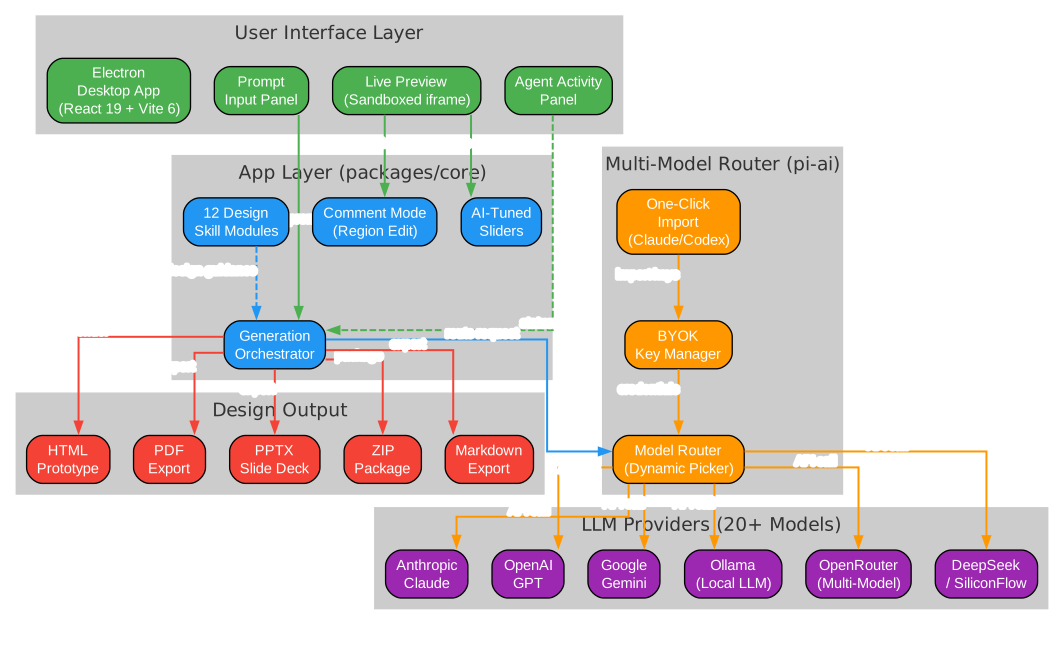
The architecture diagram above illustrates the five-layer structure of Open CoDesign. At the top, the User Interface Layer provides the Electron desktop application built with React 19 and Vite 6. The prompt input panel, live preview (rendered in a sandboxed iframe), and agent activity panel all live here.
The App Layer, implemented in packages/core, contains the generation orchestrator that manages the prompt-to-artifact pipeline. The twelve design skill modules provide domain-specific guidance, while comment mode and AI-tuned sliders enable fine-grained iteration without re-prompting.
The Multi-Model Router, powered by @mariozechner/pi-ai, provides a unified abstraction over all LLM providers. The dynamic model picker exposes each provider’s real model catalogue rather than a hardcoded shortlist. The BYOK key manager stores credentials in ~/.config/open-codesign/config.toml with file mode 0600, matching the conventions used by Claude Code, Codex, and the GitHub CLI. One-click import from existing Claude Code or Codex configurations means you can be running in under 90 seconds.
The LLM Providers layer supports Anthropic Claude, OpenAI GPT, Google Gemini, Ollama for local inference, OpenRouter for multi-model access, and DeepSeek/SiliconFlow for additional options. Any OpenAI-compatible relay is also supported, including keyless IP-allowlisted proxies.
Finally, the Design Output layer produces five export formats: HTML with inlined CSS, PDF via local Chrome rendering, PPTX slide decks, ZIP packages, and Markdown files. Each format is designed to be editable after export, not just a static snapshot.
Monorepo Structure
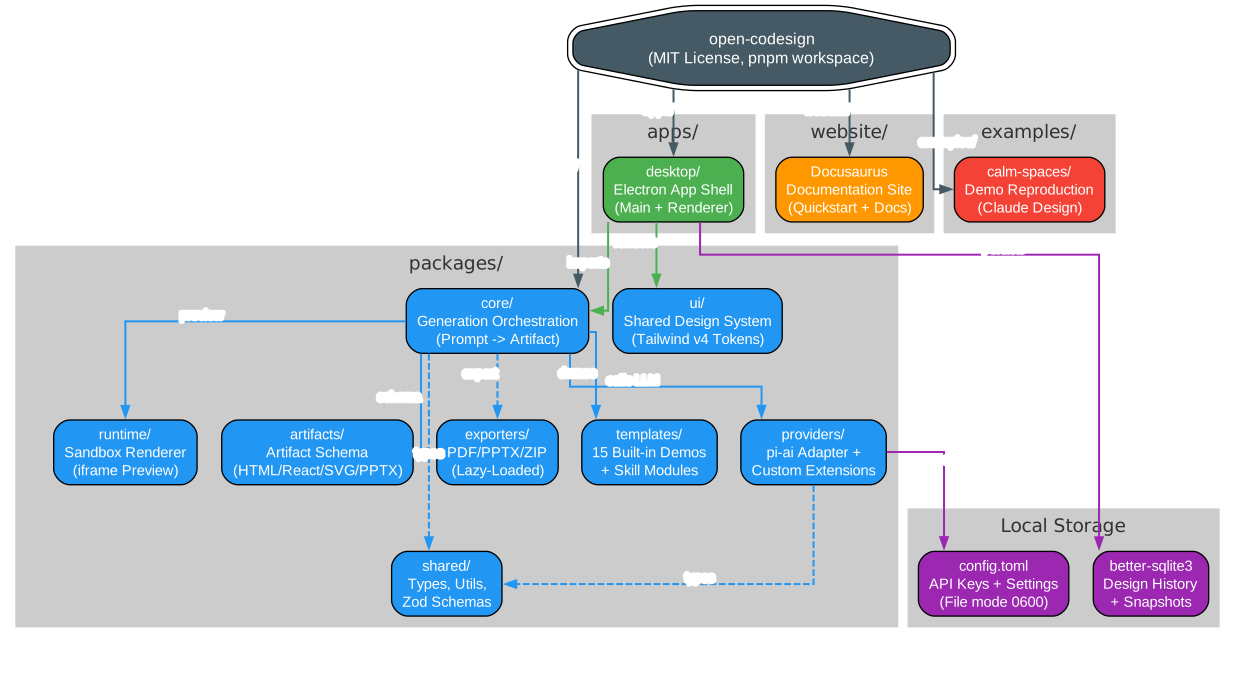
Open CoDesign is organized as a pnpm workspace monorepo orchestrated by Turborepo. The diagram above shows the full layout. The apps/desktop directory contains the Electron application shell with both main and renderer processes.
The packages/ directory houses eight specialized packages:
- core – The generation orchestration engine that transforms prompts into artifacts. This is the brain of the system, coordinating skill modules, model calls, and artifact assembly.
- providers – The pi-ai adapter and custom provider extensions. All LLM calls go through this layer; provider SDKs are never imported directly in app code.
- runtime – The sandbox renderer that displays generated artifacts in an iframe-based preview using vendored React 18 and Babel for on-device transpilation.
- ui – The shared design system built on Tailwind v4 with CSS variable tokens. All UI components use Radix UI primitives with custom shadcn-style wrappers.
- artifacts – The artifact schema definitions for HTML, React, SVG, and PPTX outputs.
- exporters – PDF, PPTX, and ZIP exporters that are lazy-loaded on first use to keep the application startup fast.
- templates – Fifteen built-in demo prompts and twelve design skill modules that serve as ready-to-edit starting points.
- shared – TypeScript types, utility functions, and Zod schemas used across the workspace.
The website/ directory contains the Docusaurus documentation site, while examples/ includes reproductions of Claude Design public demos like the “calm-spaces” template.
Local storage uses better-sqlite3 for design history and version snapshots, and TOML files for configuration. The project enforces strict TypeScript with strict: true and verbatimModuleSyntax: true, uses Biome for linting and formatting (replacing the typical ESLint + Prettier combo), and requires Conventional Commits enforced by commitlint.
Multi-Model Support
The multi-model architecture is arguably Open CoDesign’s most compelling feature. Rather than being tied to a single provider, the system uses @mariozechner/pi-ai as a unified model abstraction layer. This means you can:
- Use Anthropic Claude for high-quality design reasoning
- Switch to OpenAI GPT when Claude is experiencing capacity issues
- Run Ollama locally for completely offline, private design generation
- Access Google Gemini for multimodal design tasks
- Route through OpenRouter to access dozens of models with a single API key
- Use DeepSeek or SiliconFlow for cost-effective generation
The dynamic model picker is particularly noteworthy. Instead of presenting a hardcoded list of models, it queries each provider’s real model catalogue. When a provider adds a new model, it appears in Open CoDesign without any code changes.
One-click import from Claude Code and Codex configurations is a thoughtful touch. If you already have API keys configured for Claude Code, Open CoDesign reads them automatically – no copy-paste, no re-entering settings. This reduces the time to first artifact to about three minutes.
Workflow
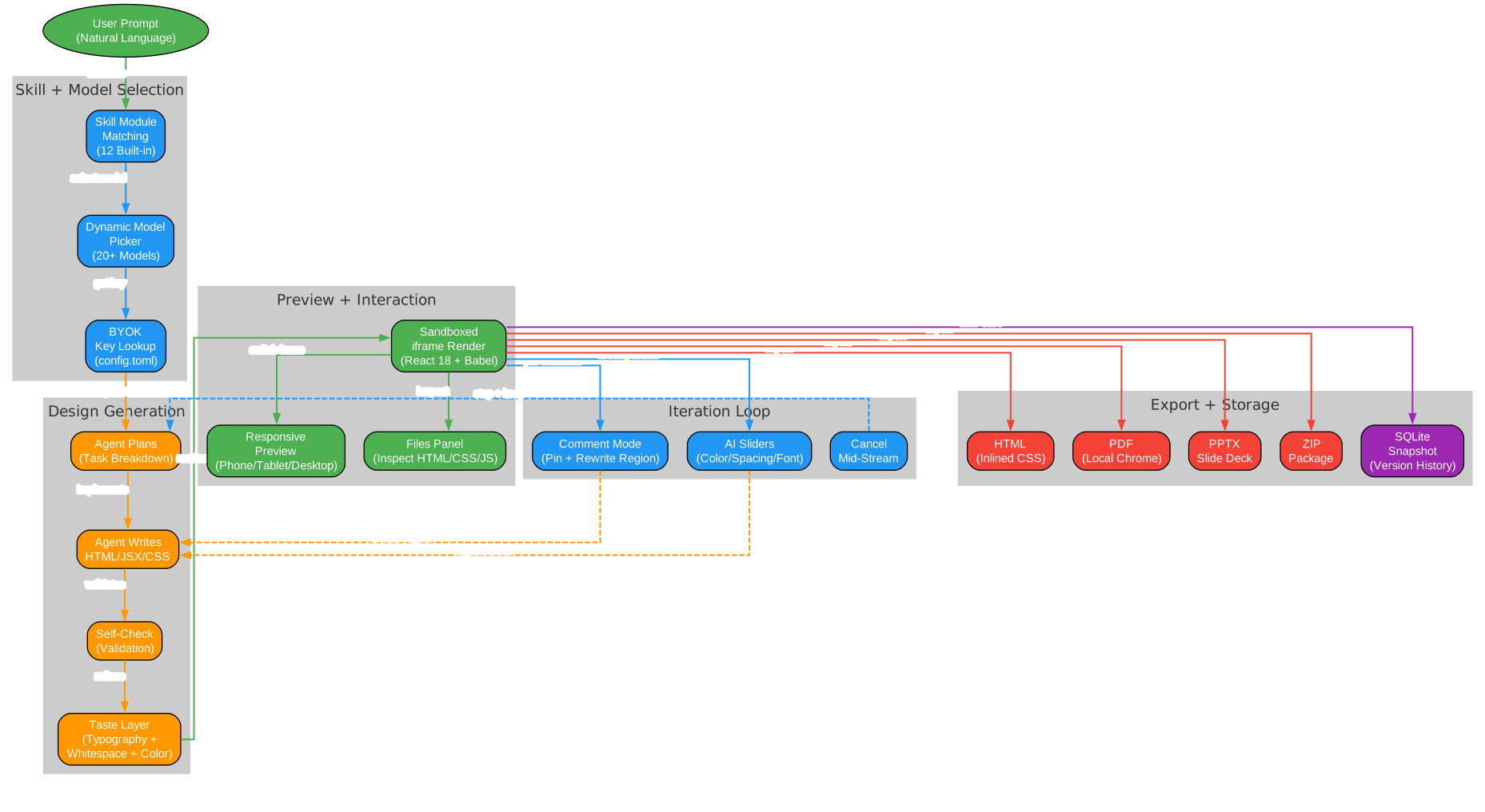
The workflow diagram above traces the complete lifecycle of a design request through six phases:
Phase 1 – User Prompt: You describe what you want in natural language. You can pick from fifteen built-in demos (landing page, dashboard, pitch slide, pricing, mobile app, chat UI, event calendar, blog article, receipt/invoice, portfolio, settings panel, and more) or write your own prompt from scratch.
Phase 2 – Skill + Model Selection: The system matches your prompt against its twelve design skill modules and presents the dynamic model picker. The BYOK key manager looks up your credentials from the local config file.
Phase 3 – Design Generation: The agent plans the task breakdown, writes HTML/JSX/CSS code, runs a self-check validation pass, and applies the taste layer for typography, whitespace, and color refinement. This entire process is visible in the agent activity panel.
Phase 4 – Preview: The generated artifact renders in a sandboxed iframe using vendored React 18 and Babel. You can switch between phone, tablet, and desktop responsive frames with one click. The files panel lets you inspect the multi-file artifact (HTML, CSS, JS) before export.
Phase 5 – Iteration: This is where Open CoDesign shines. Comment mode lets you click any element in the preview, drop a pin, leave a note, and let the model rewrite only that region. AI-tuned sliders let you adjust color, spacing, and typography without writing another prompt. And if the generation is going in the wrong direction, you can cancel mid-stream without losing prior turns.
Phase 6 – Export + Storage: Export to HTML, PDF, PPTX, ZIP, or Markdown. Every design is automatically saved as a SQLite snapshot with version history, so you can switch between recent iterations instantly.
Installation
Open CoDesign runs on macOS 12+ (Monterey or later), Windows 10+, and Linux (glibc 2.31+). It requires one API key or a local Ollama installation.
Direct Download
Download the latest release from GitHub Releases:
| Platform | File |
|---|---|
| macOS (Apple Silicon) | open-codesign-*-arm64.dmg |
| macOS (Intel) | open-codesign-*-x64.dmg |
| Windows (x64) | open-codesign-*-x64-setup.exe |
| Windows (ARM64) | open-codesign-*-arm64-setup.exe |
| Linux (x64, AppImage) | open-codesign-*-x64.AppImage |
| Linux (x64, Debian/Ubuntu) | open-codesign-*-x64.deb |
| Linux (x64, Fedora/RHEL) | open-codesign-*-x64.rpm |
Each release ships with SHA256SUMS.txt and a CycloneDX SBOM for verification.
Package Managers
# macOS via Homebrew
brew install --cask opencoworkai/tap/open-codesign

# Windows via Scoop
scoop bucket add opencoworkai https://github.com/OpenCoworkAI/scoop-bucket
scoop install open-codesign
Build from Source
# Clone the repository
git clone https://github.com/OpenCoworkAI/open-codesign.git
cd open-codesign

# Install dependencies (requires Node 22+ and pnpm)
pnpm install

# Start development mode
pnpm dev

# Build for production
pnpm build
Usage
After installation, launch Open CoDesign and add your API key on the Settings page. Supported key formats include:
- Anthropic (
sk-ant-...) - OpenAI (
sk-...) - Google Gemini
- Any OpenAI-compatible relay (OpenRouter, SiliconFlow, local Ollama)
Then type your first prompt. You can start with one of the fifteen built-in demos or describe your own design. A sandboxed prototype appears in seconds.
The sidebar shows per-generation token counts so you can track costs. The connection diagnostic panel provides one-click testing for any provider with actionable error messages. Settings are organized into four tabs: Models, Appearance, Storage, and Advanced.
The application supports both light and dark themes, with English and Chinese (Simplified) UI language toggling live.
Features

The feature comparison diagram above positions Open CoDesign against three major competitors. Here is a detailed breakdown:
What Open CoDesign Offers
- Open Source (MIT): Fork it, modify it, ship it, sell it. No vendor lock-in, no surprise pricing changes.
- Desktop Native: Runs as an Electron app on macOS, Windows, and Linux. Not a browser tab that loses your work when you accidentally close it.
- BYOK (Any Provider): Bring your own key for any supported provider. Use Claude for design reasoning, GPT for speed, Ollama for privacy – or all three in the same session.
- Local-First: All designs, history, and configuration stay on your machine in SQLite and TOML files. No mandatory cloud sync. No data leaving your machine unless your chosen model provider requires it.
- Multi-Model (20+ Models): The dynamic model picker exposes each provider’s real catalogue. When a provider adds a new model, it appears automatically.
- Version History: SQLite snapshots save every iteration. Switch between recent versions instantly.
- Data Privacy: On-device app state with no telemetry by default. Your prompts and designs never leave your machine unless you choose a cloud provider.
- Editable Export: Five formats (HTML, PDF, PPTX, ZIP, Markdown) all designed to be editable after export.
What the Competition Lacks
Claude Design is closed source, web-only, and locked to Anthropic’s models. v0 by Vercel is closed source, web-only, and limited to GPT-4o. Lovable is closed source, web-only, and offers limited BYOK support. All three require subscriptions and process your data in the cloud.
Open CoDesign’s local-first architecture means your design workflow continues even without internet access (when using Ollama). The MIT license means you can integrate it into your own products. And the multi-model support means you are never at the mercy of a single provider’s uptime or pricing.
Comparison with Claude Design
Since Open CoDesign explicitly positions itself as the open-source Claude Design alternative, a direct comparison is warranted:
| Feature | Open CoDesign | Claude Design |
|---|---|---|
| License | MIT (open source) | Closed source |
| Platform | Desktop (Electron) | Web only |
| Model support | 20+ (Claude, GPT, Gemini, Ollama, etc.) | Claude only |
| API key management | BYOK + one-click import from Claude Code | Anthropic only |
| Offline capability | Fully local (with Ollama) | Cloud-only |
| Version history | SQLite snapshots | None |
| Data privacy | On-device | Cloud-processed |
| Export formats | HTML, PDF, PPTX, ZIP, Markdown | Limited |
| Pricing | Free app, token cost only | Subscription |
| Design skills | 12 built-in modules + custom SKILL.md | Unknown |
| Comment mode | Pin + rewrite region | Unknown |
| AI sliders | Color/spacing/font tuning | Unknown |
| Token tracking | Per-generation counter | Unknown |
The core trade-off is straightforward: Claude Design offers a polished, integrated experience within the Anthropic ecosystem, while Open CoDesign offers freedom, flexibility, and cost control at the expense of being a younger project (currently v0.1.3).
Conclusion
Open CoDesign represents a significant step forward for open-source AI design tools. By combining a local-first Electron architecture with multi-model support through pi-ai, it solves the three biggest problems with current AI design tools: vendor lock-in, cloud dependency, and subscription pricing.
The project’s architecture is well-considered. The monorepo structure with eight specialized packages keeps concerns separated. The lazy-loading of heavy features like PPTX export keeps the application responsive. The BYOK model with one-click import from existing Claude Code and Codex configurations reduces friction to near zero. And the twelve built-in design skill modules with the taste layer bring a level of design quality that generic AI tools cannot match.
At v0.1.3, the project is still early. The roadmap includes filesystem support for real project directories, cost transparency with pre-generation estimates, version snapshots with side-by-side diff, three-style parallel exploration, and codebase-to-design-system token extraction. Code-signing and auto-update are planned for v0.5.
If you value open source, data privacy, and the freedom to choose your own LLM provider, Open CoDesign is worth your attention. The three-minute quickstart – install, add key, generate – makes it easy to evaluate. And with Ollama support, you can try it completely offline without spending a single token.
Check out the GitHub repository to get started, and visit the documentation site for detailed guides. Enjoyed this post? Never miss out on future posts by following us 
