Everything Claude Code: The Ultimate AI Agent Harness Performance Optimization System
In the rapidly evolving landscape of AI-assisted development, having a well-orchestrated agent harness can mean the difference between productive coding sessions and frustrating trial-and-error workflows. Everything Claude Code (ECC) emerges as a groundbreaking solution that brings structure, intelligence, and continuous learning to AI coding assistants. With over 146,000 stars on GitHub, this project represents the pinnacle of agent harness optimization, offering specialized agents, workflow skills, automated hooks, and security features that transform how developers interact with AI coding tools.
What is Everything Claude Code?
Everything Claude Code is an agent harness performance optimization system designed to enhance the capabilities of AI coding assistants. It provides a comprehensive framework that includes specialized agents for different development tasks, workflow skills that encode best practices, automated hooks for event-driven workflows, and a sophisticated continuous learning system that improves over time.
The system supports multiple AI coding platforms including Claude Code, Cursor IDE, Codex, OpenCode, and Gemini CLI, making it a versatile solution for developers working across different AI-assisted development environments. By providing structured workflows, security scanning, and token optimization, ECC helps developers get the most out of their AI coding assistants while maintaining code quality and security standards.
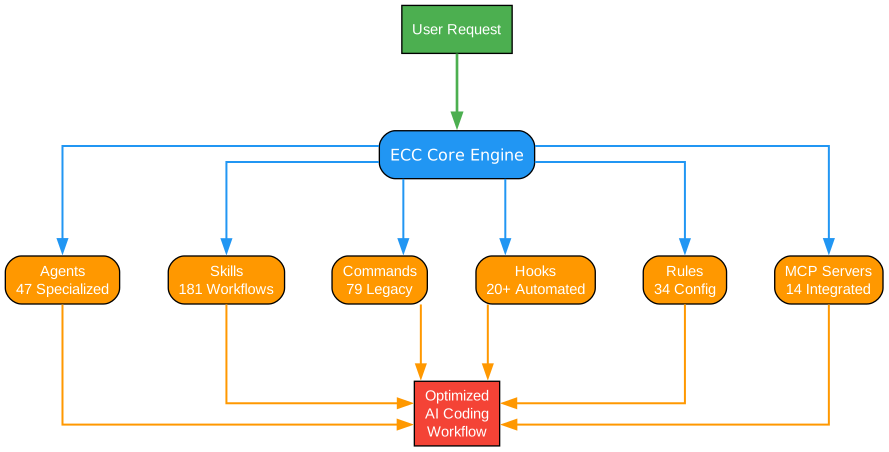
Understanding the Architecture
The architecture diagram above illustrates the comprehensive structure of Everything Claude Code, showing how its various components work together to create a cohesive agent harness system. Let’s examine each component in detail:
Core Agent Registry
At the heart of ECC lies the Core Agent Registry, which manages 47 specialized agents designed for specific development tasks. These agents include:
-
Planner Agent: Responsible for breaking down complex tasks into manageable steps, creating execution plans, and coordinating between different agents. The planner uses sophisticated algorithms to determine optimal task sequencing and resource allocation.
-
Architect Agent: Focuses on system design and architectural decisions. It analyzes requirements, proposes design patterns, and ensures that code changes align with overall system architecture. The architect agent considers scalability, maintainability, and performance implications.
-
TDD-Guide Agent: Guides developers through test-driven development workflows. It ensures tests are written before implementation, helps identify edge cases, and validates that code meets test requirements.
-
Code-Reviewer Agent: Performs comprehensive code reviews, checking for style violations, potential bugs, performance issues, and adherence to best practices. It provides actionable feedback with specific line references and suggested fixes.
-
Security-Reviewer Agent: Specializes in identifying security vulnerabilities, including injection attacks, authentication issues, data exposure risks, and compliance violations. It uses both static analysis and pattern matching to detect potential security issues.
Skill System
The skill system contains 181 workflow skills that encode development best practices and patterns. Each skill is a reusable workflow that can be invoked by agents or directly by users. Skills are organized into categories:
- TDD Workflows: Test-driven development patterns including red-green-refactor cycles, test generation, and coverage analysis
- Security Workflows: Security scanning, vulnerability detection, and compliance checking
- Backend Patterns: Database patterns, API design, caching strategies, and microservices patterns
- Frontend Patterns: Component architecture, state management, performance optimization, and accessibility patterns
- Language Patterns: Language-specific idioms, optimization techniques, and common pitfalls
Hook System
The hook system provides 20+ automated hooks that trigger on specific events. Hooks enable event-driven workflows that respond to user actions, tool invocations, and session events:
- PreToolUse Hooks: Execute before a tool is invoked, enabling validation, logging, and modification of tool inputs
- PostToolUse Hooks: Execute after a tool completes, enabling result processing, logging, and cleanup
- SessionStart Hooks: Initialize session state, load configurations, and set up the environment
- SessionEnd Hooks: Clean up resources, save session data, and generate reports
Continuous Learning v2.1
The learning system captures insights from development sessions and builds a knowledge base that improves over time. It uses instinct-based learning with confidence scoring to determine which patterns are reliable enough to apply automatically.
Data Flow
The architecture follows a layered approach where user requests flow through the agent registry, which coordinates with the skill system and hook system to execute tasks. The continuous learning system observes all interactions and extracts patterns for future use. This design ensures modularity, extensibility, and maintainability while providing comprehensive coverage of development workflows.
Key Insights
The architecture demonstrates several state-of-the-art design principles:
- Separation of Concerns: Each component has a clear responsibility, making the system easier to understand, test, and extend
- Event-Driven Design: The hook system enables loose coupling between components, allowing for flexible customization
- Continuous Improvement: The learning system ensures the harness gets better with use, adapting to team preferences and project requirements
- Multi-Platform Support: The architecture abstracts platform-specific details, enabling support for multiple AI coding assistants
Practical Applications
Teams can leverage this architecture to:
- Standardize development workflows across the organization
- Enforce coding standards and security policies automatically
- Reduce onboarding time for new developers
- Build institutional knowledge that persists across team members
- Optimize token usage and reduce API costs
Multi-Harness Support
One of ECC’s most powerful features is its ability to work across multiple AI coding platforms. This cross-platform compatibility ensures that teams can use their preferred tools while still benefiting from ECC’s comprehensive feature set.
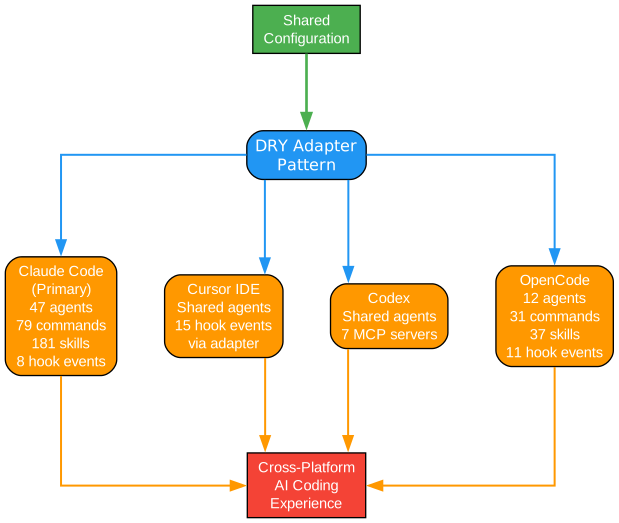
Understanding Multi-Harness Architecture
The multi-harness architecture diagram illustrates how Everything Claude Code provides unified functionality across different AI coding platforms. This design enables developers to switch between platforms without losing access to ECC’s powerful features.
Supported Platforms
Claude Code Integration
Claude Code receives the most comprehensive support as the primary target platform. The integration includes:
- Full agent registry access with all 47 specialized agents
- Complete skill library with all 181 workflow skills
- Native hook system integration with all event types
- Deep integration with Claude’s extended thinking capabilities
- Optimized token usage patterns specific to Claude’s context window
Cursor IDE Integration
Cursor IDE integration provides seamless access to ECC features within the popular VS Code-based editor:
- Agent invocation through Cursor’s command palette
- Skill execution with Cursor-specific optimizations
- Hook system integration with Cursor’s event model
- Support for Cursor’s codebase indexing and semantic search
- Compatibility with Cursor’s multi-file editing capabilities
Codex Integration
The Codex integration brings ECC’s capabilities to OpenAI’s coding assistant:
- Agent system adapted for Codex’s completion-based interface
- Skills translated to prompt patterns optimized for Codex
- Hook system adapted for Codex’s execution model
- Token optimization strategies for GPT-based models
OpenCode Integration
OpenCode integration supports the open-source coding assistant ecosystem:
- Community-driven agent definitions
- Extensible skill system for custom workflows
- Hook system compatible with OpenCode’s plugin architecture
- Support for local model deployments
Gemini CLI Integration
Gemini CLI integration brings ECC to Google’s AI assistant:
- Agent system optimized for Gemini’s capabilities
- Skills adapted for Gemini’s reasoning patterns
- Hook system integrated with Gemini’s event model
- Token optimization for Gemini’s context window
Unified Abstraction Layer
At the core of multi-harness support is a unified abstraction layer that:
- Normalizes agent definitions across platforms
- Translates skills to platform-specific formats
- Provides consistent hook execution semantics
- Manages platform-specific configurations
- Handles authentication and API interactions
Cross-Platform Skill Translation
The skill translation system converts ECC skills to platform-specific implementations:
- Prompt templates are adapted for each platform’s strengths
- Tool invocations are mapped to platform-specific APIs
- Response parsing handles platform-specific output formats
- Error handling accounts for platform-specific failure modes
Key Insights
The multi-harness architecture demonstrates several important design principles:
- Platform Abstraction: By providing a unified interface, ECC allows teams to switch platforms without retraining or workflow changes
- Graceful Degradation: Features that aren’t supported on a platform are gracefully disabled rather than causing errors
- Platform Optimization: Each platform integration is optimized for that platform’s specific capabilities and limitations
- Extensibility: New platforms can be added by implementing the abstraction layer interfaces
Practical Applications
Organizations can leverage multi-harness support to:
- Evaluate different AI coding assistants without committing to a single platform
- Support team members who prefer different tools
- Migrate between platforms as needs evolve
- Maintain consistent workflows across heterogeneous development environments
- Reduce vendor lock-in and maintain flexibility
Skills System
The skills system is the heart of ECC’s workflow automation, providing 181 reusable workflow skills that encode development best practices and patterns.
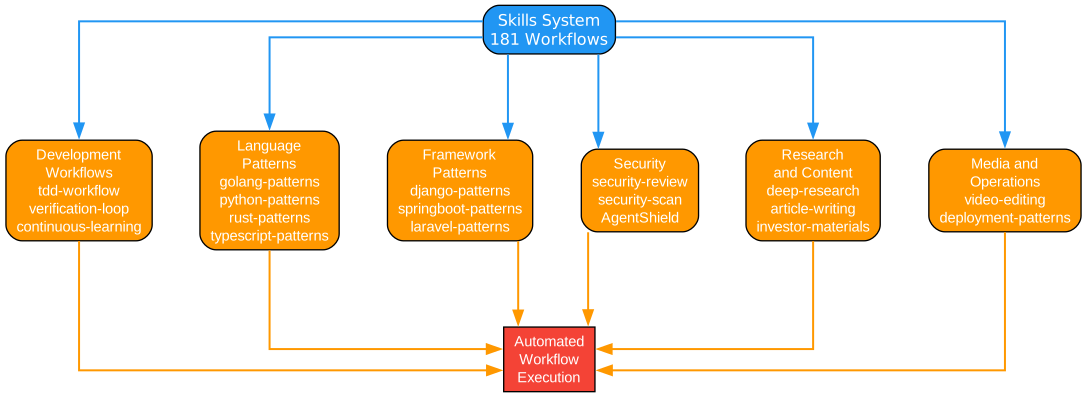
Understanding the Skills System
The skills system diagram illustrates how workflow skills are organized, discovered, and executed within Everything Claude Code. This comprehensive system enables sophisticated automation of development tasks.
Skill Categories
TDD Workflow Skills
Test-driven development skills form the foundation of quality-focused development:
- Red-Green-Refactor: Guides the classic TDD cycle of writing failing tests, implementing minimal code, and refactoring
- Test Generation: Automatically generates comprehensive test cases based on code analysis
- Coverage Analysis: Identifies untested code paths and suggests additional tests
- Mutation Testing: Validates test quality by introducing mutations and checking detection
Security Review Skills
Security skills help identify and remediate vulnerabilities:
- Vulnerability Scanning: Scans code for known vulnerability patterns using static analysis
- Dependency Auditing: Checks third-party dependencies for known CVEs
- Compliance Checking: Validates code against security standards (OWASP, SOC2, etc.)
- Secret Detection: Identifies accidentally committed secrets and credentials
Backend Pattern Skills
Backend development skills cover server-side concerns:
- Database Patterns: Implements repository, unit of work, and other data access patterns
- API Design: Guides RESTful and GraphQL API design decisions
- Caching Strategies: Implements caching patterns for performance optimization
- Microservices Patterns: Handles service discovery, circuit breakers, and saga patterns
Frontend Pattern Skills
Frontend skills address client-side development:
- Component Architecture: Guides component design and composition
- State Management: Implements Redux, MobX, and other state management patterns
- Performance Optimization: Identifies and fixes performance bottlenecks
- Accessibility Patterns: Ensures WCAG compliance and inclusive design
Language Pattern Skills
Language-specific skills provide idiomatic guidance:
- Python Patterns: Pythonic code style, async patterns, type hints
- JavaScript Patterns: Modern JS patterns, async/await, module design
- TypeScript Patterns: Type system usage, generic patterns, type guards
- Rust Patterns: Ownership patterns, lifetime management, error handling
Skill Discovery
The skill discovery system enables intelligent skill selection:
- Semantic Search: Uses vector embeddings to find relevant skills based on task description
- Tag-Based Filtering: Filters skills by language, framework, or task type
- Dependency Analysis: Identifies skills that depend on or complement each other
- Usage Analytics: Ranks skills by effectiveness based on historical usage
Skill Execution
The execution engine manages skill invocation:
- Input Validation: Validates skill inputs against defined schemas
- Dependency Resolution: Ensures required skills are executed first
- Parallel Execution: Runs independent skills concurrently for efficiency
- Error Handling: Provides graceful degradation when skills fail
- Result Aggregation: Combines results from multiple skills into coherent output
Key Insights
The skills system embodies several important principles:
- Reusability: Skills are designed to be reusable across projects and contexts
- Composability: Skills can be combined to create complex workflows
- Discoverability: Skills are easy to find through semantic search and categorization
- Extensibility: New skills can be added without modifying the core system
Practical Applications
Developers can leverage the skills system to:
- Standardize best practices across teams
- Reduce repetitive decision-making
- Ensure consistent code quality
- Accelerate onboarding for new team members
- Build institutional knowledge in executable form
Hooks System
The hooks system provides event-driven automation that responds to various events in the development workflow, enabling powerful customization and automation.
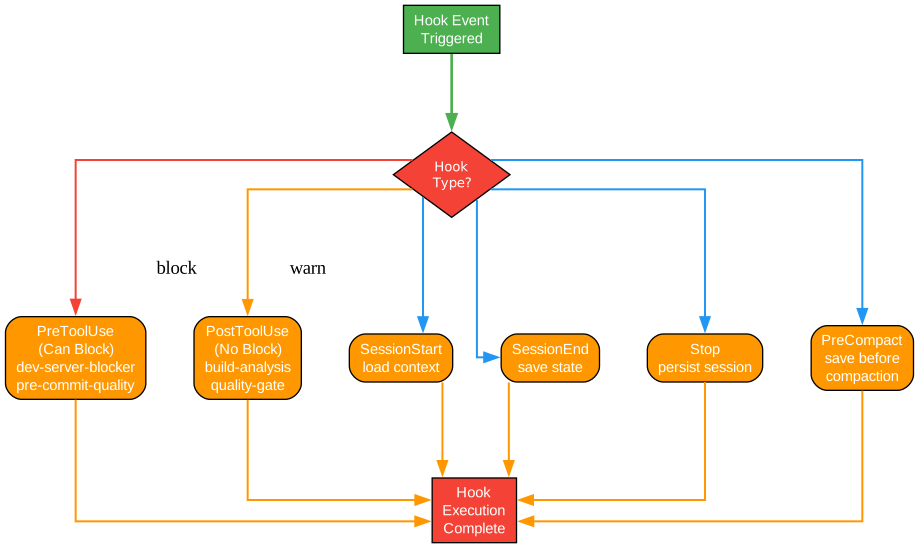
Understanding the Hooks System
The hooks system diagram illustrates how event-driven hooks enable powerful automation and customization within Everything Claude Code. This system allows developers to inject custom behavior at key points in the development workflow.
Hook Types
PreToolUse Hooks
PreToolUse hooks execute before a tool is invoked, enabling:
- Input Validation: Validate tool inputs before execution
- Input Modification: Transform or augment tool inputs
- Access Control: Enforce permissions and restrictions
- Logging: Record tool invocations for auditing
- Caching: Check for cached results before tool execution
Example use cases:
- Validate file paths before file operations
- Check for sensitive data before API calls
- Enforce coding standards before code generation
- Log all tool invocations for debugging
PostToolUse Hooks
PostToolUse hooks execute after a tool completes, enabling:
- Result Processing: Transform or filter tool outputs
- Result Validation: Verify tool results meet expectations
- Side Effects: Trigger additional actions based on results
- Cleanup: Release resources after tool execution
- Notification: Alert users or systems about results
Example use cases:
- Format generated code after file creation
- Run tests after code changes
- Update documentation after API changes
- Send notifications on build failures
SessionStart Hooks
SessionStart hooks initialize the development session:
- Environment Setup: Load configurations and set up the environment
- Context Loading: Load relevant context from previous sessions
- State Initialization: Initialize session state variables
- Skill Preloading: Preload frequently used skills
- Health Checks: Verify system health before starting
Example use cases:
- Load project-specific configurations
- Restore previous session context
- Initialize database connections
- Preload team-specific skills
SessionEnd Hooks
SessionEnd hooks handle session termination:
- State Persistence: Save session state for future sessions
- Cleanup: Release resources and close connections
- Reporting: Generate session reports and metrics
- Learning Extraction: Extract patterns for continuous learning
- Backup: Create backups of modified files
Example use cases:
- Save session context for next session
- Generate daily progress reports
- Extract learned patterns
- Create automatic backups
Stop Hooks
Stop hooks handle workflow interruption:
- Graceful Shutdown: Clean up in-progress operations
- State Preservation: Save partial progress
- Notification: Alert about interrupted workflows
- Recovery Preparation: Prepare for workflow resumption
Example use cases:
- Save partial work on interruption
- Notify team members of interrupted work
- Prepare recovery information
PreCompact Hooks
PreCompact hooks prepare for context compaction:
- Context Summarization: Summarize important context before compaction
- Priority Preservation: Mark high-priority information for preservation
- Reference Extraction: Extract references for later retrieval
- State Snapshot: Create snapshot before compaction
Example use cases:
- Summarize key decisions before context compaction
- Preserve important code references
- Create recovery points
Hook Registration
Hooks are registered with specific configurations:
- Event Type: Which event triggers the hook
- Priority: Execution order when multiple hooks exist
- Condition: Optional conditions for hook execution
- Action: The actual hook implementation
- Error Handling: How to handle hook failures
Hook Execution Flow
The execution flow follows a predictable pattern:
- Event occurs (tool invocation, session start, etc.)
- Hook engine identifies registered hooks for the event
- Hooks are sorted by priority
- Each hook is executed in order
- Results are collected and processed
- Original operation continues or is modified
Key Insights
The hooks system demonstrates several important design principles:
- Non-Invasive: Hooks don’t modify core functionality, only extend it
- Composable: Multiple hooks can be combined for complex behaviors
- Ordered: Priority system ensures predictable execution order
- Safe: Hook failures don’t crash the main system
Practical Applications
Teams can use hooks to:
- Enforce organizational policies automatically
- Integrate with external systems (CI/CD, issue trackers)
- Create custom workflows for specific project needs
- Implement security controls and auditing
- Build team-specific automation
Continuous Learning v2.1
The continuous learning system enables ECC to improve over time, capturing insights from development sessions and building a knowledge base that enhances future interactions.
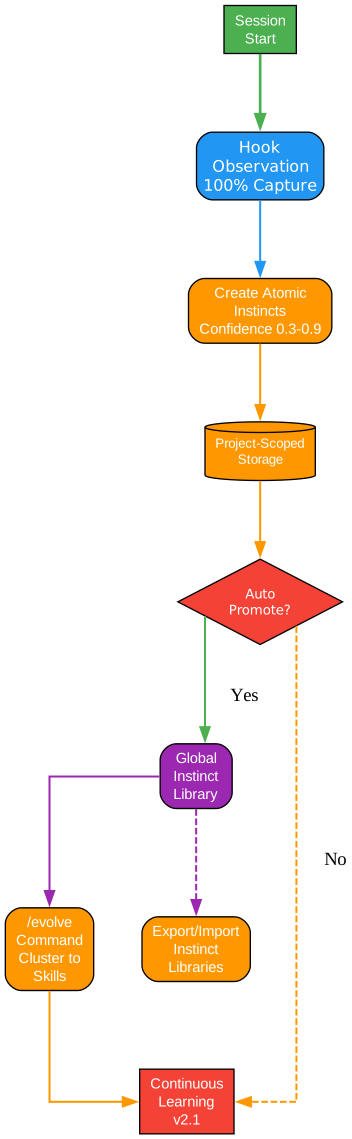
Understanding Continuous Learning v2.1
The continuous learning diagram illustrates how Everything Claude Code captures, processes, and applies knowledge from development sessions. This instinct-based learning system with confidence scoring represents a sophisticated approach to institutional knowledge management.
Learning Components
Instinct System
The instinct system captures learned patterns as reusable instincts:
- Pattern Recognition: Identifies recurring patterns in development workflows
- Instinct Creation: Converts patterns into executable instincts
- Confidence Scoring: Assigns confidence scores based on success rates
- Instinct Activation: Determines when to apply learned instincts
Each instinct contains:
- Trigger Conditions: When the instinct should be activated
- Action Pattern: What action to take when triggered
- Context Requirements: Required context for instinct application
- Confidence Score: Reliability score based on historical success
- Success Metrics: Track record of instinct effectiveness
Confidence Scoring
The confidence scoring system ensures reliable learning:
- Success Rate: Percentage of times the instinct led to correct outcomes
- Recency Weighting: Recent successes weighted more heavily
- Context Similarity: How similar current context is to learning context
- User Feedback: Explicit feedback on instinct effectiveness
Confidence thresholds:
- High Confidence (>90%): Automatically apply instinct
- Medium Confidence (70-90%): Suggest instinct to user
- Low Confidence (50-70%): Store for future reference
- Very Low Confidence (<50%): Discard or require more learning
Knowledge Base
The knowledge base stores all learned information:
- Code Patterns: Reusable code snippets and patterns
- Decision Records: Architectural decisions and rationale
- Error Solutions: Known errors and their resolutions
- Best Practices: Team-specific best practices
- Project Context: Project-specific knowledge
Learning Process
The learning process follows a continuous cycle:
1. Observation
The system observes all development activities:
- Tool invocations and their results
- User decisions and corrections
- Code changes and their outcomes
- Error occurrences and resolutions
2. Pattern Extraction
From observations, patterns are extracted:
- Common workflows and sequences
- Successful problem-solving approaches
- Effective code patterns
- User preferences and habits
3. Instinct Formation
Extracted patterns are formed into instincts:
- Pattern is validated against historical data
- Confidence score is calculated
- Trigger conditions are defined
- Action pattern is encoded
4. Knowledge Storage
New instincts are stored in the knowledge base:
- Indexed for efficient retrieval
- Linked to related instincts
- Tagged with metadata
- Versioned for tracking
5. Application
Learned instincts are applied in future sessions:
- Context is analyzed for instinct triggers
- Matching instincts are retrieved
- Confidence scores determine application mode
- Results feed back into learning
Key Insights
The continuous learning system embodies several important principles:
- Adaptive: The system improves with use, becoming more effective over time
- Safe: Low-confidence instincts don’t interfere with development
- Transparent: Users can inspect and modify learned instincts
- Shareable: Knowledge can be shared across team members
Practical Applications
Teams can leverage continuous learning to:
- Build institutional knowledge that persists across team members
- Reduce onboarding time for new developers
- Standardize successful patterns across the team
- Avoid repeating past mistakes
- Create a competitive advantage through accumulated knowledge
Key Features
47 Specialized Agents
ECC provides 47 specialized agents, each designed for specific development tasks:
| Agent Category | Agents | Purpose |
|---|---|---|
| Planning | planner, architect, strategist | Task planning and architecture |
| Development | tdd-guide, implementer, refactorer | Code implementation |
| Review | code-reviewer, security-reviewer, performance-reviewer | Code quality |
| Testing | e2e-runner, unit-tester, integration-tester | Test execution |
| Language-Specific | python-reviewer, js-reviewer, rust-reviewer | Language expertise |
| Operations | build-error-resolver, deployer, monitor | DevOps tasks |
79 Legacy Commands
ECC maintains compatibility with 79 legacy commands for users familiar with earlier versions:
/plan- Generate implementation plan/tdd- Start TDD workflow/code-review- Perform code review/build-fix- Fix build errors/security-scan- Run security scan/e2e- Run end-to-end tests/refactor-clean- Clean up and refactor/instinct-status- Check learning status/evolve- Trigger learning evolution
AgentShield Security Scanner
The AgentShield security scanner provides comprehensive security analysis:
- 1282 Tests: Extensive test coverage for security patterns
- 98% Coverage: High coverage of common vulnerability types
- 102 Static Analysis Rules: Comprehensive rule set for code analysis
- Real-time Scanning: Continuous security monitoring during development
Token Optimization
ECC includes sophisticated token optimization features:
- Model Selection: Automatic model selection based on task complexity
- MAX_THINKING_TOKENS Reduction: Optimized thinking token usage
- Context Window Management: Efficient context utilization
- Caching Strategies: Reduce redundant API calls
Installation
Installing Everything Claude Code is straightforward. Follow these steps to get started:
Prerequisites
- Node.js 18 or higher
- Git
- An AI coding assistant (Claude Code, Cursor, Codex, etc.)
Installation Steps
# Clone the repository
git clone https://github.com/affaan-m/everything-claude-code.git

# Navigate to the directory
cd everything-claude-code

# Install dependencies
npm install

# Run the setup script
npm run setup

# Configure your AI assistant
# Follow the platform-specific setup instructions
Platform-Specific Setup
For Claude Code:
# Copy ECC configuration to Claude Code directory
cp -r config/claude-code ~/.claude-code/

# Enable ECC in Claude Code settings
claude-code config set harness.enabled true
For Cursor IDE:
# Install ECC extension
cursor --install-extension everything-claude-code

# Configure in settings.json
{
  "everythingClaudeCode.enabled": true,
  "everythingClaudeCode.agents": ["all"]
}
For Codex:
# Add ECC to Codex configuration
codex config add-harness everything-claude-code

# Enable specific skills
codex config set skills.enabled ["tdd-workflow", "security-review"]
Usage Examples
Starting a TDD Workflow
# Initialize TDD workflow for a new feature
/ecc tdd-start "User authentication feature"

# The TDD-guide agent will:
# 1. Help you write failing tests
# 2. Guide implementation
# 3. Suggest refactoring
# 4. Verify test coverage
Running a Security Review
# Run comprehensive security scan
/ecc security-scan --deep

# The security-reviewer agent will:
# 1. Scan for vulnerabilities
# 2. Check dependencies
# 3. Validate compliance
# 4. Generate security report
Using the Planner Agent
# Create implementation plan
/ecc plan "Add payment processing"

# The planner agent will:
# 1. Analyze requirements
# 2. Break down into tasks
# 3. Identify dependencies
# 4. Create execution timeline
Checking Learning Status
# View learned instincts
/ecc instinct-status

# Output shows:
# - Number of learned instincts
# - Confidence scores
# - Recent learning activity
# - Suggested instinct applications
Security Features
ECC takes security seriously with comprehensive protection mechanisms:
AgentShield Scanner
The AgentShield scanner provides real-time security analysis:
- Static Analysis: Scans code for vulnerability patterns
- Dependency Auditing: Checks for known CVEs in dependencies
- Secret Detection: Identifies accidentally committed secrets
- Compliance Checking: Validates against security standards
Security Hooks
Security-focused hooks provide additional protection:
- Pre-commit Scanning: Scan code before committing
- Pre-push Validation: Validate changes before pushing
- API Key Detection: Prevent accidental key exposure
- SQL Injection Prevention: Detect potential injection points
Secure Configuration
ECC follows security best practices:
- No Hardcoded Secrets: All secrets managed through environment variables
- Minimal Permissions: Agents operate with least privilege
- Audit Logging: All actions are logged for audit trails
- Secure Communication: All API calls use encrypted connections
Conclusion
Everything Claude Code represents a significant advancement in AI-assisted development tooling. By providing a comprehensive agent harness with specialized agents, workflow skills, automated hooks, and continuous learning, ECC enables developers to work more efficiently and effectively with AI coding assistants.
The multi-harness support ensures that teams can use their preferred AI tools while maintaining consistent workflows. The extensive skill library encodes best practices and patterns, reducing repetitive decision-making and ensuring code quality. The hooks system enables powerful customization and automation, while the continuous learning system ensures that the harness improves over time.
With over 146,000 stars on GitHub, Everything Claude Code has proven its value to the developer community. Whether you’re a solo developer looking to improve your AI-assisted workflow or a team seeking to standardize development practices, ECC provides the tools and framework to enhance your productivity.
Key Takeaways
- 47 Specialized Agents for every development task
- 181 Workflow Skills encoding best practices
- 79 Legacy Commands for familiar workflows
- 20+ Automated Hooks for event-driven automation
- Multi-Harness Support for flexibility
- Continuous Learning for ongoing improvement
- AgentShield Security for comprehensive protection
Resources
Related Posts
- AgentSkillOS: Skill Orchestration System
- MattPocock Skills: AI Agent Workflows
- DESIGN.md: AI-Powered Design Systems

