Introduction
File type detection is a fundamental problem in computing that has traditionally relied on file extensions, magic numbers, or signature-based approaches. However, these methods often fail when dealing with ambiguous files, mislabeled content, or files without extensions. Google’s Magika represents a paradigm shift in this space, leveraging deep learning to achieve unprecedented accuracy in file content type detection.
Magika is an open-source tool developed by Google that uses a custom neural network model to identify file types based on their actual content rather than relying on metadata or extensions. With over 13,000 stars on GitHub, it has quickly become the go-to solution for accurate file type identification, processing hundreds of billions of files weekly at Google scale.
The Problem with Traditional File Detection
Traditional file type detection methods have several limitations:
- Extension-based detection: Files can be renamed with incorrect extensions, leading to misidentification
- Magic number signatures: Many file types share similar headers or lack distinctive signatures
- Text file ambiguity: Programming languages and text formats are particularly difficult to distinguish
- Polyglot files: Some files are designed to be valid in multiple formats simultaneously
These limitations become critical in security contexts where accurate file identification is essential for proper scanning and policy enforcement.
How Magika Works
Magika employs a custom deep learning model trained on approximately 100 million files across 200+ content types. The model is remarkably efficient, weighing only about 1MB, yet achieves near-instantaneous inference times of approximately 5 milliseconds per file on a single CPU.
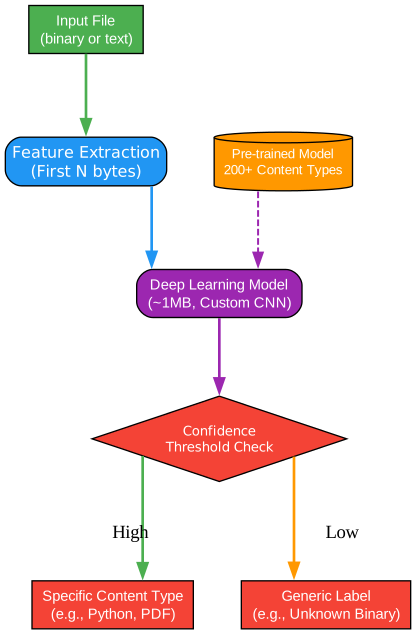
The diagram above illustrates Magika’s architecture and detection flow. The process begins with the input file, whether binary or text-based. The system extracts features from the first few kilobytes of the file content, focusing on byte patterns that are most informative for classification. These features are then processed by the deep learning model, which has been trained to recognize subtle patterns across hundreds of file types.
A critical component of Magika’s design is the confidence threshold system. After the neural network produces its prediction, the system evaluates the confidence score against content-type-specific thresholds. When confidence is high, Magika returns a specific content type label such as “Python source” or “PDF document.” When confidence is low, it returns a generic label like “Unknown binary data” or “Generic text document,” preventing false positives that could lead to security issues.
The model storage component contains pre-trained weights optimized for 200+ content types, enabling accurate detection without requiring users to train their own models. This approach ensures consistent, reliable results across diverse deployment scenarios.
File Detection Pipeline

The pipeline diagram shows the complete file detection workflow from input to output. Each stage is optimized for both speed and accuracy:
Stage 1 - File Input: The system accepts any file type, whether binary or text-based. Files can be provided as paths, byte streams, or even piped through standard input.
Stage 2 - Read Header: Magika reads approximately 2KB from the beginning of the file. This limited sample size is sufficient because the model has been trained to identify file types from characteristic patterns that typically appear early in files.
Stage 3 - Extract Features: The raw bytes are transformed into features suitable for neural network processing. This includes byte-level patterns, frequency distributions, and structural characteristics.
Stage 4 - Neural Network Inference: The extracted features pass through the custom CNN model. Despite its small size, the model captures complex relationships between byte patterns and file types through its deep architecture.
Stage 5 - Score Analysis: The model outputs confidence scores for each potential content type. The system applies content-type-specific thresholds to determine whether to trust the prediction.
Stage 6 - Content Type Output: The final result includes the detected content type, confidence score, MIME type, and additional metadata useful for downstream processing.
The entire pipeline completes in approximately 5 milliseconds per file, making Magika suitable for high-throughput scenarios where millions of files need to be processed quickly.
Supported File Types

Magika supports over 200 distinct content types organized into major categories. The diagram above shows the primary categories and representative file types within each:
Code Files: Comprehensive support for programming languages including Python, JavaScript, C++, Java, Rust, Go, and many others. Magika excels at distinguishing between similar languages that share syntax elements.
Documents: Office documents (PDF, DOCX, PPTX), web formats (HTML, Markdown), and structured documents are accurately identified even when file extensions are missing or incorrect.
Images: All major image formats including PNG, JPEG, GIF, SVG, BMP, and WebP are detected with high accuracy based on their binary signatures and internal structure.
Archives: Compressed files like ZIP, RAR, 7-Zip, and TAR are identified, which is crucial for security scanning where archives might contain malicious content.
Media Files: Audio and video formats including MP3, MP4, WebM, and FLAC are detected, enabling proper routing to media processing pipelines.
Executables: Binary executables across platforms (ELF for Linux, PE for Windows, Mach-O for macOS) and mobile formats (APK for Android) are accurately identified.
Data Files: Structured data formats like JSON, CSV, XML, YAML, and SQL databases are distinguished from each other based on their content patterns.
Config Files: Configuration files including INI, TOML, Dockerfile, and various YAML configurations are detected, helping automation tools process them correctly.
Integration Options
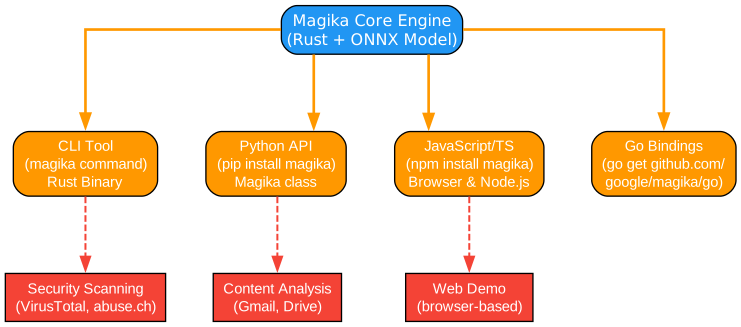
Magika provides multiple integration options to suit different use cases and development environments:
CLI Tool: The command-line interface, written in Rust, provides the fastest way to use Magika. It can be installed via pipx, brew, or direct download. The CLI supports recursive directory scanning, JSON output, and various formatting options.
Python API: The Python package (pip install magika) offers a simple API for programmatic file detection. The Magika class provides methods like identify_path(), identify_bytes(), and identify_stream() for different input scenarios.
JavaScript/TypeScript: An npm package enables Magika usage in both Node.js and browser environments. The web demo runs entirely in the browser, demonstrating the model’s efficiency.
Go Bindings: Work-in-progress Go bindings allow integration with Go-based systems, expanding Magika’s reach to additional enterprise environments.
The integration diagram also shows real-world use cases where Magika is deployed:
- Security Scanning: VirusTotal and abuse.ch use Magika to route files to appropriate security scanners
- Content Analysis: Gmail and Google Drive use Magika to enforce content policies
- Web Demo: A browser-based demo showcases Magika’s capabilities without requiring installation
Installation and Usage
Command Line Installation
# Via pipx (recommended)
pipx install magika

# Via brew (macOS/Linux)
brew install magika

# Via cargo
cargo install --locked magika-cli
Python Package
pip install magika
JavaScript Package
npm install magika
Usage Examples
Command Line
# Scan files recursively
magika -r /path/to/directory

# JSON output
magika --json file.txt

# Show confidence scores
magika --output-score file.pdf

# Read from stdin
cat file.txt | magika -
Python API
from magika import Magika

# Initialize the detector
m = Magika()

# Identify a file by path
result = m.identify_path('./document.pdf')
print(f"Content type: {result.output.label}")
print(f"Description: {result.output.description}")
print(f"MIME type: {result.output.mime_type}")
print(f"Confidence: {result.score}")

# Identify raw bytes
result = m.identify_bytes(b'function log(msg) { console.log(msg); }')
print(result.output.label)  # Output: javascript

# Identify from stream
with open('file.bin', 'rb') as f:
    result = m.identify_stream(f)
    print(result.output.label)
Performance and Accuracy
Magika achieves approximately 99% average precision and recall on Google’s test dataset, significantly outperforming traditional approaches. Key performance metrics include:
- Accuracy: ~99% average across 200+ content types
- Speed: ~5ms per file on a single CPU
- Model Size: ~1MB for the complete model
- Scalability: Processes hundreds of billions of files weekly at Google
The model’s efficiency comes from its custom architecture, optimized specifically for file type detection rather than being a general-purpose model adapted to this task.
Prediction Modes
Magika offers different prediction modes to balance precision and recall based on use case requirements:
- High-confidence: Returns specific labels only when confidence is very high, minimizing false positives
- Medium-confidence: Balanced approach suitable for most use cases
- Best-guess: Always returns a specific label, useful when a guess is better than “unknown”
These modes allow users to tune Magika’s behavior for their specific requirements, whether prioritizing accuracy or coverage.
Real-World Applications
Security and Malware Detection
Magika is used at scale within Google to route files to appropriate security scanners. By accurately identifying file types, security teams can apply the right analysis tools to each file, improving detection rates and reducing false positives.
Content Policy Enforcement
Gmail and Google Drive use Magika to enforce content policies. Accurate file type detection ensures that documents, images, and executables are handled according to appropriate policies.
Digital Forensics
Security researchers and forensic analysts use Magika to identify files without extensions or with deliberately misleading names, helping to understand the nature of evidence.
Development Tools
IDE extensions and development tools can use Magika to provide better syntax highlighting and language support when file extensions are missing or incorrect.
Comparison with Traditional Tools
| Feature | Magika | libmagic | File Extension |
|---|---|---|---|
| Accuracy | ~99% | ~85-90% | ~60-70% |
| Text file detection | Excellent | Limited | Poor |
| Speed | ~5ms | ~1-2ms | Instant |
| Model size | ~1MB | ~100KB | None |
| No extension needed | Yes | Yes | No |
| Polyglot handling | Good | Poor | N/A |
Magika’s deep learning approach provides superior accuracy, especially for text-based files where traditional signature-based methods struggle.
Research and Publication
Magika’s approach is documented in a research paper published at the IEEE/ACM International Conference on Software Engineering (ICSE) 2025. The paper details the model architecture, training methodology, and extensive evaluation results.
For those interested in the technical details, the paper provides insights into:
- Model architecture and optimization techniques
- Training data collection and curation
- Threshold calibration methodology
- Comparison with existing approaches
Getting Started
The easiest way to try Magika is through the web demo, which runs entirely in your browser without uploading files to any server. This demonstrates the model’s efficiency and provides immediate feedback on file detection capabilities.
For production use, install the CLI tool or Python package and integrate Magika into your workflow. The simple API and comprehensive documentation make integration straightforward for most applications.
Conclusion
Magika represents a significant advancement in file type detection, demonstrating how deep learning can solve problems that have challenged traditional approaches for decades. Its combination of accuracy, speed, and ease of integration makes it an essential tool for security applications, content analysis, and development tools.
With Google’s backing and an active open-source community, Magika continues to improve, adding support for new file types and optimizing performance. Whether you’re building security tools, content management systems, or development utilities, Magika provides reliable file type detection that scales from individual files to billions of operations.
Resources

Enjoyed this post? Never miss out on future posts by following us


