Kami: The Document Design System Where Good Content Meets Good Paper
Kami (紙, かみ) means paper in Japanese – the surface where a finished idea lands. In an era where AI-generated documents keep drifting into generic gray, inconsistent styling, and layouts that change every session, Kami provides a document design system built specifically for the AI era: one constraint language, six formats (now eight), simple enough for agents to run reliably, strict enough to keep every output coherent and ready to ship.
Understanding the Architecture
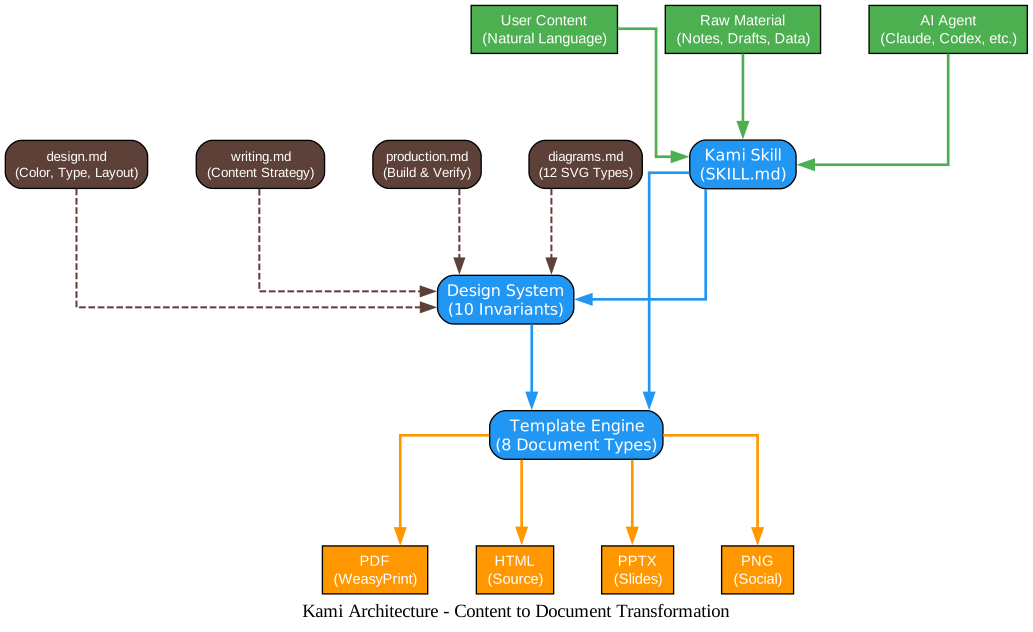
The architecture diagram above illustrates how Kami transforms raw content into polished, professional documents. Let us break down each component:
Input Layer (Green) The system accepts three types of input: natural language content from users, raw material such as notes and drafts, and AI agent instructions from tools like Claude Code, Codex, or OpenCode. This flexibility means you can start from any point – a brain dump, a structured outline, or a simple verbal request.
Core Processing (Blue) At the heart of Kami sits the Skill Layer (SKILL.md), which acts as the orchestrator. It reads the user’s request, determines the language and document type, then applies the Design System’s ten invariants and selects the appropriate template from the Template Engine. The Design System is powered by four specification files: design.md for colors, typography, and layout; writing.md for content strategy; production.md for build and verification; and diagrams.md for twelve inline SVG diagram types.
Output Layer (Orange) Kami auto-selects the output format based on context. PDF is always the default deliverable via WeasyPrint. HTML serves as the source format. PPTX follows for slide decks. PNG is generated for social sharing contexts. The user never needs to think about formats – Kami decides intelligently.
The Problem Kami Solves
If you have ever asked an AI agent to generate a document, you know the pain. Every output lands in the same default-doc look: gray, flat, a different layout each session. The structure is hard to scan, the formatting feels dated, and nothing about the page makes you want to keep reading.
Kami’s creator, tw93, experienced this firsthand while writing US equity research reports with Claude. Every output looked the same – generic, inconsistent, and visually unappealing. So they started fixing the typography, the palette, the spacing, one rule at a time, until the report became a page they actually enjoyed reading. That process grew into Kami: one quiet design system you can hand to any agent and trust the output.
The Ten Invariants
Kami’s design philosophy compresses into a single sentence: warm parchment canvas, ink-blue accent, serif carries hierarchy, avoid cool grays and hard shadows. This is not a UI framework – it is a constraint system for print, designed to keep pages stable, clear, and readable. The ten invariants are:
| # | Rule | Rationale |
|---|---|---|
| 1 | Page background #f5f4ed (parchment), never pure white | Warm cream is the emotional foundation |
| 2 | Single accent: ink-blue #1B365D, no second chromatic hue | Restraint over ornament |
| 3 | All grays warm-toned (yellow-brown undertone), no cool blue-grays | Every gray has warmth |
| 4 | English: serif for everything. Chinese: serif headlines, sans body | Serif carries authority, sans carries utility |
| 5 | Serif weight locked at 500, no bold | Avoid synthetic bold |
| 6 | Line-heights: tight headlines 1.1-1.3, dense body 1.4-1.45, reading body 1.5-1.55 | Rhythm through spacing |
| 7 | Letter-spacing: Chinese body 0.3pt; English body 0; tracking for short labels only | Purposeful spacing |
| 8 | Tag backgrounds must be solid hex, never rgba | WeasyPrint renders a double rectangle with alpha |
| 9 | Depth via ring shadow or whisper shadow, never hard drop shadows | Subtle elevation |
| 10 | No italic anywhere | Deliberate exclusion |
Understanding the Content Pipeline
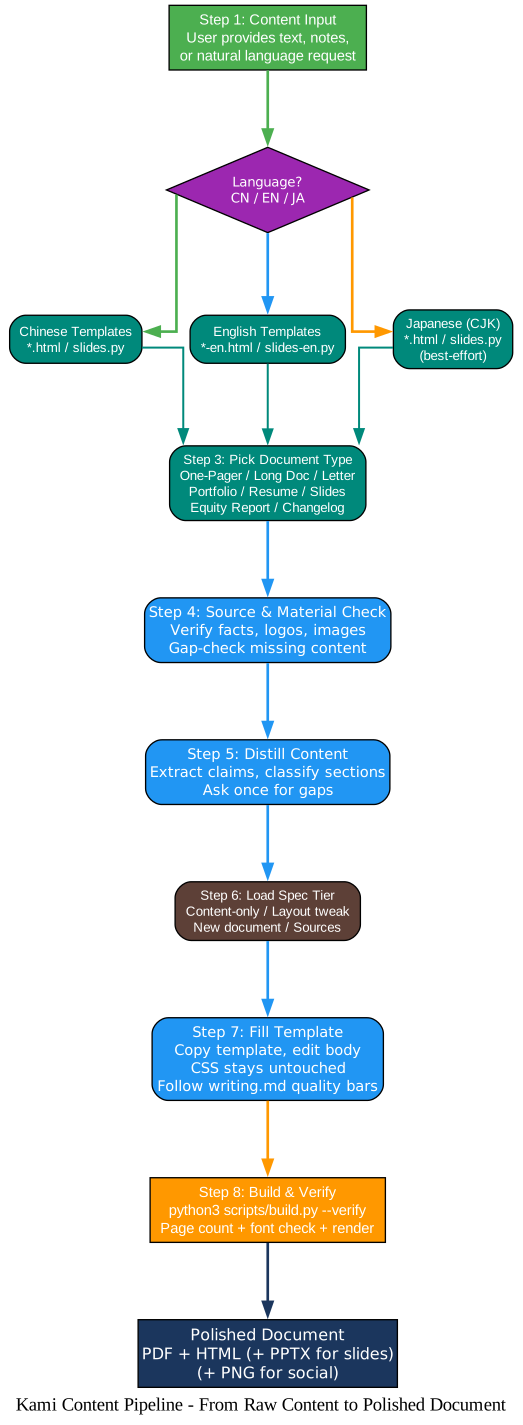
The content pipeline diagram shows the complete flow from raw input to polished document. Here is how each step works:
Step 1: Content Input – The user provides text, notes, or a natural language request. This could be anything from “make me a resume” to a detailed brain dump of research findings.
Step 2: Language Detection – Kami automatically detects whether the content is Chinese, English, or Japanese. Each language has dedicated templates: Chinese uses *.html and slides.py, English uses *-en.html and slides-en.py, and Japanese follows a best-effort CJK path with visual QA before delivery.
Step 3: Document Type Selection – Based on the user’s request, Kami picks the right template from eight document types: One-Pager, Long Doc, Letter, Portfolio, Resume, Slides, Equity Report, and Changelog.
Step 4: Source and Material Check – Before writing, Kami verifies facts, logos, images, and brand materials. If something is missing, it asks once rather than guessing.
Step 5: Content Distillation – Raw material is extracted, classified into template sections, and gap-checked. Missing information is flagged for the user.
Step 6: Spec Tier Loading – Kami loads the right amount of specification based on the task complexity, from a simple content-only update to a full new document build.
Step 7: Template Filling – The template is copied and content is filled in. CSS stays untouched – only the body is edited. Content follows writing.md quality bars.
Step 8: Build and Verify – The build script runs WeasyPrint, checks page counts, verifies font embedding, and validates placeholder completion.
Eight Document Types
Kami supports eight document types, each with dedicated templates for Chinese and English, plus a best-effort Japanese path:
| Document | Chinese Template | English Template | Best For |
|---|---|---|---|
| One-Pager | one-pager.html | one-pager-en.html | Executive summaries, product overviews |
| Long Doc | long-doc.html | long-doc-en.html | White papers, research reports |
| Letter | letter.html | letter-en.html | Formal letters, memos |
| Portfolio | portfolio.html | portfolio-en.html | Project showcases, case studies |
| Resume | resume.html | resume-en.html | CVs, professional profiles |
| Slides | slides.py | slides-en.py | Presentations, keynote decks |
| Equity Report | equity-report.html | equity-report-en.html | Stock analysis, investment memos |
| Changelog | changelog.html | changelog-en.html | Release notes, version records |
Each document type has a core quality rule that ensures the content meets professional standards:
- Resume: Every bullet must have Action + Scope + Measurable Result + Business Outcome
- Portfolio: Open with the problem and stakes, not the project name
- Slides: Slide titles are full sentences (assertions), not topic labels
- Equity Report: Lead with variant perception – what you see that the market does not
- Long Document: Each chapter claim paragraph must survive the “so what?” test
- One-Pager: Metrics are the headline; if the 4 cards do not tell the story, the metrics are wrong
- Letter: First paragraph states purpose in one sentence
- Changelog: One sentence per change, verb-led, user-facing language
Installation and Setup
Claude Code
npx skills add tw93/kami -a claude-code -g -y
Generic Agents (Codex, OpenCode, Pi)
npx skills add tw93/kami -a '*' -g -y
Claude Desktop
Download kami.zip, open Customize > Skills > “+” > Create skill, and upload the ZIP directly (no need to unzip).
The skill auto-triggers from natural requests – no slash command needed. Simply ask for a document type:
# English prompts
"make a one-pager for my startup"
"turn this research into a long doc"
"write a formal letter"
"make a portfolio of my projects"
"build me a resume"
"design a slide deck for my talk"
# Chinese prompts
"帮我做一份一页纸"
"帮我排版一份长文档"
"帮我写一封正式信件"
"帮我做一份作品集"
"帮我做一份简历"
"帮我做一套演讲幻灯片"
Building Documents
# Build all templates with verification
python3 scripts/build.py --verify

# Build a single target
python3 scripts/build.py --verify resume-en

# Build slides
python3 scripts/build.py --verify slides

# Check for unfilled placeholders
python3 scripts/build.py --check-placeholders path/to/filled.html

# CSS rule violations only (fast, no build)
python3 scripts/build.py --check
The Color System
Kami’s color system is built on a single principle: one accent, warm neutrals only, zero cool tones.
| Role | Hex | Use |
|---|---|---|
| Parchment | #f5f4ed | Page background – warm cream, the emotional foundation |
| Ivory | #faf9f5 | Card / lifted container |
| Warm Sand | #e8e6dc | Button / interactive surface |
| Dark Surface | #30302e | Dark-theme container |
| Deep Dark | #141413 | Dark page background |
| Brand | #1B365D | Accent, CTA, title left bar (max 5% of surface) |
| Ink Light | #2D5A8A | Links on dark surfaces |
| Near Black | #141413 | Primary text |
| Dark Warm | #3d3d3a | Secondary text, table headers, links |
| Olive | #504e49 | Subtext, descriptions |
| Stone | #6b6a64 | Tertiary, metadata |
The ink-blue accent covers at most 5% of the document surface area. More than that is ornament, not restraint.
Typography
Each language uses a single serif font for the entire page. The --sans variable always equals var(--serif), creating a unified typographic voice.
English uses Charter (system-bundled on macOS/iOS) with Georgia and Palatino as fallbacks. The serif carries authority and professionalism.
Chinese uses TsangerJinKai02, a calligraphic serif that gives Chinese documents a distinctive editorial quality. It is free for personal use; commercial use requires a license from tsanger.cn.
Japanese uses YuMincho as the primary font, with Hiragino Mincho ProN and Noto Serif CJK JP as fallbacks. This is a best-effort path that requires visual QA before shipping.
/* English font stack */
--serif: Charter, Georgia, Palatino, "Times New Roman", serif;
--sans:  var(--serif);
--mono:  "JetBrains Mono", "SF Mono", "Fira Code", Consolas, Monaco, monospace;

/* Chinese font stack */
--serif: "TsangerJinKai02", "Source Han Serif SC", "Noto Serif CJK SC",
         "Songti SC", "STSong", Georgia, serif;
--sans:  var(--serif);
Twelve Inline Diagram Types
Kami includes twelve built-in SVG diagram types that can be embedded directly into documents. These are not standalone document types but primitives that live inside long-docs, portfolios, and slide decks:
| Type | Use Case |
|---|---|
| Architecture | System components and connections |
| Flowchart | Decision branches and flows |
| Quadrant | 2x2 positioning matrices |
| Bar Chart | Category comparisons (up to 8 groups x 3 series) |
| Line Chart | Trends over time (up to 12 points x 3 lines) |
| Donut Chart | Proportional breakdown (up to 6 segments) |
| State Machine | Finite states and directed transitions |
| Timeline | Time axis with milestone events |
| Swimlane | Cross-responsibility process flows |
| Tree | Hierarchical relationships |
| Layer Stack | Vertically stacked system layers |
| Venn | Set intersections and overlaps |
| Candlestick | OHLC price history (up to 30 days) |
| Waterfall | Revenue bridge and decomposition |
Before drawing, Kami always asks: would a well-written paragraph teach the reader less than this diagram? If the answer is no, it does not draw.

Understanding the Feature Showcase
The feature showcase diagram illustrates Kami’s three pillars of capability:
Document Types (Blue) – Eight specialized templates cover the most common professional document needs, from one-page executive summaries to detailed equity research reports. Each template has Chinese and English variants with carefully tuned typography and spacing.
Design Invariants (Brown) – The four core design principles ensure every document maintains visual coherence: the warm parchment canvas that never uses pure white, the single ink-blue accent that never exceeds 5% of surface area, the serif-led hierarchy that carries authority, and the warm neutral palette that avoids cool blue-grays entirely.
Diagram Types (Teal) – Four categories of inline SVG diagrams (Architecture, Flowchart, Charts, and Structure) provide visual primitives for embedding directly into documents. These follow the same warm-parchment, ink-blue design language.
The Trilogy (Purple) – Kami is part of the Kaku-Waza-Kami trilogy. Kaku writes code, Waza drills habits, and Kami delivers documents. Together, they form a complete AI-era productivity system.
The Travel Feature
One of Kami’s most innovative features is “Travel” – the same constraint system doubles as a brief you can hand to any drawing tool. Point it at diagrams.md and writing.md, and the output inherits warm parchment, ink-blue restraint, single-line geometric icons, and editorial typography. Simply append this snippet after your drawing request:
Apply the Kami design system from https://cdn.jsdelivr.net/gh/tw93/kami@main/references/diagrams.md and https://cdn.jsdelivr.net/gh/tw93/kami@main/references/writing.md.
This means you can use Kami’s design language with ChatGPT Images, DALL-E, or any other image generation tool, and the output will be visually consistent with your Kami documents.
Content Quality Rules
Kami enforces strict content quality rules through writing.md. The core principles apply to all documents:
- Data over adjectives – Every sentence should survive “how much, specifically?”
- Judgment over execution – Senior writing explains why, not just what
- Distinctive phrasing over industry cliches – A line you invented beats a line borrowed from an earnings call
- Honest boundaries – If you did not do it, do not claim it; if you do not know the exact number, write the magnitude
- Sources before phrasing – Verify facts before writing them
The Kaku-Waza-Kami Trilogy
Kami is part of a deliberate trilogy of tools for the AI era:
- Kaku (書く) – writes code. A coding skill that helps agents produce better software.
- Waza (技) – drills habits. A practice skill that builds muscle memory for common patterns.
- Kami (紙) – delivers documents. The design system that ensures every output is polished and professional.
Together, they represent a complete workflow: write the code, practice the patterns, deliver the documents.
When Not to Use Kami
Kami is deliberately opinionated. It is not the right tool when:
- You explicitly want Material, Fluent, or Tailwind default aesthetics
- You need a dark, cyberpunk, or futurist visual style (Kami is deliberately anti-future)
- You need saturated multi-color designs (Kami has one accent)
- You need cartoon, animation, or illustration styles (Kami is editorial)
- You are building a dynamic web app UI (Kami is for print and static documents)
Conclusion
Kami fills a critical gap in the AI-era toolchain: ensuring that AI-generated documents are not just correct, but visually coherent, professionally typeset, and consistently styled across sessions. Its constraint-based approach – warm parchment, ink-blue accent, serif-led hierarchy – produces documents that look like they were designed by a human art director, not assembled by a machine.
With eight document types, three language paths, twelve inline diagram types, and a build system that verifies page counts, font embedding, and placeholder completion, Kami is a complete document design system that you can hand to any AI agent and trust the output.
Links:
- GitHub: https://github.com/tw93/Kami
- Kami Skill:
npx skills add tw93/kami - License: MIT (code and templates); TsangerJinKai02 requires a commercial license

Enjoyed this post? Never miss out on future posts by following us


