LLM Wiki: Turn Documents Into an Organized Knowledge Base with AI
LLM Wiki is a cross-platform desktop application that transforms your documents into a structured, interlinked knowledge base automatically. Instead of traditional RAG systems that retrieve and answer from scratch every time, LLM Wiki incrementally builds and maintains a persistent wiki from your sources – knowledge is compiled once and kept current, not re-derived on every query. With 3,100+ GitHub stars, this open-source tool brings Andrej Karpathy’s LLM Wiki pattern to life as a full-featured desktop application with significant enhancements.
Based on Karpathy’s foundational LLM Wiki pattern, the project extends the abstract methodology into a concrete, production-ready desktop application with a two-step chain-of-thought ingest pipeline, knowledge graph visualization with Louvain community detection, and a multi-phase query retrieval system that goes far beyond simple document search.
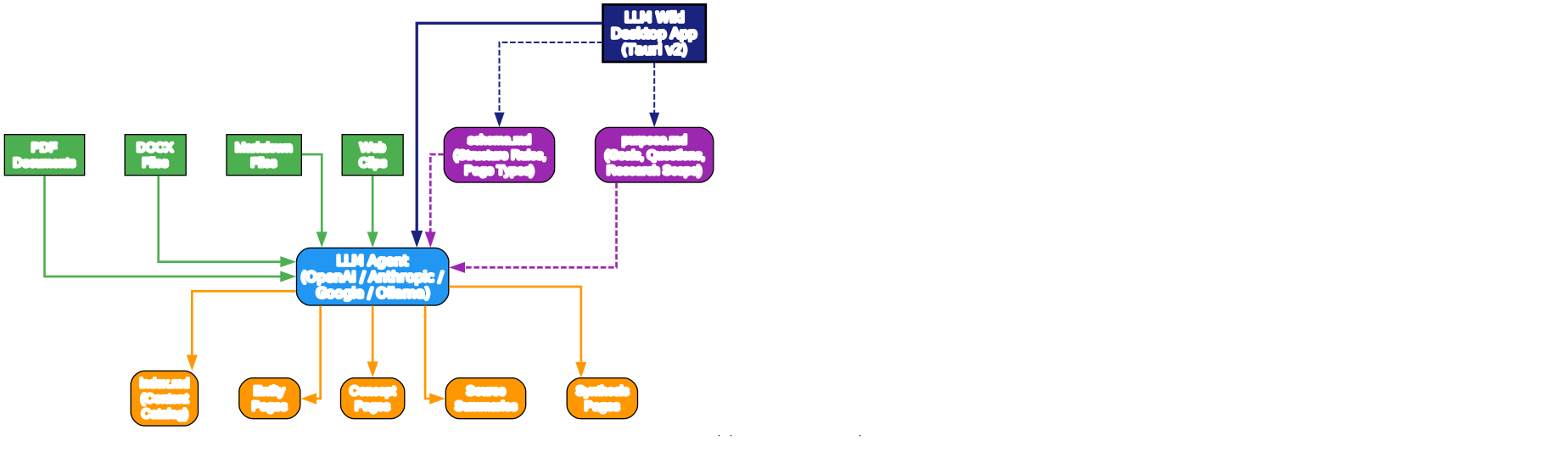
The Three-Layer Architecture
LLM Wiki follows a three-layer architecture that cleanly separates concerns between raw data, generated knowledge, and structural rules. This architecture is the foundation that makes the entire system work reliably and maintainably.
Layer 1: Raw Sources (Immutable)
The raw sources layer contains your original documents – PDFs, DOCX files, markdown, web clips, and more. These files are treated as immutable and read-only. The system never modifies them, ensuring your original data remains pristine. When you import documents, they are stored in the raw/sources/ directory and the LLM reads them during the ingest process.
Layer 2: The Wiki (LLM-Generated)
The wiki layer is where the magic happens. The LLM generates structured markdown pages organized into categories: entity pages (people, organizations, products), concept pages (theories, methods, techniques), source summaries, synthesis pages, and comparison pages. Every page includes YAML frontmatter with metadata like type, title, and a sources[] field that links back to the raw documents that contributed to it. This source traceability is critical – you can always verify where a piece of knowledge came from.
Layer 3: Schema + Purpose (Human-Curated)
The schema layer contains schema.md (structural rules, page types, and conventions) and purpose.md (goals, key questions, and research scope). The schema tells the LLM how to format wiki pages, while purpose.md gives it directional intent – why the wiki exists and what questions it should answer. This separation between structural rules and directional intent is a key innovation over the original Karpathy pattern.
The desktop application (built with Tauri v2) orchestrates all three layers, providing a three-column layout with a knowledge tree, chat interface, and preview panel.
Two-Step Chain-of-Thought Ingest Pipeline
The ingest pipeline is where LLM Wiki truly differentiates itself from simple RAG systems. Instead of a single LLM call that reads and writes simultaneously, LLM Wiki splits the process into two sequential calls for significantly better quality.
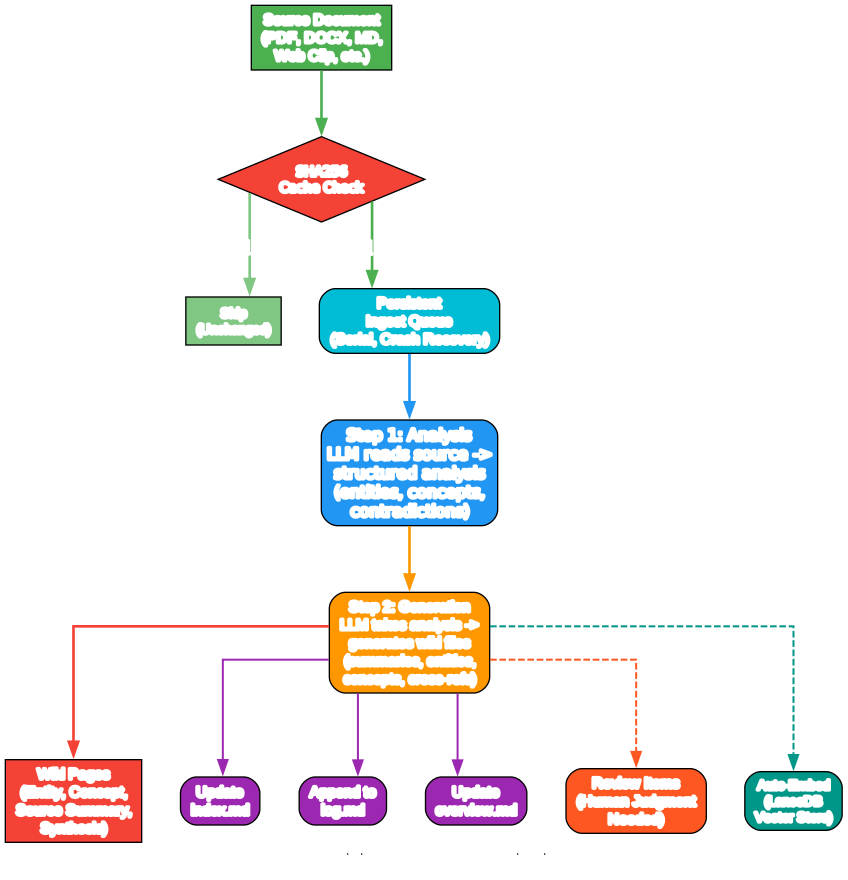
Understanding the Ingest Pipeline
The diagram above illustrates the complete two-step chain-of-thought ingest pipeline. Let’s break down each component:
SHA256 Cache Check: Before any LLM call is made, the system hashes the source file content. If the file has not changed since the last ingest, it is skipped entirely. This saves LLM tokens and processing time, and is especially valuable when re-ingesting a folder of documents where only a few have been updated.
Step 1 - Analysis: The LLM reads the source document and produces a structured analysis. This includes identifying key entities, concepts, and arguments; mapping connections to existing wiki content; flagging contradictions and tensions with existing knowledge; and recommending structural changes to the wiki. By separating analysis from generation, the LLM can focus entirely on understanding the content before writing anything.
Step 2 - Generation: Taking the analysis from Step 1 as input, the LLM generates wiki files. This includes source summary pages with frontmatter, entity and concept pages with cross-references, updated index.md and log.md, review items for human judgment, and search queries for Deep Research. The two-step approach produces significantly higher quality output because the generation step has a clear blueprint to follow.
Persistent Ingest Queue: All ingest operations are serialized through a persistent queue that survives app restarts. Failed tasks auto-retry up to 3 times, and the Activity Panel shows real-time progress with cancel and retry buttons. This ensures reliable processing even with large document collections.
Auto-Embedding: When vector search is enabled, new pages are automatically embedded after ingest using LanceDB, making them immediately available for semantic search without any manual step.
Knowledge Graph with 4-Signal Relevance Model
One of the most powerful features of LLM Wiki is its built-in knowledge graph visualization and relevance engine. Unlike simple wikilink cross-references, the system uses a 4-signal relevance model to discover meaningful connections between pages.
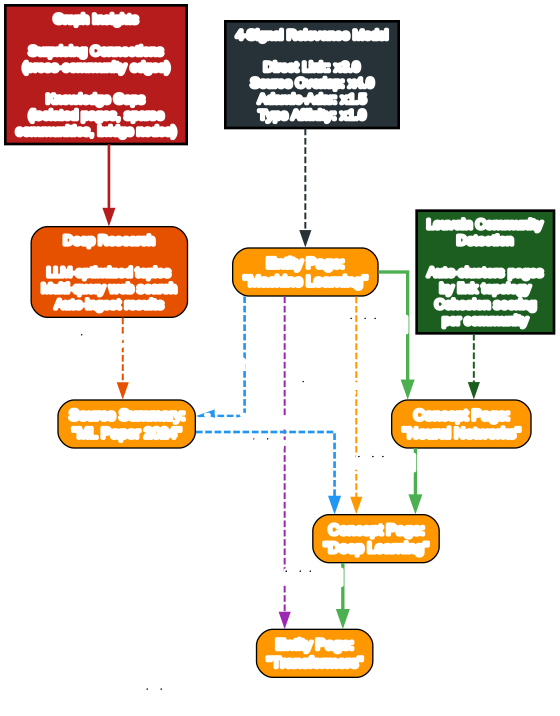
Understanding the Knowledge Graph
The knowledge graph diagram above shows how the 4-signal relevance model connects wiki pages through different relationship types. Each signal captures a different dimension of relatedness:
Direct Links (weight x3.0): Pages connected via [[wikilinks]] syntax. These are explicit cross-references that the LLM creates during ingest, representing the strongest form of relationship. When the LLM writes about “Machine Learning” and links to “Neural Networks,” that direct connection gets the highest weight.
Source Overlap (weight x4.0): Pages that share the same raw source document, identified through the sources[] field in YAML frontmatter. This is the highest-weighted signal because two pages derived from the same source are likely to be deeply related, even if they do not explicitly reference each other.
Adamic-Adar (weight x1.5): Pages that share common neighbors, weighted by the degree of those neighbors. This captures transitive relationships – if two pages are both linked to a popular hub page, they are likely related even without a direct link between them.
Type Affinity (weight x1.0): A bonus for pages of the same type (entity-to-entity, concept-to-concept). This helps surface relationships within the same knowledge domain.
Louvain Community Detection
Beyond individual connections, LLM Wiki uses the Louvain algorithm to automatically discover knowledge clusters. Communities are groups of pages that naturally cluster together based on link topology, independent of predefined page types. Each community is scored by cohesion (intra-edge density), and low-cohesion clusters are flagged as potential knowledge gaps.
Graph Insights
The system automatically analyzes graph structure to surface actionable insights:
- Surprising Connections: Cross-community edges, cross-type links, and peripheral-to-hub couplings ranked by a composite surprise score
- Knowledge Gaps: Isolated pages with few connections, sparse communities with weak internal cross-references, and bridge nodes that hold multiple knowledge areas together
- Deep Research Integration: Each insight card has a one-click Deep Research button that triggers LLM-optimized web search to fill the identified gap
Multi-Phase Query Retrieval Pipeline
When you ask a question, LLM Wiki does not just do a simple keyword search. It runs a sophisticated multi-phase retrieval pipeline that combines tokenized search, optional vector semantic search, and graph expansion to find the most relevant context.
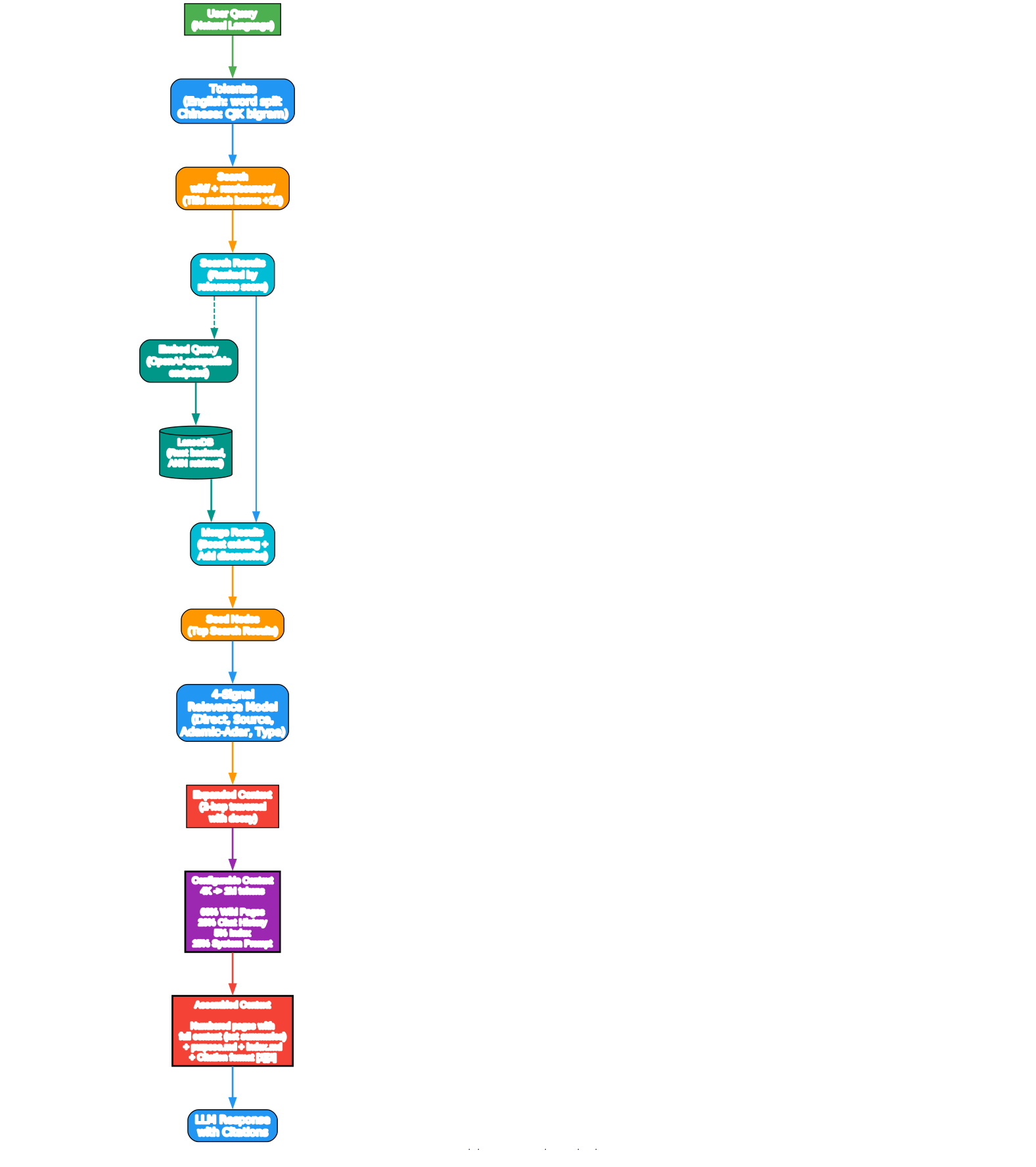
Understanding the Query Pipeline
The diagram above shows the four phases of the query retrieval pipeline. Here is how each phase works:
Phase 1 - Tokenized Search: The query is tokenized using language-aware tokenization. English queries use word splitting with stop word removal, while Chinese queries use CJK bigram tokenization. Title matches receive a +10 score bonus. The search covers both the wiki directory and raw sources directory.
Phase 1.5 - Vector Semantic Search (Optional): When enabled, the query is embedded using any OpenAI-compatible endpoint and stored in LanceDB for fast ANN (Approximate Nearest Neighbor) retrieval. Vector search finds semantically related pages even without keyword overlap, boosting overall recall from 58.2% to 71.4%.
Phase 2 - Graph Expansion: Top search results serve as seed nodes. The 4-signal relevance model finds related pages through 2-hop traversal with decay for deeper connections. This expands the context beyond what direct search alone would find.
Phase 3 - Budget Control: A configurable context window (4K to 1M tokens) allocates proportional space: 60% for wiki pages, 20% for chat history, 5% for index, and 15% for the system prompt. Pages are prioritized by combined search and graph relevance scores.
Phase 4 - Context Assembly: The final context includes numbered pages with full content (not just summaries), the purpose.md and index.md for orientation, and citation format instructions so the LLM can reference sources by number.
Desktop Application Features
LLM Wiki is built as a native desktop application using Tauri v2 with a React 19 frontend, providing a rich three-column layout that goes far beyond what a CLI-based approach could offer.

Understanding the Desktop Features
The diagram above illustrates the major feature categories of the LLM Wiki desktop application. Here is a detailed breakdown:
Core Features:
- Three-Column Layout: Knowledge Tree and File Tree on the left, Chat in the center, and Preview on the right. Custom resizable panels with min/max constraints let you adjust the workspace to your needs.
- Two-Step Chain-of-Thought Ingest: The pipeline described above, with SHA256 caching, persistent queue, and auto-embedding.
- Multi-Conversation Chat: Independent chat sessions with per-conversation persistence, configurable history depth, and cited references panels showing which wiki pages were used in each response.
- Knowledge Graph Visualization: Built with sigma.js and graphology, featuring ForceAtlas2 layout, node coloring by type or community, edge thickness by relevance weight, and interactive hover effects.
- Lint System: Periodic health checks that find contradictions, stale claims, orphan pages, and missing links, then suggest fixes.
Advanced Features:
- Deep Research: When the LLM identifies knowledge gaps, it generates optimized search topics, runs multi-query web search via Tavily API, synthesizes findings into wiki research pages, and auto-ingests the results.
- Async Review System: The LLM flags items needing human judgment during ingest with predefined action types (Create Page, Deep Research, Skip) and pre-generated search queries. You handle reviews at your convenience without blocking the ingest process.
- Vector Search: Optional LanceDB-based semantic search with any OpenAI-compatible embedding endpoint, boosting recall from 58.2% to 71.4%.
- Chrome Web Clipper: A Manifest V3 extension that uses Mozilla Readability.js and Turndown.js for clean article extraction, with project picker and auto-ingest.
- Cascade Delete: Intelligent file deletion that removes related wiki pages, cleans up index.md entries, and removes dead wikilinks while preserving shared entity pages.
Cross-Platform:
- macOS (ARM + Intel), Windows (.msi), and Linux (.deb / .AppImage) via Tauri v2
- Obsidian Compatible: The wiki directory works as an Obsidian vault with auto-generated
.obsidian/configuration - i18n: Full English and Chinese interface support via react-i18next
- All State Persisted: Conversations, settings, review items, and project config survive restarts
Installation
Pre-built Binaries
Download the latest release from the LLM Wiki Releases page:
- macOS:
.dmg(Apple Silicon + Intel) - Windows:
.msi - Linux:
.deb/.AppImage
Build from Source
# Prerequisites: Node.js 20+, Rust 1.70+
git clone https://github.com/nashsu/llm_wiki.git
cd llm_wiki
npm install
npm run tauri dev      # Development
npm run tauri build    # Production build
Chrome Extension
# 1. Open chrome://extensions
# 2. Enable "Developer mode"
# 3. Click "Load unpacked"
# 4. Select the extension/ directory from the cloned repo
Quick Start
# 1. Launch the app and create a new project (choose a template)
# 2. Go to Settings and configure your LLM provider (API key + model)
# 3. Go to Sources and import documents (PDF, DOCX, MD, etc.)
# 4. Watch the Activity Panel as the LLM automatically builds wiki pages
# 5. Use Chat to query your knowledge base
# 6. Browse the Knowledge Graph to see connections
# 7. Check Review for items needing your attention
# 8. Run Lint periodically to maintain wiki health
Project Structure
When you create a wiki project, LLM Wiki generates this directory structure:
my-wiki/
  purpose.md              # Goals, key questions, research scope
  schema.md               # Wiki structure rules, page types
  raw/
    sources/               # Uploaded documents (immutable)
    assets/                # Local images
  wiki/
    index.md              # Content catalog
    log.md                 # Operation history
    overview.md            # Global summary (auto-updated)
    entities/              # People, organizations, products
    concepts/              # Theories, methods, techniques
    sources/               # Source summaries
    queries/               # Saved chat answers + research
    synthesis/             # Cross-source analysis
    comparisons/           # Side-by-side comparisons
  .obsidian/               # Obsidian vault config (auto-generated)
  .llm-wiki/               # App config, chat history, review items
Multi-Format Document Support
LLM Wiki handles a wide range of document formats with structured extraction that preserves document semantics:
| Format | Method |
|---|---|
| pdf-extract (Rust) with file caching | |
| DOCX | docx-rs with headings, bold/italic, lists, tables to Markdown |
| PPTX | ZIP + XML slide-by-slide extraction with heading/list structure |
| XLSX/XLS/ODS | calamine with proper cell types, multi-sheet, Markdown tables |
| Images | Native preview (png, jpg, gif, webp, svg) |
| Video/Audio | Built-in player |
| Web clips | Readability.js + Turndown.js to clean Markdown |
Tech Stack
| Layer | Technology |
|---|---|
| Desktop | Tauri v2 (Rust backend) |
| Frontend | React 19 + TypeScript + Vite |
| UI | shadcn/ui + Tailwind CSS v4 |
| Editor | Milkdown (ProseMirror-based WYSIWYG) |
| Graph | sigma.js + graphology + ForceAtlas2 |
| Search | Tokenized search + graph relevance + optional vector (LanceDB) |
| Vector DB | LanceDB (Rust, embedded, optional) |
| pdf-extract | |
| Office | docx-rs + calamine |
| i18n | react-i18next |
| State | Zustand |
| LLM | Streaming fetch (OpenAI, Anthropic, Google, Ollama, Custom) |
| Web Search | Tavily API |
LLM Wiki vs Traditional RAG
The fundamental difference between LLM Wiki and traditional RAG systems is compounding knowledge. In a traditional RAG pipeline, every query starts from scratch – retrieve chunks, generate an answer, discard. Nothing accumulates. LLM Wiki flips this model: knowledge is compiled once during ingest and kept current through linting, so every subsequent query benefits from all previous work.
This compounding effect means that as your wiki grows, the quality of answers improves. New sources are integrated into the existing knowledge graph, cross-references are updated, and contradictions are flagged. The wiki becomes richer over time rather than staying flat.
Conclusion
LLM Wiki represents a significant evolution in personal knowledge management. By combining Karpathy’s LLM Wiki pattern with a full desktop application, knowledge graph analysis, community detection, and a sophisticated multi-phase retrieval pipeline, it transforms how we interact with our documents. Instead of searching through piles of files, you get an organized, cross-referenced knowledge base that compounds over time.
The project is open source under GPL v3.0 and available at github.com/nashsu/llm_wiki.
Links

Enjoyed this post? Never miss out on future posts by following us


