Huashu Design: HTML-Native Design Skill for AI Coding Agents
Huashu Design is an open-source skill that transforms AI coding agents like Claude Code, Cursor, and Codex into professional designers capable of producing high-fidelity prototypes, slide decks, motion graphics, and infographics – all through natural language commands. With 6,600+ GitHub stars and a library of 20 curated design philosophies, Huashu Design eliminates the need to open Figma or After Effects by delivering production-quality visual output directly from your terminal.
The project’s core insight is radical: HTML is not just a web technology – it is a universal design medium. When an AI agent treats HTML as a design canvas rather than a web development framework, it can produce deliverable-quality work that rivals what professional design teams create in specialized tools.
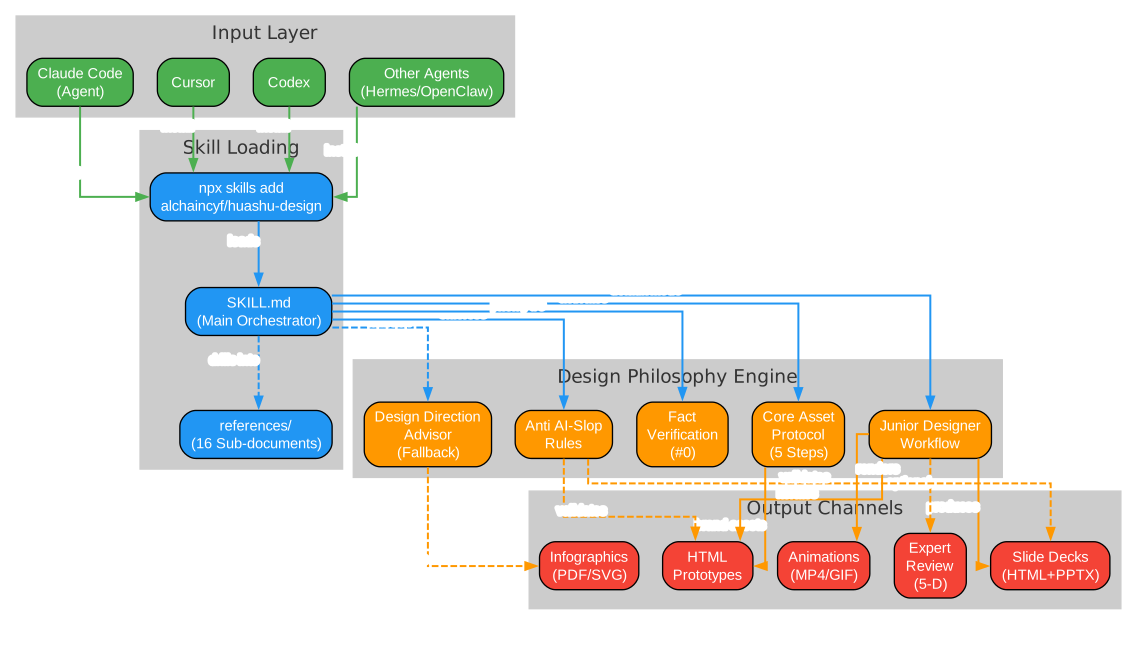
How Huashu Design Works
Huashu Design operates as a skill file (SKILL.md) that gets loaded into your AI agent. Rather than providing a graphical interface, it teaches the agent to think and work like a professional designer through structured workflows, design philosophy references, and anti-pattern rules.
Installation
npx skills add alchaincyf/huashu-design
Once installed, you can issue natural language commands directly in your agent:
"Create a presentation deck about AI psychology, recommend 3 style directions"
"Build an iOS Pomodoro timer prototype with 4 clickable screens"
"Turn this logic into a 60-second animation, export as MP4 and GIF"
"Give this design a 5-dimension expert review"
There are no buttons, panels, or Figma plugins. You type, the agent designs, and you receive deliverable output.
Architecture Overview
The architecture diagram above illustrates how Huashu Design flows from agent input through skill loading to final output. The key layers are:
Input Layer: Any skill-compatible agent – Claude Code, Cursor, Codex, OpenClaw, or Hermes – can install and activate the skill through the npx skills add command.
Skill Loading Layer: The SKILL.md file serves as the main orchestrator, referencing 16 sub-documents in the references/ directory that provide deep guidance for specific tasks like animation pitfalls, design styles, slide decks, and video export.
Design Philosophy Engine: This is the core intelligence layer, containing five major mechanisms:
- Fact Verification (#0 Priority): Before any design work begins, the agent must verify factual claims about products, technologies, or events using WebSearch – never relying on training data alone.
- Brand Asset Protocol: A mandatory 5-step process when working with specific brands, ensuring authentic color values and visual identity.
- Junior Designer Workflow: The default working mode that emphasizes showing assumptions early, iterating based on feedback, and validating with Playwright.
- Design Direction Advisor: A fallback mode triggered when user requirements are vague, recommending 3 differentiated directions from 5 schools of design philosophy.
- Anti AI-Slop Rules: Built-in safeguards against the visual patterns that make AI-generated designs look generic.
Output Channels: The skill produces five types of deliverables: interactive HTML prototypes, slide decks (HTML + editable PPTX), time-axis animations (MP4/GIF with BGM), infographics (PDF/SVG), and expert design reviews.
The 20 Design Philosophies
Huashu Design’s most distinctive feature is its curated library of 20 design philosophies organized into 5 schools. When a user’s request is vague, the Design Direction Advisor selects 3 philosophies from different schools and generates parallel visual demos for the user to choose from.
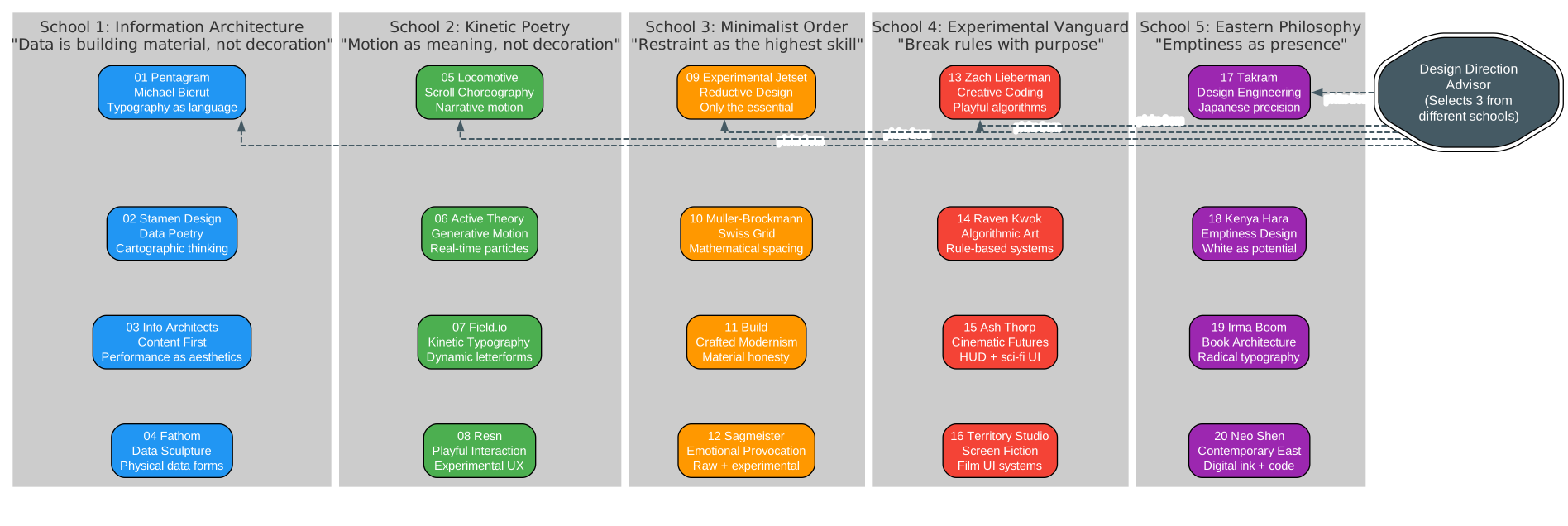
Understanding the 5 Schools
Each school represents a fundamentally different approach to visual design. The diversity across schools ensures that when the advisor recommends 3 directions, they are genuinely differentiated rather than variations on the same theme.
School 1: Information Architecture (Philosophies 01-04)
This school treats data as building material, not decoration. The four philosophies within it share a conviction that visual structure should emerge from content rather than imposed upon it.
- 01 Pentagram / Michael Bierut: Typography as language, Swiss grid systems, extreme restraint with color (black/white + one accent), and 60%+ whitespace. Best executed through HTML for precise typographic control.
- 02 Stamen Design: Cartographic thinking applied to data visualization, warm organic palettes (terracotta, sage green, deep blues), and layered information like topographic maps. Works best as a hybrid of HTML layout and AI-generated imagery.
- 03 Information Architects: Content-first hierarchy with zero decorative elements, system fonts only, classic blue hyperlinks, and reading-optimized line lengths. Pure HTML execution.
- 04 Fathom: Data as physical sculpture, interactive 3D visualizations, and scientific precision in visual representation. HTML rendering for data accuracy.
School 2: Kinetic Poetry (Philosophies 05-08)
Motion as meaning, not decoration. These philosophies use animation and interaction as primary design languages rather than embellishments.
- 05 Locomotive: Scroll choreography where page transitions tell stories, narrative motion sequences, and cinematic pacing. Hybrid approach.
- 06 Active Theory: Generative motion with real-time particles, WebGL experiences, and interactive 3D elements. Best as AI-generated output.
- 07 Field.io: Kinetic typography with dynamic letterforms, experimental type animation, and bold visual statements. AI generation recommended.
- 08 Resn: Playful interaction design, experimental UX patterns, and unexpected micro-animations. AI generation or hybrid.
School 3: Minimalist Order (Philosophies 09-12)
Restraint as the highest skill. These philosophies achieve impact through subtraction rather than addition.
- 09 Experimental Jetset: Reductive design that strips everything to its essential form, anti-decorative stance, and content as the only visual element. Hybrid approach.
- 10 Muller-Brockmann: Swiss grid mathematics, precise geometric spacing, and objective photography. HTML for grid precision.
- 11 Build: Crafted modernism with material honesty, refined typography, and subtle texture. HTML execution.
- 12 Sagmeister & Walsh: Emotional provocation through experimental typography, raw and unconventional visual approaches. AI generation excels.
School 4: Experimental Vanguard (Philosophies 13-16)
Breaking rules with purpose. These philosophies push boundaries and challenge conventions.
- 13 Zach Lieberman: Creative coding with playful algorithms, generative art, and interactive experiments. AI generation.
- 14 Raven Kwok: Algorithmic art with rule-based systems, computational aesthetics, and mathematical beauty. AI generation.
- 15 Ash Thorp: Cinematic futures with HUD design, sci-fi UI, and atmospheric depth. AI generation.
- 16 Territory Studio: Screen fiction with film UI systems, diegetic interfaces, and narrative technology. AI generation.
School 5: Eastern Philosophy (Philosophies 17-20)
Emptiness as presence. These philosophies draw from Japanese and Chinese aesthetic traditions where what is left out matters as much as what is included.
- 17 Takram: Japanese speculative design with elegant concept prototypes, soft tech aesthetics, and modest sophistication. HTML execution.
- 18 Kenya Hara: Emptiness design with 80%+ whitespace, paper texture in digital form, and layers of white. HTML for precision.
- 19 Irma Boom: Book architecture with non-linear information structures, unexpected color combinations, and editorial design. Hybrid approach.
- 20 Neo Shen: Contemporary Eastern aesthetic with digital ink wash painting, soft glow effects, and poetic negative space. AI generation.
Execution Path Selection
Each philosophy has an optimal execution path based on its characteristics:
| Path | Best For | Philosophies |
|---|---|---|
| HTML Rendering | Precise typography, data accuracy, grid systems | 01, 03, 04, 10, 11, 17, 18 |
| AI Generation | Visual elements, particles, generative art | 06, 07, 12, 13, 14, 15, 16, 20 |
| Hybrid | HTML layout + AI-generated imagery | 02, 05, 08, 09, 19 |
Core Mechanisms in Detail
Brand Asset Protocol
The Brand Asset Protocol is the most rigorous rule in the skill. When a design task involves a specific brand (Stripe, Linear, Anthropic, or your own company), the agent must follow these 5 mandatory steps:
| Step | Action | Purpose |
|---|---|---|
| 1. Ask | Does the user have brand guidelines? | Respect existing resources |
| 2. Search | Check <brand>.com/brand, brand.<brand>.com, <brand>.com/press | Capture authoritative color values |
| 3. Download | SVG files, then full homepage HTML, then product screenshots | Three fallback paths |
| 4. Extract | Grep all #xxxxxx color values, sort by frequency, filter black/white/gray | Never guess brand colors from memory |
| 5. Solidify | Write brand-spec.md + CSS variables, all HTML references var(--brand-*) | Prevent the agent from forgetting |
A/B testing showed that the v2 protocol (with these 5 steps) has 5x lower variance in stability compared to v1. This is the skill’s real moat – not the design philosophies, but the reliability of the process.
Junior Designer Workflow
The default working mode follows a “Junior Designer” pattern that emphasizes early visibility and iterative refinement:
- Before starting: Send a question checklist to the user, wait for batch answers
- In HTML: Write assumptions, placeholders, and reasoning comments first
- Show early: Present work to the user even if it is just gray boxes
- Iterate: Fill actual content, then variations, then Tweaks – show at each stage
- Before delivery: Run Playwright to visually verify in the browser
This workflow prevents the common AI pattern of producing a polished but wrong design. By showing assumptions early, the cost of misalignment is minimized.
Anti AI-Slop Rules
The skill includes explicit rules against the visual patterns that make AI-generated designs look generic:
- No purple gradients as default
- No emoji as icons
- No rounded corners with left border accent
- No SVG-drawn faces
- No Inter as display font
- Use
text-wrap: prettyfor typographic refinement - Use CSS Grid for precise layouts
- Choose serif display fonts and oklch color values deliberately
Fact Verification (Priority #0)
The highest-priority rule in the entire skill is fact verification. Before any design work begins, if the task involves specific products, technologies, events, or people, the agent must use WebSearch to verify existence, release status, version numbers, and specifications. This prevents the costly mistake of designing for a product that does not exist or using outdated specifications.
Workflow Pipeline
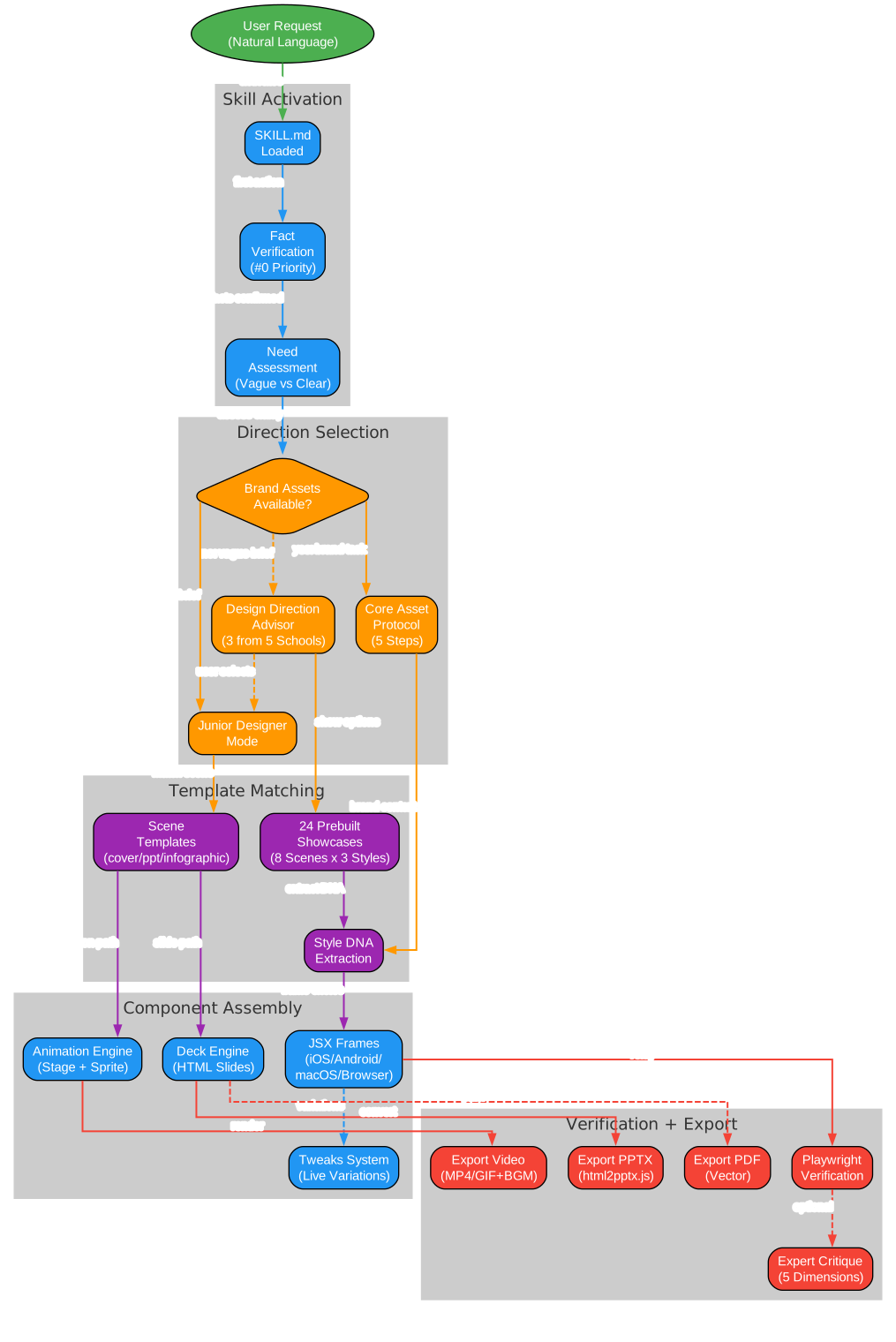
Understanding the Workflow
The workflow pipeline diagram above shows the complete journey from a user’s natural language request to final deliverable. Let us trace each phase:
Phase 1 - User Request: The process begins with a natural language prompt. This could be anything from “make me a presentation about AI” to “create an iOS prototype for a meditation app.”
Phase 2 - Skill Activation: The SKILL.md is loaded, which immediately triggers fact verification (#0 priority). The agent then assesses whether the user’s brief is clear or vague.
Phase 3 - Direction Selection: This is where the 20 design philosophies come into play. If brand assets are available, the Brand Asset Protocol extracts authentic visual identity. If the brief is vague, the Design Direction Advisor kicks in, selecting 3 philosophies from different schools and generating parallel demos. If the brief is clear, the Junior Designer mode activates directly.
Phase 4 - Template Matching: The skill matches the task to one of 24 prebuilt showcases (8 scenes x 3 styles) and extracts style DNA from the selected philosophy. Scene templates cover common formats like covers, presentations, infographics, and websites.
Phase 5 - Component Assembly: The actual HTML is assembled using starter components: JSX device frames (iPhone, Android, macOS, Browser), the animation engine (Stage + Sprite), the deck engine for slides, and the Tweaks system for live variation switching.
Phase 6 - Verification and Export: Playwright runs automated click tests on prototypes. The export pipeline handles conversion to PPTX (via html2pptx.js), MP4/GIF (with 60fps interpolation and BGM), and PDF (vector output). An optional 5-dimension expert critique can be generated.
Component Library
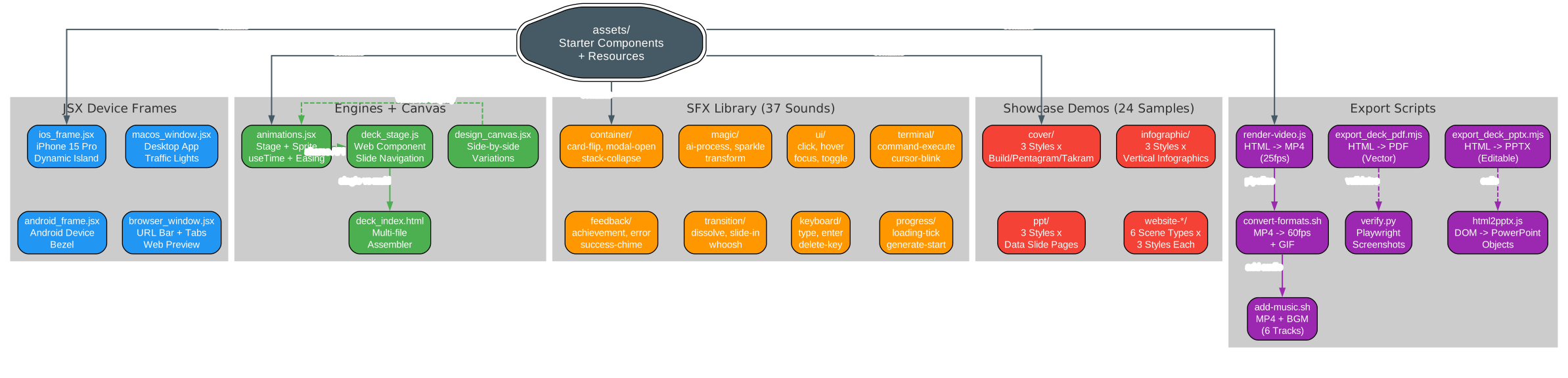
Understanding the Components
The component library diagram above shows the full asset ecosystem that ships with Huashu Design. Each component category serves a specific purpose in the design pipeline:
JSX Device Frames: Pixel-accurate device bezels for presenting prototypes in context. The iPhone 15 Pro frame includes the Dynamic Island, status bar, and Home Indicator. Android, macOS, and Browser frames provide similar fidelity for their respective platforms.
Engines and Canvas: The animation engine provides a Stage + Sprite timeline model with useTime, useSprite, interpolate, and Easing APIs. The deck engine handles HTML slide navigation as a web component. The design canvas enables side-by-side variation comparison with localStorage persistence.
SFX Library: 37 prebuilt sound effects organized into 8 categories (container, feedback, magic, transition, UI, keyboard, terminal, progress). These can be layered onto animations for Apple-keynote-level production quality.
Showcase Demos: 24 prebuilt examples across 8 scene types (cover, presentation, infographic, website variants) x 3 style directions each. These serve as both reference implementations and starting points for new projects.
Export Scripts: A complete toolchain for converting HTML output into production deliverables. The video pipeline handles HTML-to-MP4 at 25fps with optional 60fps interpolation and palette-optimized GIF conversion. The PPTX pipeline reads computed DOM styles and translates them into editable PowerPoint text boxes.
Key Capabilities
| Capability | Deliverable | Typical Time |
|---|---|---|
| Interactive Prototypes | Single-file HTML with real device bezels, clickable, Playwright-verified | 10-15 min |
| Presentation Decks | HTML deck (browser presentation) + editable PPTX (preserved text boxes) | 15-25 min |
| Timeline Animations | MP4 (25fps/60fps interpolated) + GIF (palette optimized) + BGM | 8-12 min |
| Design Variants | 3+ side-by-side comparisons with live Tweaks parameter adjustment | 10 min |
| Infographics | Print-quality typography, exportable to PDF/PNG/SVG | 10 min |
| Design Direction Advisor | 5 schools x 20 philosophies, recommend 3 directions, generate parallel demos | 5 min |
| 5-Dimension Expert Review | Radar chart + Keep/Fix/Quick Wins actionable checklist | 3 min |
Comparison with Claude Design
Huashu Design was directly inspired by Anthropic’s Claude Design product. The creator acknowledges that the Brand Asset Protocol philosophy was learned from Claude Design’s leaked system prompts. However, the two take fundamentally different approaches:
| Aspect | Claude Design | Huashu Design |
|---|---|---|
| Form | Web product (browser-based) | Skill (runs in terminal agent) |
| Quota | Subscription-based | API consumption, parallel agents unlimited |
| Output | Canvas + Figma export | HTML / MP4 / GIF / editable PPTX / PDF |
| Interaction | GUI (click, drag, modify) | Conversation (type, wait, iterate) |
| Complex Animation | Limited | Stage + Sprite timeline, 60fps export |
| Cross-Agent | Exclusive to Claude.ai | Any skill-compatible agent |
Claude Design is a better graphical tool. Huashu Design aims to make the graphical tool layer disappear entirely. Different paths for different audiences.
Getting Started
Prerequisites
- An AI coding agent that supports skills (Claude Code, Cursor, Codex, OpenClaw, or Hermes)
- Node.js installed for
npxcommand
Installation
npx skills add alchaincyf/huashu-design
Quick Examples
Create an iOS app prototype:
"Build an AI meditation timer iOS prototype with 4 core screens that are actually clickable"
Create a presentation deck:
"Create a presentation deck about AI psychology, recommend 3 style directions for me to choose from"
Create an animation:
"Turn this product launch logic into a 60-second animation, export as MP4 and GIF"
Get a design review:
"Give this design a 5-dimension expert review"
Repository Structure
huashu-design/
  SKILL.md                 # Main document (for the agent to read)
  README.md                # This file (for humans to read)
  assets/                  # Starter Components
    animations.jsx         # Stage + Sprite + Easing + interpolate
    ios_frame.jsx          # iPhone 15 Pro bezel
    android_frame.jsx
    macos_window.jsx
    browser_window.jsx
    deck_stage.js          # HTML slide engine
    deck_index.html        # Multi-file deck assembler
    design_canvas.jsx      # Side-by-side variant display
    showcases/             # 24 prebuilt examples (8 scenes x 3 styles)
    bgm-*.mp3              # 6 scene-specific background music tracks
  references/              # Deep-dive sub-documents per task
    animation-pitfalls.md
    design-styles.md       # 20 design philosophies detailed library
    slide-decks.md
    editable-pptx.md
    critique-guide.md
    video-export.md
    ...
  scripts/                 # Export toolchain
    render-video.js        # HTML to MP4
    convert-formats.sh     # MP4 to 60fps + GIF
    add-music.sh           # MP4 + BGM
    export_deck_pdf.mjs
    export_deck_pptx.mjs
    html2pptx.js
    verify.py
  demos/                   # 9 capability demos, bilingual GIF/MP4/HTML
Limitations
Huashu Design is honest about its boundaries:
- No Figma-compatible PPTX: Output is HTML that can be screenshotted, recorded, or exported, but cannot be dragged into Keynote for text position editing.
- No Framer Motion-level animation: 3D, physics simulation, and particle systems exceed the skill’s boundaries.
- Quality drops to 60-65 without brand assets: Starting from a completely blank brand context produces lower-quality results. Providing brand assets (logo, color palette, UI screenshots) significantly improves output.
As the creator states: “This is an 80-point skill, not a 100-point product. For people who do not want to open a graphical interface, an 80-point skill is more useful than a 100-point product.”
Conclusion
Huashu Design represents a paradigm shift in how we think about design tools. Instead of building better graphical interfaces, it teaches AI agents to produce professional-quality design output through structured workflows, curated design philosophies, and rigorous quality controls. The 20 design philosophies provide a vocabulary for design direction that goes far beyond generic AI aesthetics, while the Brand Asset Protocol and anti-slop rules ensure output that looks like it came from a professional design team rather than a generic AI template.
For developers who prefer working in terminals over design tools, Huashu Design offers a compelling alternative: type a sentence, get back a deliverable. The skill is free for personal use and available on GitHub at alchaincyf/huashu-design.
Links
- GitHub Repository: https://github.com/alchaincyf/huashu-design
- Creator - Huasheng (Alchain): https://www.huasheng.ai/
- X/Twitter: @AlchainHust
- Install Skill:
npx skills add alchaincyf/huashu-design

Enjoyed this post? Never miss out on future posts by following us


