Learn Claude Code: Building AI Agents from Scratch
In the rapidly evolving landscape of AI-assisted development, understanding how coding agents work under the hood is essential for building robust, safe, and extensible systems. The shareAI-lab/learn-claude-code repository, with over 51,000 stars, provides a comprehensive educational resource for implementers who want to build high-completion coding agent harnesses from scratch. This blog post explores the architecture, mechanisms, and design patterns that make modern AI coding assistants possible.
What is Learn Claude Code?
Learn Claude Code is a teaching repository that reconstructs the essential mechanisms of production-grade coding agents. Rather than mirroring every product detail, it focuses on the core components that determine whether an agent can work effectively:
| Component | Purpose |
|---|---|
| Agent Loop | The core request-response cycle |
| Tools | The agent’s hands for interacting with the world |
| Planning | Keeping multi-step work on track |
| Delegation | Isolating subtasks with fresh context |
| Context Control | Managing token budgets effectively |
| Permissions | Safety gates before execution |
| Hooks | Extension points around the loop |
| Memory | Durable cross-session knowledge |
| Prompt Assembly | Staged input construction |
| Tasks | Persistent work graphs |
| Teams | Persistent teammates with roles |
| Worktree Isolation | Isolated execution lanes |
| MCP Plugin | External capability routing |
The repository’s teaching promise is clear: understand the real design backbone well enough that you can rebuild it yourself. This approach emphasizes learning the mainline in a clean order, explaining unfamiliar concepts before relying on them, and staying close to real system structure without drowning in irrelevant product details.
Architecture Overview: Four Learning Stages

Understanding the Four-Stage Architecture
The architecture diagram above illustrates the progressive learning path that Learn Claude Code provides. This structure follows mechanism dependencies rather than file order or product glamour, ensuring that each concept builds naturally on previous ones.
Stage 1: Core Single-Agent (s01-s06)
The first stage builds a real single-agent loop that can actually do work. This foundation is critical because if the learner does not already understand the basic flow of user input -> model -> tools -> write-back -> next turn, then permissions, hooks, memory, tasks, teams, worktrees, and MCP all become disconnected vocabulary.
The agent loop (s01) establishes the fundamental pattern: send messages to the model, execute the tools it requests, feed the results back, and repeat until done. This deceptively simple pattern is the backbone of all modern AI agents. The tool use chapter (s02) adds a dispatch map that routes tool names to handler functions, enabling clean extensibility without rewriting the loop. The todo/planning chapter (s03) introduces session planning that keeps multi-step work from drifting. The subagent chapter (s04) enables delegated subtask isolation with fresh context. The skills chapter (s05) implements cheap discovery and deep on-demand loading of domain knowledge. The context compact chapter (s06) ensures long sessions stay usable by managing token budgets.
Stage 2: Hardening (s07-s11)
The second stage makes the loop safer, more stable, and easier to extend. This is where production concerns enter the picture. The permission system (s07) introduces a four-stage pipeline that every tool call must pass through before execution. The hook system (s08) provides extension points around the loop without rewriting the loop itself. The memory system (s09) enables durable cross-session knowledge. The system prompt chapter (s10) implements section-based prompt assembly. The error recovery chapter (s11) adds continuation and retry branches that keep the agent working through failures.
Stage 3: Runtime Work (s12-s14)
The third stage upgrades session work into durable, background, and scheduled runtime work. The task system (s12) introduces persistent task graphs that survive restarts. The background tasks chapter (s13) enables non-blocking execution with later write-back. The cron scheduler (s14) adds time-based triggers for scheduled operations.
Stage 4: Platform (s15-s19)
The final stage grows from one executor into a larger platform. The agent teams chapter (s15) introduces persistent teammates with defined roles. The team protocols chapter (s16) implements structured request/response coordination. The autonomous agents chapter (s17) enables self-claiming and self-resuming behavior. The worktree isolation chapter (s18) provides isolated execution lanes for parallel work. The MCP plugin chapter (s19) adds external capability routing for extending the agent with third-party tools.
Key Architectural Insight:
A good chapter order is not a list of features. It is a path where each mechanism grows naturally out of the last one. This dependency-driven approach ensures that learners understand why each component exists before learning how to implement it.
The Agent Loop: The Heart of Every AI Agent
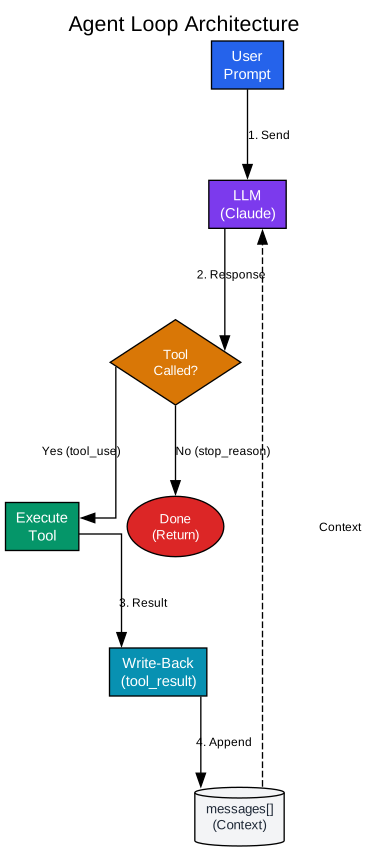
Understanding the Agent Loop
The agent loop diagram above illustrates the fundamental pattern that powers every AI coding assistant. This pattern is deceptively simple yet incredibly powerful: the model talks, the harness executes tools, and the results go right back into the conversation.
The Problem Without a Loop:
Without a loop, every tool call requires a human in the middle. The model says “run this test.” You run it. You paste the output. The model says “now fix line 12.” You fix it. You tell the model what happened. This manual back-and-forth might work for a single question, but it falls apart completely when a task requires 10, 20, or 50 tool calls in a row.
The Solution:
The solution is simple: let the code do the looping. The user’s prompt becomes the first message. The conversation is sent to the model along with tool definitions. The model’s response is added to the conversation. If the model called a tool, execute it, collect the result, and put it back into the conversation as a new message. Then loop back to send the updated conversation to the model again. The loop keeps spinning until the model decides it’s done.
The Write-Back Step:
The “write-back” step is the single most important idea in agent design. This is where the real-world result of a tool execution flows back into the conversation. Without this step, the model would have no way to know what happened when it asked to read a file or run a command. The write-back transforms the model from a static knowledge base into an active participant that can see and affect the world.
Implementation Simplicity:
The entire agent fits in under 30 lines of Python. The core loop is just:
- Send messages to the model
- Add the response to the conversation
- If the model didn’t call a tool, we’re done
- Execute each tool call and collect results
- Write results back as a new message
- Go to step 1
Everything else in the course layers on top of this loop without changing its core shape. This is the foundation that all other mechanisms build upon.
Production Considerations:
Production agents typically use streaming responses, where the model’s output arrives token by token instead of all at once. This changes the user experience (you see text appearing in real time), but the fundamental loop - send, execute, write back - stays exactly the same. The teaching repository skips streaming to keep the core idea crystal clear.
Tool Dispatch: Clean Extensibility Without Rewriting the Loop
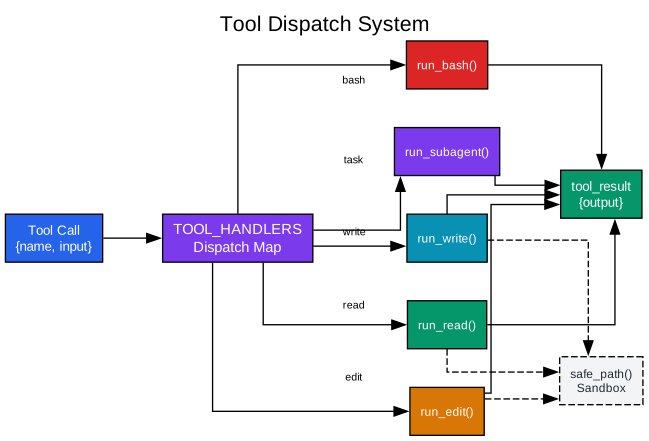
Understanding Tool Dispatch
The tool dispatch diagram above shows how a dispatch map enables clean extensibility. Adding a tool means adding one entry to the dictionary. The loop itself never changes.
The Problem with Hardcoded Tools:
If you ran the minimal agent for more than a few minutes, you probably noticed the cracks. cat silently truncates long files. sed chokes on special characters. Every bash command is an open door - nothing stops the model from running rm -rf / or reading your SSH keys. You need dedicated tools with guardrails, and you need a clean way to add them.
The Dispatch Map Solution:
The answer is a dispatch map - one dictionary that routes tool names to handler functions. Each tool gets a handler function. Path sandboxing prevents the model from escaping the workspace - every requested path is resolved and checked against the working directory before any I/O happens. The dispatch map links tool names to handlers. This is the entire routing layer - no if/elif chain, no class hierarchy, just a dictionary.
Path Safety:
The safe_path() function is critical for security. It resolves every requested path and verifies it’s within the working directory. This prevents the model from reading sensitive files outside the workspace or writing to system directories. The hard cap on output size (50,000 characters in the reference implementation) prevents blowing up the context with massive file dumps.
Adding New Tools:
Adding a tool is straightforward: add a handler function and add a schema entry. The loop never changes. This separation of concerns means that the agent loop can remain stable while the tool ecosystem grows. New tools can be added by different team members without coordinating changes to the core loop.
Scalability:
A dispatch map scales better than an if/elif chain because it’s O(1) lookup regardless of how many tools you have. It also enables dynamic tool registration - tools can be added at runtime based on configuration or user preferences. This pattern is essential for building extensible agent systems.
Permission System: Safety Gates Before Execution
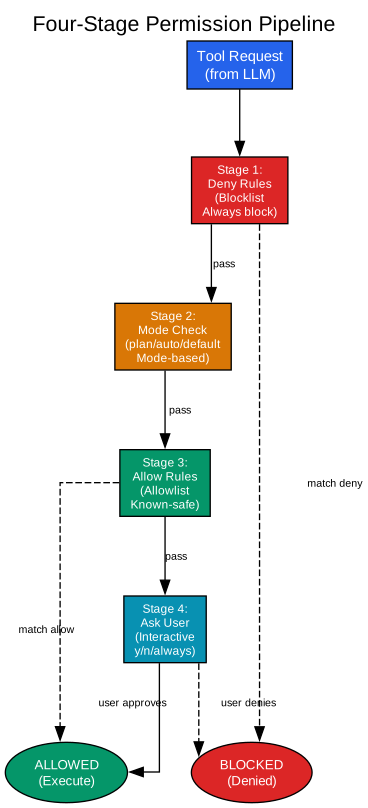
Understanding the Permission Pipeline
The permission pipeline diagram above illustrates the four-stage check that every tool call must pass through before execution. This pipeline ensures that model intent passes through a decision layer before becoming execution.
The Problem Without Permissions:
Your agent from the previous chapters is capable and long-lived. It reads files, writes code, runs shell commands, delegates subtasks, and compresses its own context to keep going. But there is no safety catch. Every tool call the model proposes goes straight to execution. Ask it to delete a directory and it will - no questions asked. Before you give this agent access to anything that matters, you need a gate between “the model wants to do X” and “the system actually does X.”
The Four-Stage Pipeline:
Every tool call now passes through a four-stage permission pipeline before execution. The stages run in order, and the first one that produces a definitive answer wins.
Stage 1: Deny Rules (Blocklist)
Deny rules catch dangerous patterns that should never execute, regardless of mode. These are bypass-immune - they’re always checked first. Examples include blocking rm -rf / or sudo commands. No matter what mode you’re in or what allow rules exist, a deny rule always wins.
Stage 2: Mode Check
Three permission modes control how aggressively the agent auto-approves actions. “Default” mode is the safest - it asks you about everything. “Plan” mode blocks all writes outright, useful when you want the agent to explore without touching anything. “Auto” mode lets reads through silently and only asks about writes, good for fast exploration.
Stage 3: Allow Rules (Allowlist)
Allow rules let known-safe operations pass without asking. These are pattern-matched against tool names and inputs. When the user answers “always” at the interactive prompt, a permanent allow rule is added at runtime.
Stage 4: Ask User (Interactive)
If no rule matched and the mode doesn’t auto-approve, the system asks the user interactively. The user can approve (yes), deny (no), or approve always (adds a permanent allow rule).
Circuit Breaker:
The permission manager tracks consecutive denials. After 3 in a row, it suggests switching to plan mode. This prevents the agent from repeatedly hitting the same wall and wasting turns.
Key Insight:
Safety is a pipeline, not a boolean. The deny-first approach ensures that dangerous operations are blocked before any other consideration. The mode-based decisions allow for different safety/speed tradeoffs depending on the situation. The allow rules enable smooth operation for known-safe patterns. And the interactive prompt gives users final control over uncertain operations.
Skill Loading: Cheap Discovery, Deep On-Demand
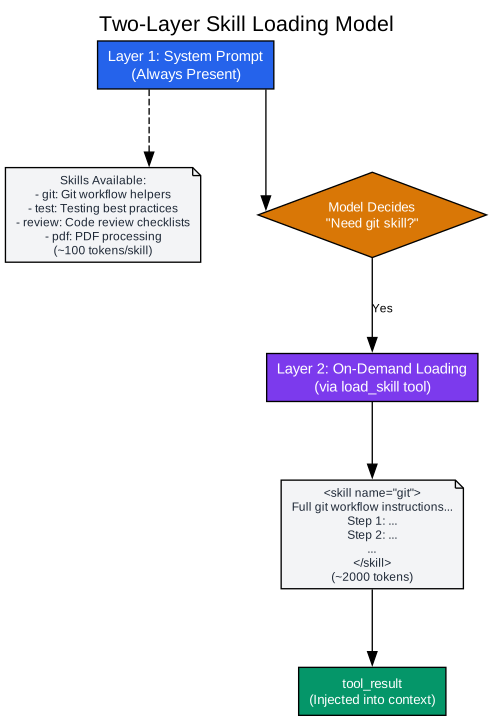
Understanding Two-Layer Skill Loading
The skill loading diagram above illustrates the two-layer pattern that enables efficient domain knowledge management. Layer 1 lives in the system prompt and is cheap. Layer 2 is the full skill body, loaded on demand through a tool call.
The Problem with Stuffed Prompts:
You want your agent to follow domain-specific workflows: git conventions, testing best practices, code review checklists. The naive approach is to put everything in the system prompt. But 10 skills at 2,000 tokens each means 20,000 tokens of instructions on every API call - most of which have nothing to do with the current question. You pay for those tokens every turn, and worse, all that irrelevant text competes for the model’s attention with the content that actually matters.
The Two-Layer Solution:
Split knowledge into two layers. Layer 1 lives in the system prompt and is cheap: just skill names and one-line descriptions (~100 tokens per skill). Layer 2 is the full skill body, loaded on demand through a tool call only when the model decides it needs that knowledge.
How It Works:
Each skill is a directory containing a SKILL.md file. The file starts with YAML frontmatter that declares the skill’s name and description, followed by the full instruction body. The SkillLoader scans for all SKILL.md files at startup, parses the frontmatter to extract names and descriptions, and stores the full body for later retrieval.
Layer 1 goes into the system prompt so the model always knows what skills exist. Layer 2 is wired up as a normal tool handler - the model calls load_skill when it decides it needs the full instructions.
Token Efficiency:
On a typical turn, only one skill is loaded instead of all ten. This dramatically reduces token usage while maintaining access to deep domain knowledge when needed. The model learns what skills exist (cheap, ~100 tokens each) and loads them only when relevant (expensive, ~2000 tokens each).
Extensibility:
This pattern enables a rich ecosystem of skills without bloating every request. Skills can be added by different teams, versioned independently, and loaded dynamically based on project context. The core agent remains lean while gaining access to specialized knowledge on demand.
Subagent Delegation: Fresh Context for Complex Subtasks
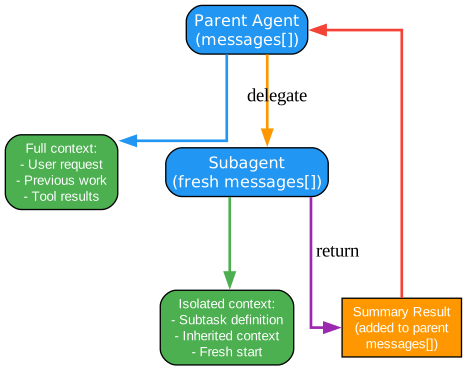
Understanding Subagent Delegation
The subagent delegation diagram above shows how parent agents can delegate subtasks to child agents with isolated context. This pattern is essential for complex, multi-step work that would pollute the parent’s context.
The Problem with Context Pollution:
As an agent works through a complex task, its context window fills with tool results, intermediate states, and exploration paths. Eventually, the context becomes cluttered with information that’s no longer relevant to the current goal. This pollution makes it harder for the model to focus and increases token costs.
The Subagent Solution:
A subagent gets a fresh messages[] array - a clean slate. The parent defines the subtask, passes any necessary context, and receives back a summary result. The parent’s context stays clean because all the messy intermediate steps happened in the child’s isolated context.
How It Works:
The parent agent identifies a subtask that would benefit from isolated execution. It creates a subagent with a fresh context, passes the subtask definition and any inherited context, and lets the subagent work. When the subagent completes, it returns a summary result that gets added to the parent’s messages. The parent never sees the intermediate tool calls, file reads, or exploration paths - only the final result.
When to Use Subagents:
Subagents are particularly valuable for:
- Exploratory tasks that might take many turns
- Tasks that require focused context without distraction
- Parallel work that can be delegated to background processes
- Tasks with different permission requirements than the parent
Context Management:
The subagent pattern is a form of context management. Instead of stuffing everything into one growing context, you partition work into isolated contexts that can be discarded when complete. This enables longer, more complex workflows without hitting token limits.
Installation and Quick Start
Getting started with Learn Claude Code is straightforward:
git clone https://github.com/shareAI-lab/learn-claude-code
cd learn-claude-code
pip install -r requirements.txt
cp .env.example .env
Configure your ANTHROPIC_API_KEY or a compatible endpoint in .env, then run:
python agents/s01_agent_loop.py
python agents/s18_worktree_task_isolation.py
python agents/s19_mcp_plugin.py
python agents/s_full.py
Suggested Learning Order:
- Run
s01and make sure the minimal loop really works - Read
s00(architecture overview), then move throughs01 -> s11in order - Only after the single-agent core plus its control plane feel stable, continue into
s12 -> s19 - Read
s_full.pylast, after the mechanisms already make sense separately
Repository Structure
The repository is organized for progressive learning:
learn-claude-code/
├── agents/              # Runnable Python reference implementations per chapter
├── docs/zh/             # Chinese mainline docs (most complete)
├── docs/en/             # English docs
├── docs/ja/             # Japanese docs
├── skills/              # Skill files used in s05
├── web/                 # Web teaching platform
└── requirements.txt
Each chapter in agents/ is a self-contained, runnable implementation that demonstrates one concept. The s_full.py file shows how all the pieces fit together in a complete system.
Web Learning Interface
For a more visual way to understand the chapter order, stage boundaries, and chapter-to-chapter upgrades, run the built-in teaching site:
cd web
npm install
npm run dev
Then use these routes:
/en: The English entry page for choosing a reading path/en/timeline: The cleanest view of the full mainline/en/layers: The four-stage boundary map/en/compare: Adjacent-step comparison and jump diagnosis
Key Takeaways
The Model Does the Reasoning, the Harness Gives the Model a Working Environment:
This is the fundamental insight. The model is the brain, but the harness provides the hands (tools), the memory (context management), the safety (permissions), and the coordination (teams, tasks). Understanding how to build this harness is what enables you to create agents that work reliably in production.
The Write-Back is Everything:
The tool result flowing back into the conversation is the single most important mechanism. Without it, the model is blind to the effects of its actions. With it, the model becomes an active participant that can see and affect the world.
Mechanism Dependencies Matter:
A good learning path follows mechanism dependencies, not feature lists. You can’t understand permissions without understanding tools. You can’t understand tasks without understanding the loop. The four-stage architecture ensures each concept builds on previous ones.
Safety is a Pipeline:
Permissions aren’t a simple yes/no check. They’re a multi-stage pipeline that considers deny rules, mode settings, allow rules, and user input in sequence. This layered approach enables both safety and flexibility.
Context is the Scarce Resource:
Every mechanism in the course ultimately serves to manage context. Skills load on demand to save tokens. Subagents isolate work to keep contexts clean. Compaction removes irrelevant history. Memory persists only what matters. Understanding context management is understanding agent design.
Conclusion
Learn Claude Code represents a significant contribution to AI agent education. By reconstructing the essential mechanisms of production-grade coding agents in a clean, teachable form, it enables developers to understand not just what agents do, but how they work. The four-stage architecture, from core single-agent to platform, provides a clear learning path that builds understanding progressively. Whether you’re building your first agent or seeking to understand the internals of existing systems, this repository offers invaluable insights into the design backbone of modern AI coding assistants.
The repository’s teaching approach - explain a concept before using it, keep one concept fully explained in one main place, start from “what it is” then “why it exists” then “how to implement it” - makes complex agent architecture accessible to developers who know basic Python but may be completely new to agent systems. By the end, you should be able to answer clearly: what is the minimum state a coding agent needs? Why is tool_result the center of the loop? When should you use a subagent instead of stuffing more into one context? What problem do permissions, hooks, memory, prompt assembly, and tasks each solve? When should a single-agent system grow into tasks, teams, worktrees, and MCP?
If you can answer those questions clearly and build a similar system yourself, this repo has done its job. Enjoyed this post? Never miss out on future posts by following us 


