Building production-grade computer vision applications requires more than just a trained model. You need tools to convert model outputs into a common format, track objects across frames, count entries and exits in defined zones, and annotate results with professional visualizations. Roboflow Supervision is an open-source Python library that provides all of these reusable computer vision tools in a single, model-agnostic package. Whether you are working with YOLO, Transformers, MMDetection, or Roboflow’s own Inference server, Supervision gives you a unified API to process detections, apply tracking, filter results, and render annotated outputs without writing boilerplate code for each model provider.
With over 38,000 stars on GitHub and a thriving community, Supervision has become the go-to library for developers who want to move from prototype to production quickly. This guide walks through the library’s architecture, core components, and practical examples so you can integrate it into your next vision project.
Architecture Overview
Roboflow Supervision is built around a central data structure called sv.Detections that standardizes results from any detection or segmentation model. The library follows a pipeline architecture: model outputs flow into sv.Detections, which then feeds into processing tools (trackers, zones, slicers) and annotators that render the final visual output.
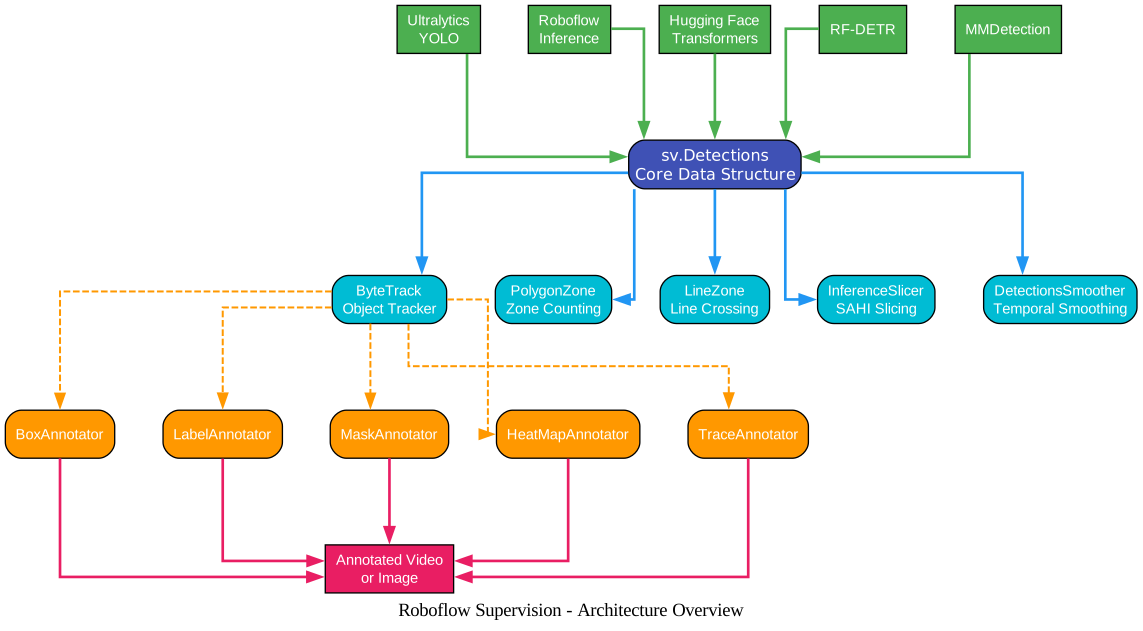
The architecture diagram above illustrates the complete data flow through the Supervision library. On the left side, five popular model connectors – Ultralytics YOLO, Roboflow Inference, Hugging Face Transformers, RF-DETR, and MMDetection – each produce raw detection results in their own format. The sv.Detections class in the center acts as the universal adapter, converting any model’s output into a consistent structure with bounding boxes, confidence scores, class IDs, and masks. From there, the processing pipeline branches into five specialized tools: ByteTrack for multi-object tracking, PolygonZone for zone-based counting, LineZone for line-crossing detection, InferenceSlicer for SAHI-style slicing inference, and DetectionsSmoother for temporal smoothing across video frames. The processed detections then flow into the annotator layer, which offers over 20 visualization options including BoxAnnotator, LabelAnnotator, MaskAnnotator, HeatMapAnnotator, and TraceAnnotator. Finally, the annotated frames are written to video or image output.
Key Insight: The
sv.Detectionsdata structure is the single most important concept in Supervision. Every model connector, processing tool, and annotator operates on this unified format, which means you can swap models without changing any downstream code. This model-agnostic design is what makes Supervision so powerful for production pipelines.
Installation
Install Supervision with pip in a Python 3.9+ environment:
pip install supervision
For optional metrics support (pandas-based evaluation):
pip install supervision[metrics]
To install from source for development:
git clone https://github.com/roboflow/supervision.git
cd supervision
pip install -e .
The core dependencies include NumPy, OpenCV, Matplotlib, Pillow, SciPy, and Requests. These are all well-maintained libraries that install cleanly on macOS, Linux, and Windows.
Key Features and Components
Supervision organizes its functionality into four main modules: Detection, Annotators, Trackers, and Datasets. Each module is designed to work independently or compose together in a pipeline.
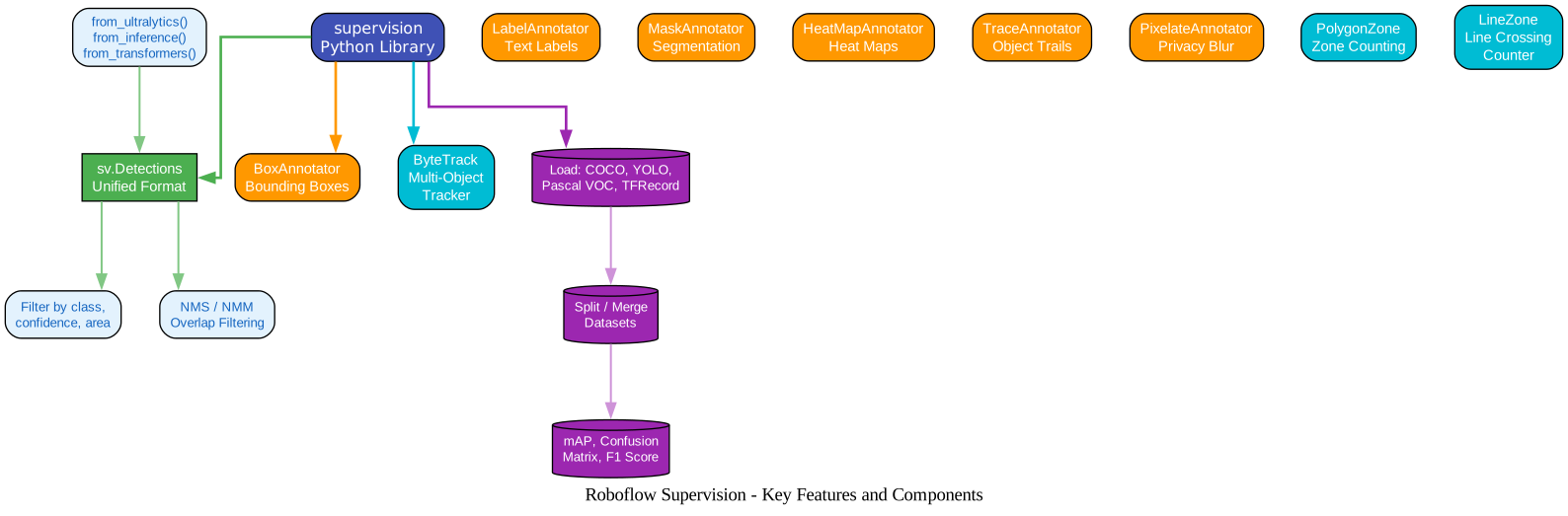
The features diagram shows how the four modules connect to the central supervision library. The Detection Module provides the sv.Detections unified format along with factory methods like from_ultralytics(), from_inference(), and from_transformers() that convert model-specific outputs. It also includes filtering by class, confidence, and area, plus NMS/NMM overlap filtering. The Annotator Module offers over 20 specialized annotators including BoxAnnotator for bounding boxes, LabelAnnotator for text labels, MaskAnnotator for segmentation masks, HeatMapAnnotator for heat maps, TraceAnnotator for object trails, and PixelateAnnotator for privacy blurring. The Tracker Module contains ByteTrack for multi-object tracking, PolygonZone for zone counting, and LineZone for line-crossing detection. The Dataset Module handles loading from COCO, YOLO, and Pascal VOC formats, splitting and merging datasets, and computing evaluation metrics like mAP, confusion matrices, and F1 scores.
Detection Module
The sv.Detections class is the heart of the library. It stores bounding boxes, masks, confidence scores, class IDs, and tracker IDs in a unified format:
import supervision as sv
from ultralytics import YOLO

model = YOLO("yolov8n.pt")
result = model(image)[0]
detections = sv.Detections.from_ultralytics(result)

# Access detection data
print(detections.xyxy)        # Bounding boxes as numpy array
print(detections.confidence)  # Confidence scores
print(detections.class_id)    # Class IDs
print(detections.tracker_id)  # Tracker IDs (after tracking)
You can filter detections by class, confidence, or area:
# Keep only person detections (class_id == 0)
detections = detections[detections.class_id == 0]

# Keep only high-confidence detections
detections = detections[detections.confidence > 0.5]

# Keep only large bounding boxes
detections = detections[detections.area > 1000]
Annotator Module
Supervision provides over 20 annotators that render detection results on images or video frames. Each annotator is highly customizable with color, thickness, opacity, and position parameters:
import cv2
import supervision as sv

image = cv2.imread("street.jpg")
detections = sv.Detections(...)

# Bounding box annotation
box_annotator = sv.BoxAnnotator()
annotated = box_annotator.annotate(scene=image.copy(), detections=detections)

# Label annotation
label_annotator = sv.LabelAnnotator()
labels = [f"{detections.class_id[i]}" for i in range(len(detections))]
annotated = label_annotator.annotate(scene=annotated, detections=detections, labels=labels)
Amazing: Supervision includes 20+ annotators covering everything from basic bounding boxes to heat maps, object traces, pixelation for privacy, and percentage bars for classification confidence. You can compose multiple annotators on the same frame to create rich, informative visualizations without writing custom drawing code.
Tracker Module
ByteTrack is integrated directly into Supervision for multi-object tracking:
import supervision as sv

tracker = sv.ByteTrack()
detections = tracker.update_with_detections(detections)
Combined with zone-based counting, you can build sophisticated analytics:
import numpy as np

polygon = np.array([[100, 200], [200, 100], [300, 200], [200, 300]])
zone = sv.PolygonZone(polygon=polygon)

# Trigger zone counting
is_in_zone = zone.trigger(detections=detections)
print(f"Objects in zone: {zone.current_count}")
Dataset Module
Supervision provides utilities for loading, splitting, merging, and converting datasets across popular formats:
import supervision as sv

# Load from COCO format
dataset = sv.DetectionDataset.from_coco(
    images_directory_path="train/images",
    annotations_path="train/annotations.json",
)

# Split into train/test
train_ds, test_ds = dataset.split(split_ratio=0.7)

# Merge multiple datasets
merged = sv.DetectionDataset.merge([train_ds, test_ds])

# Save to YOLO format
dataset.as_yolo(
    images_directory_path="output/images",
    annotations_directory_path="output/labels",
    data_yaml_path="output/data.yaml",
)
Vision Pipeline Workflow
A typical Supervision pipeline follows a clear sequence: load an image or video frame, run a detection model, convert the output to sv.Detections, optionally track objects across frames, filter results, apply zone analysis, annotate the frame, and save or display the output.
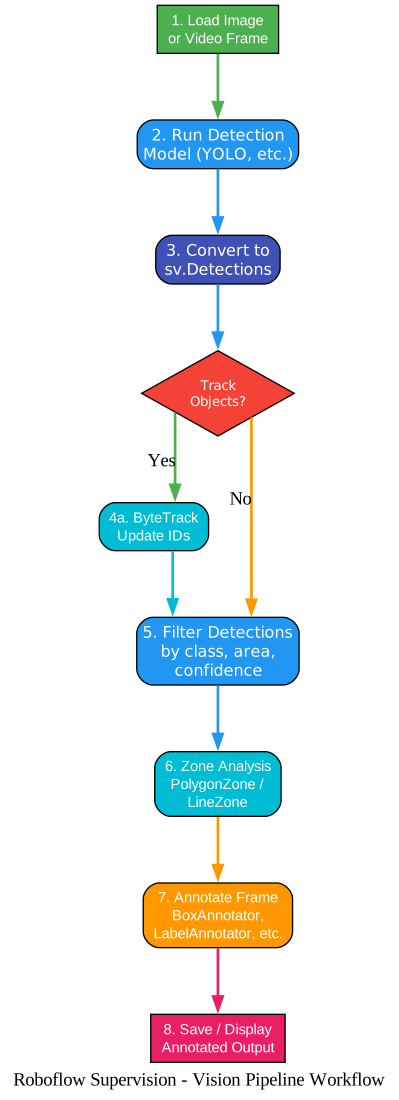
The workflow diagram above shows the eight-step pipeline in action. Step 1 loads the image or video frame using OpenCV or Supervision’s built-in video utilities. Step 2 runs the detection model (YOLO, Inference, Transformers, etc.) to produce raw results. Step 3 converts those results into the sv.Detections format using the appropriate connector method. Step 4 presents a decision point: if you need persistent object identities across frames, you apply ByteTrack tracking (step 4a); otherwise, you proceed directly to filtering. Step 5 applies filters for class, confidence, and area to narrow down the detections. Step 6 performs zone-based analysis using PolygonZone or line-crossing detection using LineZone. Step 7 annotates the frame with one or more annotators. Step 8 saves the annotated output to a video file or displays it on screen.
Takeaway: The decision point at step 4 is critical. Tracking adds persistent IDs to each detected object, enabling zone counting and line crossing to work correctly. Without tracking, zone counts will be inflated because each frame is counted independently. Always use ByteTrack when you need accurate zone analytics or line-crossing counts.
Annotator Catalog
Supervision’s annotator system is one of its most powerful features. With over 20 specialized annotators, you can create professional visualizations for any use case without writing custom drawing code.

The annotator catalog diagram organizes all available annotators into three categories. Detection Annotators handle the visual representation of detected objects: BoxAnnotator draws standard bounding boxes, BoxCornerAnnotator draws corner-only boxes for a cleaner look, RoundBoxAnnotator adds rounded corners, OrientedBoxAnnotator handles rotated bounding boxes, CircleAnnotator places circles at detection centers, DotAnnotator renders small dots, TriangleAnnotator uses triangular markers, and EllipseAnnotator draws elliptical shapes. Segmentation Annotators work with mask data: MaskAnnotator fills segmentation masks with color, PolygonAnnotator draws polygon outlines, ColorAnnotator applies per-class color coding, and HaloAnnotator adds a glowing halo effect around detections. Label and Visual Annotators provide rich information overlays: LabelAnnotator adds text labels, RichLabelAnnotator provides detailed multi-line labels, PercentageBarAnnotator shows confidence bars, IconAnnotator places custom icons, BlurAnnotator and PixelateAnnotator provide privacy protection, HeatMapAnnotator visualizes detection density over time, TraceAnnotator draws object movement trails, CropAnnotator extracts detection crops, and BackgroundOverlayAnnotator composites detection regions onto backgrounds.
Features Comparison Table
| Feature | Supervision | OpenCV | Detectron2 | Ultralytics |
|---|---|---|---|---|
| Model-agnostic API | Yes | No | No | No |
| Unified detection format | Yes | No | No | Partial |
| 20+ annotators | Yes | No | No | Limited |
| ByteTrack integration | Yes | No | No | Yes |
| Zone counting | Yes | No | No | No |
| Line crossing detection | Yes | No | No | No |
| SAHI slicing inference | Yes | No | No | No |
| Dataset format conversion | Yes | No | No | No |
| Video processing utils | Yes | Partial | No | Yes |
| Temporal smoothing | Yes | No | No | No |
| VLM integration | Yes | No | No | No |
| Python 3.9+ support | Yes | Yes | Yes | Yes |
| License | MIT | Apache 2.0 | Apache 2.0 | AGPL-3.0 |
Important: The MIT license is a significant advantage over Ultralytics’ AGPL-3.0. If you are building a commercial product and need to use detection results without open-sourcing your entire application, Supervision’s MIT license gives you that freedom. You can use Supervision in proprietary projects without any licensing concerns.
Practical Examples
Object Detection and Annotation
import cv2
import supervision as sv
from ultralytics import YOLO

# Initialize model and annotators
model = YOLO("yolov8n.pt")
box_annotator = sv.BoxAnnotator()
label_annotator = sv.LabelAnnotator()

# Process a single image
image = cv2.imread("street.jpg")
results = model(image)[0]
detections = sv.Detections.from_ultralytics(results)

# Filter to only person detections
detections = detections[detections.class_id == 0]

# Annotate
labels = [f"person {conf:.2f}" for conf in detections.confidence]
annotated = box_annotator.annotate(scene=image.copy(), detections=detections)
annotated = label_annotator.annotate(scene=annotated, detections=detections, labels=labels)

cv2.imwrite("output.jpg", annotated)
Video Processing with Tracking and Zone Counting
import cv2
import supervision as sv
from ultralytics import YOLO

# Initialize
model = YOLO("yolov8n.pt")
tracker = sv.ByteTrack()
box_annotator = sv.BoxAnnotator()
label_annotator = sv.LabelAnnotator()

# Define a counting zone
polygon = np.array([[200, 300], [500, 300], [500, 500], [200, 500]])
zone = sv.PolygonZone(polygon=polygon)
zone_annotator = sv.PolygonZoneAnnotator(zone=zone)

# Process video
video_info = sv.VideoInfo.from_video_path("input.mp4")
with sv.VideoSink("output.mp4", video_info=video_info) as sink:
    for frame in sv.get_video_frames_generator("input.mp4"):
        results = model(frame)[0]
        detections = sv.Detections.from_ultralytics(results)
        detections = tracker.update_with_detections(detections)

        # Count objects in zone
        zone.trigger(detections=detections)

        # Annotate
        labels = [f"#{tid}" for tid in detections.tracker_id]
        annotated = box_annotator.annotate(scene=frame.copy(), detections=detections)
        annotated = label_annotator.annotate(scene=annotated, detections=detections, labels=labels)
        annotated = zone_annotator.annotate(scene=annotated)

        sink.write_frame(annotated)
Line Crossing Counter
import numpy as np
import supervision as sv
from ultralytics import YOLO

# Define a counting line
start = sv.Point(50, 800)
end = sv.Point(1200, 800)
line_zone = sv.LineZone(start=start, end=end)
line_annotator = sv.LineZoneAnnotator(thickness=3)

tracker = sv.ByteTrack()
model = YOLO("yolov8n.pt")

for frame in sv.get_video_frames_generator("traffic.mp4"):
    results = model(frame)[0]
    detections = sv.Detections.from_ultralytics(results)
    detections = tracker.update_with_detections(detections)

    # Count crossings
    line_zone.trigger(detections=detections)
    print(f"In: {line_zone.in_count}, Out: {line_zone.out_count}")

    annotated = line_annotator.annotate(frame, line_counter=line_zone)
Troubleshooting
| Issue | Cause | Solution |
|---|---|---|
ModuleNotFoundError: No module named 'supervision' | Supervision not installed | Run pip install supervision |
ImportError: cannot import name 'ByteTrack' | Using an older version | Upgrade with pip install -U supervision |
AssertionError when creating sv.Detections | Mismatched array lengths | Ensure xyxy, class_id, and confidence arrays have the same length |
| Annotated frames appear blank | Annotator color matches background | Change color or color_lookup parameter in the annotator |
| Zone counts are inflated | Not using tracking | Add ByteTrack to assign persistent IDs before zone triggering |
FileNotFoundError when loading dataset | Incorrect path format | Use absolute paths or verify relative path from script location |
| Video output has wrong FPS | Missing VideoInfo | Use sv.VideoInfo.from_video_path() to get correct FPS and resolution |
from_ultralytics() returns empty detections | Model returned no results above threshold | Lower the confidence threshold or check model weights |
| HeatMapAnnotator shows no trail | Not accumulating frames | Call heat_map_annotator.annotate() on each frame and maintain state |
TypeError: expected numpy array | Passing list instead of numpy array | Convert lists to np.array() before passing to sv.Detections |
Conclusion
Roboflow Supervision fills a critical gap in the computer vision ecosystem by providing reusable, model-agnostic tools for the entire post-inference pipeline. From converting model outputs into a unified format, to tracking objects across video frames, counting entries in defined zones, and rendering professional annotations – Supervision handles the boilerplate so you can focus on building your application. With its MIT license, 20+ annotators, built-in tracking, and comprehensive dataset utilities, it is an essential addition to any computer vision developer’s toolkit.
To get started, install Supervision with Enjoyed this post? Never miss out on future posts by following us pip install supervision and explore the examples in the official documentation. The GitHub repository includes a demo notebook and end-to-end examples for common use cases like speed estimation, dwell time analysis, and traffic counting. 


