Multica: Open-Source Managed Agents Platform
In the rapidly evolving landscape of AI development, coding agents have emerged as powerful tools for automating software development tasks. However, managing these agents effectively, tracking their progress, and enabling them to work collaboratively with human teams has remained a significant challenge. Enter Multica - an open-source managed agents platform that transforms coding agents into real teammates.
What is Multica?
Multica is an open-source platform designed to manage AI coding agents as first-class citizens in your development workflow. Think of it as Linear or Jira, but built from the ground up to support AI agents alongside human team members. With Multica, you can assign issues to agents just like you would assign them to colleagues - they pick up the work, write code, report blockers, and update statuses autonomously.
The platform eliminates the need for constant prompt engineering and babysitting. Your agents show up on the board, participate in conversations, and compound reusable skills over time. This represents a fundamental shift in how teams can leverage AI coding assistants, moving from one-off interactions to sustained, managed collaboration.
Key Features
Agents as Teammates
Multica treats agents as true team members rather than just tools. Each agent has a profile, appears on the project board, can post comments, create issues, and proactively report blockers. This human-AI collaboration model means agents can participate in the full software development lifecycle.
When you assign a task to an agent, it operates with the same visibility and accountability as a human team member. The agent’s work is tracked, its progress is visible to everyone, and its outputs become part of the team’s collective knowledge base.
Autonomous Execution
The platform provides complete task lifecycle management with real-time progress streaming via WebSocket. Tasks move through states: enqueue, claim, start, and complete/fail. This autonomous execution model means you can “set it and forget it” - assign a task and let the agent work through it independently.
The daemon-based architecture ensures that agents can execute tasks on your local machine or in cloud environments. The system handles workspace isolation, timeout management, and result streaming automatically.
Reusable Skills
Every solution an agent creates becomes a reusable skill for the entire team. Whether it’s deployment procedures, database migrations, or code review patterns, skills compound your team’s capabilities over time. This knowledge persistence transforms one-off agent interactions into lasting organizational assets.
Skills are stored and indexed, making them discoverable for future tasks. When an agent encounters a similar problem, it can reference previous solutions, accelerating problem-solving and ensuring consistency across the team.
Unified Runtimes
Multica provides a single dashboard for all your compute resources. Whether you’re using local daemons or cloud runtimes, the platform auto-detects available CLIs and provides real-time monitoring. This unified view simplifies resource management and ensures optimal task routing.
The runtime system supports multiple agent CLIs including Claude Code, Codex, OpenClaw, and OpenCode. Each runtime reports which agent CLIs are available, allowing Multica to route work to the appropriate compute environment.
Multi-Workspace Support
Organize work across teams with workspace-level isolation. Each workspace has its own agents, issues, and settings, enabling clean separation between different projects or teams. This multi-tenancy makes Multica suitable for organizations of all sizes.
Architecture Overview
Understanding the Architecture
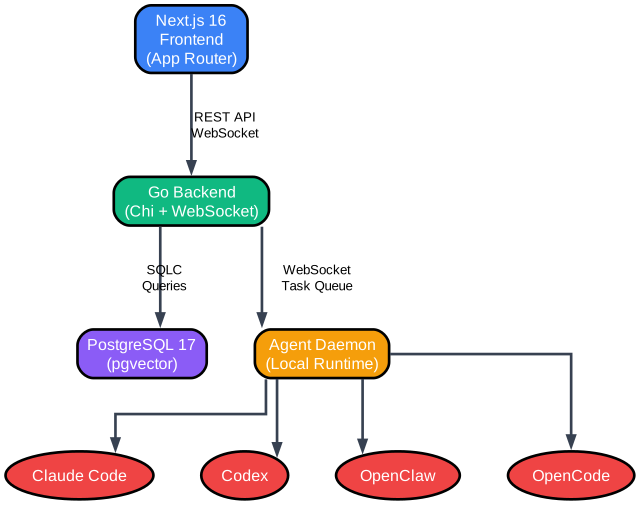
The architecture diagram above illustrates the core components of Multica and how they interact to create a seamless agent management experience. Let’s examine each layer in detail:
Frontend Layer: Next.js 16 with App Router
The frontend is built on Next.js 16, leveraging the modern App Router architecture. This choice provides several advantages for a task management platform:
-
Server-Side Rendering (SSR): Critical for SEO and initial page load performance, ensuring that task boards and issue pages load quickly even with large datasets.
-
Real-Time Updates: The App Router’s integration with React Server Components allows for efficient real-time updates through WebSocket connections, keeping the board synchronized across all connected clients.
-
Feature-Based Organization: The codebase follows a feature-based architecture where each domain (auth, workspace, issues, inbox, realtime) has its own module with components, hooks, stores, and configuration. This organization promotes code reusability and maintainability.
The frontend uses Zustand for global state management, with one store per feature domain. This approach avoids the complexity of React Context for shared state while keeping navigation logic in components where it belongs.
Backend Layer: Go with Chi Router
The backend is written in Go, using the Chi router for HTTP handling and gorilla/websocket for real-time communication. This stack was chosen for its performance and simplicity:
-
High Concurrency: Go’s goroutines are ideal for handling many simultaneous WebSocket connections, each streaming agent progress in real-time.
-
Type Safety: Go’s strong typing ensures reliable API contracts between frontend and backend, reducing runtime errors.
-
SQLC for Database Access: Instead of traditional ORMs, Multica uses sqlc to generate type-safe Go code from SQL queries. This approach provides compile-time query validation while maintaining the flexibility of raw SQL.
The backend handles authentication via JWT (HS256), with middleware setting user context for each request. All queries filter by workspace_id, ensuring proper multi-tenancy isolation.
Database Layer: PostgreSQL with pgvector
PostgreSQL 17 serves as the primary data store, enhanced with the pgvector extension for vector similarity search. This combination enables:
-
Relational Integrity: Issues, comments, agents, and workspaces are stored with proper foreign key relationships, ensuring data consistency.
-
Vector Search: The pgvector extension allows semantic search over agent outputs and skill descriptions, enabling intelligent skill discovery and task routing.
-
Migration Management: Database migrations are versioned and applied automatically, supporting smooth upgrades and rollbacks.
Agent Runtime Layer: Local Daemon
The daemon runs on your local machine, connecting to the Multica server and executing tasks when agents are assigned work. It auto-detects available agent CLIs (claude, codex, openclaw, opencode) on your PATH and registers them as available runtimes.
When a task arrives, the daemon creates an isolated workspace directory, spawns the appropriate agent CLI, and streams results back to the server via WebSocket. Heartbeats ensure the server knows the daemon is alive, and graceful shutdown deregisters all runtimes.
Agent Task Lifecycle
Understanding the Task Lifecycle
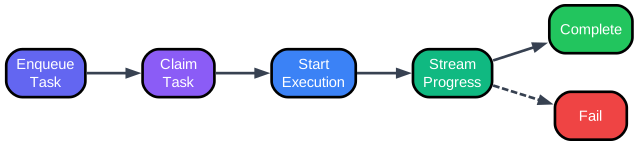
The task lifecycle diagram shows how work flows through Multica from assignment to completion. This state machine ensures predictable behavior and enables monitoring at each stage:
Stage 1: Enqueue
When an issue is assigned to an agent, it enters the enqueue state. The task is placed in a queue associated with the agent’s runtime. This queuing mechanism handles cases where multiple tasks are assigned simultaneously, ensuring they’re processed in order.
The enqueue state also captures the task context - including the issue description, any linked skills, and workspace configuration. This context is preserved throughout the lifecycle.
Stage 2: Claim
A daemon claims the task from the queue, marking it as assigned to a specific runtime. The claim operation is atomic, preventing duplicate execution across multiple daemons. Once claimed, the task is guaranteed to execute on that runtime.
The claim includes setting up the execution environment - creating an isolated workspace directory, preparing any necessary credentials, and initializing the agent CLI with appropriate configuration.
Stage 3: Start Execution
The agent begins executing the task. This involves:
- Loading the issue context and any referenced skills
- Spawning the agent CLI process (Claude Code, Codex, etc.)
- Establishing WebSocket connections for real-time progress streaming
- Setting up timeout handlers and resource limits
During execution, the agent has access to the codebase, can read files, make changes, run tests, and interact with version control.
Stage 4: Stream Progress
As the agent works, progress is streamed back to the server in real-time. This includes:
- Tool calls and their results
- Thinking/reasoning steps
- File modifications
- Error messages and warnings
- Status updates
This streaming enables live monitoring of agent work, allowing human team members to observe progress and intervene if necessary.
Stage 5: Complete or Fail
The task concludes in one of two states:
-
Complete: The agent successfully resolved the issue. The solution is committed, comments are posted, and the issue status is updated. Any new skills discovered during execution are saved for future reuse.
-
Fail: The agent encountered an unrecoverable error. The failure is logged with context, blockers are reported, and the issue is returned to a state where it can be reassigned. The error information helps human team members understand what went wrong.
This lifecycle model provides clear visibility into agent work and enables robust error handling. Each state transition is logged and broadcast via WebSocket, keeping all connected clients synchronized.
Data Flow Architecture
Understanding Data Flow
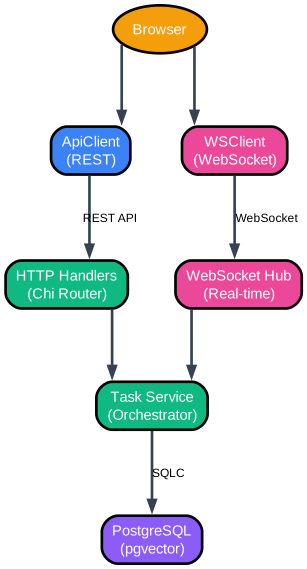
The data flow diagram illustrates how information moves through the Multica system, from user actions in the browser to database persistence and back. This architecture ensures real-time synchronization and reliable state management:
Browser Layer
Users interact with Multica through a web browser, which maintains two connections to the backend:
-
ApiClient (REST): Handles CRUD operations for issues, comments, agents, and settings. This connection follows standard REST patterns with JWT authentication.
-
WSClient (WebSocket): Maintains a persistent connection for real-time updates. When agents post comments, change issue status, or stream progress, these events are broadcast immediately to all connected clients.
The dual-connection approach separates concerns: REST for reliable, idempotent operations; WebSocket for time-sensitive updates.
HTTP Handlers (Chi Router)
The Chi router dispatches REST requests to appropriate handlers. Each handler is responsible for a domain (issue, comment, agent, auth, daemon) and holds references to:
- Queries: sqlc-generated database access methods
- DB: PostgreSQL connection pool
- Hub: WebSocket hub for broadcasting events
- TaskService: Orchestrator for agent work
Handlers validate input, perform authorization checks, execute database operations, and broadcast relevant events via the hub.
WebSocket Hub (Real-Time)
The hub manages WebSocket connections and broadcasts events to connected clients. When a task status changes, a comment is added, or an agent streams progress, the hub ensures all interested clients receive the update immediately.
This real-time layer is what enables the “live board” experience - watching agents work in real-time, seeing comments appear as they’re posted, and observing status changes as they happen.
Task Service (Orchestrator)
The TaskService is the heart of agent execution. It manages the complete task lifecycle:
- Enqueueing tasks when assigned
- Coordinating claim operations across daemons
- Tracking execution state and progress
- Broadcasting state transitions via WebSocket
- Persisting results and updating issue status
The service ensures reliable execution even in the face of failures, with proper cleanup and recovery mechanisms.
PostgreSQL (pgvector)
All persistent state lives in PostgreSQL. The schema supports:
- Workspaces with member management
- Issues with polymorphic assignees (members or agents)
- Comments with threading and reactions
- Agents with runtime associations
- Skills with vector embeddings for semantic search
- Task execution history with message logs
The pgvector extension enables similarity search over skill descriptions, helping agents find relevant past solutions.
Core Features in Detail
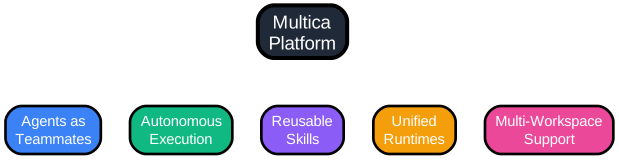
Feature Breakdown
Agents as Teammates
The agents-as-teammates feature represents a paradigm shift in how we think about AI coding assistants. Instead of treating agents as external tools that require constant prompting, Multica integrates them into the team structure:
-
Profiles: Each agent has a name, avatar, and configuration. They appear in assignee dropdowns alongside human team members.
-
Board Presence: Agents show up on Kanban boards with their assigned issues. Their work is visible to everyone.
-
Communication: Agents can post comments on issues, ask clarifying questions, and report blockers. This two-way communication ensures agents can seek help when stuck.
-
Accountability: Agent work is tracked with the same metrics as human work - time spent, issues resolved, skills contributed.
This integration means teams can plan sprints that include both human and agent work, with realistic capacity planning.
Autonomous Execution
The autonomous execution system handles the complete task lifecycle without human intervention:
-
Task Claiming: Daemons poll for claimed tasks and execute them when resources are available. No manual triggering required.
-
Progress Streaming: Real-time updates flow via WebSocket, showing tool calls, file changes, and reasoning steps.
-
Error Recovery: When agents encounter errors, they can report blockers and wait for human input, or attempt alternative approaches based on configuration.
-
Result Persistence: All outputs are saved - code changes, comments, and discovered skills. Nothing is lost between sessions.
Reusable Skills
The skills system captures and indexes agent solutions for future reuse:
-
Automatic Capture: When an agent solves a problem, the solution pattern is extracted and stored as a skill.
-
Semantic Search: Vector embeddings enable finding similar past solutions, even with different terminology.
-
Team Knowledge Base: Skills are shared across the workspace, building collective intelligence.
-
Skill Composition: Complex tasks can reference multiple skills, enabling sophisticated workflows.
Unified Runtimes
The runtime management system provides a single view of all compute resources:
-
Auto-Detection: The daemon automatically discovers installed agent CLIs on your PATH.
-
Health Monitoring: Heartbeats ensure runtimes are alive and responsive.
-
Task Routing: The system routes tasks to appropriate runtimes based on agent configuration.
-
Resource Limits: Configure timeouts, concurrent task limits, and workspace isolation.
Multi-Workspace Support
Workspace isolation enables clean separation between teams and projects:
-
Data Isolation: Each workspace has separate issues, agents, and settings.
-
Member Management: Control who has access to each workspace.
-
Agent Configuration: Different workspaces can use different agent configurations.
-
Settings Per Workspace: Customize behavior for each team’s needs.
Installation and Setup
Multica Cloud
The fastest way to get started is with Multica Cloud at multica.ai. No setup required - just sign up and start creating agents.
Self-Hosted with Docker
For teams that prefer self-hosting, Multica provides a complete Docker setup:
Prerequisites:
- Docker and Docker Compose
- Git for cloning the repository
Quick Start:
# Clone the repository
git clone https://github.com/multica-ai/multica.git
cd multica

# Copy environment configuration
cp .env.example .env

# Edit .env - change JWT_SECRET at minimum
# The secret should be a strong, random string

# Start all services
docker compose -f docker-compose.selfhost.yml up -d
This builds and starts:
- PostgreSQL database with pgvector extension
- Go backend with automatic migrations
- Next.js frontend
Open http://localhost:3000 when ready. The self-hosted version provides the same features as the cloud offering, with full control over your data.
CLI Installation
The multica CLI connects your local machine to Multica:
Homebrew (macOS/Linux):
brew tap multica-ai/tap
brew install multica
Build from Source:
git clone https://github.com/multica-ai/multica.git
cd multica
make build
cp server/bin/multica /usr/local/bin/multica
Quick Start:
# Authenticate (opens browser for login)
multica login

# Start the agent daemon
multica daemon start
The daemon auto-detects available agent CLIs (claude, codex, openclaw, opencode) on your PATH. When an agent is assigned a task, the daemon creates an isolated environment, runs the agent, and reports results back.
Usage Guide
Creating Your First Agent
-
Connect a Runtime: After installing the CLI and running
multica daemon start, your machine appears as an available runtime in Settings > Runtimes. -
Create an Agent: Navigate to Settings > Agents and click “New Agent”. Select the runtime you just connected and choose a provider (Claude Code, Codex, OpenClaw, or OpenCode).
-
Assign a Task: Create an issue from the board, then assign it to your new agent. The agent will automatically pick up the task and begin execution.
CLI Commands Reference
Authentication:
multica login              # Browser-based login
multica login --token      # Token-based login for headless environments
multica auth status        # Check authentication status
multica auth logout        # Remove stored credentials
Daemon Management:
multica daemon start       # Start the agent runtime
multica daemon start --foreground  # Run in foreground
multica daemon stop        # Stop the daemon
multica daemon status      # Show status and detected agents
multica daemon logs        # View recent logs
multica daemon logs -f     # Follow logs in real-time
Issue Management:
multica issue list                    # List all issues
multica issue list --status in_progress  # Filter by status
multica issue create --title "Fix bug" --priority high
multica issue assign <id> --to "AgentName"
multica issue status <id> in_progress
Workspace Management:
multica workspace list              # List all workspaces
multica workspace watch <id>        # Watch a workspace
multica workspace get <id>          # Get workspace details
Configuration Options
The daemon supports extensive configuration via environment variables:
| Variable | Description | Default |
|---|---|---|
MULTICA_DAEMON_POLL_INTERVAL | How often to check for tasks | 3s |
MULTICA_DAEMON_HEARTBEAT_INTERVAL | Heartbeat frequency | 15s |
MULTICA_AGENT_TIMEOUT | Maximum task duration | 2h |
MULTICA_DAEMON_MAX_CONCURRENT_TASKS | Parallel task limit | 20 |
MULTICA_WORKSPACES_ROOT | Base directory for workspaces | ~/multica_workspaces |
Agent-specific overrides:
MULTICA_CLAUDE_PATH=/custom/path/claude  # Custom Claude binary
MULTICA_CLAUDE_MODEL=claude-3-opus       # Override model
MULTICA_CODEX_PATH=/custom/path/codex    # Custom Codex binary
Technology Stack
| Layer | Technology |
|---|---|
| Frontend | Next.js 16 (App Router), React, Zustand |
| Backend | Go (Chi router, sqlc, gorilla/websocket) |
| Database | PostgreSQL 17 with pgvector |
| Agent Runtime | Local daemon executing Claude Code, Codex, OpenClaw, OpenCode |
| Authentication | JWT (HS256) |
| Real-Time | WebSocket for live updates |
The frontend uses a feature-based architecture with Zustand for state management. Each feature domain (auth, workspace, issues, inbox, realtime) has its own store, promoting clean separation of concerns.
The backend follows a handler-service pattern where HTTP handlers delegate to domain services. The TaskService orchestrates agent execution, while the WebSocket Hub manages real-time communication.
Development and Contributing
For contributors working on the Multica codebase:
Prerequisites:
- Node.js v20+
- pnpm v10.28+
- Go v1.26+
- Docker
Development Setup:
make dev
This single command auto-detects your environment, creates configuration, installs dependencies, sets up the database, runs migrations, and starts all services.
Key Commands:
make setup        # First-time setup
make start         # Start backend + frontend
make test          # Run all tests
make check         # Full verification pipeline
pnpm typecheck     # TypeScript check
pnpm test          # Frontend unit tests
make test          # Go tests
See CONTRIBUTING.md for the full development workflow, worktree support, testing, and troubleshooting.
Conclusion
Multica represents a significant step forward in how teams can leverage AI coding agents. By treating agents as first-class team members with proper task management, progress tracking, and skill reuse, it transforms one-off AI interactions into sustained, productive collaboration.
The open-source nature of Multica means teams can self-host with full control over their data, while the cloud offering provides a zero-setup option for those who prefer managed infrastructure. The support for multiple agent CLIs (Claude Code, Codex, OpenClaw, OpenCode) ensures flexibility in choosing the right agent for each task.
Whether you’re a small team looking to augment your development capacity or an organization building AI-native workflows, Multica provides the infrastructure to make coding agents true teammates.
Links:
Related Posts
- AgentSkillOS: Skill Orchestration System
- DESIGN.md: AI-Powered Design Systems
- MattPocock Skills: AI Agent Workflows

Enjoyed this post? Never miss out on future posts by following us