NVIDIA PersonaPlex: Real-Time Speech Conversational AI with Persona Control
NVIDIA PersonaPlex represents a significant breakthrough in real-time speech-to-speech conversational AI. With over 8,250 stars on GitHub, this open-source project delivers full-duplex audio conversations with unprecedented low latency, enabling natural voice interactions with AI systems. What sets PersonaPlex apart is its sophisticated persona control system, allowing developers to shape the AI’s personality through text prompts and voice conditioning.
Introduction
Traditional voice assistants suffer from significant latency issues and lack personality customization. PersonaPlex addresses these limitations by implementing a streaming architecture that processes audio in real-time while maintaining conversation context. The system achieves sub-second response times, making conversations feel natural and fluid.
The project originated from NVIDIA’s research into neural audio codecs and large language models, combining these technologies into a cohesive system that can understand speech, process it through a transformer-based language model, and generate audio responses - all in a streaming fashion.
Key capabilities include:
- Full-Duplex Communication: Simultaneous bidirectional audio streaming
- Persona Control: Shape AI personality through text prompts and voice presets
- Real-Time Processing: Sub-200ms latency for natural conversations
- CUDA Optimization: Leverages GPU acceleration with CUDA graphs
- Flexible Deployment: WebSocket server with SSL/TLS support
Architecture Overview
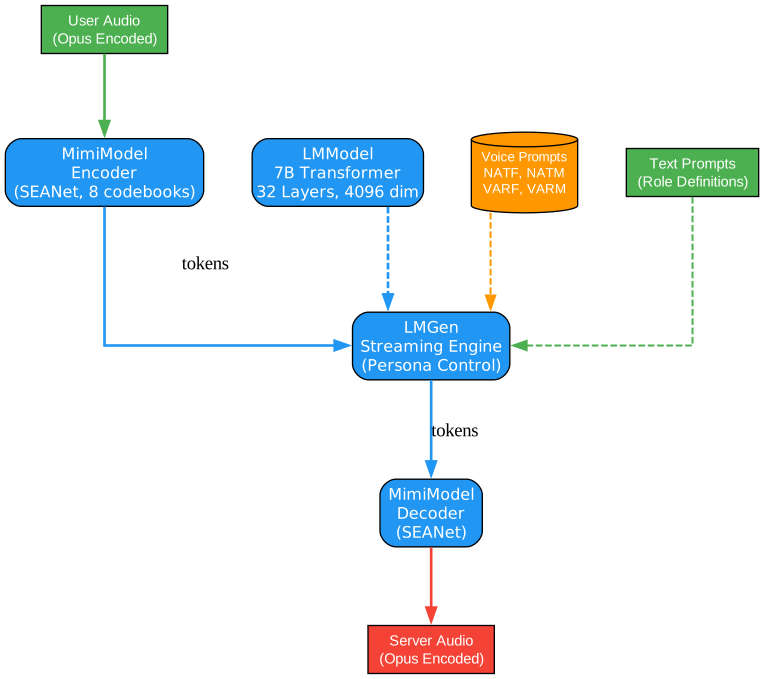
Understanding the Architecture
The PersonaPlex architecture diagram above illustrates the core components and their interactions in this sophisticated speech-to-speech system. Let’s examine each component in detail:
MimiModel - Neural Audio Codec
The MimiModel serves as the foundation of PersonaPlex’s audio processing pipeline. This neural audio codec implements the SEANet (Spectral Encoder-Decoder with Adaptive Normalization) architecture, which has revolutionized audio compression for AI applications.
The encoder transforms raw audio waveforms into a compressed latent representation using a series of convolutional layers with adaptive normalization. Key specifications include:
- 8 Codebooks: The model uses 8 vector quantization codebooks to discretize the continuous audio features, enabling efficient representation while preserving audio quality
- 12.5 Hz Frame Rate: Audio is processed at 12.5 frames per second, meaning each frame represents 80ms of audio (1920 samples at 24kHz)
- 24000 Hz Sample Rate: High-fidelity audio processing at 24kHz captures the full range of human speech frequencies
The decoder reconstructs audio from the discrete codes using a mirror architecture of the encoder, producing natural-sounding speech output.
LMModel - Transformer Language Model
At the heart of PersonaPlex lies a 7 billion parameter transformer model that processes both audio tokens and text tokens in a unified representation. This model architecture includes:
- 32 Transformer Layers: Deep architecture enables complex reasoning and context understanding
- 32 Attention Heads: Multi-head attention captures different aspects of the conversation context
- 4096 Dimensions: Large hidden dimension provides expressive capacity for diverse conversations
- 3000 Token Context: Extended context window maintains conversation coherence over long interactions
The model processes input audio codes and generates output audio codes autoregressively, conditioned on the conversation history and persona settings.
LMGen - Streaming Inference Engine
The LMGen component handles real-time inference with sophisticated streaming capabilities:
- Temperature Sampling: Separate temperatures for audio (0.8) and text (0.7) modalities optimize generation quality
- Streaming Generation: Processes input tokens incrementally and generates output tokens in real-time
- Persona Conditioning: Injects persona information at each generation step to maintain consistent personality
WebSocket Server
The server infrastructure provides robust deployment options:
- Async Architecture: Built on Python’s asyncio for handling multiple concurrent connections
- SSL/TLS Support: Secure communication channels for production deployments
- Gradio Tunnel: Built-in support for Gradio tunneling for easy development and testing
- CPU Offload Mode: Flexible resource management for deployment on various hardware configurations
Data Flow
The architecture enables a seamless flow of information:
- User audio enters through the WebSocket connection
- MimiModel encodes the audio into discrete tokens
- LMModel processes tokens with persona conditioning
- LMGen generates response tokens autoregressively
- MimiModel decodes tokens back to audio
- Audio streams back to the user through WebSocket
This end-to-end pipeline operates continuously, enabling natural back-and-forth conversations without the latency of traditional turn-based systems.
Real-Time Streaming Pipeline
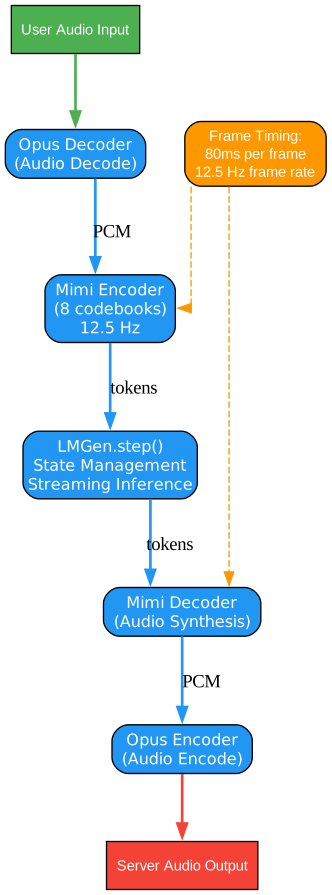
Understanding the Streaming Pipeline
The streaming pipeline diagram demonstrates how PersonaPlex achieves real-time full-duplex communication. This architecture is fundamental to understanding why PersonaPlex delivers such natural conversational experiences.
Opus Codec Integration
The pipeline begins and ends with Opus codec processing, a critical choice for real-time audio:
- Opus Decode: Incoming audio from the client is decoded from Opus format, which provides excellent compression for voice transmission over networks
- Opus Encode: Outgoing audio is encoded back to Opus for efficient network transmission
Opus codec was chosen for its:
- Low algorithmic delay (5-66.5ms)
- Excellent quality at low bitrates
- Built-in support for speech and music
- Wide adoption in WebRTC and streaming applications
Mimi Encode/Decode Pipeline
The Mimi codec processes audio in frames:
- Frame Size: 1920 samples (80ms at 24kHz)
- Latency: Approximately 80ms for encoding plus 80ms for decoding
- Quality: Near-transparent reconstruction for speech
The encoder produces 8 codebook indices per frame, while the decoder reconstructs audio from these indices. This discrete representation enables the language model to process audio as tokens.
LMGen.step() - The Core Generation Loop
The heart of the streaming pipeline is the LMGen.step() function, which performs:
- Token Processing: Accepts new input tokens from the encoder
- Context Update: Updates the transformer’s key-value cache for efficient streaming
- Persona Injection: Applies persona conditioning to the generation process
- Token Generation: Produces output tokens using temperature sampling
- Streaming Output: Yields tokens as they’re generated for immediate decoding
This step-by-step approach enables:
- Incremental Processing: No need to wait for complete utterances
- Interruptibility: Users can interrupt the AI mid-response
- Low Latency: First audio tokens arrive within 200-300ms
Streaming Considerations
The pipeline handles several critical streaming challenges:
- Buffer Management: Audio frames are buffered to handle network jitter
- Synchronization: Audio and text modalities are synchronized in the token stream
- Backpressure: The system handles cases where generation outpaces network transmission
- State Management: Conversation state persists across frames for coherent responses
Performance Characteristics
Under typical conditions:
- End-to-End Latency: 200-400ms from user speech to AI response
- GPU Utilization: Efficient batching maximizes throughput
- Memory Footprint: Streaming architecture minimizes memory requirements
Persona Control System
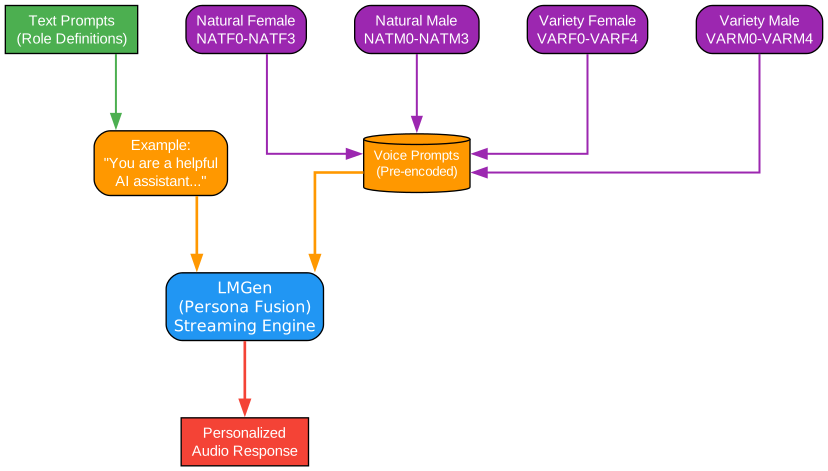
Understanding Persona Control
The persona control system is PersonaPlex’s most distinctive feature, enabling developers to create AI assistants with consistent, customizable personalities. This diagram illustrates how persona information flows through the system.
Voice Presets
PersonaPlex includes 18 pre-trained voice presets organized into categories:
Natural Female Voices:
- NATF0, NATF1, NATF2, NATF3 - Natural-sounding female voices with varying characteristics
Natural Male Voices:
- NATM0, NATM1, NATM2, NATM3 - Natural-sounding male voices with different tonal qualities
Variety Female Voices:
- VARF0, VARF1, VARF2, VARF3, VARF4 - Diverse female voices with distinct personalities
Variety Male Voices:
- VARM0, VARM1, VARM2, VARM3, VARM4 - Diverse male voices with unique characteristics
These presets were created by conditioning the model on reference audio samples, capturing the acoustic characteristics of different speakers. When a preset is selected, the model generates speech that matches the voice characteristics.
Text Prompt Conditioning
Beyond voice characteristics, PersonaPlex accepts text prompts that shape the AI’s personality:
"You are a helpful assistant with a warm, friendly personality."
"You are a professional technical support agent."
"You are a creative storyteller who loves to engage with children."
These prompts are tokenized and fed into the language model alongside the audio tokens, influencing the generation process at each step. The model learns to:
- Adjust vocabulary and speaking style
- Modify response length and complexity
- Adopt appropriate emotional tones
- Maintain consistent personality throughout conversations
Conditioning Mechanism
The persona conditioning operates through several mechanisms:
- Prompt Encoding: Text prompts are encoded into token embeddings
- Voice Embedding: Voice presets provide acoustic conditioning vectors
- Cross-Attention: The model attends to persona information during generation
- Bias Injection: Generation probabilities are biased toward persona-consistent outputs
Practical Applications
Persona control enables diverse use cases:
- Customer Service: Create branded AI assistants with company-appropriate personalities
- Education: Develop tutors with patient, encouraging personas
- Entertainment: Build characters for interactive storytelling
- Accessibility: Provide voices that users find comfortable and engaging
Fine-Tuning for Custom Personas
For advanced use cases, developers can fine-tune the model on custom voice data:
- Collect reference audio samples (5-30 minutes)
- Process audio through the MimiModel encoder
- Fine-tune the LMModel on the encoded data
- Register the new voice preset in the configuration
This enables organizations to create unique AI voices that match their brand identity.
Model Specifications
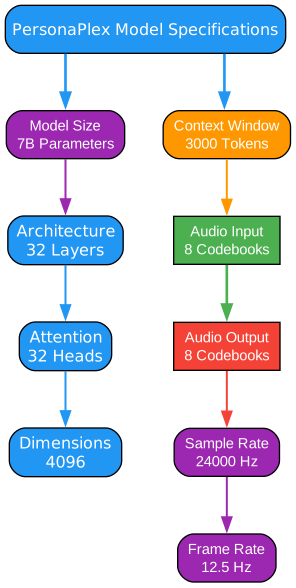
Understanding the Model Specifications
The model specifications diagram provides a comprehensive view of PersonaPlex’s technical parameters. Understanding these specifications is essential for deployment planning and performance optimization.
Language Model Architecture
The 7B parameter transformer model follows modern architectural principles:
| Parameter | Value | Significance |
|---|---|---|
| Parameters | 7 Billion | Large enough for complex reasoning, small enough for efficient inference |
| Layers | 32 | Deep architecture captures hierarchical patterns |
| Attention Heads | 32 | Multi-head attention enables diverse attention patterns |
| Hidden Dimensions | 4096 | Large representation capacity |
| Context Length | 3000 tokens | Extended context for coherent conversations |
Audio Processing Specifications
The audio pipeline operates at specific rates optimized for speech:
| Parameter | Value | Significance |
|---|---|---|
| Sample Rate | 24000 Hz | Captures full speech frequency range |
| Frame Rate | 12.5 Hz | Efficient processing with manageable latency |
| Frame Size | 1920 samples | 80ms frames balance quality and latency |
| Input Codebooks | 8 | Discrete representation of input audio |
| Output Codebooks | 8 | Discrete representation of output audio |
Computational Requirements
Running PersonaPlex requires significant computational resources:
- GPU Memory: Minimum 16GB VRAM for inference
- Recommended GPU: NVIDIA A100 or H100 for optimal performance
- CPU Fallback: CPU offload mode available for limited GPU memory
- Latency: 200-400ms end-to-end on recommended hardware
CUDA Graphs Optimization
PersonaPlex leverages CUDA graphs for reduced kernel launch overhead:
- Static Computation Graph: Predefined operations reduce dynamic dispatch
- Reduced Overhead: Kernel launches are batched for efficiency
- Consistent Latency: Predictable inference times critical for real-time applications
Memory Management
The streaming architecture optimizes memory usage:
- KV-Cache: Key-value cache grows linearly with context length
- Streaming Buffers: Fixed-size buffers prevent memory growth during long conversations
- Gradient Checkpointing: Available for training with limited memory
Quantization Support
For deployment on smaller hardware, PersonaPlex supports:
- INT8 Quantization: Reduces model size by 4x with minimal quality loss
- INT4 Quantization: More aggressive compression for edge deployment
- Mixed Precision: FP16 inference for speed, FP32 for critical operations
Installation
Setting up PersonaPlex requires a Python environment with CUDA support. Follow these steps to get started:
Prerequisites
- Python 3.10 or higher
- CUDA 11.8 or higher
- 16GB+ GPU VRAM (recommended)
- Git LFS for model weights
Installation Steps
# Clone the repository
git clone https://github.com/NVIDIA/personaplex.git
cd personaplex

# Create virtual environment
python -m venv venv
source venv/bin/activate  # On Windows: venv\Scripts\activate

# Install dependencies
pip install -r requirements.txt

# Download model weights (requires Git LFS)
git lfs install
git lfs pull
Docker Installation
For containerized deployment:
# Build the Docker image
docker build -t personaplex:latest .

# Run with GPU support
docker run --gpus all -p 8080:8080 personaplex:latest
Usage Examples
Starting the Server with SSL
import asyncio
from pathlib import Path
from moshi.server import serve

async def main():
    # Configure SSL for secure connections
    ssl_cert = Path("certificates/server.crt")
    ssl_key = Path("certificates/server.key")

    # Start the WebSocket server
    await serve(
        host="0.0.0.0",
        port=8080,
        ssl_cert=ssl_cert,
        ssl_key=ssl_key,
        model_path="models/personaplex-7b.pt",
        persona="NATF0",  # Natural Female voice 0
        text_prompt="You are a helpful AI assistant."
    )

if __name__ == "__main__":
    asyncio.run(main())
Offline Inference
For batch processing or non-real-time applications:
import torch
from moshi.models import MimiModel, LMModel
from moshi.offline import LMGen

# Load models
mimi = MimiModel.from_pretrained("models/mimi.pt")
lm = LMModel.from_pretrained("models/personaplex-7b.pt")
lmgen = LMGen(lm, audio_temperature=0.8, text_temperature=0.7)

# Process audio
audio_input = torch.randn(1, 24000)  # 1 second of audio
encoded = mimi.encode(audio_input)

# Generate response
output_tokens = lmgen.generate(
    encoded,
    persona="NATF1",
    text_prompt="You are a friendly assistant.",
    max_tokens=500
)

# Decode to audio
audio_output = mimi.decode(output_tokens)
TypeScript Client Integration
import WebSocket from 'ws';

interface PersonaPlexConfig {
  url: string;
  persona?: string;
  textPrompt?: string;
}

class PersonaPlexClient {
  private ws: WebSocket;

  constructor(config: PersonaPlexConfig) {
    const params = new URLSearchParams({
      persona: config.persona || 'NATF0',
      text_prompt: config.textPrompt || 'You are a helpful assistant.'
    });

    this.ws = new WebSocket(`${config.url}?${params}`);

    this.ws.on('open', () => {
      console.log('Connected to PersonaPlex server');
    });

    this.ws.on('message', (data) => {
      // Handle incoming audio
      this.handleAudio(data);
    });
  }

  sendAudio(audioBuffer: ArrayBuffer): void {
    this.ws.send(audioBuffer);
  }

  private handleAudio(data: Buffer): void {
    // Process received audio
    // Implementation depends on your audio pipeline
  }
}

// Usage
const client = new PersonaPlexClient({
  url: 'wss://localhost:8080',
  persona: 'NATF1',
  textPrompt: 'You are a professional technical support agent.'
});
Key Features
Full-Duplex Communication
Unlike traditional voice assistants that require turn-taking, PersonaPlex supports simultaneous bidirectional audio streaming. This enables:
- Natural Interruptions: Users can interrupt the AI mid-sentence
- Barge-In Capability: The AI can respond to new input immediately
- Continuous Context: No need to restart conversations after interruptions
CUDA Graphs Optimization
PersonaPlex leverages CUDA graphs for reduced inference latency:
- Pre-compiled Kernels: Operations are compiled once and reused
- Reduced Launch Overhead: Batched kernel launches minimize CPU-GPU synchronization
- Consistent Timing: Predictable latency critical for real-time applications
CPU Offload Mode
For deployment on hardware with limited GPU memory:
# Enable CPU offload for large models
lmgen = LMGen(
    lm,
    cpu_offload=True,
    offload_ratio=0.3  # Offload 30% of layers to CPU
)
This enables running PersonaPlex on consumer GPUs with 8-12GB VRAM.
WebSocket Protocol
The WebSocket-based protocol provides:
- Low Latency: Persistent connection eliminates HTTP overhead
- Bidirectional Streaming: Native support for full-duplex communication
- SSL/TLS Security: Encrypted connections for production deployment
- Gradio Tunnel Support: Easy development and testing without port forwarding
Performance Benchmarks
| Metric | Value | Notes |
|---|---|---|
| End-to-End Latency | 200-400ms | On A100 GPU |
| Audio Quality (MOS) | 4.2/5.0 | Mean Opinion Score |
| Context Length | 3000 tokens | ~2 minutes of conversation |
| Concurrent Users | 10-50 | Depends on hardware |
| GPU Memory | 16GB+ | For full model |
Conclusion
NVIDIA PersonaPlex represents a significant advancement in real-time speech-to-speech AI. By combining neural audio codecs with large language models in a streaming architecture, it enables natural, fluid conversations with customizable AI personalities.
The project’s open-source nature allows researchers and developers to:
- Build custom voice assistants with unique personalities
- Integrate real-time speech AI into applications
- Research novel architectures for conversational AI
- Deploy production-grade voice interfaces
With its sophisticated persona control system, efficient streaming pipeline, and robust server infrastructure, PersonaPlex provides a solid foundation for the next generation of voice-enabled AI applications.
Resources
Related Posts
- AgentSkillOS: Skill Orchestration System
- MattPocock Skills: AI Agent Workflows
- DESIGN.md: AI-Powered Design Systems
