Oh-My-Codex: A Workflow Layer for OpenAI Codex CLI
OpenAI’s Codex CLI is a powerful AI coding assistant, but it can benefit from better workflow orchestration, persistent state management, and structured agent coordination. oh-my-codex (OMX) is a workflow layer that sits on top of Codex CLI, providing a standardized approach to task clarification, planning, and execution.
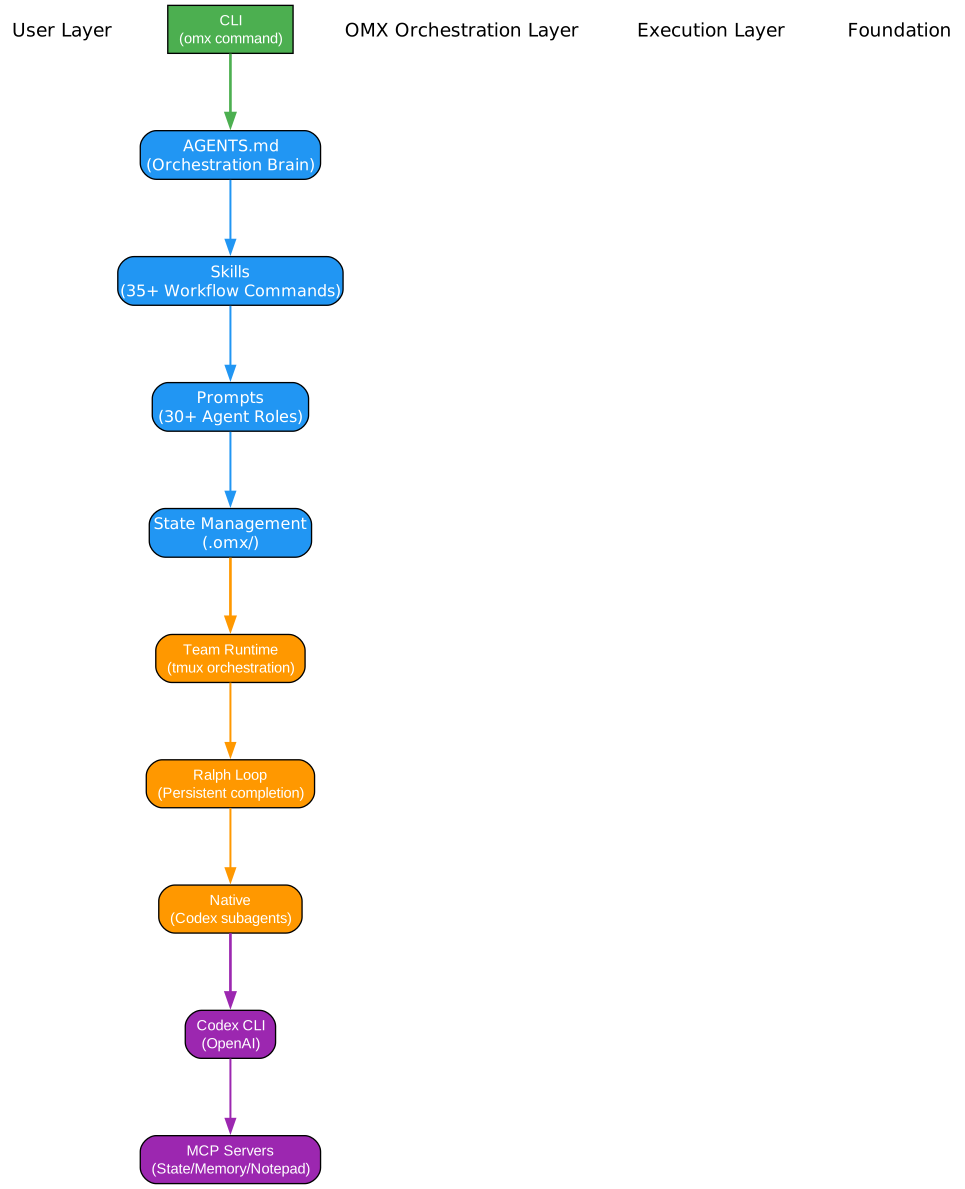
Understanding the Architecture Diagram
The architecture diagram above illustrates how OMX wraps around the OpenAI Codex CLI to provide enhanced workflow capabilities. Let’s examine each component and understand how they work together to create a more powerful development experience.
User Request Layer
At the top of the architecture, user requests enter the system. These can be anything from simple code modifications to complex multi-file refactoring tasks. The key insight is that raw user requests often need clarification before execution - this is where OMX’s workflow layer adds significant value.
OMX Workflow Layer: The Coordination Engine
The OMX Workflow Layer is the heart of the system, providing structured coordination for AI-assisted development. It manages three critical aspects:
- Workflow Skills: Pre-built workflows like
$deep-interview,$ralplan,$team, and$ralphthat guide tasks from clarification to completion - Agent Roles: Specialist agents like
executor,architect,debugger, andverifierthat handle specific types of work - State Management: Persistent storage in
.omx/directory for plans, logs, memory, and runtime state
The workflow layer ensures that tasks are properly scoped, planned, and executed with appropriate verification at each stage.
Canonical Workflow Skills
The workflow skills form a pipeline that transforms vague requests into completed, verified work:
-
$deep-interview: Clarifies intent, boundaries, and non-goals when the task is still fuzzy. Uses Socratic questioning to surface hidden requirements and constraints.
-
$ralplan: Creates approved implementation plans with tradeoff analysis. Ensures all stakeholders agree on the approach before execution begins.
-
$team / $ralph: Two execution modes -
$teamfor coordinated parallel execution across multiple agents, or$ralphfor persistent single-owner completion loops.
OpenAI Codex CLI: The Execution Engine
At the bottom sits the OpenAI Codex CLI, which handles the actual code generation, modification, and execution. OMX doesn’t replace Codex - it enhances it by providing better task routing, workflow management, and runtime support.
State Persistence
The .omx/ directory stores all runtime state, enabling:
- Cross-session memory for context continuity
- Plan artifacts for complex multi-step tasks
- Execution logs for debugging and auditing
- Mode tracking for workflow state management
Introduction
oh-my-codex (OMX) is designed for developers who already use and appreciate Codex CLI but want a better day-to-day runtime around it. It provides a standard workflow built around clarification, planning, and execution, with specialist roles and supporting skills when tasks need them.
Why OMX Matters
- Structured Workflow: Transforms ad-hoc prompting into a systematic approach
- Task Clarification: Ensures requirements are clear before implementation
- Plan Approval: Gets stakeholder buy-in before code changes
- Coordinated Execution: Manages parallel work and persistent completion loops
- Durable State: Preserves context across sessions and interruptions
The Canonical Workflow
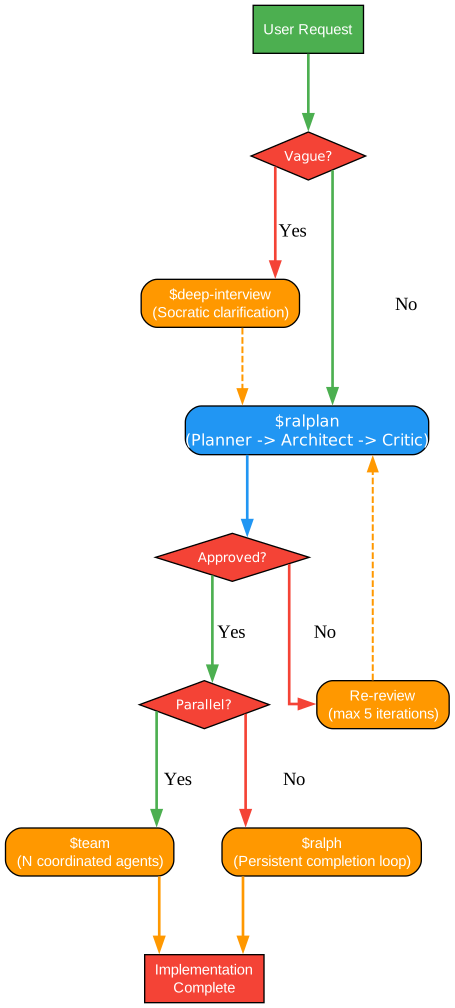
Understanding the Workflow Diagram
The workflow diagram above shows the recommended path for most OMX sessions. This canonical workflow ensures that tasks are properly understood, planned, and executed with appropriate verification at each stage.
Step 1: Deep Interview for Clarification
The $deep-interview skill is the entry point for most tasks. When a request is broad, intent is unclear, or boundaries are fuzzy, this skill uses Socratic questioning to surface hidden requirements and constraints. It clarifies:
- What exactly needs to be done
- What the boundaries and non-goals are
- What constraints and assumptions apply
- What success looks like
This step prevents wasted effort on misunderstood requirements and ensures all stakeholders are aligned before work begins.
Step 2: Ralplan for Plan Approval
Once requirements are clear, $ralplan creates a structured implementation plan with tradeoff analysis. This skill:
- Engages planner, architect, and critic roles for comprehensive analysis
- Produces PRD (Product Requirements Document) artifacts
- Creates test specification documents
- Requires explicit approval before proceeding to execution
The planning step ensures that implementation approaches are well-considered and that all tradeoffs are understood and accepted.
Step 3: Execution Mode Selection
The workflow branches based on the nature of the approved plan:
-
$team: Choose when the plan needs coordinated parallel execution across multiple independent lanes. The team runtime uses tmux/worktree coordination for durable multi-agent work.
-
$ralph: Choose when a persistent single-owner completion loop is more appropriate. This mode keeps pushing until the task is verified complete, handling blockers and escalations automatically.
Step 4: Verification and Completion
Both execution paths converge on verification. The system confirms:
- No pending work remains
- Features are working correctly
- Tests are passing
- Zero known errors exist
- Verification evidence is collected
Agent Catalog

Understanding the Agent Catalog Diagram
The agent catalog diagram above organizes OMX’s specialist agents into five categories, each serving distinct purposes in the development workflow. These agents are invoked through role keywords and provide specialized capabilities when the task benefits from them.
Build & Analysis Agents
These agents handle the core development work:
-
explore: Fast codebase search and mapping. Uses low-complexity models for efficient discovery of files, symbols, and patterns. Ideal for understanding unfamiliar codebases.
-
analyst: Clarifies requirements and acceptance criteria. Uses high-complexity models for nuanced understanding of stakeholder needs and success criteria.
-
planner: Builds execution plans and sequencing. Creates actionable roadmaps with clear milestones and dependencies.
-
architect: System boundaries and architecture design. Makes high-level design decisions about structure, patterns, and tradeoffs.
-
debugger: Root-cause and regression diagnosis. Investigates failures, identifies causes, and proposes fixes.
-
executor: Implementation and refactoring work. The default role for substantive code changes.
-
verifier: Evidence-backed completion checks. Validates that work is truly complete with supporting evidence.
Review Agents
Quality assurance specialists for different aspects of code:
-
style-reviewer: Formatting and naming conventions. Uses low-complexity models for fast style checks.
-
quality-reviewer: Logic and maintainability defects. Identifies code smells and structural issues.
-
api-reviewer: API contracts and compatibility. Ensures interfaces remain consistent and documented.
-
security-reviewer: Security boundaries and vulnerabilities. Identifies potential security issues.
-
performance-reviewer: Performance and complexity bottlenecks. Analyzes runtime characteristics.
-
code-reviewer: Comprehensive multi-axis code review. Uses high-complexity models for thorough analysis.
Domain Specialists
Agents with specialized expertise:
-
dependency-expert: External SDK/API/package evaluation. Helps choose and integrate external dependencies.
-
test-engineer: Test strategy and coverage improvements. Designs comprehensive testing approaches.
-
quality-strategist: Release quality and risk strategy. Assesses release readiness and risk factors.
-
build-fixer: Build/toolchain/type issue resolution. Fixes CI failures and build problems.
-
designer: UI/UX architecture and interaction design. Improves user experience and interface design.
-
writer: Documentation and user guidance. Creates clear, helpful documentation.
-
qa-tester: Interactive runtime QA validation. Performs manual testing and validation.
-
git-master: Commit strategy and history hygiene. Maintains clean, meaningful commit history.
Product Agents
Product management and user research:
-
product-manager: Problem framing and PRD definition. Translates user needs into product requirements.
-
ux-researcher: Usability and accessibility audits. Ensures products are usable by all users.
-
information-architect: Navigation, taxonomy, and structure. Organizes information for findability.
-
product-analyst: Metrics, funnels, and experiments. Analyzes user behavior and product performance.
Coordination Agents
Meta-level coordination roles:
-
critic: Critical challenge for plans and designs. Provides constructive criticism to improve proposals.
-
vision: Image/screenshot and diagram analysis. Processes visual information for design and debugging.
Skills Reference

Understanding the Skills Diagram
The skills diagram above organizes OMX’s workflow commands into four categories: Core Workflow, Execution Modes, Utilities, and Agent Shortcuts. Each skill is invoked with the $name syntax and provides specific workflow capabilities.
Core Workflow Skills
The canonical workflow skills that guide tasks from start to finish:
-
$deep-interview: Clarifies intent, boundaries, and non-goals when the task is still fuzzy. Uses Socratic questioning to surface hidden requirements.
-
$ralplan: Creates approved implementation plans with tradeoff analysis. Engages planner, architect, and critic roles for comprehensive planning.
-
$team: Coordinated multi-agent execution for approved plans. Uses tmux/worktree coordination for durable parallel work.
-
$ralph: Persistent completion loop with one owner. Keeps pushing until the task is verified complete.
Execution Mode Skills
Alternative execution modes for specific scenarios:
-
$autopilot: Full autonomous execution when you intentionally skip the standard workflow. For experienced users who know what they want.
-
$ultrawork: Maximum parallel execution. Spawns multiple agents to work simultaneously on independent tasks.
-
$visual-verdict: Structured visual QA loop for screenshot/reference matching. Validates visual output against expected results.
-
$ecomode: Token-efficient model routing. Uses lower-cost models when appropriate to reduce costs.
Utility Skills
Supporting utilities for workflow management:
-
$cancel: Stops active modes. Ends execution when work is done or blocked.
-
$doctor: Verifies installation. Diagnoses and reports configuration issues.
-
$help: Shows documentation. Provides guidance on available commands.
-
$note: Manages session notes. Records important information for later reference.
-
$trace: Debug tracing. Shows execution history for troubleshooting.
Agent Shortcut Skills
Quick access to specialist agents:
-
$analyze: Deep analysis of code or problems. Comprehensive investigation.
-
$tdd: Test-driven development workflow. Writes tests first, then implementation.
-
$build-fix: Fixes build errors. Resolves CI failures and type errors.
-
$code-review: Comprehensive code review. Multi-axis quality analysis.
-
$security-review: Security audit. Identifies vulnerabilities and security issues.
State Management
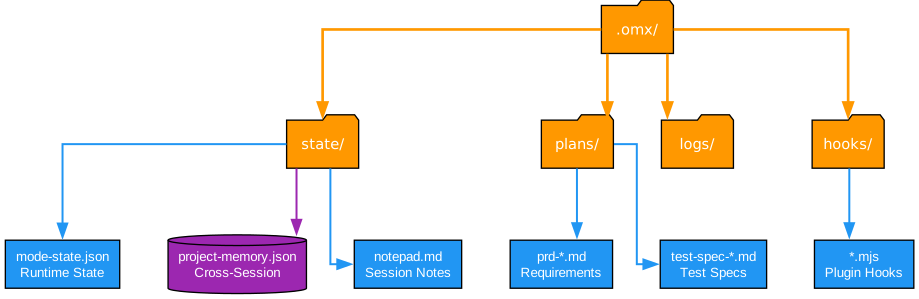
Understanding the State Management Diagram
The state management diagram above shows how OMX organizes persistent data in the .omx/ directory. This structure enables cross-session continuity and provides a complete audit trail of work.
Directory Structure
The .omx/ directory contains several subdirectories, each serving a specific purpose:
- state/: Runtime state including mode tracking and active session information
- plans/: Plan artifacts including PRDs and test specifications
- logs/: Execution logs for debugging and auditing
- hooks/: Plugin hooks for extending OMX functionality
Key Files
Within these directories, important files include:
-
mode-state.json: Tracks the current mode and workflow state. Enables resumption of interrupted work.
-
project-memory.json: Cross-session memory for context continuity. Remembers important decisions and patterns.
-
notepad.md: Session notes for temporary information. Quick reference during active work.
-
prd-*.md: Product Requirements Documents created during planning. Define what needs to be built.
-
test-spec-*.md: Test specifications created during planning. Define how to verify the work.
-
*.mjs: Plugin hooks for extending OMX. Custom JavaScript modules for additional functionality.
Benefits of Persistent State
The state management system provides several key benefits:
- Session Resumption: Resume work exactly where you left off after interruptions
- Context Continuity: Previous decisions and patterns inform current work
- Audit Trail: Complete history of actions for debugging and compliance
- Team Coordination: Shared state enables collaboration across team members
- Plan Verification: Ensures planning artifacts exist before execution begins
Installation and Setup
Requirements
Before installing OMX, ensure you have:
- Node.js 20 or higher
- Codex CLI installed:
npm install -g @openai/codex - Codex authentication configured
tmuxon macOS/Linux for team runtime (recommended)
Quick Start
# Install OMX globally
npm install -g oh-my-codex

# Run setup to install prompts, skills, and configuration
omx setup

# Start the recommended session
omx --madmax --high
Platform Notes
OMX works best on macOS or Linux with Codex CLI. Native Windows and Codex App are secondary paths with less support. For Windows users, WSL2 is generally the better choice.
| Platform | Install Command |
|---|---|
| macOS | brew install tmux |
| Ubuntu/Debian | sudo apt install tmux |
| Fedora | sudo dnf install tmux |
| Arch | sudo pacman -S tmux |
| Windows | winget install psmux |
| Windows (WSL2) | sudo apt install tmux |
Common Usage Patterns
Starting a New Task
$deep-interview "clarify the authentication change"
$ralplan "approve the auth plan and review tradeoffs"
$ralph "carry the approved plan to completion"
Parallel Team Execution
$team 3:executor "execute the approved plan in parallel"
Quick Analysis
$analyze "investigate the performance bottleneck"
$code-review "review current branch"
$security-review "audit authentication flow"
Utility Commands
$doctor              # Verify installation
$note "important decision made"  # Record session note
$trace               # Show execution history
Key Features Summary
| Feature | Description |
|---|---|
| Canonical Workflow | Structured path from clarification to completion |
| Agent Catalog | Specialist roles for different task types |
| Skills System | Reusable workflow commands |
| State Management | Persistent .omx/ directory for context |
| Team Runtime | Coordinated multi-agent execution with tmux |
| Hooks Extension | Plugin system for custom functionality |
| Model Routing | Automatic model selection based on task complexity |
Related Posts
- AgentSkillOS: Skill Orchestration System
- MattPocock Skills: AI Agent Workflows
- Everything Claude Code: Architecture Deep Dive
- Learn Claude Code: Tool Dispatch System
Conclusion
oh-my-codex represents a significant step forward in AI-assisted development workflows. By providing structured clarification, planning, and execution phases, it transforms ad-hoc prompting into a systematic approach that produces better results with fewer iterations.
The combination of workflow skills, specialist agents, and persistent state management creates a powerful development environment that learns from past work and maintains context across sessions. Whether you’re working on simple tasks or complex multi-file refactoring, OMX provides the structure needed to ensure successful outcomes.
For developers already using Codex CLI who want better workflow management, OMX offers a compelling enhancement that preserves the power of Codex while adding the coordination layer needed for professional development work.
Resources
- GitHub Repository: https://github.com/Yeachan-Heo/oh-my-codex
- Documentation: Getting Started
- NPM Package: oh-my-codex
- Discord Community: Join Discussion

